Enhancing Data Accuracy: Bot Filtering & Apple Mail Privacy Protection Compliance

Enhancing Data Accuracy: Bot Filtering & Apple Mail Privacy Protection Compliance

Dear Marketers,


The wait is over! We’re thrilled to share that the enhanced bot filtering feature is now live in Zoho Marketing Automation. Thank you for your patience as we refined this tool to deliver deeper insights into your campaign performance.


Here's a quick overview of what bot filtering means:


What are bot opens/clicks? 

Bot opens/clicks are actions performed by automated software, not humans. These programs often scan emails for security threats like viruses or malicious links. As a result, they can inflate your engagement metrics by showing multiple opens/clicks from a single contact, even if no one actually interacted with the email.


Why bot filtering matters 

Bot-generated activity can distort your campaign performance metrics. Our bot filtering feature helps you eliminate this noise, providing a more accurate picture of your audience's engagement.


Key features of bot filtering

Based on your feedback and our technical improvements, here’s how the feature has evolved:

  • Easy toggle: Enable or disable bot filtering with a simple switch in Settings > Marketing Channels> Email. Bot filtering will be enabled by default to ensure your reports prioritize reliable, human-generated engagement from the start.

  • Transparency: A visual indicator in your reports shows whether bot filtering is active, ensuring full transparency in your data analysis.

  • Reporting: Whether you enable or disable the filter, your dashboard will display two distinct metrics:

    • Reliable opens/clicks (verified engagement by individuals)

    • Bot opens/clicks (automated activity)
      This dual view offers a clearer picture of your campaign’s true performance and highlights potential discrepancies.

    • Apple MPP tracking: We’ve added visibility into Apple Mail Privacy Protection (MPP) activity. Reports now include a dedicated metric for Apple MPP opens, allowing you to analyze how privacy-focused auto-opens impact your data.


Apple Mail Privacy Protection (MPP)

Apple Mail offers users the option to enable Mail Privacy Protection (MPP), a feature designed to enhance privacy by preventing email senders from accurately tracking email opens. This feature is not enabled by default, but once activated, Apple Mail pre-loads tracking pixels—regardless of whether the recipient actually opens the email.

As a result, all emails received in Apple Mail appear as opened, leading to inflated and unreliable open rates. Since tracking pixels are triggered automatically, distinguishing between genuine user engagement and automated activity becomes challenging.

How Does Zoho Marketing Automation Address This?  

To counteract the impact of MPP, Zoho Marketing Automation provides dedicated metrics (MPP Opens) to show open rate. Using intelligent data modeling, our system delivers reliable engagement metrics, helping you assess the effectiveness of your campaigns despite Apple’s privacy changes.

Here's how to enable the bot filtering option in Zoho Marketing Automation.

Step 1: Bot filtering option
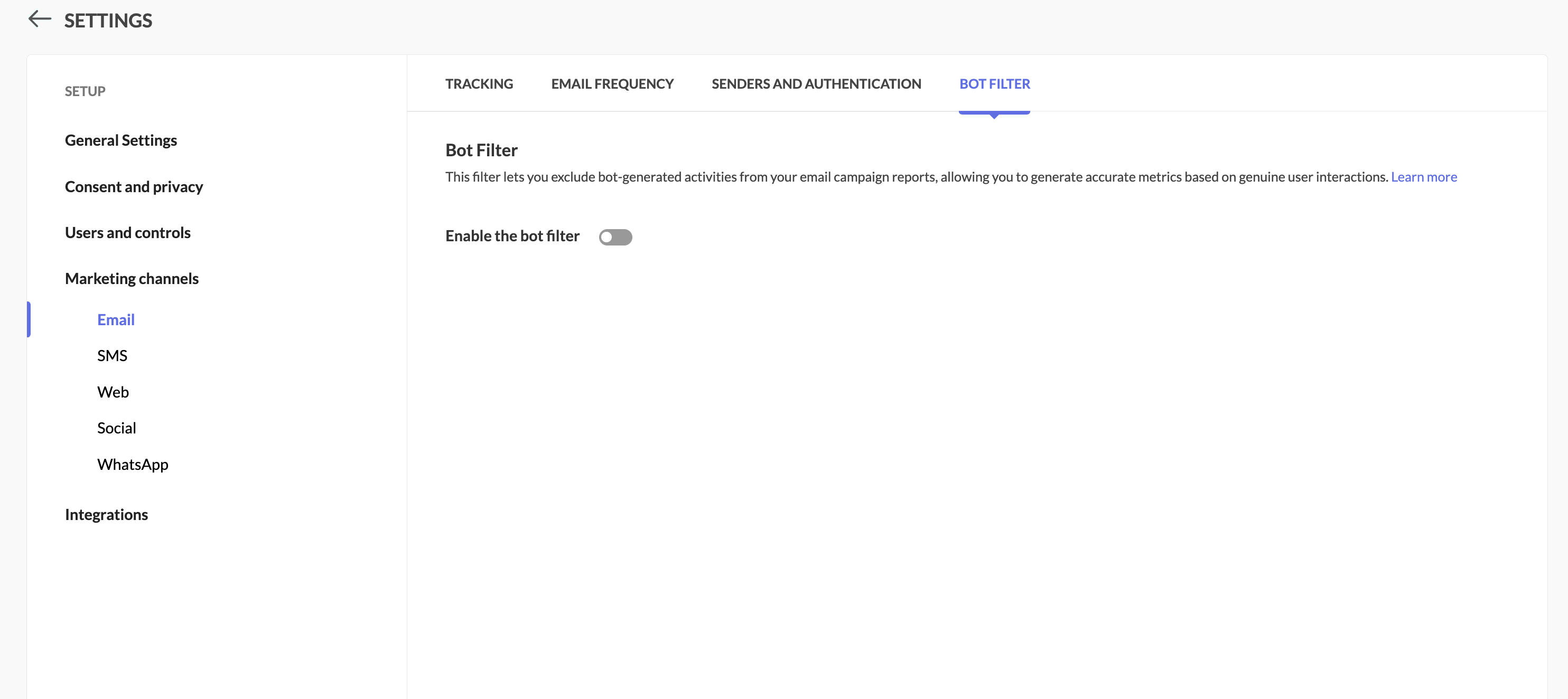
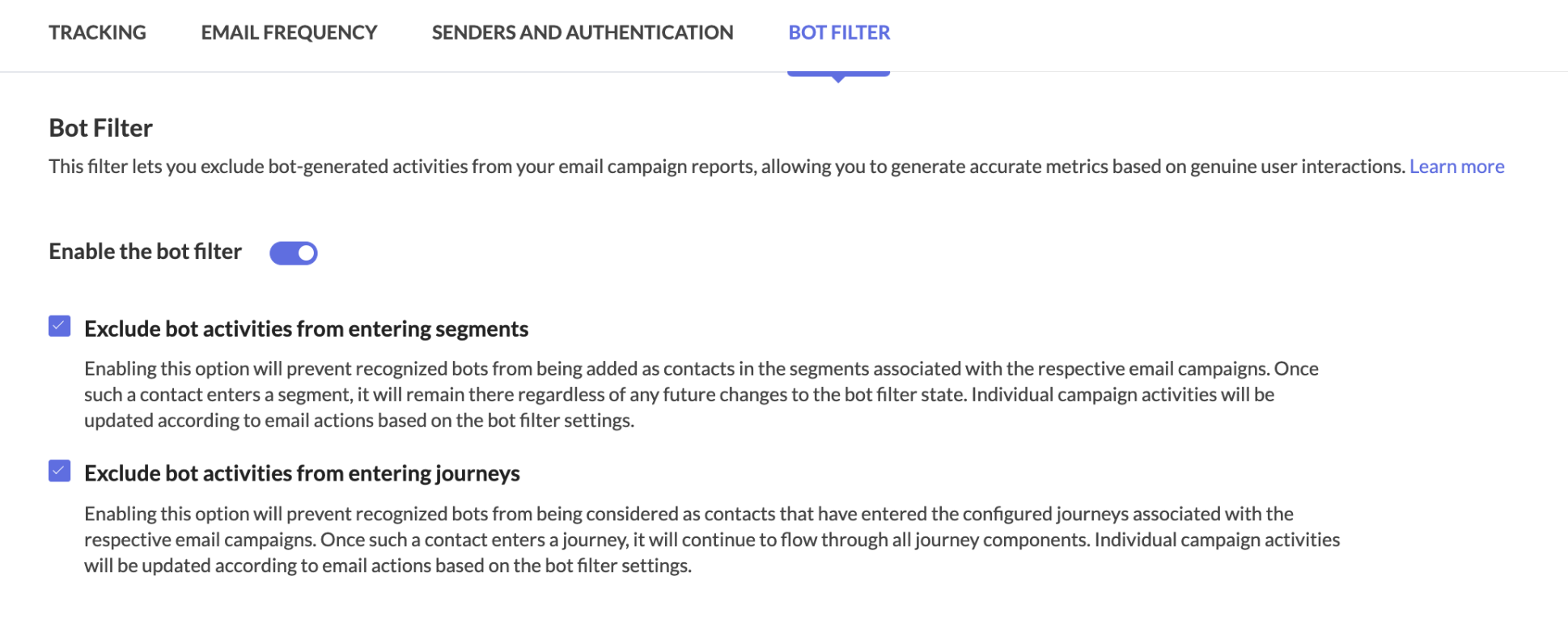
Locate the Bot Filter link under Settings > Marketing Channels.


Step 2: Toggle the bot filtering option

In the Bot Filter setting, you can see that bot filtering capability has been enabled for you by default.
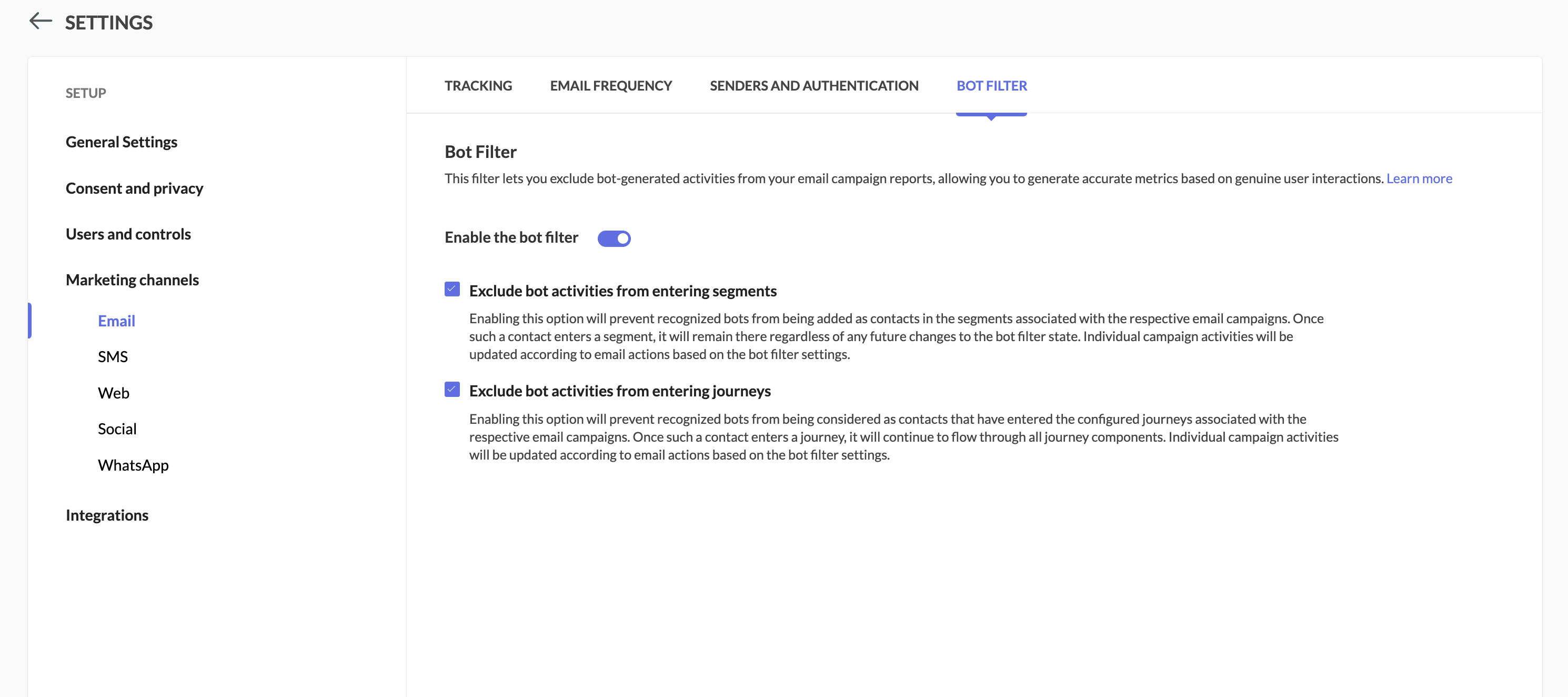


Step 3: Enable/disable the option

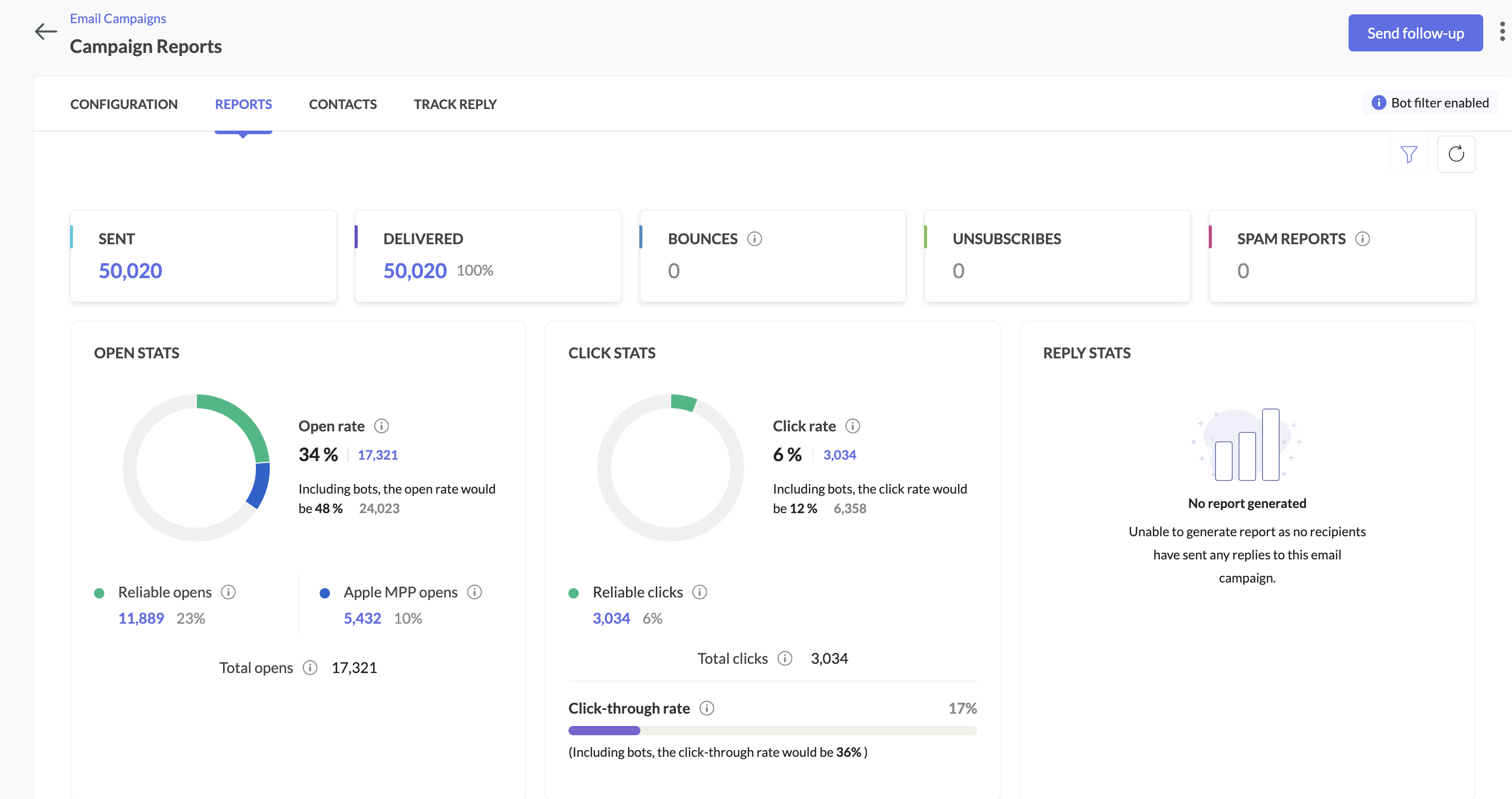
  • Filter enabled: Your primary reports will focus on human engagement, while bot activity is shown separately along with primary reports.

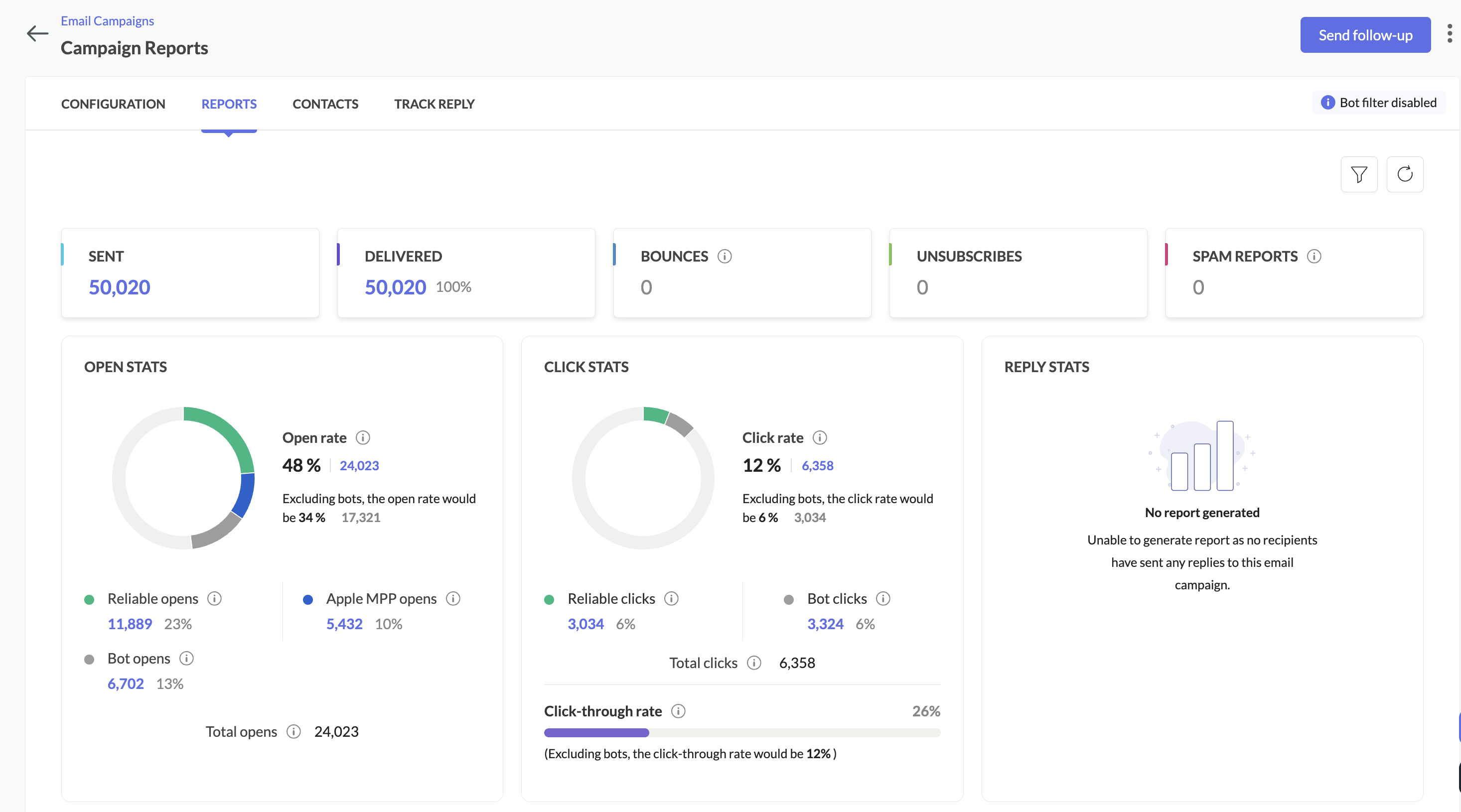
  • Filter disabled: Similar to the option above, all opens/clicks (human + bot) will be shown in main reports, with bot metrics still visible for comparison.

Here's how you can see it in the campaign reports:
When the bot filter setting is disabled


When the bot filter setting is enabled


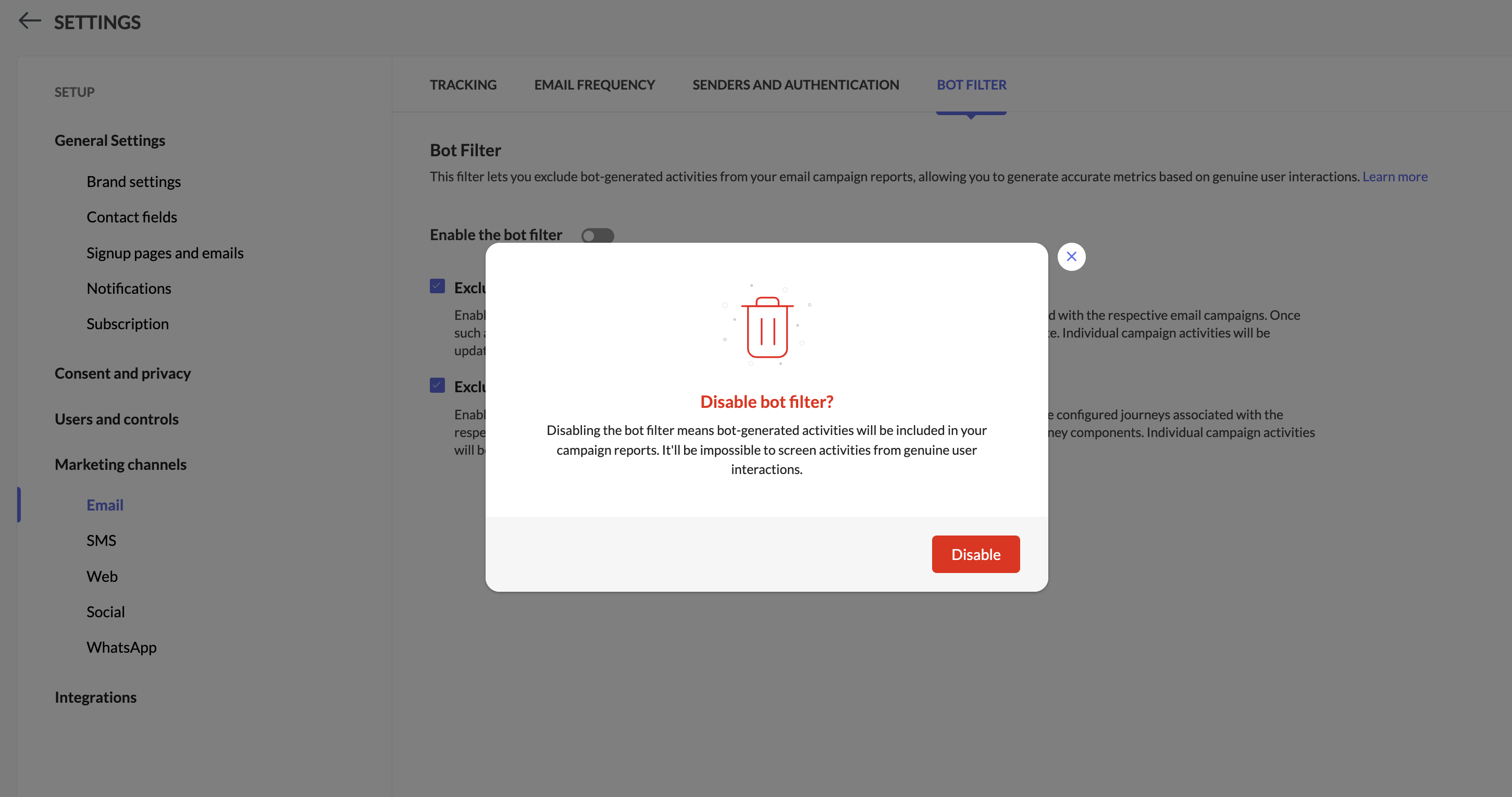
Step 4: Pop-up confirmation to disable bot filtering

You'll see a pop-up while disabling bot filtering.


Info
Notes:

  • While disabling bot filter, users will be prompted whether to allow bots to enter segments or workflows based on which follow-up actions will be triggered.
 

  1. The Apple MPP opens will be part of segments and workflows by default.

  2. Campaigns executed from 6th Feb 2025 will be shown the new reports along with reliable opens, Unreliable opens, and bot opens. Existing campaign reports won't be impacted by this change.

  3. We have introduced new filters within the contacts section in the campaigns report to analyze both reliable opens and bot opens.

  4. Bot engagement metrics will be available now while exporting campaign reports.

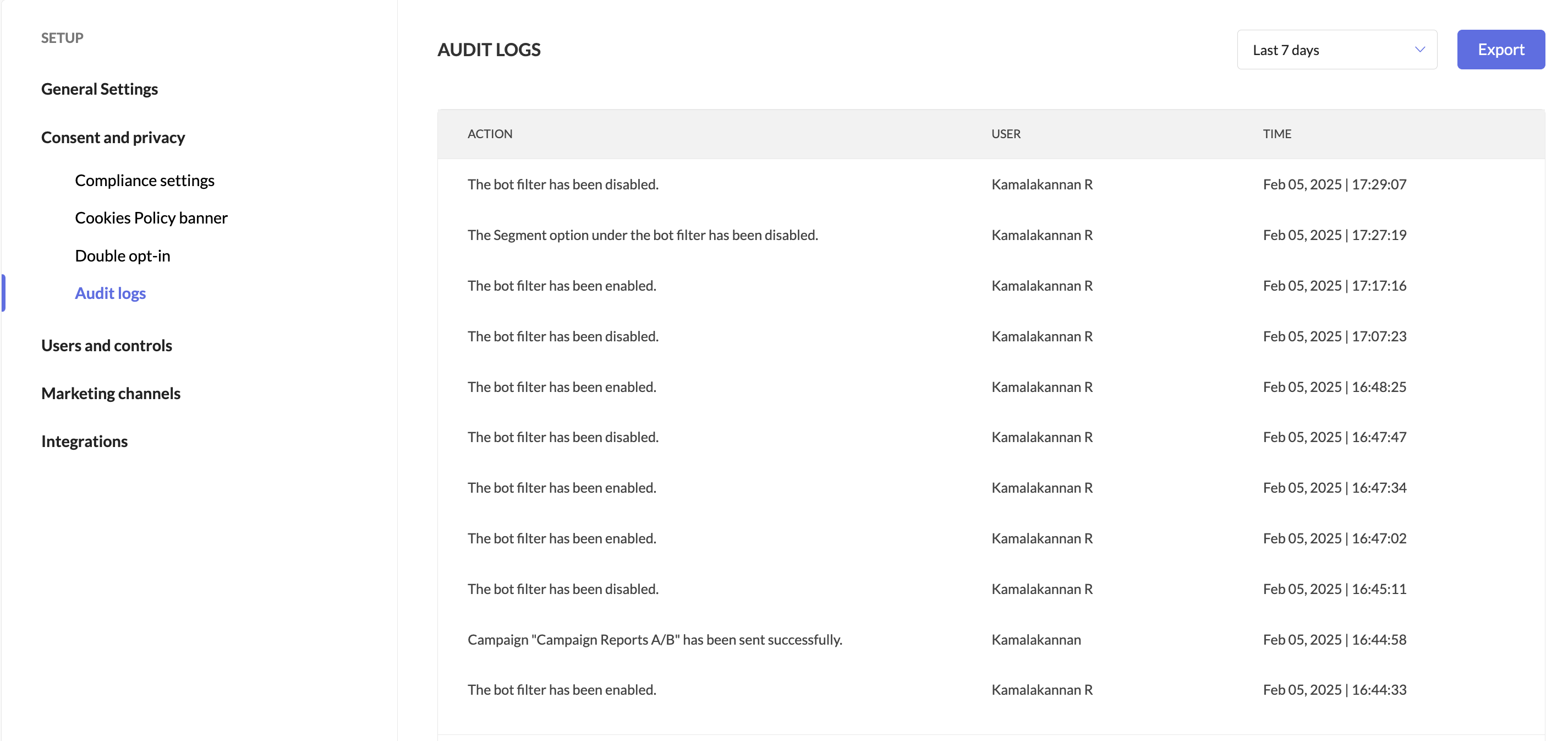
  5. Users can track when the bot filter was enabled or disabled by accessing Audit Logs.


We're here to help

We’re confident this balanced approach will help you optimize campaigns with greater precision. Give it a try, and let us know how it works for you!


Happy marketing!

Best regards,
Zoho Marketing Automation
    • Sticky Posts

    • Marketer’s Space - Automating CRM Actions with Journeys – Part 2

      Hello marketers! Welcome back to another post in Marketer’s Space. In our previous post, we explored how CRM actions in Journeys help marketing and sales teams work together by nurturing CRM leads and pushing only engaged prospects back to sales. If you
    • Introducing automation and utility conversations in WhatsApp marketing

      We’re excited to announce the addition of two new features to our WhatsApp integration: Automation and Utility conversations. These enhancements will allow you to streamline your marketing efforts and engage with your customers more effectively by automating
    • Tip of the week 02 - The art of 'seeing' your leads

      What's the last page that your lead visited before signing up for your brand? What was the page that first convinced your lead to explore more about you? Where are your leads coming in from? Well, these are some perennial questions today's marketers live upon. And, knowing the answers to these questions is crucial, considering the vitality of leads in every business. In the journey of finding lead opportunities, it's important to understand that every detail about a lead is useful. While the channels
    • Zoho Marketing Automation Update: Topics, Contacts, and List Management

      At Zoho Marketing Automation, our highest priority is making it easier for you to use our product to accomplish your business goals. With that in mind, we are updating three of our pivotal features: Topic, Contacts, and List Management.   These existing
    • Important: Zoho MarketingHub is now Zoho Marketing Automation

      Hello Everyone,   We hope you all are doing well. We'd like to notify you that we have rebranded Zoho MarketingHub to Zoho Marketing Automation. We'll discontinue using the term "MarketingHub" from May 26, 2021. However, there will be no changes in the
    • Recent Topics

    • Series Label in the Legend

      My legend reads 'Series 1' and 'Series 2'. From everything I read online, Zoho is supposed to change the data names if it's formatted correctly. I have the proper labels on the top of the columns and the right range selected. I assume it's something in
    • Dynamic Signature - Record owner

      Hi everyone, I’m using Zoho Writer merge templates from Zoho CRM and have two questions: Owner signature: How can I automatically insert the CRM record owner’s signature in the merged document? I’m not sure where this signature is stored or how to reference
    • Set Warehouse based on Vendor

      Greetings. I would like to set automaticaly the Warehouse based on the Vendor. Context: I am working on an adaptation of a Purchase Order to be used as a Quotation. I have defined that when a user has to raise a quote the Vendor will be "PROCUREMENT" I would like to set the Warehouse to a predefined value when "PROCUREMENT" is set as Vendor. I have tried to do with the Automation feature using the Field Update option, but Warehouse does not is listed as a field. Can you help? Thanks in advance.
    • Creating multiple CRM leads from a Zoho Forms subform

      Hi all, We have a heavily used intake form that is used for new leads as a part of our intake. There is a subform that allows the lead to add additional team members, their titles and other basic info. That form submission creates a new Lead and the subform
    • Zoho CRM for Everyone's NextGen UI Gets an Upgrade

      Hello Everyone We've made improvements to Zoho CRM for Everyone's Nextgen UI. These changes are the result of valuable feedback from you where we’ve focused on improving usability, providing wider screen space, and making navigation smoother so everything
    • search and Smart Bar both missing in Mail

      One of the users on my account does not have the search bar at the top right or the Smart Bar at the bottom left of the desktop Mail app. Any ideas how to get those back?
    • Printing from Zoho Creator hosted on my own server to printers hosted on my clients local network

      Hello. Fairly new to Zoho Creator and looking for best options to be able to print from my application hosted on my own server to any printer hosted on my clients own local network. Any advice is welcome. Thank you.
    • Add System Pre-Defined Lookup Field to Subform?

      Hi there! New to using Zoho, so this may already exist, but I'm having trouble figuring it out. Is there a way to get the system pre-defined Account Lookup field (in our case, renamed to Company Name), as the starting point for a subform? In our company,
    • Synchronise item image between Zoho Commerce and Zoho Books/Inventory/CRM

      Here is a blindingly simple idea to tie several Zoho products together. Zoho - please include a method to synchronise the item image (or images) from one Zoho application to another. For example, if you upload an item image in Zoho Inventory, a user should
    • Zoho CRM Participants Automatic - Invite Using Deluge

      Hi Zoho! Is there a way to make the invitations automatic via API? I'm using this one but it doesn't work or reflect in the CRM: participantUser = Map(); participantUser.put("type","email"); participantUser.put("participant",email); participantUser.put("invited",
    • Numbered / bullet point List in Zho Cliq

      Hi, is there a way to format chat messages in Cliq like this Topic 1 Hey, I finished this project yesterday etc... Topic 2 I am still working on this etc...
    • Cannot Access Subform Display Order in Deluge

      As highlighted in this community post, we still have to deal with the significant limitation of not being able to access the user-sorted order of subform rows through Deluge. This creates a major disconnect between the UI capabilities and backend automation,
    • ZOHO Blueprint and Workflow

      Hi, Correct me if i'm wrong, Blueprint triggers when a record that meets the criteria is created. It follows a specific transition that you will be setting up. Does blueprint work if the first state was triggered by a workflow? For example, In my custom module 1, I have a field named status. The statuses are 1, 2, 3 and 4. As soon as I create a new record, a workflow triggers that updates the status field to 1. Can a blueprint start from 2? My other concern is, can blueprint transitions work at the
    • How many groups in Zoho Mail can I make?

      I'm currently on the free plan, which has a limit of 10 users. Does that limit includes groups too? If not, what is the limit for groups? Thanks!
    • Feature Suggestion for Zoho Social: Auto-reply to Comments or Keywords

      Hi Zoho team, I'd like to suggest a very specific feature that would be extremely helpful for customer engagement: the ability to automatically send a reply to comments on posts — either all comments or those containing specific keywords. For example,
    • My domain did not activate

      Hi, my domain (apsaindustrial.com.ar) did not activate, and the phone verification message never arrived. Please would you solve this problem? Thanks.
    • Already have Zoho account. Not letting me log in

      I already have a Zoho account that is associated with my Google email and my phone number. Even though I'm already logged in to Zoho, when I click on the mail icon to access my email, it takes me to the pricing page. When I click on the free option, it
    • ZOHO Mail App Not working

      There seems to be an issue with Zoho Mail App today. It is not connecting to server, internet is working fine, tried uninstalling app and reinstalling, loading circle keeps spinning round. Is there an update on the way?
    • facing error 550 5.4.6 while sending emails

      Please help me fix this issue
    • Allow Itemization for Recurring Expenses

      For whatever reason, one cannot itemize a Recurring Expense. This capability should be added. The use cases to support this are largely the same as what they were to allow for itemization in Expenses. Anything that would need to be itemized for a regular
    • Zoho reply to not working. just reply to my self

      Hello. i using on my wordpress website a contact form from Wsform. i can set the reply to email there. normally it works. but since i am using your wordpress plugin zoho mail it doesn`t work. its not using the reply to (email from customer). I just can
    • Painfully Slow Zoho mail

      Since yesterday Zoho Mail seems to have starting functioning very slowly and having a few bugs. It's slow to open mails, slow to send, slow to change between email accounts. Sometimes clicking on a particular folder (eg Sent folder) stops working and
    • Can't receive any email from other platform

      Hello,everyone, i'm just join zoho and create two email accounts for my own business. I was using it to get a verified email from stripe, but can't receive it. and I use my private gmail account to send test email twice, first time show below reply, but
    • Weekly Tips: Secure your attachment downloads with Zoho Mail

      Safety is one of our main concerns, whether it’s about device security or online protection. We use tools like fingerprint scanners, facial recognition, and two-factor authentication to keep our devices and email accounts secure. We use methods like OTP
    • Your Incoming has been blocked and the emails will not be fetched in your Zoho account and POP Accounts

      Can some on help me regarding our account . thank you so much
    • Zoho Creator integration with Sage 50

      Hi, Wondering if anyone has had any experience connecting Zoho to Sage 50 and could share any information on this matter. Thank you.
    • Dropshipping Address - Does Not Show on Invoice Correctly

      When a dropshipping address is used for a customer, the correct ship-to address does not seem to show on the Invoice. It shows correctly on the Sales Order, Shipment Order, and Package, just not the Invoice. This is a problem, because the company being
    • Conditional Email Forwarding

      How can I set conditional email forwarding of the users? For example: Mail should be forwarded to a address only if it comes from a particular sender. So, I want such email forwarding, which forwards mails based on particular conditions, like the incoming
    • Dependent drop-downs... how?

      Good day. I have 2 different situations where I need a dependent drop-down field. First is for a subform, where I want to show related fields for a specific customer on the main form. In my case it is a parent whose children make use of our school transport
    • Incoming emails not appearing in Inbox

      Hello, I have an issue with incoming emails sent from my website (domain: h2ostop.si). Emails are visible in the Sent folder, which means they are successfully sent through Zoho SMTP, but they never appear in my Inbox. Nothing arrives in Inbox, Spam,
    • Automatic Matching from Bank Statements / Feeds

      Is it possible to have transactions from a feed or bank statement automatically match when certain criteria are met? My use case, which is pretty broadly applicable, is e-commerce transactions for merchant services accounts (clearing accounts). In these
    • Is there any way to send an Excel received by email to Dataprep?

      Every day I receive an email alert with an Excel file that I want to process through a Dataprep pipeline. To do this, I need to: -Save the file to disk -Open the pipeline -Run the pipeline -Update the source -Several clicks to select and open the saved
    • Email Opt Out Question

      Has the problem where if a customer is emailed opt out prevents you sending standard emails? For me this feature is simply to stop any email marketing and should not block people from receiving emails via Zoho mobile, which makes no sense.
    • Can No Longer Access Zoho Email Accounts from iPhone or iPad Apple Mail Apps ,.

      Keeps asking for password, Says ID or password incorrect. Tried creating a new app specific password. Same result. Is this possibly related to the server maintenance. Have verified all email settings, userid and password. This has worked for years until
    • Latest update caused issue in using marathi typingzoho

      With latest update now marathi typing does Not work in zohonotebook. I preferred zoho over other because it was supporting marathi font without any distortion.. But after new update,keyborad simply does not work
    • Login verification emails never received.

      I can't login to my account. You send a verification email, but it never arrives. This is a common problem, frequently caused by some relay point out there classifying the sender as a spammer. Is there anything I can do to bypass this? Maybe get a text
    • Zoho Bigin - should be able to link a "contact" to multiple "companies"

      Hello Support, I called into telephone support and was told that a contact can only be linked to one company. We have situations were director are contacts of and directors of multiple companies so that seems a basic weakness in Bigin. When go to add
    • CRM: hosting a single html file in Zoho and displaying it as a widget

      I have seen that CRM offers the option of uploading a web project to Zoho itself and displaying it as a widget in CRM. The instructions then talk about setting a development environment with Node and developing an application to upload to Zoho. But I
    • Global lists for Multi select

      It would be great if I could select a global list to use for a multi select dropdown filed.
    • Hotmail is blocking the zoho mail IP

      Greetings, Since last Tuesday (5 days ago today) I wrote to Zoho support and I still haven't received a single response (Ticket ID: 2056917). Is this how you treat people who pay for your email service? I am making this public so that those who want to
    • Next Page