Design & Print Data Directly using Canvas Print View

Design & Print Data Directly using Canvas Print View

Hello Everyone,

We are excited to announce a new addition to your Canvas in Zoho CRM - Print View. Canvas print view helps you transform your custom CRM layouts into print-ready documents, so you can bring your digital data to the physical world with ease.

Whether you’re printing labels for shipping, creating personalized forms, or need to document one particular record's information, this feature gives you the control and flexibility to design, customize, and print right from your CRM.

What can you do with Print View?

With Canvas Print View, you can print out a single record's data or a few selected records' data or even the total number of records per page onto physical sheets directly from your CRM account to your hands. Simply :
  1. Design a custom layout using Canvas by pulling details automatically from your CRM modules
  2. Generate a clean, printable sheet of mailing labels
  3. Print information out on standard paper sizes like A4 or Letter from your selected module,
  4. Automatically display cutting lines to guide separation for
  5. Save time and reduce manual errors without leaving your CRM

Scenario 1: Print Shipping labels from your CRM Account

Imagine you’re running a shipping or courier service, and you manage all your customer data within Zoho CRM. Your team needs to generate address labels for daily deliveries. You can use the print view to :
  1. Create a custom mailing label layout using Canvas and get customer contact details automatically from your contact module.
  2. Generate a clean, printable sheet of mailing labels
  3. Choose to display cutting lines to guide label separation
  4. Finally, print them out on standard paper sizes like A4, Letter from your selected module
And, Voila! Your team now has all the address labels they need for daily deliveries.

Look at the GIF below to understand how Canvas Print View works for print mailing labels.


Scenario 2 : Print Service Report Forms in an Auto-shop Repair Firm

Say, you run an automobile service centre, and you use Zoho CRM to track customer vehicles, service requests, complaints, and repair details. After completing a repair job, the technician updates the service record in CRM with details such as the vehicle model, service type, parts replaced, labour cost, and total cost.

Using the Print View feature in Canvas, the service centre generates a Service Report that includes:
  1. Customer name, email, and phone number
  2. Service number and Service date
  3. Vehicle Name, Complaint, and Feedback
Now, you can hand this printed report to the customer as proof of service where both the technician and the customer can be signed for acknowledgment and stored in the customer’s file as part of their service history. This is any day better than giving customers a rough invoice or verbal update, and encourages repeat visits for future services.

The GIF below will help you understand how Canvas Print View works for such scenarios.


Other examples where you can use this feature

Similarly, you can use the Print View feature of Canvas to create printable sheets for other scenarios, such as :

  1. Create academic course sheets, promotion letters and more automatically from the courses module,
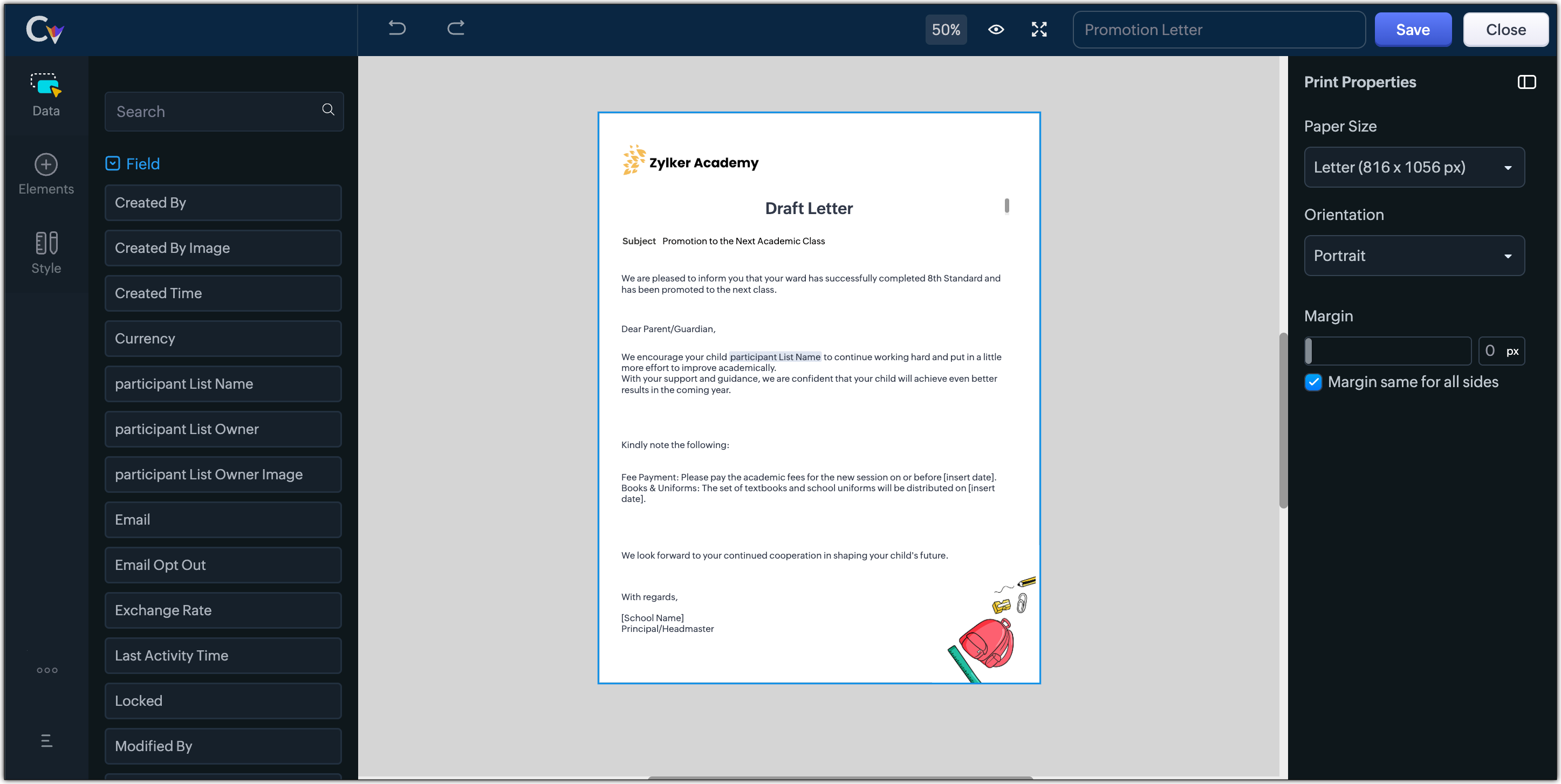


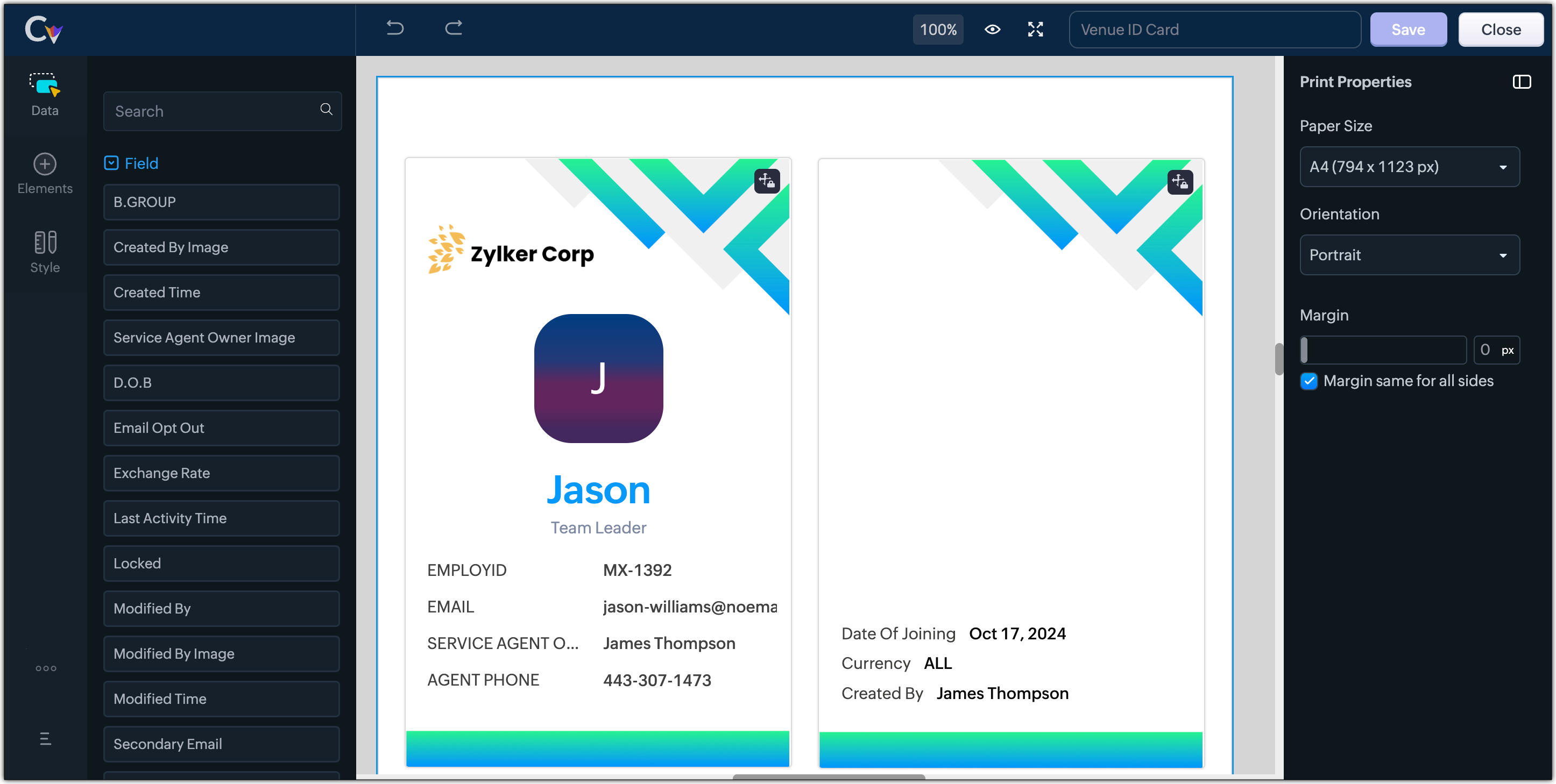
  2. Resume, id card, or other identification forms for marketing activities or related events,


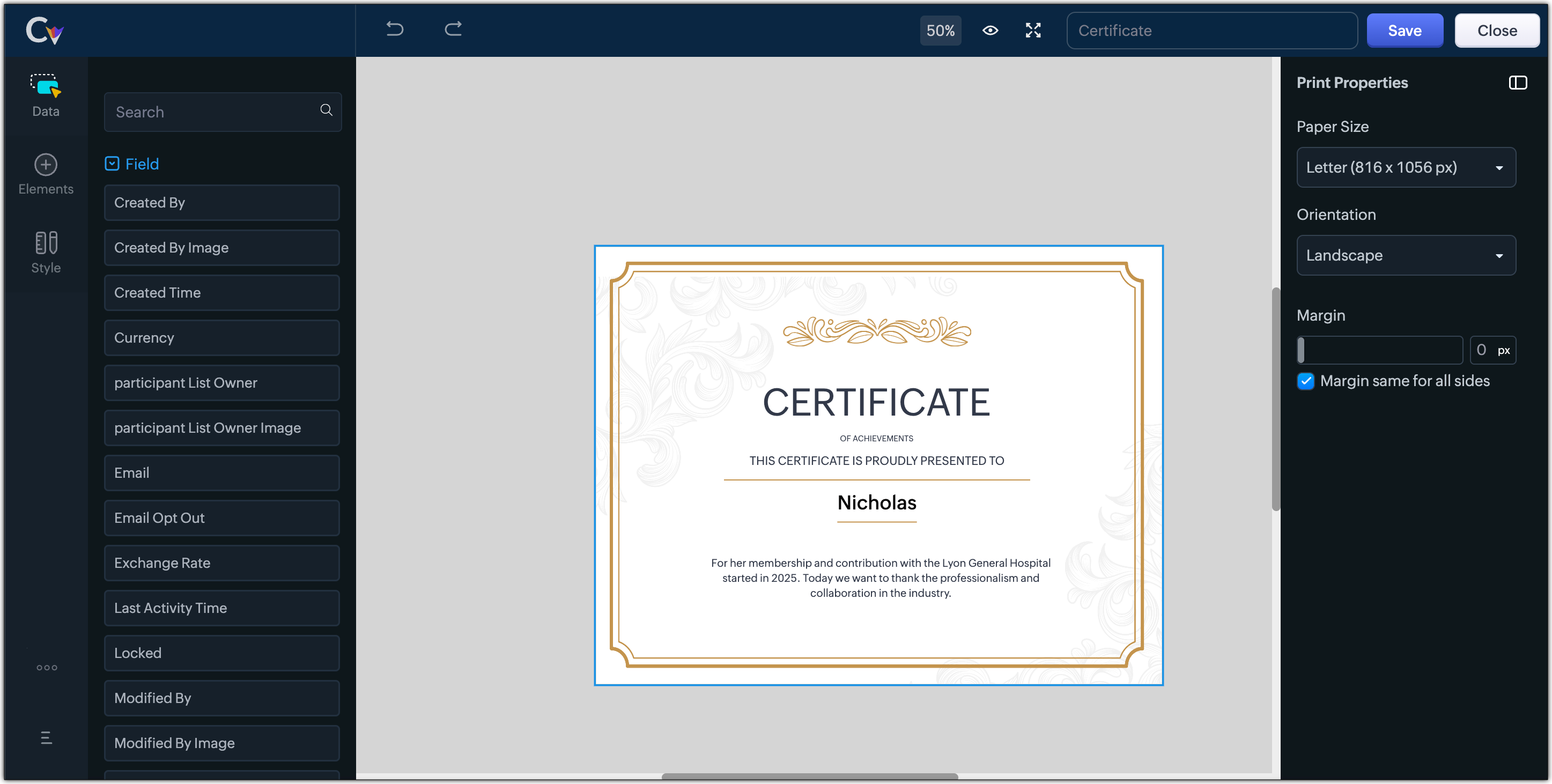
  3. Certificates, contracts, agreements, or guarantees that need to be manually attested by customers

Customization Options to print Mailing labels

Canvas Print View offers a wide range of customization options to help you design exactly how you want to print out your mailing labels. The options available are :
  1. Paper Sizes: Choose from Mailing Label formats based on your printing needs
  2. Orientation: Switch between Portrait or Landscape mode to suit your layout design
  3. Margins: Define precise margins for your printout or apply the same margin on all sides with a single click
  4. Print record in :
    1. Choose to print the mailing labels per page or in a list or in a Grid.
    2. To print mailing labels per page, users can choose the same margin for all sides and align center options.
    3. To print mailing labels in a list, users can choose the same margin for all sides, align center and cutting lines options.
    4. To print mailing labels in a grid, users can choose the same margin for all sides, align center, auto width, and cutting lines options.


Notes
Note :
  1. Align Center : Aligns your content to the center of the page or adjust freely
  2. Auto Width : Enable this setting to fit content dynamically within the layout
  3. Cutting Lines : Add visible cutting guides to clearly separate labels or sections on the page

Customization Options to print A4 or Letter format information

The customization options available for printing information in A4 or Letter paper sizes are :
  1. Margins: Define precise margins for your printout or apply the same margin on all sides with a single click.
  2. Print record in : Choose to print the information per page or in a list.
    1. To print information per page, users can only choose to apply the same margin for all sides.
    2. To print mailing labels in a list, users can choose to apply the same margin for all sides and enable cutting lines to guide separation.


Info
Availability : This feature is available to all users except for IN DC users. It will be opened up for the Indian data centre users shortly.

No more exporting, formatting, or jumping between tools to generate print-ready documents. Canvas Print View can be your print-buddy that can let you tailor documents to suit your business requirements.

Head over to your Canvas builder, select the Print View option, and start creating beautifully customized templates that work on paper just as well as on screen.

Feel free to comment below if you need any assistance from us!

Thanks & Regards
Serena Woolridge

    • Recent Topics

    • Re: Application Architecture in Zoho Creator — A Platform-Specific Deep Dive

      A recent community post on application architecture made some excellent points about planning architecture early in Zoho Creator projects. The core message is right — Creator applications have a habit of growing organically into maintenance nightmares,
    • Missing Fields in Lead Conversion Mapping

      I’ve been using Zoho CRM since 2013 to manage leads and convert them into contacts and jobs. When I convert a lead to a customer, I create a new contact and a job. Previously, this process automatically transferred key information from the lead to the
    • Mass email from Report output

      Hi, I'd like to send a mass email based on a report output. The report is pulling multiple information from linked modules. Each line of the report ends up with a contact name, email and multiple field values pulled from the linked modules (some are custom
    • How to take result of calculation in a form and subtract from a value in another form

      I'm using the following code on successful form submission to perform a calculation and enter the result into a field a shown below input.Space_Used = ifNull(input.Area_In_Square_Meters,0) * ifNull(input.Total_Stock,0); I now need the result above, the
    • What's New in Zoho Analytics - February 2026

      Hello Users! We're back with another round of updates for Zoho Analytics. This month's release focuses on giving you greater flexibility in how you visualize, manage, and act on your data - with new features like custom visualizations, remote MCP server,
    • Understanding tasks

      So we have a module linked to contacts called Equipment and that in turn has a related module called service calls. Often on a service call we want add a task but we are not able. I think it needs a link to the contact. WE therefore tried to add tasks
    • Cross Module Filtering – Use Fields from Lookup modules in Custom Views criteria and Advanced Filters

      Hello everyone, Zoho CRM now enables you to achieve deeper filtering of records in a module, using fields of a lookup, thereby enhancing your data management experience manifold. This filtering based on lookup module fields is now available in advanced
    • Related Lists in Email Templates

      Hi Zoho team, I would love to see a feature where related list information can easily be added to an email template (instead of mail merge). I have a client who books flights for their customers. They do this through a Flights module so all booked flights
    • Auto-sync field of lookup value

      This feature has been requested many times in the discussion Field of Lookup Announcement and this post aims to track it separately. At the moment the value of a 'field of lookup' is a snapshot but once the parent lookup field is updated the values diverge.
    • Introducing SlyteUI : From Idea to a Working Interface in Minutes

      Hello everyone! Are you spending hours building basic UIs? Does even the smallest customization feel like a major task? CRM customization should feel intuitive and straightforward, not time consuming or exhausting. SlyteUI makes this possible by simplifying
    • need to add tax in servce and items

      please give access to add gst or tac to add in service and parts
    • Blueprint transitions on locked records

      We use the ability to automatically lock records (quotes, sales orders, etc.) based on criteria, such as stage. For instance, if a quote has been sent to a client, the quote is then locked for further edits. Our ideal quote stage process is: Draft>Sent>Won.
    • Lead Entry Strategy

      Hi there. Was wondering if anybody could share their strategy around lead entry into Zoho CRM. One of the challenges with Zoho CRM is a lead requires a last name. We want to capture companies that operate within our addressable market, and we often don't
    • Social posts not saving as drafts or posting

      Over the past two days, I have written and modified the same post for 5 different channels 4 different times. They will neither save as draft, nor go through and load in the scheduler, nor will they post when I try to push it live now. In every case,
    • Introducing user groups, roles, and profiles in Zoho Sign

      Hello, Today, we're excited to unveil user groups, roles, and profiles to offer granular access controls in Zoho Sign. These help administrators manage document visibility and accessibility based on assigned user roles and permission sets. User groups:
    • On Duty Requests - Zoho People Data

      Hello Team, We are currently using the On Duty Form to record Work From Home (WFH) requests in our organization. However, we are facing an issue where pending On Duty requests are not appearing in the Attendance Module. For example, if I submit On Duty
    • Add org-specific data with Custom modules

      Zoho Sprints offers a wide range of default modules designed to support agile project management. However, some projects or organizations may require additional modules to store project-specific or organization-specific data. To address this, Zoho Sprints
    • All new Address Field in Zoho CRM: maintain structured and accurate address inputs

      Availability Update: 29 September 2025: It's currently available for all new sign-ups and for existing Zoho CRM orgs which are in the Professional edition exclusively for IN DC users. 2 March 2026: Available to users in all DCs except US and EU DC. 24
    • 【無料/オンライン】4/30開催|Zoho ワークアウト(オンライン勉強会)

      ユーザーの皆さま、こんにちは。 コミュニティグループの中野です。 4月開催の「Zoho ワークアウト」のご案内です。 本イベントは、Zohoユーザー同士で交流しながら 設定・運用・活用に関する課題解決を目指すオンライン勉強会です。 「設定を進めたいけれど、一人だと手が止まってしまう」 「他社がどう活用しているのか知りたい」 「相談できる相手がおらず、運用に悩んでいる」 そんな方におすすめのイベントです。 ▶︎参加登録はこちら(無料) https://us02web.zoom.us/meeting/register/qIH1ut8aTnq-R7-21eF3BQ
    • Give your organization a branded login experience with White Labeling

      When users log in to their email, the URL they land on is often the first thing they notice. A generic login page can feel disconnected from your organization's identity, especially when you have already established a strong brand presence. For administrators,
    • Archive Option in Conversation View

      Hello, I have a suggestion\request to add an "Archive Thread" button in conversation view of Zoho Mail. The best suggestion I have is to put an "Archive Thread" button next to the "Label Entire Thread" button in conversation view. Most users don't just
    • Search API filter/sort ignores comment-triggered modifiedTime updates

      Summary When a comment is added to a Call or Account, the parent record's modifiedTime is correctly bumped. This bumped value is visible in: GET /api/v1/calls/{id} ✅ GET /api/v1/calls/search without a filter ✅ — the record's response body shows the new
    • Automation#17: Auto-Create Tasks in Zoho Projects Upon Ticket Creation in Zoho Desk

      Hello Everyone, This edition delivers the solution to automatically create a task in Zoho Projects when a ticket is created in Zoho Desk. Zylker Resorts uses Zoho Desk for bookings and handling guest requests. Zylker resorts outsources cab bookings to
    • Mail Merge in Zoho Desk

      Hello Team, Do we have an option of mail merge within Zoho Desk like we have in Zoho CRM? We have a requirement to generate some pdf file in the form of mail merge doc from the ticket.
    • No DINAR (Serbia) in currency list

      There is no Serbian Dinar listed in the currency list. Dinar is available in Books, Inventory, CRM, FSM. Please make it available in Desk as well. Without it, the integration with other apps is not possible.
    • CRM Notes

      Hello, We want to add a Note to the Contact record when a Note is added to a Case or Deal. I wasn't able to do this using a workflow, so I tried using Zoho Flow, but that didn't work either. Does anyone have a suggestion on how we can accomplish thi
    • Zoho Forms for Vertical Studio Subscriber Organizations

      We’re excited to introduce the Zoho Forms integration with Vertical Studio. This allows you to capture data using forms and send it directly to your Vertical Studio modules. With this integration, form submissions can be used to create or update records,
    • Announcing Zoho Sheet desktop app for macOS and Windows (Beta)

      Hello Sheet users, We know you’ve been waiting for this one. It has always been the top priority on our roadmap to provide a single native desktop app for macOS and Windows that works both online and offline. Today, we are excited to announce that the
    • Using Email Triggers on Zoho Flow

      Hello, I'm sending the email to create the variables as this article says: https://help.zoho.com/portal/en/kb/flow/user-guide/create-a-flow/articles/email-trigger#How_email_trigger_works But the collection of the variables only seems to work when the
    • How to transfer uploaded files from Zoho Survey to external systems?

      Hi everyone, I'm currently integrating Zoho Survey with an external system and have run into a limitation I haven't been able to solve yet. I'm using webhooks to send submitted survey data (JSON) to my external API, which works perfectly for all standard
    • Re-Apply SLA When Ticket Reopened from Closed Status?

      If you have an SLA applied, timers are deactivated when going to "On Hold" status type and reactivated when going back to an Open status type. What we discovered is when a customer replies to a closed case and it reopens, the SLA is not applied and timers
    • WhatsApp Calling Integration via Zoho Desk

      Dear Zoho Desk Team, I would like to request a feature that allows users to call WhatsApp numbers directly via Zoho Desk. This integration would enable sending and receiving calls to and from WhatsApp numbers over the internet, without the need for traditional
    • Sync Task Status from Zoho Projects to Zoho Desk

      Hi Zoho Desk Team, Hope you’re doing well. We’re actively using the Zoho Desk–Zoho Projects integration, which helps our support and project teams stay aligned. However, we noticed that when we change a task’s status in Zoho Projects, the change is not
    • filter on sheets mobile (iOS, iPadOS) does not work

      re-posting this as a question because reporting as a problem netted zero responses... I have this issue on every spreadsheet, whether imported or created natively in Zoho Sheets. I can use on desktop without issue: but on iOS the filter dropdowns are
    • Discussion Forum Categories and Forums

      I'm prepping for a forum roll out and found that there isn't a lot of granularity of permissions on the forum level.  It would be nice to see the settings from the category level of the forum available at the forum level, so you can assign who can post
    • Enable integration of CRM CPQ functionality for ZohoOne customers using Zoho Finance application

      Hi there. I can't believe I'm needing to launch this idea as I would have thought this was a little obvious. Following a number of conversations with the technical team it's become evident that the CPQ functionality within CRM cannot integrate with Zoho
    • Ignore Auto Sales Order number generation not working

      Hi, My Flow has broken and I'm no longer able to use the Ignore auto number generation function and instead use the field that came from the trigger (via Jotform) when creating a new Sales Order in Books. Any suggestions how to fix this?
    • Introducing the New Applications Module

      We're excited to introduce the Applications module, a powerful new feature designed to revolutionize how you manage job applications. This module offers a more streamlined, efficient approach to tracking and processing candidates throughout your recruitment
    • Coupon Codes and Cancelling Subscriptions

      We have two Zoho One organizations, one we use for dev/testing. In Zoho Billing when we cancel a subscription, we are getting two different behaviors with regards to coupons. In one environment, the coupon is removed upon cancellation. In the other, the
    • How to set custom Sales Order numbers

      I am trying to create Sales Orders with data from Jotform submissions. Auto number generation is disabled within Books. Whereas the flow Input recognizes the number (40732 in this example), the Output does not. How can I fix this? I'd like the number
    • Next Page