How to create a simple order form in minutes
Looking for ways to receive orders online? No matter what type of business you run, Zoho Forms makes it easy to create efficient order forms and start collecting orders online in minutes.
Pick your starting point
Use templates: To expedite your form-building process, Zoho Forms provides a range of pre-defined order form templates. By using these templates, you can guarantee that you are gathering all the necessary data while saving a ton of time. All you have to do is select a template that corresponds with your kind of business and customize it to meet your requirements.

Build from scratch: With Zoho Forms, you can create your form from the ground up by utilizing our drag-and-drop interface. This gives you complete control over the fields you include and the overall look and feel of your form, allowing you customize everything from head to toe to perfectly match your needs.

Gather all the important details
Once you have chosen your starting point, it's time to add the essential fields your order form needs. Here are some key elements to consider:
Customer information: Capture your customer's name, email address, phone number, and shipping address to ensure smooth order fulfilment.
Product details: Showcase your products with high-quality images and detailed descriptions to boost customer confidence in the product. Include fields for quantity and price to allow customers to add items to their virtual cart easily.

Give it a professional touch!
Ensure your order forms are polished and correspond to the brand. With Zoho Form, you can alter the form's appearance to reflect your brand better. Provide a visually appealing form to your customers by uploading your company logo and selecting a colour and font that match well with your brand.
Secure payments made easy
If your business is ready to accept online payments, then you can utilize Zoho Forms' Payment field to integrate your form with popular payment gateways like PayPal, Stripe, or Paytm. This speeds up the checkout process and raises your conversion rate by enabling your customer to pay safely and directly through your form.

Don't leave them wondering
Customize your thank you page to confirm their order and provide additional information, like an order summary, estimated delivery time, or tracking details. This small gesture creates a professional experience and leaves a lasting positive impression on your customers. 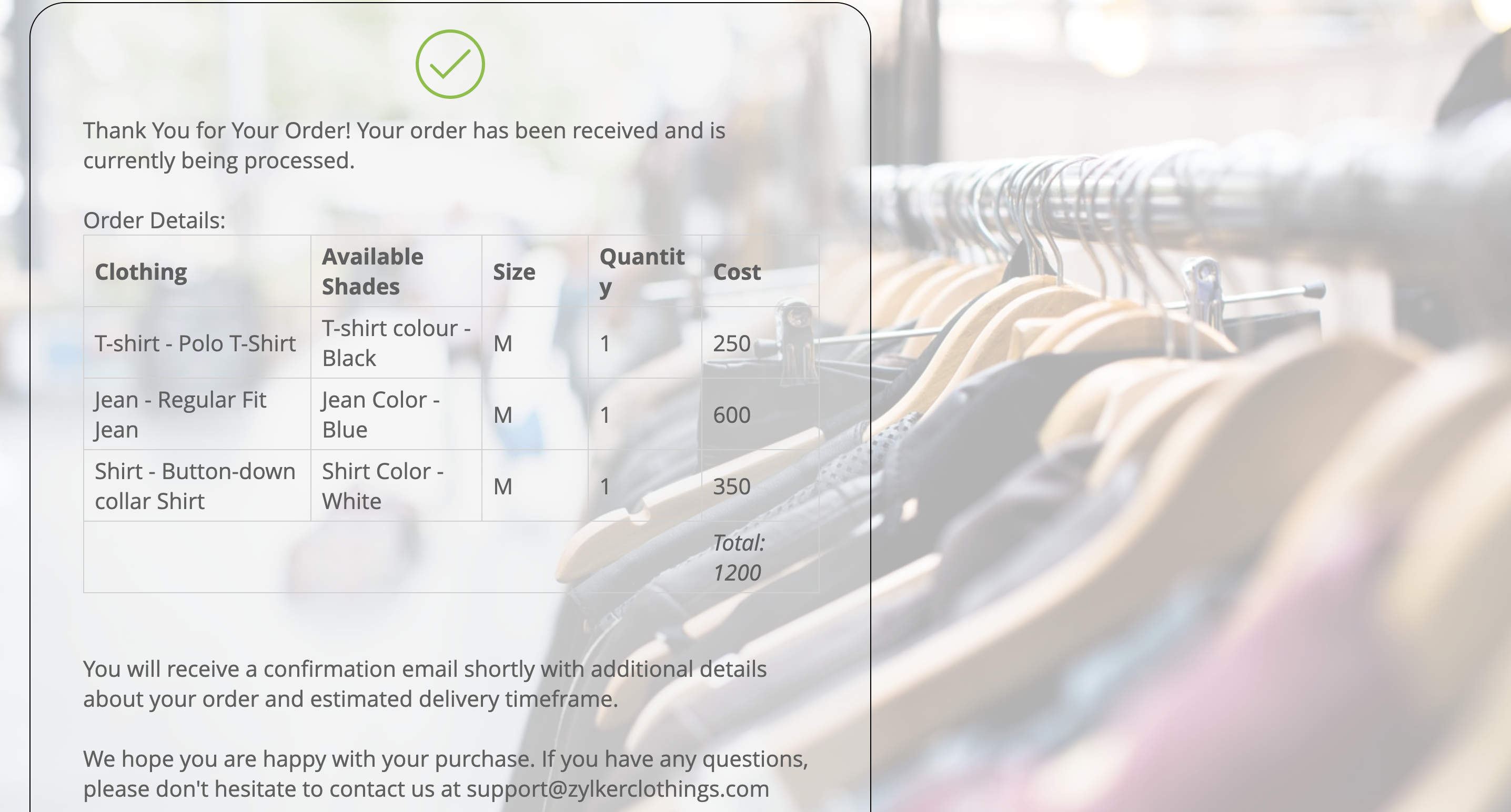
Share and start selling!
That's it; your order form is complete and ready to go. Embed the form on your website or simply share the link of your form on social media channels or even mail it directly to your customers. Now you can sit back, relax, and watch the orders roll in.
With Zoho Forms' user-friendly interface and powerful features, you can create professional order forms and take control of your online sales in minutes. Get started today and experience the benefits of streamlined online ordering! In our next discussion, we'll dive deeper into collecting payments through online order forms. In the meantime, feel free to leave any questions you have in the comments below.
Topic Participants
Ramya A
Sticky Posts
Easily track referrals with Zoho Forms
Referral tracking can be a powerful way for businesses to understand where their leads are coming from. With Zoho Forms, tracking the referral sources of your leads is an easy and straightforward process. Here are some tips to help you make the most of9 Ways to use Zoho Forms this Navratri
Hello form builders!Navratri is almost here! It is a time for celebration and culture in the Indian community, and organizing such a grand event can be overwhelming. But with the right tools, you can streamline the process and focus on creating unforgettableThe secret to collecting data from valid users
Collecting accurate data is crucial for making informed decisions. Zoho Forms offers two efficient ways to validate user data and ensure that you collect entries exclusively from valid users. Double Opt-in: Double Opt-in is a privacy feature that ensuresStorage space in Zoho Forms: The ultimate guide to efficiently managing your data
Are you using Zoho Forms for data collection? As with any data-intensive application, understanding how storage space is calculated is essential. That's why we've created this guide— to show you everything you need to know about managing storage spaceLinking primary form submissions to a second form submission
Let's imagine you have a form that you use to request a minimal amount of data from your users. To collect additional information, you redirect them to another form either automatically or based on a condition. During the course of redirection, you can
Recent Topics
Nouveauté dans Zoho Writer - Création de documents et de modèles assistée par l'IA
Zia, l’assistant IA de Zoho Writer, soutient les utilisateurs dans l’amélioration de leur écriture et la création de contenus : correction orthographique et grammaticale en temps réel, suggestions adaptées au contexte, détection du plagiat, révisionsSession Expired
I constantly get "Session Expired" and need to relogin or close and open the application again. This gets really frustrating during the day. Is this something that can be solved? This really makes me want to leave the app as it is no go to need to reopenDisable Buttons for Users with Profiles without permission
Hey, I've noticed that users without permission of setting up things in the marketplace, can still see the icon: On a click, you see this: It would be way better, if they couldn't see this menu icon at all. (Aside from the fact that it completely misplacedZoho Analytics - Make text clickable in underlying data
Hi Community, I have a simple sales report based on a Invoice query table. I have included a link on to each invoice on the table and sent the Invoice number URL to the link. This works find in the query table, but when I click underlying data on theCredit Management: #5 Advanced Refund Policy
You're subscribed to a well-known SaaS design tool. You've used it to manage your team's projects, create marketing visuals, brochures, and so on. But your needs change over time. Your company may switch to another tool or hire an in-house designer whoExported Slide Image Lacks Portion of the Background Image
This does not always happen, but when I export (or "download") the rendered image of a slide, it sometimes lacks a portion of the background image. I created a sample slide deck to demonstrate it and shared it with the admins. It is also publicly availableEffective Inbox Organization: Folders vs Tags in Zoho Mail?
I'm exploring the best ways to organize a busy inbox, especially when managing multiple clients or project using Zoho Mail. I’d love to know what works best for others: 1. Do you prefer **folders** (possibly with sub-folders) for each client or project?Piss poor service in Support in Domains and email
Srijith Narayanan B contacted me today. Very pleasant fellow. Just didn't want to tell him how bad your support service is. You help the person, but you leave before we can finish the next stage. Which causes a lot of frustration. It's been 8 days nowZoho Mail android app update: Block & reject future emails, Report phishing, Spam alerts, Suspicious URL detection
Hello everyone! In the most recent Zoho Mail Android app update, we have brought in support for the following features: Block & reject future emails Report Phishing Spam alerts in the mail details screen. Suspicious URL detection. Block & reject futureZohomail does not support additional fields in mailto links
Hello, I set up Zohomail as default composer in Firefox according to manual here: https://www.zoho.com/mail/help/defaultcomposer.html#alink2 Later, I wanted to use this functionality to answer in a Linux mailing list thread using mailto link: mailto:xxxxx@kernel.org?In-Reply-To=%3C727o0521-q24p-s0qq-66n0-sn436rpqqr1p@example.com%3E&Cc=xxxxx%example.org&Subject=Re%3A%20%5BPATCH%20v2%28%29Email address for forwarding is not saving and there's no confirmation ema
Steps to reproduce: 1. Enter my forward email in the email forward section of the account 2. Click save 3. See a notification stating saved successfully 4. Refresh the page, no forward email is saved 5. No email confirmation received at the forwardingThis domain is not allowed to add in Zoho. Please contact support-as@zohocorp.com for further details
This is the error i keep getting when trying to use my Zoho Domain Mail. This domain is not allowed to add in Zoho. Please contact support-as@zohocorp.com for further details Find attached. I hope this can be resolved very quickly so i can go on and makeAuto CC - Moving Departments
We have Auto CC e-mail replies to your support mailbox enabled. We have two departments: Helpdesk (helpdesk@domain.com) Delivery (delivery@domain.com) If we create a Helpdesk ticket, and reply, replies are CC'd to helpdesk@domain.com (OK) We then moveUnable to see free plan option
Hello Zoho Support Team, I hope you are doing well. I am trying to sign up for Zoho Mail, but I am unable to see the option for the free plan. Could you please guide me on how I can access or activate the free plan? Thank you for your assistance.Sorten the domain of zoho mail ids
I recently created zoho mail id and am quite excited with the features. But one issue ig nobody wanna type this big zohoaccounts.com I mean silly bold Suggestion zmail.com (sound gmail) (attraction) or some genz words looks coolWeekly Tips : Customize your Zoho Mail Notifications
In a professional context, email communication remains one of the most crucial channels for staying connected and managing workflows. Keeping track of your emails, task updates, or important announcements can be overwhelming—especially if you are jugglingThe attendees will now be redirected to the landing webpage when they exit the webinar, set by the organizer.
Hello All, In the latest version of the Zoho Meeting iOS mobile app (v1.3.16), we have brought in the below enhancements: Post Webinar Re-direction Revamped exit UI for Webinar Post Webinar Re-direction: The attendees will now be redirected to the550-5.1.1 The email account that you tried to reach does not exist
Hi, I made sure my domain, SPF, MX records, and DKIM are all verified. I've entered the information correctly in cPanel and Email Routing is set to Remote Mail Exchanger. I am able to send, but unable to receive emails. When I sent a test reply to it, I get the following error: The response was: 550-5.1.1 The email account that you tried to reach does not exist. Please try 550-5.1.1 double-checking the recipient's email address for typos or 550-5.1.1 unnecessary spaces. Learn more at 550 5.1.1 https://support.google.com/mail/?p=NoSuchUserDownload API file contents from browser
Hi Team - is there something being planned to be able to trigger file downloads from the browser via a deluge script? i.e. retrieve a file via API, trigger the file download directly from the browser. Or... using the convertToPdf function (https://www.zoho.com/deluge/help/functions/file/convert-to-pdf.html)When using "locations" in zoho books, can you keep the two locations totally separate from each other?
I am looking to add a location but I don't want to intermingle the banking or other accounts. I want that to be like two separate independent branches that use different banking accounts, accounts payable, and accounts receivable. The people who are inAdding a Channel to SalesIQ
I have a client that currently uses Zoho CRM and Zoho Desk. They would like a live chat to place on their website that has a mobile app and chat bots (something like SalesIQ). However, they would also like to have all this work over SMS as well. Does the SalesIQ API allow this? Can I add visitors without them being a visitor on a website? Thanks! Bryan RedeagleZoho Flow Needs to Embrace AI Agent Protocols to Stay Competitive
Zoho Flow has long been a reliable platform for automating workflows and integrating various applications. However, in the rapidly evolving landscape of AI-driven automation, it risks falling behind competitors like n8n, which are pioneering advancementsImportant Features Missing
Hey all I love linkthread, but i am missing some important features. I want to be able to include my Google Tag Manager. I have all the important stuff in my GTM Container: Facebook Pixel, LinkIn Pixel, Zoho Pagesense and so on. So i am able to do retargetingZoho SignForms: Prefill parameters with spaces render as “+” in the document (even when using %20)
Hello Zoho Sign team, we are using SignForms with prefill parameters passed via URL. Spaces in parameter values are being rendered as “+” in the finalized document—even when we URL-encode spaces as %20. This is critical for us because we prefill addressesCurrency selector (based on variable) usage in comparsion
Hi, I've developed a currency selector based on the following topic, and it's working well in pivot tables and charts: https://help.zoho.com/portal/en/community/topic/how-can-i-allow-my-users-to-choose-a-currency-for-the-dashboard I also have a comparisonCustomize Column in Projects - Default View for Template?
Is there a way to have the columns you'd like to see added to a template? I want my customized columns to show up every single time I create a project from that template. It appears I can customize them in the template but when I create the project they do not transfer over. Template: See below how the columns in order are : Task, Owner, Status, Assigned, Website URL, Blog H1..etc. When I create a project from that same template it comes out as: Task, Owner, Status, Tags, Start Date, End Date, etcAsk the Experts 24: Analytics, data administration, and mobile experience with Zoho Desk
Hello Everyone! Welcome back to the Ask the Experts(ATE) series! We were so focused on our Autumn 2025 release that we didn't host an ATE session last month. In this month's ATE, we'd like to expand our areas for discussion: we'd like to listen to yourMulti-Page Forms in Zoho Creator!
Let’s make long applications easier to handle by dividing them into pages, adding a progress bar, and guiding users step by step through complex data entry. This would be a total game-changer for the user experience and could significantly boost completionEmail login error
Login successfully but email page errorShared Mailboxes Disappeared
Zoho Mail users in our company haven't been able to see their Shared Mailboxes for the past few hours. I've checked with App and Web Access, but they can't access them. When I send emails to their addresses, I get no error messages. They're still visibleRemote Server is misconfigured
Dear Team, I am unable to use email id as remote server is misconfigured. It would be really great if you could help on this and get this resolved. Thanks & Regard Rohit Guptawhy cant i access my email account. it keeps asking me for reverifiying my account by entering my password.
I cant access my account. it keeps asking me for reverifcaton by entering my password. once its entered it asks for it over and over.Free webinar alert on October 16 - Less Complexity, More Security: Workplace + Directory
Hello Zoho Workplace Community! Security and productivity shouldn't be at odds—and with Zoho, they're not. Discover how Zoho Workplace + Directory delivers seamless collaboration with enterprise-grade security, all in one integrated ecosystem. Join ourWorkdrive and ChatGPT Team Synced Connectors
Hi, we want to be able to integrate Zoho Workdrive with OpenAI’s ChatGPT Team plan. Google Drive and OneDrive both offer this, zoho please catch up asap. We dont want to have to put our company files in google drive, we want to allow chatgpt Team editionAlias Name (on items) use case in Zoho inventory
Hey, Hope everyone is well. Wondering if anyone can shed some light on the use case of Alias Names on Products in Zoho Inventory? Cheers, ChrisUpdating an Invoice Line Item's Discount Account via API Call / Deluge Custom Function
I need help updating an invoice line item's discount account via API. Below is a screenshot of the line item field I am referring to. Now the field to the left of the highlighted field (discount account) is the sales income account. I am able to modifySend e-mail with attachments
Dear Zoho, How is that possible in Zoho Flow to send an e-mail with attachment? Just a simple example: Zoho Flow checks my Zoho mails and if the conditions starts the trigger then I would like to send an email with the original email's attachment. Any idea? BR, AdamHow to I get checkboxes on a subform to update via deluge
Hello, would someone be able to tell me what I'm doing wrong here? I am trying to take the contents of a Deals subform and add them to an invoice then update the checkbox on each row so that 'add to invoice' is unticked and 'invoiced' is ticked. The outputUnified customer portal login
As I'm a Zoho One subscriber I can provide my customers with portal access to many of the Zoho apps. However, the customer must have a separate login for each app, which may be difficult for them to manage and frustrating as all they understand is thatZoho Projects - Task Owner filter at Project level
Hi Projects Team, The feature requests I would like to raise is the ability to create a custom view at the project level for projects with tasks owned by a user or users. For example "Ashley's Projects" custom view might contain a list of project in whichNext Page