Incoming Threads Report

Incoming Threads Report

From data to decisions: A deep dive into ticketing system reports

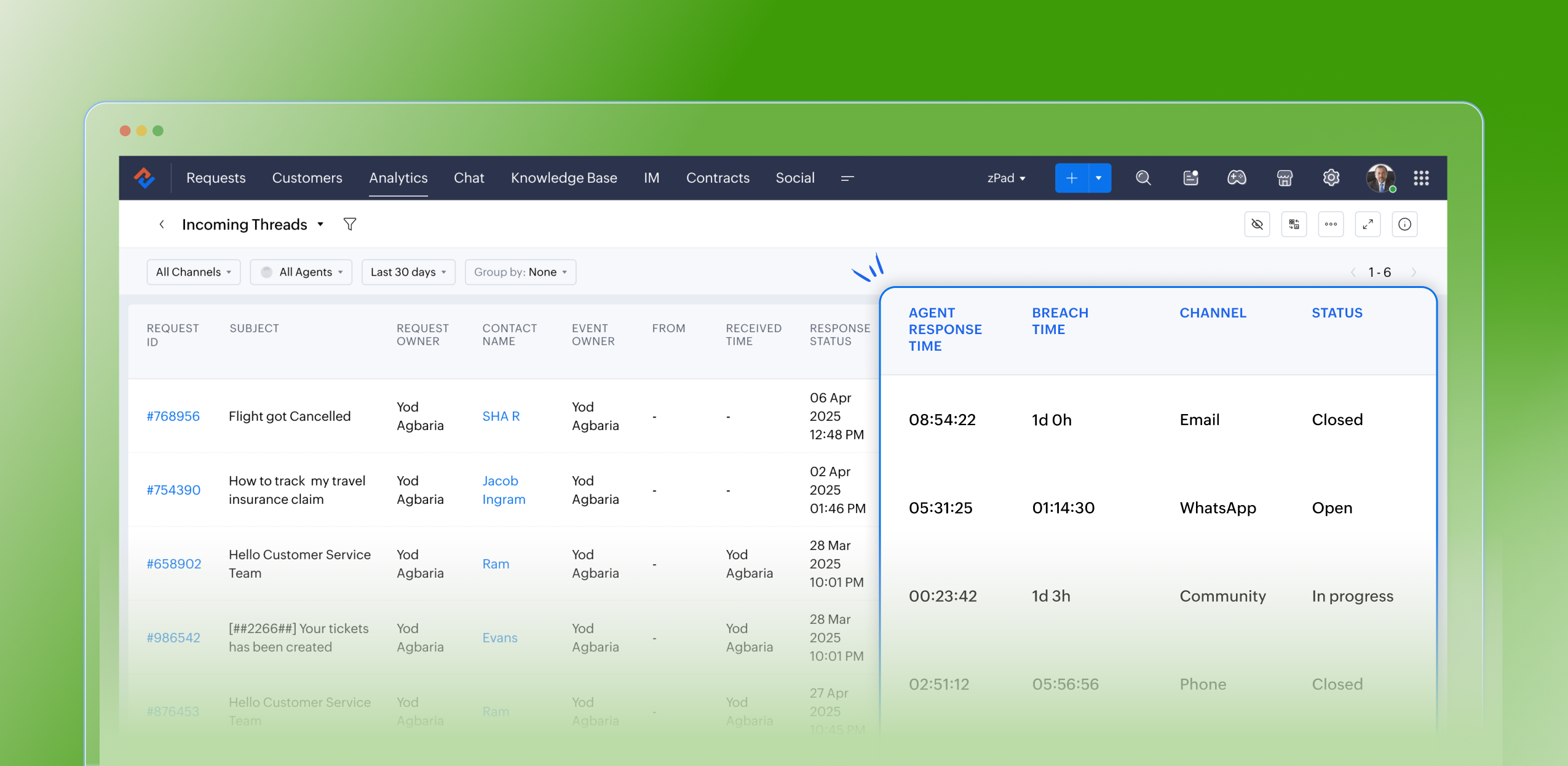
Customers raise questions and issues through multiple channels, such as email, chat, or tickets. To monitor the number of queries received on a specific day from each channel, leads can use the Incoming Threads report. This report enables them to allocate resources efficiently based on ticket volume. For instance, if more queries are received through WhatsApp than email, the manager can reassign some agents from the email team to handle WhatsApp queries, ensuring timely responses and effective customer service.

Purpose

The Incoming Threads report provides visibility into the number of messages (threads) received across all customer channels, including email, chat, web forms, social media, and WhatsApp. Each thread represents a customer interaction—whether a new ticket or a follow-up message—and helps teams determine how busy each channel is on a given day.

What are ticket-based reports?  

Ticket-based reports are summaries created from the data collected in a help desk ticketing system. These reports focus on different aspects of ticket management and give insights into how customer support requests are handled and resolved. They usually include metrics like ticket volume trends, response times, resolution times, ticket statuses, agent and team performance, and customer satisfaction scores.

Specific attributes found in the incoming threads report

  • Request ID: Zoho Desk identifies and distinguishes tickets using a unique reference number called a ticket ID
  • Subject: The ticket subject is typically a summary or description of the issue the customer is experiencing
  • Request owner: Owner of the ticket
  • Contact name: The customer's contact name
  • Event owner: The owner of the event
  • From: The from email address
  • Received time: The time the request was received
  • Response status: The status of the response
  • Responded by: The agent who responded to the request
  • Agent responded time: The time stamp when an agent sends a reply to a ticket or customer message
  • Agent response time: The total time taken by the agent to respond to a ticket; measured from when the ticket or customer message is received until the agent sends a reply
  • System response time: The elapsed time between the receipt of a ticket and the first agent’s response, which assures the customer their issue is being addressed
  • Is violated: If a ticket is marked as “violated,” it means the required action was not completed within the stipulated SLA period
  • Violated time: The data and time the violation occurred
  • Owner during the violation: The owner of the ticket when the breach occurred
  • Breach time: The time of the breach
  • Status: The status of the ticket
  • Channel: The channel through which the ticket was submitted

Notable use cases:

  • Resource Allocation: Assists managers in reallocating agents based on current workload. For instance, if there's a surge of tickets coming through chat or WhatsApp compared to email, agents can be redistributed to manage the demand effectively.
  • Performance Monitoring: Allows for the assessment of agent responsiveness and efficiency across different communication channels.
  • Customer Experience Optimization: By pinpointing peak times and identifying channels with increased ticket inflow, managers can ensure prompt responses and uphold SLA commitments.

Advantages

  • Assists leads in filtering and analyzing the volume and types of incoming tickets
  • Monitors the count of open tickets at any given moment
  • Confirms the timestamps for ticket creation and resolution
  • Identifies the individual responsible for resolving each ticket
  • Greatly optimizes resource allocation and time management
  • Boosts team productivity and ensures adherence to service level agreements (SLAs)

Takeaway

The Incoming Threads Report is a useful analytical tool within Zoho Desk that offers a unified view of communication inflow, agent activity, and SLA performance. It empowers support teams to maintain balanced workloads, ensure timely responses, and drive proactive, efficient customer service operations.


Please stay tuned for more in the Desk Reports series.


Regards,


Kavya Rao

The Zoho Desk Team


InfoManaging a help desk involves complex responsibilities, such as identifying bottlenecks, minimising errors, and evaluating team performance for seamless service delivery. To do this effectively, access to comprehensive analytics and real-time insights is crucial. Zoho Desk streamlines these tasks by also providing detailed analytics and live reports through the Radar app, allowing managers to make informed decisions anytime, anywhere. Download now!

    • Recent Topics

    • Marketing Tip #26: Optimize product images for SEO

      Product images can do more than make your store look good. They can also help customers discover your products through search. Since search engines can’t "see" images, they rely on text signals to understand what an image is about. Two small actions make
    • Automation Series: Mandatory Time Logging Before Task Closure

      In a project, when users work on multiple tasks simultaneously, they track time in different ways, either by starting a timer or by adding a time log. Sometimes users may forget to add time, which can lead to discrepancies in the timesheet. When timesheets
    • Is there a way to show contact emails in the Account?

      I know I can see the emails I have sent and received on a Contact detail view, but I want to be able to see all the emails that have been sent and received between all an Accounts Contacts on the Account Detail view. That way when I see the Account detail
    • Zoho CRM gets a new email compose and lot more

      Dear Customers,  [UPDATE October 21, 2021: We have started opening these features to some of the customers already. And, it will be available to all the customers before November 2nd Week, 2021. Sorry for the delay caused]  [UPDATE February 21, 2022:
    • Custom AI solutions with QuickML for Zoho CRM

      Hello everyone, Earlier, we introduced Custom AI Solutions in CRM that let you access QuickML for your custom AI needs. Building on that foundation, we’ve now enabled a deeper integration: QuickML models can be seamlessly integrated into CRM, and surface
    • CRM gets location smart with the all new Map View: visualize records, locate records within any radius, and more

      Hello all, We've introduced a new way to work with location data in Zoho CRM: the Map View. Instead of scrolling through endless lists, your records now appear as pins on a map. Built on top of the all-new address field and powered by Mappls (MapMyIndia),
    • Introducing document visibility in Zoho Sign

      Hello! Complex document workflows often involve multiple stakeholders with different roles. Sending a separate envelope to every person is time consuming and can lead to administrative bottlenecks. With Zoho Sign's document visibility feature, you can
    • Sent email stuck on processing

      My sent emails are stuck on processing, whats going on?
    • [Webinar] What's new in Zoho Analytics: Q2 2026

      Hey data lovers! Our What's New webinar series is bringing you another lineup of exciting features and product enhancements from the past quarter, all designed to help you get more out of your analytics. Get an inside look at new data connectors, Zoho
    • Alterar número de telefone para receber o código OTP

      Boa tarde! Como posso alterar o número de telefone da minha conta para aceder ao meu email corporativo? Estou tentando logar, mas não consigo, pois está sendo enviado o código OTP para o número antigo, preciso aceder urgente meu email, porque e de trabalho.
    • CRM x WorkDrive: We're rolling out the WorkDrive-powered file storage experience for existing users

      Release plan: Gradual rollout to customers without file storage add-ons, in this order: 1. Standalone CRM 2. CRM Plus and Zoho One DCs: All | Editions: All Available now for: - Standalone CRM accounts in Free and Standard editions without file storage
    • Request to Increase URL Field Character Limit

      Hi Arthi, Hope you are doing well. I'm trying to save a URL in the Work Order (WO) module using the URL field, but I receive the following error message: "Please enter a valid Repair File. Maximum 450 characters are allowed." The issue is that the URL
    • How to change column headings in pivot table?

      Hi, Is there a way to rename the column headers of a pivot table? Now some the columns are named with value labels: 'SUM of .....'. We would like to rename those headers. As of now we couldn't find any direct solution to adjust the headers, besides copying and reformat. We want to avoid these extra steps. Best, Tiemen
    • Undelivered Mail

      I suspect that there are recipient's servers that blocks my emails. I receive the following email from mailer-daemon@mail.zoho.eu : A message that you sent could not be delivered to one or more of its recipients. This is a permanent error. pantelis.sarantos@unipakhellas.gr,
    • Email not loading on PC

      Hello, my email opens on but it doesn’t load on PC. I don’t have other issues with the email, all the configurations are ok and I face with following issue in the photo. It says “ mail.zoho.com refused to connect” I will be very thankful if anyone can
    • Why are bounce/error emails being sent to info@ instead of contact@?

      I have my Zoho Mail and WordPress site configured so that normal website emails should go to contact@hybridbatteryservice.com. However, I keep receiving technical bounce/error emails and delivery failure notifications at info@hybridbatteryservice.com
    • Do Not Disturb status not respected when Cliq bar is enabled across Zoho apps

      Hi Zoho Cliq team, I want to report what appears to be a bug with how the Do Not Disturb status interacts with the embedded Cliq bar in other Zoho apps. **Issue:** When my Cliq status is set to Do Not Disturb, I continue to receive notification tones
    • Zoho Webinar Summer Broadcast 2026

      What if your webinar platform could connect directly with your business tools, automate routine tasks, trigger actions across your workflows, and support every stage of your webinar lifecycle? That’s the question we’ve been answering so far this year.
    • Zoho CRM Layout Rules: Nine New Actions, Profile-Based Execution, and Interactive Preview

      Hello everyone, Availability: This feature is now available for customers in the JP and SA DCs. It is planned to be released for other customers in soon. We’re excited to announce powerful new enhancements to Layout Rules in Zoho CRM - a feature built
    • Invalid request when trying to access Mail

      When I click on the red button to access Zoho Mail at https://mail.zoho.com/zm/, I get a big yellow warning triangle with "invlid request, The input passed is invalid or the URL is invoked without valid parameters. Please check your input and try ag
    • Whats the average response time for ticket submitted?

      I submitted a request to unblock my mail accounts. They seem to be blocked for outgoing mail, and I have been waiting for days to have this fixed with no reply. I have submitted 2 tickets and an email. My work has to completely stop. I pay for the service
    • All new Address Field in Zoho CRM: maintain structured and accurate address inputs

      Availability Update: 29 September 2025: It's currently available for all new sign-ups and for existing Zoho CRM orgs which are in the Professional edition exclusively for IN DC users. 2 March 2026: Available to users in all DCs except US and EU DC. 24
    • Is there any way to have Dataprep ingest RSS?

      As stated by the title. Does the Zoho environment offer tools that I can use to, directly or using workarounds, have Dataprep ingest an RSS feed? Thanks
    • Introducing Color Coding of Picklist Values

      Dear Everyone, Greetings!! Zoho CRM is uplifting the user experience. Recently, we had some notable aesthetic improvements in CRM like Kanban View UI enhancement, New List view UI enhancement, color coding of tags, and color coding of picklists in meetings.
    • Important updates to your Widget JS APIs

      Hello everyone, Greetings from Zoho Creator! This is an urgent notice for developers and Partners who use widgets in their Zoho Creator applications. We previously announced an update to the CDN URLs used for loading the Widget JS API, with a deadline
    • Deluge sendmail in Zoho Desk schedule can't send email from a verified email address

      I am trying to add a scheduled action with ZDesk using a Deluge function that sends a weekly email to specific ticket client contacts I've already verified the email address for use in ZDesk, but sendmail won't allow it in its "from:" clause. I've attached
    • Mailbox delegation “Send As” error

      I believe there may be an issue with mailbox delegation. When I create a delegation from the Admin Console, it works correctly if I select Read permissions. However, if I select Send As permission for the delegated user, I immediately receive the following
    • Restrict Zoho Cliq Webinars and Announcements to Admins Only

      Hi Zoho Team, We hope you're doing well. We would like to raise a feature request regarding in-app announcements in Zoho Cliq, such as the recent webinar popup about the Cliq Developer Platform: While these announcements are useful, they are not always
    • how do i get mail.mydomain.com to point to zoho mail web-mail?

      I have started using zohomail, and am loving it. With my previous provider, I used to go to mail.mydomain.com, and it would take me to my webmail. I am not able to find the mapping for zoho's webmail to map to it. It is difficult to go to webmail with
    • Number of decimal places

      Hi Latha, I have added the following three fields to the Company module. Currently, these fields only allow a maximum of 2 decimal places. However, for some of our requirements, we need to enter values with up to 10 decimal places. Could you please help
    • zoho imap connection stopped working 05/28 12pm EST

      Hi, beginning Thursday, 5/28, ~12 pm est imap to siteground stopped working. When I tried to reconnect the account, connection was failing with the following message: Unable to connect SMTP server:gvam1107.siteground.biz, Port: 587. I did notice that
    • User Name in Zoho Cliq Not Updating Across Apps?

      We updated the name of a user in Zoho. (From Sue to Taylor) Her name has not been updated in Cliq on all apps. When in Zoho One, if I go to Cliq directly, it is correct, but if I am in another app, and the Cliq bar pops up on the bottom, it will be the
    • Service currently unavailable

      The Zoho Mail Webmail is working, the Mail Admin Console is not: "Our service is temporarily unavailable, please try after sometime." How long must I wait to retry? edit: To add to this, the Webmail is not working 100% - I can open mail in the inbox,
    • Service currently unavailable

      Service currently unavailable It is not possible to access email; the entire Zohoworkplace platform is down
    • User Permission Log

      Our external auditors are asking for a way to view changes made to user permissions (basically, a user permission change log). Is this feature built into Creator? 
    • E-mail down

      We cannot get into our email inboxes, are you affected by a Microsoft update issue? How long do you think as to restoration?
    • ZOHO MAIL SERVICE NOT WORKING

      Hello i've a problem my zoho mail account says a display with this text "our service is temporally unavaible"
    • ايميل مجانى

      Can I create a free email account on Zahoo?
    • Sign up for email for a domain

      Hi - I thought I had signed up for a domain of <domain>.com, but only see the email of @zohomail.com . How do I get the <domain.com> domain linked to my email?
    • Feature Request: Include Creator-applicable Deluge updates in the Creator Release Notes

      I'd like to put forward a suggestion about how Deluge updates are surfaced to Zoho Creator developers, and I'm hoping the Creator team will consider it. Zoho Creator is built on Deluge. Every workflow, custom function, validation and schedule we write
    • Next Page