Introducing Data Bars: Graphically represent changes in data within the cells
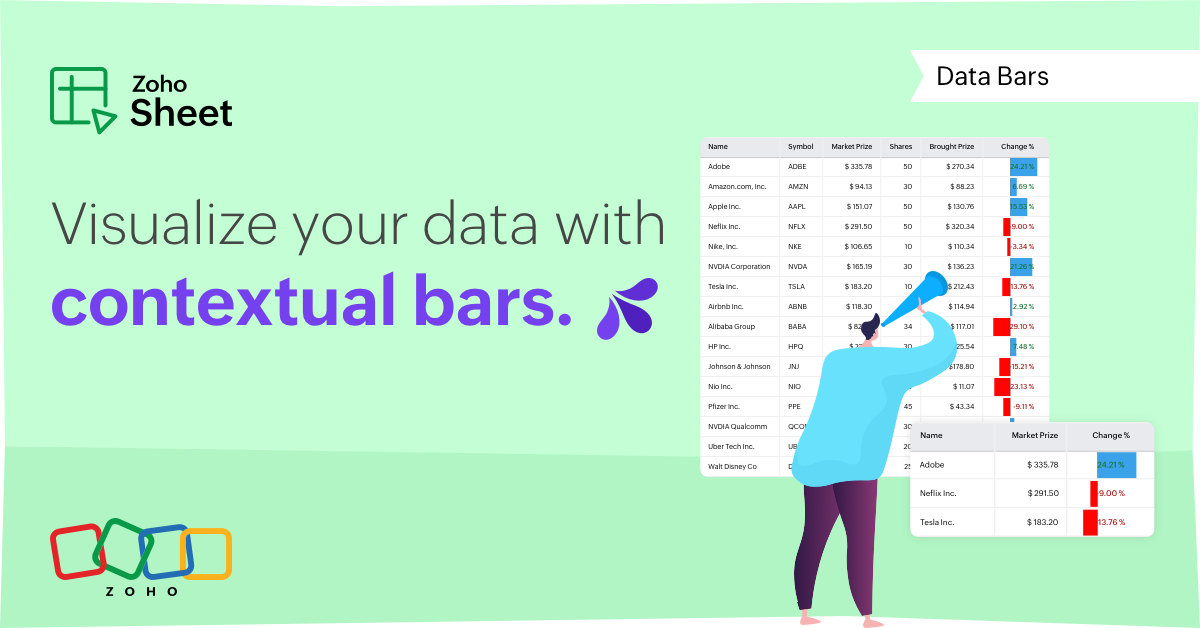
Conditional formatting has helped millions of spreadsheet users analyze and highlight their data more efficiently. In addition to the classic rules, color scales, and icon sets available in Zoho Sheet, you can now apply Data Bars, a convenient method of visually analyzing the values in a cell range.
What are Data Bars?
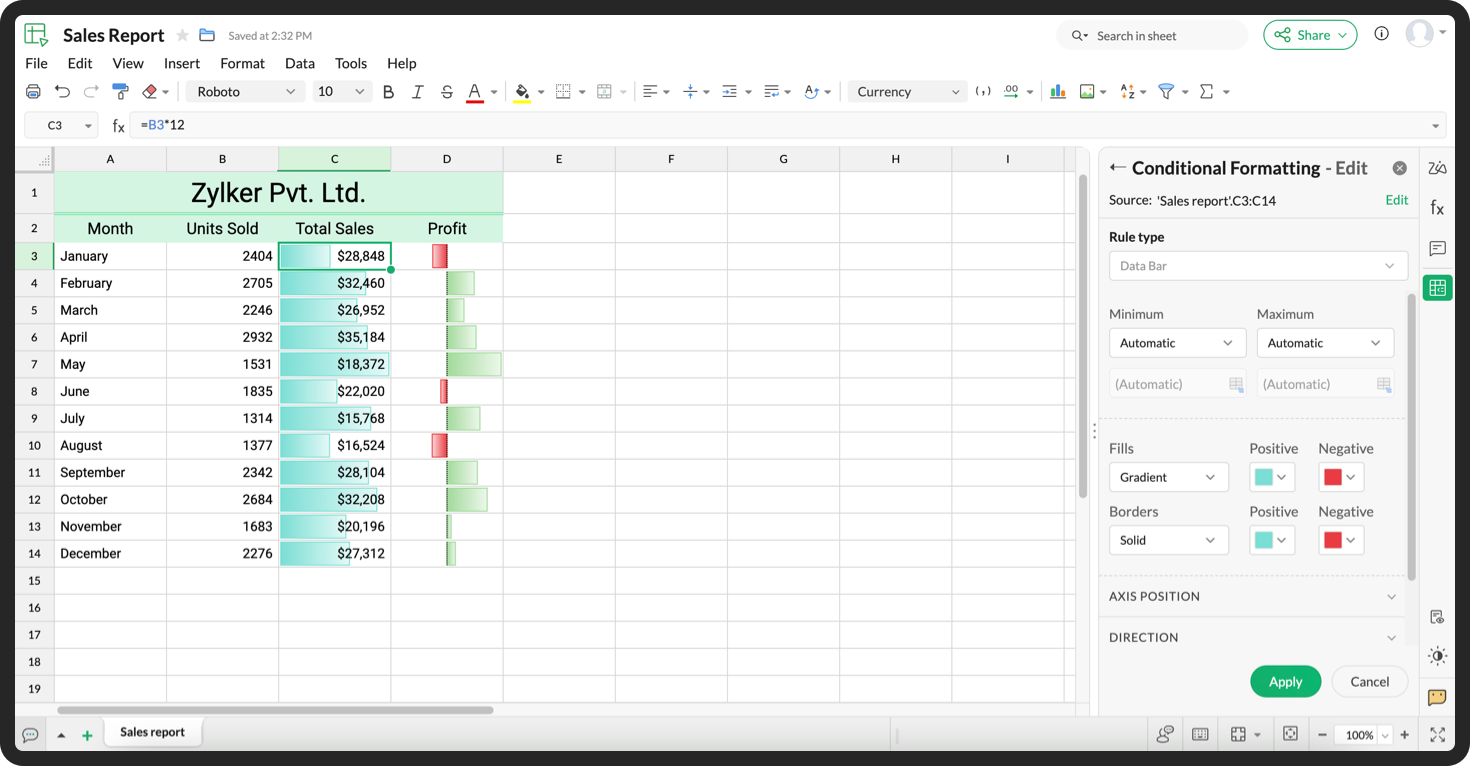
Data Bars are cell-level bars that can be used to visually represent the position of a value in a given range, with longer bars representing higher values. This helps users summarize data sets at a glance. Let's say you have a monthly sales report and wish to see which months have the highest and lowest sales figures. Find these results in an instant using Data Bars!
Customizations
Customize your data bars, by adjusting the border, color, and gradient of your bars. You can also choose the direction of the bars and the axis position in the cell, and hide cell content so that only your bars are displayed.
You can also use Data Bars in combination with other conditional formats, like color scales, to analyze your data. Not sure how to get started? Zia now offers suggestions on conditional formatting too!
Read more
At Zoho Sheet, we diligently track user requests and feedback. In line with this, based on extensive user requests, we've integrated Slicers to pivot tables and are delighted to announce its release. Slicers are interactive visual filters that have add,
Conditional formatting has helped millions of spreadsheet users analyze and highlight their data more efficiently. In addition to the classic rules, color scales, and icon sets available in Zoho Sheet, you can now apply Data Bars, a convenient method
Hello Sheet users, We're excited to announce a new feature enhacement, shaped directly by your valuable feedback! As you might know, conditional formatting is a great tool for anyone dealing with large data sets. Previously, if you’ve ever wanted to draw
Navigating your worksheets and performing specific actions should be a quick and easy process. That's where keyboard shortcuts come in. Shortcut keys help you accomplish tasks more efficiently, eliminating the need to move away from the keyboard. What
Zia, Zoho's popular AI assistant, has been helping users succeed across Zoho applications since inception. In Zoho Sheet, Zia helps users efficiently build reports and analyze data with recommendations about data cleaning, charts, and pivot table. Also,
Hi, I am hoping someone can help. I have a zoho form that has a CRM lookup field. I was hoping to send this to my publicly to clients via a text message and the form then attaches the signed form back to the custom module. This work absolutely fine when
Hi Zoho Team, We would like to request an enhancement to the Zoho Quartz client interface when viewing submitted recordings. Current Limitation: When viewing a Quartz recording from the client (user) interface, there is currently no option to switch the
Les journées de travail ne se déroulent jamais exactement comme prévu. Une conversation informelle devient une séance d’échange d'idées, une absence modifie un planning, et votre agenda se retrouve vite décalé par rapport à la réalité. Chez Zoho Calendar,
Hi; For defining Holidays, you need to add logic to handle the year as well as the month & day. We need to be able to enter Holidays for the next year. I need to add a holiday for January 2, 2017, but I can't until January 1st, which is a Sunday and we
Hi, we use zoho desk and have issues with public comments. We started using them because the "Reply" option just seemed very clumsy because of the following reasons: - the top "Reply" button starts what seems to be a regular email, showing the entire
Hello Zoho Desk users! We have introduced the parent-child ticketing system to help customer service teams ensure efficient resolution of issues involving multiple, related tickets. You can now combine repetitive and interconnected tickets into parent-child
Hi ! I'm trying to create ticket through Zoho API, and I'm getting a 422 response : "Validation failed for the condition : Ticket Status Info should not be empty" My request looks like this : curl --location 'https://desk.zoho.eu/api/v1/tickets' \ --header
Hi, I am trying to install a app into Sales Order Module related list, however there is no button allow me to do that. May I ask how to install widget to inventory module related list?
Last modified on (9 July, 2025): This feature was available in early access and is currently being rolled out to customers in phases. Currently available for users in the the AU, CA, and SA DCs. It will be enabled for the remaining DCs in the next couple
Hello. Is there a free sandbox environment for the developers using Zoho Books API? I am working on the Zoho Books add-on and currently not ready to buy a premium service - maybe later when my add-on will start to bring money. Right now I just need a
Hello, In a Zoho Desk Ticket thread, sometimes one of the recipients has auto-reply activated. This creates a new message in the Ticket thread that not only pollutes the thread, but most importantly cannot be replied properly because usually auto-reply e-mails don't do "reply all", so the other recipients are not included. I want to delete such a message in the Ticket thread. I searched the help of Zoho Desk, but only found a way to mark as Spam (https://help.zoho.com/portal/kb/articles/marking-support-tickets-as-spam)
I am not receiving important emails into Desk, because of DMARC errors. Here's what's happening: 1. email is sent from customer e.g. john@doe.com, to my email address, e.g info@acme.com 2. email is delivered successfully to info@acme.com (a shared inbox
Hi, I recently set up Zoho Desk for a client and we are trying to prevent the Zoho Desk system-generated support email address (not the mailbox used as the department’s "From address") from being automatically added in CC when agents use “Reply All” on
Hi Zoho Flow / Zoho Vault Team, We’d like to request an enhancement to the Zoho Vault integration in Zoho Flow. Current Limitation: At the moment, Zoho Flow supports only the following selected Zoho Vault actions, such as: Fetch passwords, Share passwords
Can someone let me know if there are any plans to improve the features for managing functions in CRM? I have lots of functions and finding them is hard. The search only works on the function name and the filter only works on function type. I have created
I’m running into several issues that appear to stem from deeper-than-expected overlap between Zoho Finance (Books/Inventory) and Zoho POS. The level of coupling between these systems seems greater than what was originally communicated, and it’s leading
My workbook has multiple sheets. Each sheet has some calcluated totals in certain cells. The front master sheet has a list of everything that is detailed on the other sheets, with the totals. These could change at any time, so the totals need to be references to the other cell's value, not a fixed number. So on the master sheet, I put in =, then go the other sheet and choose the cell and hit Enter. In regular Excel, this works. But in the Zoho sheet, it doesn't work. I have to edit the result by
I'm tired of relying on Google Docs. I'm actually considering moving to ClickUp, but if Writer were a good content creation tool instead of just a word processor, I would finally be able to move all my development within the Zoho ecosystem, rather than
Since Zoho Docs is now available as a desktop app and offline, when is a realistic ETA for Sheet to have the same functionality?I am surprised this was not laucned at the same time as Docs.
Recently Zoho added the ability to markup text within notes. That way, users can change font size, colors, etc. It's a great change. However, since the change, reports that include a column for "Note Content" are printing HTML tags within the report.
We’ve had Zoho One for almost 5 years and have always synced our emails from Gmail via IMAP… As of late, we’ve run into issues with our emails not syncing, due to being over the 10GB storage cap… What’s very odd is that we haven’t changed a thing? I know
Greetings from the Zoho Bookings team! We’re excited to introduce Audit Log, a new feature designed to help you track all key actions related to your appointments. With Audit Log, you can maintain transparency, strengthen security, and ensure accountability.
Hi I am looking for 3rd-party options for bill automation in zoho which are economical and preferably have accurate scanning. What options do I have? Zoho's native scanning is a bit pricey
I would like to suggest that you add the ability to reorder dashboards in the Analytics Module. I can see that this has been requested some time ago, the latest 9 years ago. I am not sure if this is a big or small endeavor, but such a small fix can go
Every product has its learning curve, and sometimes having a guided path makes the learning experience smoother. With that goal, we introduce a dedicated learning space for Zoho Projects, a platform where you can explore lessons, learn at your own pace,
Hi There, We have two modules named Opportunities (Deals) and End Users (CustomModule1), as per the image below. Within Opportunities, we have a lookup field that looks up from the End Users Module. We are looking to get an alert either via email or another
Hello Zoho Support, My Zoho Sites project accidentally auto-added domains with http:// prefix and duplicated domain entries. Current domains list shows: http://www.kinhtethethao.com.vn (Primary – cannot be removed) http://www.kinhtethethao.com.vn (verification
Over the last few weeks, we have joined Zylker Cloud Services as they restructured their automation ecosystem using Workflow APIs and Actions APIs. Along the way, we discovered how to audit workflows, update old rules, create new ones, and manage associated
I'm having an issue when trying to use Zoho Flow and the notes function. I currently have it set up when a new response comes into a particular form, all of their responses will go into the notes section of their contact on the CRM. I'm currently mapping
I am using Zoho flow to create rows in an google sheets for every new order in Shopify but the issue is that it is creating one row per order and all line items are comma separated values but I want separate rows for each line item. Is there a way to
Hello, I've been trying to debug two of my simple flows between Zoho Projects and Clockify but it seems like the Debug and Test feature is not working for me. When I click the Play button on any of the flows and then perform the trigger actions nothing
We have an ongoing problem in our organisation where we use Zoho Projects to plan all of our projects tasks and that also allows us to look forward using the workload report to see which of our consultants are overstretched etc and which are available.
Tracking attendance shouldn’t feel like a chore. With the revamped Attendance module UI, Zoho FSM makes it easier than ever to monitor work hours, check-in activity, and team availability—whether you’re managing an entire workforce or just keeping an
I setup a few pricebooks, that worked fine. But now the only thing I can do with it, when I enter a quote or sales order, I can select which pricebook to use, but I have to do this product by product every time I add one. Is there a way to connect a pricebook
Hi team, Can you please let me know where we can check if a client has unsubscribed, along with the date and time it was done? If this information is not available at our end, please help confirm the unsubscribe date for the below email ID from the backend:
In the logistics industry, the quality of service is something that cannot be shown to others unless they experience it. Sure, there are metrics that show how you fare when compared to your competition, but then, it only communicates little with respect to quality. The usual route which firms in logistics took are advertisements, to which the internet has opened alternatives in today’s digital age like websites and appointment scheduling sites. A great online presence can help you communicate with
When Meera opened her bookstore, onboarding customers was effortless. A customer walked in, picked a book and left with a handwritten bill. As the store gained popularity, things changed. " Can I place an order over the phone?" a customer asked one day.
All of our sales team have their Outlook 365 accounts setup with IMAP integration. We're trying to track their email activity that occurs outside the CRM. I can see the email exchanges between the sales people and the clients in the contact module. But