Introducing group by, aggregation, and repeating regions in mail merge templates

Introducing group by, aggregation, and repeating regions in mail merge templates

Display data exactly the way you want and highlight key insights with Zoho Writer's enhanced merge templates.

We've supercharged Zoho Writer's merge templates with the capability to dynamically group, aggregate, and repeat data as blocks. You can now fetch data from any data source, including Zoho CRM, Bigin, and Creator, and present them in an easily understandable form in just a few clicks.

Here's how you can enhance data presentation using group by, aggregation, repeating regions, and data transformation.

Let's understand these new capabilities and how to use them in detail. To make this easier, let's take a look at how Zylker Automobiles, an imaginary car manufacturer, uses the new group and loop options to easily present their data in different ways.

1. Visualize data with group by for easy and quick understanding.

Business case: Generate a master pricelist with the state-wise price of all car models.
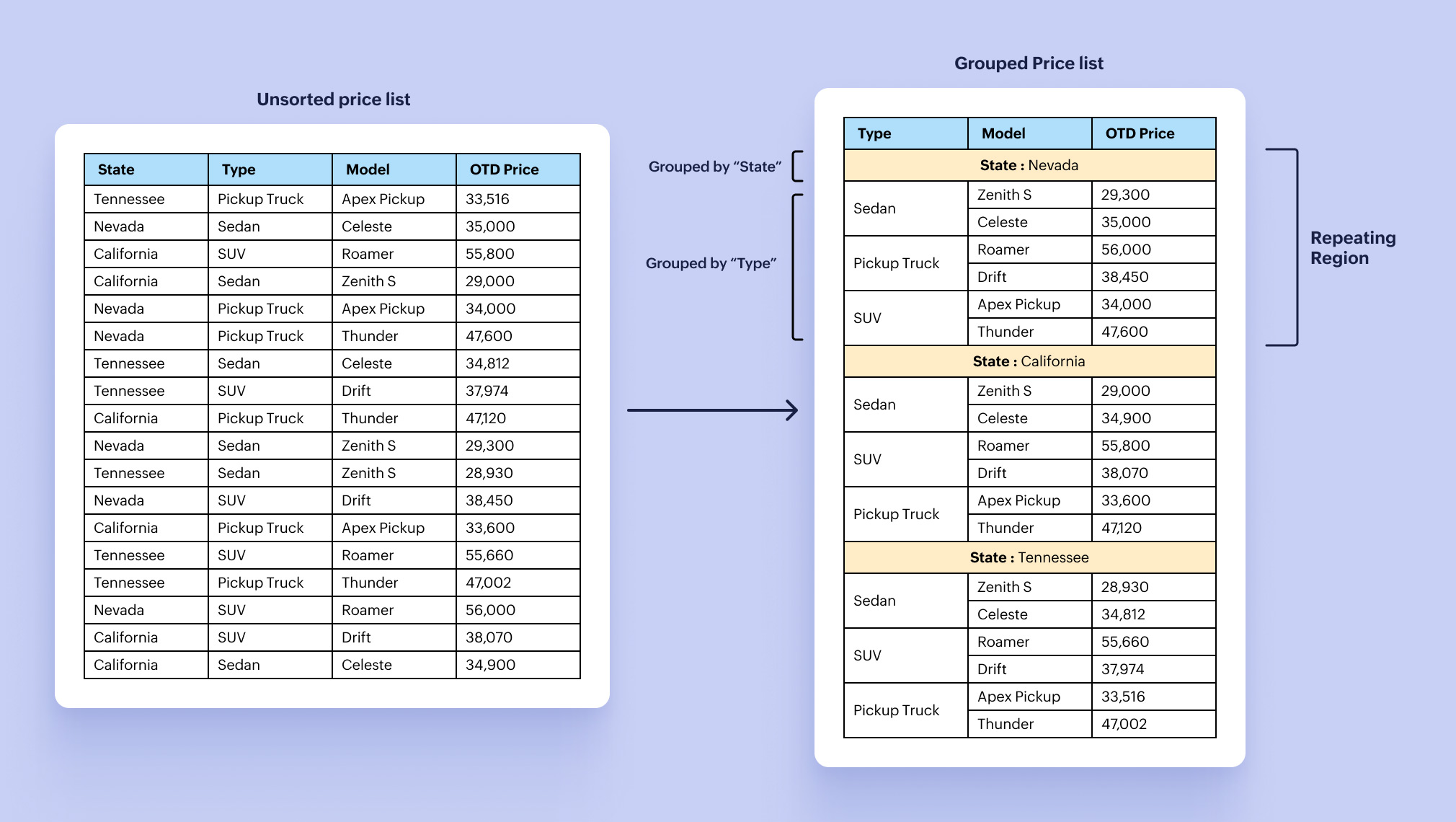


Zylker Automobiles' sales admin uses group by and repeating regions to display the price list for all car models separately for each state whenever the prices of their cars are changed.

Group by helps you to group data based on a specific field or value. With repeating regions, you can configure the layout/table/row only once and dynamically expand it based on the volume of data, instead of manually expanding it. Click here for the detailed steps to use the group by function.

Watch this video to learn how to use the group by, aggregation, and data transformation capabilities in your mail merge templates.

2. Summarize data to highlight key aspects and insights.

Business case: Generate the monthly revenue report with country-wide and region-specific revenue summaries and breakdowns.
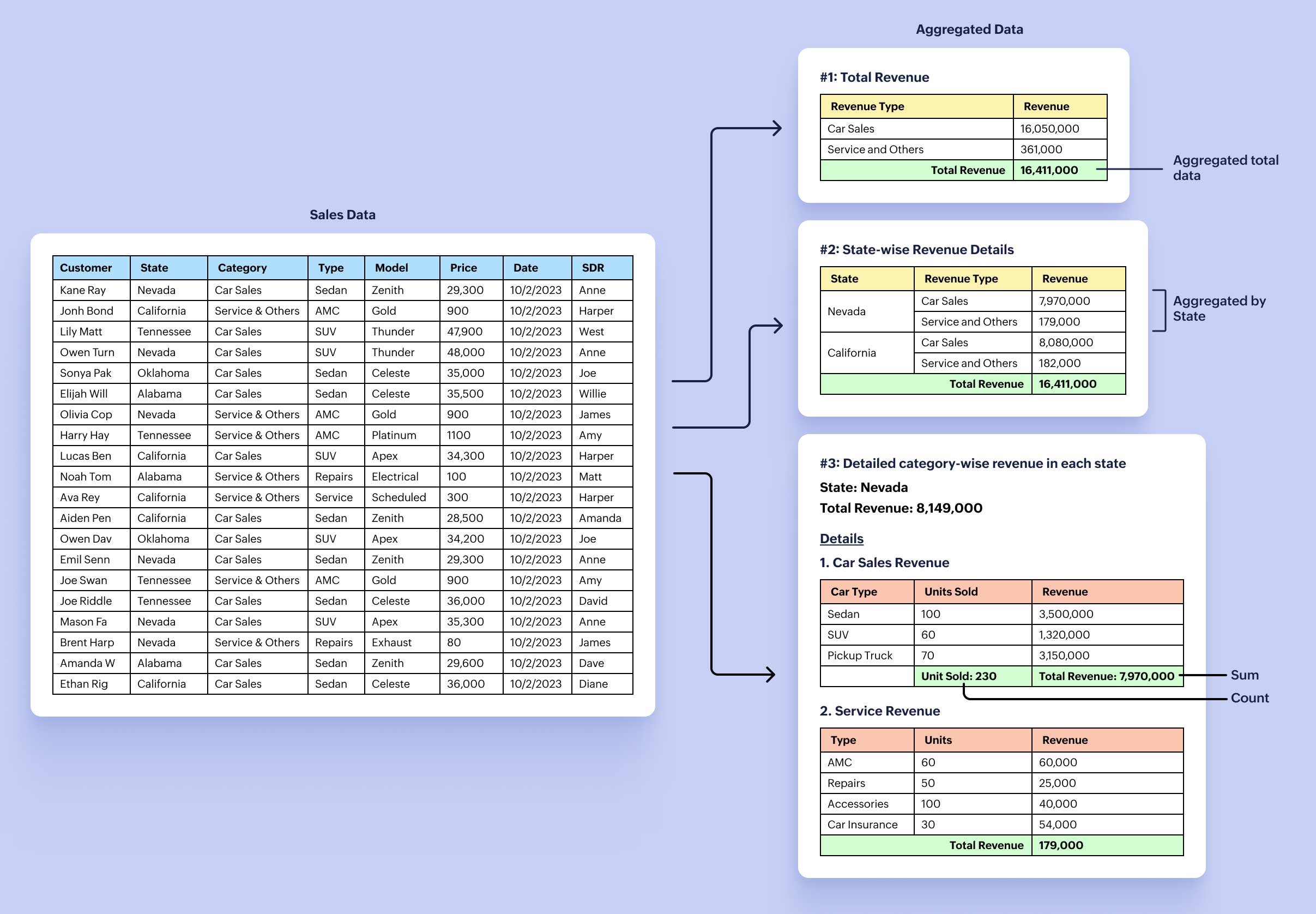

You can use the aggregation functions to summarize a large chunk of data to glean important insights like maximum, minimum, count, average, and sum.

Zylker Automobiles' sales admin combines the power of the built-in group by, aggregation, and repeating regions to highlight the:

  • Total revenue generated in a month.
  • State-wise total revenue with a breakdown of revenue from each category.
  • Granular, item-wise breakdown of revenue for each category for every state.

Click here to learn how to use the aggregation functions.

3. Transform data to create and populate sub-forms.

Business case: Generate and save the detailed revenue report of each state as a separate file in a specific folder.
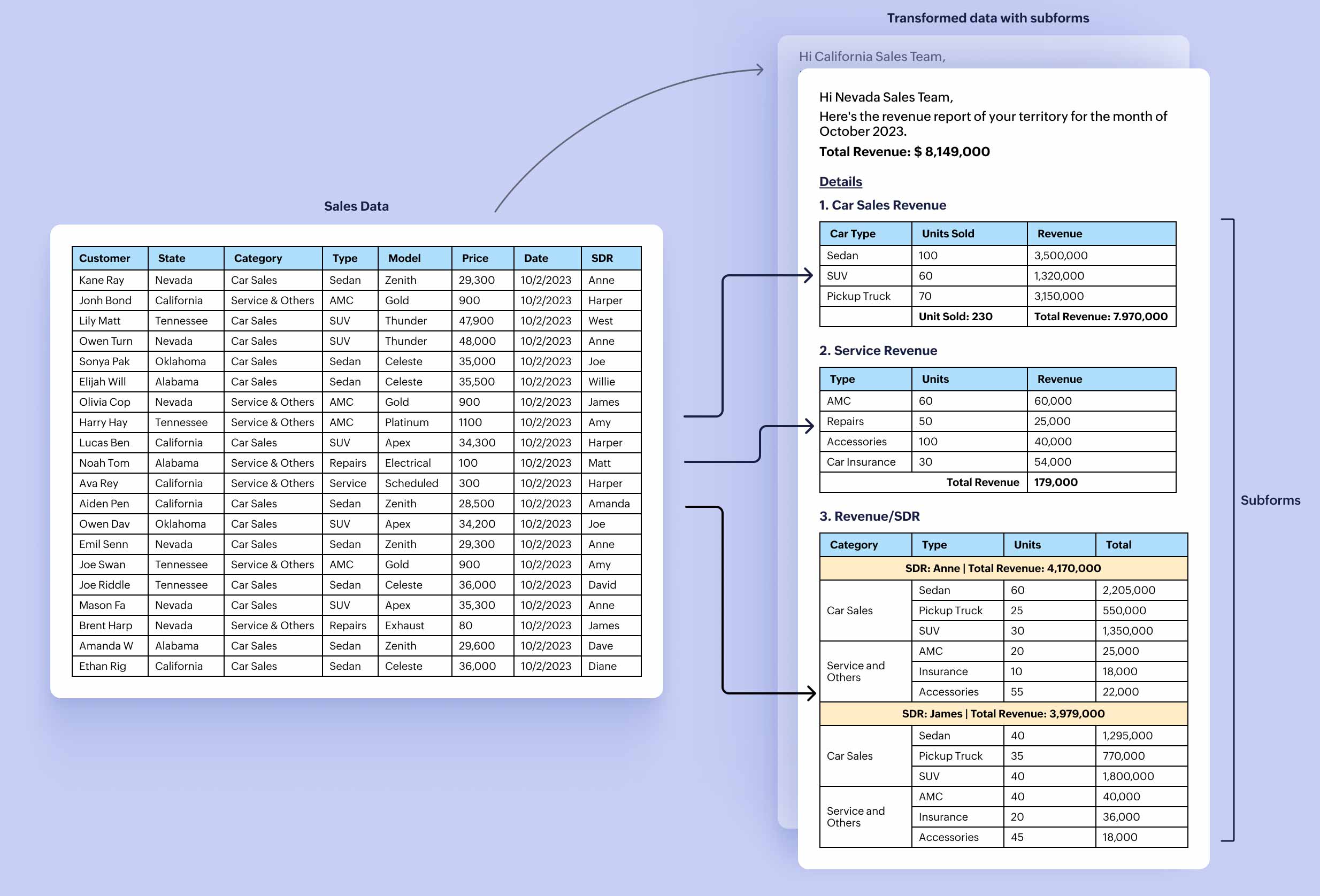


Zylker Automobiles uses data transformation to map the desired fields in the data source as main and sub-form fields. This allows them to extract and process the raw, unordered transactional data to generate the revenue report for each state separately. Click here to know how to use the Transform Data Source option.

4. Format data with the new number-formatting options.

Business case: Send an email to each SDR at the beginning of every month with their total revenue from the previous month in words, along with a summary of their performance.
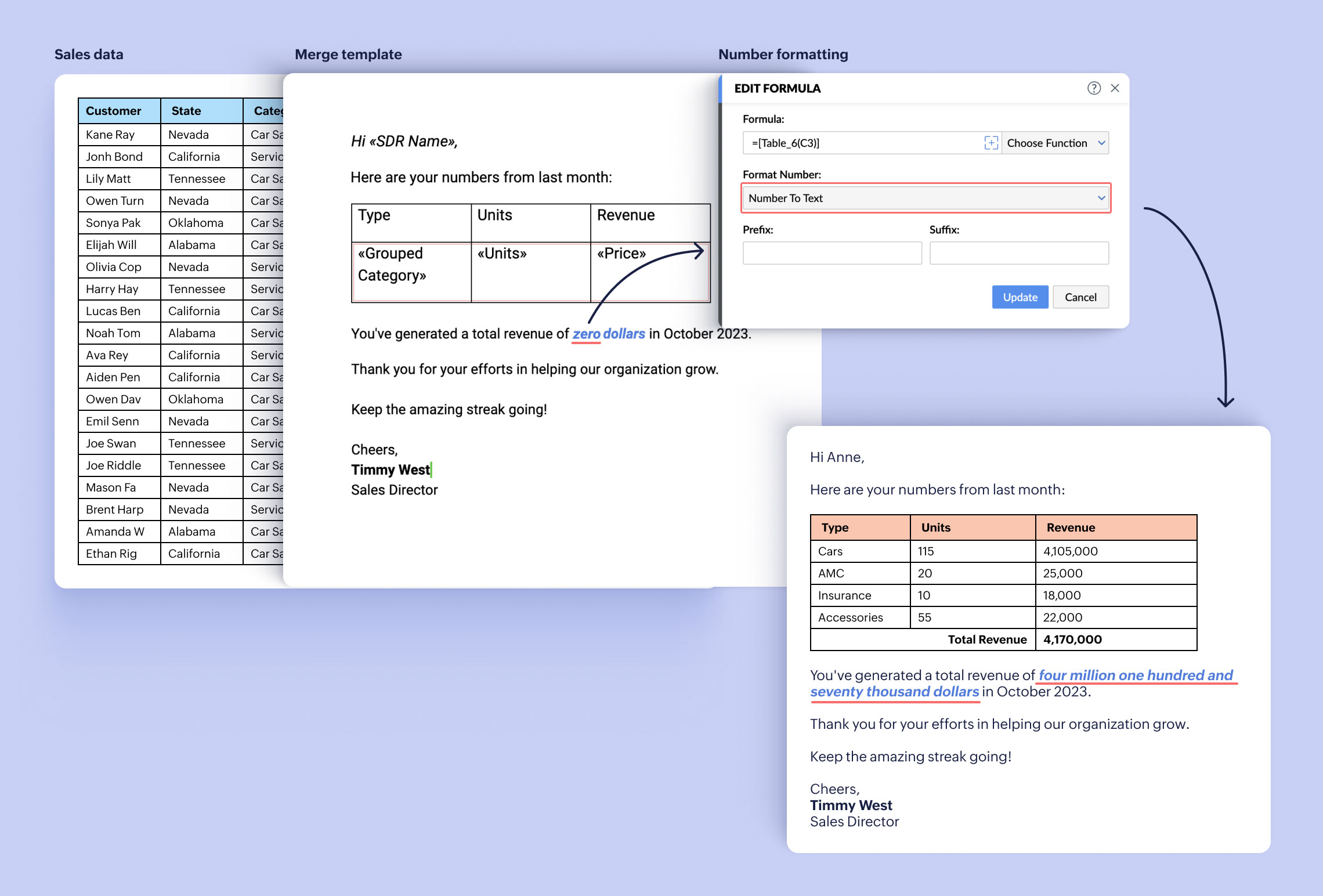


Zoho Writer has added new formatting options exclusively for numbers. With these, you can now convert a number to text, ordinal number, ordinal text, and ordinal year.

The Zylker Automobiles sales admin uses the new Number to Text formatting option to convert and display numbers as texts in email that they send to their SDR every month.

Try the group by and aggregation functions in Writer's mail merge templates, and let us know your feedback. You can also watch this video to understand how to use these features to elevate your documents.

If you need any assistance or have any questions in configuring the group by, aggregation, or data transformation operations, please write to us at support@zohowriter.com or add a comment below.

Happy merging and data visualizing!

    • Sticky Posts

    • Zoho Writer's WordPress extensions

      Hey Zoho Writer users! Say goodbye to all your WordPress content publishing woes with Zoho Writer's WordPress extensions. Publish content with all your formatting and images, republish content when you update a document, and more—from a single window
    • Easily perform calculations using dates with the new DATEDIF function

      Hey Zoho Writer users! We've enhanced Zoho Writer's formula capabilities with the new DATEDIF function. This allows you to calculate the difference between dates in days, months, and years. Function syntax: =DATEDIF(start_date, end_date, unit) Inputs:
    • Date-based conditions and filters

      Configure conditions with date  Hi everyone! We are excited to announce that you can now compare and filter data with date-based conditions. This update lets you compare date fields in a document to a reference date and display a text or value if the
    • Introducing group by, aggregation, and repeating regions in mail merge templates

      Display data exactly the way you want and highlight key insights with Zoho Writer's enhanced merge templates. We've supercharged Zoho Writer's merge templates with the capability to dynamically group, aggregate, and repeat data as blocks. You can now
    • Say hello to an improved way to merge documents!

      Automating all your documents from start to finish is now easier than ever with Writer's new merge tools.   If you haven't seen it yet, you can read the main announcement here. Here is the full list of the features we've rolled out: 1. Dynamic Table Headers
    • Recent Topics

    • Zoho Sign - Zoho CRM extension upgrade

      Hi everyone, We've updated Zoho Sign extension for Zoho CRM with significant internal changes. Impact on existing Zoho Sign extension users Users using the extension without customization If you are using the integration without implementing Zoho Sign's
    • Changing Default PDF Name

      Is it possible to change the default name of a PDF? As of right now, all of my quotes are named 'QT_$QuoteNumber' (i,e: 'QT_19803471298374) - would it be possible to change this to: '$CompanyName - $AccountName - $QuoteNumber' for instance?
    • Zoho Books blocks invoicing without VeriFactu even though it is not mandatory until 2027

      I would like to highlight a very serious issue in Zoho Books for Spain. 1. The Spanish government has postponed the mandatory start of VeriFactu to January 1st, 2027. This means that during all of 2026 businesses are NOT required to transmit invoices
    • Group by Owner/ Owner Kanban /Group by Custom Field

      Hi, We are missing the option of viewing Tasks grouped by their owner, as it is an essential function for us to manage our employees' working tasks. We find it hard to inspect what are the tasks that our employees are working on.  We are seeking an option
    • Flow using way too many tasks

      I built a flow that is using way too many tasks for what it is doing. I reached out to support a week ago but never heard back so hoping the community can help. Does a filter count as a task? I am seeing tons of records filtered with < 1 Sec Time Taken
    • Regarding the integration of Apollo.io with Zoho crm.

      I have been seeing for the last 3 months that your Apollo.io beta version is available in Zoho Flow, and this application has not gone live yet. We requested this 2 months ago, but you guys said that 'we are working on it,' and when we search on Google
    • CRM x WorkDrive: We're rolling out the WorkDrive-powered file storage experience for existing users

      Release plan: Gradual rollout to customers without file storage add-ons, in this order: 1. Standalone CRM 2. CRM Plus and Zoho One DCs: All | Editions: All Available now for: - Standalone CRM accounts in Free and Standard editions without file storage
    • Start Workflow from Deluge Script

      I have developed a customized process from our CRM that leverages a deluge script to create a statement of work document. Once the document has been created via the merge and store function, I would like the ability to start a workdrive review & approve
    • Saved Sections?

      In sites editor, the + button reveals options to add a section, element, etc. It includes Saved Sections, but I can find no way to save a section I've already created. Otherwise, is there a way to copy a section from one page to another?
    • Marketer's Space: Unable to select a sender address? Here's the fix

      Hello Marketers, Welcome back to yet another post! So you've added a sender address in Zoho Campaigns and later found that you're not able to select it while creating an email campaign. Has this ever happened to you? If so, don't worry—you're not alone.
    • Loading Project Balances in ZOHO Books for each project

      Hello, What is the best method for loading project balances actual and budget into ZOHO books to provide tracking to our project managers. We have projects and federal awards (also treated as projects) which span multiple years. We are converting from
    • Auto-Invite Users to Portals in Zoho CRM based on Conditions

      Hello Everyone, You can now automate portal invitations in Zoho CRM with the new Auto-Invite users feature in Portal management. No more manually enabling portal access one by one. With this enhancement, you can automatically send invites for users to
    • Scale up your writing style with content analysis tool in Knowledge Base

      Hello everyone, Sometimes writers may have strong knowledge about the subject but may find it challenging to articulate clearly or produce comprehensible, jargon free content. To make the process easier and to ensure consistent, high-quality articles,
    • Zoho Books "Update" Trigger for Zapier?

      Hi Zoho Team, I've been in talks with Zapier about using their services to connect my Zoho Books account to various apps, but I require an additional trigger beyond the "New" trigger. I require an "Update" trigger, which will allow me to filter and create Zaps only when certain conditions are fulfilled on the Zoho Books end before I automate a separate app. Specifically this will help me create invoices in QuickBooks Online only when payments are recorded in Zoho Books, rather than when a new invoice
    • How to prevent editing of closed tickets in Zoho Desk?

      I would like to confirm whether it is possible to completely prevent agents from editing tickets once their status is set to Closed. Is there any configuration, permission, or best practice in Zoho Desk to ensure that closed tickets remain read-only and
    • Zoho Desk Limitations

      Good day, all, I would like to know whether others share my frustration with some of Zoho's limitations. Don't get me wrong, I like Desk (and I also have a subscription for Analytics), I have been with them for close to 10 years, and unfortunately, I
    • Cliq iOS can't see shared screen

      Hello, I had this morning a video call with a colleague. She is using Cliq Desktop MacOS and wanted to share her screen with me. I'm on iPad. I noticed, while she shared her screen, I could only see her video, but not the shared screen... Does Cliq iOS is able to display shared screen, or is it somewhere else to be found ? Regards
    • Is it possible to remove filtering options?

      My CRM has a lot of custom fields that should not be used in filters or views. Fields that are automated and exist only to store temporary values that get used in functions. These create a lot of noise in the list of fields to filter. Isn't there any
    • New Mandatory One-Click Unsubscribe Link Overshadowing Custom Unsubscribe Link

      I was recently informed by Zoho CRM Support that they are now mandated by the large email service providers like Google and Yahoo to provide a one-click unsubscribe option in the header (not the body) of all mass emails. I have a custom unsubscribe link
    • how to undoreconciled transaction

      how to undo reconciled transaction
    • Can I export all attachments from Zoho CRM?

      Can I export all attachments from Zoho CRM?
    • Exciting Updates to the Kiosk Studio Feature in Zoho CRM!

      Hello Everyone, We are here again with a series of new enhancements to Kiosk Studio, designed to elevate your experience and bring even greater efficiency to your business processes. These updates build upon our ongoing commitment to making Kiosk a powerful
    • Change eMail Template for Event-Invitations

      Hello ZOHO-CRM Team How I can change the eMail Template for Event-Invitations? I work with the German Version of the Free Version. I know how I can modify eMail alerts or Signature Templates, but where I can other eMails modify you send out? Thank you for your answer. Regards, Juerg
    • Right-Click Pipeline to Open in New Tab

      Please add the ability to right-click on a pipeline to open it in a new tab
    • Service Title in Service Report Template Builder

      I am currently working on the Service Report Template Builder in Zoho FSM. I have created three separate service report templates for different workflows: Preventive Maintenance Report Requested Service Report Installation Report My issue is that I cannot
    • Zoho Sign for Zoho Projects

      Documents authorization and validation with signature is now easier in project management with Zoho Projects' Zoho Sign extension. Sign documents or send them for signatures directly from tasks and issues using Zoho Sign extension in Zoho Projects. Extension
    • Deluge Learning Series – Best Practices in Deluge | December 2025

      We’re excited to bring you the next session of the Deluge Learning Series, focused entirely on writing cleaner, faster, and more reliable Deluge code. In this edition, we’ll dive deep into the essential best practices every Deluge developer should follow
    • Associate a Contact to a Campaign using deluge?

      If I want to add one record to another related list, which zoho function do I use? zoho.updateRelatedRecord is not it I don't think.  I simply want to take a "Contact" and associate it to a "Campaign" using deluge.  Can anyone help? contactId = 5122008000000796037;
    • Add "Groups" above "Users" in the Zoho Forms Left Menu

      Hi, We have Groups but you have to go to a Form and Share or use the Directory App to manage them, please add "Groups" above "Users" in the Zoho Forms Left Menu so you can manage them in 1 place within Zoho Forms too. Thanks Dan
    • What tool is best to import PST to Zoho Mail?

      The best tool to import PST to Zoho Mail is Aryson PST Converter, as it offers direct and secure migration without data loss. Zoho Mail does not support native PST file imports, so using a professional tool is the most reliable solution. Aryson PST Converter
    • Changing field types

      Question im a Zoho CRM user and curious, if I change a flied type from single or multi line text to a URL field type will i lose the data in the field or will it be converted to website link automatically. Thanks
    • Adding Taxes to paid consultations in Zoho Bookings

      I created a 'paid' consultation under Zoho Booking and integrated it with payment gateways for online/instant payment before a booking is done. How can I add 'taxes' to the price of consultation? I can add taxes to other Zoho apps (liks Books, Checkout,
    • Zoho CRM Reports Module on Mobil App

      I have the mobile app and the reports module doesn't appear in the sidebar for some reason. I saw a Youtube video where the user had the Reports module on mobile. Is there a setting to show it on mobile? Thanks.
    • Inquiry on Help Centre Tab Customisation

      Hi Zoho team, I’m wondering if it’s possible to further customise the Help Center tabs, specifically the descriptions under Knowledge Base, Community, and Tickets. While the current setup allows customising tab names, being able to tailor the descriptions
    • Passing a form object to a function

      Suppose I have a sort_order field in multiple tables and I want to increment it by +1 onCreate of a new record. Is there a way to pass the form object as an argument into the function to keep things DRY? The following function from Zia works, but I'd
    • Can you copy and paste a page within a form?

      I have been looking at trying to copy/duplicate a whole page within a form. I can't see how I can do this without having to add all the data in again. This is very time consuming. Any help would be great.
    • SMS to customers from within Bigin

      Hi All, Is there anyone else crying out for Bigin SMS capability to send an SMS to customers directly from the Bigin interface? We have inbuilt telephony already with call recordings which works well. What's lacking is the ability to send and receive
    • Unable to sort as Descending order

      Trying to change the sort order for a lookup field (checkboxes) from Ascending to Descending and keep getting an error in Deluge that the order must be Ascending Did anyone ran into this? Thanks Eyal
    • How do I copy an email message to one or more other folders?

      I can move a message to another folder using the "move to" option but I can't figure out how to copy a message. 
    • New feature request: Allow copy of email message to another folder

      Hello Zoho team, This is a suggested new feature to allow copy an email message to either another folder or the same folder. Within the same Zoho account. This is not a support request about "label". This is a suggested new feature to allow copies of
    • Next Page