Introducing spam detection for webforms: An additional layer of protection to keep your Zoho CRM clean and secure

Introducing spam detection for webforms: An additional layer of protection to keep your Zoho CRM clean and secure

Greetings all,

One of the most highly anticipated feature launches—Spam Detection in webforms—has finally arrived!

Webforms are a vital tool for record generation, but they're also vulnerable to submissions from unauthenticated or malicious sources, which can lead to the collection of spam records that clutter CRM systems and reduce data quality. 

Zoho CRM's new spam detection capability provides an additional security layer and minimizes dependencies on the basic options such as captchas and double opt-ins, ultimately improving data quality of webform submissions. Users no longer have to check potential spam records from webforms manually.

Let's dive into how Spam Detection restricts suspected spam records from webforms and helps users keep their CRM clean and organized.

What does spam detection do?

Spam detection offers the following advantages:
  1. Simplifies the manual review of potential spam in webform submissions.
  2. Detects potential spam submissions by identifying invalid or suspicious email addresses and scoring them to indicate spam probability.
  3. Holds these possible spam records for manual approval from users.
  4. Automatically blocks spam records to keep them out of the CRM account.

What happens to webform submissions?

All webform submissions are evaluated against predefined criteria and screened for spam detection. Let's say you've received several webform submissions for the Leads module from your website visitors.

Clean, non-suspicious records that originate from verified IP addresses—and are therefore deemed likely to be genuine and valid—are fed into the Leads module (unless approval has been set for all webform submissions).

In contrast, suspicious submissions are flagged as potentially spam and held back for manual approval in the usual record approval page called, Awaiting Leads (previously known as Approve Leads). These records are assigned a Spam Possibility Score based on the identified suspicious factors. 

The new Record Source column provides details related to the submission's source—for example, the submission's IP address, the webform name, and the URL—when you hover over the info icon. 

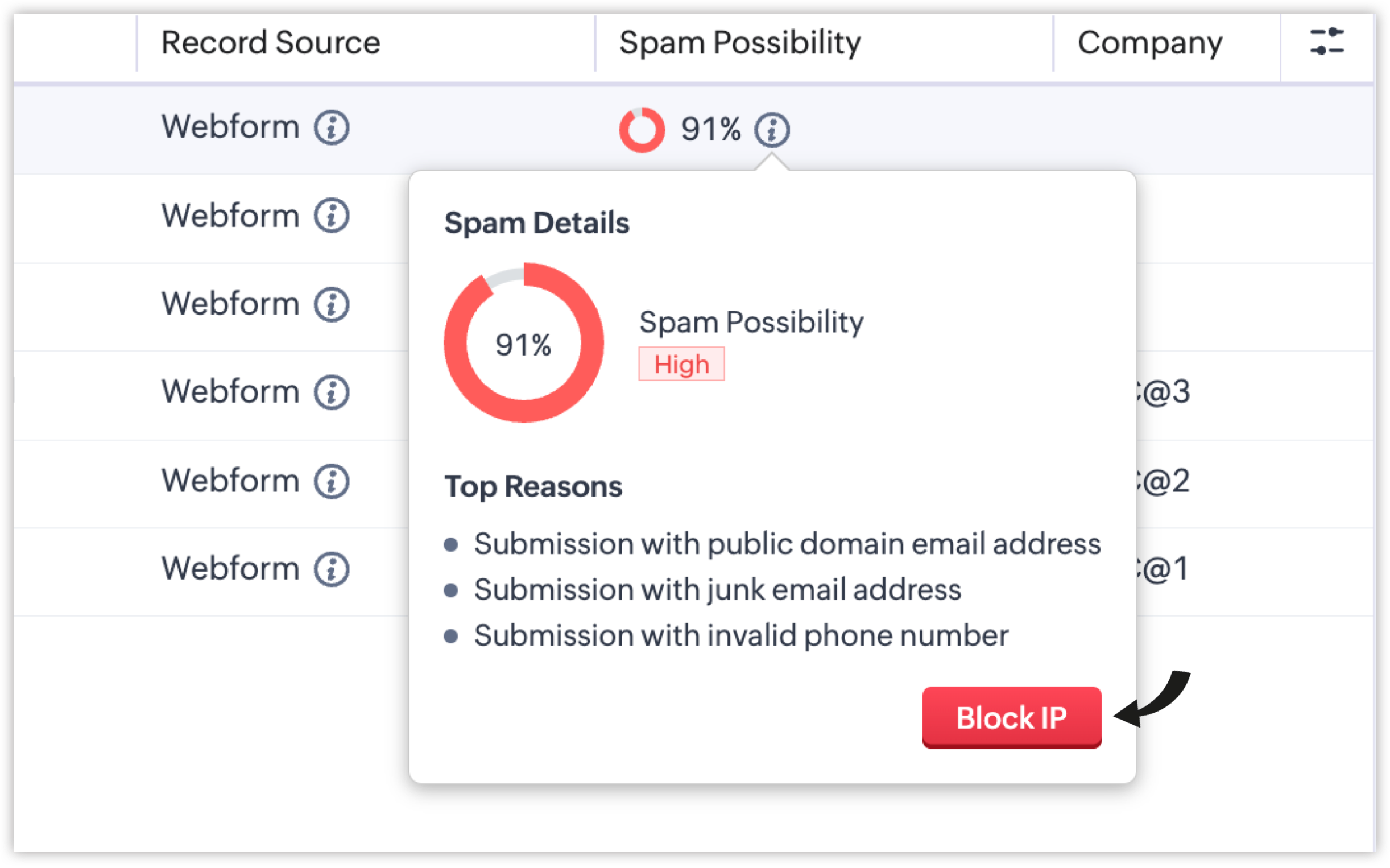
The new Spam Possibility column indicates the spam probability for each record as a percentage. You can also view the top reasons behind the scores of the spam record by hovering over the info icon beside it. 
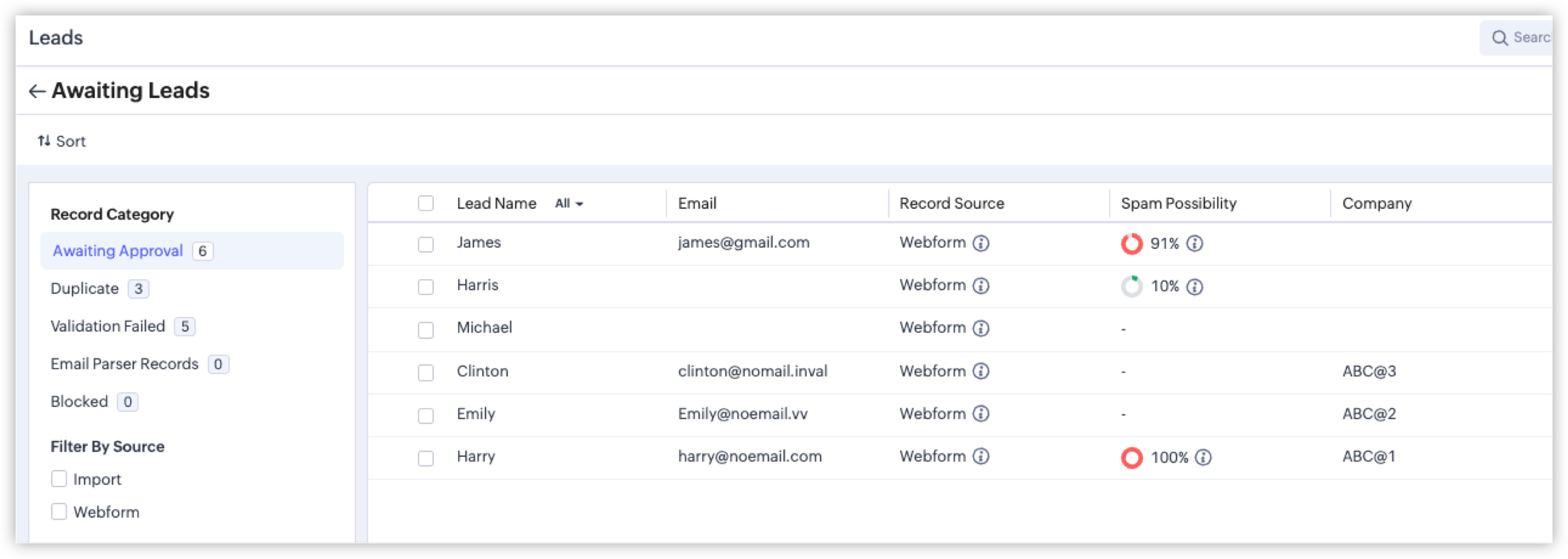

Each reason identified contributes to the score, and the sum is calculated to determine the final Spam Possibility Score for the record. Some of the reasons are listed below:
  1. Submission from bots/crawlers: If a bot or crawler fills and makes a submission via your hosted webform, the Spam Detection layer will automatically identify this malicious submission.
  2. Submission with invalid phone numbers: If a form respondent shares an incorrect phone number, a toll-free number, or a junk contact number, it will be flagged as an invalid phone number.
  3. Submission with invalid email addresses: If the submitted email address originates from a spam source, an unauthorized domain, or a temporary mailbox, it will be flagged as an invalid email address.
We're also introducing an advanced security layer: Honeypot Field, which is a cybersecurity mechanism that identifies bots by detecting submissions made to invisible form fields that genuine users don't interact with. If the submission comes with values filled in the hidden fields, the system flags the entry as likely being a spam submission.

Spam Detection has more parameters like these to detect spam submissions and assign appropriate scores. For quick probability recognition, the following colors represent the severity of spam possibilities:
  1. Green: 1% - 20%
  2. Orange: 21% - 70% 
  3. Red: 71% - 100%

How spam detection helps handle records awaiting approval

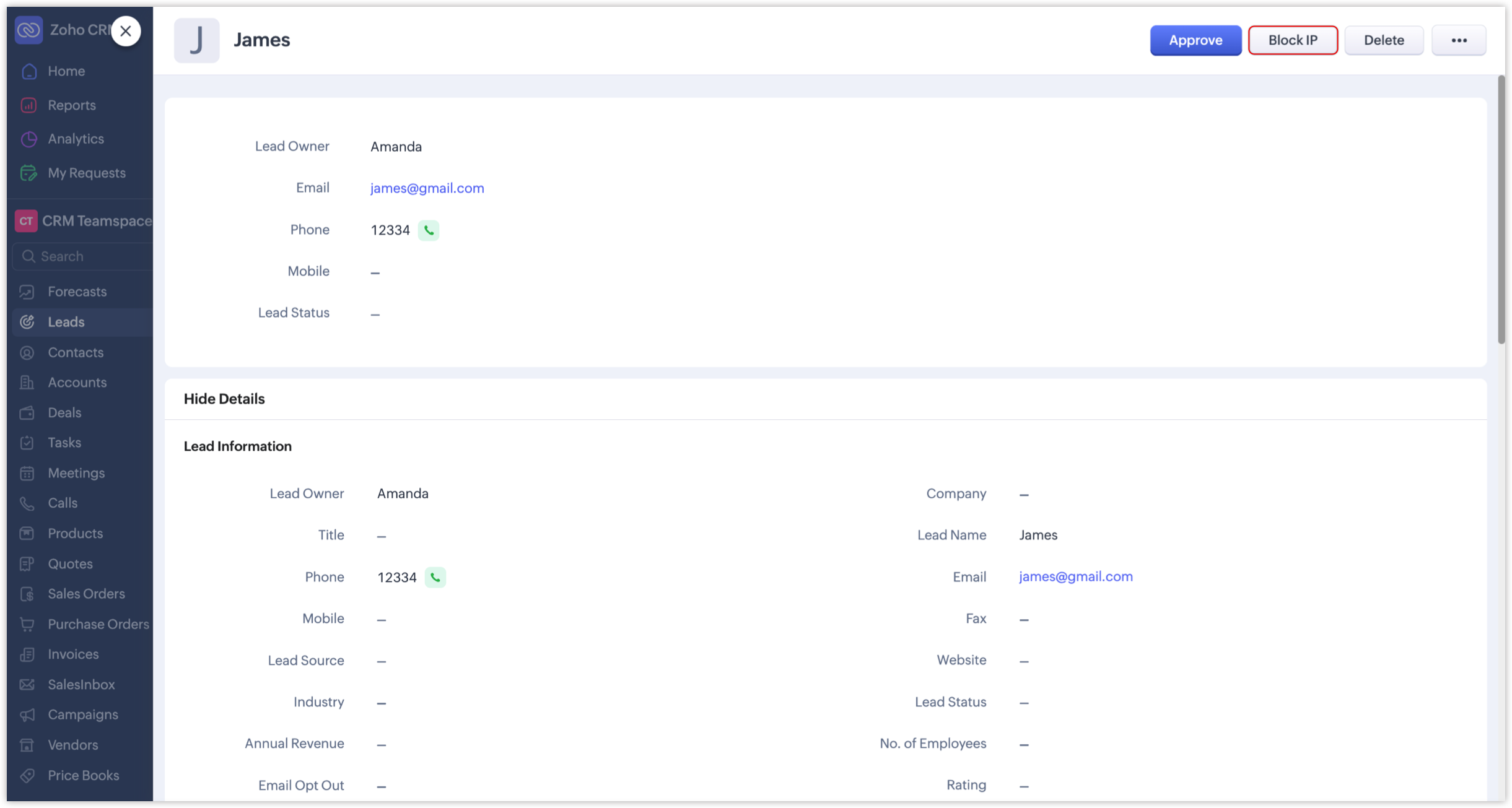
Previously, records that awaited approval were evaluated manually and then approved, merged, resolved, or deleted accordingly. In addition to these traditional actions, and with the introduction of Spam Detection, administrators can now optionally block IP addresses of records with high spam possibility scores if they want to restrict further submissions from them.

  1. The Block IP button is available, along with the other buttons like Merge, Approve, or Resolve.
  1. Admins can also directly block an IP by using the Block IP button available when hovering over the info icon.
Record submissions from such blocked IPs will be categorized under the new Blocked record category.
Additionally, Zoho's system internally maintains a set of blacklisted IPs based on security assessments. Records submitted from those IPs will be automatically and permanently blocked by the CRM.
Notes
Note: Records under the Blocked category will be deleted in 60 days.

How to enable Spam Detection for your webforms

While setting up a webform, you'll see the Spam Detection section where you can adjust the Spam Possibility Score slider to set the threshold at which records should be flagged for manual review.

A score range of 90% to 100% will be set by default for all webforms as the tolerance level, which the webform owner can change anytime based on their preferences.

NotesNote: Records whose spam possibility scores fall within the set range will be held for approval, along with the relevant percentages and reasons. If, say, the chosen range is 80 to 100%, only those records with spam possibility percentages between 80 and 100 will be listed. Submissions with lower percentages will not be held as spam.

We've revamped the record approval page to provide a better UI experience and make it easier to manage and review spam records. Let's look at the changes in detail.

Revamped record approval page

  1. In modules like Leads, the "Approve Leads" field under Actions has been renamed to "Awaiting Leads". This change extends to other modules as well.
  2. The approval page has been redesigned to make it easier to switch between categories and review all records. This enhancement applies to all webform-supported modules and team modules.
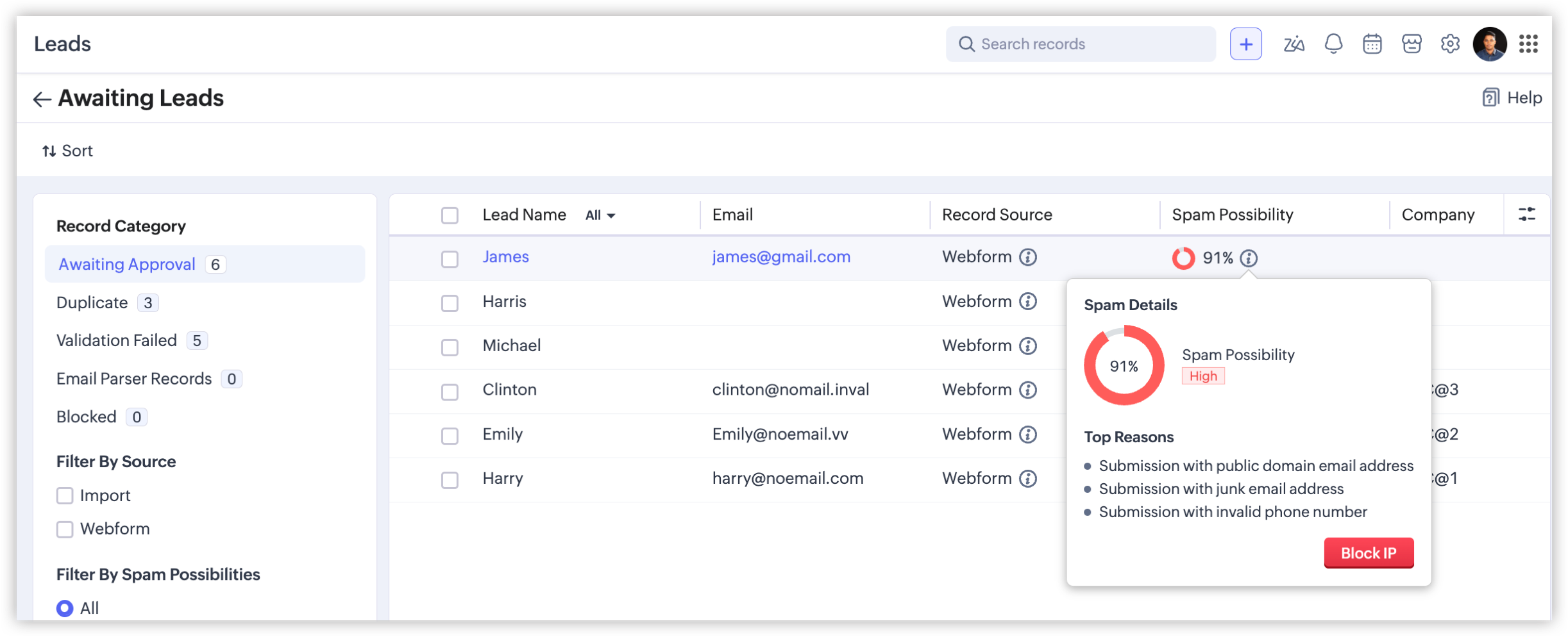
  3. The number of records in each category displayed prevents users from overlooking records that are awaiting approval.
  4. You can also filter these records using the new filters in the left panel on the Awaiting Leads page.
    1. Filter By Source: Filters records based on the source—webform or import.
    2. Filter By Spam Possibilities: Choosing the Webform option will enable this filter to list records based on the spam possibilities.
    3. Filter By Fields: Lists records based on these fields: Created Time and Record Owner.
    4. Filter By IP - Webform: Filters blocked possible spam entries based on whether a given record is blocked manually by a user or automatically by the system. This filter is available only under the Blocked category.
That concludes everything about spam detection in webforms. Feel free to share your thoughts and suggestions in the comments.

Info
Availability 

Editions: All paid editions, including the developer edition (except for the paid trial edition)
DC: All DCs
Release Plan: We've released this feature for partners across all DCs, and for customers up to the Professional edition across all DCs. We'll roll it out to higher editions in a few more days. [Updated on July 9, 2026]

Regards,
Fiona

    • Recent Topics

    • CRM wants to access other apps and services on this device (Documents area)

      Did anyone else see this today? It only seemed to popup in the Documents area. Blocking it did not stop the ability to upload files there... Why is this coming up and what apps/services is it requesting in the background? Also, is it applicable elsewhere
    • Custom module - change from autonumber to name

      I fear I know the answer to this already, but thought I'd ask the question. I created a custom module and instead of having a name as being the primary field, I changed it to an auto-number. I didn't realise that all searches would only show this reference.
    • How can I populate dropdown data with information from another source or app?

      I want to maintain a list of items in another app (say in excel or another database) and sync those as items in a drop down menu, instead of copy pasting to import. Is this kind of a feature available?
    • Dynamic Field Folders in OneDrive

      Hi, With the 2 options today we have either a Dynamic Parent Folder and lots of attachments all in that one folder with only the ability to set the file name (Which is also not incremented so if I upload 5 photos to one field they are all named the same
    • Zoho Tables is now available in Zoho One!

      Hello Zoho One users, We’re excited to announce that Zoho Tables is now included as a part of Zoho One suite! As teams grow, managing projects, approvals, inventories, campaign trackers, and operational workflows across multiple spreadsheets become difficult.
    • Getting there -thanks

      So we are still testing thanks to the great Zoho team for firstly getting pricelists working (essential) and writing some code to hide delivery and pickup options. Brilliant. So price lists are a definite mainly because of VAT. We run our Zoho books with
    • I want to prefill CRM Account information using the GSTIN of the Customer

      Currently i need to add account details manually in zoho crm and when it syncs in zoho books manual working needs to be done. Whereas in zoho books i can prefill the customer details using the GSTIN which is great feature. Can the same be enabled for
    • #3 Making it look like my business

      Day 3: Meera had created her first invoice. The numbers were right, but something still felt unfinished. Her studio name was there, but the address did not look the way she wanted. Her logo was missing, and the invoice did not really feel like it came
    • Using IMAP configuration for shared email inboxes

      Our customer service team utilizes shared email boxes to allow multiple people to view and handle incoming customer requests. For example, the customer sends an email to info@xxxx.com and multiple people can view it and handle the request. How can I configure
    • Scan & Fill with double quote key/value pairs

      Hi, An old Ticket moved to a Topic/Idea: I love the idea of the new Scan & Fill as it nearly covers my previous request for a QR Scanner to read a multi-part QR Code. My QR Codes are hard-coded as below: {"key1":"value1","key2":"value2","key3":"value3"}
    • Increase the "Maximum Saved Entries per User" Options Limit

      Hi, You can create lots of saved entries, yet the Limit when you apply one is 25, we may often expect 32 to be in draft, and therefore want to enforce that, can we increase the limit of this field from 25 to 100 (As you can just turn it off and have more
    • HEIC File Type Viewer

      Hi, It would be nice to be able to click on the images in the All Entries/Reports Tables which are HEIC the same as JPG, PNG, etc. so they open in a viewer from Zoho or the Attachment Service, today HEIC requires you to download each image and open it
    • Map Dependency Upgrades in Zoho CRM

      Map Dependency Fields enhancements are now available across all DCs. Hello everyone, We’ve introduced a set of enhancements to Map Dependency Fields to make setup simpler, faster, and more intuitive. Map Dependency helps control how values appear across
    • Zoho Forms Submission URL

      Hi Zoho, It would be great to have a URL which can take us to specific form entries. For example: https://forms.zoho.eu/ACCOUNTNAME/report/FORMNAME/records/UNIQUE-REF I currently have a use case where I want to use Zoho Flow to create a module entry in
    • Optional Parameter in Deluge Sendmail function to link email to record

      I love sendmail - it offers flexibility (and, with standalone functions, commonality with minimal maintenance) over the years the templates hadn't offered. I understand the templates have come a long way, but I still prefer sendmail most days. That said...
    • Zoho CRM Functions: Redesigned Interface, Rich Analytics, and Multi-Language Support

      Hello everyone! We have given Functions in Zoho CRM a major overhaul with a new interface that makes it easier to build, organize, monitor, and troubleshoot your functions throughout their lifecycle. As part of this revamp, we have also introduced a unified
    • 📣 And the Bigin Customer Award winners are...

      50+ entries. Customers from across the globe. So many great Bigin stories. And now, it's time to celebrate the people who stood out. We launched the Bigin Customer Awards to see how businesses are using Bigin in their own unique ways, and you did not
    • Report Configuration - Unable to select "File_Upload" under Supporting Document

      Good day everyone. I encounter this issue whereby i have difficulty to select "File_Upload" under Supporting Document when i configuring my report. Ps: I have create Supporting Document in Zoho creator form as subform and the add this "File Upload" inside
    • Zoho CRM Multi-select values not translated

      Hello! I have some issue with translate custom multi-select fields in zoho CRM in other language. I download export file, but it has all my custom fields and picklist values exept multi-select fields picklist values.  Please, help me to undestand, is
    • Go Multilingual with Instant Bot Auto-Translation

      Imagine you run a travel company with customers across different regions. Your website chatbot helps visitors discover travel packages, answers questions, and makes bookings. As your business expands into new markets, you want to offer the same experience
    • Create Flexible Layouts with Layout Rules

      In a project, when a work moves from planning to execution, the information teams need can change at every stage. A project can need one set of details, a phase can need another, and a custom process may require an entirely different set of information.
    • Zoho Sites after login page blank

      after i login to zoho sites, it stalls at a blank screen please help
    • Map My Client Locations for Zoho CRM Extension: Turn CRM Addresses Into Action

      Hello everyone, Your CRM knows who your customers are. Now, see where they are on the interactive map directly from Zoho CRM. Introducing Map My Client Locations for Zoho CRM, an extension built for businesses that rely on sales visits, field service,
    • Find the conversions hiding outside your funnel: User Journeys is now live in PageSense

      Hello Everyone, We are excited to announce that User Journeys is now live in Zoho PageSense. Here is what that means for you. Funnels are great for one thing. They tell you how the path you designed is performing. Homepage to product to cart to checkout,
    • Zoho CRM Error message #2 : Fixing [Invalid Credentials] and [Authentication Fail] while configuring IMAP

      Hi Everyone! As a part of our Zoho CRM Error messages series, we're going to focus on couple of error messages that you might encounter while configuring IMAP and ways to resolve them. These are: [Invalid Credentials] [Authentication Fail] The annoying
    • Zoho Community Digest - August 2026 | Part 4

      Hi everyone, and welcome back! We're closing out August with a strong final week, from Incentives for Zoho CRM bringing commission management inside the platform to Sequences in Bigin automating customer follow-ups end to end. There's also an IP allowlist
    • Related Lists: Consolidate cross-module data

      A new and efficient way to connect your project data across the boundaries of modules, entities, and applications. Introducing related lists to incorporate related records from any module, entity, or external source directly into the detail view of a
    • Zoho Workshops in Frankfurt a.M. | 07. & 08. Oktober 2026 | Nur noch 1 Monat

      Liebe deutschsprachige Zoho Community, Nur noch einen Monat bis zu den Zoho Workshops in Frankfurt! Am 7. und 8. Oktober ist es soweit: Die Zoho Workshops kehren zurück und finden dieses Mal im Radisson Blu Hotel, Frankfurt am Main, statt. Wenn Sie Ihre
    • Need to set workflow or journey wait time (time delay) in minutes, not hours

      Minimum wait time for both Campaigns workflows and Marketing Automation journeys is one hour. I need one or the other to be set to several minutes (fraction of the hour). I tried to solve this by entering a fraction but the wait time data type is an integer
    • Zoho Assist Remote Desktop on Android grey screen

      With Zoho Assist Remote Desktop for Android when I connect to an unattended device I see only a Grey Screen. It worked fine before. This is a recently issue. I tried to clean data and cache, reinstall app, try and old version... but nothing. Always grey
    • Integration Multiple WooCommerce Stores

      Currently, Zoho Marketing Automation supports connecting only one WooCommerce store per account. For businesses managing multiple brands or stores, this creates operational challenges, as they are forced to maintain separate accounts for each store. Suggested
    • Introducing Smart Fields in Zoho Forms

      Hello form builders! We are excited to introduce Smart Fields in Zoho Forms - a faster way to add calculations to your forms without writing formulas. Instead of creating multiple fields and configuring complex calculations yourself, you can now drag
    • Feature Request: Add Sort by Cell Color and Text Color functionality

      Hello Zoho Sheet Development Team, I am writing to suggest a feature enhancement for Zoho Sheet. Currently, the platform supports "Filter by Color," which is incredibly useful. However, there is no native option to "Sort by Color" (by cell fill or text
    • MCP for Zoho Sign is not working

      I'm using the mcp builder at mcp.zoho.com and selected Zoho Sign. I have created it 4 different times but my other mcp servers are working. However, mcp for zoho sign WILL NOT WORK. It throws a 400 error. I've checked everything. I tried with both Grok
    • Automating CRM backup storage?

      Hi there, We've recently set up automatic backups for our Zoho CRM account. We were hoping that the backup functionality would not require any manual work on our end, but it seems that we are always required to download the backups ourselves, store them,
    • Android screen dissapeared

      While running assist on an android tablet, screen poofs out of existence, have to restart sharing.
    • Kaizen #229: Email-Deal Associations in Zoho CRM

      Hi All, Welcome back to another week of Kaizen! Emails are a core channel for customer communication in any CRM system. In Zoho CRM, emails can be associated with records across multiple modules. In this post, we will focus on email associations with
    • Cross-application Deluge calls fail when application link name starts with a number

      I encountered an issue when calling a custom function in another Zoho Creator application within the same account. The target application’s URL/application link name began with a number, similar to: 27_example_application The following cross-application
    • Bank charges

      Hello, team zoho I have a difficulty, in the form to register the payment of the customer has a field "bank charges" more when registering an expense or payment to the supplier that field does not appear. And I think that's a mistake because in my account
    • Bank Feeds - Multiple Orgs / Multiple LLCs

      Hi, We are migrating our books over from another service, and trying to connect our bank feeds. We have 3 separate LLCs, and 3 separate orgs in Zoho Books. We want to connect the bank feeds for each entity to each org. However, when we connect the 2nd
    • Next Page