Create static subforms in Zoho CRM: streamline data entry with pre-defined values

Create static subforms in Zoho CRM: streamline data entry with pre-defined values

Alert
Last modified on (9 July, 2025):
  • This feature was available in early access and is currently being rolled out to customers in phases. 
  • Currently available for users in the the AU, CA, and SA DCs.
  • It will be enabled for the remaining DCs in the next couple of weeks.

Info
Update (26th September 2025):
This feature is now enabled for all the users in the US DC.

Hello everyone,

Traditionally, Zoho CRM's subform capabilities have enabled users to dynamically add, edit, and manage additional data linked to their main records. However, until now, all subform fields were subject to data entry or updates, both on the record's page and through the API.

What's new?

We're excited to introduce the static subform option, designed to offer a more controlled and consistent approach to data entry in Zoho CRM. Administrators can now pre-define certain fields and the exact number of rows in a subform.

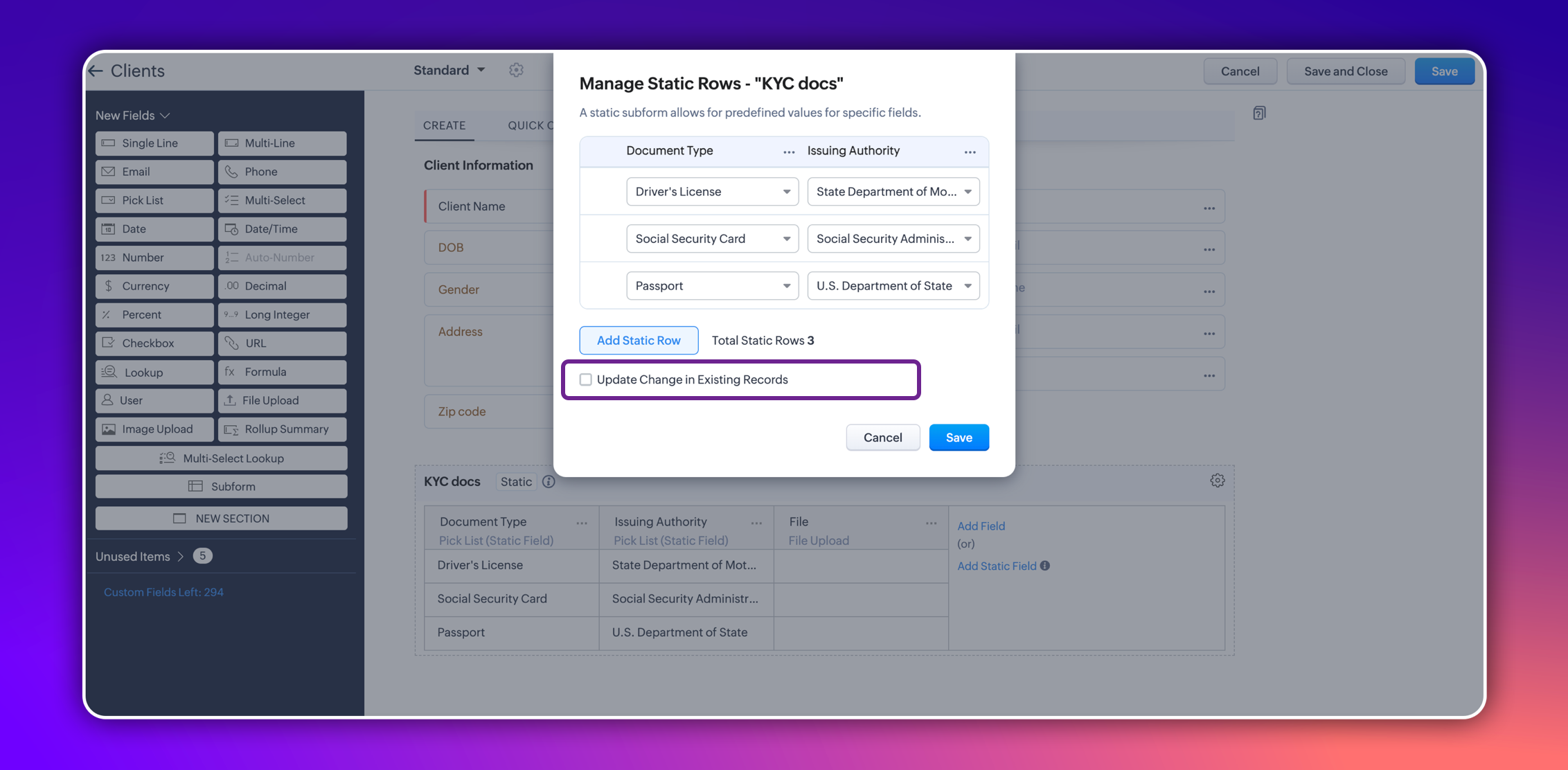
In certain scenarios, a subform should maintain a fixed number of rows with fixed values across all records. For example, a subform could be set up to include specific columns consistently, such as "Document Type" and "Issuing Authority." The rows for these columns could remain constant and feature values like "Driver's License," "Social Security Card," and "Passport" for "Document Type," and "State Department of Motor Vehicles," "Social Security Administration," and "U.S. Department of State" for "Issuing Authority." Unlike a standard subform, where users can dynamically add or remove rows, a static subform ensures these rows are consistent across all records.


This ensures consistency and eliminates the need for users to manually enter or maintain these rows in each record, thereby saving time.

How does static subform address this need?

Static subforms enable administrators to define specific fields and a fixed number of rows within a subform.

For example, consider the aforementioned use case of a client's details in KYC records, which might always consist of documents like a driver's license, passport, and social security card. Other fields within the subform may vary, which allows for customization as needed when creating or editing records.


Consider job applications, for example. With static subforms, HR departments can standardize the collection of essential documents such as resumes/CVs, educational certificates, and proofs of residence. This ensures that every applicant's profile is complete and consistent, making the data management process more efficient and reliable.


This approach not only streamlines the application process but also ensures companies receive thorough and consistent candidate profiles.

Key highlights
  • Administrators can easily set up a static subforms by configuring rows with static values.
  • Admins have the option to automatically update all existing record entries with static values while mapping the static values in the configuration pop-up.


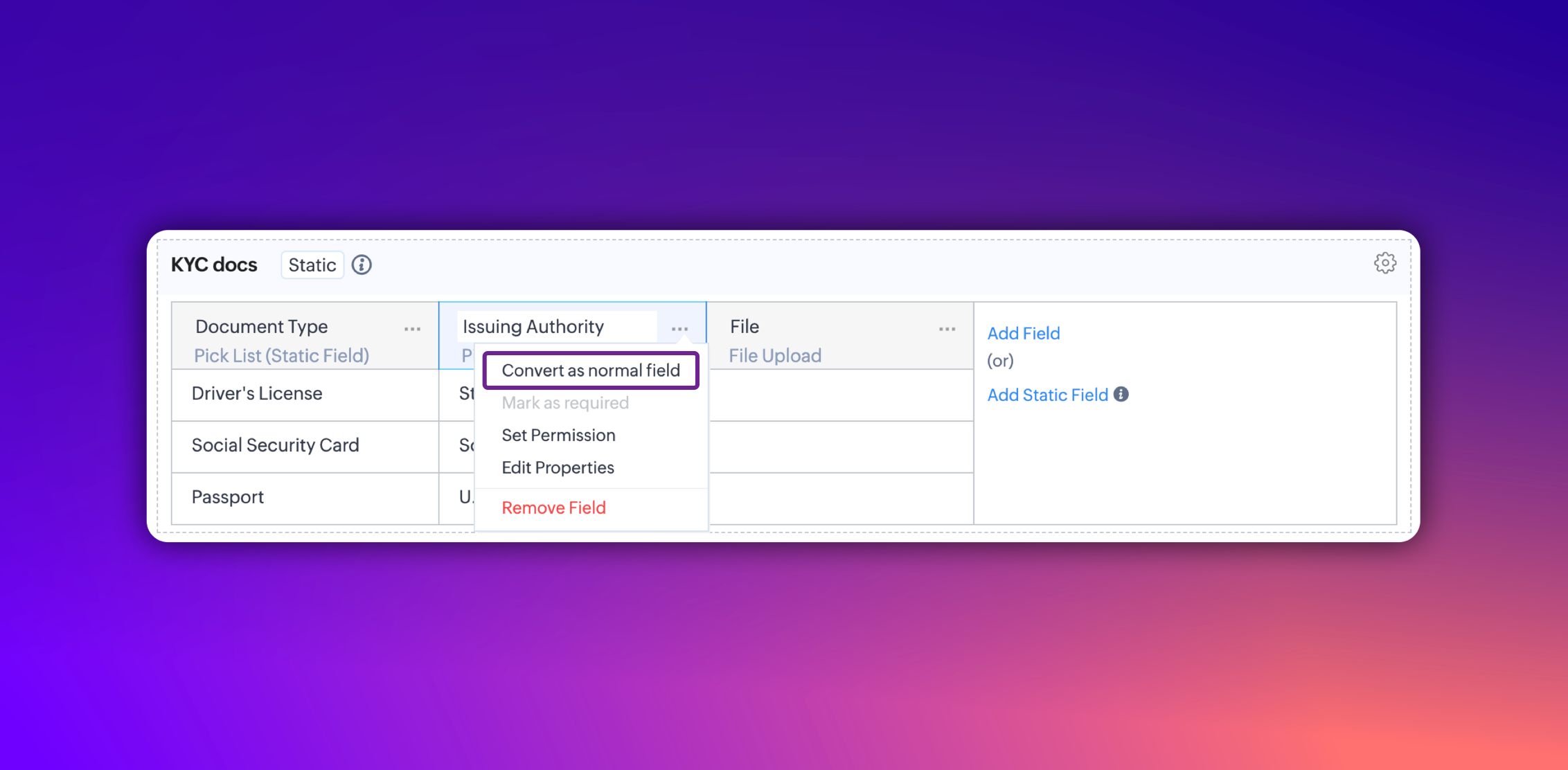
  • Additionally, you can convert a static subform field into a normal field at any point. However, it's not possible to convert a normal subform into static subform.

Notes
Notes:
  • These fields are static across all the layouts in a module and synced across all associated records.
  • Changes will be applied to all existing records only if the admin checks the option to update existing records in the static value mapping pop-up.
  • Transforming regular subform fields into static fields is not possible.
  • Once a subform is designated as static, its type cannot be changed.
  • Static subform feature is currently available only in web. They're unavailable on mobile devices and for API versions below 5.1.

Thanks,
Nizamuddin

    • Recent Topics

    • Automation#31: Automate Splitting Names for New Contact Records

      Hello Everyone, This week, we present to you a custom function, which allows you to split the first and last names from the user's email ID based on the separator used in the ID. Having grown into a large firm, Zylker Techfix aims to optimize its processes,
    • The same Contact associated to multiple Companies - Deals

      Hi, I would like to know if there is an option to associate the same contact with multiple companies (two or more) deals, using the same contact details for all. This is because we have contacts who are linked to different companies or branches of the
    • local file csv import problem

      The issue occurs when I upload a CSV file via Databridge. In the preview, everything looks correct — the values are in the proper columns. However, after clicking Import, the first column becomes empty, and the values from that column appear in a new
    • Kaizen #227 : Client Script Support for List Page (Canvas)

      Hello everyone! Welcome to another week of Kaizen. In today's post lets see how Client Script can be used in Canvas List Page to mask sensitive information from specific roles and add colors to Canvas List Page records based on custom criteria.This use
    • Implement Date-Time-Based Triggers in Zoho Desk

      Dear Zoho Desk Support Team, We are writing to request a new feature that would allow for the creation of workflows triggered by specific date-time conditions. Currently, Zoho Desk does not provide native support for date-time-based triggers, limiting
    • Automation#25: Move Tickets to Unassigned When the Owner Is Offline

      Hello Everyone, Welcome to this week's Community Series! 'Tis the holiday season—a time when work often takes a brief pause. The holiday spirit is in full swing at Zylker Techfix too, with employees taking some well-deserved time off. During this period,
    • Analytics <-> Invoice Connection DELETED by Zoho

      Hi All, I am reaching out today because of a big issue we have at the moment with Zoho Analytics and Zoho Invoice. Our organization relies on Zoho Analytics for most of our reporting (operationnal teams). A few days ago we observed a sync issue with the
    • Automation#27: Retain Ticket Owner on Moved Tickets

      Hello Everyone! This week, we present to you a custom function that retains the ticket owner when a ticket is moved from one department to another. Here’s more to help you understand the custom function: At Zylker Techfix, Alex, the Support Engineer manages
    • Automation#28 Notify Agents on Article Expiry

      Hello Everyone! This week, we’re bringing you a feature that notifies your team when articles in the Knowledge Base are set to expire to keep your content relevant and helpful for customers. The Zoho Desk's Knowledge Base is an asset for customers to
    • Automation#29 Retain ticket status on moved tickets

      Hello Everyone, Hear out Zylker Techfix’s Success Story on Smoother Ticket Transitions! Zylker Techfix, a gadget servicing firm committed to quick repairs and timely deliveries, faced a challenge when ticket statuses changed automatically while moving
    • encountering an error when attempting to associate an email with a Deal using the Zoho CRM extension in Zoho Mail.

      When I click "Yes, associate," the system displays an "Oops!! Something went wrong" error message. I have attached a screenshot of the issue for reference.
    • Automation#32:Auto Add New Portal Users to the Help Center User Groups

      Hello Everyone, Introducing a custom function that automates the process of adding new portal users to Help Center user groups, making user management effortless! By default, Zoho Desk allows you to assign new portal users to groups manually. But with
    • Using email "importance" as workflow-criteria

      I'd like to set up a workflow that triggers if an incoming email has been flagged as "high importance" but I'm not seeing any way to do that. Hopefully I'm just missing something obvious...?
    • Automation#34 : Automate Email threading for Ticket notification

      Hello Everyone, It's been a while since we've presented an automation. However, our community has been buzzing with ideas, use cases, and discussions with our community experts and Ask the Experts session. So, here we are again, presenting an automation
    • Automation#35 : Auto-Add Comments under the Owner's Name in Tickets via Macros

      Hello Everyone, This week's custom function provides simple steps to configure a Macro for adding comments to tickets with the name of the Comment owner. When managing tickets, you can use the Comment feature to communicate internally with your team and
    • Automation#36: Auto-create time-entry after performing the Blueprint transition

      Hello Everyone, This week’s edition focuses on configuring a custom function within Zoho Desk to streamline time tracking within the Blueprint. In this case, we create a custom field, and request the agent to enter the spending time within the single
    • Automation#33: Automate Splitting Names for Existing Contact Records

      An organized directory – who doesn't love one? Previously, we explored how to split contact names into First Name and Last Name for new contacts in Zoho Desk. But what about existing contacts already in your database? This week, we bring you a custom
    • About Meetings (Events module)

      I was working on an automation to cancel appointments in zoho flow , and in our case, we're using the Meetings module (which is called Events in API terms). But while working with it, I'm wondering what information I can display in the image where the
    • Don't Allow Customer to Edit Values After Submitting Ticket

      After a customer submits a ticket through the customer portal, they can go into the ticket and see some of the values from the questions they answered in the sidebar. Currently, a customer can edit these values even after they submitted them. This makes no sense. We ask very specific questions that we don't want customers to later change! Please disable the ability for customers to edit the values to their submission questions in the portal. Screenshot attached.
    • import data from Apollo.ai into zoho crm via zoho flow

      I might be asking this question in the wrong forum. We use Apollo.ai to find potential new leads for our business, there are around 10000 leads that we have initially found. We have an Apollo.ai account but just to do searches, we dont use it as a crm.
    • Fix the speed

      It takes ages to load on every step even though my dataset is quite small.
    • Workqueue

      I really like the idea of the Workqueue generally - it will be really useful. What it seems to lack however, is the ability to customise it properly. I want to be able to show a custom view rather than just "My Leads" and "Leads Assigned in Last 3 hours".
    • Webform & spam

      Hi, We set up 2 webform on our website, fowarding the content to Zoho CRM. Since it has been opened up, we are getting lot of spam message (for now about 20 a day). To lower the amount of false new leads we added the captcha field and new enquieries are
    • Zoho CRM Web form page URL

      Hi there, I am getting quite a bit of spam through my Zoho CRM Web form and want to restrict the URLs it is submittable from. I can see that I can add Location URLs but I need to be able to just add a domain so can I enter mydomain.com/* to cover all
    • Receiving too many Spam Leads. Why?

      I am receiving so many junk leads from web forms created by zoho's platform. The junk queries are increasing day by day and are affecting our business. I am continuously following up with zoho team from the past one year but not getting any satisfactory
    • Mail Merge is not working properly as far as the AUTOMATE section is concerned

      Hi there, I created a Mail Merge template for the Deal module. I would like Deal owners to mail merge their Deal records, download the Mail Merge document as a Word doc and make a few changes before sending it to the customer. Thing is, neither the "Merge
    • Canvas Detail View Related List Sorting

      Hello, I am having an issue finding a way to sort a related list within a canvas detail view. I have sorted the related list on the page layout associated with the canvas view, but that does not transfer to the canvas view. What am I missing?
    • WhatsApp Business Calling API

      Dear Zoho SalesIQ Team, I would like to request a feature that allows users to call WhatsApp numbers directly via Zoho SalesIQ. This integration would enable sending and receiving calls to and from WhatsApp numbers over the internet, without the need
    • project name field issue- n8n

      Hey guys, I have a question. I want to create a new product using the workflow. The problem is with the product name field; I don't know how to fill it in. The workflow starts with retrieving information from the leads table, retrieving links to scrape
    • Function #20: Custom calculation in item table of invoices

      When you create an invoice in Zoho Books, the 'Amount' of a line item is typically calculated as the product of the "Quantity" and the "Rate" of the item. For instance, if an item has a sales rate of $50 and a quantity of 5 is sold, then the amount would
    • How to track repeat customers?

      I own a food business and every order is entered into Zoho with: a unique Customer ID total order amount date of order With this information, I want to be able to see a list of my "best" customers. In other words, descending lists arranged according to:
    • How to hide or archive a blog post temporarily in Zoho commerce website builder?

      I would like to temporarily hide or archive a blog post in zoho commerce website builder so that it doesnt appear on my website till I enable it again. I tried to look for this option but could not find it.  It only allows me to permanently delete a blog
    • Button to Reapply Filters on Sheet(s)

      I wrote a macro that I attached to a button to reapply the filters on all my sheets and it says it works, but it doesn't actually do anything. What is wrong with it? Is there another way? Or even make it work for one sheet? Sub UniversalFilterRefresh()
    • Zoho Books - Breaking A Working App

      We've been using Zoho for many years now. Across all apps, entering phone numbers in standard formats was enabled in all apps. These formats are: xxx.yyy.zzzz xxx-yyy-zzzz (xxx) yyy-zzzz and we were able also to add extension numbers in these formats:
    • using the client script based on the look up filed i wnat to fetch the record details like service number , service rate

      based on selected service look up field iwant to fetch the service serial number in the serice form how i achive using client script also how i get the current date in the date field in the on load of the form
    • Automate pushing Zoho CRM backups into Zoho WorkDrive

      Through our Zoho One subscription we have both Zoho CRM and Zoho WorkDrive. We have regular backups setup in Zoho CRM. Once the backup is created, we are notified. Since we want to keep these backups for more than 7 days, we manually download them. They
    • MS Teams for daily call operations

      Hello all, Our most anticipated and crucial update is finally here! Organizations using Microsoft Teams phone system can now integrate it effectively with Zoho CRM for tasks like dialling numbers and logging calls. We are enhancing our MS Teams functionality
    • Can you default reports/charts to report the current week?

      Our data table maintains two years of data. Management wants certain report to automatically filter the report to the latest calendar week. I know I can do this manually with filters but I want the report to automatically default to the latest calendar
    • Address changes in quote form

      When entering a quote, the first piece of information required is the Account, which properly populates the billing and shipping address fields. Then I use the lookup function to select a contact, and when I do, the billing and shipping addresses are
    • Build data protection into your support

      At Zoho, privacy is our principle. Every Zoho product is built with privacy as the foundation and the finishing touch, guiding every decision we make. Security, privacy, and compliance are woven into the software development lifecycle, starting from how
    • Next Page