Kaizen #121 : Customize List Views using Client Script

Kaizen #121 : Customize List Views using Client Script

Hello everyone! 

Welcome back to another interesting Kaizen post. In this post, we can discuss how to customize List Views using Client Script. This post will answer the questions Ability to remove public views by the super admin in the Zoho CRM and Is it possible to restrict ZCRM user to see only custom views created by administrator?


In this post,
  1. What is a List View?
  2. Use Case - To hide all public views except one
  3. Solution using Client Script
  4. Other ZDKs available to customize List Views
  5. Summary
  6. Related Links


1. What is a List View?

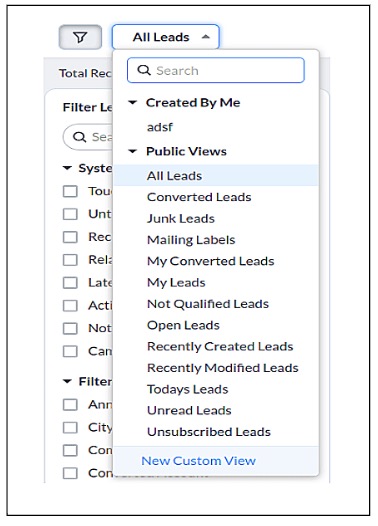
      A List View is grouping of records based on a defined set of criteria. List Views are beneficial for displaying customer specific data according to your business requirements. For example, you may be interested in following-up on the leads created during the last week or reviewing overdue tasks. The best way to handle these scenarios is to filter the records using the list views. Click here for more details on List Views.There are two types of List Views in Zoho CRM -
  • Standard List Views : You can modify the standard views and sort the order of the columns in the list. 
  • Custom List Views : You can create, modify, and delete custom views, and you can also sort the order of the columns in the list.
Often, there are business requirements where you need to customize these views, like hiding a view from certain users or masking a particular column in the view. Let us see how to control the list views visible to a user, using Client Script.

2. Use Case - To hide all public views except one

      Zylker is a manufacturing company that uses Zoho CRM. A Salesman creates records in the custom module named "Orders".The name of the profile assigned to a Salesman is "Sales".  The Admin does not want the "Sales" profile users to view the standard public views except the "My Orders" public view.

3. Solution using Client Script 

      Admin should remove the visibility to all public views for the profile "Sales" and permit only the "My Orders" view. Here are the list of steps to be followed.
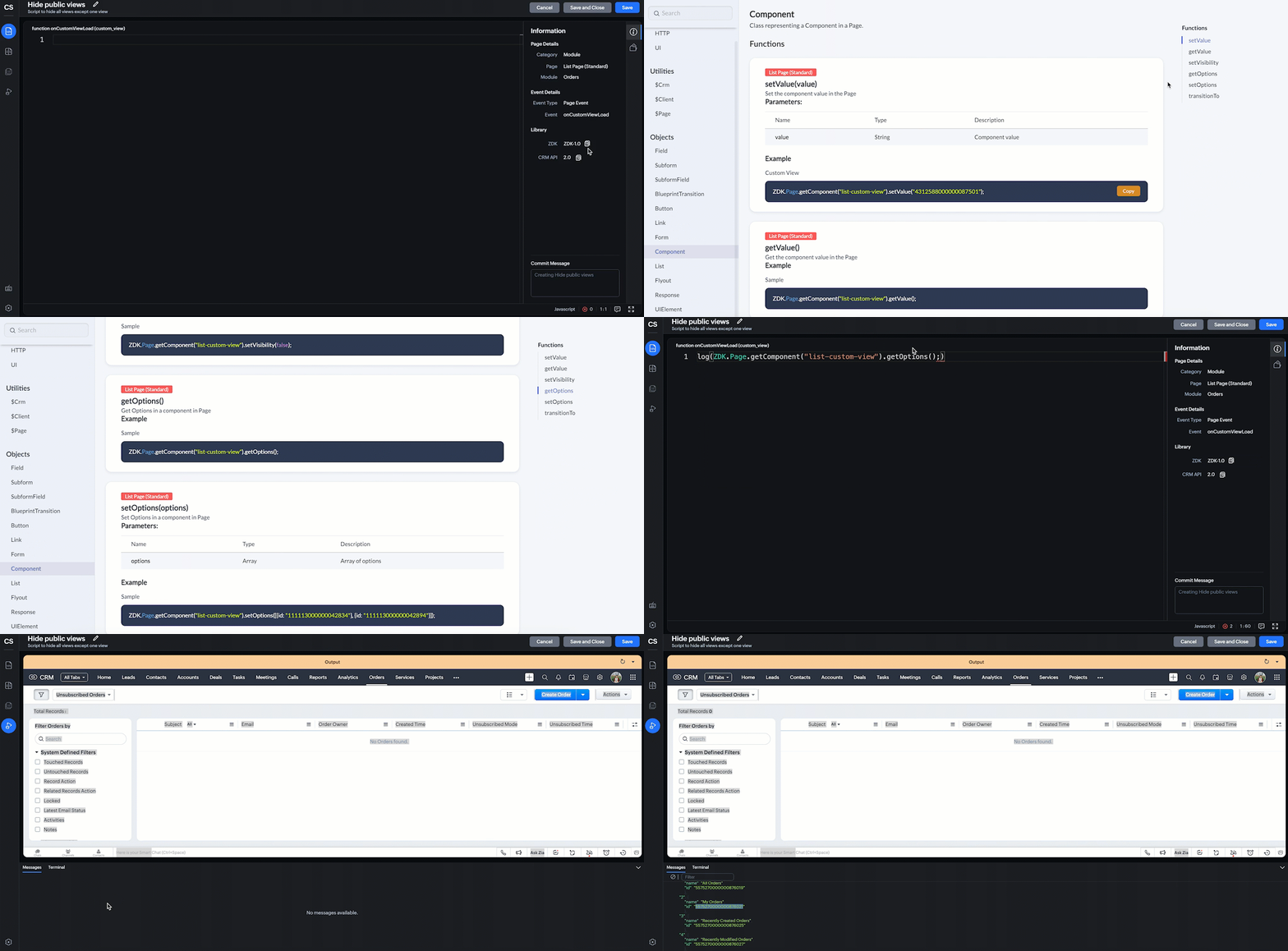
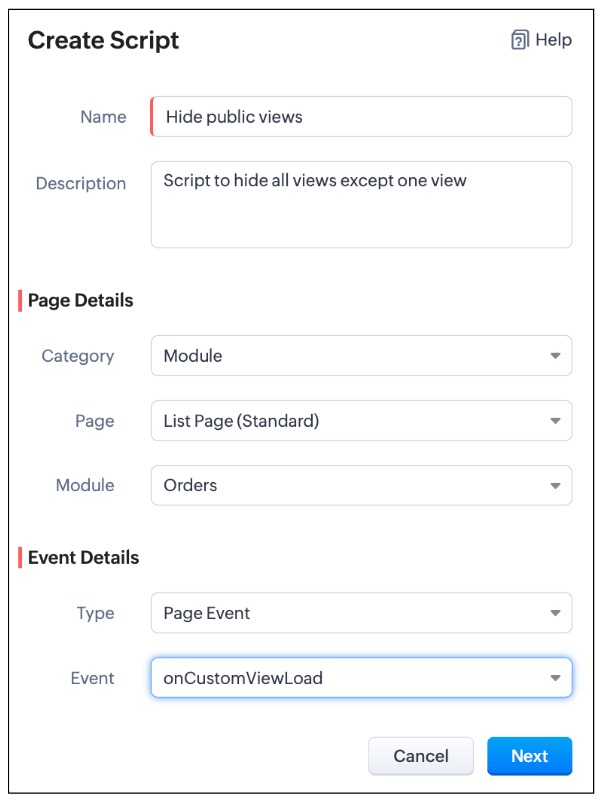
  • Create a Client Script for List Page (Standard) of Orders module and specify the event as onCustomViewLoad.  To know more about how to create a Client Script, click here.


    log(ZDK.Page.getComponent("list-custom-view").getOptions());


  •  Then,  getOptions() will return the options in the component of List Page. Here the component is 'list-custom-view'.
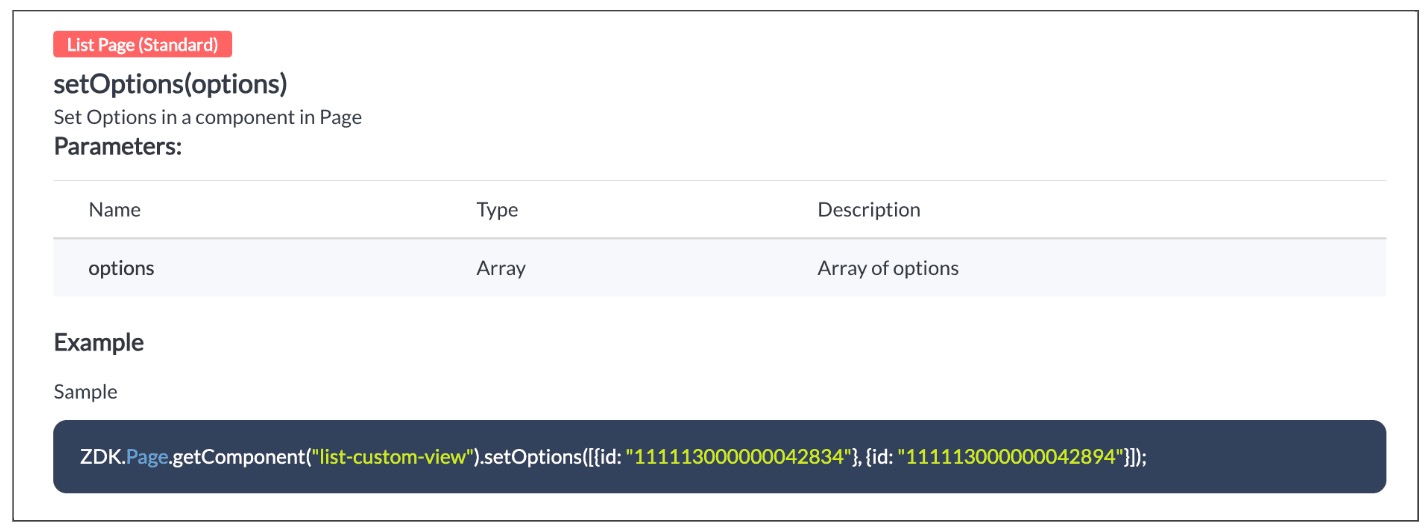
  • Now with  the copied id of "My Orders" view , use  "getComponent.setOptions()" and add the only option on list-custom-view as "My Orders" view, if the profile is "Sales".

var user = ZDK.Apps.CRM.Users.fetchById($Crm.user.id);
if (user.profile.name != 'Sales') {
    ZDK.Page.getComponent("list-custom-view").setOptions([{ id: "5575270000000876021" }]);
}
  • Save the Script.

  • You can now see that only "My Orders" view is visible for the "Sales" profile, and all other public views are hidden.
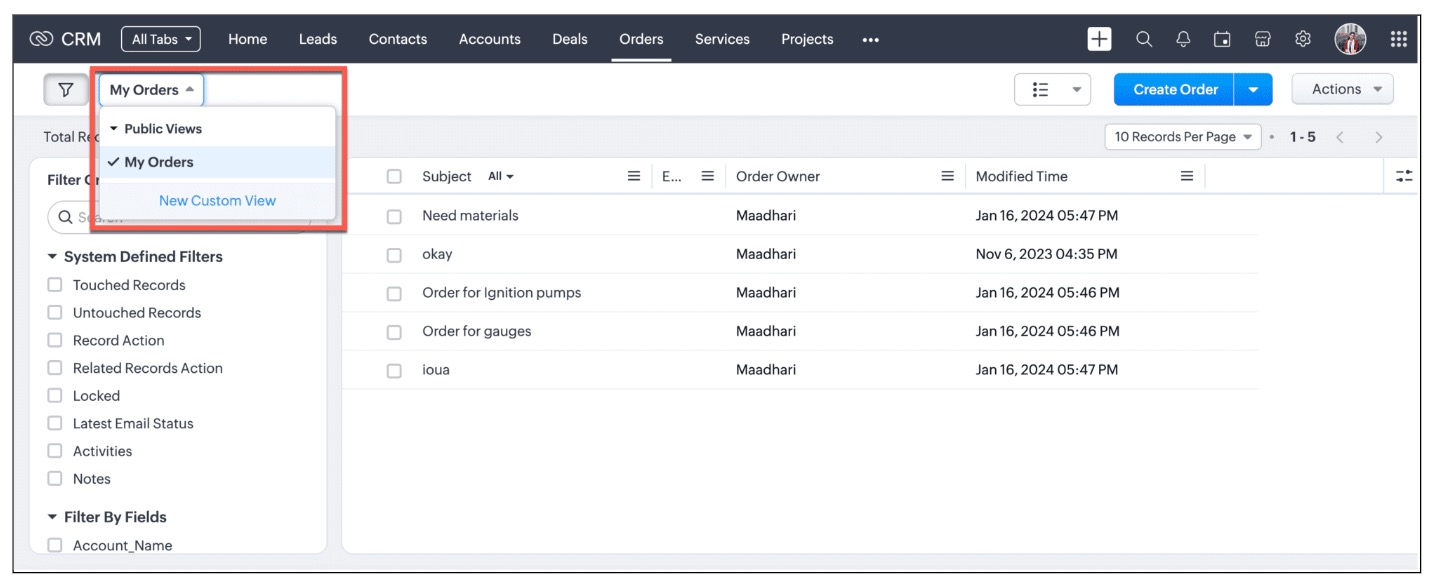
  • For other profiles like Manager and Admin, all public views will be visible as shown below.
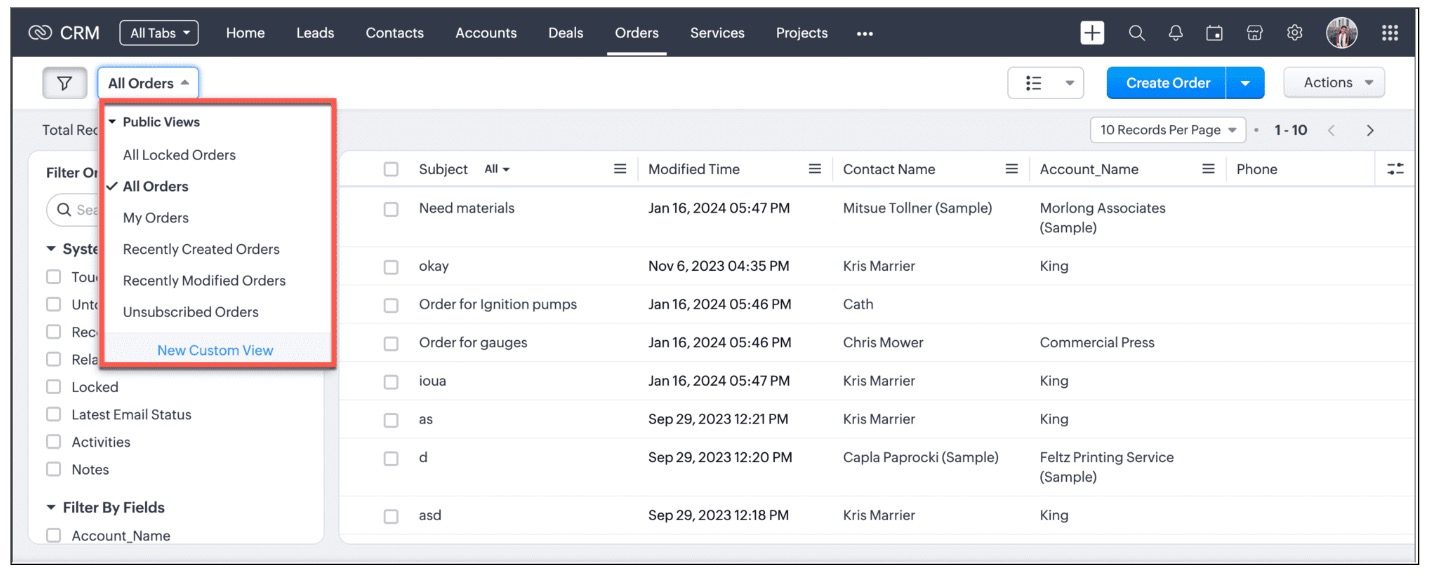
We are working on the other components in the List Page, and will let you know once they are live.

4. Other ZDKs available to customize List Views

Client Script enables you  to customize List Views using the following list of ZDKs and Client Script functions.
  • freezeColumns(option) - You can freeze list view and disable modifying columns.
  • maskField(field_name, (length,character,reverse)) - You can mask fields in the List View
  • sortByField(field_name, option) - You can sort field in the List View
  • getRecords() - You can get Records in the List View
  • selectRecords(criteria) - You can select Records in the List view by criteria
  • selectRecordsByID(ids) - You can select Records in the List view by record ID
  • clearSelection() - You can clear selected Records in the List view
  • style(style_config, criteria) - You can style Records in the List View. Click here to view the related Kaizen post.
  • setValue(value) - You can set the component value in the Page
  • getValue() - You can Get the component value in the Page
  • setVisibility(value) - You can set visibility of the component in the Page
5. Summary:

In this post, we have discussed,
  • About standard and custom List Views.
  • How to control the visibility of List Views using Client Script.
  • How to fetch the list of views available for a module using Client Script.
  • How to set your desired views for users using Client Script.
  • ZDK methods available in Client Script to customize List views

6. Related Links

Notes
Kaizen Collection : 
Click here to view our Kaizen Collection. 
We hope you found this post useful. We will meet you next week with another interesting topic!
If you have any questions, let us know in the comment section.


Cheers!


    • Sticky Posts

    • Kaizen #222 - Client Script Support for Notes Related List

      Hello everyone! Welcome to another week of Kaizen. The final Kaizen post of the year 2025 is here! With the new Client Script support for the Notes Related List, you can validate, enrich, and manage notes across modules. In this post, we’ll explore how
    • Kaizen #217 - Actions APIs : Tasks

      Welcome to another week of Kaizen! In last week's post we discussed Email Notifications APIs which act as the link between your Workflow automations and you. We have discussed how Zylker Cloud Services uses Email Notifications API in their custom dashboard.
    • Kaizen #216 - Actions APIs : Email Notifications

      Welcome to another week of Kaizen! For the last three weeks, we have been discussing Zylker's workflows. We successfully updated a dormant workflow, built a new one from the ground up and more. But our work is not finished—these automated processes are
    • Kaizen #152 - Client Script Support for the new Canvas Record Forms

      Hello everyone! Have you ever wanted to trigger actions on click of a canvas button, icon, or text mandatory forms in Create/Edit and Clone Pages? Have you ever wanted to control how elements behave on the new Canvas Record Forms? This can be achieved
    • Kaizen #142: How to Navigate to Another Page in Zoho CRM using Client Script

      Hello everyone! Welcome back to another exciting Kaizen post. In this post, let us see how you can you navigate to different Pages using Client Script. In this Kaizen post, Need to Navigate to different Pages Client Script ZDKs related to navigation A.
    • Recent Topics

    • To print Multiple delivery notes in batches

      In Zoho Books, we can print a Delivery Note from an Invoice using the Print Delivery Note option, but it is non-editable and always prints all line items from the invoice. Our requirement is to deliver invoiced items in batches and print delivery notes
    • Notes badge as a quick action in the list view

      Hello all, We are introducing the Notes badge in the list view of all modules as a quick action you can perform for each record, in addition to the existing Activity badge. With this enhancement, users will have quick visibility into the notes associated
    • Add Full-Screen Viewing for Quartz Recordings in the Client Interface

      Hi Zoho Team, We would like to request an enhancement to the Zoho Quartz client interface when viewing submitted recordings. Current Limitation: When viewing a Quartz recording from the client (user) interface, there is currently no option to switch the
    • 2025 Recap: A Year to Remember | Zoho Inventory

    • Important Update : Pipedrive deprecated fields no longer supported in Zoho Analytics

      Dear Pipedrive users, We would like to inform you about a recent update related to your Pipedrive integration with Zoho Analytics. The Pipedrive team has deprecated certain fields from their application. You can find more details in the official Pipedrive
    • Product Updates in Zoho Workplace applications | November 2025

      Hello Workplace Community, Let’s take a look at the new features and enhancements that went live across all Workplace applications this November. Zoho Mail Format comments easily using Slash Commands With Slash commands, you can easily format text, insert
    • Right-Click Pipeline to Open in New Tab

      Please add the ability to right-click on a pipeline to open it in a new tab
    • Adjusting Physical Inventory

      Not getting very far with support on this one, they say they are going to fix it but nothings happened since November. Please give this a thumbs up if you would like to see this feature or comment if you have some insight. Use Case: Inventory set to be
    • Power up your Kiosk Studio with Real-Time Data Capture, Client Scripts & More!

      Hello Everyone, We’re thrilled to announce a powerful set of enhancements to Kiosk Studio in Zoho CRM. These new updates give you more flexibility, faster record handling, and real-time data capture, making your Kiosk flows smarter and more efficient
    • Support for Custom Fonts in Zoho Recruit Career Site and Candidate Portal

      Dear Zoho Recruit Team, I hope you're doing well. We would like to request the ability to use custom fonts in the Zoho Recruit Career Site and Candidate Portal. Currently only the default fonts (Roboto, Lato, and Montserrat) are available. While these
    • How to install Widget in inventory module

      Hi, I am trying to install a app into Sales Order Module related list, however there is no button allow me to do that. May I ask how to install widget to inventory module related list?
    • Deluge date time issue

      The deluge function info zoho.currentdate.toString("MMM/YYYY") returns Dec 2026 instead of 2025
    • Sending automated messages that appear in the ticket's conversation thread

      Good morning, esteemed Zoho Desk community, warm greetings Today I am here to raise the following problem, seeking a solution that I can implement: I need to implement an automation that allows me to send reminder messages to customers when I am waiting
    • Issue with Zoho Creator Form Full-Screen View in CRM Related List Integration

      Hi Team, We have created a custom application in Zoho Creator and integrated it into Zoho CRM as a related list under the Vendor module, which we have renamed as Consignors. Within the Creator application, there is a form named “Pickup Request.” Inside
    • Set connection link name from variable in invokeurl

      Hi, guys. How to set in parameter "connection" a variable, instead of a string. connectionLinkName = manager.get('connectionLinkName').toString(); response = invokeurl [ url :"https://www.googleapis.com/calendar/v3/freeBusy" type :POST parameters:requestParams.toString()
    • sync views to sheet

      Im looking to sync my views aka reports in analytics to zoho sheets, when data is updated in analytics it also should be updated in sheets, till now zoho sheets only offer raw data connection and it is not enough as these reports are difficult to re-do
    • How to update the Status in a custom module?

      Hi, I have a custom module "cm_payment_registry" in Billing, I am trying to change the status which is "Draft" with: array = {"custom_status":"Approved"}; zoho.billing.update("cm_payment_registry",organization.get("organization_id"), XXXXXXXXXXXXXX, array,"connectionname");
    • is it possible to add more than one Whatsapp Phone Number to be integrated to Zoho CRM?

      so I have successfully added one Whatsapp number like this from this User Interface it seems I can't add a new Whatsapp Number. I need to add a new Whatsapp Number so I can control the lead assignment if a chat sent to Whatsapp Phone Number 1 then assign
    • Replace Zoho Invoice with QuickBooks

      We are implementing Zoho FSM for a cleaning business in the US with 50+ field workers. This business has been using Quickbooks for accounting for decades and will not migrate to Zoho Books. A major issue in the integration is the US sales tax calculation.
    • Reply and react to comments

      Hi everyone! We're excited to bring to you a couple of new features that'll make your sprint process simpler. A cloud application brings with it an array of social media features that can be efficiently used in your organizational setup. As an agile scrum
    • Possible to connect Zoho CRM's Sandbox with Zoho Creator's Sandbox?

      We are making some big changes on our CRM so we are testing it out in CRM's Sandbox. We also have a Zoho Creator app that we need to test. Is it possible to connect Zoho CRM's Sandbox to Zoho Creator's Sandbox so that I can perform those tests?
    • Send Supervisor Rule Emails Within Ticket Context in Zoho Desk

      Dear Zoho Desk Team, I hope this message finds you well. Currently, emails sent via Supervisor Rules in Zoho Desk are sent outside of the ticket context. As a result, if a client replies to such emails, their response creates a new ticket instead of appending
    • 2025 Highlights: A Year of Steady Progress and Significant Developments

      As we come to the end of 2025, let's take a moment to reflect on the significant progress and developments we've made to improve your travel and expense management. In the Spotlight Introducing Online Booking (US edition only - Early access) Enable online
    • Hide/Show Subform Fields On User Input

      Hello, Are there any future updates in Hide/Show Subform Fields "On User Input"?
    • Zoho Sheet for Desktop

      Does Zoho plans to develop a Desktop version of Sheet that installs on the computer like was done with Writer?
    • Unable to remove the “Automatically Assigned” territory from existing records

      Hello Zoho Community Team, We are currently using Territory Management in Zoho CRM and have encountered an issue with automatically assigned territories on Account records. Once any account is created the territory is assigned automatically, the Automatically
    • Reminders for Article Approval

      Is there a way to send reminders for approvers to review articles and approve/deny them? I'm not seeing that option anywhere.
    • ¿Cómo puedo configurar las contraseñas creadas bajo una directiva para que nunca caduquen y no aparezcan como caducadas en los informes?

      ¿Cómo puedo configurar las contraseñas creadas bajo una directiva para que nunca caduquen y no aparezcan como caducadas en los informes? La razón por la cual contraseña estas no deben caducar es porque su actualización depende de mi cliente y no de mí.
    • Function #42: Show the actual rate of items on invoices

      Hello everyone, and welcome back to our series! In Zoho Books, you have the ability to create Price Lists, wherein you can mark up and mark down the item rates by a specific percentage or set custom rates. Generally, when you apply a price list to an
    • Ability to Set Text Direction for Individual Cells in Zoho Sheet

      Dear Zoho Sheet Team, We hope you are doing well. We would like to request an enhancement in Zoho Sheet that allows users to set the text direction (right-to-left or left-to-right) for individual cells, similar to what is available in Google Sheets. Use
    • Emails sent through Bigin are not posting in IMAP Sent folder

      I have set up my email to work from within Bigin using IMAP.  I am using IMAP so I can sync my email across multiple devices - phone / laptop / desktop / iPad / etc.  I want all my emails to populate my email client (outlook & iphone email) whether or
    • New in CRM: Dynamic filters for lookup fields

      Last modified on Oct 28, 2024: This feature was initially available only through Early Access upon request. It is now available to all users across all data centers, except for the IN DC. Users in the IN DC can temporarily request access using this form
    • Move record from one custom module to another custom module

      Is it possible to create a button or custom field that will transfer a record from one custom module to another? I already have the 'Leads' module used for the Sr. Sales department, once the deal is closed they convert it to the 'Accounts' module. I would like to create a 'Convert' button for a custom module ('Locations') for the department that finds locations for each account. Once the location is secured, I want to move the record to another custom module called 'Secured Locations'. It's basically
    • Warehouse fast processing

      Hey guys, would anyone be interested in something like the attached image ? If there's any interest I'd be willing to develop it further for others to use, it's much faster than using Zohos native solutions, it can part pack, pack in full, part ship,
    • Data Processing Basis

      Hi, Is there a way to automate the data processing for a candidate every time an application arrives from job boards, without requiring manual intervention? That is, to automatically acquire consent for data processing. I've seen a workflow that allows
    • Can't change form's original name in URL

      Hi all, I have been duplicating + editing forms for jobs regarding the same department to maintain formatting + styling. The issue I've not run into is because I've duplicated it from an existing form, the URL doesn't seem to want to update with the new
    • Start/Stop Timmer in Chrome Extension

      The chrome extension is great and allows you to do allot however one of the most common things employees working on projects need to do is track their time. Having an easy start/stop timer to track time would be great.
    • Turning the page for Zoho SalesIQ: 2025 to 2026

      As we wrap up 2025, we would like to take a moment to reflect on what we set out to achieve this year, what we’ve delivered, and where we’re headed next. What we focused on in 2025 This year was all about strengthening the core of engagement and AI, making
    • Invalid collection string

      I haven't changed anything in one of my functions. I'm trying to run it manually and suddenly "Invalid collection string" appears. My code has 6 lines and the error says that the error is on 7th line. Why? What does this error mean? Nothing has been changed
    • Zoho Directory 2025: New Features | Security Enhancements | Enriched UI

      Hello everyone, Greetings from the Zoho Directory team! 2025 has been a highly successful year for Zoho Directory. We are delighted to introduce a fresh set of features, an enriched UI, and major product enhancements. These updates aim to deliver a smoother
    • Next Page