Kaizen #126 - Circuits in Zoho CRM - Part 1
Hello everyone!
Welcome back to another week of Kaizen!
Today, we will discuss an exciting topic—Circuits in Zoho CRM.
For starters, we will discuss what Circuits are, how beneficial they are for businesses, different views of a Circuit, and the different states and flow controls.
In the next post, we will discuss associating a Circuit to a blueprint, workflow, and a button, testing and execution, and see a Circuit in action with an interesting use case.
What are Circuits in Zoho CRM?
We use different microservices to accomplish our business needs, but most of the time, we are forced to switch over to multiple places.
With Circuits in Zoho CRM, you can integrate multiple microservices in a single platform and create automated workflows, all within your CRM!
For example, consider that you have an e-commerce application that involves multiple processes like tracking inventory, payment processing, fulfilling and tracking orders, generating receipts and reports, etc.
Typically, you would code this entire logic and use it to fulfill your business needs. But, with Functions in Zoho CRM, you can write the logic for each of these individual processes and simply orchestrate them using Circuits.
So, for the above example, you can simply create an automated workflow using Circuits and use the functions in the right order. That's not just it! You can re-use these functions elsewhere, too.
Another simple example of a Circuit is when you want to automating sending SMS alerts to users when an event occurs. How this is different from a workflow is that in this circuit, you can have a function that triggers an SMS alert, and also a function that sends an email to the user when the SMS alert ails. This involves circuit's functional states and a decision making state.
Like this, the use cases of circuits are endless.
Advantages of Circuits
- Automate your routines
Convert all your manual routines to automated workflows to save time. Avoid the need to trigger or interrupt applications to control the system flow, as you can create smooth-sailing, smart workflows that control themselves. - Scale fast
Handle any number of requests hassle free as your workflows get executed on cloud. While Zoho Circuit dynamically allocates resources on need, you can focus more on building your applications rather than managing them. - Update in minutes
Building the business logic of your applications in workflows empowers you to update the applications quickly. Swap or reorganize the components easily and build the modified applications in minutes. - Low-code
Create a circuit effortlessly with the visual drag-and-drop interface, which makes it easier for the users with minimum coding knowledge. - Developer-friendly
Circuits help you manage parallel processes, service integrations, spot failures, retry, and view logs, within minutes. Developers can focus on the business logic and not worry about these factors. - Orchestrate CRM Functions
Use various CRM functions on your circuit to integrate multiple third-party apps and Zoho CRM seamlessly. Write functions once, and orchestrate them in circuits to solve different business needs. - Automate IT and business processes within CRM
Create a circuit, associate it with a workflow, blueprint, or button, and automate your entire business process. With high availability, scalability, and fault tolerance, circuits ensure the performance of your workflow remains consistent even with changing states and an increase in frequency. - Diagnose errors and view audit logs
A detailed log of each execution provides the status of each state's task execution, the payload and parameters passed, and the responses and exceptions generated. - Use Existing Functions
From picking functions you've already tried, tested, and are up and running in your CRM account, to using a circuit within another circuit, this flexibility opens up possibilities of handling so much of your out-of-the-box requirements in a single space.
How are Circuits different from Workflow Rules and Blueprints?
Circuits is simply an orchestration of functions with powerful state management capabilities, along with in-built flow controls to automate the business process.
Workflow rules help us automate repetitive tasks and standardize business processes within the CRM system.
Workflow rules are useful in simple automations that the sales person does on a regular basis, like sending an email after record creation.
Builder View and Code View of a Circuit
Builder View
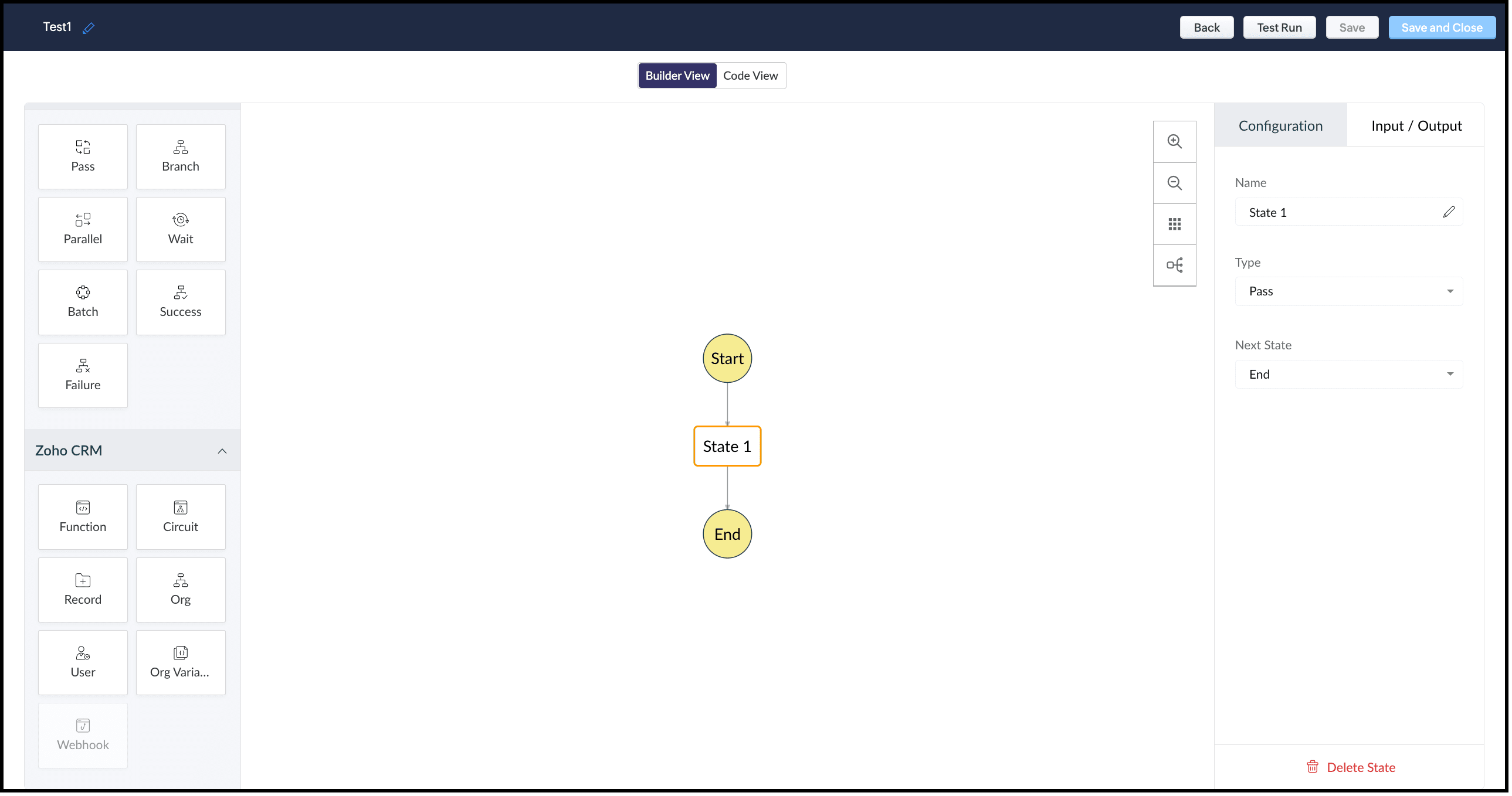
This view offers an easy drag-and-drop interface to build your circuit. The left pane in this view comprises all the states that can be added to a circuit.
The right pane comprises Configuration and Input/Output.
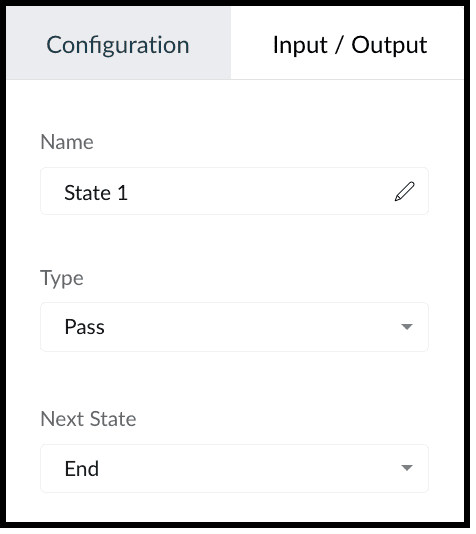
The Configuration tab lets you give a name to the state, choose its type, and select its next state.
The Input/Output tab allows you to control how JSON data must flow from one state to another through Paths.
Paths are strings beginning with $ that identify the components within the JSON. Specific parts of a JSON can be accessed by denoting their attributes in Input Path, Result Path, and Output Path.
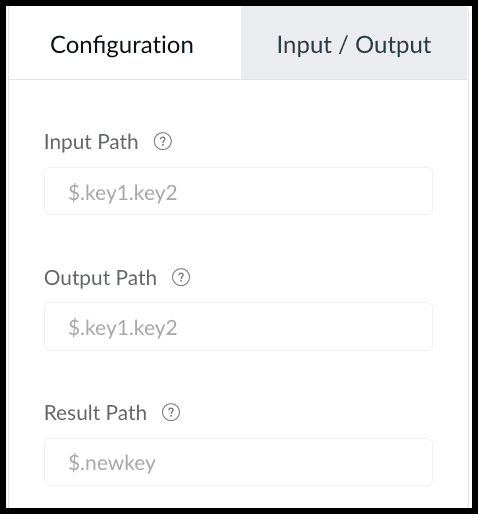
This tab contains the following.
1. Input Path
Input path selects parts of the input JSON to pass to the state. You can also pass parameters to the input as a collection of key-value pairs. The values of Parameters can either be static or parts of the input JSON selected as a Path. For example, if your state's input is
{
"Entry1": {...},
"Entry2": {...}
}
then, you can apply the input path as $.Entry2 within the state definition. So, only the data inside the "Entry2" object will be passed as input to the state.
2. Result Path
After the input is processed by the state, Result Path selects what combination of the state result and the actual state input has to be passed to the output.
3. Output Path
Output Path further filters the data from the Result Path to pass it as state output.
Code View of a Circuit
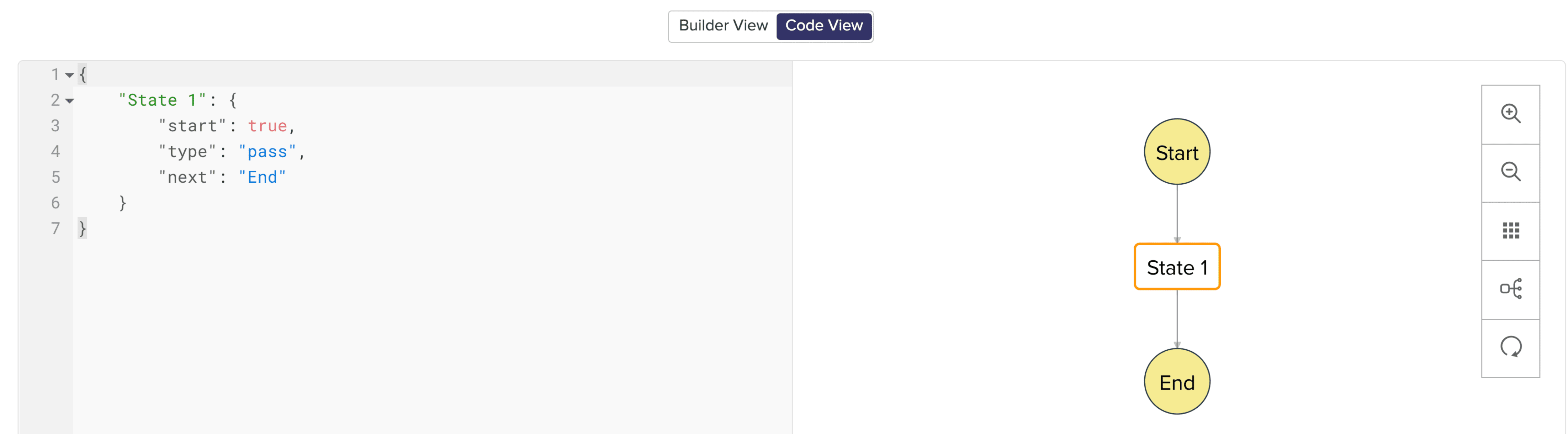
In Code View, you can define your state machine in a simple JSON-based, structured language. Once a circuit is created, a sample workflow with the pass state as 'State 1' is created by default.
States of a Circuit and Flow Controls
Circuits offer a cascading structure to different states in a business process, allowing you to write functions that each feed their output into the next one, or any other one you pre-define, individually. You can also reroute, pause for a certain period, or feed it in batches to enable just about any sort of action.
Simply put, Circuits have different 'functional states' and 'flow controls' that allow you to automate execute your business process.
Flow Controls
Flow Controls let you control the flow of your circuit. To achieve this, Circuits make use of different states that allow you to make the execution, 'Wait' for another state, 'Pass' the input of a state to another, use 'Success' and 'Failure' to stop the execution of the Circuit.
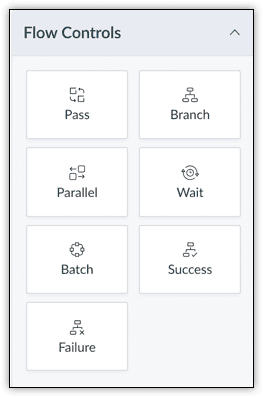
The different states available are:
- Pass: Transfers the input from one state to another.
- Branch: Decides between branches of execution based on input.
- Parallel: Performs simultaneous executions.
- Wait: Inserts a delay for a specific time. The maximum wait time is 30 days.
- Batch: Implements multiple group executions. You can have a maximum of 10 jobs per batch.
- Success: Terminates an execution, returning 'Success'.
- Failure: Terminates an execution, returning 'Failure'.
For more details on states, refer to this article.
Zoho CRM
Zoho CRM states help you execute business logic in circuits with respect to the data available in CRM.
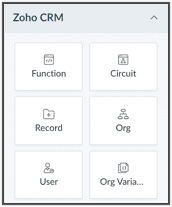
You can write functions in the built-in editor or orchestrate existing ones, get the details of a record as an input to other the states, get the details of your org, user, CRM variables and use them in your Circuit.
You can also trigger another Circuit within a Circuit using the 'Circuit' flow control.
'Function' State
Use this state in your Circuit to use an existing function in CRM. Depending on your need, you can configure the input and output, and control data flow in your circuit. Only the functions that are REST API-enabled are shown here.
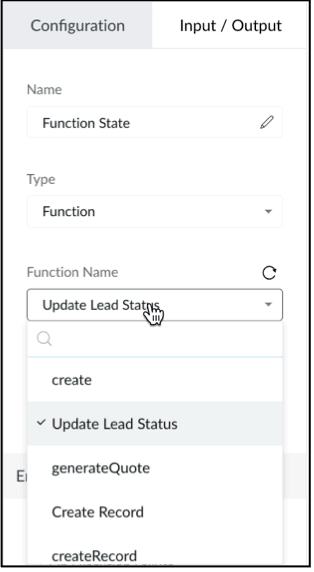
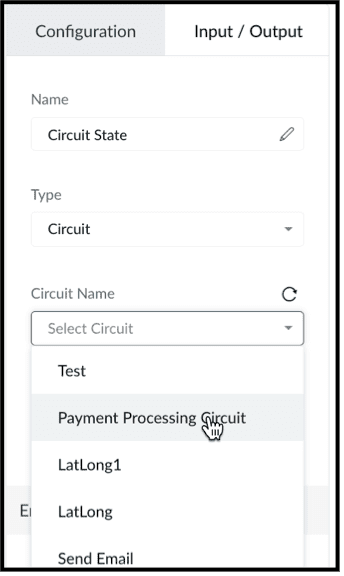
'Circuit' State
You can use another Circuit in one of the states and configure the flow accordingly.
'Record' State
This state fetches the details of a particular record in a module in CRM. You can choose to pass a portion or all of this state's result as an input to the next state in the circuit. Note that the information displayed will be based on the scope provided to the user.
Depending on where the Circuit is associated(Blueprint, Workflow, Button - Create/Clone/Details/Edit View pages, individual record, mass action), the response of the Record State differs.
'Org' State
This state gives you the details of your CRM org that you can use in your circuit.
'User' State
Use this state in your circuit to get the details of the current user in your org and process this information in other states.
'Org Variable'
This state gives you the details of all CRM Variables in your org.
Error Handling
When you use any of the Zoho CRM states, you can also perform error handling as these functional states tend to have runtime errors.
On TimeOut
When a functional state runs longer than the expected time, timeout errors occur. For handling timeout errors in code view, the field value "errorType": "Error.TimeOut" will be added.
On Execution Failure
When a state's execution fails due to some exception that cannot be processed, it can be handled using execution failure. In code view, key-value "errorType": "Error.ExecutionFailure" is appended.
Custom Error
You can also have custom error handling for your states.
Configure Exception Type and Exception Value to set the error handling options based on the error code or error message delivered by the state's output.
Retry the function in case of failure or timeout, set the Attempt (number of retries) and Delay (wait time after failure for every retry attempt).
In case of failure, if the retries fail to fix the error, the State will Fallback the error output to the Next state in the Result field.
We hope you found this post useful. Stay tuned for part 2!
Let us know if you have any questions or suggestions.
Cheers!
Shylaja S
Topic Participants
Shylaja S
Ash-Tech.co.il
Pheranda Nongpiur
Nicolás
Sam Stemp
Sticky Posts
Kaizen #198: Using Client Script for Custom Validation in Blueprint
Nearing 200th Kaizen Post – 1 More to the Big Two-Oh-Oh! Do you have any questions, suggestions, or topics you would like us to cover in future posts? Your insights and suggestions help us shape future content and make this series better for everyone.Kaizen #226: Using ZRC in Client Script
Hello everyone! Welcome to another week of Kaizen. In today's post, lets see what is ZRC (Zoho Request Client) and how we can use ZRC methods in Client Script to get inputs from a Salesperson and update the Lead status with a single button click. In thisKaizen #222 - Client Script Support for Notes Related List
Hello everyone! Welcome to another week of Kaizen. The final Kaizen post of the year 2025 is here! With the new Client Script support for the Notes Related List, you can validate, enrich, and manage notes across modules. In this post, we’ll explore howKaizen #217 - Actions APIs : Tasks
Welcome to another week of Kaizen! In last week's post we discussed Email Notifications APIs which act as the link between your Workflow automations and you. We have discussed how Zylker Cloud Services uses Email Notifications API in their custom dashboard.Kaizen #216 - Actions APIs : Email Notifications
Welcome to another week of Kaizen! For the last three weeks, we have been discussing Zylker's workflows. We successfully updated a dormant workflow, built a new one from the ground up and more. But our work is not finished—these automated processes are
Recent Topics
Client Portal ZOHO ONE
Dear Zoho one is fantastic option for companies but it seems to me that it is still an aggregation of aps let me explain I have zoho books with client portal so client access their invoice then I have zoho project with client portal so they can access their project but not their invoice without another URL another LOGIN Are you planning in creating a beautiful UI portal for client so we can control access to client in one location to multiple aps at least unify project and invoice aps that wouldEmail Insights included in Bigin emals are marked as SPAM everywhere
Today I noticed that email recipients who use Office 365 never receive emails sent from Bigin. Further examination showed that all Email Insights links in email headers are marked as spam/phishing by Office 365. Example screen included. The problem isData Import | Zoho Analytics Custom Query Window Size
Please increase the window size for the Custom Query Data Import. It's impossible to work with such a small query window.Name changed in settings for mailbox but still not changed when typed in To field
In the email account secretary@ i have updaetd the new staff members details but the old members name still appears when I type secretary@ in the To field. I cant work out where Zoho is finding the old name from. I have deleted the browser cache. If ICannot add my name to my domain name
I want to have My name@mydomain.com and it says my name is linked to another account already. Please fix it since I do not have another account.Invoice status on write-off is "Paid" - how do I change this to "Written off"
HI guys, I want to write off a couple of outstanding invoices, but when I do this, the status of the invoices shows as "Paid". Clearly this is not the case and I need to be able to see that they are written off in the customer's history. Is there a wayEstablishing new Zoho email account on laptop
Good Morning: I am very long time Outlook business user and decided to try your email service last night and had established an account. I am trying to verify my account; how do I establish my Zoho email account on my laptop? I opened the account withunable to send message reason 550 5.4.6 unusual sending activity
My email account can't send message. It shows unable to send message reason 550 5.4.6 unusual sending activity detectedhow to add email to existing organization i w
I am already registered my organization and i have an email id. I need one more email id but i can't find anywhere .i want the cheapest email id . how to add ?e-mail bloqueado
Estou com meu e-mail lucas@peplus.me bloqueado, preciso desbloquear para retorno de usos em minhas atividades.zoho labels api not working
We're using n8n to automte email reply using zoho api. I'm facing issue with label api. I added the required scopes but its not working. i followed zoho api documentation but didn't work. also, where do i find/how do i create zoho oauth token mentioneeedDesk DMARC forwarding failure for some senders
I am not receiving important emails into Desk, because of DMARC errors. Here's what's happening: 1. email is sent from customer e.g. john@doe.com, to my email address, e.g info@acme.com 2. email is delivered successfully to info@acme.com (a shared inboxStreams/Shared email doesn't show up in windows trident app. It works fine on MAC. Is there any difference between 2 install ?
I can see streams/share email boxs on my MAC version of trident app but i can't see them in windows version of trident app. Is there any difference between 2 install? I try to find setting but not able to see any setting to add stream/share email boxes.add zoho account
How to add a zoho mail to previous zoho account? I have twoZoho Desk Mobile App Year-End Roundup - 2025
Dear Zoho Desk users, Greetings! As you gear up for the festive season, we are excited to share a quick journey into all that is released in 2025! Zia's generative AI capabilities Zia insights can be highly beneficial in helping agents manage daily supportNarrative 17: The role of Zia AI in customer support
Behind the scenes of a successful ticketing system: BTS Series Narrative 17: The role of Zia AI in customer support Overview Zia in Zoho Desk is a layered AI assistant that combines generative AI, prediction, and automation to support agents, automateDomain Transaction
I have purchased a domain name called trainedworkforce.co.in I made the payment got the receipt but the domain is still not purchased after successful transaction .Ability to Set a Unified Tab Order/View for All Users in Zoho Projects
Hello Zoho Projects Team, We hope you are doing well. We would like to submit a feature request regarding tab/menu organization in Zoho Projects. Current Behavior: The tab (module) order in Zoho Projects is user-specific. Each user (internal or external)Zohomail - The "All Messages" vs "In Box"
Why do some new email message appear under the all messages view but not in my inbox? That's really annoying but to be fair I've experienced the same with gmail.error while listing mails
I can't access email in any of my folders: Oops, an error occurred - retry produces the second error response: error while listing mails (cannot parse null string). I've signed in and out of Zoho, restarted my iMac.Introducing the Zoho Projects Learning Space
Every product has its learning curve, and sometimes having a guided path makes the learning experience smoother. With that goal, we introduce a dedicated learning space for Zoho Projects, a platform where you can explore lessons, learn at your own pace,Where to show Customization Field ?
Dear Sir, I have made some New Field in Item Field Customisation. Now I don't require that field in Estimate, Sales Orders etc. I just wants that field in Sales Invoice to Show/Hide... Is that possible ?Zoho Desk 2025 round-up: Key highlights on feature releases
Hello everyone, As we gear up for 2026, here is a detailed round-up of all feature releases in Zoho Desk web throughout the year. For consolidated information on releases check out the What’s New page You can also watch these webinars. Zia in web ZiaPrint Sales Orders, Purchase Orders or Invoices from API
Hello, Is it possible to use the print option that is available in Sales Orders Purchase Orders and Invoices with the API?. I don't see any information in the docs about this. ThanksHow to show a hided report??
in CRM Report , I clicked Hide incidently , how to show the floder again? Nowhere I can find the hided report floder...Converting Customer Invoice to Purchase Bill
Hi, In my service-based business, I sometimes create the customer invoice first, and later I receive the purchase bill from the vendor for the same job. Is there any option in Zoho Books to: Convert a customer invoice into a purchase bill, or Link/associateEmail tracking inquiry
I am trying to track when my emails are opened and clicked like I previously did in HubSpot. HubSpot pretty much did the entire process automatically. After digging through, I finally found in settings --> emails --> BCC Dropbox there is an email I canMass Update of Lookup Fields not possible
Hello List I've created a custom field for Leads and Contacts 'Current Campaign'. This is very Handy as I can filter leads and then related them to a campaign. Everything ready, but then I realized that mass update doesn't work for lookup fields... aCollapsible Sections & Section Navigation Needed
The flexibility of Zoho CRM has expanded greatly in the last few years, to the point that a leads module is now permissible to contain up to 350 fields. We don't use that many, but we are using 168 fields which are broken apart into 18 different sections.Download Attached Files
Hi everyone, Brand new to Zoho Creator. I have a form with a subform. The subform has a field for "File Upload" I have this in a subform to allow multiple files to be uploaded to the parent form. Once the files are uploaded, how can i download or view them? Is this a setting I am just not seeing? If there isn't a way to download them, could i create another form field that dynamically creates the file's URL? That way a user can click the URL to get to the file? Any help with this would be greatlyTicket layout based on field or contact
Hi! I want to support the following use-case: we are delivering custom IT solutions to different accounts we have, thus our ticket layouts, fields and languages (priority, status field values should be Hungarian) will be different. How should I setupNo funcionan correctamente el calculo de las horas laborales para informe de tickets
Hola, estoy intentando sacar estadísticas de tiempo de primera respuesta y resolución en horario laboral de mis tickets, pero el calculo de horas en horario laboral no funciona correctamente cree los horarios con los feriados : Ajusté los acuerdos deZoho Mail Android app update: Set out of office response exclusively for organization members and external users, response interval
Hello everyone! We have now introduced an option to configure out of office messages exclusively for organization members and external users within the Zoho Mail app. Additionally, now you can also customize response intervals for the Out of office messages.Feature Request: Detailed View - Related Block Links!
Desperately need a view record link option on records displaying in the related blocks on a Detail View. For the love of god, please add this feature. Thank you!Sub-Form Padding in CSV Export
Hi, When you use the Sub-Form, and for example you have a Date Field on the Main Page, then Option 1 and Option 2 fields on the Subform, when you export this to CSV the Date column will only have the Date in 1 row, the first row, it would be nice to padDependent / Dynamic DropDown in ZohoSheets
Has anyone figured out a way to create a Dropdown, the values of which is dependent on Values entered in the other cell ?How do I change the order of fields in the new Task screen?
I have gone into the Task module layout, and moving the fields around does not seem to move them in the Create Task screen. Screenshot below. I have a field (Description) that we want to use frequently, but it is inconveniently placed within the MoreZoho → ShipStation Integration – Sales Order–Driven Fulfilment Workflow
Hello All, I’m reaching out to explore the best way to integrate a shipping tool into our inventory which will speed our process up. We are looking to integrate ShipStation into our existing order-to-fulfilment workflow, as we’re keen to standardise onIA ou je peux trouver comment utiliser IA
Je voudrais utiliser IA dans l'interface zoho pour m'aider quand j'ai des questions de rôle partage ou autre configuration d'automatisation, j'utiliser ChatGPT externe mais il ne connait pas toujours l'interface zoho et les réponses sont parfois longueData Processing Basis
Hi, Is there a way to automate the data processing for a candidate every time an application arrives from job boards, without requiring manual intervention? That is, to automatically acquire consent for data processing. I've seen a workflow that allowsNext Page