Kaizen #157: Flyouts in Client Script

Hello everyone!
Welcome back to another exciting edition of our Kaizen series, where we explore fresh insights and innovative ideas to help you discover more and expand your knowledge!In this post, we'll walk through how to display Flyouts in Client Script and break down the key differences between Flyouts and pop-ups in Client Script, including when to use each one.
In this Kaizen post,
1. What are Flyouts in Client Script?2. Flyout- ZDKs and functions in Client Script3. Use Case4. Solution4.a. Create a Widget for EMI Calculator.4.b. Create a Client Script to render the Widget as Flyout.5. Difference between flyout and popup in Client Script6. Summary7. Related links
1. What are Flyouts in Client Script?
Flyouts are floating User Interface that can be moved around and controlled using Client Script. Widgets can be used to render a flyout. The flyout can run independently, and any Client Script can communicate with it.
2. Flyout- ZDKs and functions in Client Script :
- createFlyout(name, config) - Creates a flyout. You can specify the heading, dimensions, and animation type using the config parameter.
- getFlyout(name) - To Fetch the details of a flyout.
- open(config, data) - Opens the created flyout.
- notify(data, options) - Notifies and waits for data in a flyout. The options can be wait: true (Client Script execution will wait for a response from the widget) or wait: false - (Client Script execution will not wait for a response from the widget)
- close() - Closes the active flyout.
Click here for more details about the ZDKs and functions related to flyouts.
3. Use Case :
Sales Advisors in a Finance Consulting Company regularly rely on an EMI calculator to help customers with loan queries. To improve their efficiency and eliminate the need to switch between different windows, the admin manager intends to integrate the calculator directly into CRM. The EMI calculator should appear on the Create Page of the Loans module and remain active until the user closes it.
4. Solution:
To achieve this in Zoho CRM, we can use Widgets to create an EMI calculator and render them using flyouts in client script whenever the create Page of Loan page loads.
4.a. Create a Widget for EMI Calculator
Install Zoho CLI, and follow the steps given in this document to create the Widget app folder. Then update the html, javascript, and css code as per your requirement.
index.html
- <!DOCTYPE html>
- <html lang="en">
- <head>
- <meta charset="UTF-8" />
- <meta http-equiv="X-UA-Compatible" content="IE=edge" />
- <meta name="viewport" content="width=device-width, initial-scale=1.0" />
- <title>Document</title>
- <link rel="stylesheet" href="style.css" />
- </head>
- <body>
- <div class="loan-calculator">
- <div class="top">
- <h2>EMI Calculator</h2>
- <form action="#">
- <div class="group">
- <div class="title">Amount</div>
- <input type="range" min="1000" value="30000" max="50000" step="500" class="loan-amount" id="loanAmount" />
- <div class="slider-label">$<span id="loanAmountValue"></span></div>
- </div>
- <div class="group">
- <div class="title">Interest Rate</div>
- <input type="range" min="5" value="6" max="100" step="1" class="interest-rate" id="interesRate" />
- <div class="slider-label"><span id="interesRateValue"></span></div>
- </div>
- <div class="group">
- <div class="title">Tenure (in months)</div>
- <input type="range" min="6" max="100" step="1" value="12" class="loan-tenure" id="tenureMonth" />
- <div class="slider-label"><span id="tenureMonthValue"></span></div>
- </div>
- </form>
- </div>
- <div class="result">
- <div class="left">
- <div class="loan-emi">
- <h3>Loan EMI</h3>
- <div class="value">123</div>
- </div>
- <div class="total-interest">
- <h3>Total Interest Payable</h3>
- <div class="value">1234</div>
- </div>
- <div class="total-amount">
- <h3>Total Amount</h3>
- <div class="value">12345</div>
- <div class="right">
- <canvas id="myChart" width="400" height="400"></canvas>
- </div>
- </div>
- </div>
- <script src="https://cdn.jsdelivr.net/npm/chart.js@3.6.2/dist/chart.min.js"></script>
- <script src="https://live.zwidgets.com/js-sdk/1.2/ZohoEmbededAppSDK.min.js"></script>
- <script src="main.js"></script>
- </body>
- </html>
- Click here to view the complete code.
- Once you have added the code, upload the zip file by following the below steps.
- Go to Setup > Developer Space > Widgets.
- Click Create New Widget and Fill in the details.
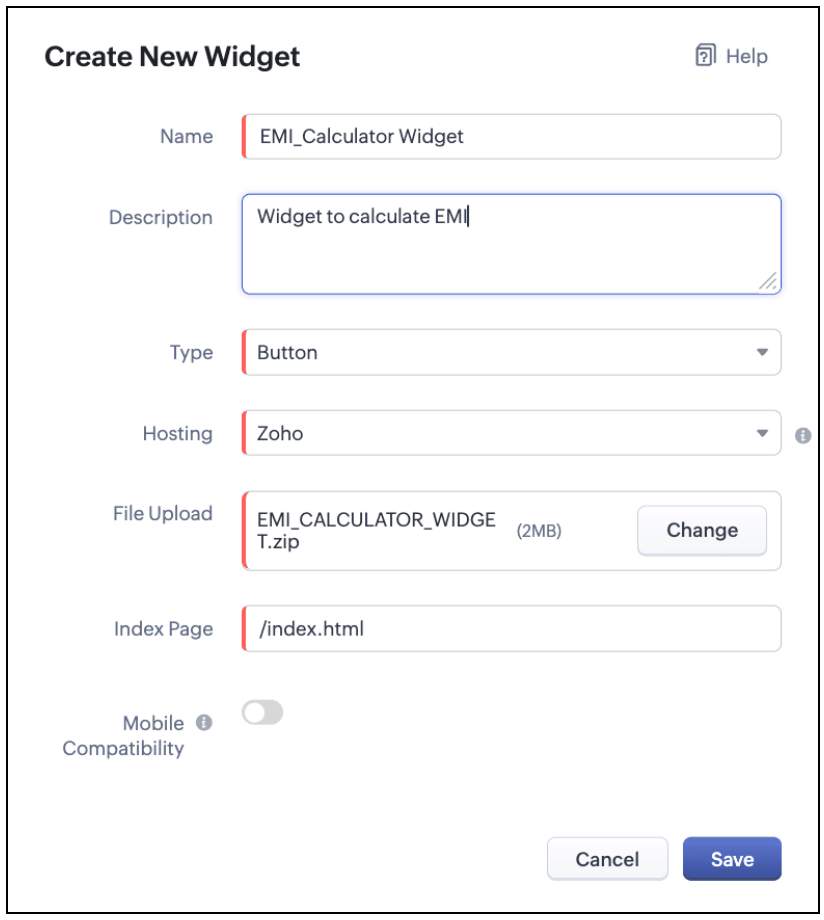
The Hosting should be "Zoho" and mention the html page of the app folder that you uploaded.

Note:
The widget should be of "button" type in order to render through a Client Script.
4.b. Create a Client Script to render the Widget as Flyout
Configure a Client Script for Create Page(Standard) Loans module, that triggers during onLoad event as shown below. Click Next. Click here to know how to configure a Client Script.

Enter the following script and click Save.
- ZDK.Client.createFlyout('EMIFlyout', {
- header: 'EMI Calculator',
- animation_type: 1,
- height: '400px',
- width: '450px',
- close_on_exit: false
- });
- ZDK.Client.getFlyout('EMIlyout').open(
- { api_name: 'EMI_CALCULATOR_WIDGET', type: 'widget' },
- { data: loanDetails }
- );
In the above script, createFlyout() will create a new flyout with header.
Below is the syntax and parameter detail.

Now Open the flyout and render the Widget in the flyout using open() method and specify the api_name of the widget.

Here is how the Client Script renders the flyout.
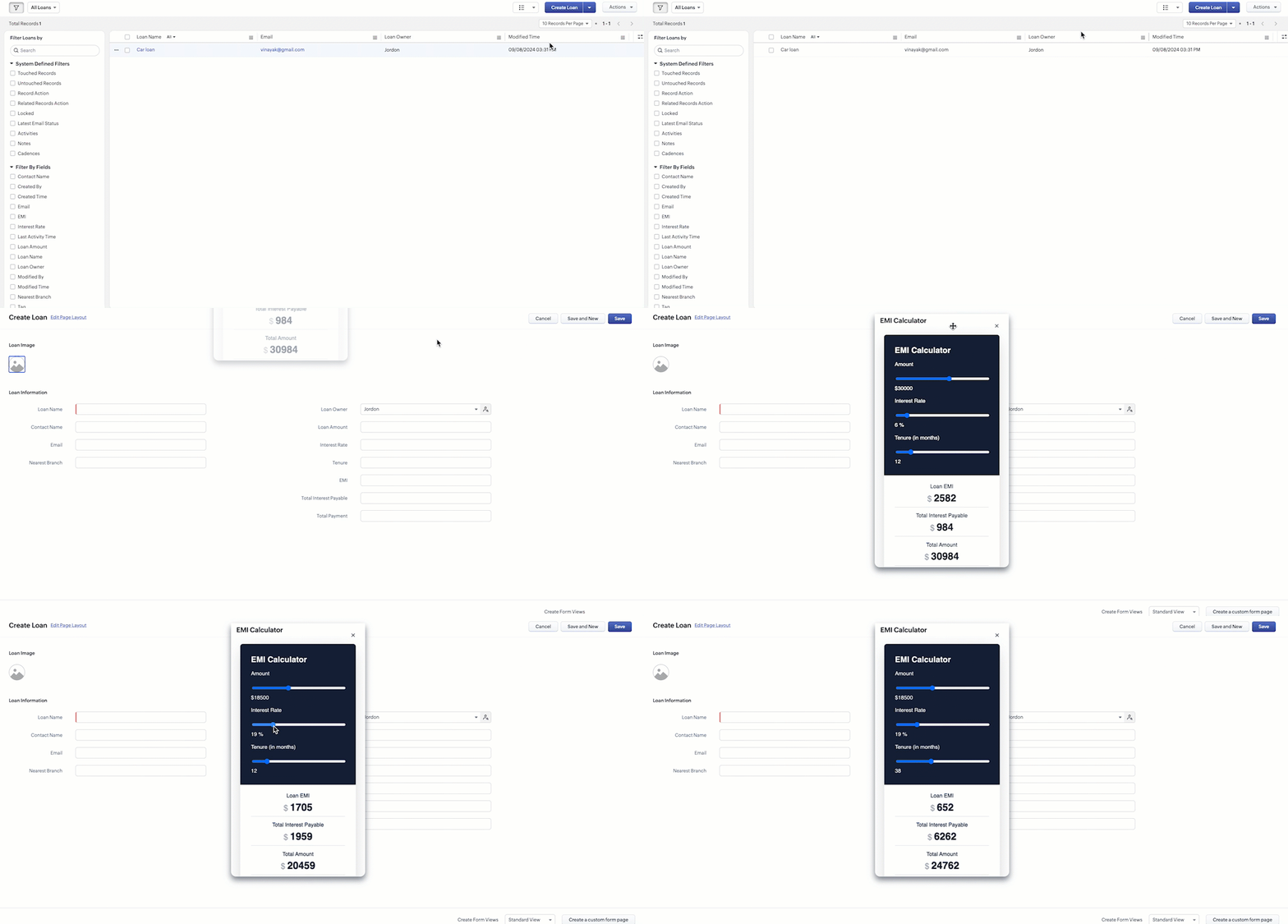
5. Difference between flyout and popup in Client Script
Flyout | Pop up |
A flyout can be moved around the page. | A pop-up cannot be moved anywhere on the page. |
It can run independently in a separate thread. The user can interact with the background interface without closing the flyout. | The user cannot interact with the background without closing the pop up. |
Use flyouts, when you need to exchange data to and fro between a Widget and Client Script. You can use ZDK.Client.sendResponse() to pass data from a widget rendered as a flyout to the Client Script. | Use popup, when you need to interrupt the screen to gather input from the user or display a message before proceeding. Use $Client.close() to pass data to the Client Script, which will also close the popup. |
In the scenario discussed in this post, if you want to make it mandatory for the user to read or interact with the EMI Calculator before entering any value in the create Page(Standard), then you can use pop-up instead of Flyout. Both pop up and flyout can be used to display widgets, and their dimensions can be altered.
Refer to this post to know how to render widgets as pop up using Client Script.
6. Summary
- In this post, we have seen,
- Flyouts in Zoho CRM.
- ZDKs and methods to render a Flyout(Widget) using Client Script.
- When to use a Flyout and when to use a pop up.
7. Related Links
 Previous Post: Kaizen #156 -Enhancing Mass Communication in Zoho CRM with a Custom Button Widget | Kaizen Collection: Home
Topic Participants
Maadhari M
Jeremy Nagel - www.smooth.tel
Kava Li
Jeganprabhu S
Ishwarya SG
Sticky Posts
Kaizen #198: Using Client Script for Custom Validation in Blueprint
Nearing 200th Kaizen Post – 1 More to the Big Two-Oh-Oh! Do you have any questions, suggestions, or topics you would like us to cover in future posts? Your insights and suggestions help us shape future content and make this series better for everyone.Kaizen #226: Using ZRC in Client Script
Hello everyone! Welcome to another week of Kaizen. In today's post, lets see what is ZRC (Zoho Request Client) and how we can use ZRC methods in Client Script to get inputs from a Salesperson and update the Lead status with a single button click. In thisKaizen #222 - Client Script Support for Notes Related List
Hello everyone! Welcome to another week of Kaizen. The final Kaizen post of the year 2025 is here! With the new Client Script support for the Notes Related List, you can validate, enrich, and manage notes across modules. In this post, we’ll explore howKaizen #217 - Actions APIs : Tasks
Welcome to another week of Kaizen! In last week's post we discussed Email Notifications APIs which act as the link between your Workflow automations and you. We have discussed how Zylker Cloud Services uses Email Notifications API in their custom dashboard.Kaizen #216 - Actions APIs : Email Notifications
Welcome to another week of Kaizen! For the last three weeks, we have been discussing Zylker's workflows. We successfully updated a dormant workflow, built a new one from the ground up and more. But our work is not finished—these automated processes are
Recent Topics
How to get the call recording external ID via desk API
I have enabled phonbridge integration with Zoom Call. I am trying to access the call recording in Zoom by calling Zoom API. I have built a Desk workflow to trigger on a new call, to call a custom function. when calling the API, the response doesn't containCan't View Project Names in Mobile App
I can't view project names on PO's in the app, nor can I add that as a viewable PDF field in inventory on the computer. I've attached screenshots showing that in the mobile version whether you are on the PO, editing the PO, or viewing the PO line items,Notebook
I have purchased the monthly pro subscription of Notebook. But it does not support my XP-Pen to write something in it. So it is not useful to me. Hence I am requesting you to help me to discontinue this subscription.Domain Mapping & Image Publishing Issues on Zoho Sites
Hello, I am facing two issues with my Zoho Sites account: 1. Images not visible after publishing. 2. Domain mapping error: "Domain already exists". I am a paid customer. Please connect me with Live Chat Support or Zoho Assist so I can show my issuePrevent duplicate with custom fields?
I was wondering something about custom field/custom modules in Zoho Desk. For some reason you can make a custom field mandatory but not unique? For example, if I create a custom module to manage equipment and renewal and make a field serial number noHow to Automate Monthly PDF Reports with Filters in Zoho Creator
Hi everyone, I’m trying to build an automated monthly reporting process in Zoho Creator and would appreciate suggestions or best practices from anyone who has done something similar. What I’m trying to do: I have a form called New_Customer with fieldsFeedback: Streamlining Note Management in Zoho Notebook
Dear Team/Support, I would like to share some feedback regarding the note management system that could help improve usability and accessibility for users like myself. Notebook 1 (screenshot attached): Currently, the system does not allow selecting andshowing Limit exceeded
Good afternoon...trust you're good. I've been having issues working with but it's not responding. it's showing Limit exceeded, sorry it seems like too many people are working on the sheet right now please try again later. meanwhile no one is working onUpload API
I'm trying to use the Upload API to upload some images and attach them to comments (https://desk.zoho.com/DeskAPIDocument#Uploads#Uploads_Uploadfile) - however I can only ever get a 401 or bad request back. I'm using an OAuth token with the Desk.tickets.ALLLosing description after merging tickets
Hello, We merge tickets when they are about the same topic from the same client. It happens sometimes. We recently noticed that after the merger only the description from the master ticket is left in a thread. And the slave-ticket description is erased.update linked contacts when update happens in account
Hi, I have a custom field called Licence in the Accounts module. When someone buys a licence, I’d like to update a custom field in the related Contacts. How can I achieve this? I noticed that workflows triggered on Accounts only allow me to update fieldsProblem Management Module
I am looking for a Problem Management module within Zoho Desk. I saw in some training videos that this is available, and some even provided an annual price for it. I want an official confirmation on whether this is indeed available. This is not a particularlyUnable to explore desk.zoho.com
Greetings, I have an account with zoho which already has a survey subscription. I would like to explore desk.zoho.com, but when I visit it while logged in (https://desk.zoho.com/agent?action=CreatePortal) I just get a blank page. I have tried differentOffline support for mobile app
Accessing your files and folders from your mobile devices is now quicker and simpler, thanks to the power of offline support. Whether on an Android or iOS device, you can use the Offline function to save files and folders, so you can review them evenZoho Desk KB article embedded on another site.
We embed KB articles from Zoho Desk on another site (our application). When opening the article in a new tab, there is no issue, but if we choose lightbox, we are getting an error "To protect your security, help.ourdomain.com will not allow Firefox toDoes Attari Messaging app have Bot option and APIB
Hi, Does Attari also have Bot and API as we use in WhatsApp??How to add application logo
I'm creating an application which i do not want it to show my organization logo so i have changed the setting but i cannot find where to upload/select the logo i wish to use for my application. I have seen something online about using Deluge and writingDetails & Limitations of the Free Forever Plan
I cannot find any comparison/details about the Free Forever Plan. Can you please publish details of what are its limitations?how to differentiate if whatsapp comes from certain landing page?
I create a Zobot in SalesIQ to create a Whatsapp bot to capture the lead. I have 2 landing pages, one is SEO optimized and the other want is optimized for leads comes from Google Ads. I want to know from which landing page this lead came through WhatsAppHow to record company set up fees?
Hi all, We are starting out our company in Australia and would appreciate any help with setting up Books accounts. We paid an accountant to do company registration, TFN, company constitution, etc. I heard these all can be recorded as Incorporation Costs, which is an intangible asset account, and amortised over 5 years. Is this the correct way to do it under the current Australian tax regulations? How and when exactly should I record the initial entry and each year's amortasation in Books? GenerallyShow Payment terms in Estimates
Hi, we are trying to set up that estimates automatically relates payment terms for the payment terms we introduced on Edit contact (Field Payment terms). How can it be done? Our aim is to avoid problems on payment terms introduced and do not need to introduce it manually on each client (for the moment we are introducing this information on Terms and Conditions. Kind Regards,When dispatched to crew, assigning lead missing
Hello, For the past two or three weeks, whenever an officer assigns Service Appointment to a team, the lead person is missing from the assigned service list. Therefore, we have to reschedule the SA and then the lead person becomes visible in the assignedI want to transfer the project created in this account to another account
Dear Sir I want to transfer the project created in one account to another accountCustom Bulk Select Button
Zoho CRM offers the ability to select multiple records and invoke a Custom Button This functionality is missing from Recruit Currently we can only add buttons in the detail page and list But we cannot select Multiple Records and invoke a function withPower of Automation :: Smart Ticket Management Between Zoho Desk and Projects
Hello Everyone, A custom function is a software code that can be used to automate a process and this allows you to automate a notification, call a webhook, or perform logic immediately after a workflow rule is triggered. This feature helps to automateBUG - Google Business Buttons - Add a button to GBP Post
I am experiencing an issue with the "Add a button" feature when creating posts for my Google Business Profile (GBP) through Zoho Social. When I schedule or publish a GBP post and include a call-to-action button with a specific URL, the post itself publishesDo you have software like Windows software?
We want swadeshi softwareTrying to export a report to Excel via a deluge script
I have this code from other posts but it gives me an error of improper statement, due to missing ; at end of line or incomplete expression. Tried lots of variations to no avail. openUrl(https://creatorapp.zoho.com/<username>/<app name>/XLSX/#Report:<reportname>,"sameNeed help to create a attach file api
https://www.zoho.com/crm/developer/docs/api/v8/upload-attachment.html Please help me to create it... It's not working for while. Do you have some example?Export view via deluge.
Hi, Is it possible to export a view (as a spreadsheet) via deluge? I would like to be able to export a view as a spreadsheet when a user clicks a button. ThanksPossible to generate/download Quote PDF using REST API?
See title. Is there any way after a quote has been created to export to a PDF using a specified template and then download it? Seems like something that should be doable. Is this not supported in the API v2.0?Bug in allowing the user to buy out of stock items
Hi i want to allow the user to buy out of stock items, according to the commerce documentation if i disable Restrict "Out of stock" purchases it will, but it doesnt work, so i want to know if it had any relation with zoho inventory, and if theres anyReplace Lookup fields ID value with their actual name and adding inormation from subforms
Hi everyone, I wanted to see if someone smarter than me has managed to find any solutions to two problems we have. I will explain both below. To start we are syncing data from Zoho CRM to Zoho Analytics and I will use the Sales Order module when givingCan a Zoho Sites page be embedded into another website (outside Zoho)
Hi All, We have a request from a client - they'd like to take one of our information pages created in Zoho Sites and embed it into their own website? I was told through an email with Zoho that this was possible >>Thank you for your patience regardingBug in allowing the user to buy out of stock items
Hi i want to allow the user to buy out of stock items, according to the commerce documentation if i disable Restrict "Out of stock" purchases it will, but it doesnt work, so i want to know if it had any relation with zoho inventory, and if theres anyTransition Criteria Appearing on Blueprint Transitions
On Monday, Sept. 8th, the Transition criteria started appearing on our Blueprints when users hover over a Transition button. See image. We contacted Zoho support because it's confusing our users (there's really no reason for them to see it), but we haven'tZoho CRM Sales Targets for Individual Salespeople
Our organistion has salespeople that are allocated to different regions and have different annual sales targets as a result. I am building an CRM analytics dashboard for the sales team, which will display a target meter for the logged in salesperson.Transfer all Related Data to new Account Owner
Currently when I change the account Owner I only see the option to change only the open deals But I want the new account owner to take over all the related modules and all the deal stages Is it not possible right now? Am I missing something? Do I reallyHow to Calculate MTTR (Mean Time to Resolve)
We want to calculate MTTR (Mean Time to Resolve) in our Zoho Analytics report under Tickets. Currently, we are using the following fields: Ticket ID Ticket Created Time Ticket Closed Time Ticket On Hold Time We are planning to calculate MTTR (in days)How to export project tasks, including the comments
Hi, how can I export the project tasks, whereby I can also see the comments associated to a specific task? The use-case is that often we use comments to discuss or update a task related ideas. I would like to export the tasks, where we can also see theNext Page