Kaizen #182 - Queries in Canvas List View

Hello everyone!
Welcome to another week of Kaizen!
We're back with another post in this series on Queries in Canvas List View.
Queries in Zoho CRM allow you to dynamically retrieve data from CRM as well as third-party services directly within the CRM platform.
You can construct a query of one of the following types:
- CRM Module type query to retrieve data from CRM modules.
- COQL type query to construct a query using the COQL API.
- REST API type query to fetch data from an external service and use it in Zoho CRM.
You can associate a query with the 'Decision' component of Kiosk, Canvas Detail View, or Canvas List View.
In this post, we will take up a use case and see how you can associate a query with Canvas List View.
Use case
Sales and support teams often need quick access to Zoho Desk tickets related to a contact in Zoho CRM. To avoid switching between apps to check ticket statuses, we can use the Queries feature to fetch the latest Zoho Desk ticket's details of a contact dynamically and display them on the Canvas List View page of the Contacts module.
This ensures that CRM users can instantly view the most recent ticket linked to a contact without leaving Zoho CRM.
Follow along to see how you can achieve this!
Step 1 - Add a Source
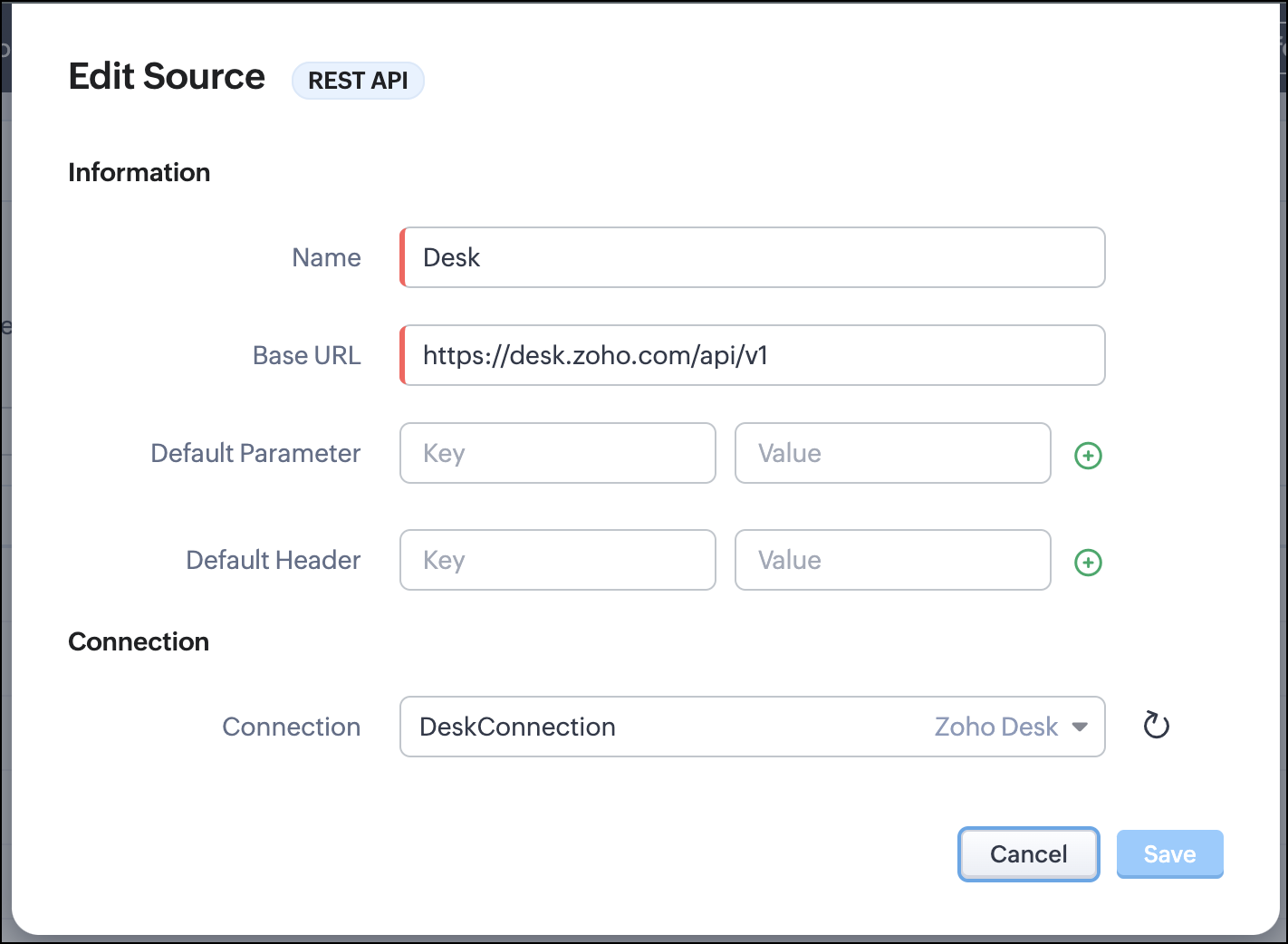
- Go to Setup > Developer Hub > Queries > Sources > Add Source.
- Under Information,
- Give a name for the source and its Base URL. Queries will make API calls to this URL to fetch data. Ensure to add this to Trusted Domain.
- Specify any default parameters and headers for this base URL.
- Under Connection, choose the connection you have created with Zoho Desk with the necessary scopes. If you haven't, create one.
- Click Save.

Note
Queries will make API calls to the URL you add in the Source and consume credits that are applicable in that service. Ensure you monitor your API usage in your source provider.
Step 2 - Create a REST API Query
- Go to Setup > Developer Hub > Queries > Add Query.
- Under Source, choose the source you created in step 1.
- Under Information,
- Enter the Name, API Name, and the Endpoint of the query.
- Specify the parameter email that takes the dynamic variable {{Contact_Email}} as its value. This is to fetch the latest ticket from Zoho Desk for a contact with the email in this variable during runtime. Refer to our Kaizen post on Handling Query Variables in Zoho CRM for additional details.
- Specify Headers, if any.
- You can serialize the output to fit your needs using JavaScript in the Serializer.
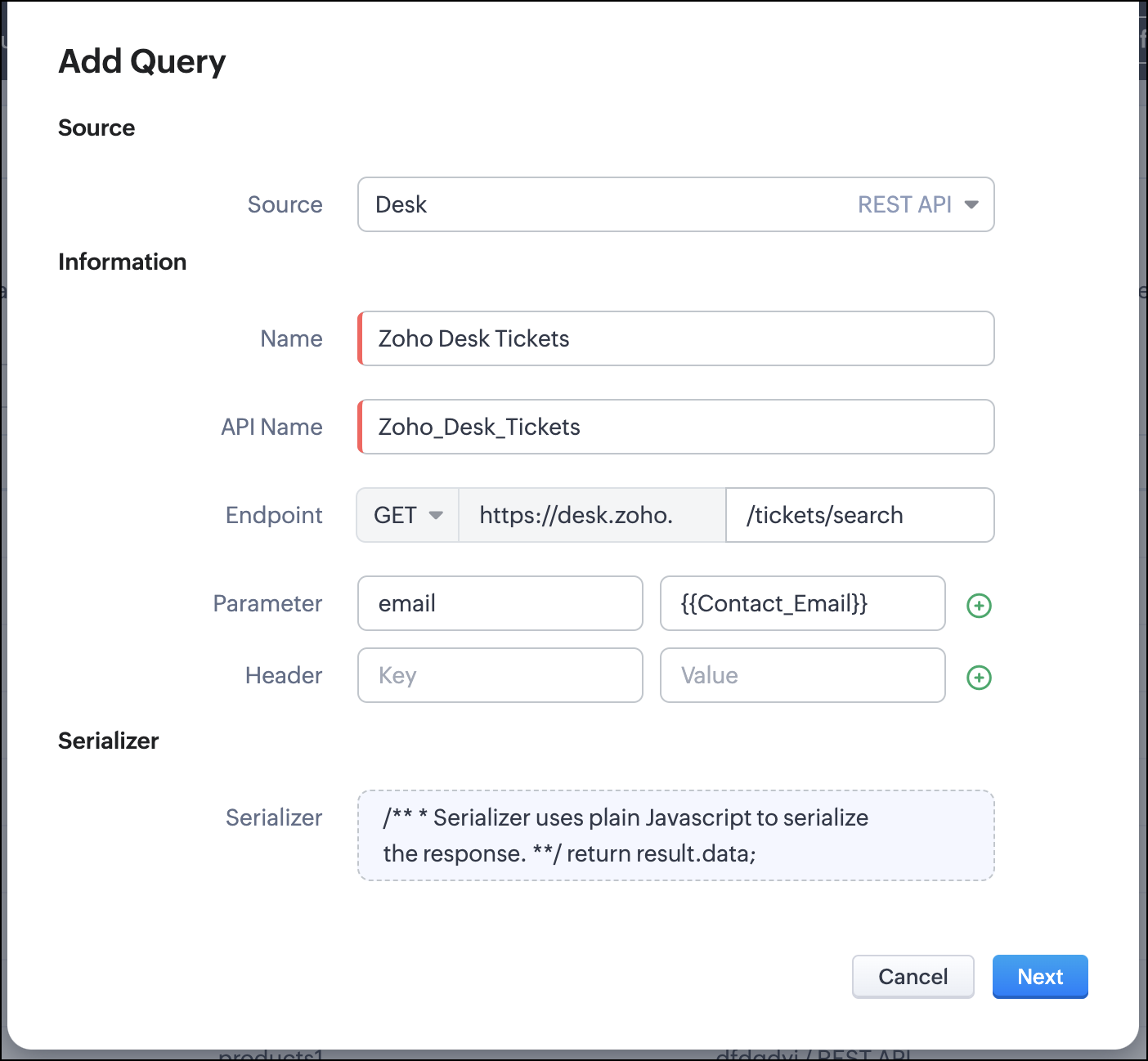
- Click Next.
- Enter an email address in the box to test the query.
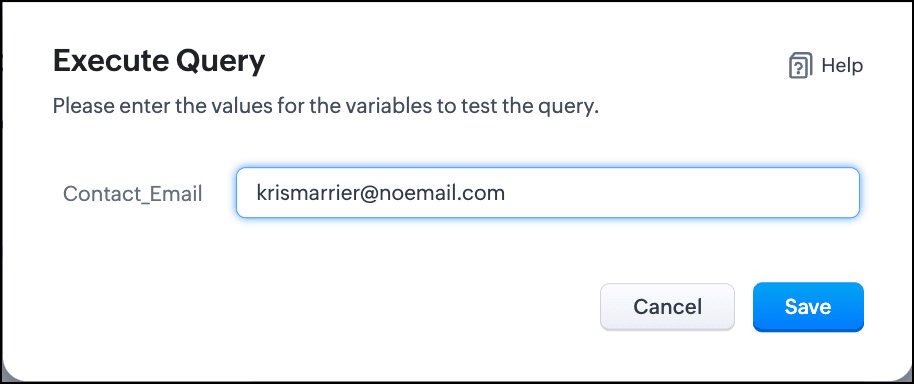
- Click Save. You can see the response of the query and the serialized response if you had serialized the output.
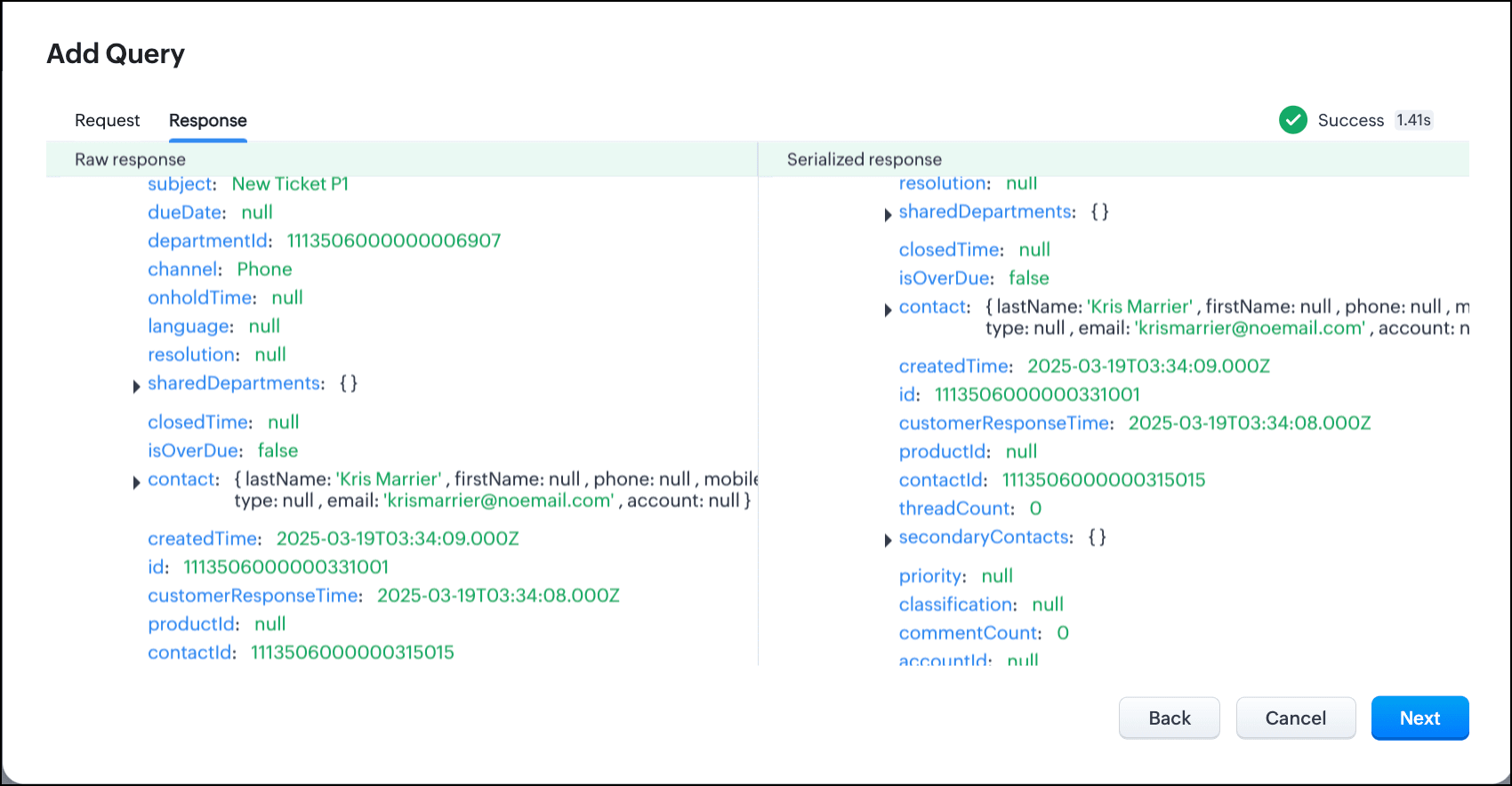
- Click Next.
- You can see the Schema of the query. The Schema acts as a bridge/mapping layer between external API responses and Zoho CRM's internal data structure. For example, the response of the Desk API returns result[].assignee.firstName, which is mapped to CRM as Assignee > FirstName. Schema ensures that the CRM UI knows how to display the field correctly.
With the right mapping in the schema, you can avoid manual data entry or syncing, and use the API data in workflows, reports, and dashboards.
You can change the CRM Field Type and Label to suit your needs. Refer to our Kaizen post on Serialization and Schema Management for more details. - Click Save to save the query.
Now that our query and fetching data from Zoho Desk is sorted, let's move on to the Canvas.
The Custom List view in Canvas enables you to stack records horizontally, one above the other.
Follow the steps in the How to Work with Canvas? guide to create a Custom List View Canvas for the Contacts module.
- On the Canvas, click the database icon for the Queries component.
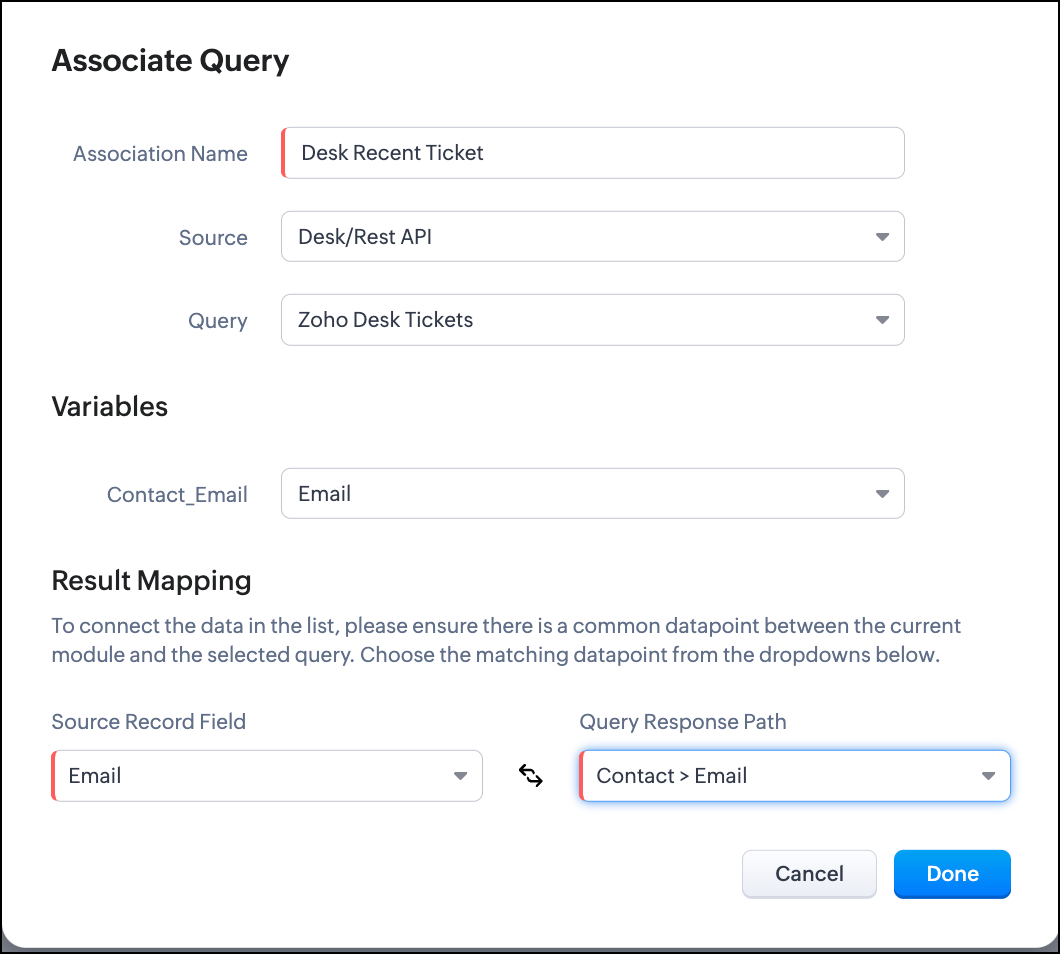
- Click Associate Query.
- Give an Association Name and select the Source(added in step 1) for the query.
- Under Query, select the query you created.
- The Variables section will contain the variables in the query. The drop-down displays all fields in the Contacts module. Select the Email field.
- Under Result Mapping, choose Email as the Source Record Field and Contact > Email as the Query Response Path. The Query Response Path is populated from the schema of the query.
- Click Done to associate the query with the canvas.
- You can see all the fields of the query on the left. Drag and drop the required fields on the canvas.
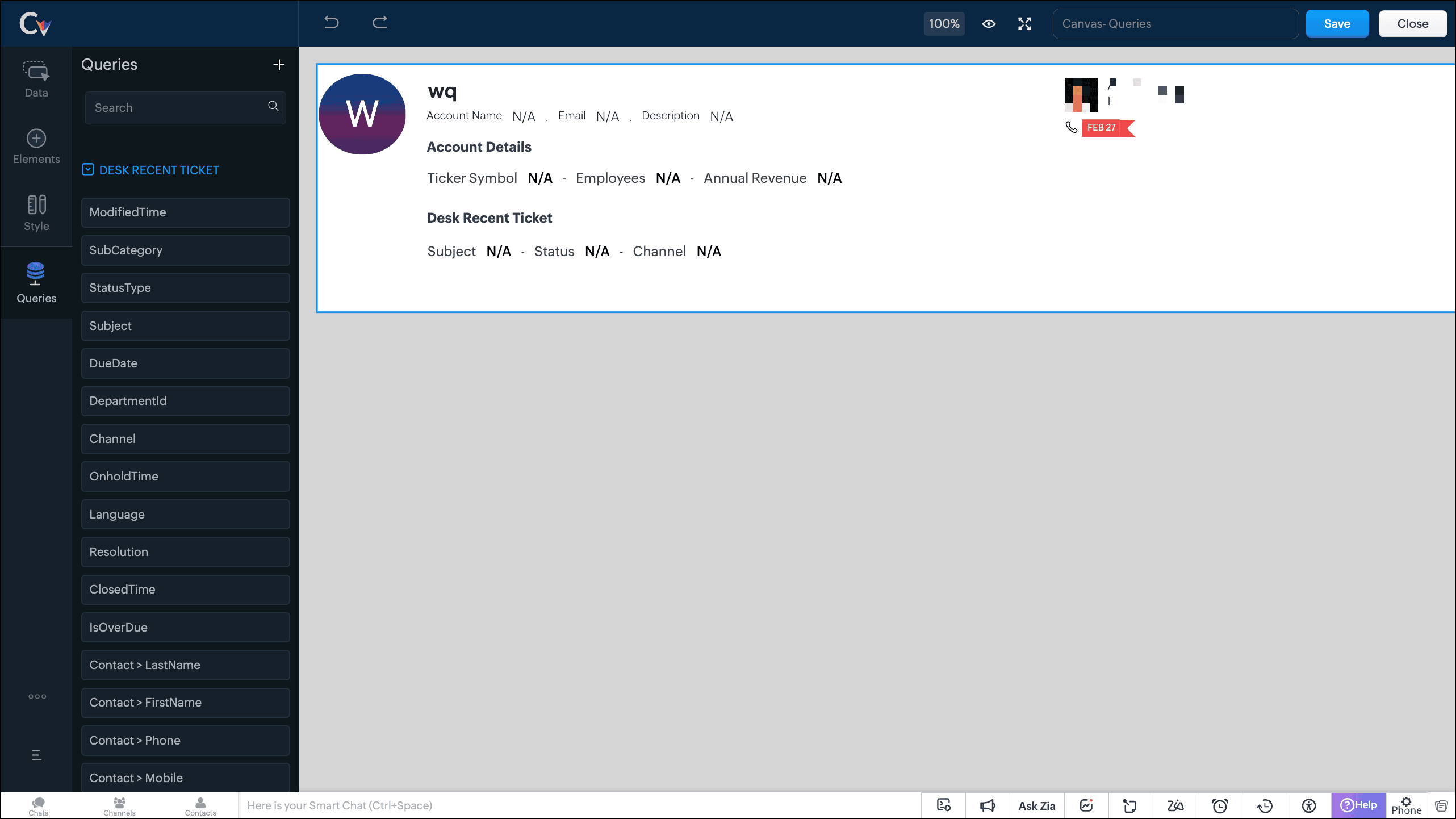
- Save the canvas.
Time for the big reveal!
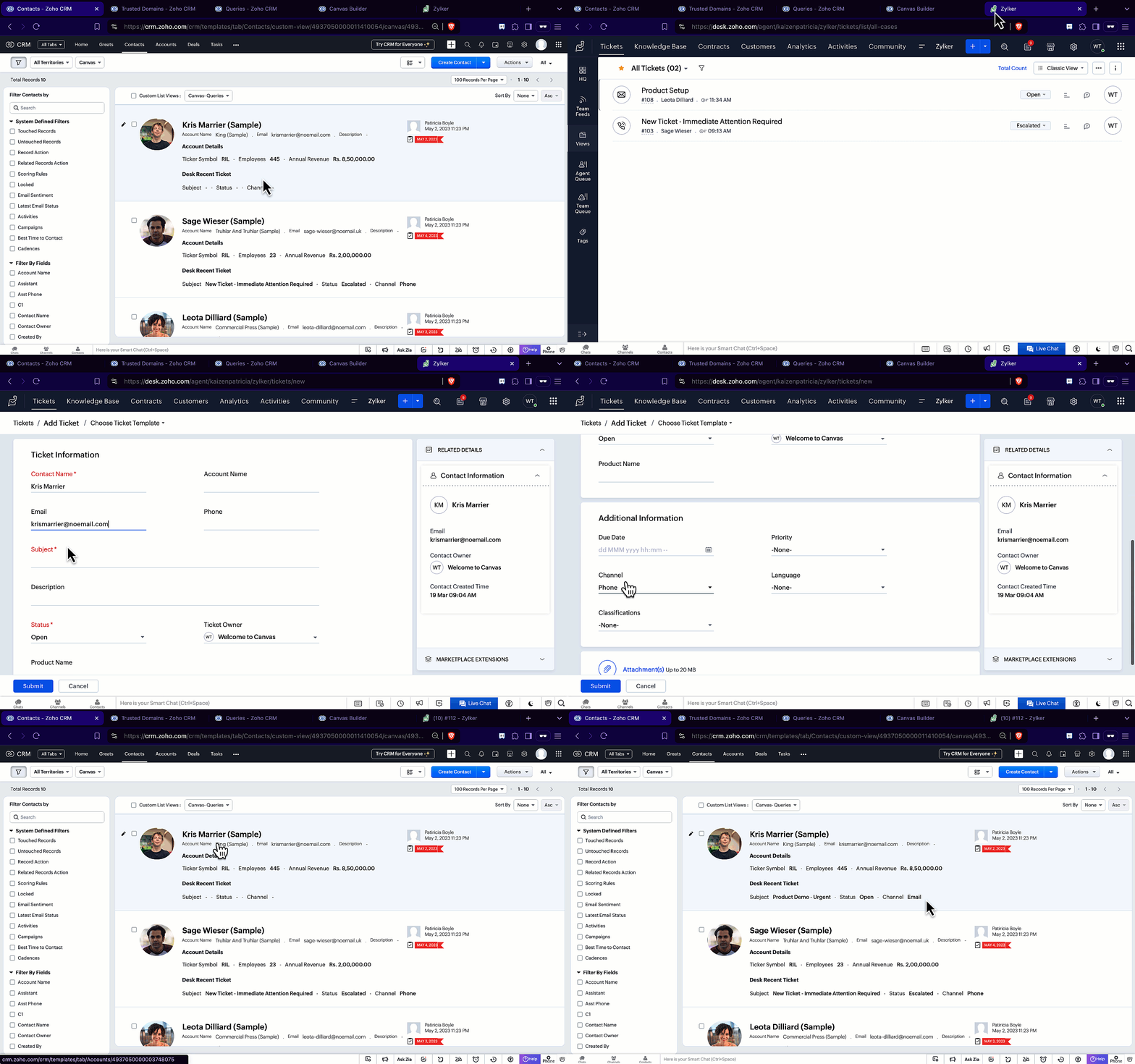
The following GIF shows how the ticket details from Zoho Desk are populated on the Canvas List View of the Contacts module.

Note that every time you reload the canvas, the query underneath makes an API call to the source provider to fetch data for the contacts in Zoho CRM. Ensure your API calls are monitored to avoid exhasuting your credits.
We hope you liked this post.
Topic suggestions are welcome! See you all next week!
Cheers!
----------------------------------------------------------------------------------------------------------------------------------------

See Also
Topic Participants
Shylaja S
Sticky Posts
Kaizen #217 - Actions APIs : Tasks
Welcome to another week of Kaizen! In last week's post we discussed Email Notifications APIs which act as the link between your Workflow automations and you. We have discussed how Zylker Cloud Services uses Email Notifications API in their custom dashboard.Kaizen #216 - Actions APIs : Email Notifications
Welcome to another week of Kaizen! For the last three weeks, we have been discussing Zylker's workflows. We successfully updated a dormant workflow, built a new one from the ground up and more. But our work is not finished—these automated processes areKaizen #152 - Client Script Support for the new Canvas Record Forms
Hello everyone! Have you ever wanted to trigger actions on click of a canvas button, icon, or text mandatory forms in Create/Edit and Clone Pages? Have you ever wanted to control how elements behave on the new Canvas Record Forms? This can be achievedKaizen #142: How to Navigate to Another Page in Zoho CRM using Client Script
Hello everyone! Welcome back to another exciting Kaizen post. In this post, let us see how you can you navigate to different Pages using Client Script. In this Kaizen post, Need to Navigate to different Pages Client Script ZDKs related to navigation A.Kaizen #210 - Answering your Questions | Event Management System using ZDK CLI
Hello Everyone, Welcome back to yet another post in the Kaizen Series! As you already may know, for the Kaizen #200 milestone, we asked for your feedback and many of you suggested topics for us to discuss. We have been writing on these topics over the
Recent Topics
Custom CSS in Zoho Form
Hi, Please let me know, how we can add custom css in Zoho Form. ThanksZoho Recruit
Getting this issueMissing Email
We recently started using ZohoMail we migrated our users from google workspaces. The migration process seemed to have gone smoothly however not all emails are showing in the inbox folder. For example: If I sort the inbox folder from old to new. (OldestClient Script Quality of Life Improvements #1
Since I'm doing quite a bit of client scripting, I wanted to advise the Zoho Dev teams about some items I have found in client script that could be improved upon. A lot of these are minor, but I feel are important none-the-less. Show Error on SubformAccount blocked after accessing via VPN
All my accounts are blocked after using a VPN. I have submitted multiple support tickets without response. It’s critical that my email be restored asap Can you please provide a way to unblock my accountsExchange Rate Updates
Hi, It would be great that when you work with multiple currencies, the exchange rate updates automagically every day (as seen on Zoho Books) or at least that when you create/update an opportunity the exchange rate could be manually updated, or maybe both!Courses without signup
Can I create "real" public courses where no signup is needed?Espace Sandbox – Votre environnement de test sécurisé dans Zoho Projects
Zoho Projects propose un sandbox sécurisé pour tester des configurations, des personnalisations et des modifications sans compromettre les données en production. Note : Disponible avec le plan Enterprise le plus récent basé sur les utilisateurs (y comprisDescargas en learn
Buenos dias, yo en mis cursos para no tener que cargar los archivos que utilizare en las lecciones decidi utilizar la opcion de bloques para añadir un enlace de mi workdrive con el video que deseo para que sea todo mas organizado, pero hay un problema.Mail delivery
I initially had a problem sending any outgoing mail and was able to fix it on my own, given Zoho support never got back to me. However, despite being able to send emails now, none of my mail to different Gmail addresses are arriving, and they are notMermaid Support & Zoho Learn
Hi Zoho Team, I’m currently working with Zoho Learn and was wondering if there’s any way to add support for Mermaid syntax to create flowcharts, sequence diagrams, and other visual elements within articles or lessons. Mermaid is widely used in technicalBlocked due to VPN
Hi My account outgoing mails and IMAP access have been blocked due to using a vpn being interpreted as suspicious logins. I’ve tried to mail support but not sure if this is also blocked. This is extremely frustrating as I’m using a vpn because I’m travellingreset admin access.
I am a user under the domain @lanutraceuticals.com. I do not have admin access. Kindly let me know the administrator contact or help me reset admin access.”Unsubscripation booked domin
Kindly Un subscription booked domainHow to change Super Admin
Good Day, Can someone kindly guide me on how to change the super Administrator. I have tried many times but could not succeed.Events disappearing in Calendar
To reproduce the bug: 1.- Add a new event in Calendar 2.- Type any name for the Event 3.- Click "Create" 4.- The event appears 5.- Click on the event to open it 6.- Optional: Edit the event 7.- Click OK 8.- After two seconds, the event disappears Now, click on another day and then come back to the inserted event's day. The event appears.Mail transfer to a contact with multiple accounts
Hi, Since we can only associate one email for a Contact across Zoho, would it be a problem if we want to merge our mailbox in the future? For example, Mr. Jones is the main POC for 5 accounts, once we merge our mail where would the messages go-- is it@mention not working in Mail
Am I missing something? When trying to forward a message there is a hint you could do this also by "@mention" at the end of the message. When typing (for example) "@s.." there should appear addresses from my contacts, shouldn´t it? But nothing happens! So what can I do? Best regards and thanks for any help in advance! JH P.S.: Sorry for my bad English.Enable Zia-Powered Deluge Assistance and AI Agent Without Mandatory OpenAI Integration
Hi Zoho Creator Team, Hope you're doing well. We’d like to request a feature enhancement related to Zia's AI capabilities in Zoho Creator, particularly regarding Deluge Assistance and the AI Agent. Currently, as shown in your documentation (Generate DelugeZoho Sign community meetup series - India
Hello everyone! Zoho Sign is a comprehensive digital signature application tailor-made for Indian businesses with unique features like Aadhaar eSign, eStamping, USB/PFX signing. We are now excited to announce our first meetup series for Zoho Sign in India,Product Updates in Zoho Workplace applications | June 2025
Hello Workplace Community, Let’s take a look at the new features and enhancements that went live across all Workplace applications this June. Zoho Mail Slideshow view for inline images in Notes View all your inline images added in a notes in a effortlesslyAssign multiple vendors to the same product
Guys, My business often purchase the same product from several vendors (based on price and availability). Is it possible to assign more than one vendor to the same product? I saw this same question in this forum, from some time ago. Is this feature available or, at least, in Zoho's roadmap? If not, is there any trick to solve my problem? Without this feature, I simply cannot manage my company's inventory, limiting very much the use of Zoho CRM. Waiting for your reply. Leonardo Kuba Sao Paulo / BrazilIs there as way to shut off the invitation when you set up a new user?
Is there as way to shut off the invitation when you set up a new user? I would like to get all my users in the system, my org structure set up and tested, etc, BEFORE I invite the users. I did not see a way to shut of the automatic invitation email. The only way to get around it is to set up the users with no Email ID. However, when you do that - you get into the problem of not being able to update a user's Email ID (which makes NO sense whatsoever). If I set up a user with an incorrect emailManage Engine login issue
App not available The app you're trying to access isn't yet available in the in data center region, where your account is present. To use ManageEngine, you can sign up for a new account in another data center region. Learn How Go to Zoho accounts PleaseZoho Creator - users "Name" Column
Hi, When you add user to an application inside Zoho Creator, the system generate an account name for it. We don't have the ability to change this name. According to Zoho creator Support (Case:11523656) : "The values displayed under 'Name' column of 'Users & permissions' section, is actually the respective account's username and not the actual name specified on the account. Usernames are system designated based on the account email address and cannot be modified from your end." We need to have theZoho Assist Unattended - devices disappearing
Hello, I've recently introduced a new model of laptops into our environment (Lenovo Legion). We are experiencing an issue where only the latest installed agent - laptop is visible in Assist. This issue does not appear with our Dell inventory. Example:Searchable email tab in Bigin
Hi team, Could I please request a feature update, to be able to search emails within the email tab of Bigin. We have large correspondence with some agents and it would be very helpful if we are able to search from this section:The silent force behind great customer service
Customer service is known to be a demanding role. Customer service agents are expected to bring empathy, clarity, and human connection to every voice call, chat, and remote session, even if the situation requires some time for customers facing stressful,New From Email in Zoho Desk
Dear ZohoSupport, We are trying to establish a new From Address in Zoho Desk but we are facing difficulties. When trying to use the smtp.office365.com SMTP Server, after clicking the Save and Verify button, the Authentication Failed error pops up although,Option in pipeline deal to select which hotel or branch or store if client has more than one local store
Hi, I would like to know if there is an option in the deal pipeline to select which hotel, branch, or store a deal is related to—if the company has more than one location. For example, I have a client that owns several hotels under the same company, andAggregate SalesIQ Knowledge Base Interactions into Zoho Desk Knowledge Base Dashboard
Hello Zoho Desk Team, We hope you're doing well. We’d like to request a feature enhancement related to the Zoho Desk Knowledge Base dashboard and its integration with Zoho SalesIQ. 🎯 Current Limitation When customers interact with knowledge base articlesAdmin Visibility and Control Over Group Chats in Zoho Cliq
Hello Zoho Cliq Team, We hope you're doing well. While we appreciate the current capabilities in Zoho Cliq — including the ability to restrict who can create group chats and configure user permissions — we would like to request several enhancements toUpdate Regarding Zoho Finance Applications' Domains For API Users
Hi users, Until now, both the Zoho Finance apps and their APIs shared a common domain. We've recently introduced separate domains for APIs. You can now start using the new domains for API calls. The old domains will not work for API users starting AprilAbility for Agents to Initiate Voice Calls With Site Visitors Without Active Chat Session
Dear Zoho SalesIQ Team, Greetings, We would like to request a feature enhancement related to the voice call functionality in Zoho SalesIQ. Current Limitation: At the moment, voice calls can only be initiated by agents after a chat session has been startedAdd new Card
How do you add a new credit card to a contact with Zoho API as can be done on web. I am not able to find way to do this with Books API, CRM API or Subscriptions API. This is an issue for our company as we do migration from a different system. I can add card to a subscription through Subscriptions API, but some of our customers may not have a subscription, but only invoices set up in Zoho Books. Is there any way in Zoho API to add new credit card to contact/customer?Benchmark for Using Mail Merge in Service Order Scopes
Hello, I was wondering if Zoho CRM has a benchmark or best practices for utilizing Mail Merge in service order scopes. Specifically, I'm looking for guidance on how to effectively integrate this feature for creating and managing service orders, especiallyWhy don't we have better integration with Mercado Pago or Pagseguro?
Currently, the integration between Zoho Commerce and Mercado Pago for Brazil is very poor... Since it is old, it does not include the main payment method in Brazil today, which is PIX. Is there a date for this to finally be launched? There are numeroustwo columns layout
it's actually frustrating to not have this feature, I actually had to convince my employer to subscribe to zoho forms and integrate it with zoho crm, but because of this feature not beeing provided, our forms looks unnecessarly long and hideous.Sync Zoho Desk Help Center Category Icons to SalesIQ Articles
Dear Zoho SalesIQ Team, Greetings, We are using the integration between Zoho SalesIQ and Zoho Desk to sync articles from our Zoho Desk Knowledge Base into SalesIQ. While this integration works well for syncing article content, we’ve noticed a visual inconsistency:Company Name not pre-populating when using Quick Create: Contact
Hi Devs, This has bugged me for a long time, and it's a simple UX design change to solve it. Problem: Users creating Contacts not linked to Companies/Accounts Cause: When a user creates an Opportunity where after browsing the Contacts they realise theyNext Page