Kaizen #182 - Queries in Canvas List View

Hello everyone!
Welcome to another week of Kaizen!
We're back with another post in this series on Queries in Canvas List View.
Queries in Zoho CRM allow you to dynamically retrieve data from CRM as well as third-party services directly within the CRM platform.
You can construct a query of one of the following types:
- CRM Module type query to retrieve data from CRM modules.
- COQL type query to construct a query using the COQL API.
- REST API type query to fetch data from an external service and use it in Zoho CRM.
You can associate a query with the 'Decision' component of Kiosk, Canvas Detail View, or Canvas List View.
In this post, we will take up a use case and see how you can associate a query with Canvas List View.
Use case
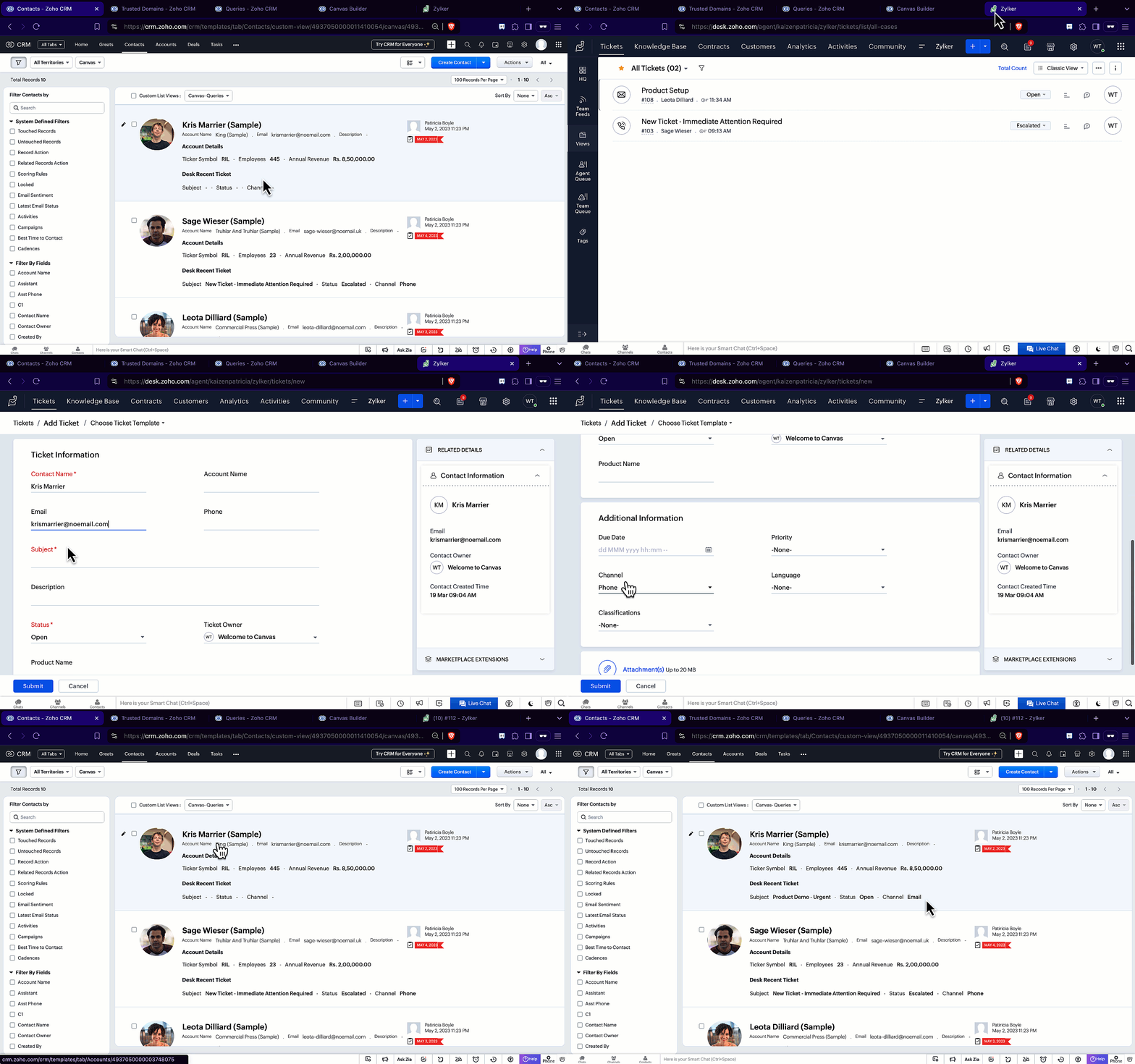
Sales and support teams often need quick access to Zoho Desk tickets related to a contact in Zoho CRM. To avoid switching between apps to check ticket statuses, we can use the Queries feature to fetch the latest Zoho Desk ticket's details of a contact dynamically and display them on the Canvas List View page of the Contacts module.
This ensures that CRM users can instantly view the most recent ticket linked to a contact without leaving Zoho CRM.
Follow along to see how you can achieve this!
Step 1 - Add a Source
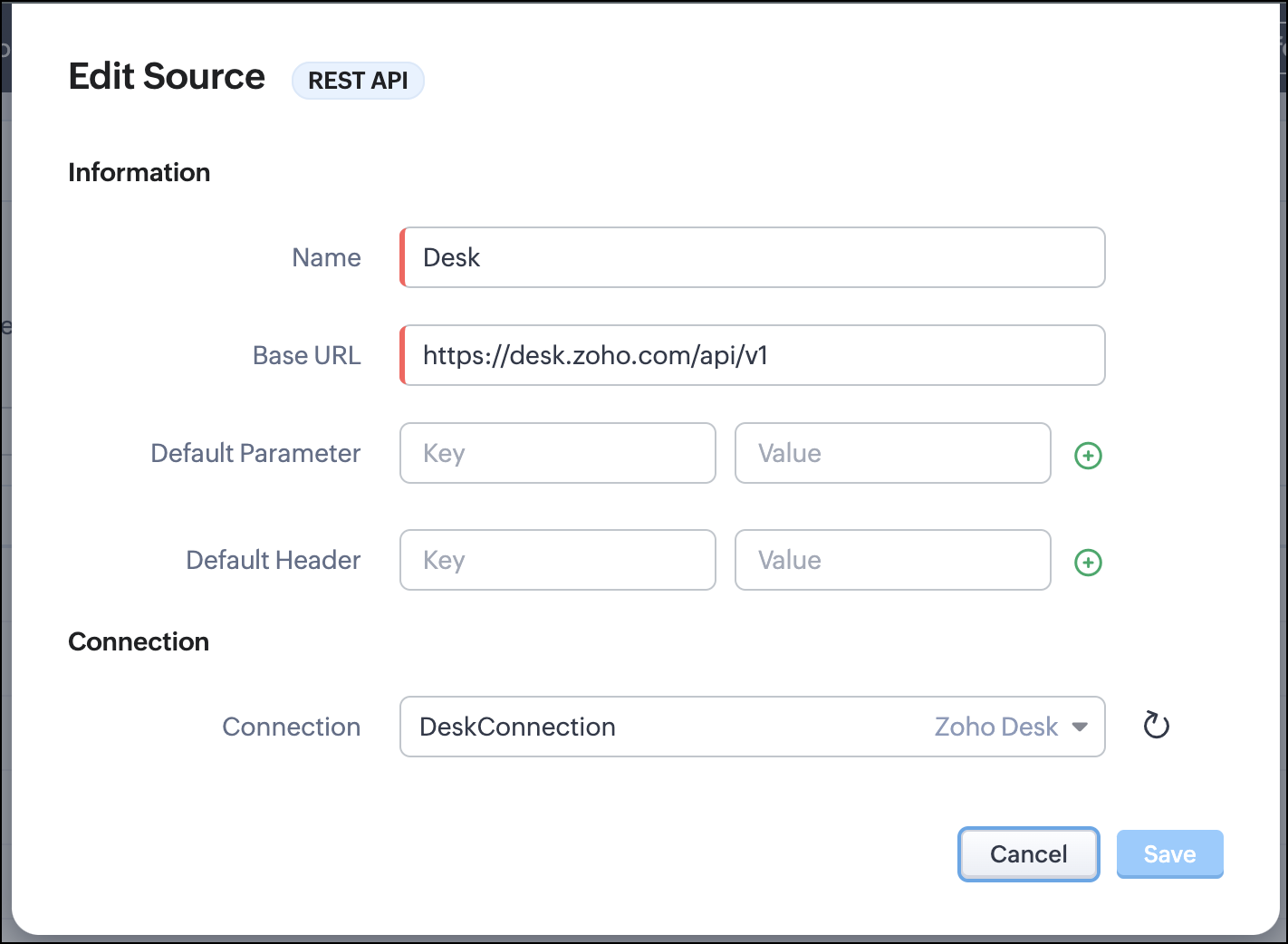
- Go to Setup > Developer Hub > Queries > Sources > Add Source.
- Under Information,
- Give a name for the source and its Base URL. Queries will make API calls to this URL to fetch data. Ensure to add this to Trusted Domain.
- Specify any default parameters and headers for this base URL.
- Under Connection, choose the connection you have created with Zoho Desk with the necessary scopes. If you haven't, create one.
- Click Save.

Note
Queries will make API calls to the URL you add in the Source and consume credits that are applicable in that service. Ensure you monitor your API usage in your source provider.
Step 2 - Create a REST API Query
- Go to Setup > Developer Hub > Queries > Add Query.
- Under Source, choose the source you created in step 1.
- Under Information,
- Enter the Name, API Name, and the Endpoint of the query.
- Specify the parameter email that takes the dynamic variable {{Contact_Email}} as its value. This is to fetch the latest ticket from Zoho Desk for a contact with the email in this variable during runtime. Refer to our Kaizen post on Handling Query Variables in Zoho CRM for additional details.
- Specify Headers, if any.
- You can serialize the output to fit your needs using JavaScript in the Serializer.
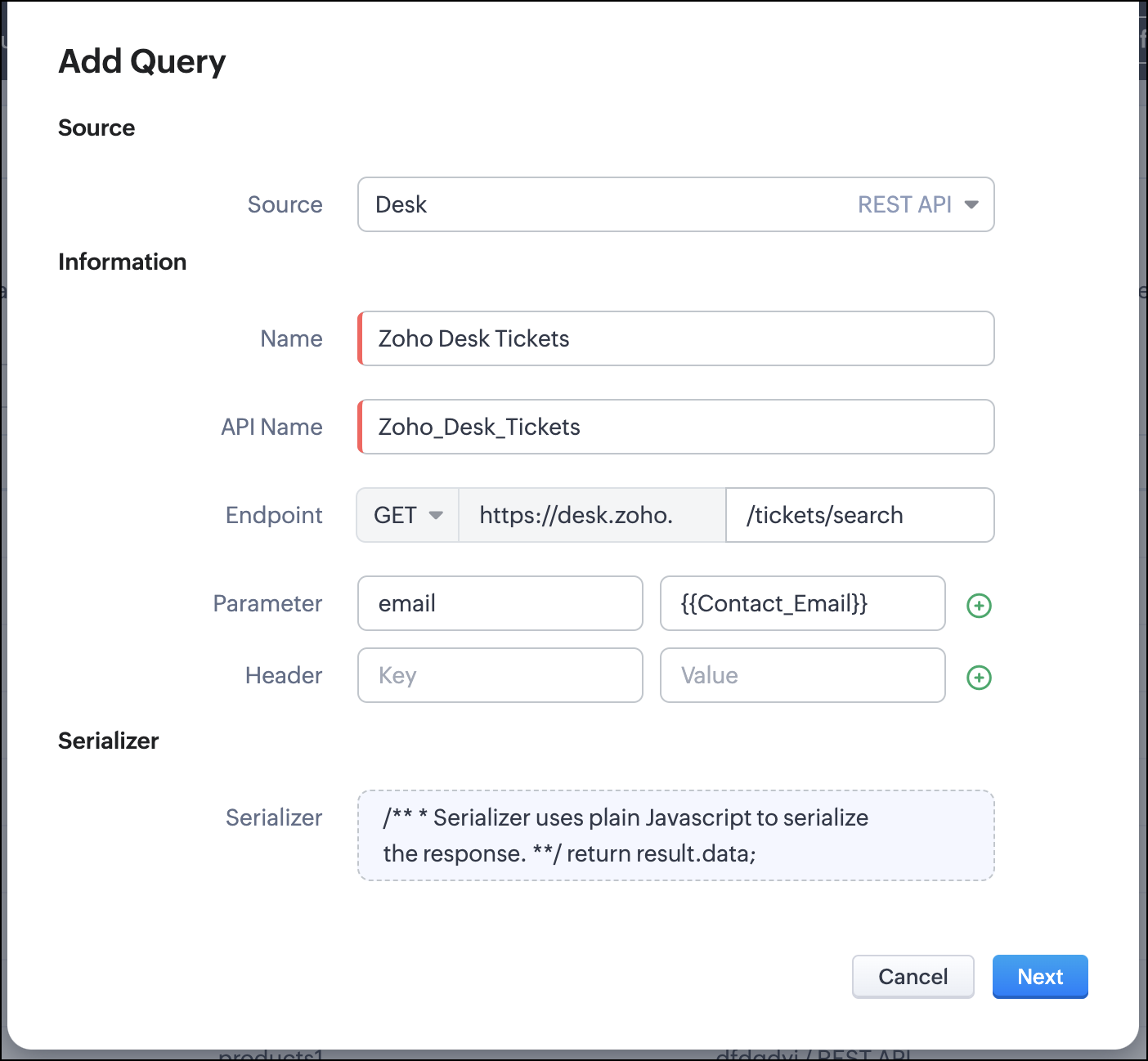
- Click Next.
- Enter an email address in the box to test the query.
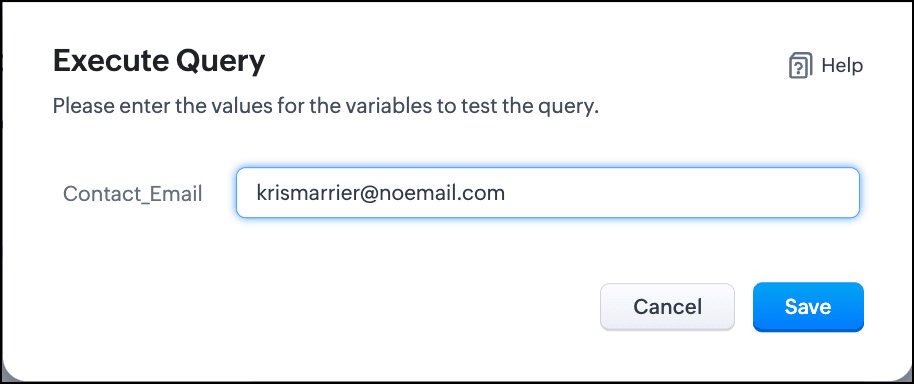
- Click Save. You can see the response of the query and the serialized response if you had serialized the output.
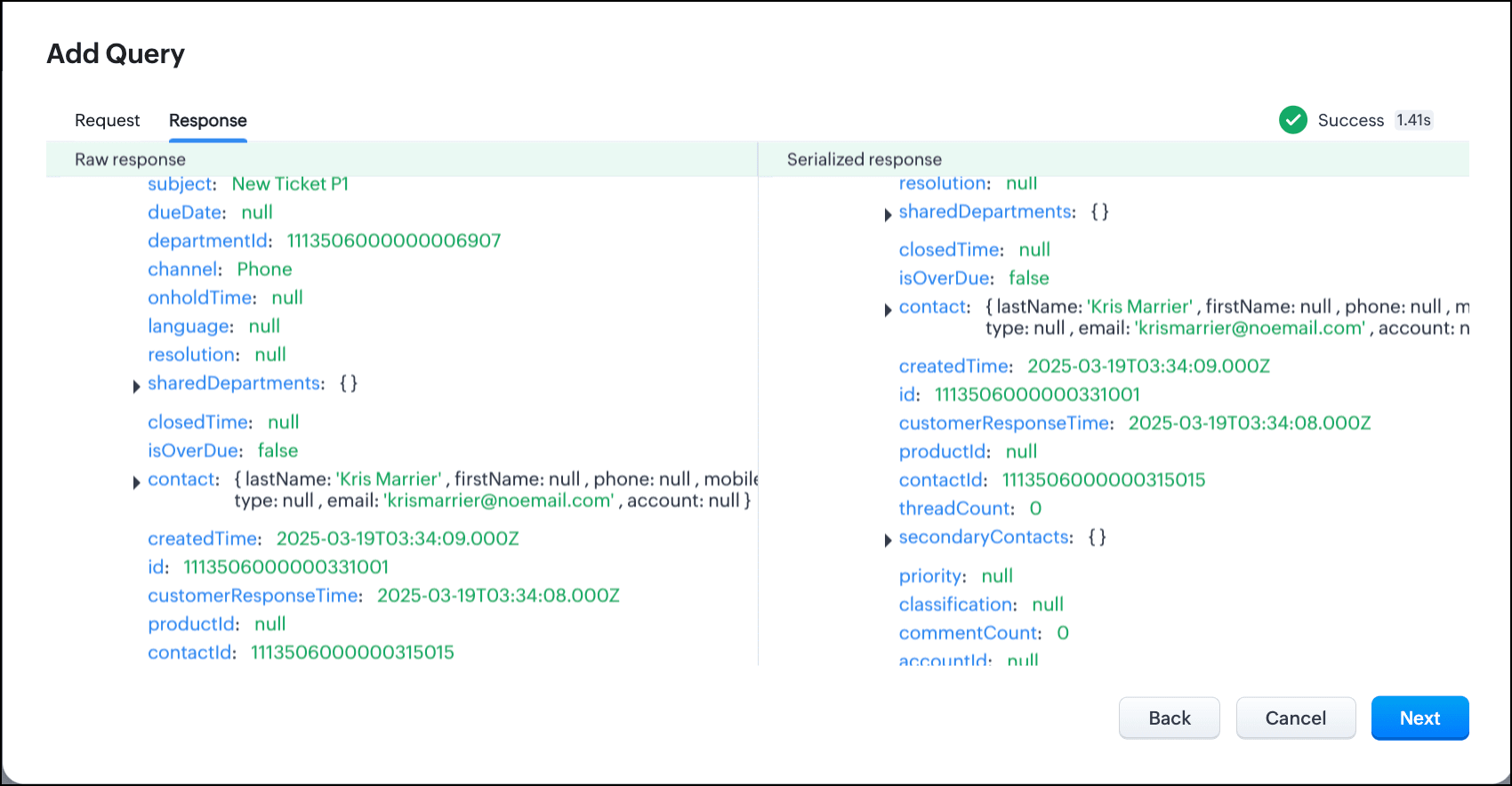
- Click Next.
- You can see the Schema of the query. The Schema acts as a bridge/mapping layer between external API responses and Zoho CRM's internal data structure. For example, the response of the Desk API returns result[].assignee.firstName, which is mapped to CRM as Assignee > FirstName. Schema ensures that the CRM UI knows how to display the field correctly.
With the right mapping in the schema, you can avoid manual data entry or syncing, and use the API data in workflows, reports, and dashboards.
You can change the CRM Field Type and Label to suit your needs. Refer to our Kaizen post on Serialization and Schema Management for more details. - Click Save to save the query.
Now that our query and fetching data from Zoho Desk is sorted, let's move on to the Canvas.
The Custom List view in Canvas enables you to stack records horizontally, one above the other.
Follow the steps in the How to Work with Canvas? guide to create a Custom List View Canvas for the Contacts module.
- On the Canvas, click the database icon for the Queries component.
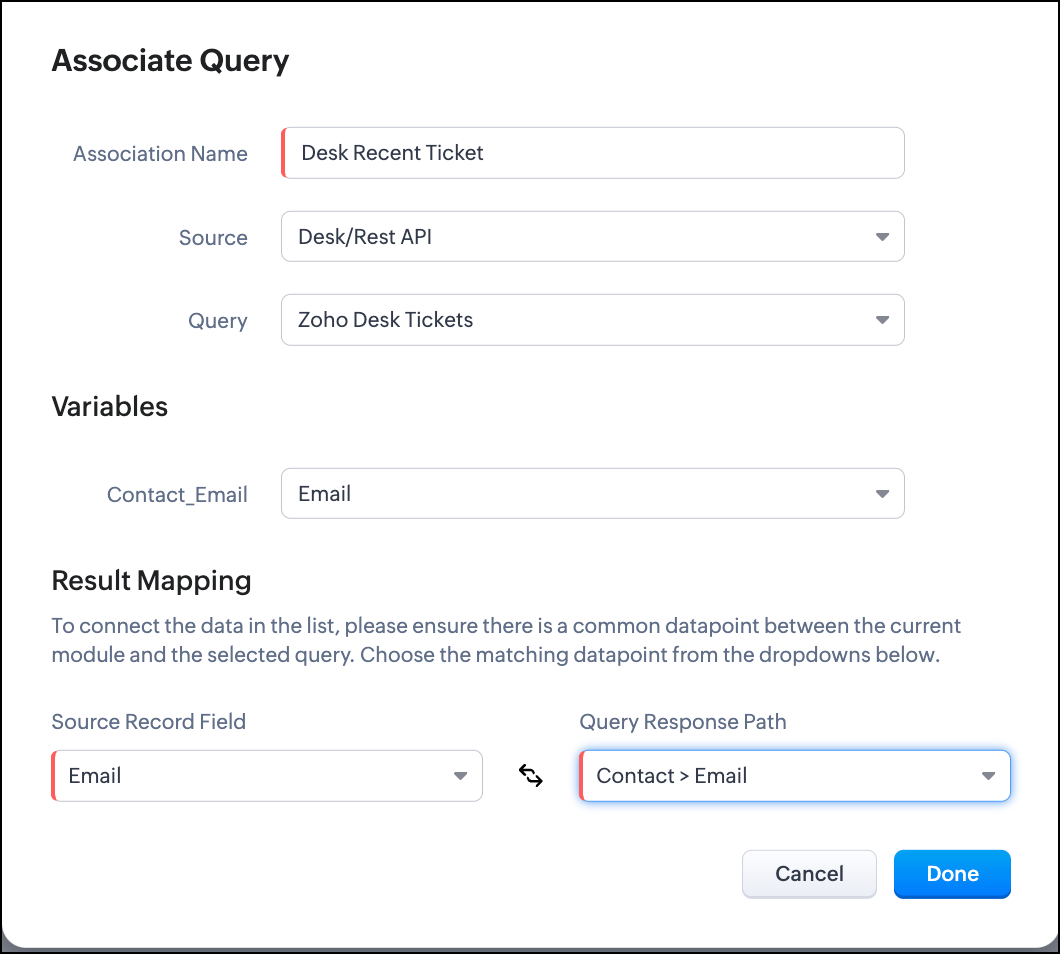
- Click Associate Query.
- Give an Association Name and select the Source(added in step 1) for the query.
- Under Query, select the query you created.
- The Variables section will contain the variables in the query. The drop-down displays all fields in the Contacts module. Select the Email field.
- Under Result Mapping, choose Email as the Source Record Field and Contact > Email as the Query Response Path. The Query Response Path is populated from the schema of the query.
- Click Done to associate the query with the canvas.
- You can see all the fields of the query on the left. Drag and drop the required fields on the canvas.
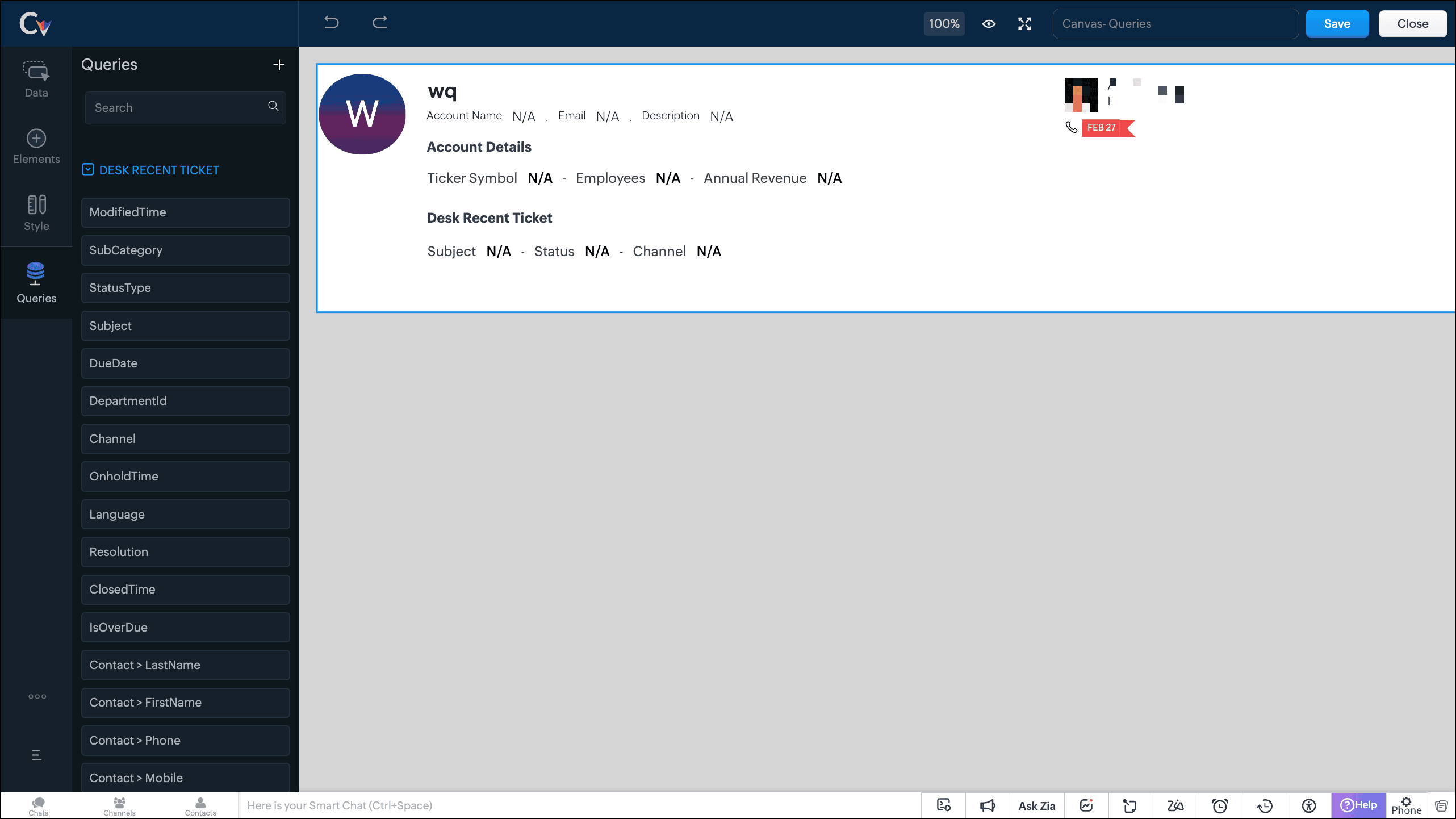
- Save the canvas.
Time for the big reveal!
The following GIF shows how the ticket details from Zoho Desk are populated on the Canvas List View of the Contacts module.

Note that every time you reload the canvas, the query underneath makes an API call to the source provider to fetch data for the contacts in Zoho CRM. Ensure your API calls are monitored to avoid exhasuting your credits.
We hope you liked this post.
Topic suggestions are welcome! See you all next week!
Cheers!
----------------------------------------------------------------------------------------------------------------------------------------

See Also
Topic Participants
Shylaja S
Sticky Posts
Kaizen #217 - Actions APIs : Tasks
Welcome to another week of Kaizen! In last week's post we discussed Email Notifications APIs which act as the link between your Workflow automations and you. We have discussed how Zylker Cloud Services uses Email Notifications API in their custom dashboard.Kaizen #216 - Actions APIs : Email Notifications
Welcome to another week of Kaizen! For the last three weeks, we have been discussing Zylker's workflows. We successfully updated a dormant workflow, built a new one from the ground up and more. But our work is not finished—these automated processes areKaizen #152 - Client Script Support for the new Canvas Record Forms
Hello everyone! Have you ever wanted to trigger actions on click of a canvas button, icon, or text mandatory forms in Create/Edit and Clone Pages? Have you ever wanted to control how elements behave on the new Canvas Record Forms? This can be achievedKaizen #142: How to Navigate to Another Page in Zoho CRM using Client Script
Hello everyone! Welcome back to another exciting Kaizen post. In this post, let us see how you can you navigate to different Pages using Client Script. In this Kaizen post, Need to Navigate to different Pages Client Script ZDKs related to navigation A.Kaizen #210 - Answering your Questions | Event Management System using ZDK CLI
Hello Everyone, Welcome back to yet another post in the Kaizen Series! As you already may know, for the Kaizen #200 milestone, we asked for your feedback and many of you suggested topics for us to discuss. We have been writing on these topics over the
Recent Topics
【Zoho CRM】アナリティクス機能のアップデート:ウォーターフォールの導入
ユーザーの皆さま、こんにちは。コミュニティチームの藤澤です。 今回は「Zoho CRM アップデート情報」の中からアナリティクス機能のアップデートをご紹介します。 本記事は、以前紹介された機能に新たに追加された機能です。 以前の記事:https://support.zoho.co.jp/portal/ja/kb/articles/zoho-crm-visualize-your-data-with-a-new-set-of-charts-treemap-butterfly-sankey-and-cluster-charts[Free Webinar] Learning Table Series - Creator for the Finance Industry
Hello Everyone! The Learning Table Series is a free monthly webinar that runs for around 45 minutes. It's offered to our Community users and aims to provide a dynamic learning experience by demonstrating how Creator can be used as a solution for variousWebhook - Configuration failed: 200 response not received for POST request
Hello, I am trying to set up a webhook to connect with an automation software but I receive the following error from Zoho: Configuration failed: 200 response not received for POST request I have tried testing it on webhook.site as well and receive theAutomated Shopify adjustment problem. "An inventory adjustment has been created by the system to set the initial stock from Shopify"
Has anyone noticed issues since the Shopify Sync has been updated recently? If you sync with Shopify, check to see if there are automated adjustments for old products that keep recurring. We have this problem for 6 SKU's that Zoho is doubling the stockBest website platform to sync to Zoho Inventory
Anyone like to suggest the best website platform for syncing to Zoho Inventory? We DO NOT want to sync stock, only orders. Shopify - not an option as we have more than one website and Shopify requires 2 accounts and Zoho will not sync with 2 different accounts. Magento and WooCommerce both sync via Kloudconnectors - does anyone have any experience with this? I have trialled it and there are flaws - eg purchase order numbers are not populated. Discussion welcome!Include product images in data sync between Zoho CRM and Zoho Inventory
Currently the item image does not sync between Zoho CRM and Zoho Inventory when using the internal Zoho sync functionality. This requires users to manually update the item image in Zoho Inventory for products created in CRM and vice versa. Including theShow ordered quantity on packing slips and invoices
Hello Is there any way possible to show the original ordered quantity of an item (as recorded in the sales order) on subsequent package slips and sales invoices, so that these documents can show the customer the ordered qty vs the qty being currentlySearch Zoho Inventory Items module via API
How can I search Zoho Inventory Items by custom fields, categories, etc using the API? This is not documented. Is there an advanced search function like CRM's COQL search available via the Zoho API? If there is an undocumented way to search Items viaHow can I get my images to display correctly on mobile site?
I have just created a site and uploaded images, which look perfect on the desktop version. However when I view the site on my mobile device some of the images are not displaying correctly. They are all blurry. Anyone else experience this?Does Creator support HTMX?
I love the Zoho ecosystem and Zoho Creator does a lot of things really well. However, I'm needing more real-time interactivity in my forms. Is the only option to create a JS widget? How about HTMX?My fix for "This report is not accessible" in published pages
Hi Community, after having the same issue as many others here and going through the community's posts, i found a solution on my own. Again, the quality of support from Zoho is pretty awful: if you cannot help yourself, you're lost. I really like Zoho,Tip of the Week #59– Enhance team collaboration with multichannel shared inboxes!
Struggling with scattered customer conversations and missed follow-ups across your team? When messages are everywhere, it's easy for them to fall through the cracks—leading to delays, duplicate replies, and miscommunication among team members. Zoho TeamInboxDelete standard e-mailtemplate
Hello, Is it possible to delete or hide a standard e-mailtemplate? I would only like to show my own created e-mailtemplates to my staff. I only find a 'delete' option at my custom made e-mailtemplates, but the standard e-mailtemplates do not show thisAdd values to Countdown Mode
Is it possible to add values to the countdown mode drop down? The longest is 2 days. I would like values for 5 days, 10 days, 15 days...RSS feed from a Zoho site blog?
Does the Zoho Site blog have an RSS feed associated with it? I would like to have this picked up on a business Facebook page. thanksRefresh token not appearing
Hello, I was wondering if there is another way of obtaining a refresh token, as following the usual 60-second-code procedure generates a new access token, but not the refresh token, and so i have to repeat everything to get a new token every hour or so,How would I collect a signature in person on Zoho sign?
Suppose I have a customer show up at my office and we close a deal. I have an iPad ready to go, and I need to have the customer sign the document right there. How would I do it?What's New in Zoho Analytics - June 2025
Hello Users, We're delighted to bring you new features and enhancements designed to make your analytics experience smarter and more powerful than ever. AutoML Enhancements We’re thrilled to introduce powerful new AutoML enhancements, making machine learningCRM Client scripts via extension?
I've made a lot of industry specific customization to zoho CRM, using custom modules, workflows/automations, deluge scripts, api calls, and client scripting. I have had organic interest explaining what i've done to other small business owners in my industry.How to import data via Excel for a multi-select lookup field?
In the Accounts module, I have a multi-select lookup field to the Contacts module. When I import Accounts data via Excel, I want to enter the contact email address (which is used as the identifier) under the column name for the multi-select lookup field.Need better way to tie Undeposited Funds to Invoice Payments to make it easy to reconcile Undeposited Funds account
Hello, Request to have Zoho create tighter integration between Undeposited Funds and Invoice Payments. Currently reconciling the undeposited funds account is a fairly tedious process for us. Since the deposits and payments are just thrown into a "bucket"Customized folder permissions in web Zoho WorkDrive won't apply to Sync
Hi, within the 'Deals' macro-folder I created a folder for each Sales person (att. 1). Within each Sales person's folder a subfolder is automatically generated via function every time a new deal record is created in Zoho CRM, i.e. 1 deal record = 1 dealWhat happens after trial period
Dear Support, We are planning to use ZOHO CRM for our organization. We are now registered for a 15 days trial version. I would like to know what happens with our account and our data after these 15 days. Will it automatically change into a 'free' accountForte's Extra Costs
Hello everyone in the Zoho community, I wanted to share some information about Forte in case anyone wanted to look into them as a processor. I currently use Stripe, but wanted to use Forte's ACH to pay vendors and take ACH payments for our products. This is one of the only ACH processors that Zoho accepts. They state their cost is $25/month plus their transaction fees for ACH. However, after signing up and going through their approval process, I found this out they work with a PCI compliance serviceSEPA stripe vs gocardless
Hi, we want to use Zoho Books - but as we are a company that is based in Germany we are using SEPA mandates. I know that its possible to use GoCardless - but the fees are extremly high (15 EUR fee for a 5000 EUR transaction). Is there any other way toZoho Commerce - Zoho Shop (Multilanguage)
hi there we have a shop in zoho commerce, can I change the language in the shop, i mean, can I create a German and a French version, as an instance or something? If yes, how it works? thanks for your answers greetings priscaFrench Tutorials
Is there any Zoho projects tutorials, ebook, video or else in french? If so, where can I fin it please? ThxMy zoho mail has been disabled and cannot send email
I’m the super admin for my company’s email accounts, but my own email address has been unexpectedly locked. I’m seeing the following error message: Could you please assist in unlocking my account so I can resume sending emails?SMTP error
I am using SMTP from Zoho the account is accounts@khlaklaeeb.com it was working fine then started to have Error and unable to delivery messages SMTP host SMTP.zoho,com SMTP user: accounts@khlaklaeeb.com SMTP port 465 PAssword: App Password it was workingAutomatically creating a ticket in Zoho Desk when an invoice is created in Zoho Books
I need to find a way to create a ticket automatically (i.e. using workflow) in Zoho Desk whenever an invoice is created in Zoho Books. Please advise if there is a way of doing that?Been getting this error, every now and then "Get count limit exceeded, please try again after 3 mins"
it is really annoying.Co-existing with Google Workspace
We currently use GWS and due to legacy practices, we cannot migrate away from it. Not easily anyway. The issue we have is that while we have Zoho Mail, we get duplicate copies of emails. Our setup is that GWS is our primary. We have Zoho MX records inStop Zoho Projects From Automatically Adding Client Users
I have a custom function that creates a Zoho Project for every Quote attached to a Deal when it moves to Closed Won. Everything works fine, except for the fact that connecting a Zoho Project to the CRM automatically takes the Contact associated with thedd Linked Note to Comments & History via Custom Function + Zoho Document View Feature
Hi all, I have a couple of custom functions running in Zoho (specifically in Inventory/Books), and I'm trying to streamline it. Here’s the scenario: When a Purchase Receive is processed, my custom function automatically creates a Package. I'd like toHow to break line in zohoCRM
Hello everyone, I'm currently working with Deluge scripting language and encountering an issue with newline characters (\n). My goal is to format a string with multiple lines, but the newline characters are not being interpreted correctly. Instead ofMarketer’s Space: Supercharged Workflow with Zoho CRM Integration
Hello Marketers! Welcome back to another post in Marketer’s Space. Today, we’ll explore how integrating Zoho CRM with Zoho Campaigns can help you create smarter, more personalized Workflow. In this post, we’ll look at a specific use case to demonstrateZoho Live chat doesnt chat on CRM Contact page????
We have used Salesforce Live Agent for the last 8 years and the chat comes in on the Contact record which is logical and intuitive as the chat agent can see the customers sales history and open opportunities...etc... We just migrated to Zoho CRM and IImage Quality Issue on Zoho Assist
Hello, For the past two days, I've been experiencing a significant image quality issue on Zoho Assist when connecting to one of my computers. I’ve tried reinstalling the application, but the issue persists across multiple devices. The internet connectionNew views to manage activities within a record
Dear customers, We hope you're well! Today, we're here with a useful update to the Activities related list. As you might be aware, parent records display related information from other modules as related lists. This helps you get a 360-degree view ofSent Mail not in "Sent" IMAP folder
I have configured ZOHO to use IMAP. When I send an email from within Zoho, the email does not show up in my "Sent" IMAP folder. Every email client I have ever used, stores sent mails in the "Sent" folder. This is a serious flaw! Please fix this ASAP! OliverNext Page