Kaizen #182 - Queries in Canvas List View

Hello everyone!
Welcome to another week of Kaizen!
We're back with another post in this series on Queries in Canvas List View.
Queries in Zoho CRM allow you to dynamically retrieve data from CRM as well as third-party services directly within the CRM platform.
You can construct a query of one of the following types:
- CRM Module type query to retrieve data from CRM modules.
- COQL type query to construct a query using the COQL API.
- REST API type query to fetch data from an external service and use it in Zoho CRM.
You can associate a query with the 'Decision' component of Kiosk, Canvas Detail View, or Canvas List View.
In this post, we will take up a use case and see how you can associate a query with Canvas List View.
Use case
Sales and support teams often need quick access to Zoho Desk tickets related to a contact in Zoho CRM. To avoid switching between apps to check ticket statuses, we can use the Queries feature to fetch the latest Zoho Desk ticket's details of a contact dynamically and display them on the Canvas List View page of the Contacts module.
This ensures that CRM users can instantly view the most recent ticket linked to a contact without leaving Zoho CRM.
Follow along to see how you can achieve this!
Step 1 - Add a Source
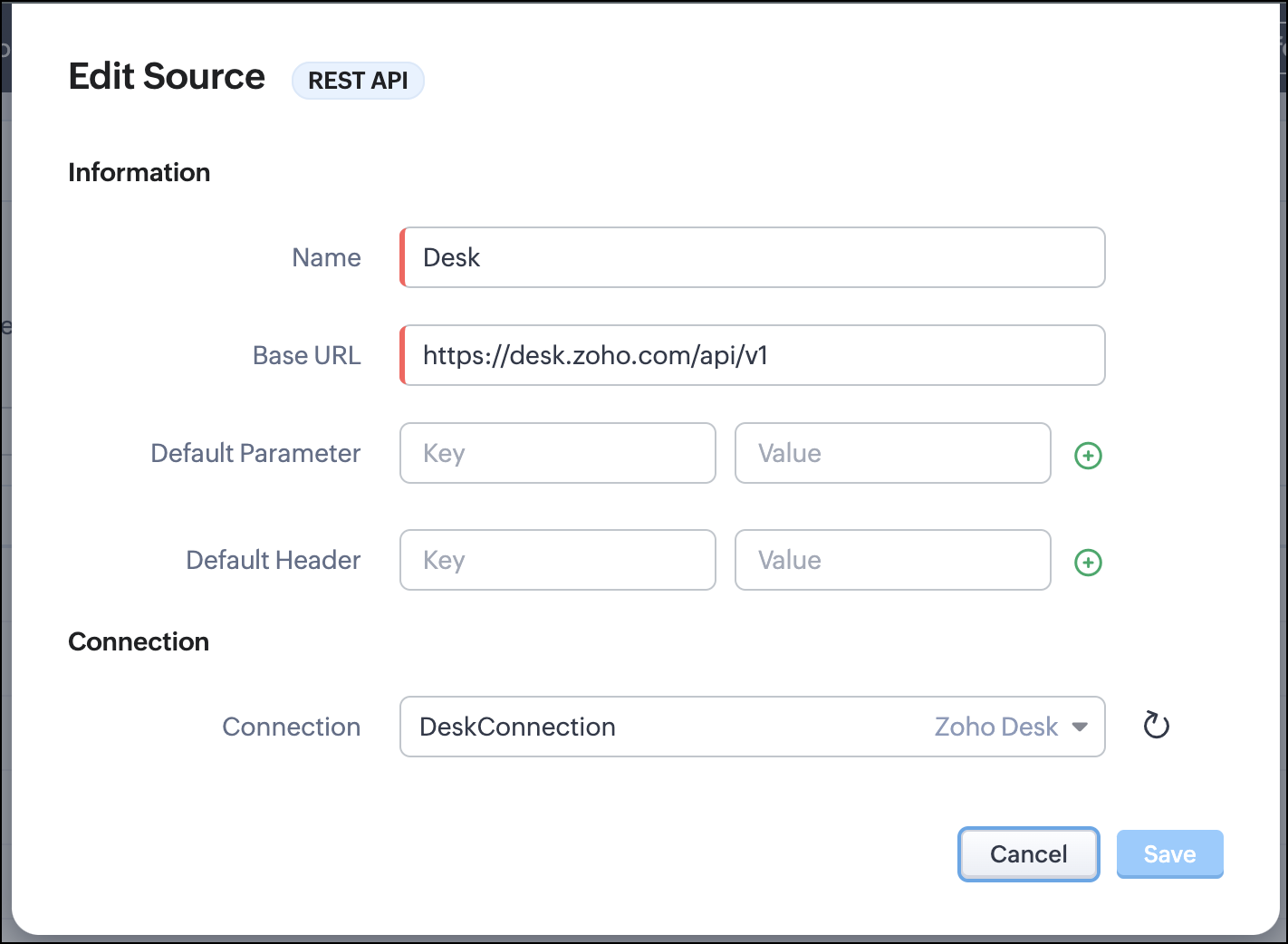
- Go to Setup > Developer Hub > Queries > Sources > Add Source.
- Under Information,
- Give a name for the source and its Base URL. Queries will make API calls to this URL to fetch data. Ensure to add this to Trusted Domain.
- Specify any default parameters and headers for this base URL.
- Under Connection, choose the connection you have created with Zoho Desk with the necessary scopes. If you haven't, create one.
- Click Save.

Note
Queries will make API calls to the URL you add in the Source and consume credits that are applicable in that service. Ensure you monitor your API usage in your source provider.
Step 2 - Create a REST API Query
- Go to Setup > Developer Hub > Queries > Add Query.
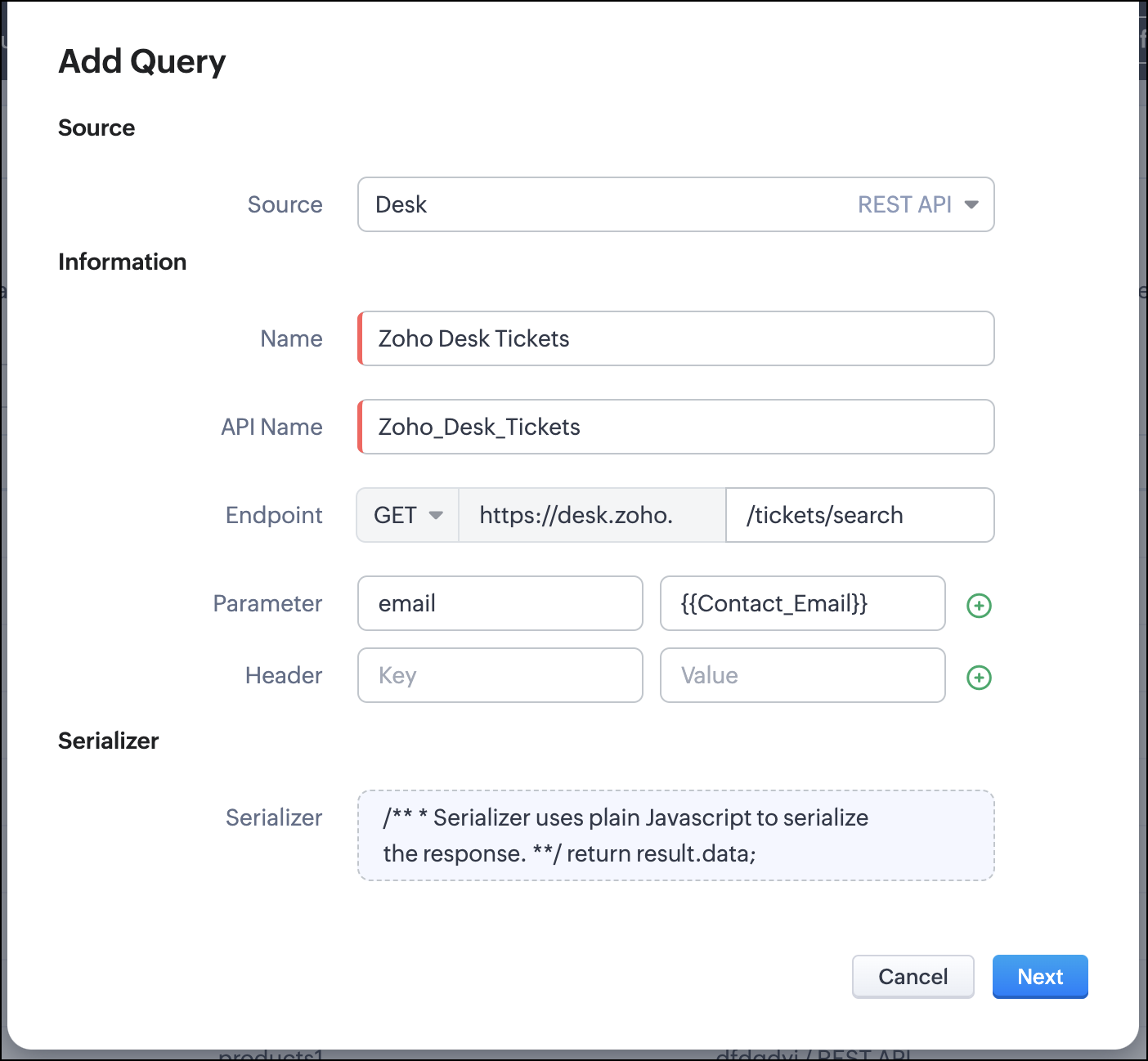
- Under Source, choose the source you created in step 1.
- Under Information,
- Enter the Name, API Name, and the Endpoint of the query.
- Specify the parameter email that takes the dynamic variable {{Contact_Email}} as its value. This is to fetch the latest ticket from Zoho Desk for a contact with the email in this variable during runtime. Refer to our Kaizen post on Handling Query Variables in Zoho CRM for additional details.
- Specify Headers, if any.
- You can serialize the output to fit your needs using JavaScript in the Serializer.
- Click Next.
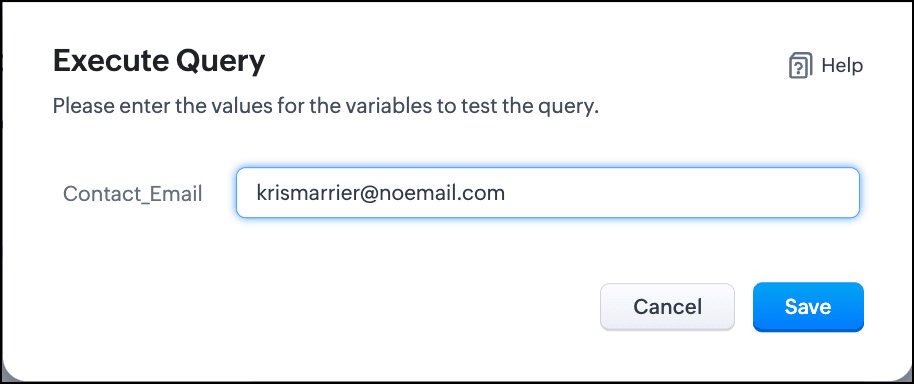
- Enter an email address in the box to test the query.
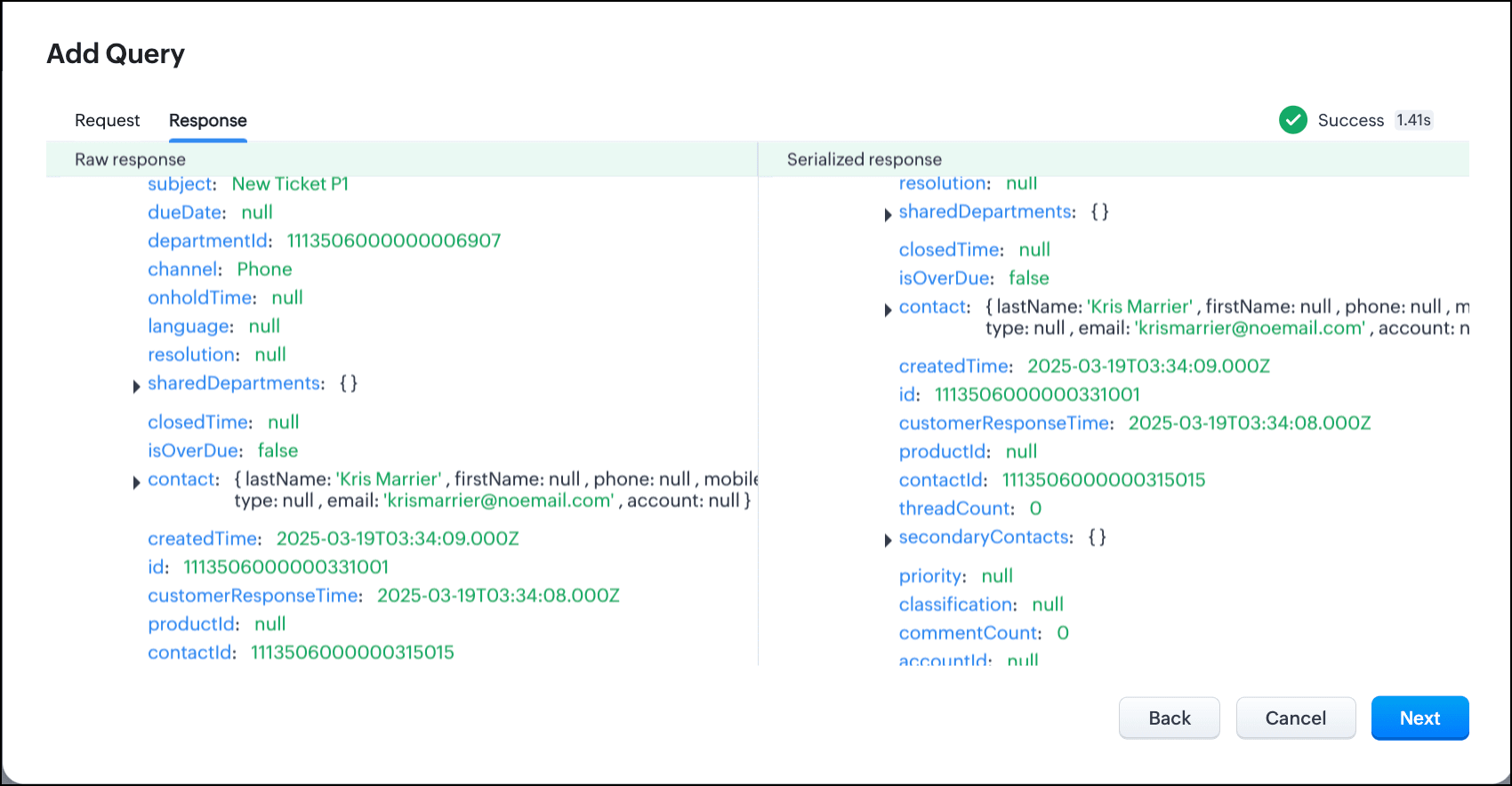
- Click Save. You can see the response of the query and the serialized response if you had serialized the output.
- Click Next.
- You can see the Schema of the query. The Schema acts as a bridge/mapping layer between external API responses and Zoho CRM's internal data structure. For example, the response of the Desk API returns result[].assignee.firstName, which is mapped to CRM as Assignee > FirstName. Schema ensures that the CRM UI knows how to display the field correctly.
With the right mapping in the schema, you can avoid manual data entry or syncing, and use the API data in workflows, reports, and dashboards.
You can change the CRM Field Type and Label to suit your needs. Refer to our Kaizen post on Serialization and Schema Management for more details. - Click Save to save the query.
Now that our query and fetching data from Zoho Desk is sorted, let's move on to the Canvas.
The Custom List view in Canvas enables you to stack records horizontally, one above the other.
Follow the steps in the How to Work with Canvas? guide to create a Custom List View Canvas for the Contacts module.
- On the Canvas, click the database icon for the Queries component.
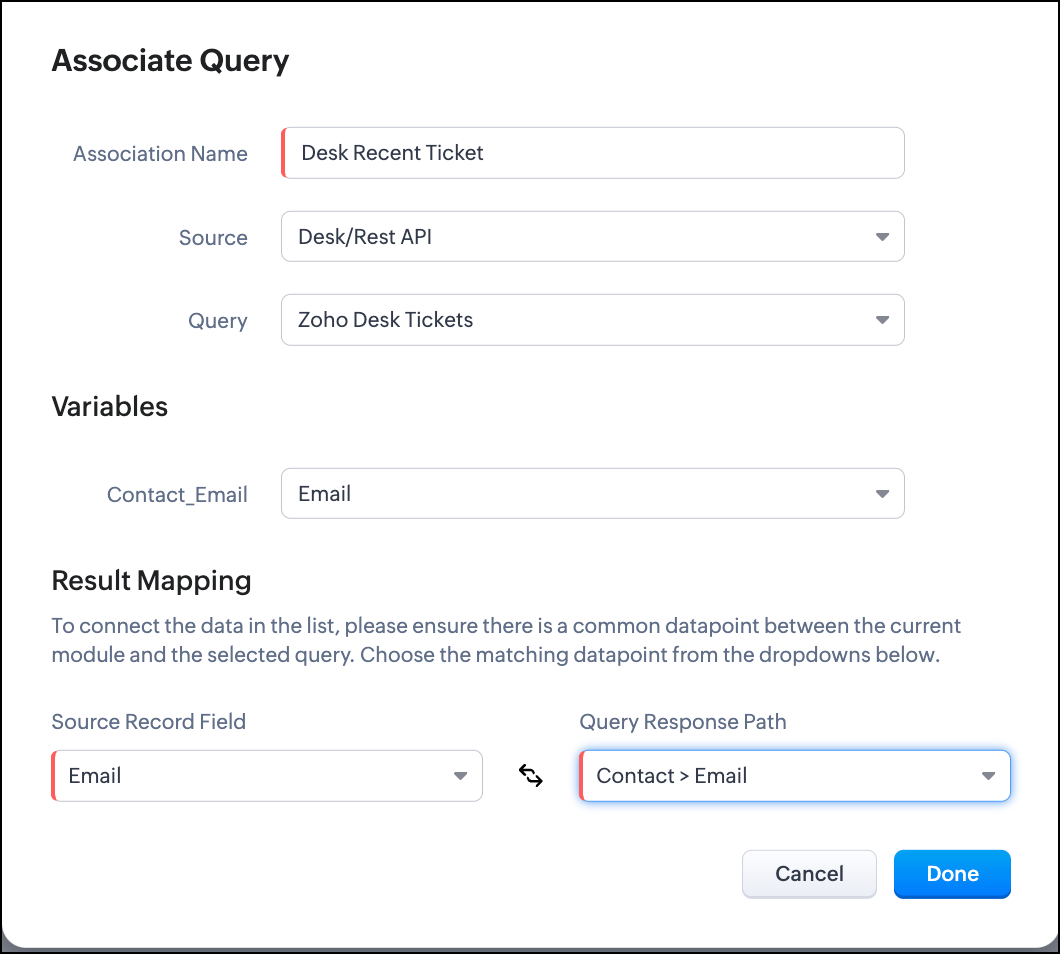
- Click Associate Query.
- Give an Association Name and select the Source(added in step 1) for the query.
- Under Query, select the query you created.
- The Variables section will contain the variables in the query. The drop-down displays all fields in the Contacts module. Select the Email field.
- Under Result Mapping, choose Email as the Source Record Field and Contact > Email as the Query Response Path. The Query Response Path is populated from the schema of the query.
- Click Done to associate the query with the canvas.
- You can see all the fields of the query on the left. Drag and drop the required fields on the canvas.
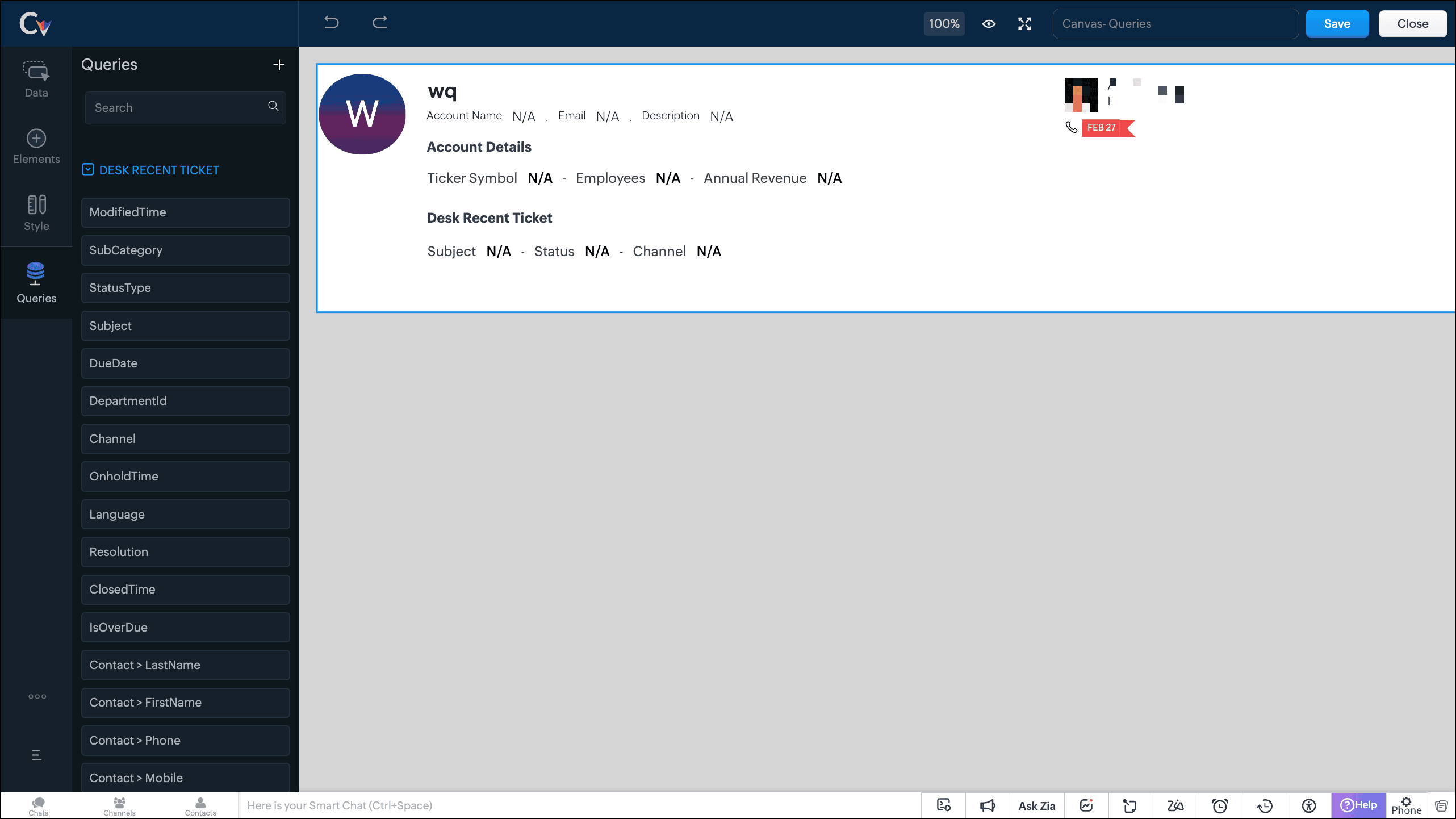
- Save the canvas.
Time for the big reveal!
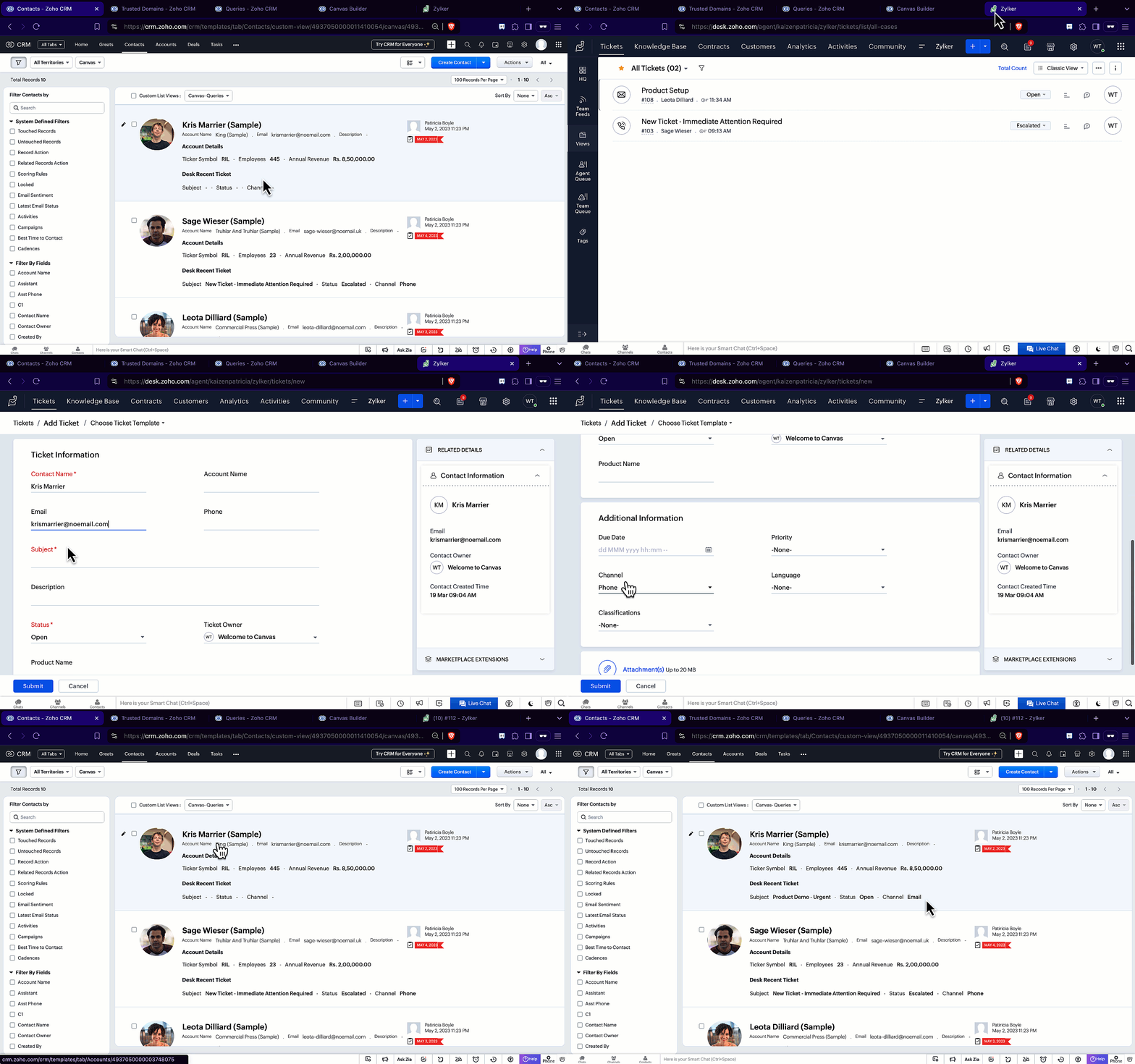
The following GIF shows how the ticket details from Zoho Desk are populated on the Canvas List View of the Contacts module.

Note that every time you reload the canvas, the query underneath makes an API call to the source provider to fetch data for the contacts in Zoho CRM. Ensure your API calls are monitored to avoid exhasuting your credits.
We hope you liked this post.
Topic suggestions are welcome! See you all next week!
Cheers!
----------------------------------------------------------------------------------------------------------------------------------------

See Also
Topic Participants
Shylaja S
Sticky Posts
Kaizen #217 - Actions APIs : Tasks
Welcome to another week of Kaizen! In last week's post we discussed Email Notifications APIs which act as the link between your Workflow automations and you. We have discussed how Zylker Cloud Services uses Email Notifications API in their custom dashboard.Kaizen #216 - Actions APIs : Email Notifications
Welcome to another week of Kaizen! For the last three weeks, we have been discussing Zylker's workflows. We successfully updated a dormant workflow, built a new one from the ground up and more. But our work is not finished—these automated processes areKaizen #152 - Client Script Support for the new Canvas Record Forms
Hello everyone! Have you ever wanted to trigger actions on click of a canvas button, icon, or text mandatory forms in Create/Edit and Clone Pages? Have you ever wanted to control how elements behave on the new Canvas Record Forms? This can be achievedKaizen #142: How to Navigate to Another Page in Zoho CRM using Client Script
Hello everyone! Welcome back to another exciting Kaizen post. In this post, let us see how you can you navigate to different Pages using Client Script. In this Kaizen post, Need to Navigate to different Pages Client Script ZDKs related to navigation A.Kaizen #210 - Answering your Questions | Event Management System using ZDK CLI
Hello Everyone, Welcome back to yet another post in the Kaizen Series! As you already may know, for the Kaizen #200 milestone, we asked for your feedback and many of you suggested topics for us to discuss. We have been writing on these topics over the
Recent Topics
Transition from Sole Proprietorship to GmbH (Limited Liability Company) – Best Approach in Zoho Books / Zoho One
Hello everyone, I am currently operating under a Zoho One plan with a sole proprietorship in Switzerland. As of January 1st, 2026, I will be incorporating a new legal entity – a GmbH (Swiss equivalent of a Limited Liability Company). While the businessIssue Connecting My Domain to Zoho Sites Despite Purchasing It from Zoho
Hello, I am facing an issue connecting my domain to my website on Zoho Sites. Details of the issue: I purchased the domain directly from Zoho. I am already using the same domain successfully with Zoho Mail. However, when I try to assign this domain toInsert auto number from main form into subform rows
Hello. I'm trying to take from my main form "order number" which i have setup as an auto generated number into every line created in my subform. So when a row is created in my subform i want the "order number " from the main form to be inserted automatically.Dark Mode - Font Colors Don't Work
When editing a document in Dark Mode and selecting font colors, they don't show up on screen. Viewing/editing the same document in Light Mode shows them just fine.Integrate Bunq with ZOHO Bookes
We are new users of ZOHO Books, and our bank (BUNQ, in the Netherlands) isn't listed on the bank integrations. Is there a way to handle this?Access Denied
I am iOS Developer and updating our clients project and shifted ZohoDeskPortalCore SDKs from cocoapods to SPM and changed few lines of code but now i am get access denied, the help center app is unavailable. please contact administrator.Using Zoho Desk to support ISMS process
Hi, I am evaluating using Zoho Desk for security incident management. This seems to be aligned with Zoho Desk purpose as its just another type of incident. However in security incident management, ideally I can link incidents (tickets) with a risk fromTaxJar vs Avalara
Hi, I'm evaluating adoption of a sales-tax service for US based business. Anyone else have experience with TaxJar and Zoho Books? I am a Zoho One subscriber so anticipate needing to use Flow to make this work. It seems like Avalara are simply too expensiveHow to check Leads with no Task (open activity)
Hi everyone, I was wondering if there’s a way to view leads that don’t have any tasks assigned or open activities linked to them.What can we do on our end to improve the Answer bot answers?
Hi, I'm using the Answer bot card in the Codeless bot builder. I've input several questions and their answers in the FAQ section to feed the Answer bot. The text is all in French, as this is the language our customers communicate in. I've tried testingHow to upload file to Connect using API?
Hi there. I looked at the API documentation and nowhere did it mention how to use the API method to upload a file even though it is mentioned that it is possible to be done so. Please help.Group Tax in Service Line Items
Hi FSM Team! I noticed that when you update a tax in the service line item the group tax is not showing up as an option. Let me know what can be done thank you!FSM Improvement Idea - Show an Import button when there is no data
I am setting up FSM for a client and I noticed that there is no option to import data, see screenshot below. Even when you click Create Contact there is only an option to Import from Zoho Invoice. It is only after you add at lease 1 record that the ImportOAUTH_SCOPE_MISMATCH Error for Marketing Automation APIs with CRM Plus Account
I'm trying to integrate Marketing Automation journey triggering via API but getting OAUTH_SCOPE_MISMATCH errors. I need clarification on API access for CRM Plus users.Access token generate from the refresh token not working for API
Dear Sir/Madam, When I use my refresh token to obtain new access_token, that token return INVALID_TOKEN when the same API is called. I made sure that my api site is correct and match the auth web site. However the original access_token work fine.Function #4: Schedule Customer Statements
Regularly sending statements to customers is an imperative part of many business processes as it helps foster strong customer relationships and provides timely guidance on payments. While you can generate the statement of accounts and have it sent overLimiting search or dependencies with an asterisk "*".
I have a form with several dependency fields with options still developing for each field. Since these options were developing and not yet ready to be a selection in the field, I placed a filter for the dropdown field. In this filter, I selected fieldsCross Data Center Support for 1:1 Chats with External Users
Hello Zoho Cliq Team, We hope you're doing well. We appreciate the recent enhancement that enables cross data center collaboration in external channels, which has already improved communication across distributed teams. However, we’ve noticed that thisHandling Greetings/Small Talk at the Beginning of a Zobot Conversation
Hello everyone, I’m currently configuring a **Zobot** in Zoho SalesIQ and everything is working as expected, except for one specific scenario at the very beginning of the conversation. My target audience has the habit of starting with a **greeting orRegex in Zoho Mail custom filters is not supported - but it works!
I recently asked Zoho for help using regex in Zoho Mail custom filters and was told it was NOT supported. This was surprising (and frustrating) as regex in Zoho Mail certainly works, although it does have some quirks* To encourage others, here are 3 regexImporting a new list into campaigns
I'm in the middle of switching my email platform to campaigns. I have a list that I want to import, and it overlaps with my existing Zoho CRM list. The fields in my Zoho CTM are more robust. Will this new list that I upload into my campaigns overwritewhen I email a invoice how can i see it was sent and also were i can go to see all emails sent
when I email a invoice how can i see it was sent and also were i can go to see all emails sent?How can I see content of system generated mails from zBooks?
System generated mails for offers or invices appear in the mail tab of the designated customer. How can I view the content? It also doesn't appear in zMail sent folder.CRM Blueprint Notification by Cliq
Dear Zoho team, In Workflow, there is nofication by cliq, but in blueprint, there is no option as cliq notification. I think it is very convenient to get notified by Cliq , as there are multi modules in apps, but we will always check CliqsSync Contacts in iOS
What does the "Sync Contacts" feature in the iOS Zoho Mail app do?Live webinar: Craft the ideal sales pitch deck with Show
Every great sale starts with a great story. And your pitch deck? That’s where the story takes shape. But too often, these presentations end up looking generic, overloaded with text, or lacking structure. The good news is, it's easier to fix than you think!Project Statuses
Hi All, We have projects that sometimes may not make it through to completion. As such, they were being marked as "Cancelled". I noticed that these projects still show as "Active" though which seems counter intuitive. In fact, the only way I can get them👋 Welcome to the Zoho MCP Community
Hello all, glad to have you here! This is your space for everything AI agents, MCP tools, and intelligent business apps. This community is for you — developers, partners, creators, and businesses exploring how agents can transform work. Whether you’reDNS Manager
Where Can I find my DNS manager so I can link this to click funnels or AWEBERHow do I sync multiple Google calendars?
I'm brand new to Zoho and I figured out how to sync my business Google calendar but I would also like to sync my personal Google calendar. How can I do this so that, at the very least, when I have personal engagements like doctor's appointments, I canNeed to extract date from datetime field
I have a datetime field and need only the date part from it. I am unable to find a built-in function that would be <DateTime>.Date(). I don't think I want to go the string conversion route of converting the datetime to string and then parsing out values and create a date out of it. Any one out there has a better solution to this? Thanks in adavnce. Regards Moiz Tankiwala Smart Training & IT SolutionsNew in Cadences: WhatsApp follow-ups, upgraded limits, and options for add-ons
Hello everyone, We're rolling out two key updates to help you engage better and scale smarter with Cadences in Zoho CRM. Reach customers on WhatsApp, directly from Cadences Previously, Cadences have enabled you to automate follow-ups through emails, calls,additional accounts
If I brought 5 emails to my account. Can I later buy additional emails.Why I am unable to configure Zoho Voice with my Zoho CRM account?
I have installed Zoho Voice in my Zoho CRM, but as per the message there is some config needed in Zoho Voice interface. But when I click on the link given in the above message, I get an access denied page.Cliq Meeting Calls No Audio and Screen Share
When in a Cliq channel meeting, the audio does not work at all on pc. When i use my phone as audio source, screen share on pc does not work. I have updated audio drivers but the strangest thing is that during a 1 on 1 call, it works well. Therefore theWork anniversary and birthdays on connect
Hello, I like the idea of having employee's work anniversary and birthdays on the dashbaord. Do you have to have the employee complete this information themselves in connect settings, or does it pull from their directory settings? (ie. we use Zoho oneAlias Email Id already exists
Hi I'm trying to create an alias : contact @ yoavarielevy.co.il but i get the message Alias Email Id already exists I had an account with the same name but I deleted it. Can you help? Thanx YoavFeature Request: Ability to Set a Custom List View as Default for All Users
Dear Zoho CRM Support Team, We would like to request a new feature in Zoho CRM regarding List Views. Currently, each user has to manually select or favorite a custom list view in order to make it their default. However, as administrators, we would likeAdding Multiple Products (Package) to a Quote
I've searched the forums and found several people asking this question, but never found an answer. Is ti possible to add multiple products to a quote at once, like a package deal? This seems like a very basic function of a CRM that does quotes but I can'twebinar registration confirmation are landing in SPMA folders
I am trialing zoho webinar and do not have access to custom domains. When I test user registrations, they are working but the resulting confirmation email is landing in a spam folder. How can I avoid this?Next Page