Kaizen 214 - Workflow APIs - Part 2

Last week, we discussed how Zylker Cloud Services used the Workflow APIs to discover and audit all the automations in their CRM, listing every workflow, checking triggers, and understanding their automation limits. This week, we take the next step: understanding what configurations are valid before creating or updating workflows via APIs.
Step 4: Workflow Rule Configurations API
When you work in the CRM UI, creating workflows feels straightforward. The interface shows only valid triggers and actions. Try adding an unsupported action, and it simply will not appear. This is because the UI enforces hundreds of rules behind the scenes.
With APIs, these validations must be handled manually. That is where the Workflow Rule Configurations API comes in. It gives all the valid triggers and actions for a given module, preventing errors before they happen.
Why this API matters
Consider two examples:
You want to create a workflow for the Products module based on a Scoring Rule update. The UI hides this option because scoring rules are not supported for Products.
You try to add a Field Update action for a Record Delete trigger. This is invalid, as the record no longer exists. The UI prevents it, but via API, you would get an error if you try to create or update the workflow with this configuration.
The Configuration API removes this guesswork, allowing you to fetch and respect valid triggers and actions.
Sample Request:
GET {api-domain}/crm/v8/workflow_configurations?module=Deals
Sample Response:
{ "workflow_configurations": { "related_triggers_details": [ { "api_name": "Notes", // The API name of the related module that can trigger workflows "module": { // Details about the related module "singular_label": "Note", "plural_label": "Notes", "api_name": "Notes", "name": "Notes", "id": "4876876000000002197" }, "name": "Notes", // Module name "triggers": [ // Available triggers for this related module { "api_name": "create", "deprecated": false, "name": "Create", "scheduled_actions_supported": true, "actions": [ // List of supported actions for this trigger "add_tags", "remove_tags", "email_notifications", "tasks", "create_record", "create_connected_record", "add_meeting", "webhooks", "functions", "flow" ] }, // ... other triggers (create_or_edit, edit, delete) omitted for brevity ] } ], "triggers": [ // Primary triggers for the Deals module itself { "api_name": "score_increase", "deprecated": false, "name": "ScoreIncrease", "scheduled_actions_supported": false, // Indicates whether scheduled actions are allowed for this trigger "actions": [ // Only these instant actions are supported "field_updates", "assign_owner", "add_tags", "remove_tags", "email_notifications", "tasks", "webhooks", "functions", "circuits", "flow" ] }, // ... other triggers omitted for brevity ... ], "actions": [ // Details about available workflow actions { "is_clickable": true, "associate_action": false, "limit_per_action": null, "api_name": "schedule_call", "supported_in_scheduled_action": true, "name": "ScheduleCall", "limit": 1 // Maximum instances per workflow }, { "is_clickable": true, "associate_action": true, "limit_per_action": null, "api_name": "tasks", "supported_in_scheduled_action": true, "name": "Task", "limit": 5 }, // ... other actions omitted for brevity ... ] } } |
Interpreting and using the Workflow Configuration API
The configuration response might look complex, but it gives us all the information we need about configuring Workflow Rules in Zoho CRM, for the specific module.
4.1 "What can trigger my Workflow?"
The triggers array shows all the supported triggers for that specific module.
"triggers": [ { "api_name": "create", "deprecated": false, "name": "Create", "scheduled_actions_supported": true, "actions": [ "field_updates", "assign_owner", "add_tags", "remove_tags", "email_notifications", "tasks", "create_record", "create_connected_record", "add_meeting", "webhooks", "functions", "circuits", "flow" ] }, . . // ... other triggers omitted for brevity ... { "api_name": "score_increase", "deprecated": false, "name": "ScoreIncrease", "scheduled_actions_supported": false, "actions": [ "field_updates", "assign_owner", "add_tags", "remove_tags", "email_notifications", "tasks", "webhooks", "functions", "circuits", "flow" ] } ] |
The response lists all available triggers for the module. For each trigger type, you get:
Trigger conditions: When the workflow will be triggered (on create, edit, score change, etc.)
Action compatibility: Which actions can be used with each trigger type
Scheduled actions support: Whether scheduled actions are supported for that trigger or not.
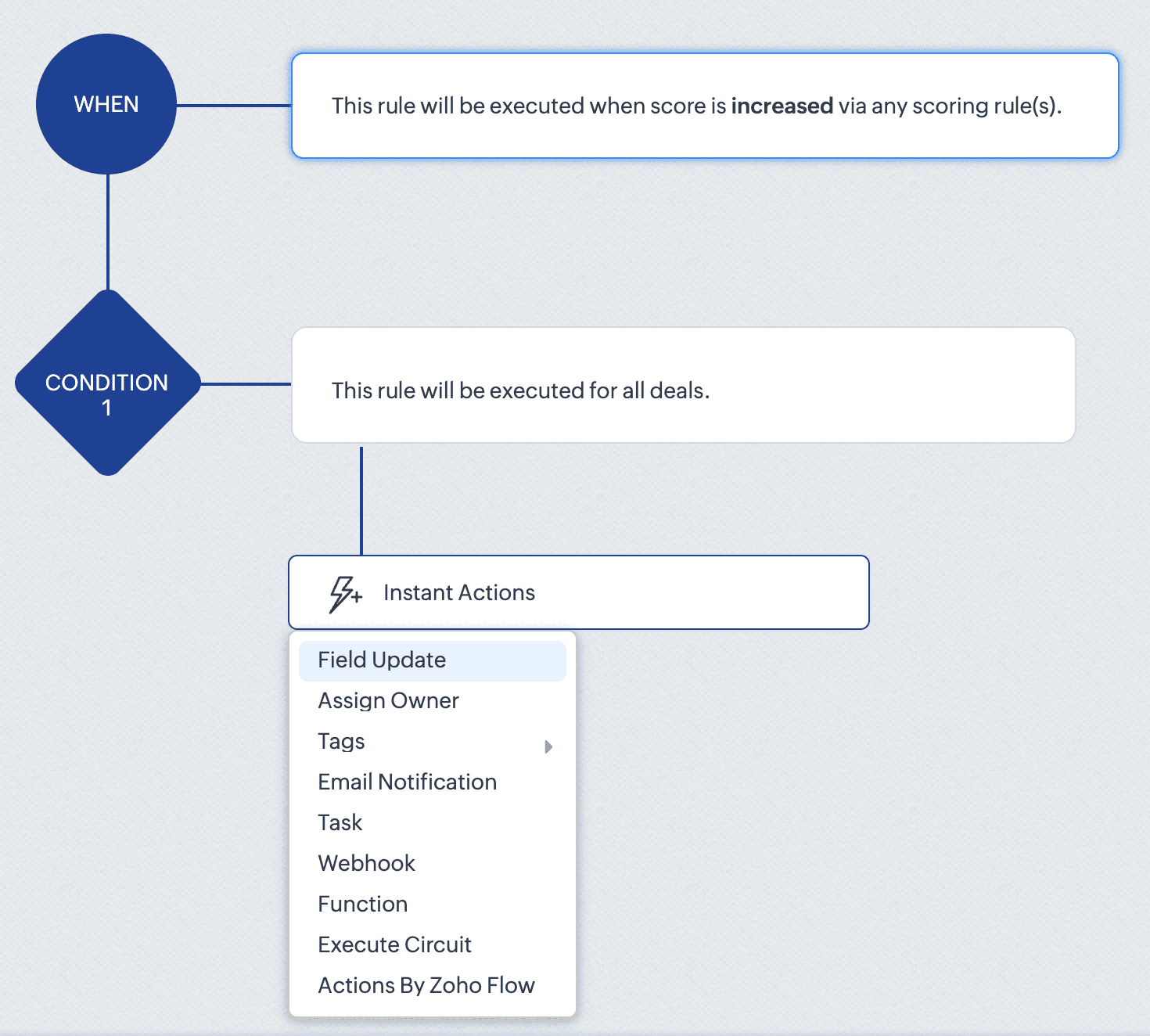
For instance, the score_increase trigger triggers the workflow when the score of a record is increased. The scheduled_actions_supported key is false for this trigger, which means that this specific trigger type doesn't support scheduled actions. This directly translates to API behaviour: attempting to configure a Workflow Rule via API with a scheduled action for the score_increase trigger will result in an error.
This API constraint is visibly enforced in the CRM interface. When configuring a score-based trigger in the UI:
4. 2. "What can my Workflow actually do?" - Understanding Actions
The actions array defines the execution capabilities of your workflows. For each action type, you get important information like:
Limits per action instance: Maximum number of items that can be processed within a single action instance
Instance limits: How many times this specific action can be added to a condition in the Workflow rule.
Scheduled action support: Whether the action can be added as a scheduled action.
For example, in the add_tags action:
{ "is_clickable": true, "associate_action": false, "limit_per_action": 10, // Maximum 10 tags per Add Tags action "api_name": "add_tags", "supported_in_scheduled_action": true, "name": "AddTags", "limit": 1 // Maximum one Add Tags action per workflow } |
From this data, it is clear that within a single Add Tags action, you can select up to 10 specific tags to add. Similarly, you can only include one Add Tags action instance in the entire workflow rule. Also, this action cannot be used as a scheduled action.
This has direct implications for API users:
Attempting to configure a workflow that adds more than 10 tags in one action will result in an error
Trying to add two separate Add Tags actions to the same workflow will fail
Adding a Add Tags action under scheduled actions section will also result in an error.
In the UI, these constraints are proactively taken care of. As seen in the GIF, if you add fewer than 10 tags, clicking Add Tags again only lets you edit the existing action. Also it lets you add only up to 10 tags in an action. And if you have already added an action with 10 tags, the Add Tags option will no longer be available. Either way, the system prevents any possibility of adding a second Add Tags action, regardless of tag count.
This UI experience is what the Workflow Rules Configuration API replicates for developers. By checking these limits before making API calls, you can build workflows using APIs with the same confidence and error-free experience that UI users have.
4.3. “What can trigger my Workflow from a related module?” – Understanding related triggers
The related_triggers_details array shows how changes in related records can trigger workflows in your primary module. For example, in the Deals module, for the Notes related trigger:
"related_triggers_details": [ { "api_name": "Notes", // The API name of the related module "module": { // Detailed information about the related module "singular_label": "Note", "plural_label": "Notes", "api_name": "Notes", "name": "Notes", "id": "4876876000000002197" }, "name": "Notes", // Module name "triggers": [ // Available triggers for this related module { "api_name": "create", // Trigger when related records are created "deprecated": false, "name": "Create", "scheduled_actions_supported": true, "actions": [ // Supported workflow actions for this trigger "add_tags", "remove_tags", "email_notifications", "tasks", "create_record", "create_connected_record", "add_meeting", "webhooks", "functions", "flow" ] }, // ... other triggers (create_or_edit, edit, delete) omitted for brevity ] } ] |
For each related module, you get:
Module information: Details about the related module that can trigger workflows.
Available triggers: The actions on the related record (create, edit, delete, etc) that can trigger the workflow.
Supported actions: For each trigger, the actions that are supported for that specific trigger.
For instance, the Notes related trigger allows you to create workflows that execute when notes are added to deals. The configuration shows that when a note is created, your workflow can perform actions like sending email notifications, creating tasks, triggering webhooks, and more.
If you try to include an unsupported trigger or unsupported action, the API call will fail. For example, adding a field_updates action for a Notes create trigger . The configuration API response clearly shows that field_updates is not among the supported actions for Notes-related triggers.
The API also gives us important differences between trigger-action configurations. For example, while field_updates action is supported for the create trigger for the main module (Deals), the same action is not supported for the related module (Notes) create trigger. These distinctions would otherwise only be discovered through API errors.
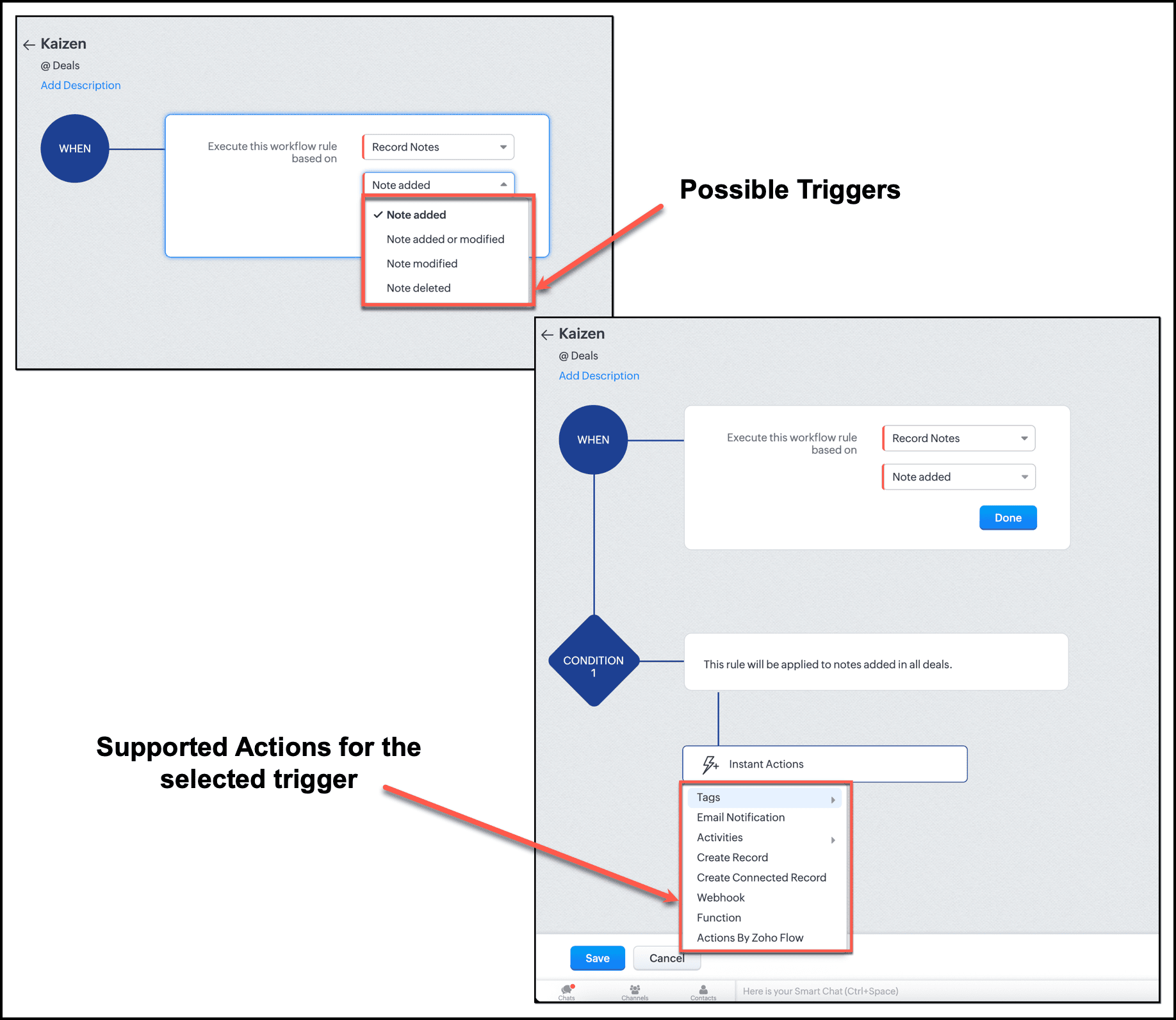
In the UI, this limitation is enforced. When setting up a workflow triggered by Notes, the "Field Updates" action does not appear in the available actions list.
By checking the related_triggers_details section before making API calls, you can discover exactly which actions are supported for each related module trigger, thus avoiding configuration errors while creating or updating Workflow rules.
Conclusion
The Workflow Configuration API transforms how we approach automation development through APIs. Instead of discovering constraints through failed API calls, we can now design workflows with the right configuration, without any trial-and-error methods. It gives us complete visibility into all valid trigger-action combinations before a single line of code is written, enough information to build automations triggered by related records, and limit awareness to respect action constraints before they become API errors.
For Zylker, this means we can now confidently proceed with updating the old Workflow rules and creating new ones. In our next post, we will put this knowledge into action.
We hope that you found this post useful. If you have any questions or feedback, let us know in the comments below, or write to us at support@zohocrm.com. We would love to hear from you!

Topic Participants
Anu Abraham
Sticky Posts
Kaizen #217 - Actions APIs : Tasks
Welcome to another week of Kaizen! In last week's post we discussed Email Notifications APIs which act as the link between your Workflow automations and you. We have discussed how Zylker Cloud Services uses Email Notifications API in their custom dashboard.Kaizen #216 - Actions APIs : Email Notifications
Welcome to another week of Kaizen! For the last three weeks, we have been discussing Zylker's workflows. We successfully updated a dormant workflow, built a new one from the ground up and more. But our work is not finished—these automated processes areKaizen #152 - Client Script Support for the new Canvas Record Forms
Hello everyone! Have you ever wanted to trigger actions on click of a canvas button, icon, or text mandatory forms in Create/Edit and Clone Pages? Have you ever wanted to control how elements behave on the new Canvas Record Forms? This can be achievedKaizen #142: How to Navigate to Another Page in Zoho CRM using Client Script
Hello everyone! Welcome back to another exciting Kaizen post. In this post, let us see how you can you navigate to different Pages using Client Script. In this Kaizen post, Need to Navigate to different Pages Client Script ZDKs related to navigation A.Kaizen #210 - Answering your Questions | Event Management System using ZDK CLI
Hello Everyone, Welcome back to yet another post in the Kaizen Series! As you already may know, for the Kaizen #200 milestone, we asked for your feedback and many of you suggested topics for us to discuss. We have been writing on these topics over the
Recent Topics
Create and populate a record in an instant: Introducing zero-shot field prompting to Zia's ICR
A couple of months ago, we upgraded our in-house AI image detection and validation tool, Zia Vision, with intelligent character recognition (ICR). By training Zia with sample images, you could create and enrich CRM records with data extracted from standardHow to Prevent Users From Skipping LMS Videos in Zoho People
How to Prevent Users From Skipping LMS Videos in Zoho People Hello Zoho Developers, In this blog, we will quickly look at how you can stop users from skipping or fast-forwarding videos in Zoho People LMS. Zoho People provides a feature called Disable[Integration Edition] Deluge Learning Series – Custom API with Deluge | November 2025
We’re excited to conclude this four-month Integration Edition of the Deluge Learning Series: Session 1 – Integrating Zoho Apps with Deluge Using Built-In Integration Tasks Session 2 – Integrating Zoho Apps with Deluge Using invokeURL and invokeAPI SessionAutomate Backups
This is a feature request. Consider adding an auto backup feature. Where when you turn it on, it will auto backup on the 15-day schedule. For additional consideration, allow for the export of module data via API calls. Thank you for your consideration.Tips for Organizing Workflows and Improving Team Coordination in Zoho
Hi everyone, I’m looking for some general advice on how different teams are organizing their daily work within Zoho’s apps. Our team recently expanded, and we’re trying to streamline how tasks, discussions, and documents are shared so everything staysPrevent user from viewing all records?
I have a report that is meant to be used by vendors to view only the records that are assigned to them. All the vendor information is stored in a separate application, so I need to call a function to get the current user's ID (not the zoho user ID). The report settings criteria doesn't support using function calls, so instead I'm embedding the report in an html page like this: if (thisapp.Global.CurrentUserIs("Vendor")) { personID = common.getLoggedInPersonID(); query = "Assigned_Vendor.ID="Zoho Site pages not displaying in iframes
I simply want to show a Zoho Site page inside an iframe on another non Zoho website. When testing this across many browsers, the iframe content simply does not appear. IE reports that the host does not allow their content to be displayed in iframes. Very disappointing. Is there a way around this please? Here is the URL of the page I would like to appear in an iframe. http://ips-properties-to-rent.zohosites.comZoho Inventory as connector in Zoho Creator
Hello, It doesn't appear that Zoho Inventory is one of the many built in connectors in Zoho Creator? I see that there are non-Zoho inventory applications that have built in connectors such as Cin7, which leads me to believe that I'm missing somethingCustomer Parent Account or Sub-Customer Account
Some of clients as they have 50 to 300 branches, they required separate account statement with outlet name and number; which means we have to open new account for each branch individually. However, the main issue is that, when they make a payment, theySend Zoho Forms Link using Zoho CRM Email Templates
I have set up Zoho Forms and CRM integration to pre-populate data from Zoho CRM to Zoho Forms. The setup is working fine. I have also created an email template in the Zoho CRM deals module to send Zoho forms links. So when I send an email using that templateMy go to On Load Client Script - Fast, efficient, and works for ALL profiles; Hides everything except initial fields
This is my on Load client script that I use for Create pages. I use a modified version for Edit and Display pages which you can create yourself using the same basic structure that I will give you below. First up, the script. Below that will be an explanationCustom Search using HTM+CSS Snippet
Suppose I wanted to create my own list view using HTML and CSS snippets inside a Page with a custom search input at the top of the list (not the Search snippet). Without Javascript, is there a way to retrieve a user's entry from that search input andMass Update of Lookup Fields not possible
Hello List I've created a custom field for Leads and Contacts 'Current Campaign'. This is very Handy as I can filter leads and then related them to a campaign. Everything ready, but then I realized that mass update doesn't work for lookup fields... aZoho CRM Kiosk Upload Files
Hello all, We are trying out Kiosks at the moment to see where it can fit best in our business. We are still a bit off in the application but lets say we will sort this out. My question is the following - when I create a Kiosk I can add "File Upload"Double opt-in notifications and customizable confirmation messages for your webforms
Dear CRM Community, We are excited to announce a major upgrade to our Webforms feature. You can now customize the confirmation message shown to your users who double opt-in from your webform and also customize your confirmation emails when they submitHas Anyone successfully integrated Zoho and Sage Intact?
Hey all, We’re evaluating Zoho One + Sage Intacct and I’m trying to connect with anyone who has actually implemented the two together.Specifically, I’d love to know: -- Which functions you kept in Zoho vs. Intacct (e.g., Product Catalog, AR/AP, invoicing,Introducing Image Upload Field
Hello everyone, In this post we will discuss about the benefits and usage of the Image upload field. The field is available for standard and custom modules. Usage: This field can be used to upload a gallery of images to a record and share the record with peers or customers. The record can be made accessible to users outside of Zoho CRM via Portals, where they can upload the necessary images. Preview, editing, and deleting images: The uploaded images can be directly edited and saved from the recordTrigger a Workflow Function if an Attachment (Related List) has been added
Hello, I have a Case Module with a related list which is Attachment. I want to trigger a workflow if I added an attachment. I've seen some topics about this in zoho community that was posted few months ago and based on the answers, there is no triggerFree webinar alert on November 19 - Email driven strategies - Master personality based styles
Hello Zoho Community! Want to make email management easier, smarter, and more you? We’ve got just the session for you! Join our interactive, game-based webinar to discover how Zoho Mail adapts to your personality and work style. Learn practical hacks,AI generated meeting notes associated to Account or Deal
As our organization works to improve efficiency we are looking for a solution to leverage AI to generate meeting notes and then add those notes to a CRM record such as an Account or Deal. I see Zoho has a Notebook AI offering that talks about the abilitydue date on cheue
how to handle cheque in zoho books for customers and vendors including due dateZoho CRM Portal Field Level Permission Issue
Hi Support Team, I am using the Zoho CRM Portal and configuring field-level editing permissions. However, we are unable to restrict portal users from editing certain fields. We have created a portal and provided View and Edit (Shared Only) access for'Statement of Accounts does not exist' error received, when creating PO using api in Zoho Inventory
Here is request json -- JSONString = { "date": "2019-09-24", "purchaseorder_number": "PO-6-1", "delivery_date": null, "delivery_org_address_id": 36221200000056XXX, "vendor_id": 362212000000564XXX, "attention": "Testing", "line_items": [{ "unit": "Pieces", "account_id": 36221200000003XXX, "quantity": 1, "item_id": 362212000000049XXX, "tax_type": "", "tax_name": "", "name": "One HD", "purchase_rate": 85, "tax_percentage": 0, "item_total": 85.00, "tax_id": "", "warehouse_id": 362212000000564XXX }] }Zoho Projects API 100 requests/2 min. Limit
Hi Requesting clarification on the API documentation. "You can invoke or call an API for 100 times in a span of two minutes. If you invoke more than 100 times, the particular API request will be locked for the next 30 minutes. " Does this limit applyIntegrate your Outlook/ Office 365 inbox with Zoho CRM via Graph API
Hello folks, In addition to the existing IMAP and POP options, you can now integrate your Outlook/Office 365 inbox with Zoho CRM via Graph API. Why did we add this option? Microsoft Graph API offers a single endpoint to access data from across Microsoft’sZoho Projects - Attachments added to Task and Bug emails are not saved
Hi Projects team, I have been experimenting with emails into projects to create tasks and bugs. I have noticed that attachments added to the emails are not saved to the task or bug. Is this normal behaviour? Thanks, AshleyZoho Inventory's latest shipping integration updates at a glance.
Hello Users, We would like to share some important news about our latest improvements in the Shipping integration capabilities of Zoho Inventory that we achieved in 2024 with some of our major integration partners in key editions across APAC, North America,Sorting a list of record acquired from the zoho.crm.searchRecords function.
This is something for which I'm trying to figure out a straightforward way to do. The searchRecords does a great job fetching me the records that I want. However, in some cases, where it returns multiple records, I want it to sort the returned list by date of creation of that record, so that when I do records.get(0), I get the most recent record. As an example, here's my sample pseudo code: records = zoho.crm.searchRecords("Clients", "Office_Number:equals:123456"); Now the "records" list above containsZoho Inventory Custom Field Update
Hello All, In this post I am describing how can we Update the Custom Field Value in Zoho Inventory. // Get Org ID orgid = organization.get("organization_id"); // Field Value resvp = ifnull(item.get("purchase_rate"),null); // Record ID iid = item.get("item_id");Deprecation of the Zoho OAuth connector
Hello everyone, At Zoho, we continuously evaluate our integrations to ensure they meet the highest standards of security, reliability, and compliance. As part of these ongoing efforts, we've made the decision to deprecate the Zoho OAuth default connectorAlphabetically
How can i arrange alphabetically - (Manage Manufacturer) Field in Item MasterCan i set a default value for country and state in address field in zoho creator?
Can i set a default value for country and state in address field in zoho creator?Convert HTML to PDF & Send as Email Attachments in Zoho Creator (Deluge)
This approach is useful for sending welcome letters, instructions, or promotional offers after order creation. // 1. Define the variables using the submitted input customerName = input.Customer_Name1; orderID = input.ID; customerEmail = input.Email_Address; //Redirect after submission is not working after a few submission
I have setup redirect url correctly and everything works as expected. However, it seems that there's a limit to the number of submissions before the redirect stops working. After the "limit" is reached, the page redirects to a seemingly zoho hosted page,Enhancement Request for Multi-Asset Work Order Feature
Hello Latha, Thank you for your continued support. The multi-asset Work Order feature is extremely helpful. I did some testing based on our requirements, and during the process, I noticed a few areas where we need your team’s support to improve the featureMarketing Tip #8: Run limited-time offers
Exclusive offers that don't last long make shoppers purchase right away instead of waiting. Run a flash sale or limited-time discount to convert interest into sales. Try this today: Set up a "Buy X Get Y" coupon in Zoho Commerce valid for a limited timeAdd Option to Mass Dispatch by User
Hello! We are using the dispatch console to dispatch service appointments to our service ressources. Right now, the process is our dispatcher verifies each ressource's route for the day and dispatches it after validation. Sadly, there doesn't seem toZoho Projects - Email notification relabelling of modules not present on default templates
Hi Projects Team, I noticed that in the default email template notification, the word "bug" was not renamed to the lable I am using in my system. As many users may used the Bugs modules for various purposes including Changes, Revisions, Issues, etc...Include the "Added Email ID" to the Filters of a Report
Hi, With a Report and lots of entries, a normal thing is to filter entries by the submitter, but that is not included in the Auto Filter of Reports and you can't add a custom filter to a Report without specifying the actual value. I would like to be ableLoops in Deluge
Hi, Can someone tell me how I do a simple loop in deluge? For example, if i have a variable "X" containing a number of loops to perform, i would like to perform an action X amount of times. X = 10; do while (Y < X){ // ... do something } to further explain, the equivalent in PHP of what i am trying to acheive would be: $X = 20; for($Y = 1; $Y < $X; $Y++ ){ // ... do something } ThanksNext Page