Latest updates in Zoho Meeting | An improved Analytics tab and user interface, an invite pop-up revamp, an enhanced Zoho Meeting iOS app, a recording feature in the Android app, and more
Hello everyone,
We’re excited to share a few updates and enhancements in Zoho Meeting.
Here's what we've been working on lately: Improved analytics for meetings, an invite pop-up revamp, a multi-video feed interface in the iOS app, a recording feature in the Android app, and other updates that you’ll find useful.
An improved Analytics tab
Under the separate Analytics tab, you can now access critical data such as Session Count, Session Duration, and Session History. These analytics are integral to planning your meetings and webinars because they provide valuable information about the level of engagement from your participants and attendees. Learn more

An enhanced user interface offers easy access
We've worked on enhancing our user interface, and we've made major updates on our Settings tab that will help businesses customize their Zoho Meeting account, always taking their participants and attendees into consideration.

An invite pop-up revamp
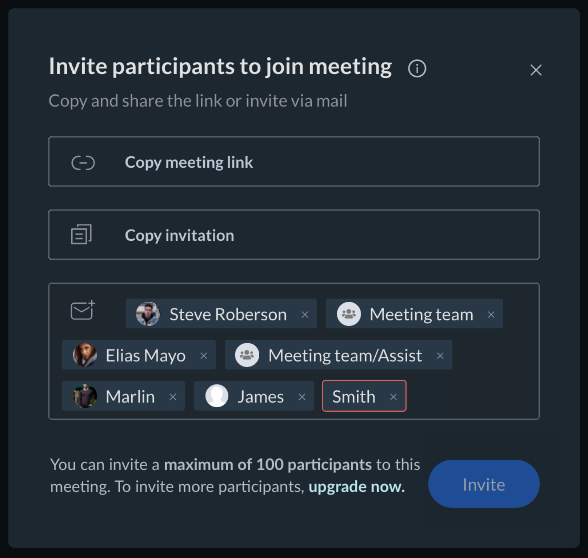
The invite meeting pop-up has had a complete makeover so that it’s clearer and easier to use. Use this feature to invite participants after you've started your meeting. You can copy the meeting link or invitation, or send to an individual or bulk invite members or groups via Mail.
Mobile app updates
iOS
We’ve incorporated the following features and enhancements into the Zoho Meeting iOS app.
Multi-video feed interface
We are happy to present video conferencing with a new, interactive interface to view all participants simultaneously. Now users can view all of the participants who've enabled their cameras in the session enhancing their user experience.
Pinning
Users can pin their own or other participants’ feeds. The pinned tile will be displayed as a large grid, and users can see up to three video feeds in a minimized grid. This helps users to actively follow someone during the meeting while also keeping an eye on other participants in the minimized grid at the bottom.
Highlighting the active speaker
Active speakers during the meeting will have a green frame around their video feed. This helps to keep track of who is currently speaking and also reduces the frustration of manually figuring out who is speaking.
Mic status
The mic status (muted/unmuted) of participants will be displayed inside the respective video feeds. This lets users alert someone if they speak with the mic muted.
Video scaling
The individual video feeds can be scaled to fit or fill the respective grids depending on your requirements and preferences. This can be done by simply double-tapping the video cell or by long-pressing the video cell and selecting “scale to fit/fill.”
Context menus
Users can carry out quick actions for themselves such as mute/unmute, scale to fit/fill the video, and rename their display name via the context menu by long pressing the video cells. Hosts can do these same actions for themselves and for others as well, including the option to remove participants.
Android
We’ve incorporated the following features and enhancements into the Zoho Meeting Android app.
- Recording support with pause/resume/stop and recording listing/share/delete capabilities.
- You can now share your feedback from the Android app.
Bug fixes
We’ve completed some bug fixes related to the Japanese characters being recognized as emojis in polls, and the issue around laptops going to sleep during audio sessions if there’s no interaction on the page.
We hope you'll enjoy these updates from Zoho Meeting. For questions or feedback, write to us at support@zohomeeting.com
Topic Participants
Anisha A
Sticky Posts
Zoho Meeting is included in Zoho One now!
Hello Everyone, For those who waited for the integration of Zoho Meeting with Zoho One, here is the good news. The integration has been completed and you can now add the Zoho Meeting application in your Zoho One portal. Edition included in Zoho One License You will get Enterprise plan of Zoho Meeting, using which you can host online meetings with up to 100 participants and webinars with up to 100 attendees. You will also get the cloud storage for 25 session recordings/user. Adding Zoho Meeting applicationZoho Meeting Updates: Bug Fixes in Meetings and Webinars, and Desktop App Enhancements
Hi there, We hope you are all safe and well. Following our previous feature release, we have added some enhancements and bug fixes for the improved functioning of Zoho Meeting. Let's take a look at last month's updates: Online meeting updates The microphone button remained active even when a user switched to phone audio. This issue has been fixed. An error caused the microphone status of participants to be wrongly displayed in the meeting toolbar and the attendees list.This issue has been fixed.V2.7: Introducing webinar co-organizers, enhanced screen sharing quality, choosing external webcam, region based dial-in number display and more.
Dear All, Here comes the new updates from Zoho Meeting that are recently rolled out! We 're introducing co-organizers in the webinar, done major improvements in screen sharing quality and more. Introducing co-organizers in the webinar You can now invite co-organizers to help you manage your webinar. Co-organizer can launch polls, answer questions, change presenters during the webinar, record webinar, view all attendees/staff and more. Learn more. Webinar CoOrganizers Enhanced screen sharing qualityLive webinar: A complete overview of Zoho Meeting
Are you looking for ways to engage and communicate with large audiences? Learn how Zoho Meeting can empower you from conducting online meetings with your team to hosting webinars for your sales leads. Join us for a live webinar this Thursday at 8:30 to 9:00 AM PDT. In this webinar, you will learn how to: Organize and host webinars Engage your audience with polls and Q&A Generate analytical reports Schedule and attend online meetings Record and share meetings and webinars Co-branding and user managementLive webinar: A complete overview of Zoho Meeting
Are you looking for ways to engage and communicate with large audiences? Learn how Zoho Meeting can empower you from conducting online meetings with your team to hosting webinars for your sales leads. Join us for a live webinar this Thursday. Here's what you can learn: Webinar scheduling and preparation Attendee interaction and engagement In-depth post webinar analytics Scheduling and hosting online meetings Managing your recordings Co-branding and user management Date: Thursday, March 29th, 2018
Recent Topics
Partial refunds
I am trying to process refund for a one item invoice, however the refund is partial: i am getting this error while creating credit note, can anyone share some wisdom about thisBest practice importing items and matching assemblies
Hi, I was wondering what would be the best practice to import items and composite items (assemblies) From my backup, what should I import first? The items or the composite items? I am on Zoho one, using inventory and books. Kind regards, SabineBulk Fill In & Edit PO/Bill/SO/Invoice
Hello, I am adding stock in bulk on a PO, the system is automatically populating the Rate (price) and Tax from the item data. Problem is that the bill rate is different from the rate on the item data, so I have to manually erase each and enter the price.Separate Items & Services
Hi, please separate items and services into different categories. Thank youItems Below Reorder Point Report?
Is there a way to run a report of Items that are below the Reorder Point? I don't see this as a specific report, nor can I figure out how to customize any of the other stock reports to give me this information. Please tell me I'm missing something sAllocating inventory to specific SO's
Is there a way that allocate inventory to a specific sales order? For example, let's say we have 90 items in stock. Customer 1 orders 100 items. This allocates all 90 items to their order, and they have a back order for the remaining 10 items which couldCancelled Transfer order problem
Hello, We've canceled a transfer order, and we can't add the related items to a new Transfer Order. The system tells us that the bin doesn't have the required quantity, but when we check the item, it indicates that there are 2 units in the bin. It alsoCreating a Chart from a Report
In Zoho Analytics, is it possible to create a chart from a Pivot View report? We are looking to use Zoho Analytics to replace Excel for Sales reports and would like to be able to show both the table and the chart together.Client Portal ZOHO ONE
Dear Zoho one is fantastic option for companies but it seems to me that it is still an aggregation of aps let me explain I have zoho books with client portal so client access their invoice then I have zoho project with client portal so they can access their project but not their invoice without another URL another LOGIN Are you planning in creating a beautiful UI portal for client so we can control access to client in one location to multiple aps at least unify project and invoice aps that wouldEmail Insights included in Bigin emals are marked as SPAM everywhere
Today I noticed that email recipients who use Office 365 never receive emails sent from Bigin. Further examination showed that all Email Insights links in email headers are marked as spam/phishing by Office 365. Example screen included. The problem isData Import | Zoho Analytics Custom Query Window Size
Please increase the window size for the Custom Query Data Import. It's impossible to work with such a small query window.Name changed in settings for mailbox but still not changed when typed in To field
In the email account secretary@ i have updaetd the new staff members details but the old members name still appears when I type secretary@ in the To field. I cant work out where Zoho is finding the old name from. I have deleted the browser cache. If ICannot add my name to my domain name
I want to have My name@mydomain.com and it says my name is linked to another account already. Please fix it since I do not have another account.Invoice status on write-off is "Paid" - how do I change this to "Written off"
HI guys, I want to write off a couple of outstanding invoices, but when I do this, the status of the invoices shows as "Paid". Clearly this is not the case and I need to be able to see that they are written off in the customer's history. Is there a wayEstablishing new Zoho email account on laptop
Good Morning: I am very long time Outlook business user and decided to try your email service last night and had established an account. I am trying to verify my account; how do I establish my Zoho email account on my laptop? I opened the account withunable to send message reason 550 5.4.6 unusual sending activity
My email account can't send message. It shows unable to send message reason 550 5.4.6 unusual sending activity detectedhow to add email to existing organization i w
I am already registered my organization and i have an email id. I need one more email id but i can't find anywhere .i want the cheapest email id . how to add ?e-mail bloqueado
Estou com meu e-mail lucas@peplus.me bloqueado, preciso desbloquear para retorno de usos em minhas atividades.zoho labels api not working
We're using n8n to automte email reply using zoho api. I'm facing issue with label api. I added the required scopes but its not working. i followed zoho api documentation but didn't work. also, where do i find/how do i create zoho oauth token mentioneeedDesk DMARC forwarding failure for some senders
I am not receiving important emails into Desk, because of DMARC errors. Here's what's happening: 1. email is sent from customer e.g. john@doe.com, to my email address, e.g info@acme.com 2. email is delivered successfully to info@acme.com (a shared inboxStreams/Shared email doesn't show up in windows trident app. It works fine on MAC. Is there any difference between 2 install ?
I can see streams/share email boxs on my MAC version of trident app but i can't see them in windows version of trident app. Is there any difference between 2 install? I try to find setting but not able to see any setting to add stream/share email boxes.add zoho account
How to add a zoho mail to previous zoho account? I have twoZoho Desk Mobile App Year-End Roundup - 2025
Dear Zoho Desk users, Greetings! As you gear up for the festive season, we are excited to share a quick journey into all that is released in 2025! Zia's generative AI capabilities Zia insights can be highly beneficial in helping agents manage daily supportNarrative 17: The role of Zia AI in customer support
Behind the scenes of a successful ticketing system: BTS Series Narrative 17: The role of Zia AI in customer support Overview Zia in Zoho Desk is a layered AI assistant that combines generative AI, prediction, and automation to support agents, automateDomain Transaction
I have purchased a domain name called trainedworkforce.co.in I made the payment got the receipt but the domain is still not purchased after successful transaction .Ability to Set a Unified Tab Order/View for All Users in Zoho Projects
Hello Zoho Projects Team, We hope you are doing well. We would like to submit a feature request regarding tab/menu organization in Zoho Projects. Current Behavior: The tab (module) order in Zoho Projects is user-specific. Each user (internal or external)Zohomail - The "All Messages" vs "In Box"
Why do some new email message appear under the all messages view but not in my inbox? That's really annoying but to be fair I've experienced the same with gmail.error while listing mails
I can't access email in any of my folders: Oops, an error occurred - retry produces the second error response: error while listing mails (cannot parse null string). I've signed in and out of Zoho, restarted my iMac.Introducing the Zoho Projects Learning Space
Every product has its learning curve, and sometimes having a guided path makes the learning experience smoother. With that goal, we introduce a dedicated learning space for Zoho Projects, a platform where you can explore lessons, learn at your own pace,Where to show Customization Field ?
Dear Sir, I have made some New Field in Item Field Customisation. Now I don't require that field in Estimate, Sales Orders etc. I just wants that field in Sales Invoice to Show/Hide... Is that possible ?Zoho Desk 2025 round-up: Key highlights on feature releases
Hello everyone, As we gear up for 2026, here is a detailed round-up of all feature releases in Zoho Desk web throughout the year. For consolidated information on releases check out the What’s New page You can also watch these webinars. Zia in web ZiaPrint Sales Orders, Purchase Orders or Invoices from API
Hello, Is it possible to use the print option that is available in Sales Orders Purchase Orders and Invoices with the API?. I don't see any information in the docs about this. ThanksHow to show a hided report??
in CRM Report , I clicked Hide incidently , how to show the floder again? Nowhere I can find the hided report floder...Converting Customer Invoice to Purchase Bill
Hi, In my service-based business, I sometimes create the customer invoice first, and later I receive the purchase bill from the vendor for the same job. Is there any option in Zoho Books to: Convert a customer invoice into a purchase bill, or Link/associateEmail tracking inquiry
I am trying to track when my emails are opened and clicked like I previously did in HubSpot. HubSpot pretty much did the entire process automatically. After digging through, I finally found in settings --> emails --> BCC Dropbox there is an email I canMass Update of Lookup Fields not possible
Hello List I've created a custom field for Leads and Contacts 'Current Campaign'. This is very Handy as I can filter leads and then related them to a campaign. Everything ready, but then I realized that mass update doesn't work for lookup fields... aCollapsible Sections & Section Navigation Needed
The flexibility of Zoho CRM has expanded greatly in the last few years, to the point that a leads module is now permissible to contain up to 350 fields. We don't use that many, but we are using 168 fields which are broken apart into 18 different sections.Quick Create needs Client Script support
As per the title. We need client scripts to apply at a Quick Create level. We enforce logic on the form to ensure data quality, automate field values, etc. However, all this is lost when a user attempts a "Quick Create". It is disappointing because, fromDownload Attached Files
Hi everyone, Brand new to Zoho Creator. I have a form with a subform. The subform has a field for "File Upload" I have this in a subform to allow multiple files to be uploaded to the parent form. Once the files are uploaded, how can i download or view them? Is this a setting I am just not seeing? If there isn't a way to download them, could i create another form field that dynamically creates the file's URL? That way a user can click the URL to get to the file? Any help with this would be greatlyTicket layout based on field or contact
Hi! I want to support the following use-case: we are delivering custom IT solutions to different accounts we have, thus our ticket layouts, fields and languages (priority, status field values should be Hungarian) will be different. How should I setupNext Page