Let’s Talk Recruit: LinkedIn Cheatsheet

Welcome to the first edition of Let’s Talk Recruit for 2026. We are kicking off the year by revisiting one of the most asked about topics in Zoho Recruit.

How our LinkedIn integrations actually work and how recruiters can get the most value from them.
LinkedIn continues to be a critical sourcing and application channel for recruiters. But when it connects with an ATS, the experience depends heavily on how features are activated and used. In this post, we break down LinkedIn integrations in Zoho Recruit, explain when to use each option, and show you how to set them up the right way.
Understanding Our LinkedIn Integrations
Zoho Recruit’s LinkedIn integrations fall into two clear categories. One helps you publish jobs on LinkedIn and the other helps you capture applications from LinkedIn. Understanding this split helps you choose the right setup for your hiring process.
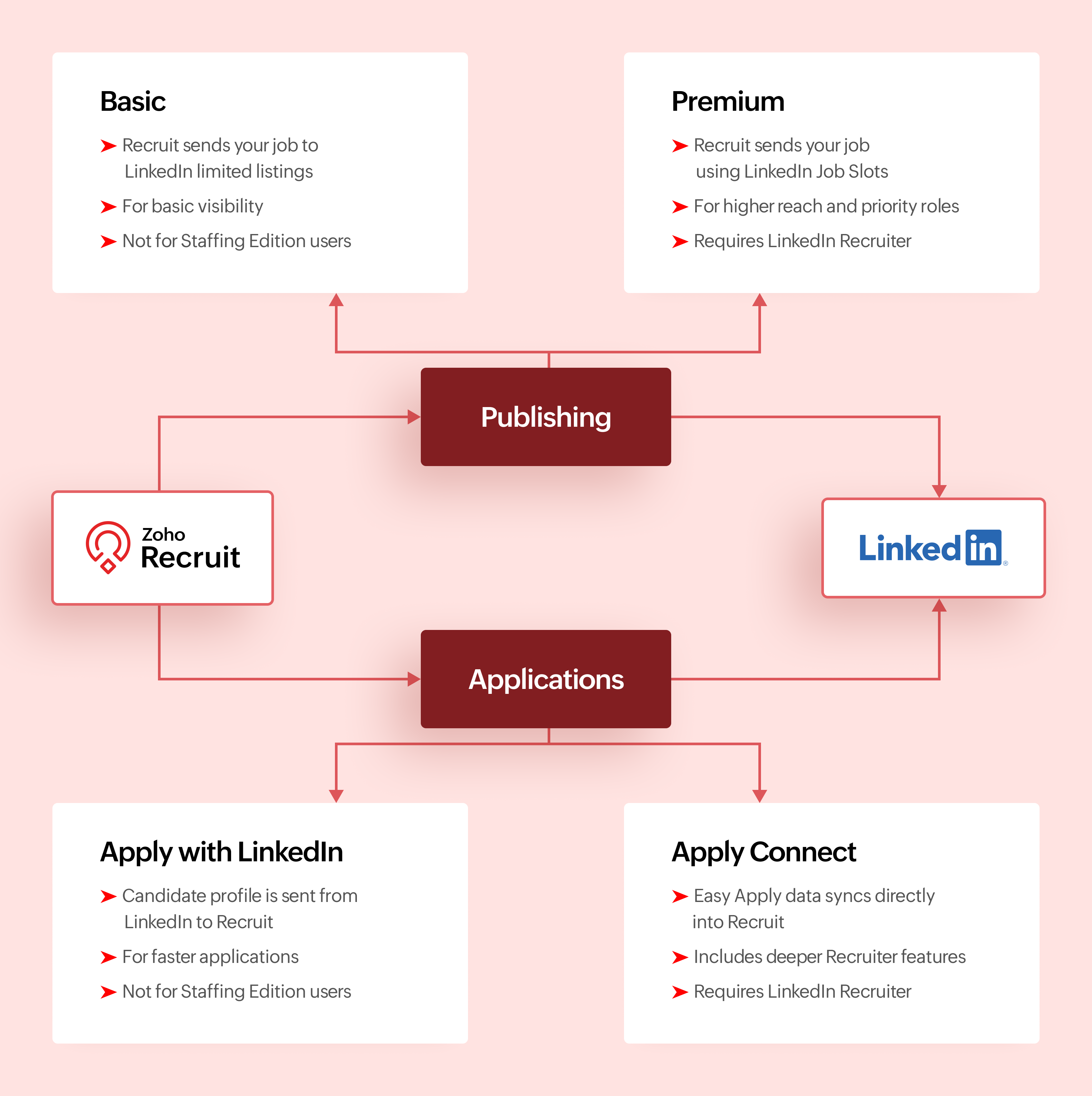
Activation Checklist
Use this checklist to set up LinkedIn with Zoho Recruit so jobs and Easy Apply applications flow correctly.
Step #1: Connect LinkedIn Easy Apply to Zoho Recruit
- Connect your LinkedIn account to Zoho Recruit
- Turn on Apply Connect so Easy Apply applications are sent directly to Zoho Recruit

Why this matters
This ensures candidates who apply through LinkedIn Easy Apply appear automatically in Zoho Recruit.
This ensures candidates who apply through LinkedIn Easy Apply appear automatically in Zoho Recruit.
Step #2: Choose how you post jobs on LinkedIn
- Decide how jobs will be posted from Zoho Recruit.
- If you use LinkedIn Job Slots, enable Premium Job Posting
- If you do not use Job Slots, enable Basic Job Posting
- Do not post the same job manually on LinkedIn outside Zoho Recruit
Why this matters
Posting jobs from Zoho Recruit keeps LinkedIn jobs and ATS records in sync.
Step #3: Test Easy Apply and start hiring
- Post a test job to LinkedIn from Zoho Recruit
- Apply using LinkedIn Easy Apply
- Confirm the candidate shows up in Zoho Recruit
Once verified, please continue posting jobs and managing applications only from Zoho Recruit.
Comparing Integrations
Feature | Basic Job Posting | Premium Job Posting | Apply with LinkedIn | Apply Connect |
Primary purpose | Publish jobs | Publish jobs with higher visibility | Simplify applications | Deep LinkedIn and Recruit integration |
Category | Job publishing | Job publishing | Application capture | Application capture |
Publishes jobs from Recruit | Yes | Yes | No | No |
Captures applications into Recruit | No | No | Yes | Yes |
Requires LinkedIn Job Slots | No | Yes | No | No |
Requires Recruiter contract | No | No | No | Yes for advanced features |
Available for Staffing Edition | No | Yes with Job Slots | No | No |
Supported with self serve job posts | Yes | No | Yes | No |
Candidate applies using LinkedIn profile | No | No | Yes | Yes |
In ATS LinkedIn profile widgets | No | No | No | Yes |
Applicant notifications | No | No | No | Yes |
Best suited for | Standard visibility | High priority roles | Faster applications | End to end LinkedIn sourcing |
Make the most of LinkedIn and Recruit together
LinkedIn delivers the best results when it is part of a connected hiring process.
Use Premium Job Posting for roles where visibility directly impacts hiring speed. Combine Apply with LinkedIn or Apply Connect with clear application stages in Zoho Recruit. Track candidate sources to understand where LinkedIn performs best. Keep candidate records clean so
LinkedIn data enriches your database instead of creating duplicates.
When LinkedIn sourcing and Zoho Recruit work together, recruiters spend less time managing tools and more time hiring the right talent.
What's Next?
Recruiter System Connect (RSC) is coming to Zoho Recruit. This upcoming capability will further strengthen how LinkedIn Recruiter data connects with Zoho Recruit, especially for teams that spend significant time sourcing inside LinkedIn Recruiter.
Why wait for RSC?
- Everything in one place
Post jobs, receive applications, and manage candidates directly in Zoho Recruit without switching tools. - Cleaner data, better tracking
Candidate profiles come in structured, making it easier to track sources and analyze hiring performance. - Made for consistent hiring
RSC supports repeat hiring on LinkedIn with reliable workflows and better visibility for recruiting teams.
More updates will be shared soon.
Let’s Talk!
LinkedIn can support hiring in many ways, but the real value comes from choosing the right integration for your Zoho Recruit setup and using it intentionally.
If you are already using any of these features, share what is working well for you. If you are exploring these integrations for the first time, tell us what you would like to learn next.
Topic Participants
Pradyumn K
Sticky Posts
Zoho Recruit Community Meet-up - India (Venues Finalised)
Zoho Recruit Community Meet-up - India (Venues Finalised) Namaste, India. 🙏🏼 The Zoho Recruit team is hitting the road—and we're absolutely excited behind the scenes. Join us for the Zoho Recruit India Meet-up 2026, a morning designed to make your recruitingZoho Recruit Community Meetup - London 🇬🇧 (Venue Finalised)
Hello Recruiters! We’re excited to announce that the Zoho Recruit team is coming to the UK for an in-person Zoho User Group (ZUG) Meetup in London! This is your chance to connect with fellow Zoho users, learn from experts, and walk away with actionableAn update to improve email delivery | Email Authentication & Relay
Update Rollout Latest Update: Enterprise users (8th July, 2025) This update is now live for Enterprise plan users in all regions. This includes People Plus, but not Zoho One, which will be covered in an upcoming update. Professional users (31st May 2025)Zoho Recruit User Group Meet-up | INDIA 2025 (Venue Finalised)
Hello Zoho Recruit users from India, We’re pleased and excited to announce our 2025 edition of Zoho user group meet-up in India in five cities! In this meet-up, our team of experts will help you understand the intricate nuances to use Zoho Recruit better,Zoho Recruit is coming to the UK | Zoho Community Learning Series
Customers from the United Kingdom, Exciting news: We will be in London for the Zoho Recruit user meet up. Our team will help you better understand the intricate nuances of Zoho Recruit to help you hire faster, inform about new and upcoming features, and
Recent Topics
Introducing SlyteUI : From Idea to a Working Interface in Minutes
Hello everyone! Are you spending hours building basic UIs? Does even the smallest customization feel like a major task? CRM customization should feel intuitive and straightforward, not time consuming or exhausting. SlyteUI makes this possible by simplifyingZia Agents in Zoho CRM: a better way to set up digital employees
Hello everyone, If you've been using Zia Agents in Zoho CRM, so far using Connections was the only deployment method you're familiar with. You create an agent in Zia Agents (define its objective, write instructions, use tools, add knowledge base) andCanadian Banks ?
Can you advise which Canadian Banks can be used to fully sync credit cards and bank accounts? ThanksMass email from Report output
Hi, I'd like to send a mass email based on a report output. The report is pulling multiple information from linked modules. Each line of the report ends up with a contact name, email and multiple field values pulled from the linked modules (some are customCombined Tasks and Issues View (Jira-Style Unified Workload)
Hello Zoho Projects Team, We hope you are doing well. We would like to submit a feature request regarding task and issue visibility in Zoho Projects. Current Behavior: At the moment, Zoho Projects separates Tasks and Issues into different modules, eachScale up your support with Zia actions
Hi there, Have you explored how Zia can help automate repetitive tasks? In customer support, every detail matters when delivering the right solutions to customers, and Zia is here to support you. This edition highlights how Zia can simplify and streamlineDisable Zoho Contacts
We don't want to use this app... How can we disable it?Zoho CRM with Built-In MCP Support
Zoho CRM now provides built-in support for Model Context Protocol (MCP), enabling AI tools to connect and perform CRM actions using natural language. Zoho CRM MCP servers act as a bridge between AI agents and Zoho CRM, exposing CRM capabilities as callableAllow Zia Agents using Zoho One Account
When I went to try Zia Agents, it forced the creation of a new, separate account. This seems counter-intuitive to me. I don't want to manage a separate account. Plus, aren't Zoho One users the ones most likely to adopt Zia Agents most quickly? It seemsMy Zoho mail stopped receiving or sending emails about 3 hours ago
Its a pop 3 account. The emails get into the actual mailbox on the server and I can send emails directly from the server, but they are no longer in Zoho, in neither of my Zoho accounts. All green ticks under Mail Accounts under SettingsPOP mailbox limits
If I am accessing a remote POP mail server using Zoho Mail is there a mailbox quota for the account or is it all related to my mail account storage limits?SPF: HELO does not publish an SPF Record
I am using Zoho mail. Completed all of the required prerequisites from the dashboard to avoid any issues with mail delivery. But when checking on mail-tester.com getting the following error. Can anyone help me solve this?Check out in Meetings
Why there is no check out in Meetings of Zoho CRM, very difficult to trackAbility to Attach Images When Reporting Issues to Zoho Projects from Zoho Desk
Hi Zoho Desk Team, Hope you’re doing well. We’re using the Zoho Desk–Zoho Projects integration to report bugs directly from support tickets into the Zoho Projects issue tracker. This integration is extremely useful and helps us maintain smooth coordinationZoho Show Keeps Crashing and Goes Down with the Data
Today, I am experiencing something unusual: Zoho Show keeps crashing and goes down with the data. When you try to reopen the same deck, you get that lovely "Presentation not found" error. This has happened today rather frequently with multiple decks.Outgoing Mail Blocked – Suspicious Login Activity (Need Clarification and Solution)
Hello, I’m currently facing an issue where my Zoho Mail account has been blocked due to “suspicious login activity,” and outgoing emails are restricted. Here are the details shown: Block type: Outgoing mail blocked Reason: Suspicious login activity AEscalate the tickets to the escalation team through email
Hi Zoho Team, I would like to ask if it is possible to escalate the tickets when the status changed to "Escalated" by sending an email to them. I have attached the snapshot from my Zoho desk where I want it to email to a certain group(escalation team).Mailbox storage showing incorrect usage
My mailbox shows 4.99 GB used out of 5 GB. However, actual mailbox usage is only around 394 MB. Trash and Spam are already empty. IMAP/POP is not enabled. WorkDrive is not in use. This appears to be a storage calculation issue. Please help to recalculateGoogle Fonts Integration in Pagesense Popup Editor
Hello Zoho Pagesense Team, We hope you're doing well. We’d like to submit a feature request to enhance Zoho Pagesense’s popup editor with Google Fonts support. Current Limitation: Currently, Pagesense offers a limited set of default fonts. Google FontsHave to ask: WHY is Zoho Purposefully blocking Apple Reminders?
I just have to ask: Why is zoho purposefully blocking Apple reminders (CalDav). This is just strange... I just can't see a reason why this is done both within the Zoho calendar and mail calendar? These are both paid services. Why? This little simple feature is forcing me to leave Zoho. Our workflow depends on Reminders and after talking with an Apple engineer, they noticed theat Zoho is purposefully blocking this caldav port call. I just don't understand why. Thanks!I am not able to check in and checkout in zoho people even location access allowed
This issue i am facing in mackbook air m1, I allowed location in chrome browser and i also tried in safari but getting similar issue. Please have a look ASAP.Issue with attaching files to a task through the API
Hello! I've implemented a function that creates a task for every new bill that is created but I haven't been able to attach to the task the files which are attached to the bill. I have encountered multiple errors but the most common one is error 33003:Printing receipts with 80mm thermal printer and Zoho Creator
I have a sales form in my Zoho Creator app and I would like to print receipts for customers. Question 1: From what I've read on this forum there's no way to submit and have the receipt print automatically, you'd have to go through the printer dialog,Integrate with WooCommerce using Wordpress Plugin
We’re thrilled to announce a powerful update to the Zoho Marketing Automation WordPress plugin with WooCommerce integration! This enhancement enables new possibilities for businesses running online stores using WooCommerce, empowering them to merge seamlessRemoving To or CC Addresses from Desk Ticket
I was hoping i could find a way to remove unnecessary email addresses from tickets submitted via email. For example, a customer may email the support address AND others who are in the helpdesk notification group, in either the TO or CC address. This resultsWhen I schedule calendar appointments in zoho and invite external emails, they do not receive invites
Hello, We have recently transitioned to zoho and are having a problem with the calendar feature. When we schedule new calendar appointments in zoho the invite emails aren't being sent to the external users that we list in participants. However, this worksSync desktop folders instantly with WorkDrive TrueSync (Beta)
Keeping your important files backed up and accessible has never been easier! With WorkDrive desktop app (TrueSync), you can now automatically sync specific desktop folders to WorkDrive Web, ensuring seamless, real-time updates across devices. Important:Unable to send
Hello, I am unble to send any single email during the whole time due to the Zoho IP 136.143.188.16 being bloked by SpamCop.net Please help can somebody help me?Errorcode 554
Hello, I am unble to send any single email during the whole time due to the Zoho IP 136.143.188.16 being blocked by SpamCop. Please can somebody help me?Spamcop
Have been trying to email several of our clients and many of our emails keep getting bounced back with an error that states: ERROR CODE :550 - "JunkMail rejected - sender4-op-o16.zoho.com [136.143.188.16]:17694 is in an RBL: Blocked - see spamcop.net/bl.shtml?136.143.188.16"Emails being blocked / spamcop
Hello, I am unablr to send any single email during the whole time due to the Zoho IP 136.143.188.16 being blocked by SpamCop.net Please help on this.Zoho IP blocked by SpamCop 136.143.188.16
Hello, I am unble to send any single email during the whole time due to the Zoho IP 136.143.188.16 being blocjed by SpamCop.net Please help on this.This domain is not allowed to add in Zoho. Please contact support-as@zohocorp.com for further details
After not using the domain rcclima.org.pe for some time, I'm trying to set up the free version of Zoho Mail. When I tried to validate my domain, rcclima.org.pe, I received the error message discussed in this thread: "This domain is not allowed to be added554 5.1.1 – Mail sending blocked for the domain(s): [gmail.com]
Here's your corrected text: Hello, I hope you are doing well. I was unable to send a message and received the following error: "554 5.1.1 – Mail sending blocked for the domain(s): [gmail.com]" I tried to send and deliver an email but got this error. ICan I hide empty Contact fields from view?
Some contacts have a lot of empty fields, others are mostly filled. Is there a way I can hide/show empty fields without changing the actual Layout? I would like to de-clutter my view, and also be able to add information later as I am able. I would beReplying from same domain as a catch-all?
I have 2 domains setup on Zoho, both with associated email addresses. They look something like this: john@example.com (primary address) john@test.com (this domain also has a catch-all setup) I use the catch-all for test.com as a public-facing email addressAccount and Email and Password
I'm signing up as a Partner so I can move my website clients across to a separate email server from their current cPanel one.. So I have a Zoho account and then I moved one of my emails across to that account to test the import process... So the questionZoho CRM Copilot Connector
Hello, Are there plans to release a connector for Zoho CRM and Copilot? I'm in the early research stages of potentially switching our CRM solution to Microsoft Dynamics because of its out of the box integration with Copilot. The advantage being that weApproval Workflow for Purchase Orders Abrir
The requirement is , that all purchase orders greater than or equal to 5000 go through an approval process from certain people, but within books I only see that the approvers can be by levels or any approver but we cannot enter a rule like these. CanZoho mail admin panel not opening
Next Page