Marketer’s Space - Automating CRM Actions with Journeys - Part 1

Marketer’s Space - Automating CRM Actions with Journeys - Part 1


Marketing and sales go hand in hand, yet teams often struggle with inefficiencies in lead management. Leads may go cold due to delayed follow-ups, and valuable prospects might get lost in the shuffle. This is where integrating Zoho CRM with Zoho Marketing Automation (ZMA) comes into play. By utilizing CRM actions in Journeys, businesses can automate lead nurturing, push only engaged leads to sales, and ensure seamless collaboration between the marketing and sales teams. This integration helps marketers target the right prospects at the right time while allowing sales teams to act on high-intent leads without delays.

In this post, we’ll explore how leads that originate in Zoho CRM are nurtured through ZMA before being handed off back to sales.

Syncing Leads from Zoho CRM, Engaging Them, and Automating Sales Follow-Ups

Many businesses capture leads first in Zoho CRM—through website forms, inbound inquiries, or sales outreach. However, not all leads are immediately ready for sales engagement. That’s where marketing steps in, using Zoho Marketing Automation to nurture these leads until they show clear interest. Here’s how you can set up a CRM-integrated Journey to automate this process from start to finish.

Sync Leads from Zoho CRM to Zoho Marketing Automation

To ensure a smooth transition of records between Zoho CRM and ZMA, you first need to sync your CRM leads into Marketing Automation. This allows marketers to send targeted campaigns to the right audience. Ensure all relevant fields (such as Name, Email, Lead Source, and Lead Stage) are mapped properly. Once synced, these leads will now be available in ZMA for segmentation and targeted campaigns.
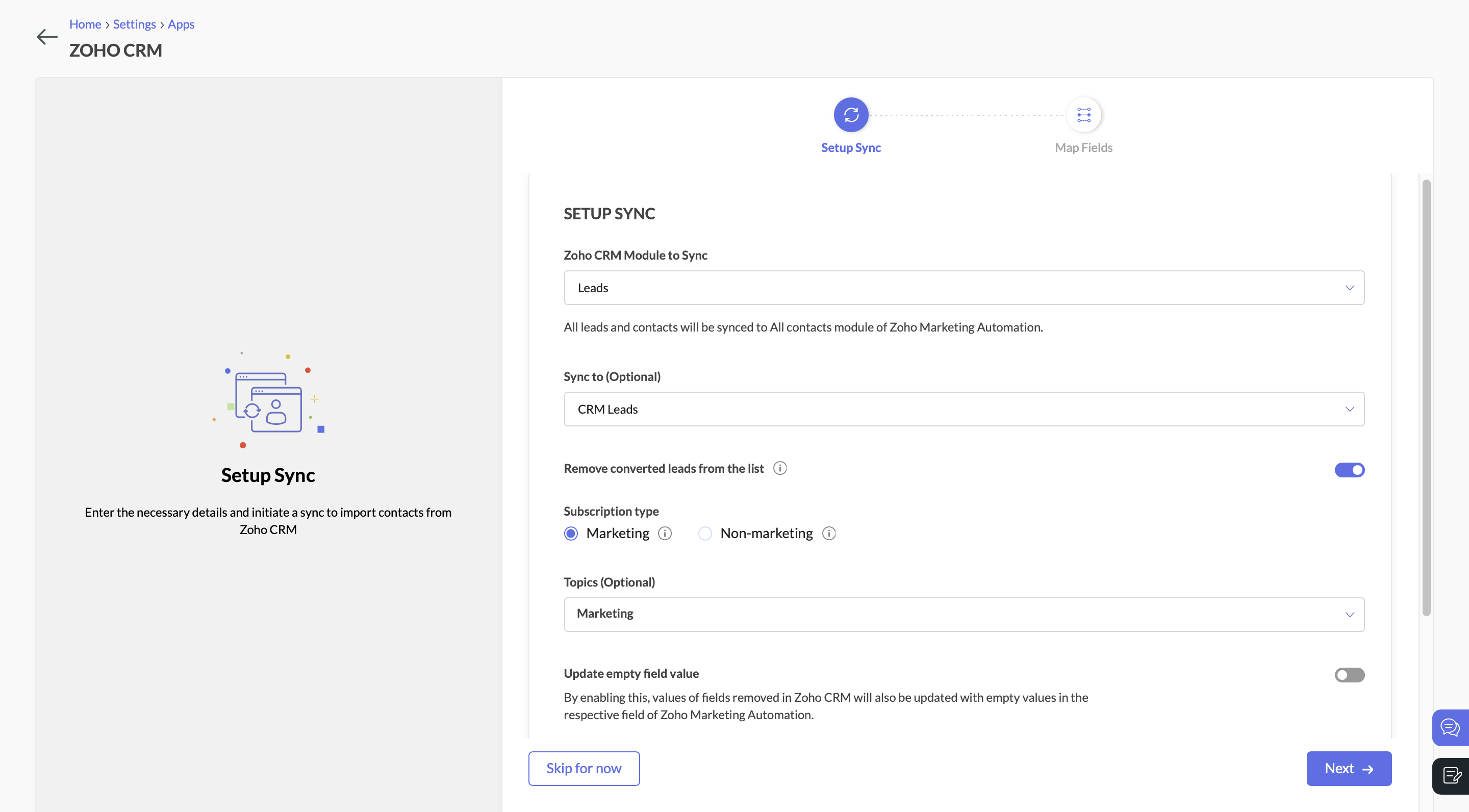
Setup syncSync Leads from Zoho CRM to Zoho Marketing Automation

Send a Marketing Campaign to Engage CRM Leads

With the leads synced, you can now target them with an email campaign. Let’s say you’re promoting a product demo or a free consultation. You send an email with a call-to-action (CTA) button, inviting leads to learn more.

Create a Journey to Target Interested Leads

Navigate to the Journeys section in Zoho Marketing Automation and create a new Journey. This Journey will track engagement and ensure that interested leads are identified, categorized, and updated in both ZMA and Zoho CRM.
  • Add the Email Action Trigger . Click on “Specific Email” and choose the email campaign.
  • Then select the email action “Specific link clicked” and choose the CTA that you included in the campaign.
  • Specify the exact URL you want to track (e.g., a demo request page, a pricing page, or a consultation booking link).
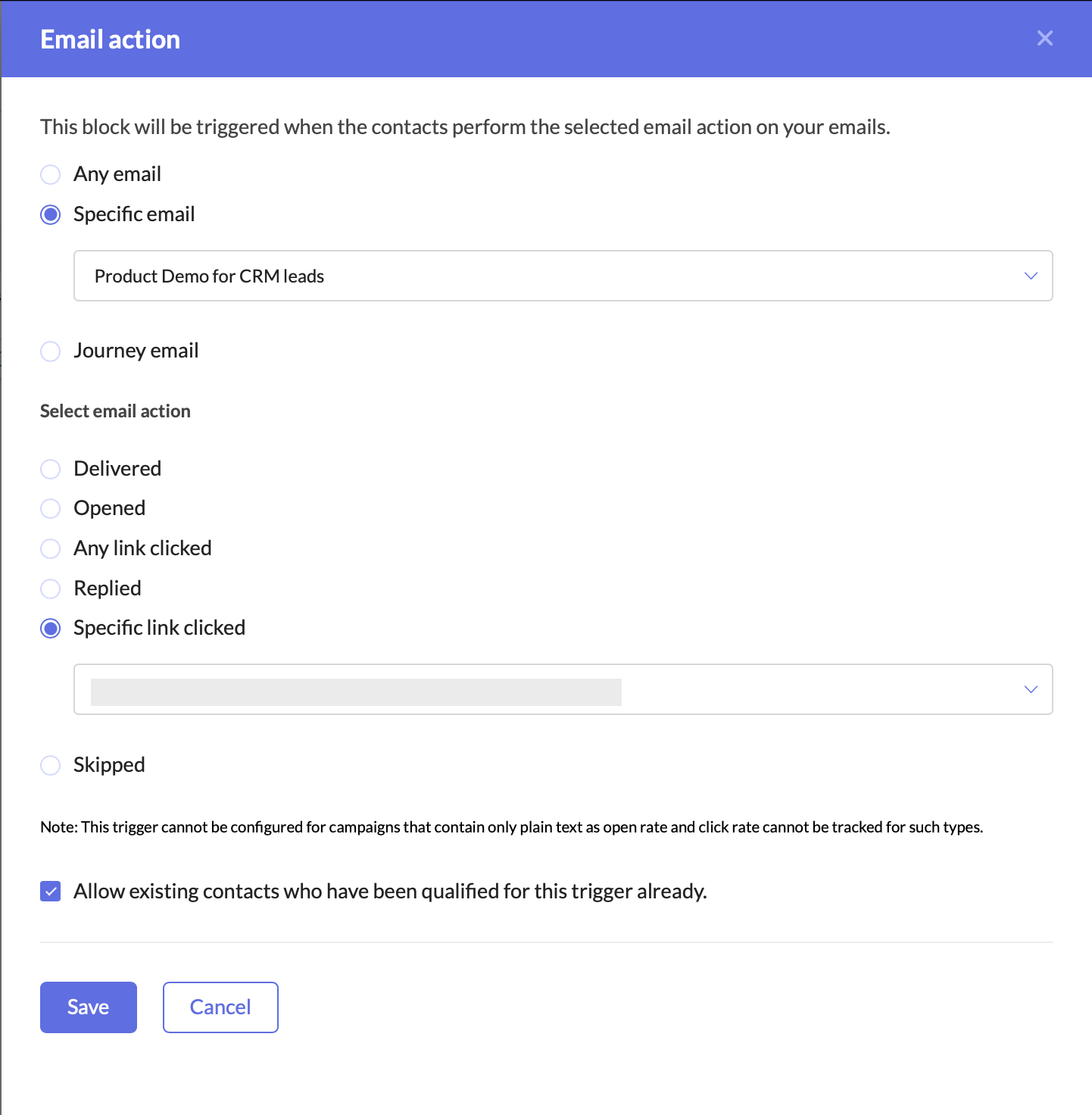
Email ActionCreate a Journey to target interested leads

Adding this trigger ensures that your Journey only targets leads who have shown clear intent by clicking on your email’s CTA. This helps you:
  • Identify engaged leads who are actively interested in your offering.
  • Filter out unresponsive leads, allowing marketing and sales teams to focus their efforts on high-potential prospects.
  • Automate lead qualification without manual tracking.
Once a lead clicks on the CTA, they enter the Journey, signaling that they are engaged and should be prioritized for further marketing and sales efforts.

Update the Lead Stage in Zoho Marketing Automation

Now that the lead has clicked on the CTA and entered the Journey, the next step is to update their lead stage to reflect this new level of engagement.
  • Add the Update Lead Stage action component right after the Email Action Trigger.
  • Configure it to move these contacts to the “Marketing Engaged” stage in ZMA.
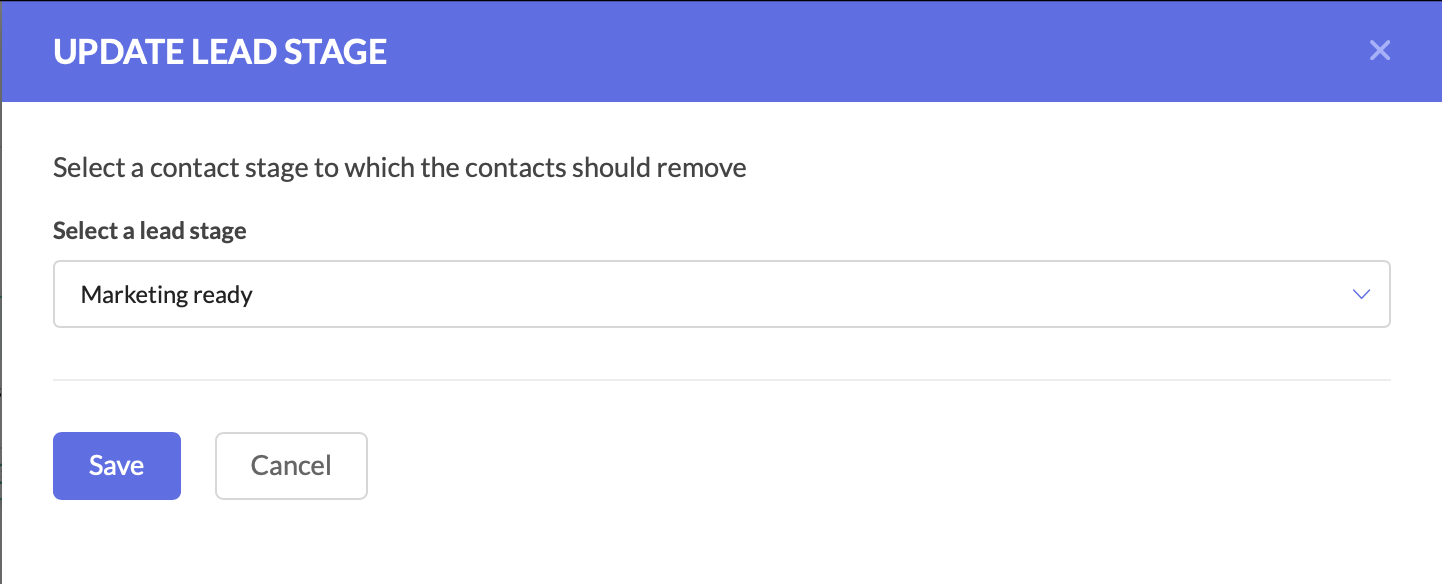
Update lead stageUpdate the Lead Stage in Zoho Marketing Automation

By moving them to the Marketing Engaged stage, you’re ensuring that these leads are recognized as actively interested, making it easier to track their Journey through your funnel.

Push the Updated Lead Data to Zoho CRM

At this stage, the lead stage has been updated in Zoho Marketing Automation, but we also need to reflect these changes in Zoho CRM. Since both platforms need to have the latest details, we now push the updated lead information back to Zoho CRM.
  • Add the Push Data to CRM action component after the Update Lead Stage action.
  • Configure it to push the lead’s latest details into the Leads module in Zoho CRM.
  • Ensure that all relevant fields are mapped correctly.
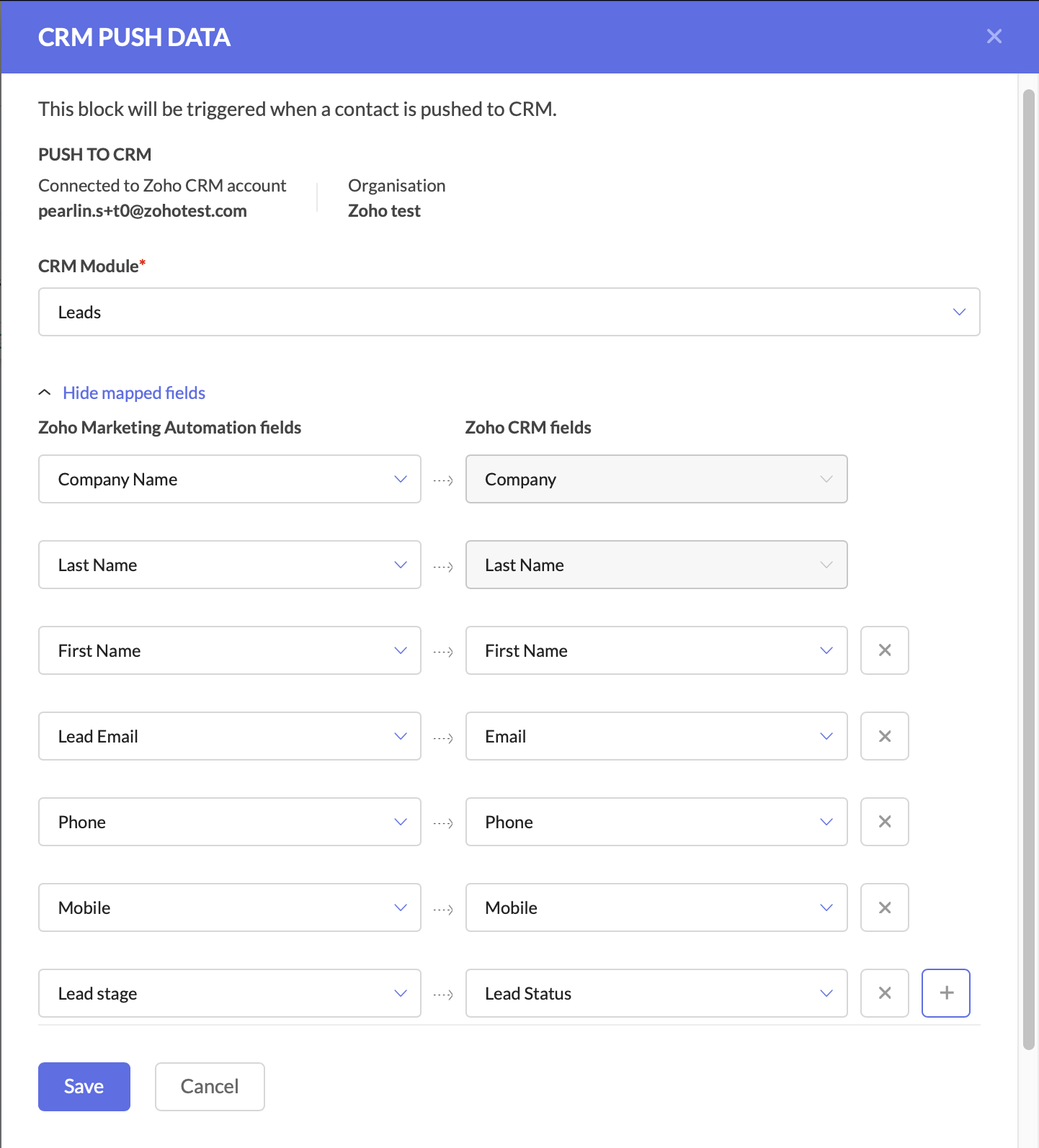
CRM push dataPush the Updated Lead Data to Zoho CRM

Keeping Zoho CRM up to date is critical for sales teams, as it ensures they are always working with the latest information.
At this point, your Journey has:
  • Tracked engaged leads through the Email Action Trigger.
  • Updated the lead stage in ZMA to “Marketing Engaged.”
  • Pushed the updated lead data back to Zoho CRM.
With these foundational steps in place, you are now ready to take the next action—automating deal creation and assigning follow-up tasks to the sales team.

Create a Deal for the Interested Lead

At this stage, the lead has shown interest, so we should automatically create a deal in Zoho CRM.
  • Add the Create Deal CRM Action Component and configure the deal name, due date, stage, amount, and deal assignment.
  • You can also map fields at this stage.
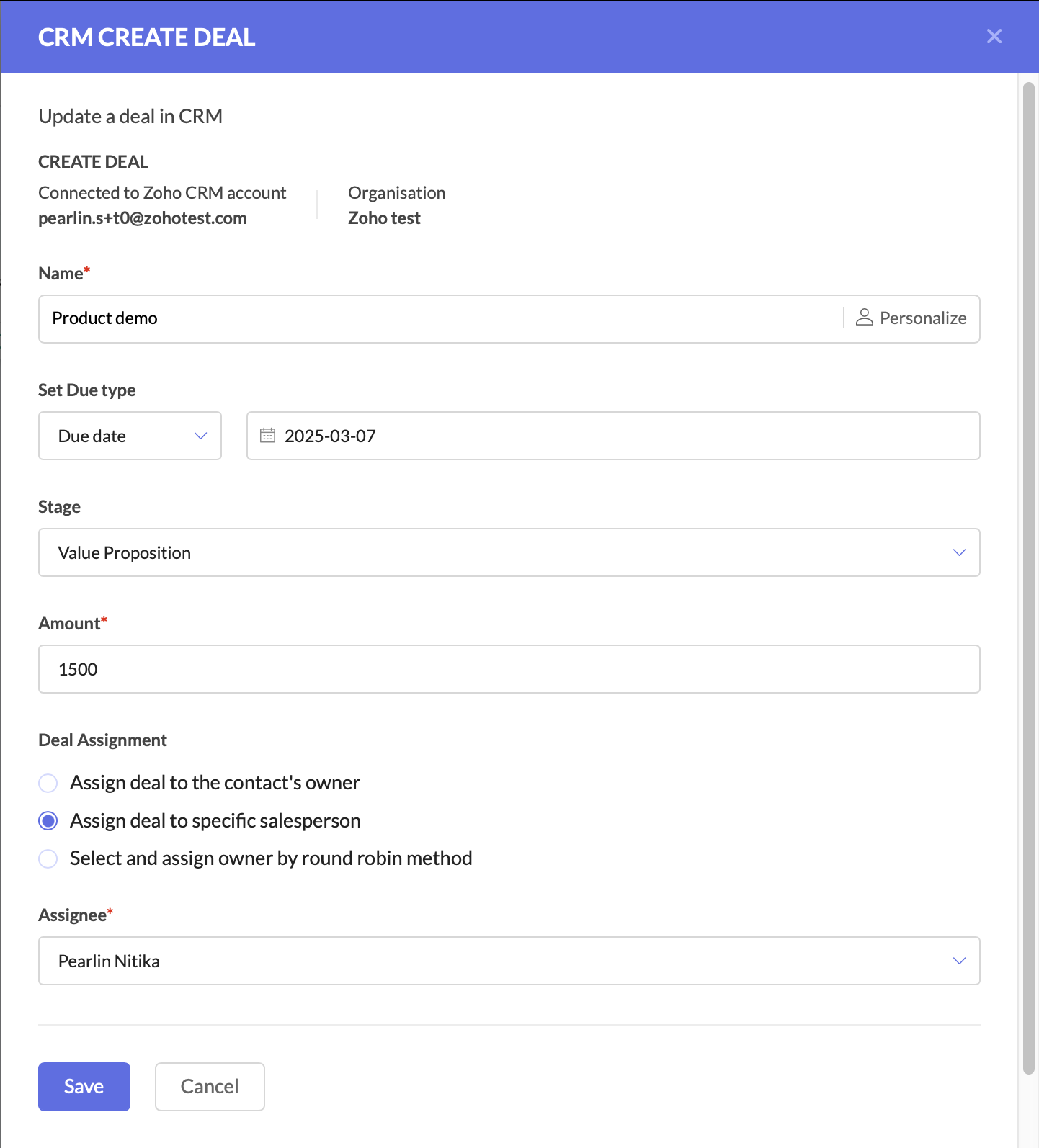
CRM Create dealCreate a deal for the interested lead

Create a Task for Follow-Up

The final step is to ensure a salesperson takes action on the newly created deal.
  • Add the Create Task CRM Action Component.
  • Configure the CRM module, subject and description, due date, priority, status, and assign the task to the deal owner in CRM.
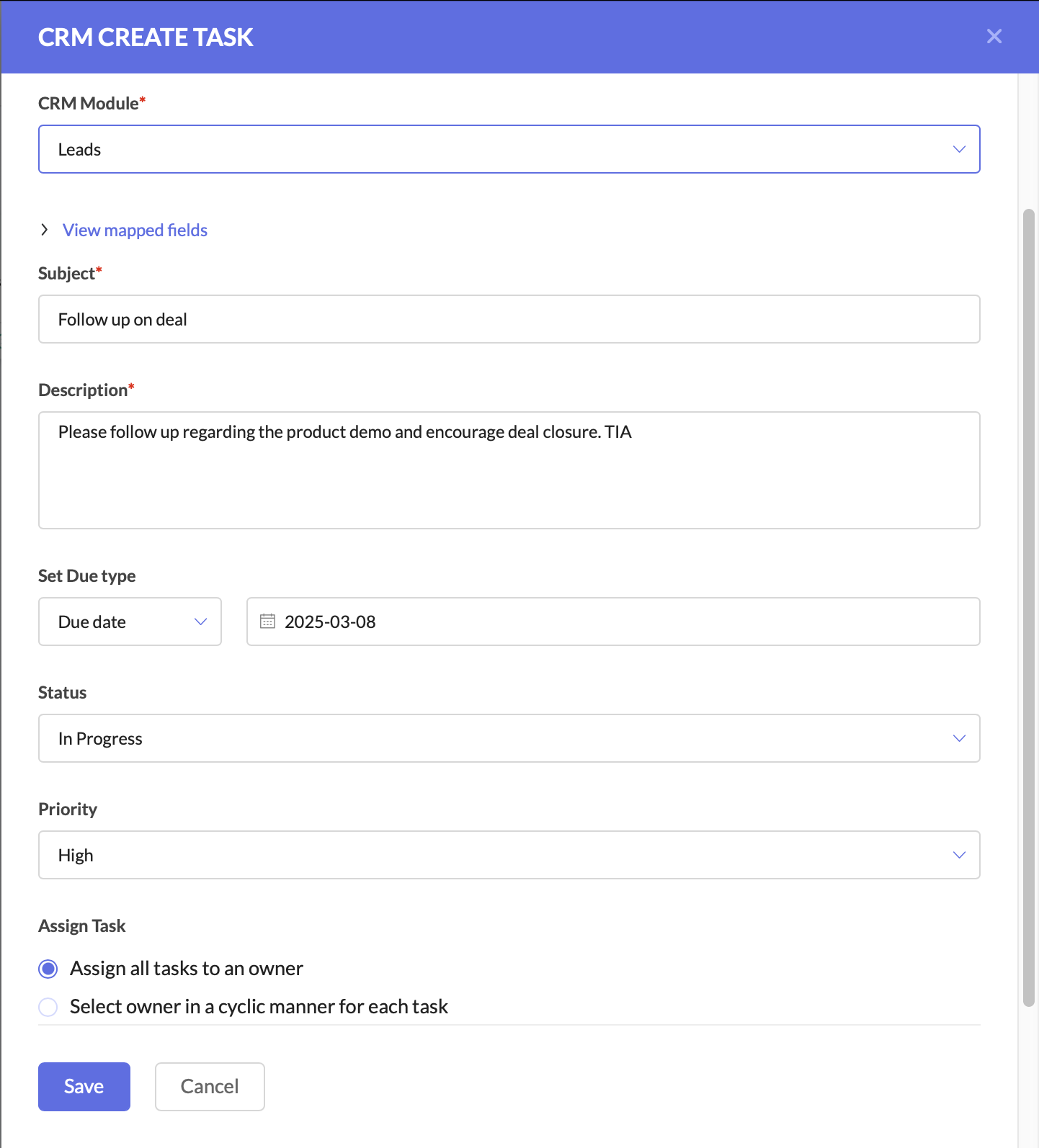
CRM Create taskCreate a task for follow-up

After this, you can connect the components to ensure a seamless flow.


This setup ensures that leads are not just nurtured, but also seamlessly handed off to sales when they show interest. The sales team receives up-to-date CRM records, active deals, and clear follow-up tasks, increasing their chances of closing the deal faster.

Why This Matters for Businesses

By using Zoho CRM and ZMA together, marketing and sales teams need not waste time on cold outreach, and can focus on high-intent leads.
For businesses, this means:
  • Higher revenue by focusing only on engaged leads.
  • Stronger collaboration between marketing and sales.
  • Better customer experience with timely follow-ups.
This is just one of the many ways you can use Zoho CRM actions in ZMA Journeys to refine your lead management process and ensure that only high-intent prospects reach your sales team. In the next post, we’ll explore another powerful use case—how to handle leads that originate in ZMA and transition them seamlessly into Zoho CRM for sales follow-up. Stay tuned for part two, and until then, happy marketing!

Regards,
Pearlin Nitika
User education | Zoho Marketing Automation
    • Recent Topics

    • Zoho CRM Layouts

      I have customised all our modules, Leads, Contacts and deals, and within them, I have created lots of different layouts depending on the type of Lead or contact, for example. Since the new Zoho UI came out, they have all disappeared. I have gone into
    • How to Convert NSF to PST Format Effortlessly? - SYSessential

      It is highly recommended to obtain the error-free solution of the SYSessential NSF to PST converter to convert NSF files from Lotus Notes. Using this professional software, it becomes easier to convert all NSF database items, including emails, journals,
    • Can't connect to POP and SMTP over VPN

      I use Thunderbird to access Zoho Mail via POP and SMTP. I have configured an app-specific password for Thunderbird to use. Everything is properly configured and works correctly — until I enable my VPN. I'm using a paid commercial VPN service (Mullvad).
    • my zoho mail is hacked

      my email is sending my username and password to people i dont know
    • Suministrar accesos

      Asunto: Enable UPLOAD_RULE for API Attachments Mensaje: Hola, Necesito habilitar la capacidad de subir attachments vía API en Zoho Mail. Actualmente recibo el error: "UPLOAD_RULE_NOT_CONFIGURED" al usar el endpoint: POST /api/accounts/{accountId}/messages/attachments
    • how to change the page signers see after signing a document in zoho sign

      Hello, How can I please change the page a signer sees after signing a document in Zoho Sign? I cannot seem to find it. As it is now, it shows a default landing page "return to Zoho Sign Home". Thanks!
    • Introducing real-time document commenting and collaboration in Zoho Sign

      Hi, there! We are delighted to introduce Document commenting, a feature that helps you communicate with your recipients more efficiently for a streamlined document signing process. Some key benefits include: Collaborate with your recipients easily without
    • Polish signer experience to compete with docusign

      I would like to suggest that someone spend the little bit of time to polish the signer experience, and the email templates to more of a modern professional feel. They are currently very early 2000s and with some simple changes could vastly improve the
    • Ticket Loop from Auto Responce

      We’re seeing an issue where a client’s help desk triggers a ticket loop. When they email us, our system creates a ticket and sends the acknowledgement. Their system then creates a ticket from that acknowledgement and sends one back to us, which creates
    • validation rules doesn't work in Blueprint when it is validated using function?

      I have tried to create a validation rule in the deal module. it works if I try to create a deal manually or if I try to update the empty field inside a deal. but when I try to update the field via the blueprint mandatory field, it seems the validation
    • How to make rule to filter out some emails from receiving the notification "Receiving a new ticket"?

      Good Morning, We are currently using the "Receiving a new ticket" notification rule to provide that auto reply template to a customer that emails us for support. However, there are some emails we don't want to receive this auto-reply. Where can I set
    • Zoho Signatures Missing

      In the past after collecting signatures from two different PDFs I would merge them by calling an api and the signatures would appear in the combined PDF. Recently the signatures have disappeared whenever I combine the PDFs together. Why did this randomly
    • Stop the Workarounds: We Need Native Multi-Step Forms

      After over 17 years of community requests, I'm hoping the Zoho team can finally address the lack of native multi-page form support in Zoho Creator. This has been one of the longest-standing feature requests in the community, with threads spanning nearly
    • Metadata API Access to Functions

      I think it would be incredibly helpful to have api access to every function's code. Our team primarily uses deluge functions to update fields across modules according to business logic. I would like to create a visual dependancy model for our CRM, but
    • Filter button in the Zoho Sheet Android App doesn't toggle on

      I am a new Zoho Sheets user and experiencing a specific issue with the filter functionality in the Android mobile application. Detailed Issue Description: The filter icon appears correctly in the toolbar. Upon tapping the filter icon/button, the toggle
    • Automate pushing Zoho CRM backups into Zoho WorkDrive

      Through our Zoho One subscription we have both Zoho CRM and Zoho WorkDrive. We have regular backups setup in Zoho CRM. Once the backup is created, we are notified. Since we want to keep these backups for more than 7 days, we manually download them. They
    • Exciting Updates to the Kiosk Studio Feature in Zoho CRM!

      Hello Everyone, We are here again with a series of new enhancements to Kiosk Studio, designed to elevate your experience and bring even greater efficiency to your business processes. These updates build upon our ongoing commitment to making Kiosk a powerful
    • Reply to Email for SO/PO

      Hello, We are new to Zoho Books and running into an issue. Our support@ email is our integration user. When our team is sending out PO/SO's we are updating the sender email, but for some reason many of our responses are coming back to our support@ email
    • New activity options for workflows

      Greetings, We are excited to announce the addition of two new dynamic actions to our workflow functionality: Create Event and Schedule Call. These actions have been thoughtfully designed to enhance your workflow processes and bring more efficiency to
    • Remove the “One Migration Per User” Limitation in Zoho WorkDrive

      Hi Zoho WorkDrive Team, Hope you are doing well. We would like to raise a critical feature request regarding the Google Drive → Zoho WorkDrive migration process. Current Limitation: Zoho WorkDrive currently enforces a hard limitation: A Zoho WorkDrive
    • Enrich your contact and company details automatically using the Data Enrichment topping

      Greetings, I hope you're all doing well. We're happy to announce the latest topping we've added to Bigin: The Data Enrichment topping, powered by WebAmigo. This topping helps you automatically enhance your contact and company records in Bigin. By leveraging
    • Important Update: Google Ads & YouTube Ads API Migration

      To maintain platform performance and align with Google's newest requirements, we are updating the Google Ads and YouTube Ads integrations by migrating from API v19 to the newer v22, before the official deprecation of v19 on February 11, 2026. Reference:
    • Enhancements for Currencies in Zoho CRM: Automatic exchange rate updates, options to update record exchange rates, and more

      The multi-currency feature helps you track currencies region-wise. This can apply to Sales, CTC, or any other currency-related data. You can record amounts in a customer’s local currency, while the CRM automatically converts them to your home currency
    • Kaizen #228 - Process Large-Scale Migrated Data Using Catalyst Solutions

      Howdy, tech wizards! This week’s Kaizen explores how Catalyst Solutions in the Zoho CRM Developer Hub help import large volumes of data into Zoho CRM while improving data quality and simplifying the migration process. Why Catalyst Solutions? Catalyst
    • Getting Subform Fields to Display Top to Bottom

      I have a form where the fields are all in one column. I want to insert a subform where the fields are stacked in one column as well. I have built both the form and subform but the subform displays the fields from left to right instead of a stacked column. This will cause a problem displaying the subform correctly on mobile apps. How can I do this please?' Here is my form with subform now. As you can see the subform "Follow Up Activity" is displaying the fields left to right. I need them to go top
    • Zoho Expense Import Reports Won't Work Because Default Accounts Already Exist

      Im trying to import reports from another Zoho expense account to mine and im getting errors that won't allow the import to happen The account name that you've entered 'Ground Transportation' already exists. Enter another name for the account and try again.z
    • Inactive License for free account.

      I recently upgraded my Cliq subscription not my team (on the free version), are unable to login to their accounts. The error message received is Inactive License Looks like you have not been covered under the current free plan of users. Please contact
    • 2026 Product Roadmap and Upcoming Features

      This is your guide to what is coming in Zoho Vertical Studio throughout 2026. We’ll update this post throughout the year as items move from development to release, and as and when new initiatives are added. Once a feature is released, it will be reflected
    • Please, make writer into a content creation tool

      I'm tired of relying on Google Docs. I'm actually considering moving to ClickUp, but if Writer were a good content creation tool instead of just a word processor, I would finally be able to move all my development within the Zoho ecosystem, rather than
    • Syncing zoho books into zoho crm

      I was wondering how I can use zoho books in crm as I have been using them separately and would like to sync the two. Is this possible and if so, how? Thanks
    • Release Notes | January 2026

      We have rolled out a set of powerful new enhancements across Zoho Vertical Studio that bring several long-awaited capabilities to your applications. These updates focus on deeper customization, smarter automation, better reporting, and improved usability
    • Live Chat for user

      Hi everyone, I’m new to Zoho Creator and wanted to ask if it’s possible to add a live chat option for all logged-in portal users so they can chat internally. I’m trying to create a customer portal similar to a service desk, but for vehicle breakdowns,
    • Power up your Kiosk Studio with Real-Time Data Capture, Client Scripts & More!

      Hello Everyone, We’re thrilled to announce a powerful set of enhancements to Kiosk Studio in Zoho CRM. These new updates give you more flexibility, faster record handling, and real-time data capture, making your Kiosk flows smarter and more efficient
    • Announcing new features in Trident for Mac (1.34.0)

      Hello everyone! We’re excited to introduce the latest updates to Trident, which are designed to take workplace communication to the next level. Let’s take a quick look at what’s new. Connect with customers using Zoho Voice integration. You can now easily
    • Massive Zoho Books failure

      We have not received any communication or notification from Zoho, but we have detected that Zoho Books is not working for all our users. We cannot access or use Zoho Books. This is critical. We are trying to contact Zoho on the Spain telephone number,
    • The Social Wall: January 2026

      Hello everyone, We’re back with the first edition of The Social Wall of 2026. There’s a lot planned for the year ahead, and we’re starting with a few useful features and improvements released in January to help you get started. Create a GBP in Social
    • How to block whole domain?

      I am getting at least 50-75sometimes over 100 spams emails a day. I see a lot of the spam is coming from .eu domains. I would like to block /reject all email coming for the .eu domain. I do not have any need for email from .EU domains. Why won't the BlackList
    • How Zoho Contracts Makes Negotiations Clear, Secure, and Transparent

      Negotiation is one of the most critical—and often most chaotic—stages of the contract lifecycle. Multiple stakeholders review the same document, propose changes, debate terms, and exchange feedback. Without the right tools, this collaborative process
    • Error: Invalid Element tax_override_preference

      In both Books and Inventory, we're getting the following error whenever we try to enter any Bill: I think this is a bug. Even cloning an old bill (that obviously was entered just fine), this error occurs.
    • Assign Income to Project Without Invoice

      Hello, Fairly new user here so apologies if there is a really obvious solution here that I am just missing... I have hundreds of small deposits into a bank account that I want to assign to a project but do not want to have to create an invoice every time
    • Next Page