Marketer's Space: Why mobile optimization deserves a place in your email strategy

Marketer's Space: Why mobile optimization deserves a place in your email strategy

Importance of mobile optimization

Hello Marketers,

Welcome back to Marketer's Space! Today, we'll talk about the importance of creating mobile-friendly email designs.

While mobile phones were once used only to make phone calls, today they're used for almost everything, including texting, reading, browsing, shopping, and much more. As marketers, this shift means one thing: We must ensure that our email campaigns are mobile-friendly. This isn't an exaggeration; it's a real challenge that many marketers and business owners face, especially during peak seasons. Let's look at one such example.

David's challenge: Great email but low engagement

David runs a handmade gift store. He and his team create customized gifts and greeting cards. For the holiday season, he has crafted a thoughtful email from scratch to send to his new contacts and recurring customers to introduce his new festive collection. His email content is on point; he personalizes it with merge tags, segments his audience, automates his workflows, and even schedules the campaign to go out at his recipients' optimal open times. In short, David has done everything right—or, at least, that's what he thought.

Despite all his efforts, the results aren't as expected. When he analyzes his campaign reports, he sees that the emails have been successfully delivered and that most of his contacts have opened them. But that's it; he hasn't received any clicks, orders, or engagement from his contacts. Confused, David digs deeper into his email reports and notices that most of his recipients opened the email on their mobile devices. He gets curious and checks how his email looks on his phone—and is a bit taken aback! His email is readable but not mobile-friendly.

David's checklist to create mobile-friendly emails

David immediately decides to fix this and make his next campaign mobile-friendly. Here's what he does differently:

Use simple layouts

The first and most effective change David makes is removing the column layout in his email. While the layout looks stylish on his laptop, it doesn't render well on mobile screens. Having multiple columns of images increases the scroll time and makes the email harder to navigate on smaller devices. Fewer columns enable the content to flow more smoothly from top to bottom and makes it easier for recipients to read and scroll through on their phones.
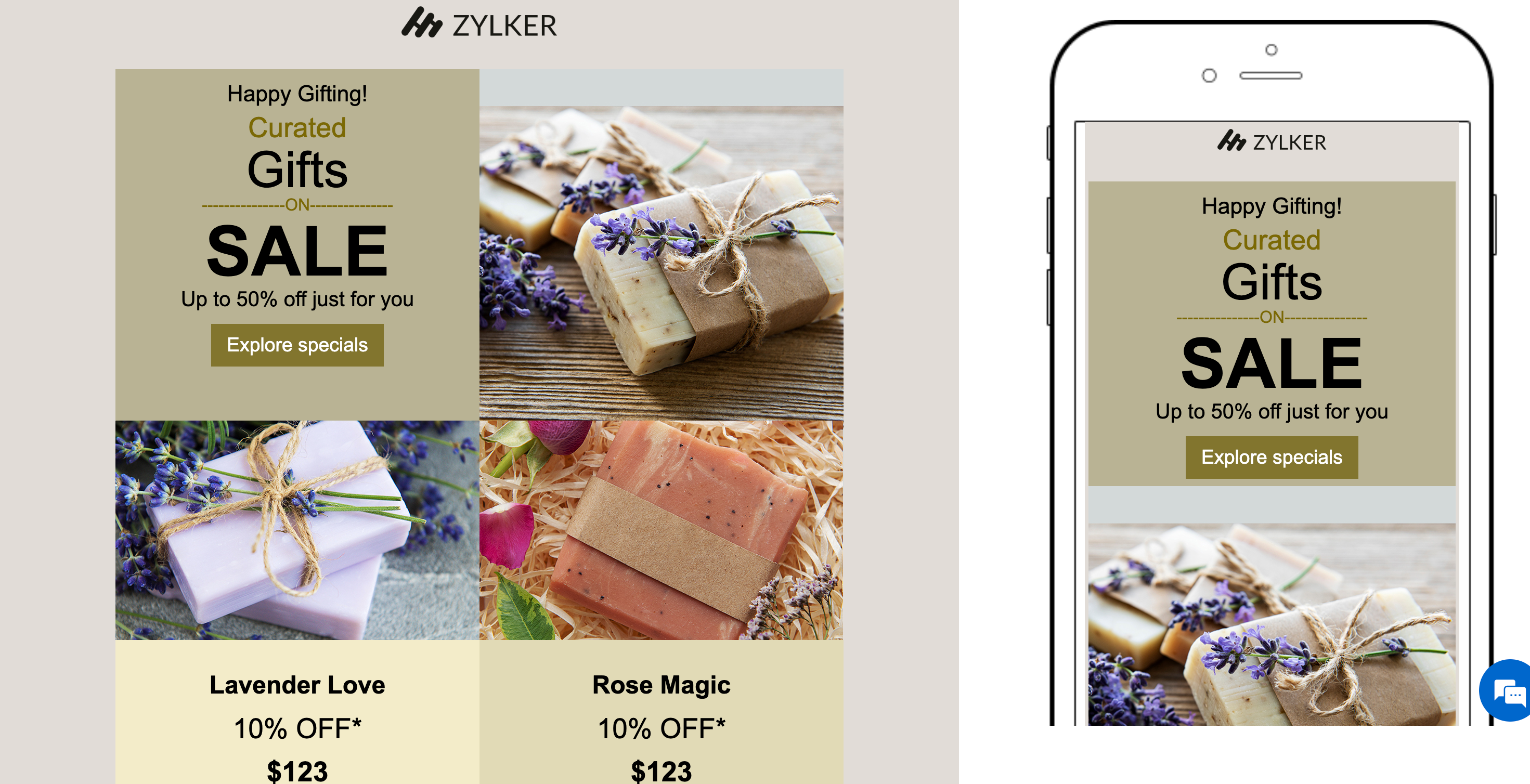
Simple layouts

Keep the content concise

Recipients who read emails on mobiles decide within seconds whether to keep reading or move on to a different screen. That's why brevity and structure matter. David breaks his content into short paragraphs, uses bullet points for clarity, and adds subheadings to guide the reader's eye.
Keep the content concise

Optimize visuals and CTAs

Images can enhance an email's appeal when they're optimized to suit different screen sizes. David uses lightweight images that load quickly and avoids large files that can slow down loading times. He also makes his call-to-action (CTA) buttons prominent, surrounds them with ample white space to prevent accidental taps, and uses action-oriented text like "Shop now" and "Get the offer."

Focus on readability

Tiny fonts that look elegant on desktops can be hard to read on mobile screens. David ensures that he uses at least 14px for body text and 22px or more for headings. He also makes sure there's proper spacing between lines, images, and buttons to make the design visually comfortable.

Test across devices before sending

Even the best-designed emails can appear differently across multiple devices and email clients. Using the Preview and Test feature in Zoho Campaigns, David previews his campaign to gauge how his email will look both on desktop and mobile screens. He also sends test emails to his team to identify any inconsistencies before finally sending the campaign to his contacts.
Test across devices

Avoid large, fixed-width elements

Fixed-width components like wide banners or tables can force users to scroll horizontally on small screens. David switches to flexible, percentage-based widths to ensure his content automatically adjusts to fit any device without users needing to pinch or zoom.

How Zoho Campaigns helps David get it right

Let's look at which features in Zoho Campaigns have helped David create mobile-friendly email campaigns in no time:
  1. Mobile-friendly templates: All pre-designed email templates available in Zoho Campaigns are mobile-friendly by default.
  2. Drag-and-drop editor: Zoho Campaigns' template editor enables users to customize text, image, and button elements. You can easily adjust font, color, size, and padding to create mobile-optimized designs.
  3. Preview and test options: View how your email looks on desktop and mobile screens and send test emails to your team before sending campaigns to your audience.
    Preview and test email

  4. Customize using HTML: If you're comfortable with coding, you can use the built-in HTML editor to code your content manually or import your own HTML and CSS files through the Import/Upload HTML option. Learn more

In a nutshell

By making these small yet impactful changes, David ensures that his emails not only reach his contacts but also engage with them effectively—regardless of the devices they use.

Regards,
Aiswarya Jayaprakash
User Education
Zoho Campaigns

    • Recent Topics

    • Wrapping up 2025 on a high note: CRM Release Highlights of the year

      Dear Customers, 2025 was an eventful year for us at Zoho CRM. We’ve had releases of all sizes and impact, and we are excited to look back, break it down, and rediscover them with you! Before we rewind—we’d like to take a minute and sincerely thank you
    • Introducing the Zoho Projects Learning Space

      Every product has its learning curve, and sometimes having a guided path makes the learning experience smoother. With that goal, we introduce a dedicated learning space for Zoho Projects, a platform where you can explore lessons, learn at your own pace,
    • Create CRM Deal from Books Quote and Auto Update Deal Stage

      I want to set up an automation where, whenever a Quote is created in Zoho Books, a Deal is automatically created in Zoho CRM with the Quote amount, customer details, and some custom fields from Zoho Books. Additionally, when the Sales Order is converted
    • How to show branch instead of org name on invoice template?

      Not sure why invoices are showing the org name not the branch name? I can insert the branch name using the ${ORGANIZATION.BRANCHNAME} placeholder, but then it isn't bold text anymore. Any other ideas?
    • Admin asked me for Backend Details when I wanted to verify my ZeptoMail Account

      Please provide the backend details where you will be adding the SMTP/API information of ZeptoMail Who knows what this means?
    • Unable to remove the “Automatically Assigned” territory from existing records

      Hello Zoho Community Team, We are currently using Territory Management in Zoho CRM and have encountered an issue with automatically assigned territories on Account records. Once any account is created the territory is assigned automatically, the Automatically
    • Kaizen #223 - File Manager in CRM Widget Using ZRC Methods

      Hello, CRM Wizards! Here is what we are improving this week with Kaizen. we will explore the new ZRC (Zoho Request Client) introduced in Widget SDK v1.5, and learn how to use it to build a Related List Widget that integrates with Zoho WorkDrive. It helps
    • Set connection link name from variable in invokeurl

      Hi, guys. How to set in parameter "connection" a variable, instead of a string. connectionLinkName = manager.get('connectionLinkName').toString(); response = invokeurl [ url :"https://www.googleapis.com/calendar/v3/freeBusy" type :POST parameters:requestParams.toString()
    • Possible to connect Zoho CRM's Sandbox with Zoho Creator's Sandbox?

      We are making some big changes on our CRM so we are testing it out in CRM's Sandbox. We also have a Zoho Creator app that we need to test. Is it possible to connect Zoho CRM's Sandbox to Zoho Creator's Sandbox so that I can perform those tests?
    • I Need Help Verifying Ownership of My Zoho Help Desk on Google Search Console

      I added my Zoho desk portal to Google Search Console, but since i do not have access to the html code of my theme, i could not verify ownership of my portal on Google search console. I want you to help me place the html code given to me from Google search
    • Timeline Tracker

      Hi Team, I am currently using Zoho Creator – Blueprint Workflows, and I would like to know if there is a way to track a timeline of the approval process within a Blueprint. Specifically, I am looking for details such as: Who submitted the record Who clicked
    • Critical Issue: Tickets Opened for Zoho Support via the Zoho Help Portal Were Not Processed

      Hi everyone, We want to bring to your attention a serious issue we’ve experienced with the Zoho support Help Portal. For more than a week, tickets submitted directly via the Help Portal were not being handled at all. At the same time no alert was posted
    • Primary / Other Billing Contacts

      If you add an additional contact to a Zoho Billing Customer record, and then mark this new contact as the primary contact, will both the new primary and old primary still receive notifications? Can you stop notifications from going to the additional contacts
    • Missing Import Options

      Hello, do I miss something or is there no space import option inside of this application? In ClickUp, you can import from every common application. We don't want to go through every page and export them one by one. That wastes time. We want to centralize
    • CRM x WorkDrive: File storage for new CRM signups is now powered by WorkDrive

      Availability Editions: All DCs: All Release plan: Released for new signups in all DCs. It will be enabled for existing users in a phased manner in the upcoming months. Help documentation: Documents in Zoho CRM Manage folders in Documents tab Manage files
    • Is it possible to enforce a single default task for all users in a Zoho Projects ?

      In Zoho Projects, the Tasks module provides multiple views, including List, Gantt, and Kanban. Additionally, users can create and switch to their own custom views. During project review meetings, this flexibility creates confusion because different users
    • [Free Webinar] Zoho Creator webinars - Learning Table and Creator Tech Connect Series in 2026

      Hello everyone, Wishing you all a wonderful new year! May 2026 and the years ahead bring more opportunities, growth, and learning your way 🙂 We’re excited to kick off the 2026 edition of the Learning Table Series and Creator Tech Connect Series ! Learning
    • Reply and react to comments

      Hi everyone! We're excited to bring to you a couple of new features that'll make your sprint process simpler. A cloud application brings with it an array of social media features that can be efficiently used in your organizational setup. As an agile scrum
    • Restrict Users access to login into CRM?

      I’m wanting my employees to be able to utilize the Zoho CRM Lookup field within Zoho Forms. For them to use lookup field in Zoho Forms it is my understanding that they need to be licensed for Forms and the CRM. However, I don’t want them to be able to
    • How to set page defaults in zoho writer?

      hi, everytime i open the zoho writer i have to change the default page settings to - A4 from letter, margins to narrow and header and footer to 0. I cannot set this as default as that option is grayed out! so I am unable to click it. I saved the document
    • Where is the settings option in zoho writer?

      hi, my zoho writer on windows has menu fonts too large. where do i find the settings to change this option? my screen resolution is correct and other apps/softwares in windows have no issues. regards
    • Module Customisation - Lookup function not available

      Good evening, Within my business, I can have multiple customers, who have multiple mobile assets. When I set these assets up, I enter information such as vehicle registration, Vehicle identification number (VIN), Unit number, YOM, in addition to others.
    • zoho click, and nord VPN

      Unfortunately, we've been having problems with Zoho Click, where essentially the line cuts off after about a minute's worth of conversation every time we are on VPN. Is there a way we can change this within the settings so it does not cut the line off
    • Zoho Calender

      a) does the clanender in zoho project allow you to see the name of the event in the celnder view, it currently says either "Task (1) or "Milestoen (1)" b) Alternatively does the calender in Zoho project integrate with zoho calender?
    • Matching ZOHO Payments in Banking

      Our company has recently integrated ZOHO Payments into our system. This seemed really convenient at first because our customers could pay their account balance by clicking on a link imbedded in the emailed invoice. Unfortunately, we can't figure out how
    • Team Gamification

      Would love to motivate, engage and encourage our team with our social media posts. Would like to include Gamification features of Social Media in Zoho Social or Marketing Automation. And also bring in Social Advocacy tools/tracking/management to these,
    • Power up your Kiosk Studio with Real-Time Data Capture, Client Scripts & More!

      Hello Everyone, We’re thrilled to announce a powerful set of enhancements to Kiosk Studio in Zoho CRM. These new updates give you more flexibility, faster record handling, and real-time data capture, making your Kiosk flows smarter and more efficient
    • New Enhancements to Zoho CRM and Zoho Creator Integration

      Hello Everyone, We’ve rolled out enhancements to the Zoho Creator and Zoho CRM integration to align with recent updates made to the Zoho Creator platform. With enhancements to both the UI and functionality, This update also tightens access control by
    • Work Type - Limitation

      Hello, I'm setting up work types and have noticed, a limitation on the parts area to 10 lines. Can this be increased to 20 or greater? In addition to this, when I attempt to add the work type to a work order, the correct labour hours doesn't flow through.
    • Emails sent through Bigin are not posting in IMAP Sent folder

      I have set up my email to work from within Bigin using IMAP.  I am using IMAP so I can sync my email across multiple devices - phone / laptop / desktop / iPad / etc.  I want all my emails to populate my email client (outlook & iphone email) whether or
    • Adding Default Module Image into mail merge field

      As with most people finding their way to these forums i have a specific requirement that doesn't seem to be supported by Zoho I have created 2 custom modules to suit my purpose 1 is an inventory type module that lists aluminium extrusions, and all relevant
    • Turning the page for Zoho SalesIQ: 2025 to 2026

      As we wrap up 2025, we would like to take a moment to reflect on what we set out to achieve this year, what we’ve delivered, and where we’re headed next. What we focused on in 2025 This year was all about strengthening the core of engagement and AI, making
    • Stage-probability mapping feature in custom module

      Hi, I'm building a custom module for manage projects. I would like to implement the stage-probability feature that Potentials has. Is this possible?
    • Temporary Outage in Zoho Cliq Affecting US Users – July 23, 2025

      We experienced a service disruption in Zoho Cliq that impacted core functionality for users in the US region. The issue occurred between Jul 23, 2025, 06:54:00 PM IST and 07:13:13 PM IST, lasting approximately 19 minutes. To restore service stability,
    • Why Sharing Rules do Not support relative date comparison???

      I am creating a Sharing Rule and simply want to share where "Last Day of Coverage" (Date field) is Greater than TODAY (Starting Tomorrow). However, sharing rules don't have the option to compare a date field to a relative date (like today), only to Static
    • Zoho Cliq not working on airplanes

      Hi, My team and I have been having this constant issue of cliq not working when connected to an airplane's wifi. Is there a reason for this? We have tried on different Airlines and it doesn't work on any of them. We need assistance here since we are constantly
    • Problem with Workdrive folders

      I'm having a problem a problem accessing files in a Zoho work drive folder when using the Zoho writer app. The problem folder appears grayed out in the Zoho work drive window in both the online and writer application. However I can open the folder in
    • Send Supervisor Rule Emails Within Ticket Context in Zoho Desk

      Dear Zoho Desk Team, I hope this message finds you well. Currently, emails sent via Supervisor Rules in Zoho Desk are sent outside of the ticket context. As a result, if a client replies to such emails, their response creates a new ticket instead of appending
    • Multi-currency and Products

      One of the main reasons I have gone down the Zoho route is because I need multi-currency support.  However, I find that products can only be priced in the home currency, We sell to the US and UK.  However, we maintain different price lists for each. 
    • Create an Eye-Catching Announcement Widget for Your Help Center

      Hello Everyone! In this week’s edition, let’s explore how to keep your customers updated with exciting news in the Help Center. See how ZylkerMobile wowed their customers by bringing updates right to their portal. ZylkerMobile, the renowned brand for
    • Next Page