SAML authentication in Zoho Mail: Simplify and secure your organization's login management

SAML authentication in Zoho Mail: Simplify and secure your organization's login management

Managing login credentials across multiple web applications can be challenging for organizations with a large number of users. Without a centralized authentication system, users are required to maintain separate passwords for each application, increasing the risk of weak passwords and unauthorized access.

Zoho Mail's SAML Authentication feature addresses this by allowing administrators to configure SAML using the URLs and public key provided by their chosen Identity Provider. This simplifies login management and provides a secure and unified authentication experience for Zoho Mail users.

What is SAML authentication in Zoho Mail?  

SAML, which stands for Security Assertion Markup Language, is an XML-based framework for exchanging user authentication and attribute information across different domains and services. It enables Single Sign-On (SSO), allowing users to access multiple web applications with a single set of credentials.

When a user attempts to log in, they are redirected to the Identity Provider for validation, and upon successful authentication, access to Zoho Mail is granted automatically.

How does SAML Authentication work in Zoho Mail? 

Once SAML Authentication is configured in the Zoho Mail Admin Console, the login process works as follows:

  1. The user accesses the custom URL configured for their domain.

  2. They are redirected to the SAML login page of the configured Identity Provider.

  3. The Identity Provider validates the user's credentials.

  4. Upon successful validation, the Identity Provider sends an encrypted response to Zoho Mail.

  5. Zoho Mail decodes the response and initiates the user session if the authentication is successful.

How can administrators use SAML authentication effectively in Zoho Mail? 

  • Centralized login management: Users access Zoho Mail using the same credentials they use for their Identity Provider, eliminating the need for separate passwords.

  • Secure authentication process: User credentials are validated by the Identity Provider, and an encrypted response is sent to Zoho Mail to confirm authentication, ensuring that only verified users gain access.

  • Simplified access control: Access to Zoho Mail is automatically revoked when a user's Identity Provider account is deactivated, reducing the risk of unauthorized access.

Steps to set up SAML Authentication in Zoho Mail 

Before configuring SAML Authentication, ensure the following prerequisites are completed:

  • Add and verify your domain in Zoho Mail Admin Console.

  • Create users and email accounts for your organization.

  • Configure a custom URL for your domain.

Once the prerequisites are in place, follow these steps to configure SAML authentication:

  1. Log in to Zoho Mail Admin Console.

  2. Navigate to Security and Compliance in the left pane.

  3. Click Security and go to SAML Authentication.

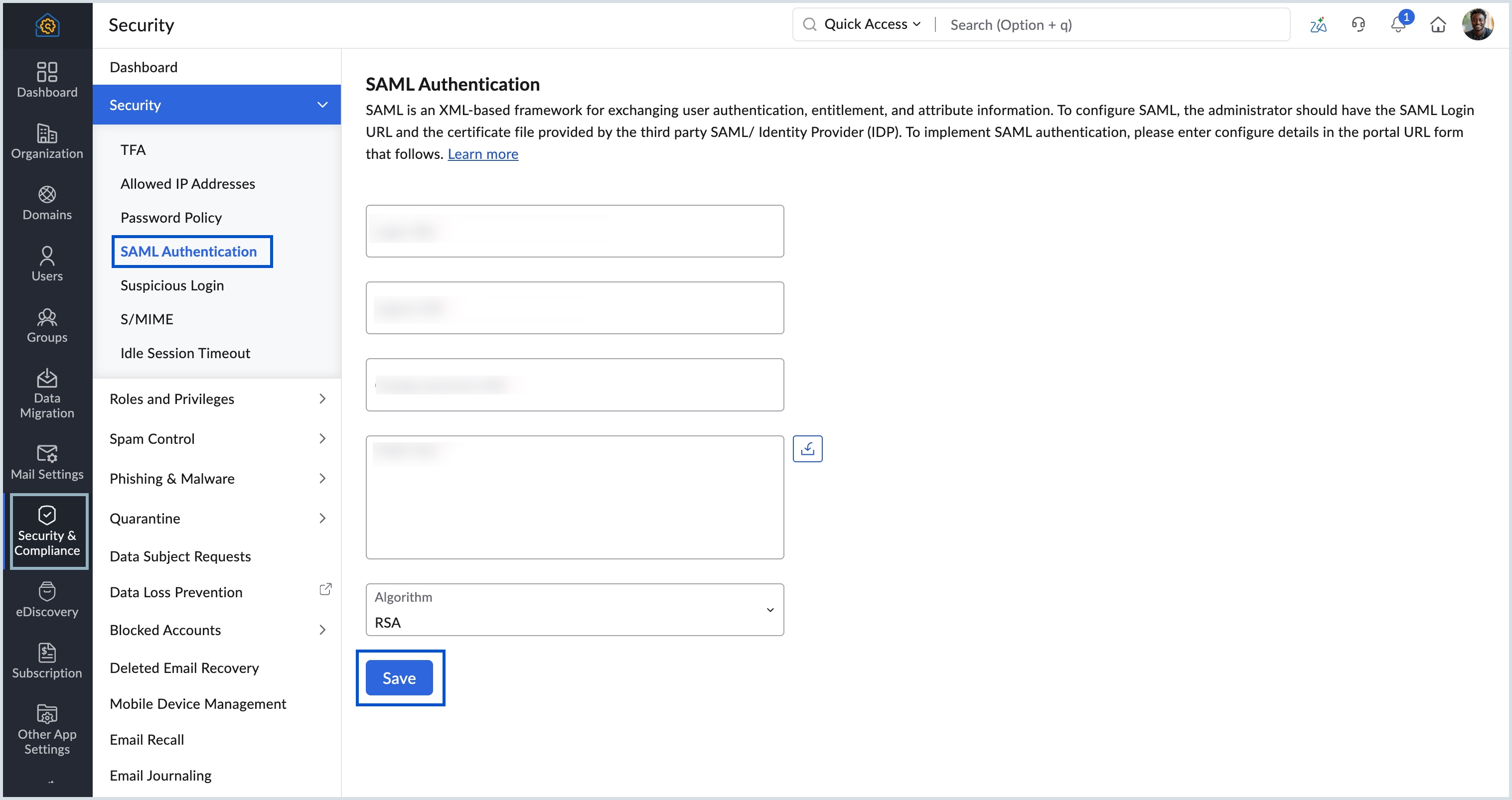
  4. Enter the Login URL, Logout URL, and Change Password URL provided by your Identity Provider.

  5. Upload the public key file provided by your Identity Provider.

  6. Click Save to complete the configuration.
​

​

​
Learn in detail about the SAML authentication in Zoho Mail.

    • Recent Topics

    • Minor Problem: Dashboard Forgets Cash vs Accrual

      The dashboard doesn't reflect my cash/accrual choice from settings, AND doesn't remember what I've set it to.
    • information on a suggestion how to treat old records in the - pipeline deals, notes, activities (tasks- events-calls) and emails etc.

      Hi, I would like information or a suggestion on how to treat old records in the - pipeline deals, notes, activities (tasks- events-calls) and emails etc. ? As each option (pipeline deal, notes, activities, emails etc.) counts as a record and as we advance
    • Automating Employee Birthday Notifications in Zoho Cliq

      Have you ever missed a birthday and felt like the office Grinch? Fear not, the Cliq Developer Platform has got your back! With Zoho Cliq's Schedulers, you can be the office party-cipant who never forgets a single cake, balloon, or awkward rendition of
    • zoho stream web notifications

      since im locked out of IMAP and cant use my mail app that lets my team collaborate and chat below emails, im trying out the zoho version of this... zoho streams. On the bottom of an email in the zoho mail web app, i "comment" and mention another user.
    • New in Zoho CRM: Pre-fill Public Forms with CRM Data

      Public forms just got more flexible! With the new Pre-fill Public Forms with CRM Data option in the Zoho Forms integration, people filling out your public forms can search for a CRM record, select the right one, and have the form automatically populate
    • HEIC File Type Viewer

      Hi, It would be nice to be able to click on the images in the All Entries/Reports Tables which are HEIC the same as JPG, PNG, etc. so they open in a viewer from Zoho or the Attachment Service, today HEIC requires you to download each image and open it
    • Zoho Books | Product updates | October 2026

      Hello users, October brings a range of new features and enhancements to Zoho Books, designed to simplify compliance, streamline accounting workflows, and improve inventory management. From the launch of the Nigeria Edition and France’s e-invoicing capabilities
    • Specific ListView Canvas on Canvas Home Page Always Loads Most Recent ListView, Not the One Specified

      I had mentioned this to ZOHO, but I mainly wanted to see if others in the Community are also facing this problem. I created a Canvas ListView for a Custom Module, and then created a Canvas Home page (technically on a tab item, but I'm not sure if that
    • print preview

      We are using microsoft edge, till 12 sep we were getting directly print option. Now we are getting this preview option we have to click print option again. How to bypass this-preview option?
    • Zoho Projects - Has something changed regarding to linking Projects and Deals via the API?

      I am trying to link Zoho Projects to Deals in CRM using the API, but each time, the Deal Contact is added as a Client user and receives an email invite asking them to join the organisation. These are internal projects and the customer should not have
    • Connection into Cliq?

      I have the SalesIQ chat widget on my site using the Zohobot but I'm not always on and my employees don't keep it open all the time. We do have Cliq open all the time though so I'd love a way to manage those discussions directly in Cliq as they come in.
    • Kaizen #264 - Using zoho-crm Skill to Write Functions

      Hello CRM wizards, Welcome back to another week of Kaizen. In our previous Kaizens, we explored how the zoho-crm skill can assist you across various Zoho CRM developer tools. This time, let us see how it can help you write Deluge Functions, from simple
    • Edit Pinned Comments in Zoho Desk

      It's great that private comments can now be pinned to the top of the ticket but what would be extremely helpful would be to allow for the pinned comment to be edited vs. having to find the comment in the ticket to edit it.
    • Recover accidentally deleted mail account

      Email account was accidentally deleted from admin console. 
    • mail sent to gmail goes directly to spam

      Hi TKIM and SPF are configured and verified. E-mails coming from zoho to my personal gmail account are going directly to the spam folder. How can I solve this? I can send you guys the headers privately if you need to.
    • Shopify Integration: How do I change the default Unit of Measure from KG to PCS

      For those using Shopify with Zoho Inventory, has anyone managed to have imported items default to PCS/EA instead of KG? If so, where is this configured? I can only find weight units in Shopify, not a sales unit of measure.
    • flexible subscription plan

      Greetings! We currently have 5 Standard plans, but would like to add 5 mail-lite one just to receive emails (do not need other business features or storage. As Super Admin, I tried to do that my self but didnt see the option on your sales platform. Please
    • mail

      We want our tracked links in campaign and journey emails to use our own domain instead of the shared maillist-manage.net domain. We have already created the CNAME links.rexven.com → customer-campaign.zoho.com (DNS only). Does our plan support a custom
    • Useless support and impossible to add users for whom I paid for

      Over a week ago i signed up for 5 emails addresses and 10GB, and so far I only have 1 email working, no access to the dashboard. Remote connection with "support"....useless Screen grabs sent to "support" useless Messages to "support"... now not answering
    • Mr

      can't access my email
    • Reduce Mail Lite Renewal from 2 licenses to 1

      Hello Zoho Support, I have a Mail Lite 5GB subscription with 2 licenses. have deleted the unused user, and now only 1 user/license is being used. My subscription is due for renewal, but the renewal page still shows 2 licenses and does not give me an option
    • Adding additional records dynamically to a subset of fields

      I'm trying to create a service ticket layout which will be passed to a Creator application for Field Service Management (FSM) purposes. We need to be able to define a specific subset of service product fields such as "Service Product", "Service Product Serial Number", "Service Product Warranty End Date" and "Service Product Current Warranty Status". We may need to record more than one of these subsets, in case the customer has more than one product which has to be serviced on their site. It seems
    • Push error with Zoho Books and Zoho CRM

      I have successfully linked Books and CRM but I have some push errors with the following message: "The customer associated to this record is not linked to module chosen in the current contact sync configuration." I am unable to work this out, could you help please.
    • Function #24: Automatically display deal name from Zoho CRM on quotes in Zoho Books

      Deals allow businesses to organize and visualize their sales pipeline. This provides a clear overview of all potential opportunities and helps in making informed decisions. Zoho CRM empowers you to create deals or potentials for your clients and monitor
    • {"code":57,"message":"You are not authorized to perform this operation"}

      In my trial version of Zoho account, I am trying to integrate Zoho CRM Contact Module with Zoho books but when i call API it gives such type of error {"code":57,"message":"You are not authorized to perform this operation"}. I am using refreshed token
    • Allow widgets to be placed between native sections in the Ticket Properties panel

      One of our biggest frustrations with the Tickets module is how rigid the Ticket Properties panel is. Every section there is built only from native Zoho Desk fields. We can add sections, rearrange fields, and pick layouts, but we can’t put anything custom
    • #13 Understanding Your Zoho Invoice Limits

      Ravi's busiest month was also the month his invoicing stopped working. He had been using Zoho Invoice comfortably for months. Then, just when business picked up, he hit a limit he hadn't expected. The problem wasn't that he had missed a payment or forgotten
    • Map Dependency Upgrades in Zoho CRM

      Map Dependency Fields enhancements are now available across all DCs. Hello everyone, We’ve introduced a set of enhancements to Map Dependency Fields to make setup simpler, faster, and more intuitive. Map Dependency helps control how values appear across
    • How to Allocate Incoming Purchase Stock to Specific Sales Orders in Zoho Inventory?

      Hi all, We are using Zoho One Enterprise and need guidance on managing sales order–wise allocation of incoming stock in Zoho Inventory. Our workflow is: A customer order is received, and the Sales Order is confirmed. The sales team immediately creates
    • How to disable automatic ticket closure emails for specific outgoing communications?

      Is there a way to disable the automatic "Ticket Closed" email notification for specific tickets or outgoing emails? Currently, every time we send an email to a customer, the system automatically sends a "Ticket Created" email, followed by a "Ticket Closed"
    • Zoho Webinar - Sharing System Audio (NOT AVAILABLE)

      Hi, We are having a serious problem with Zoho Webinar. In the webinars we run, we very often share the audio from a video we are streaming directly from YouTube or other applications. Until recently we were using Zoom, but as we use other Zoho applications
    • What's new in Zoho Workplace | September 2026

      Hello Zoho Workplace community! Here's a roundup of all the new features and announcements that went live across Zoho Workplace applications in September. Zoho Mail Compose Options Across Templates You can now use the Undo, Redo, and New List options
    • Unable to export reports despite enabled report export permissions

      Hi Zoho Community, We are unable to export reports in Zoho CRM. When attempting an export, we receive the following error: “Cannot Export Report — You do not have permission to export one or more modules used in this report. Please contact your administrator.”
    • What does "Tickets for Review" do?

      What is the purpose of the va nilla view " Tickets for Review?"
    • Set department automatically for incoming calls

      Is it possible, when receiving an incoming call through Zoho Desk (using Twilio integration), for the department to be auto-selected based on the phone line being called? Currently, we have to manually select the department from the dropdown menu when
    • Zoho Desk training for administrators in EU and US region

      Hello Everyone, Get ready for the certified Virtual Classroom training for our Zoho Desk users in Europe and the US. Our in-house Zoho Desk expert, @Dheeraj | Zoho Desk, will conduct the virtual classroom training. This training focuses on simplifying
    • Support Plan: Recuring Issue

      Hi Zoho Team, Could you please look into this recurring alert and provide clarification on why this restriction is still in place? This issue has become a bottleneck in our workflow, significantly limiting our automation capabilities. We are unable to
    • Webinar de Zoho People: tecnología para RR. HH.

      ¿Y si RR. HH. pudiera estar tan conectado con el negocio como el resto de tu organización? La gestión de personas está evolucionando, y los departamentos de Recursos Humanos necesitan herramientas que les permitan ir más allá de las tareas administrativas
    • Zoho CRM still doesn't let you manage timezones (yearly reminder)

      This is something I have asked repeatedly. I'll ask once again. Suppose that you work in France. Next month you have a trip to Guatemala. You call a contact there, close a meeting, record that meeting in CRM. On the phone, your contact said: "meet me
    • WhatsApp in Zoho CRM Plus: inbound works, every outbound message fails with crm.bm.msg.failed.undefined since Oct 14 (business stopped)

      Hello Zoho team and community, We are Roxo Inc, a Zoho CRM Plus customer in Florida. WhatsApp is our main sales and support channel, and since October 14, 11:11 AM EDT we cannot send any WhatsApp message from Zoho CRM. We are facing a large drop in sales
    • Next Page