Tips & Tricks #1: Zoho Desk - Cómo mostrar tarjetas de producto en tu chatbot

Tips & Tricks #1: Zoho Desk - Cómo mostrar tarjetas de producto en tu chatbot


¡Hola a todos! 

Si utilizas Conversaciones Guiadas (Guided Conversations) en Zoho Desk para ayudar a los clientes a encontrar productos, probablemente te hayas encontrado con este problema: el bot ofrece una lista de opciones, pero los clientes siguen sin saber cuál elegir.

No hay imágenes, especificaciones ni precios; solo aparecen los nombres. Como resultado, los clientes hacen preguntas adicionales, los agentes tienen que intervenir innecesariamente y todo el flujo pierde eficacia.

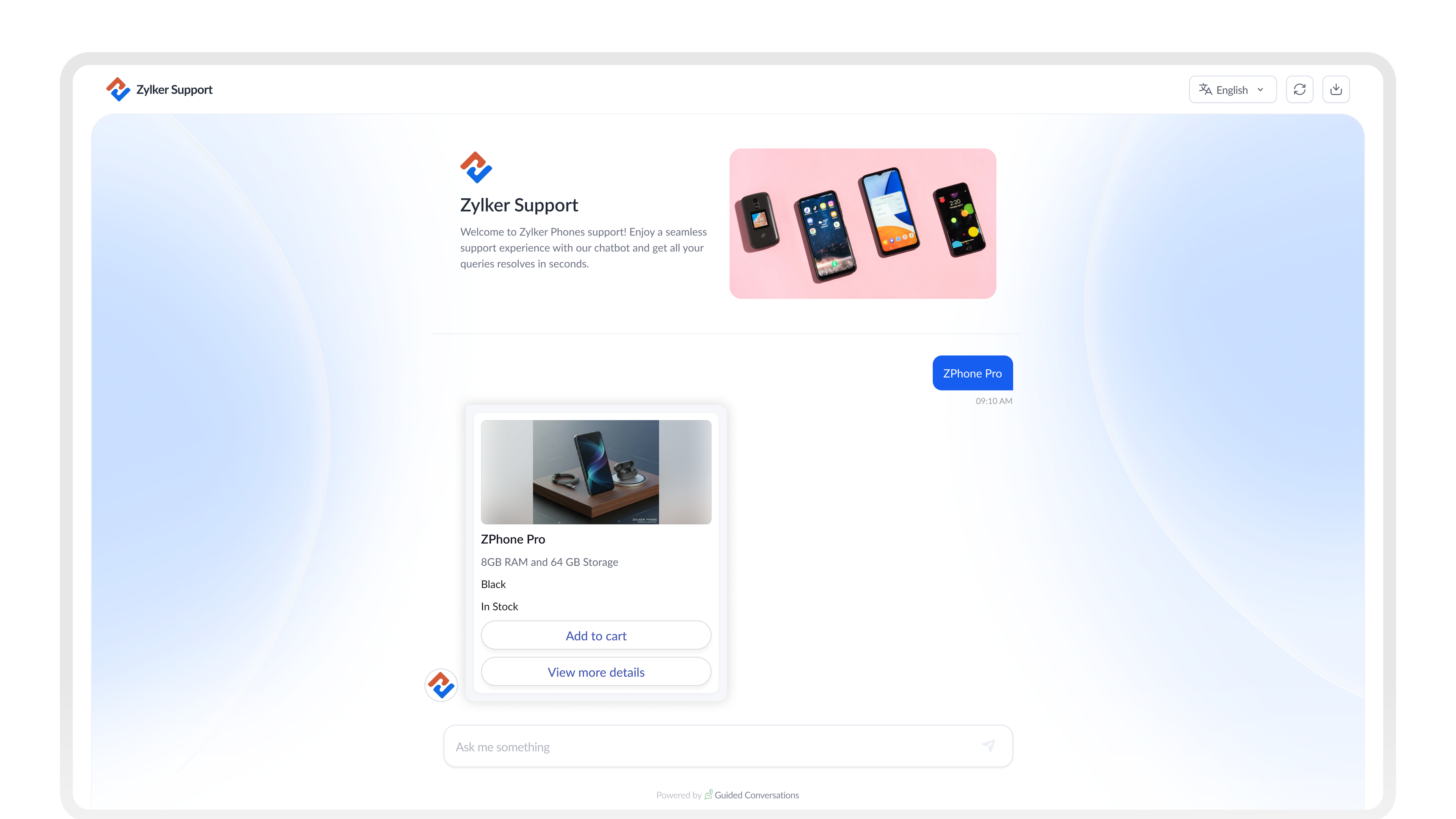
Card Choice en GC soluciona este problema. Permite mostrar opciones de productos como tarjetas visuales e interactivas dentro del chat, para que los clientes dispongan de toda la información necesaria para tomar una decisión sin salir de la conversación.

A continuación, te explicamos cómo configurarlo de principio a fin para tu empresa.


¿Qué es Card Choice?

En lugar de utilizar simples botones de texto, Card Choice permite mostrar opciones mediante tarjetas enriquecidas. Cada tarjeta puede incluir:

  • Una imagen del producto
  • Un título y un subtítulo
  • Una descripción breve
  • Especificaciones clave, como precio o disponibilidad
  • Botones de acción como:
    • Ver detalles
    • Comparar
    • Añadir al carrito


¿Tarjetas estáticas o dinámicas?

Antes de empezar la configuración, determina qué tipo se adapta mejor a tu caso de uso.

Usa tarjetas estáticas cuando...
Usa tarjetas dinámicas cuando...
Las opciones son fijas y cambian poco
Departamentos o categorías de soporte
Tipos de citas o reservas
Planes de suscripción
Los datos provienen de un sistema externo
Catálogos de productos que cambian con frecuencia
Precios o stock actualizados en tiempo real
Amplias gamas de productos


Idea
CONSEJO
Para la mayoría de los flujos de comercio electrónico, las tarjetas dinámicas son la mejor opción. Obtienen los datos automáticamente de tu sistema, por lo que no tendrás que actualizar manualmente las tarjetas cada vez que cambien los productos o los precios.

Configuración de Card Choice en tu flujo

1. Diseña el flujo

Comienza con un bloque de preguntas para identificar qué está buscando el cliente. A continuación, añade un bloque de API o webhook para obtener los productos que coincidan con su búsqueda desde tu sistema.

Después, agrega un bloque de Dynamic Card Choice para mostrar los resultados.
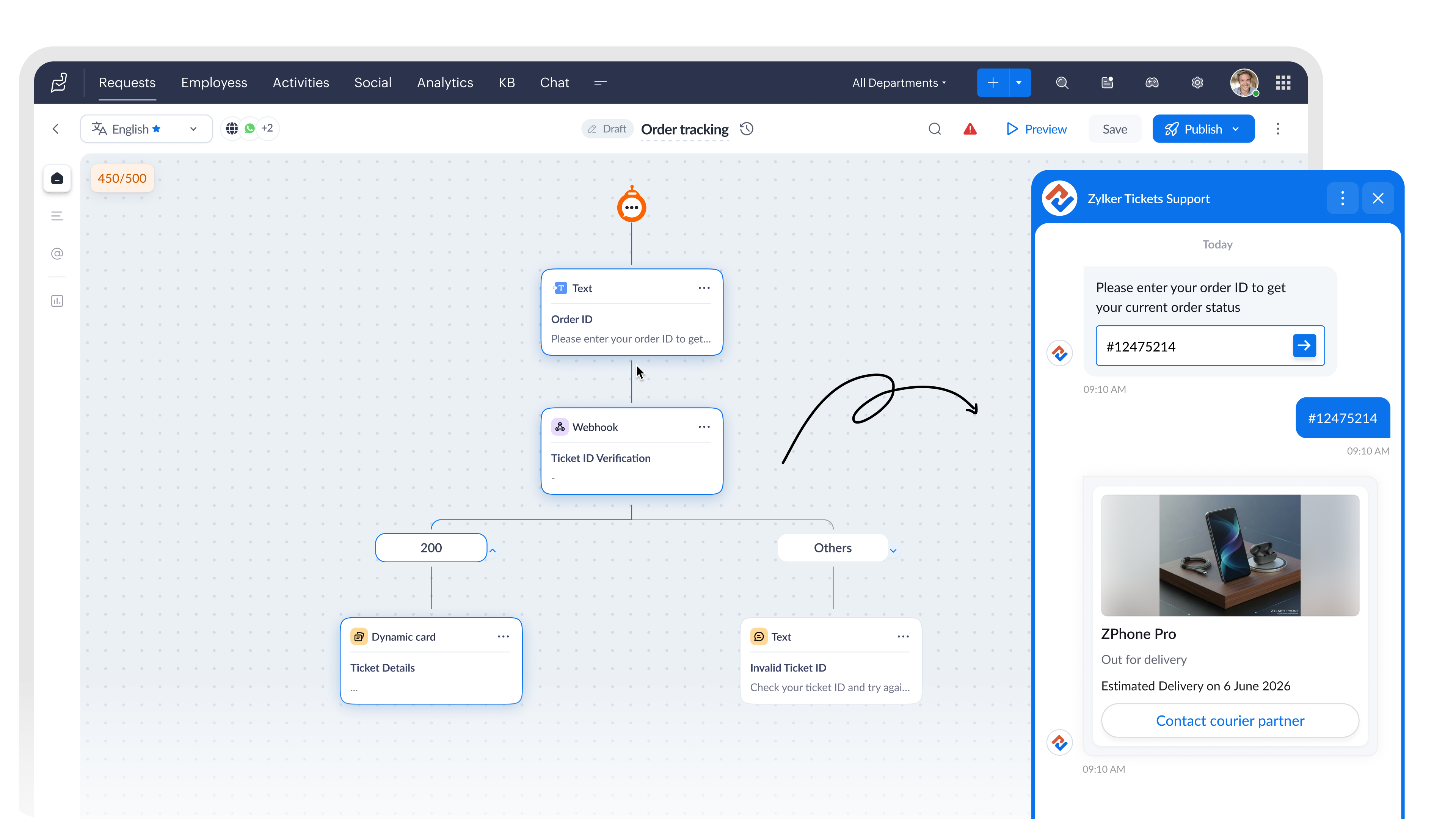

2. Configura el bloque Card Choice

Dentro del bloque, establece Card Type como Dynamic Card.

Después, selecciona el Rendering Style según la cantidad de opciones que quieras mostrar simultáneamente.

Una sola tarjeta funciona bien para...Varias tarjetas funcionan bien para...
Resúmenes de reservas
Confirmaciones de pedidos
 Planes de seguros
Exploración de productos 
Comparación de habitaciones de hotel
Paquetes de servicios


3. Vincula los datos de tus productos con los campos de la tarjeta

Cuando se ejecuta el bloque Webhook, este obtiene los datos de producto desde tu API y guarda la respuesta como una variable del flujo.

Después, puedes asignar esa variable directamente a los campos del bloque Dynamic Card Choice, de modo que cada tarjeta se complete automáticamente con información actualizada del producto, como:

  • Nombre
  • Precio
  • Imagen
  • Descripción

Todo ello sin necesidad de introducir los datos manualmente.

Función de cada campo

  • Imagen: muestra la fotografía del producto. Configura el tipo de dato como Image.
  • Título: nombre principal del producto obtenido desde la API.
  • Subtítulo: ideal para mostrar precio, marca o disponibilidad.
  • Descripción: resumen breve del producto (2 o 3 líneas).
  • Etiqueta: etiqueta que acompaña a un valor, como «Almacenamiento» o «Stock».
  • Variable: almacena la selección realizada por el cliente para utilizarla posteriormente en el flujo.
  • Ocultar campo: oculta datos internos, como identificadores de producto, para que no aparezcan en la tarjeta.

4. Utiliza la selección del cliente

En un bloque Dynamic Card Choice (Selección de tarjetas dinámicas), la elección realizada por el cliente se guarda automáticamente en la variable del bloque.

Puedes utilizar esta variable en los siguientes pasos del flujo, por ejemplo para:

  • Realizar una llamada a un webhook
  • Crear un ticket
  • Transferir la conversación a un agente

¿Qué cambia para tu equipo?

Una vez configurado Card Choice, los clientes dejan de hacer preguntas como:

  • «¿Puedes enviarme una imagen?»
  • «¿Cuál es el precio de ese producto?»
  • «¿Qué modelo tiene más capacidad de almacenamiento?»
  • «¿Puedes mostrarme más opciones?»

Toda esa información ya está disponible directamente en la tarjeta.

Esto se traduce en:

  • Menos mensajes de seguimiento antes de que el cliente tome una decisión.
  • Menor intervención de agentes durante la fase de descubrimiento de productos.
  • Conversaciones más cortas y con resultados más claros.
  • Clientes que llegan al agente sabiendo exactamente qué quieren.
Notes
NOTA
Si estás creando flujos para WhatsApp, los bloques Static Card Choice y Dynamic Card Choice no están disponibles en ese canal.

Pruébalo

Card Choice es una de esas funcionalidades que marcan una diferencia real una vez puesta en marcha. Los clientes exploran más rápido, toman decisiones antes y los agentes dedican menos tiempo a responder preguntas sobre productos que deberían resolverse automáticamente.

Si ya lo has configurado o estás creando un flujo ahora mismo, comparte tus preguntas o capturas de pantalla en los comentarios. Estaremos encantados de ayudarte a resolver cualquier problema o compartir buenas prácticas.

Ruta: Zoho Desk → Guided Conversations → Card Choice Block.

Redactado por Prabin de Zoho Desk

Beatriz Moya | Zoho España

Marketing Specialist


    • Recent Topics

    • Can you import projects into Zoho Projects yet?

      I see some very old posts asking about importing project records into Zoho Projects. But I can't find anything up to date about the topic. Has this functionality been added? Importing tasks is helpful. But we do have a project where importing projects
    • reset password

      Hi I need to reset my password and need help
    • Is it possible to set a value to a field based on certain conditions

      Greetings Say i have a field that i want to set its value based on the value of another field.. for example if "number" field has value greater than 10, i want to set my field's value to X. Or if radio group had option 1 selected, then i want to set my
    • Zoho CRM Layout Rules: Nine New Actions, Profile-Based Execution, and Interactive Preview

      Hello everyone, Availability: This feature is now available for customers in the JP and SA DCs. It is planned to be released for other customers in soon. We’re excited to announce powerful new enhancements to Layout Rules in Zoho CRM - a feature built
    • How to add line breaks in formula with Concat?

      I am trying to combine different fields with a formula field, but want to add line breaks.  I.e. the current code looks like:  Concat(${Contacts.Company_Name}, ' ' ,${Contacts.First_Name}, ' ' ,${Contacts.Last_Name}) And the result should be:  John Doe
    • Introducing spam detection for webforms: An additional layer of protection to keep your Zoho CRM clean and secure

      Greetings all, One of the most highly anticipated feature launches—Spam Detection in webforms—has finally arrived! Webforms are a vital tool for record generation, but they're also vulnerable to submissions from unauthenticated or malicious sources, which
    • Is Zoho Assist Secure Connect even practical for 1 person shop?

      I was gun ho with Zoho Assist to replace my existing Remote Access product I have been using but I need to implement MFA on each unattended connection. Right now each of these connections in my other product has a rotating token that I have enter off
    • Join the Zoho Desk Virtual Classroom Training (VCRT)

      Hello everyone, Have you heard about Zoho's Virtual Classroom Training (VCRT)? Zoho Desk's Virtual Classroom Training offers end-to-end training for Zoho Desk users. Join the VCRT and get hands-on guidance for setting up Zoho Desk and getting your business
    • Zoho CRM's revamped timeline view now extends to 3 years and support notes, filters, and email statuses

      Editions: All DCs: All Release plan: These enhancements are being rolled out to customers in a phased manner. They will be available to most organizations by the end of May. For organizations with huge volumes of data, they will be available by the end
    • Zoho Mail App Unable to connect to server

      Hi all, For the last two weeks, my Zoho Mail App on my iPhone which has worked fine up to this point has been unable to connect to the mail server. I can't access my emails even though I will get notification banners on the screen saying that they have been received. I can open Safari on my phone and then log in that way. This issue happens when I'm connected to wifi and on my phone data.  I've tried deleting the app several times and reinstalling, and have updated to the latest version. But it still
    • Add the Zoom Option to the Camera

      Hi, I use the ZOHO Forms Camera so I can manage metadata, compression, etc. but this doesnt have the zoom parameter activated, so when we have photos in a tight space and want to use 0.5 for example, we can't, can this be enabled please. Thanks Dan
    • Manage booking pages from your Android phone

      Hello everyone! We are happy to announce that users can now add and manage booking pages from their Bigin Android app. It is a multi-step form that users can create for purposes like booking appointments, scheduling calls or meetings, conducting webinars,
    • Automating Employee Birthday Notifications in Zoho Cliq

      Have you ever missed a birthday and felt like the office Grinch? Fear not, the Cliq Developer Platform has got your back! With Zoho Cliq's Schedulers, you can be the office party-cipant who never forgets a single cake, balloon, or awkward rendition of
    • Unbundle feature for composite items

      We receive composite items from our vendors and sell them either individually or create other composite items out of them. So, there is a lot of bundling and unbundling involved with our composite items. Previously, this feature was supported in form
    • Inventory Barcode Creation - Add Picture of Item

      Hi I am trying to set up bar code labels and include a picture of the item on the label - any idea on how to add that field to the barcode generator?
    • CNIL - Suivi de Pixel

      Bonjour à tous, À la suite de la nouvelle recommandation de la CNIL sur les pixels de suivi dans les e-mails, savez-vous si Zoho Campaigns permet : de conditionner le suivi des ouvertures au consentement de chaque contact ; de proposer un lien permettant
    • Gemini Action - Add "inineData" Support

      Thank you guys for adding a Gemini action. I like Gemini models for the "grunt work" of AI, as they have the cheapest tokens of the trustworthy providers One thing that's missing in the action, though, is the ability to pass file data. If you pass a base64-encoded
    • Protect backed up and exported data using password encryption

      Hello everyone, Protecting live data is crucial for any organization or product, as it contains sensitive customer information. However, protecting data does not end within the platform. Backup and export files often contain sensitive information and
    • Zoho Projects - Cloning a task does not trigger task workflow when created

      Hello! I have a Project where my team uses a set of tasks from a tasklist as templates, so we could simply clone it and drag it to another list in kanban view to avoid creating a new one from scratch. The process works well, but after cloning it the new
    • Best way to setup Inventory bin tracking for products with multiple boxes/crates

      Hi - we need some advice from the community on setting up Items in the Inventory for products with multiple crates. We have large products in our warehouse where the product is delivered as two large (double pallet) crates. We've setup the Items for these
    • not able to access Zoho from home WIFI

      for some reasone i am not able to access Zoho on my laptop or my iphone while i am connected to my home Wifi, i am able to access these sites both on laptop as well as Iphone and associated apps on any other Wifi as well as when I am on my 4G connection
    • Five Guided Conversations Updates in Zoho Desk

      Hello everyone, Guided Conversations is getting updates that make it easier to create more inclusive customer experiences, retain important conversation context, customize your widget, keep track of changes, and connect with external services. Here are
    • An important update for Zoho Cliq desktop users

      The latest version of the Zoho Cliq desktop app (v1.8.0) will no longer be supported on macOS 10.15 Catalina and earlier versions. This is because the framework we use (Electron) no longer supports some older macOS versions. If you’re using macOS 10.15
    • Simplify eSignatures: Automate document workflows with Zoho WorkDrive

      Hello everyone, We’re excited to invite you to our upcoming live webinar, where Zoho WorkDrive and Zoho Sign will come together to show you how to simplify and automate document workflows. From creating and collaborating on documents to approvals, e-signatures,
    • Function #7: Fetch a value from Deal in Zoho CRM to the related Estimate in Zoho Books

      We're here with another function for those using the integration with Zoho CRM. You know that potentials can be linked to transactions in Zoho Books. But if you're including additional details about a Deal (potential) in Zoho CRM and you want to inherit
    • Workflows being applied and the Large unwanted popup

      When a workflow is being applied do to an action, then the Agent is left with a large Window asking if they would like the see the changes this workflow did. Is there any way to disable this prompt from appearing?
    • Maintenance notice for Zoho CommunitySpaces US data centers on August 23, 2026

      Dear customers, We have scheduled a maintenance activity for Zoho CommunitySpaces in our United States (US) data centers on August 23, 2026, from 1:30 a.m. to 2:00 a.m. During this 30-minute maintenance window, Zoho CommunitySpaces will be temporarily
    • Knowledge base: The nitty-gritty of SEO tags

      A well-optimized knowledge base with great SEO can benefit your company by allowing customers to find help articles and support resources using search engines. This enables customers to quickly and efficiently find the information they need without direct
    • zoho desk: Can tickets be created from Microsoft Teams messages?

      I am trying to see if there is a way to integrate Microsoft teams with zohodesk. we have a few customers who prefer to communicate requests through Teams, and it would be great to create tickets when they do.
    • ´´Send Email Reply´´ action does not work when the message body contains placeholders.

      Hi Community, I am working on a workflow where the Customer contact is notified via email when their ticket status goes On Hold. To do that, I chose the Send Email Reply action, and the minute I add a placeholder, the workflow does not work and the ticket´s
    • Zoho ERP | Product updates | July 2026

      Hello users, We're back with another round of updates to help you streamline your operations. This month's release brings new features and enhancements designed to help you work more efficiently. Read on to discover everything that's new in Zoho ERP this
    • Zoho Forms Spam Submissions

      Hello community! It seems that after updating the Recaptcha settings on our newsletter form (Zoho Forms), we keep getting low quality spam emails subscriptions. I first used 0.5 treshold on invisible google captcha, then raised it to 0.7 but to no avail.
    • Migration from Hosted Exchange Server

      I am looking for documentation on how to migrate from a hosted version of Microsoft Exchange to Zoho Mail.  The existing material is very good for non-hosted Exchange or local Outlook account but I have been unable to locate information to move from a hosted Exchange environment. This is complicated by not being able to have access to the Exchange Server (other than login credentials) and the lack of a local PST file (local Outlook uses OST files). I am to the point that all I need to do is migrate
    • Subform edits don't appear in parent record timeline?

      Is it possible to have subform edits (like add row/delete row) appear in the Timeline for parent records? A user can edit a record, only edit the subform, and it doesn't appear in the timeline. Is there a workaround or way that we can show when a user
    • Unable to view existing or create new WhatsApp IM templates on Zoho Desk

      Hi there, Is there a issue with WhatsApp templates in Zoho Desk currently [17 Aug 2026]? I am unable to view existing or create new WhatsApp IM templates. It's saying "Oops, something went wrong. Please try again later."
    • WhatsApp Business Calling API

      Dear Zoho SalesIQ Team, I would like to request a feature that allows users to call WhatsApp numbers directly via Zoho SalesIQ. This integration would enable sending and receiving calls to and from WhatsApp numbers over the internet, without the need
    • Automating CRM backup storage?

      Hi there, We've recently set up automatic backups for our Zoho CRM account. We were hoping that the backup functionality would not require any manual work on our end, but it seems that we are always required to download the backups ourselves, store them,
    • Zoho CRM Kiosk Upload Files

      Hello all, We are trying out Kiosks at the moment to see where it can fit best in our business. We are still a bit off in the application but lets say we will sort this out. My question is the following - when I create a Kiosk I can add "File Upload"
    • Add Support to Upload Inventory Items with Categories or Enable Separate Upload for Inventory Categories

      Currently, Zoho Inventory does not support uploading new items along with their parent and sub inventory categories using the item import feature. This creates challenges for businesses with structured inventory hierarchies when trying to upload items
    • About products & categories URL

      hello guys, I'm trying to migrate date from Magento 2 to Zoho Commerce and I have some doubt about URL. In my M2 for product I have "Url Key" field with value like this: "product-url" and page appear like this: "www.sitename.com/product-url.html" In ZC
    • Next Page