Upcoming Updates - August 2022
Hi all,
Greetings from the Zoho Creator team! Today we've got news for you on some exciting updates. And rest assured— there’s more to come!
In this post, we'll be going over the upcoming features and improvements for this month as mentioned below. A few of these will be available immediately and the rest are planned for release in the coming weeks.
- Enabling dark mode for Android apps
- Introducing presets
- Customizing display titles for forms
- Launching a revamped UI for customer portals
- Announcing strict validation for the max length field property
In addition to the above, Creator 4 will be deprecated, and all the accounts still using it will be automatically upgraded to Creator 5 by August 31, 2022. Scroll down to know more!
Dark mode for Android
One of our most requested features is finally here: Dark mode!
Dark mode, which is currently supported in our iOS apps, has now been extended to Android apps as well. We have carefully designed every component and screen to have an overall balanced color scheme for your mobile apps. Dark mode will be automatically enabled based on your default system settings and has the following benefits:
- Reduces power usage by a significant amount (depending on your device's screen technology)
- Improves visibility for users with low vision and those who are sensitive to bright light
- Makes it easier for anyone to use their devices in low-light environments

Presets - panel configuration reusability
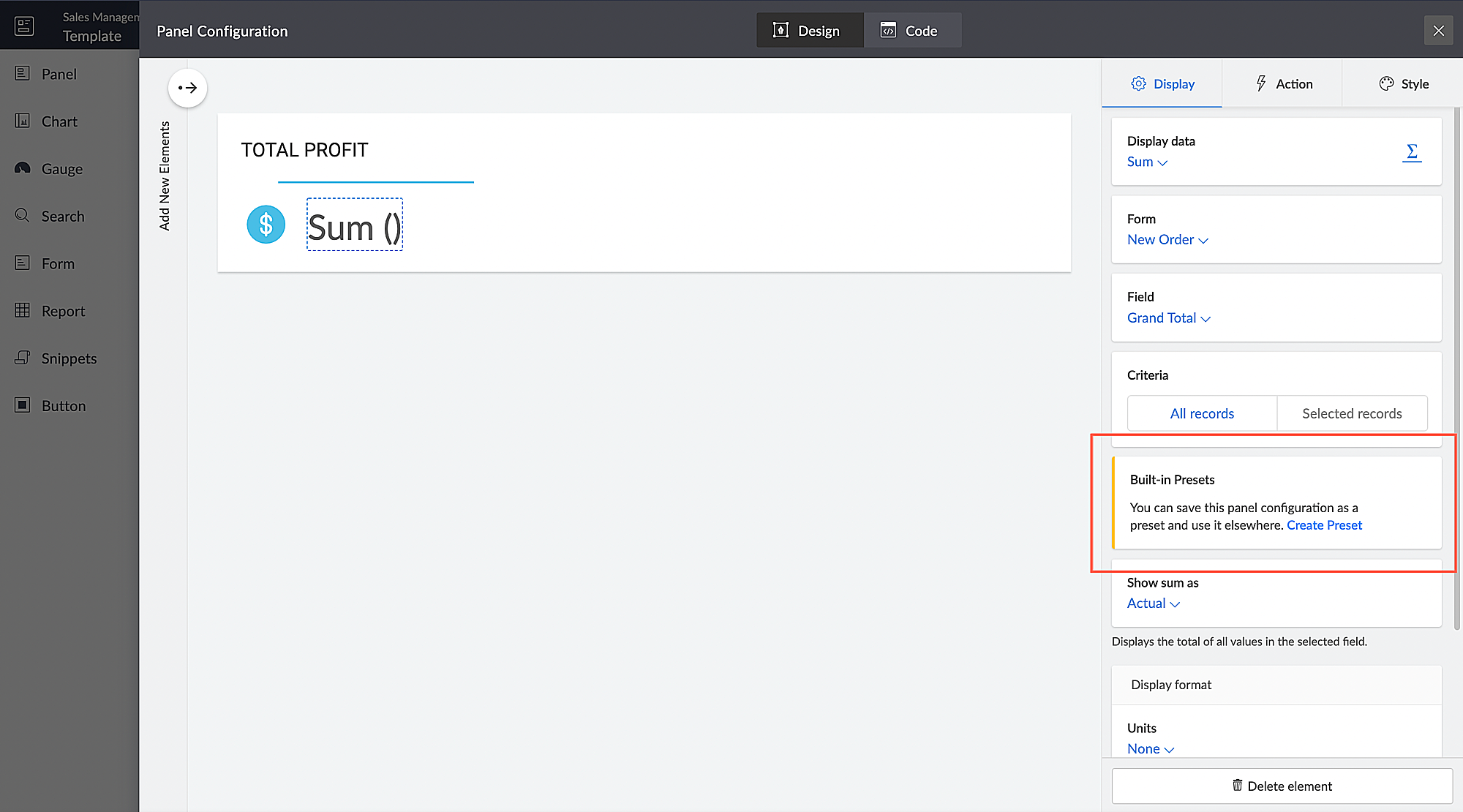
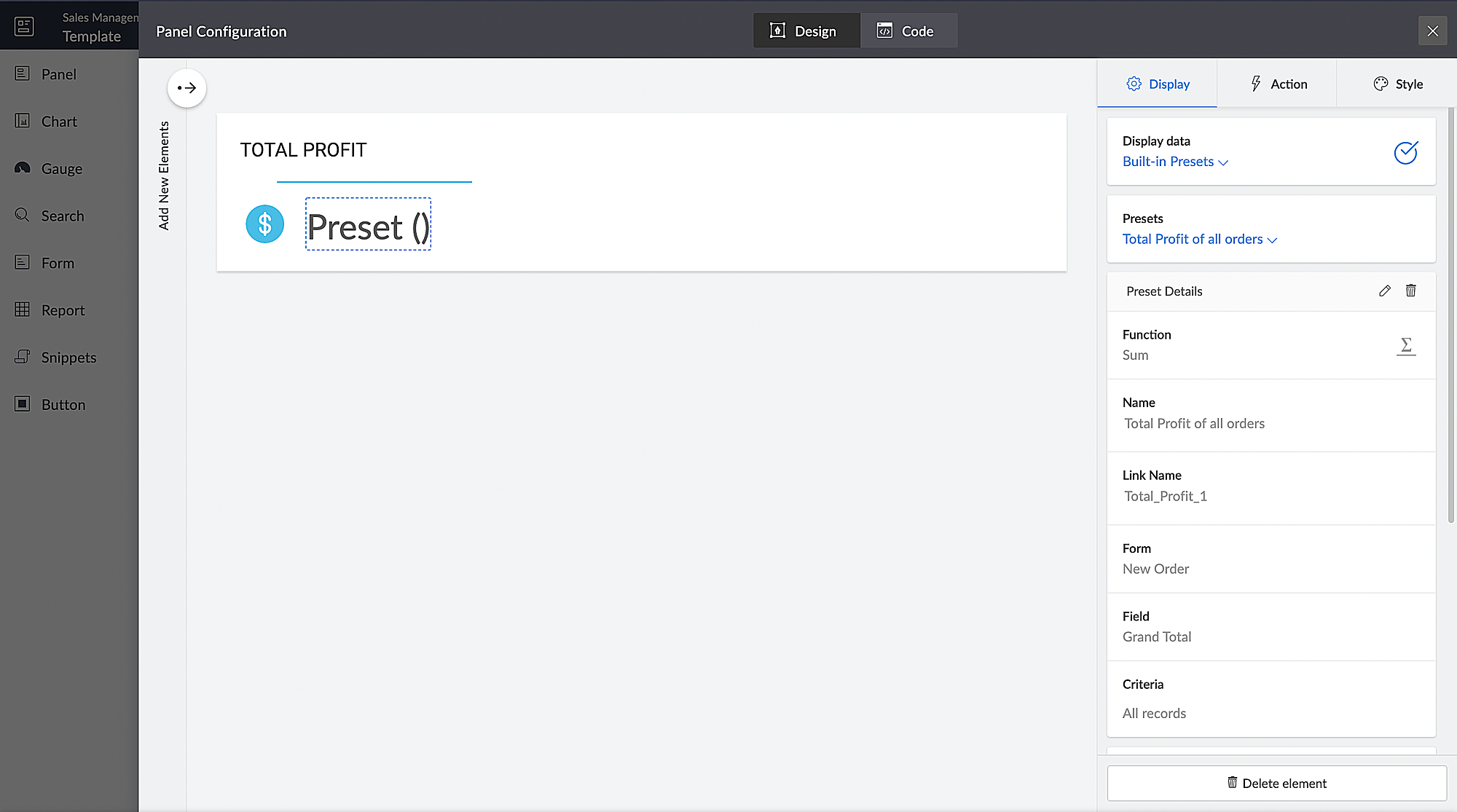
You can configure aggregates to be displayed on page panels. Currently, if such a configuration needs to be reused on a different panel on the same page or on a different page, it has to be manually reconfigured. With presets, the aggregate configuration can now be saved and used across apps in your Creator account, thereby preventing repeated manual configurations. The created presets will be available as a dropdown inside the panel element.
Presets are required in cases, where a configured aggregate value needs to be displayed in more than one panel, like if a user needs to display the Total Profit value in their dashboard, both as an actual value and as a percentage value. In this particular case, the user will have to manually configure the Total Profit value in two panels and choose a different Show As value (Actual in one panel and Percentage of a number in the other panel) in each panel. Using the preset capability, users can save the configuration and reuse it in different panels with only the Show As value being different.
Introducing different display titles for forms
Interacting with forms can become more meaningful when we have contextual information about the actions performed by users. We've introduced form titles that'll enable you to assign different customized titles to the forms displayed when a user is performing the following tasks:
- While adding record - The title that will be displayed when a user accesses the form to add a record.
- While editing record - The title that will be displayed when a user is editing an existing record.
By default, the form title for while adding to the form and while editing the form actions will be the same as the form name. Learn more

Revamped UI for customer portals
We're happy to announce the rolling out of a major refinement to the customer portal UI (sign in, signup, and reset password pages).
Portal users will now be able to use a one-time password (OTP) for signing in to your customer portal. Along with Google and Facebook, federated login can now be set up to allow users to sign in to the portal using their Apple IDs.
These refinements have been designed to ensure compatibility with upcoming features that we are working on. Although the feel and appearance of the new UI will be different from the existing one, we have ensured that it doesn't affect any of your existing portal functionalities. We'll have a separate detailed post on the changes for existing users once the feature is ready to go live.
Announcing strict validation for the max character length field property
In reference to this post, starting from August 31, 2022, maximum character length validation will be implemented strictly across Creator. If a record is added via Deluge, API, or email input, the maximum length property will be validated for all your form fields. This validation ensures that all the records added via various inputs undergo a thorough check for their field characters to ensure they're on par with the predefined character limits that you set, thereby minimizing error handling. After this update, errors might be shown in the following cases:
(i) Existing forms:
While editing/updating a record in an existing form, the maximum length property will be validated for all fields in that form.
(ii) Workflows
- On validate: Following this update, during the execution of the on validate script for a particular record, the maximum length validation will be strictly performed for all the fields that are associated with the script, and an appropriate error will be thrown.
- On success: Following this update, during the execution of the on success script, an exception will be thrown for varchar fields (email, single line) when a new record is successfully submitted to the database or when an existing record is updated or deleted from the database. In the case of number fields, the values will be truncated upon successful submission.
(iii) APIs
While adding/updating record values via API requests, the maximum length property will be validated for all fields.
Additionally, if a record is added via email input, the maximum length property for all the fields will be validated. As an admin, you can minimize errors by suitably adjusting your character limits. We also assure you that we've taken all necessary measures to ensure that the transition is seamless, with minimal impact on your end.
Upgradation to Creator 5
The majority of our users have already migrated to Creator 5 from the previous version (Creator 4). As the final step of this process, we'll be automatically migrating the remaining accounts using the older version to Creator 5 by August 31, 2022.
As you all know, Creator 5 empowers developers to customize traditional web-based apps for smartphones and tablets, opening up new possibilities and ensuring an all-around smoother experience. You will be notified via email prior to the migration and this will not affect the data in your existing Creator apps.
We hope this announcement serves to be helpful in planning your upcoming projects and apps. We'd also like to thank you once again for your loyalty and continued support. Please don't hesitate to reach out to us at support@zohocreator.com if you have any questions or concerns, or need assistance.
That's all for now!
Thanks,
The Zoho Creator Team.
Topic Participants
Meghaa
Meghaa Pradyumnan
George Thiess
Club De Baloncesto Soldados Elite
AP
Sticky Posts
Introducing Zoho Creator's 2025 Release Projection 2
Hello Creators! I'm Prakash, from the Creator product management team, and today I'm delighted to unveil our next set of features as part of Release Projection 2 for 2025. With thoughtful analysis and planning, we've curated powerful new capabilitiesZoho Creator - 2023 Release Projection 1
Hello everyone! A very Happy New Year to you and your family. Hope you're all good and having a great time using Zoho Creator to make your lives easier and your businesses prosper. 2022 was an action-packed year for us at Creator, and we hope to continueZoho Creator User Group meetups in a city near you! - Oct - Nov, 2023
Greetings from the Zoho Creator team! We're hosting a series of Zoho Creator meetups in various cities across the globe, and we'd love to meet you there! Our meetups are a great opportunity to network with industry peers, exchange ideas and best practices,Zoho Creator - 2023 Release Projection 2
Hello everyone! Time truly flies when you're having an incredible journey, and today we mark the completion of an eventful and action-packed six months. It feels like just yesterday when we embarked on this adventure together with the launch of our newUpcoming Updates - August 2022
Hi all, Greetings from the Zoho Creator team! Today we've got news for you on some exciting updates. And rest assured— there’s more to come! In this post, we'll be going over the upcoming features and improvements for this month as mentioned below. A
Recent Topics
What formula to use in computing total hrs and decimal hrss
So , my data includes log im column , 2 breaks with 2 columns that says back and lunch and 1 column that says back and logged out. What formula should i use to be able to automatically have my total hours as I input time in each column? ThankyouReplacing email ID,
In zoho sheets If I am sending it as an email attachments can I replace sender email ID from notifications to my email ID.Latest Enhancements and Bug Fixes in Zoho Meeting
Hello there, We hope you're doing well. The latest updates from Zoho Meeting include enhancements like adding names for instant meetings, renaming participants, enabling text notifications for participant entry/exit, viewing details of bandwidth optimization,Multi-video feed in webinars, custom domain options, and our integration with MS Outlook
Hi there, We hope you're doing well. With your help, we have been able to release many useful features and enhancements in 2020. We, the Zoho Meeting team, would like to thank you all for the feedback, support, and encouragement you've given as we workedAdd co-hosts in meetings, manage webinar registration and other enhancements
Hello all, This month's updates allow you to add co-hosts while scheduling meetings. You can also control your webinar registrations better by allowing or blocking registrations from the domain or country of your choice. Read on to learn more. MeetingA new UI for distraction-free engagement in online meetings and webinars that scale up for 3000 attendees
Hello all, We're excited to share our new, refined UI for online meetings. Here's how the new UI will improve your experience during online meetings: We've re-designed Zoho Meeting's online meeting UI to enable users to fully engage in conversationsI Can't Clone Webinar that I Co-Organize
How do i get our account admin to give me permission to clone our webinars? I am a co-organizerLatest updates in Zoho Meeting | Calendar view, Zia integration with OpenAI, edit the recurring pattern in a recurring meeting, device error notifications revamp, and more.
Hello everyone, We’re glad to share a few updates and enhancements in Zoho Meeting, including the Calendar view, being able to edit the recurring pattern in a recurring meeting, revamped device error notifications, and other enhancements that you’ll findNew enhancements in the latest version of the Zoho Meeting Android mobile app.
Hello all, In the latest version of Zoho meeting Android mobile app (v2.2.6), we have brought in support for the below enhancements. Close account: Now users will be able to close their Zoho account directly from the app. Unmute toast message: If a userShare material, Lock Meeting and revamped feedback UI in the latest version of the Meeting iOS app.
Hello all, In the latest version of the Zoho Meeting iOS mobile app (v1.6), we have brought in the below enhancements. Share material in meeting: We have introduced share material during meeting that allows participants to view supported materials suchLatest updates in Zoho Meeting | New chat feature between an organizer and co-organizer in webinars, recording consent for webinar co-organizers and attendees in the Android app, and more.
Hello everyone, We’re excited to share a few updates for Zoho Meeting. Here's what we've been working on lately: A new chat feature between an organizer and co-organizer in webinars, recording consent for webinar co-organizers and attendees in the AndroidLatest updates in Zoho Meeting | A new Files tab to manage all your PDFs, PPTs, Video files and recordings, live transcription , ability to lock settings and adaptive echo cancellation.
Hello everyone, We’re excited to share a few updates for Zoho Meeting. Here's what we've been working on lately: A new Files tab to manage all your PDFs, PPTs, Video files and recordings, live transcription during sessions, ability to lock settings andLatest updates in Zoho Meeting | Meeting Rooms , Pin video feeds and customize from and reply-to email addresses
Hello everyone, We’re excited to share a few updates for Zoho Meeting. Here's what we've been working on lately: Introducing Zoho Meeting Rooms, an immersive solution for teams to connect over virtual meetings in video conference rooms. You can also pinLatest updates in Zoho Meeting | New top bar video layout, a revamp of our in-session settings and now import webinar registrations with a CSV file
Hello everyone, We’re excited to share a few updates for Zoho Meeting. Here's are some of them : We have moved audio, video, virtual background and preferences under a single settings pop-up for better user navigation. You can now upload a CSV file containingImportant update: Changes in email sender policies
Hello, This is to announce important changes to email sender policies from Google that may impact your use of Zoho Meeting. Restriction on public domains Effective February 1, 2024, Google is implementing policies that will affect the configuration ofChat for webinar session, schedule meeting session for 24 hours - Zoho Meeting iOS app update
Hello, everyone! In the most recent iOS version of the Zoho Meeting app, we have introduced the chat functionality for the webinar session. To access this feature, the Organizer should have the 'Public chat' option enabled on the Zoho Meeting desktopInvoice Copy 2005116990189
Please provide the invoice for the trancaction 2005116990189Darshan Hiranandani About
Hi, I’m Darshan Hiranandani, a dedicated software developer with a strong passion for creating efficient and user-friendly applications. With a degree in Computer Science and several years of experience in the tech industry, I specialize in full-stackLatest update in Zoho Meeting | On-demand webinars
Hello everyone, We’re excited to introduce our new on-demand webinar feature, you can now provide pre-recorded sessions that your audience can access immediately, no need to wait for scheduled sessions. Benefits of On-demand webinars : Scheduling flexibilityZoho Meeting iOS app update - Join breakout rooms, access polls, paste links and join sessions, in session host controls
Hello, everyone! In the latest iOS version(v1.7) of the Zoho Meeting app, we have brought in support for the following features: Polls in meeting session Join Breakout rooms Paste link in join meeting screen Foreign time zone in the meeting details screen.Zoho Meeting app update.
Hello, everyone! In the latest Android (v2.3.7) and iOS (v1.7.1) versions of the Zoho Meeting app, we have brought in support for the following features: Report Abuse option. WorkDrive integration. Report Abuse option You can now report to us any deceptiveZoho Meeting Android app update - v2.4.0
Hello everyone! We are excited to announce that we have brought in support for the following features in the latest version of the Zoho Meeting Android app(v2.4.0): 1. Start Personal Meeting Rooms 2. Revamp of the schedule meeting screen and meeting detailsIntroducing Zoho Desk integration and a few minor enhancements
Zoho Desk Integration We've now introduced an integration between Zoho Meeting and Zoho Desk to efficiently manage meeting-related customer inquiries. With this integration, you can track, respond to, and resolve meeting-related tickets directly fromZoho Meeting iOS app update: Hearing aid, bluetooth car audio and AirPlay audio support.
Hello everyone! We are excited to announce the below new features in the latest iOS update(v1.7.4) of the Zoho Meeting app: 1. Hearing aid support: Hearing aid support has been integrated into the application. 2. Bluetooth car Audio, AirPlay audio support:Zoho Meeting Android app update: Breakout rooms, noise cancellation
Hello everyone! In the latest version(v2.6.1) of the Zoho Meeting app update, we have brought in support for the following features: 1. Join Breakout rooms. 2. Noise cancellation Join Breakout rooms. Breakout Rooms are virtual rooms created within a meetingiOS 12 update: Introducing autofill passwords and Siri Shortcuts in Zoho Vault
With this iOS 12 release, Zoho Vault users can now autofill usernames and passwords on Safari and other third-party apps. Users can enjoy a seamless login experience to their everyday apps without compromising security and also access passwords stored in Zoho vault with Siri Shortcuts by adding personalized phrases. How to enable autofill password on your iOS device? First, you need to update your device to iOS 12. Apple recommends you to take a backup before you update your device to the latestZoho Vault: A look at what's new for iOS, iPadOS, and macOS
Hi everyone, At Zoho Vault, we constantly aim to improve your security experience. Based on both internal and external feedback, we have recently rolled out updates across our iOS, iPadOS, and support for macOS platforms. Introducing the desktop app forBiometric Access Support on Zoho Vault Desktop App
Is there any plans to add biometric authentication (fingerprint, face recognition) for Vault desktop apps (Windows/macOS) to enhance security and ease of access. I would love to hear other members view on thisFree webinar: Learn the benefits of migrating to Zoho Vault's new interface
With remote work becoming more and more common across the globe, productivity and time management are now pivotal concerns for every organization. With the number of business applications employed by companies constantly increasing, a password manager like Zoho Vault saves a lot of productive hours for your team. Vault's new interface has been carefully designed to address these pressing needs, helping users increase their productivity while improving their overall online experience. This July,Free Webinar: An exclusive live Q&A session with the Zoho Vault team
As 2020 draws to an end, we're closing out a year that has seen drastic changes all around the world. Many businesses have adopted cloud solutions and a remote work culture for the first time, and this has given rise to newer cyber risks and threats thatWhy passwordless authentication should be your top security project for 2021
Hello users! We know that nobody likes to remember passwords, yet they form an indispensable part of our lives. Many of us working with any kind of technology today manage numerous passwords for personal and business accounts. With the widespread adoptionFree Webinar: See why Zoho Vault is the best alternative to LastPass
When LastPass was acquired by LogMeIn in Oct 2015, we expressed our genuine concern about how this would change the LastPass business model and how customer trust would transfer from one company to another. As we suspected, LastPass doubled their pricingManaging cyber threats when working remotely | A Customer Survey Report
The nearly universal adoption of remote work has changed the way businesses function. Globally, enterprises continue to work to find new ways to make life easier for employees working remotely. However, a commonly cited concern has been the lack of cybersecurityWorld Password Day: 5 interesting facts about passwords
It's World Password Day: that time of the year when we talk about password hygiene and the importance of safe password management. World Password Day is observed on the first Thursday of every May, and this year, we'd like to talk about some of the mostFree Webinar: Go passwordless in 2022 with Zoho Vault
Passwords have long been the preferred authentication method, largely due to their universal appeal. While they're easy for people to use and implement, they're also convenient for hackers to exploit. Reports from 2021 state that weak and stolen passwordsMyki has announced EOL for its services | Learn why Zoho Vault password manager is the best alternative
Hello Myki users, Myki has announced end-of-life for its Teams, MSP, and GUARD services, after being acquired by JumpCloud. In their recent announcement, Myki stated that they will be removing their apps and extensions from the respective stores, turningJoin our exclusive meetup with Zoho's Real Estate community
Hey there, The Zoho Vault team is conducting a meetup for all real-estate users from Zoho. During this session, we will be discussing the need for secure password management and how Vault can help you and your clients safely protect passwords and otherFree webinar: A quick walkthrough of Zoho Vault and major updates in 2023
Managing passwords is crucial for all businesses. You can securely store, share, and manage passwords effectively from anywhere with Zoho Vault. We have introduced several new features in 2023 to offer the best online experience for our users. Join ourFree webinar: Why a password manager is a “must-have” for everyone in 2024
In the past decade, we've witnessed numerous cybersecurity breaches globally, with a significant portion resulting from the "it won't happen to me" mindset. Shockingly, in 2023, 86% of breaches involved weak and stolen passwords. Password hygiene is crucialZoho Vault - Webinars 2023 - Video Recordings and Slide Decks
Hello, We wanted to offer a consolidated list of Zoho Vault webinar resources from 2023. Therefore, we're putting together a list that includes links to our webinar recordings and slide decks for easy access. Webinar Video recording Slide deck GettingNext Page