Weekly Tips: Get Work Done Faster with Zia AI
Every day brings a fresh batch of messages — meeting invites to accept, client feedback to review, colleagues asking for updates, and the constant ping of new notifications. It's exhausting trying to clear your inbox while wondering how you will catch up on your work. How great it would be if someone could quickly summarize important messages for you and also help you draft your reply for the emails without missing out on anything?
Here's Zoho Mail's Zia— your intelligent AI assistant that organizes and simplifies your email process so your workflow feels much smoother.
Here's Zoho Mail's Zia— your intelligent AI assistant that organizes and simplifies your email process so your workflow feels much smoother.
Zia AI
Zia, Zoho's Artificial Intelligence that has been provided with the ability to generate, summarize and auto-suggest content with the help of Open AI. Zia integration in Zoho Mail will help you generate new email content based on the context provided by you, summarize the emails in your inbox, and auto-suggest the email content as you type in the email composer.
Steps to enable Zia AI in Zoho Mail:
The ZIA extension can only be enabled by the Super Administrators or Administrators of the organization either through the Mail settings or the Admin Console settings. Follow the steps below to enable ZIA AI from the Mail settings:
- Log into Zoho Mail with your SuperAdmin/Admin credentials.
- Navigate to to Settings > Integrations > Extensions > Zia.
- Click on the Zia integration card.
- Provide the the OpenAI API key. Refer here to generate the API key from the OpenAI site.
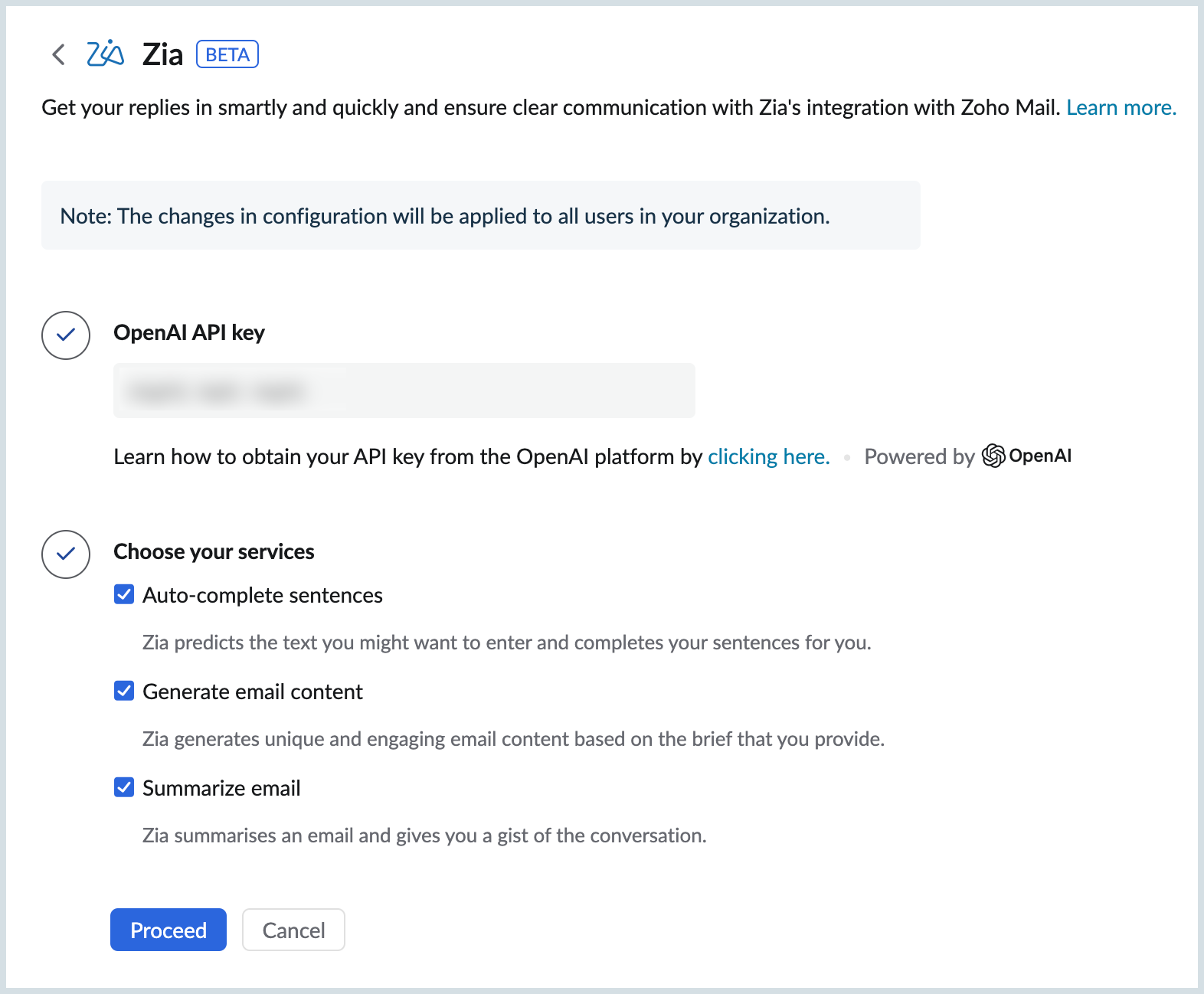
- Choose the services you want to enable for your organization's users using the options provided. The available options are:
- Auto Complete Sentences
- Generate email content
- Summarize email content
- Click Proceed and Read&Accept Open AI's Data Privacy Notice.
Topic Participants
Sania Sultana H
Justin Henderson
Sticky Posts
Weekly Tips : Save Time with Saved Search
Let's assume your work requires you to regularly check emails from important clients that have attachments and were sent within a specific time period. Instead of entering the same conditions every time—like sender, date range, and attachments included—youWeekly Tips: Protect Confidential Information with PGP in Zoho Mail
We deal with confidential information almost every day, whether it is being sent out or received. Though emails sent using Zoho Mail are encrypted both during transit and at rest, attempts to access and steal your sensitive data are always a threat thatGet Holiday ready with Zoho Mail's Templates
As the holiday season approaches, it’s time to step away from work and unwind. You may not be able to respond to every email or send individual messages to wish everyone holidays greetings—but It is still important to stay connected. How do you send thoughtfulWeekly Tips: Secure your attachment downloads with Zoho Mail
Safety is one of our main concerns, whether it’s about device security or online protection. We use tools like fingerprint scanners, facial recognition, and two-factor authentication to keep our devices and email accounts secure. We use methods like OTPGet Holiday ready with Zoho Mail's Offline mode
With the holiday season right around the corner, this is the perfect time to get ready to unplug, relax, and enjoy a well-deserved break. In addition to preparing yourself, you can also make sure your organization members are set for their time away from
Recent Topics
Zoho Recruit Community Meetup - London 🇬🇧 (Venue Finalised)
Hello Recruiters! We’re excited to announce that the Zoho Recruit team is coming to the UK for an in-person Zoho User Group (ZUG) Meetup in London! This is your chance to connect with fellow Zoho users, learn from experts, and walk away with actionableUsers may not pick the fields to be shown as columns in the Choose Account window when creating a new Deal record
Hi there, by talking with other users I found out that I, as an Admin, am the only one who can pick fields to be shown as columns in the Choose Account window when creating a new Deal record. In fact, if other users click on the "Add Column" symbol onCreate custom rollup summary fields in Zoho CRM
Hello everyone, In Zoho CRM, rollup summary fields have been essential tools for summarizing data across related records and enabling users to gain quick insights without having to jump across modules. Previously, only predefined summary functions were【参加無料】東京 Zoho ユーザ交流会 NEXUS ー AI エージェント (Zia Agents)の活用事例 / CRMで実現するマーケティング業務効率化
ユーザーの皆さま、こんにちは。コミュニティチームの藤澤です。 3月27日(金)に東京、新橋で「東京 Zoho ユーザー交流会 NEXUS」を開催します! ーーーーーーーーーーーーーーーーーーーーーーーーーーーーーーーーーーーー ✒️申し込みはこちらから:https://www.zohomeetups.com/tokyo2026vol1#/?affl=communityforumpost2 ーーーーーーーーーーーーーーーーーーーーーーーーーーーーーーーーーーーー ★参加のおすすめポイント ✅ AIエージェント(Zia)のリアルに使える実例を知るOne Support Email Managed By Multiple Departments
Hello, We use one support email (support@company.com). Incoming emails come to the "Support Department" and based on what the customer is asking, we route that ticket to different departments (billing, technical support, etc.). When users in these differentError AS101 when adding new email alias
Hi, I am trying to add apple@(mydomain).com The error AS101 is shown while I try to add the alias.ZOHO.CRM.UI.Record.open not working properly
I have a Zoho CRM Widget and in it I have a block where it will open the blocks Meeting like below block.addEventListener("click", () => { ZOHO.CRM.UI.Record.open({ Entity: "Events", RecordID: meeting.id }).catch(err => { console.error("Open record failed:",Python - code studio
Hi, I see the code studio is "coming soon". We have some files that will require some more complex transformation, is this feature far off? It appears to have been released in Zoho Analytics already🚀 WorkDrive 6.0 (Phase 1): Empowering Teams with Content Intelligence, Automation, Accessibility, and Control
Hello, everyone! WorkDrive continues to evolve from a robust file management solution into an intelligent, secure, and connected content collaboration platform for modern businesses. Our goal remains unchanged: to simplify teamwork, strengthen data security,Introducing Workqueue: your all-in-one view to manage daily work
Hello all, We’re excited to introduce a major productivity boost to your CRM experience: Workqueue, a dynamic, all-in-one workspace that brings every important sales activity, approval, and follow-up right to your fingertips. What is Workqueue? SalesZoho Commerce
Hi, I have zoho one and use Zoho Books. I am very interested in Zoho Commerce , especially with how all is integrated but have a question. I do not want my store to show prices for customers that are not log in. Is there a way to hide the prices if notSupport Custom Background in Zoho Cliq Video Calls and Meetings
Hello Zoho Cliq Team, We hope you are doing well. We would like to request an enhancement to the video background capabilities in Zoho Cliq, specifically the ability to upload and use custom backgrounds. Current Limitation At present, Zoho Cliq allowsUpload own Background Image and set Camera to 16:9
Hi, in all known online meeting tools, I can set up a background image reflecting our corporate design. This doesn't work in Cliq. Additionally, Cliq detects our cameras as 4:3, showing black bars on the right and left sides during the meeting. WhereISO 27001 Compliance
What are people doing to ensure ISO 27001 compliance for their Zoho environments? It would make sense for Log360 Cloud to integrate natively with the Zoho suite, but that is not the case. It requires a gateway cluster, which is not an option for a fullyZoho People - Retrieve the Leave Details - get("LeaveCount")
Hi, Zoho People I need to collect all of an employee's leave requests for the calendar year and check how many half-days they have taken. If I run the script on the query he just modified, I can retrieve the information related to that query and use theWhat's new in Zoho Sheet: Simplify data entry and collaboration
Hello, Zoho Sheet community! Last year, our team was focused on research and development so we could deliver updates that enhance your spreadsheet experience. This year, we’re excited to deliver those enhancements—but we'll be rolling them out incrementallyMarketer's Space: New to Campaigns? Some common early mistakes that might occur
Hello Marketers, Welcome back to another post in Marketer's Space. If you're just getting started with Zoho Campaigns, things can feel exciting and slightly confusing at the same time. You're not alone. Most early frustrations come from setup gaps ratherThis user is not allowed to add in Zoho. Please contact support-as@zohocorp.com for further details
Hello, Just signed up to ZOHO on a friend's recommendation. Got the TXT part (verified my domain), but whenever I try to add ANY user, I get the error: This user is not allowed to add in Zoho. Please contact support-as@zohocorp.com for further details I have emailed as well and writing here as well because when I searched, I saw many people faced the same issue and instead of email, they got a faster response here. My domain is: raisingreaderspk . com Hope this can be resolved. Thank youWorkflow Rule - Field Updates: Ability to use Placeholders
It will be great if you can use placeholder tags to update fields. For example if we want to update a custom field with the client name we can use ${CONTACT.CONTACT_FIRSTNAME}${CONTACT.CONTACT_LASTNAME}, etcNeed a Universal Search Option in Zohobooks
Hello Zoho, Need a Universal Search Option in Zohobooks to search across all transactions in our books of accounts. Please do the needful ThanksImplement Date-Time-Based Triggers in Zoho Desk
Dear Zoho Desk Support Team, We are writing to request a new feature that would allow for the creation of workflows triggered by specific date-time conditions. Currently, Zoho Desk does not provide native support for date-time-based triggers, limitingWhy is my Lookup field not being set through Desk's API?
Hello, I'm having trouble setting a custom field when creating a Ticket in Zoho Desk. The endpoint I'm consulting is "https://desk.zoho.com/api/v1/tickets" and even though my payload has the right format, with a "cf" key dedicated to all custom fields,How exactly does "Reply assistance" work in Zoho Desk? What context is sent to the LLM?
Hi, Im trying to better understand the technical behavior of the feature "Reply assistance" in Zoho Desk, and I couldn’t find detailed information in the current documentation. Specifically, I have questions about what data is actually being sent to theDeletion Workflows
Hello, Unless I missed it, we can't create deletion workflows. My usecase is to auto-delete junk leads. We have field called lead status, and an agent qualify all our new leads. When it's a junk lead she chose the correspondant value in the picklist. My goal is that the system delete them automatically. Is that possible? Planed ?URGENTImpossible to book an appointement
J'essaie plusieurs fois mais aucun créneau n''est disponible Message d'erreur lorsque j'essaie de sélectionner une dateSendpulse SMTP/IMAP Issues
It’s possible Zoho made some changes on their side. Sometimes, even if your regular password works, Zoho requires an app-specific password for external apps like SendPulse to connect via IMAP. You can create this in Zoho’s security settings and use itInsane mail security
I cannot access my email... anywhere. For some reason the password for the Mail app on my Mac is being rejected, it worked yesterday but now it doesn't? Ok let's try the web interface. I can access my general Zoho login with the password but if I wantUI issue with Organize Tabs
When looking at the organize Tabs window (bellow) you can see that some tabs are grayed out. there is also a "Add Module/Web Tab" button. When looking at this screen it's clear that the grayed out tabs can not be removed from the portal user's screenTask list flag Internal/External for all phases
Phases are commonly used in projects to note milestones in the progression of a project, while task lists can be used to group different types of tasks together. It makes sense to be able to define a task list as either internal or external however theHAVING PROBLEM WITH SENDING EMAIL
Hi all, I'm unable to receive emails on info@germanforgirls.eu. I'm getting an error code 550. 5.1.1. invalid email recipients. Moreso, I would like info@germanforgirls.eu to be the default "send from" email and not solomon@germanforgirls.eu. Kindly seeSharing my portal URL with clients outside the project
Hi I need help making my project public for anyone to check on my task. I'm a freelance artist and I use trello to keep track on my client's projects however I wanted to do an upgrade. Went on here and so far I'm loving it. However, I'm having an issue sharing my url to those to see progress. They said they needed an account to access my project. How do I fix this? Without them needing an account.Different Task Layouts for Subtasks
I was wondering how it would be possible for a subtask to have a different task layout to the parent task.Subscription went to default (@zoho.com) address instead for custom domain
Hello! So I bought a lite sub to test things out, wanting to use my own domain. However, after passing through all the verification steps (completed now), it seems that the sub I bought was assigned to the default email that I already had with Zoho andCanvas templates and font-family
i dont understant why its always the smallest things that waste all of my time! why in some videos i see they have tamplates in the Canvas editor and i cant seem to fint it? and why oih why cant i cange the font? i just want simple Arial! help meeeeeeeeeeRe: Ca.gory groups and not all email addresses being added to a group emails
Hi, I have added emails under 'Contacts' into categories but when sending a group email and putting the category name in not all email addresses go onto the email. I have refreshed the page, deleted and redone the info etc with no luck. I only found outIMPORTANT
Dear Zoho Support Team, I am currently experiencing an issue when trying to send emails from my Zoho Mail account. Each time I attempt to send a message, I receive the following error: "Unable to send message; Reason: 554 5.1.8 Email Outgoing Blocked."Able to Send Emails from Zoho but Not Receiving Emails from Gmail
Hello, I am experiencing an issue with my shopify domain email setup and would appreciate your help. Current situation: I can successfully send emails using Zoho. I can receive emails from some services (for example, Facebook). However, I cannot receiveAntispam validation failed for your domain in Accounts
I tried adding a domain to zeptomail.zoho.com, but the “add domain” operation failed. The front‑end error reads: “Domain could not be added. Please contact support@zeptomail.com.” The back‑end API returned: ``` { "error": { "code": "TM_3601", "details":Announcing new features in Trident for Windows (v.1.38.5.0)
Hello Community! Trident for Windows just received a major update, with a range of capabilities that focuses on strengthening and enhancing communication. Let’s dive into what’s new! View complete technical email details. For those who need deeper visibilityWindows Desktop App - request to add minimization/startup options
Support Team, Can you submit the following request to your development team? Here is what would be optimal in my opinion from UX perspective: 1) In the "Application Menu", add a menu item to Exit the app, as well as an alt-key shortcut for these menusNext Page