What's New in Zoho Analytics - November 2025
We're thrilled to announce a significant update focused on expanding your data connectivity, enhancing visualization capabilities, and delivering a more powerful, intuitive, and performant analytics experience. Here’s a look at what’s new.
Explore What's New!
Accessibility
Introducing a new Accessibility section in Zoho Analytics. It gives you full control over how you view and interact with your Zoho Analytics interface. This update brings enhanced usability and helps ensure a more comfortable, efficient, and accessible reporting experience.
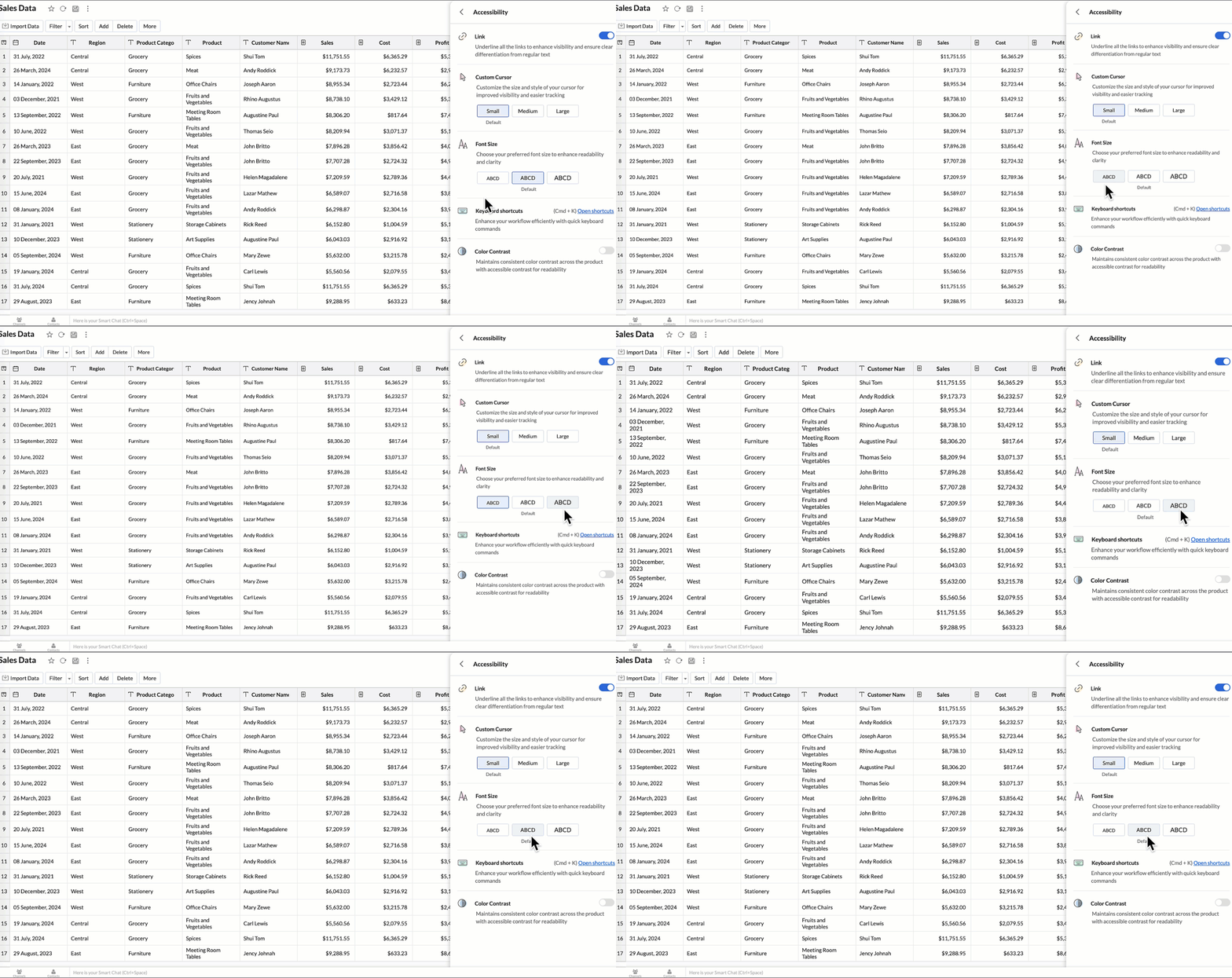
You can now personalize your interface with these new settings:
- Highlight Links - Underline all links to distinguish them clearly from regular text.
- Custom cursor - Choose the size of your mouse cursor (Small / Medium / Large) for better visibility and easier navigation.
- Font size - Adjust the font size of the interface to suit your reading comfort.
- Color contrast - Enable high-contrast mode to improve readability and support users with visual impairments.
- Keyboard shortcuts - Access a full list of built-in shortcuts, to speed up your workflow and navigate quickly using the keyboard.
Learn more.
New Data Connectors
Bring data from more sources into your analytics ecosystem with these new native connectors.
Qntrl Connector
Effortlessly bring workflow and process data from Qntrl into Zoho Analytics. Build reports to analyze task progress, approvals, and operational efficiency.
Learn more.
Asana Connector
Sync your Asana tasks, projects, and workflows seamlessly. Create visual dashboards to track productivity, timelines, and team performance.
Learn more.
Zoho Community Spaces Connector
Import engagement and activity data from Zoho Community Spaces. Analyze member participation, content performance, and community growth trends.
Learn more.
Zoho Finance Connector - New Modules
Gain deeper financial insights with newly added modules, enabling more granular reporting and analysis across your Zoho Finance suite.
Learn more.
Data Sync & Live Connect Enhancements
Incremental Fetch Enhancements
- From Other Workspaces: Users can now configure incremental fetch for data imported from another workspace, bringing in only new or updated records. This improves sync efficiency and reduces load times.
- For Custom Queries: Incremental fetch is now supported for data imported via custom queries, retrieving only new or updated records to enhance performance and reduce processing time.
Developer Hub Enhancements
API – Ruby Language Support
Zoho Analytics SDK now supports Ruby, enabling developers to build Ruby-based integrations and automation with native methods.
Learn more.
JS API - Tab Switch
Enhance embedded dashboard navigation. The JavaScript API now allows you to switch between tabs programmatically, enabling a better navigation control and interactive dashboard experiences.
Learn more.
Map & Geo Analytics Enhancements
Map-Layering Enhancements
Map Layering now includes drill-through for individual layers, options to fix unresolved locations, and the ability to use layered maps as filters in dashboards. These updates deliver deeper and more interactive geo-analysis.
Learn more.
Map Chart – Tooltip Enhancements
Map chart tooltips have been refined by removing Latitude/Longitude values. Users now see cleaner, more meaningful data highlights.
Reporting & Visualization Enhancements
Drill Through Enhancements
Drill-through is now supported for both Public Views and Embedded Views, enabling viewers to seamlessly access related reports for deeper data exploration and enhanced analytical context.
Previously, drill-through functionality was limited to shared reports. With this enhancement, viewers can now open linked drill-through reports, provided those reports have also been made Public.
Learn more.
Tooltip / Info Icon in Widgets
Widgets now support tooltips and Info icons to display additional descriptions or context. This helps dashboard viewers understand metrics instantly.
Learn more.
Anomaly Detection for Dimensional Fields
Zoho Analytics now supports enhanced anomaly detection when a dimension field (category) is added to the Color shelf. Users can choose from multiple detection modes to better analyze deviations across different perspectives
- Overall data
- Each X-Series
- Each Color-Series Individually
- Each Combined Series of X and Color Columns
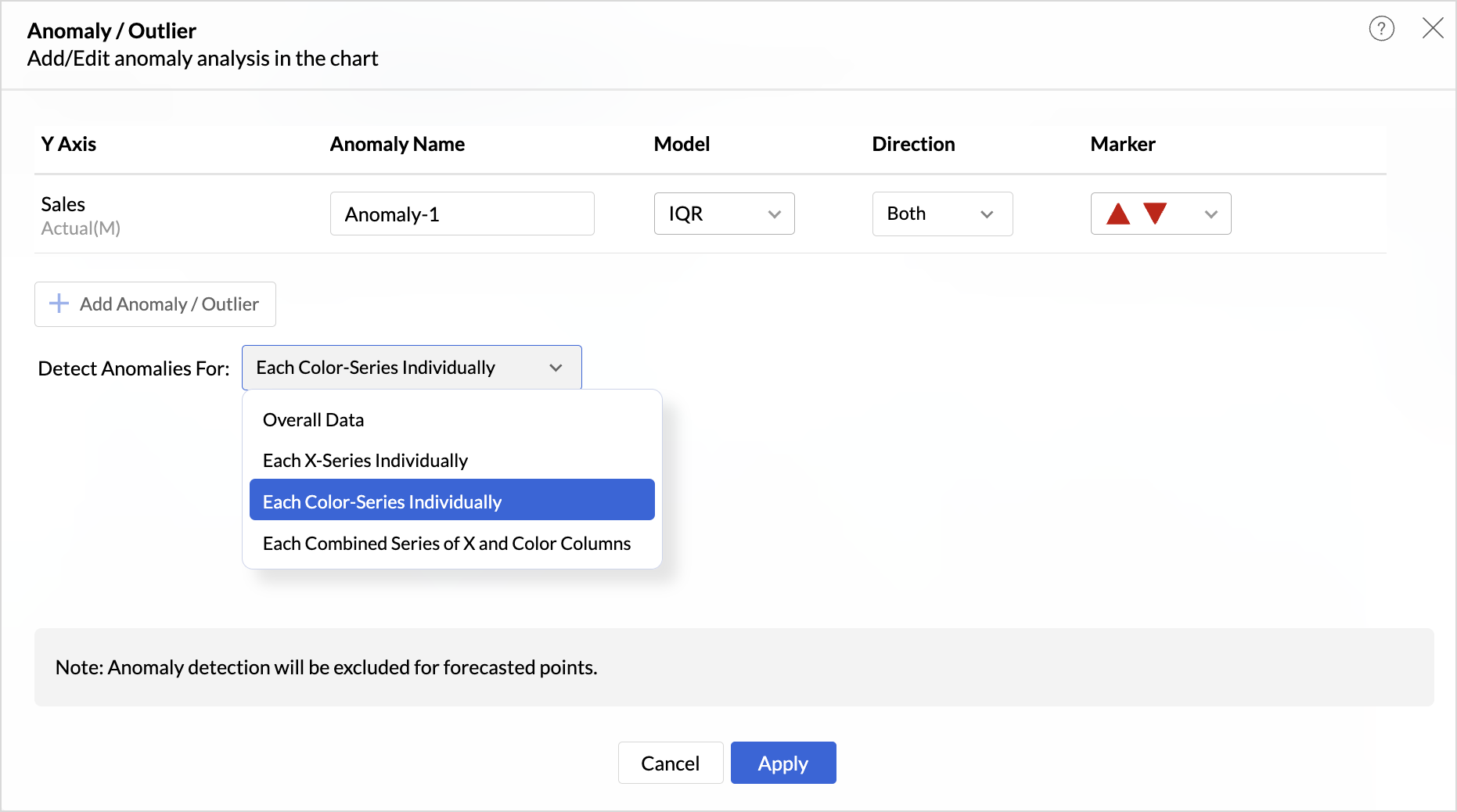
These enhancements offer greater flexibility and precision in uncovering unusual trends and outliers across segmented data visualizations.
Sorting of Values Across Group in Pivot Views
We have added a new option called Sort across Group which helps you apply clearer and more consistent sorting in Pivot Tables.
Earlier, sorting worked only inside each group. With Sort across Group, you can now sort the entire pivot table based on the selected column, regardless of how the groups are arranged.

Freeze Column Support in Pivot & Summary Views
We have added Freeze Column support in Pivot and Summary Views to help you work more comfortably with wide reports. This feature keeps selected columns fixed on the left side of the table while you scroll horizontally, allowing you to compare key columns with other metrics without losing context.

Report-Level Fiscal Year Option
Align individual reports with your organization's financial calendar by defining the Fiscal Year start month at the report level. This setting applies only to the selected report and appears when a date column is used, enabling accurate time-period analysis.
Learn more.
Dynamic Thresholds with Variables in User Filters
Aggregate formulas can now be used with variables inside thresholds. When paired with User Filters, threshold values are calculated dynamically based on each user’s filter selections ensuring every user sees context-relevant threshold boundaries instead of a fixed value.

Datatype-based Variable Suggestions for Default User Filters
When configuring default values in User Filters, only variables matching the filter’s datatype are now listed. This prevents configuration issues such as assigning a text variable to a numeric filter, and ensures accurate default value mapping.
Learn more.
AI & ML Enhancements
AutoML – 128GB Server Support
AutoML now runs on high-power 128GB servers in the US Data Center. This enables faster model training and support for significantly larger datasets.
Learn more.
Zia Insights - Enhancements
Customize Zia Insights
Users can now tailor Zia Insights by selecting specific metrics and dimension columns for insight generation and choose the types of insights to focus on:
- Contribution Analysis: Understand key factors impacting outcomes.
- Time Series Insights: Detect trends, seasonality, anomalies, and forecast future values.
- Comparison Between Dimensions: Analyze performance and variance across different dimensions.
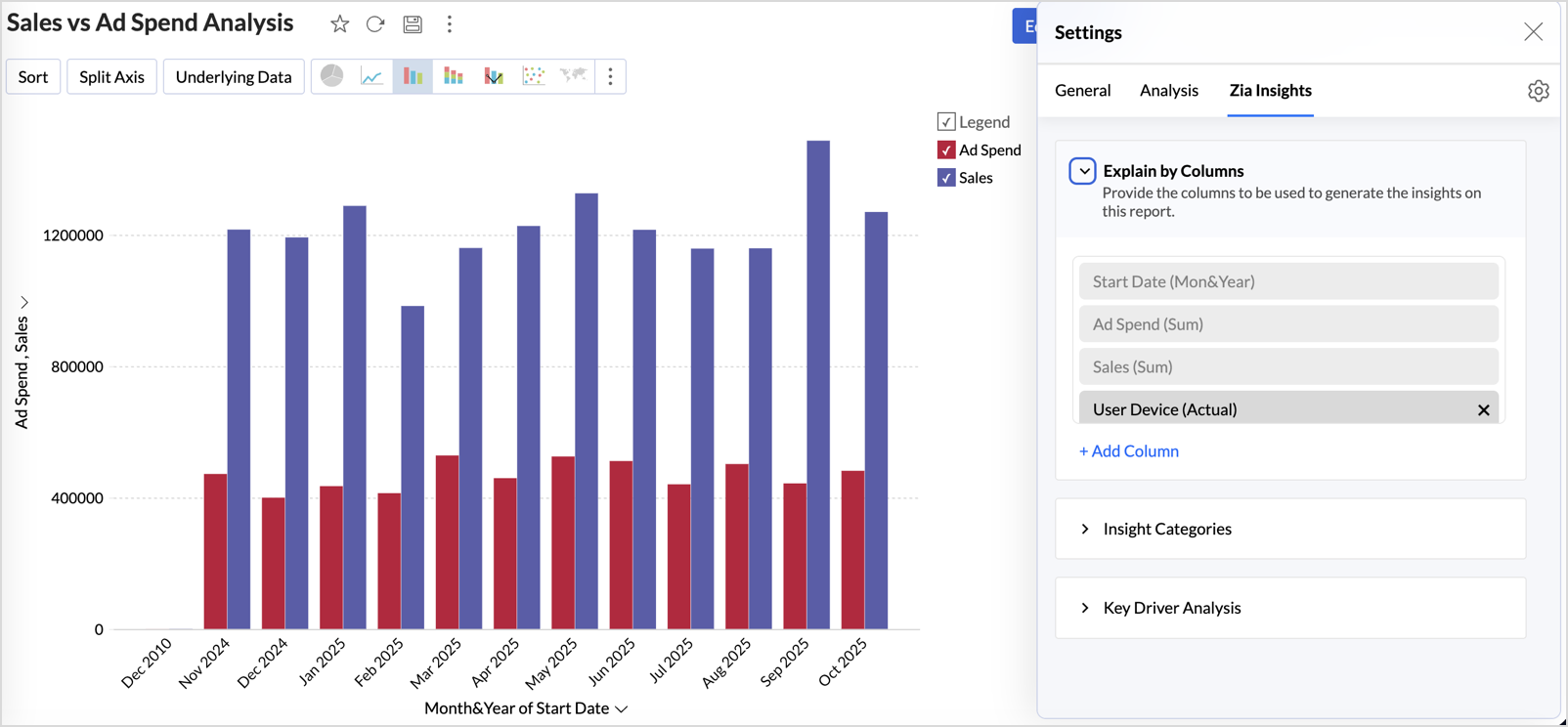
This customization ensures insights are focused, relevant, and tailored to the report’s context.
Learn more.
Diagnostic Insights Now Available for Multiple Time Series Analyses
Previously, diagnostic insights were available only for Recent Time Period Analysis. With this update, users can now access diagnostic insights across multiple time series analyses like, Anomalies/Outliers, Largest Incline/Decline, Period-over-Period Changes, and Start vs End Period Analysis revealing the “why” behind the data for more informed decisions.

Other Updates
Audit Logs for White label Users
Track administrative actions with greater precision. All activities performed in the White Label admin console are now comprehensively logged in the Audit Logs for improved security and compliance.
New Language Support
Zoho Analytics is now more accessible globally, with support for 29 international and 11 Indian languages.
Learn more.
Topic Participants
Rakesh Ramkumar B
Juan
Sticky Posts
Meet the new Zoho Analytics: The Agentic Analytics platform
Every major release of Zoho Analytics has changed what you can do with data. This one changes who does the work. For years, analytics meant a chain of hands. The engineer shaped the data, the analyst wrote the query, the designer built the dashboard,[Virtual launch event] Experience the agentic analytics platform | A sneak peek into Zoho Analytics 7.0
AI and agents are reshaping how businesses operate, and teams that can act on contextual, real-time intelligence are the ones best placed to adapt. Analytics platforms are evolving fast to meet that need. Join us for a live walkthrough of Zoho AnalyticsWhat's New in Zoho Analytics - August 2026
Hello Users! This month puts you in control of how your analytics moves: promote content safely between workspaces with Deployment Management, govern data access and sign-in more precisely, and make your forecasts smarter with external drivers. There'sWhat's New in Zoho Analytics - June 2026
Hello Users! This month is about meeting your data wherever it lives: reaching it from AI assistants, bringing it in from more sources, and keeping it flowing with less manual effort. Here's what's new across Ask Zia and AI, data import, integrations,What's New in Zoho Analytics - February 2026
Hello Users! We're back with another round of updates for Zoho Analytics. This month's release focuses on giving you greater flexibility in how you visualize, manage, and act on your data - with new features like custom visualizations, remote MCP server,
Recent Topics
Bank feeds automation is broken - requires manual intervention and authentication
Yodlee supports Australian Open Banking CDR protocols natively, but Zoho Books' implementation is still triggering legacy screen-scraping MFA blocks on CBA and other business banking accounts. When will Zoho update its Australian bank feed pipeline toCannot Access Subform Display Order in Deluge
As highlighted in this community post, we still have to deal with the significant limitation of not being able to access the user-sorted order of subform rows through Deluge. This creates a major disconnect between the UI capabilities and backend automation,Process FOR loop for subform items in the order of the manual sorting
Hi Guys, I have searched everywhere and tried everything, but I still not able to resolve one particular challenge. I have a subform in my Invoice with rows for each item. I made it so that we can change the order of the items manually. I need to be ableAugmenting subform capabilities
Greetings, everyone! Finally, the day has come for us to announce some of the most anticipated, requested, and exciting updates to subforms in Zoho Creator. As you're aware, subforms are an integral part of Creator forms, as they help in establishingBuild appointment scheduling into your vibe-coded apps with Zoho Bookings
Exploring vibe coding? Wondering how an app built with AI can handle appointment scheduling? Join our upcoming live webinar to discover how Zoho Bookings APIs can help connect applications to scheduling capabilities. Here's what we'll explore: • ShowIs there a way to make Reason For Loss field mandatory at Closed Lost stage?
Hi guys, Reason For Loss system picklist appears on Verify Details page but it is not mandatory so as a result, AEs tend to omit it (leave at default value -None-). Is there a way to make it mandatory at Closed Lost? I tried layout rule but this fieldApproval Process configuration is now more flexible and fully customizable
Hello everyone! Approval Process is back with a better user experience that makes it easier to add rules to your processes. This enhancement includes some UI updates that help you create highly structured approval stages—and more. Let's look at the enhancementsHow to customize the displayed name of contacts in Trident?
Hello, For work purposes, I sort different customers into different folders, and I also change their display names in Contacts so I can easily recognize them later. However, Trident doesn’t seem to support this. Even after I edit a contact’s name in Contacts,User and mailbox reports in Zoho Mail: Review account status, storage, and login activity of users
Administrators often need answers to questions such as which users have never logged in, whose storage is almost full, or which mailboxes are accessed through POP or IMAP. The User and Mailbox reports in the Zoho Mail Admin Console provide these detailsZOHO CRM APP - SALESINBOX
Is it possible to access SALESINBOX in the CRM MOBILE APPUnbundle feature for composite items
We receive composite items from our vendors and sell them either individually or create other composite items out of them. So, there is a lot of bundling and unbundling involved with our composite items. Previously, this feature was supported in formZoho mail always free not showing up for me
Im in the Australian data centre regionTip #96 – See more of the remote screen with Virtual Monitor – 'Insider Insights'
Hello Zoho Assist Community! Say you're supporting a device that has no monitor attached, like a server in a closet or a kiosk PC. You connect, and the screen is tiny, blurry, or distorted. Text overlaps and windows end up in odd places. TroubleshootingUnderstanding transactional channels in Zoho CPaaS
Every interaction with a business creates an opportunity to communicate.Whether it's welcoming a new user, confirming a payment, sharing an order update, or verifying a login, timely communication keeps users informed and connected. But how do businessesAutoscan Settings
I saw that autoscan is now included in my plan which is great however when I import pdf invoices from my main supplier which contain inventory lines and some also include shipping charges the autoscan doesn't match any of the items and also misses theHow to resubscribe to email after using unsubscribe link in Zoho
I was testing the unsubscribe link feature from our contacts module in ZohoCRM and I sent my personal email a version of an email template with the default embedded unsubscribe link to see if it would utilize the "Email Opt Out" field to track un-subscription.WhatsApp Calling Integration via Zoho Desk
Dear Zoho Desk Team, I would like to request a feature that allows users to call WhatsApp numbers directly via Zoho Desk. This integration would enable sending and receiving calls to and from WhatsApp numbers over the internet, without the need for traditional[ZohoDesk] Improve Status View with a new editeble kanban view
A kanban view with more information about the ticket and the contact who created the ticket would be valueble. I would like to edit the fields with the ones i like to see at one glance. Like in CRM where you can edit the canvas view, i would like to editNo access to contact categories in Zoho Mail Apps
I have set up a number of contact categories for my organization. When I compose an email using a web browser these categories are visible. When I compose an email using your Android or iOS Apps no contact categories are visible. Is this expected? IfZoho Plug In
Is there anyone out there who is able to use it? I have seen lots of problems posted, unable to get any satisfactory suppport at the moment! I would be really appreciate hearing from users that have it installed and working, my team are loosing belief it will ever work. Be great to hear from those that have a more positive experienceOutlook to Zoho sync
I am the admin for our company and I have (1) single user that is having difficulties with her emails syncing. I have found where the problem is, but I don't know 100% if what is happening is how the plug-in works or if it's a setup issue. My boss createdCant' find the CRM plug in for outlook
I want to be able to tag emails that I have received into accounts. But I can't find the plug in for out look in the other apps section. Where can I download it from?Problems with Zoho CRM Microsoft Outlook Plug-In (Add-On)
I am having problems with the Zoho CRM Microsoft Outlook Plug-In. I was able to install and setup the Plug-In correctly I believe in Microsoft Outlook, but contacts are now being created in Zoho CRM when an email is sent from MS Outlook. A contact is created and appears under Contacts in Zoho CRM but no other information is populated in the fields; for instance only the name is there (for instance "rfairley" ) which matches the beginning of their email address; but no phone numbers. Also, otherzoho for outlook
it would be woderfull to be able to add an email to a case, just as it is possible to add an email to a potential VincentMail Addon issue
Hi, I am trying to make the mail add on feature work without clutter. The issues is that all emails from the contact are being listed in every opportunity that contact is involved in/ linked to. I want to filter out the emails that are not relevant to the opportunity. It is ok to have all the mails of a contact under in the contact module. But under the opportunity it shall show only the relevant emails. Is there a way i could do this? Atleast if I could manually assign or amend the listed emailsEliminate duplicate tickets in one department using Email Deduplication
Hello everyone, A department can have multiple email addresses designed for different purposes for example, support@zpad.com and help@zpad.com. When a customer sends an email or thread response to both addresses, or includes both in the To, CC, or BCC"Pinning" a Note
It would be really helpful to have a way to "Pin" a note to the top of the notes section. This is really important when you have something important about someone and do not want the note to get buried farther and farther down the note stream. For instance:ChatGPT Plugin / MCP Server auth error
Hi all I'm trying to connect the ChatGPT plugin for Zoho CRM but after username stage of the auth process, I get this error from the URL https://mcp.zoho.eu/mcp-client/ {"error_description":"Invalid request url, Request is not as per defined in oauthFeature Request - Copy Reschedule Link
Hi Bookings Team, I had a client contact me today, to let me know that she can't make a meeting she booked this week. I can't remember if I included a reschedule link in email notifications, but I was thinking that it would be great if I could just openIssue While Rescheduling Interviews in Zoho Recruit
Dear Zoho Support Team, We are facing an issue with the Interview Rescheduling functionality in Zoho Recruit integrated with Microsoft Teams. Problem Description When an interview is rescheduled through Zoho Recruit: The new interview is created successfullyEnhancement Request for Job Publishing Management in Zoho Recruit
Provide a centralized view to Publish/Unpublish job openings across: - Job Portals - Career Portal - Employee Referral Portal Add filters to view job openings based on: Published to Career Portal Published to Employee Referral Portal Published to specificMass Update Option for Changing Work Order Owner
Hello FSM Team/Mr. Abid, We would like to inquire if there is an option to mass update or bulk change the Owner of Work Orders in Zoho FSM. Current Situation: At the moment, the Owner of a Work Order can only be changed individually, which becomes time-consumingAs notificações enviadas pelo webhook da API de Notifications do Zoho CRM consomem créditos de API?
Olá, Estamos avaliando a API Notifications v8 do Zoho CRM para enviar notificações ao nosso webhook quando um Deal for criado ou atualizado. Gostaríamos de confirmar especificamente se o Zoho cobra créditos de API por cada notificação enviada para a notify_url.Categorize Items with Item Headers
Hello customers, Did you ever want to classify items based on specific categories to help your customers understand your invoice better? With the new Item Header feature, you can easily categorize items in your invoices and estimates and give them a common title. Item Headers are available in the Invoices, the Recurring Invoices and the Estimates module. It can be carried forward from estimates to invoices at the time of converting the estimates. To add an item header: Go to the Estimates, InvoicesCareers Site & Job Openings
Hello, It would be good to have a section in the careers site with past and inactive jobs. On that note, active jobs to automatically move to this section once the target date in the job opening is reached. At the moment, Recruit administrator will haveTeamInbox - Configure Email Sending Delay
Hello, The feature in Zoho Mail to automatically DELAY a sent message by X minutes is a wonderful feature to catch mistakes before they are sent out. Is this possible with TeamInbox? If not, is it on the roadmap to add it in? ThanksZoho Desk API Custom Module not all data is showing up
When i get a record by id for my new module: responseDetailed = invokeurl [ url :"https://desk.zoho.eu/api/v1/cm_tickets_CM/" + record.getJSON("id") type :GET parameters:"" connection:"desk_connection" ]; The response doesnt contain all fields, the fieldCan you sync CRM contacts to TeamInbox?
Can you sync CRM contacts to TeamInbox? Or at least upload them? From what I can see, you have to enter them manually one at a time.Team Inbox Support Is TERRIBLE
Team inbox has the worst support team i've ever dealt with. They take forever to reply to your emails/issues, if you even get a reply. They don't have a phone number so you can't talk with anyone. There is clearly bugs in their system and they don't addressIntroducing ServiceDesk Plus Integration
Integrate Zoho Sprints with ServiceDesk Plus (SDP), a service management system that wraps IT asset management, IT service management, and configuration database management into a unified solution. With this integration, agile teams can track and manageNext Page