March is here with a fresh wave of updates to Zoho Billing. From making compliance easier, reporting more flexible, to making day-to-day workflows smoother across the board. Here's everything that's new this month.
Introducing Usage-Based Billing Reports
You can now access four new reports under the Usage Billing section to gain complete visibility into how usage is recorded and billed. These reports also help you monitor fund allocations and track drawdown activity across all subscriptions.
The four reports available are:
- Usage Summary
- Usage Details
- Prepaid Summary
- Prepaid Details
You can track your usage through a set of reports tailored to your billing type. If you have Usage Billing enabled, the Usage Summary and Usage Details reports are available to you. If your organization uses Prepaid Billing with Drawdown, you also get access to the Prepaid Summary and Prepaid Details reports.

Note: This feature is currently in Early Access.
To access these reports, go to Reports > Usage Billing Group and select the report you need.
Manage Module Visibility for Plans, Addons, and Coupons
You can now choose which modules are active in your organization. If your business doesn't use Plans, Addons, or Coupons, you can simply disable them to keep your workspace clean and focused.
To configure these settings, go to Settings > Setup & Configuration > General.
Track Activity Logs for Projects
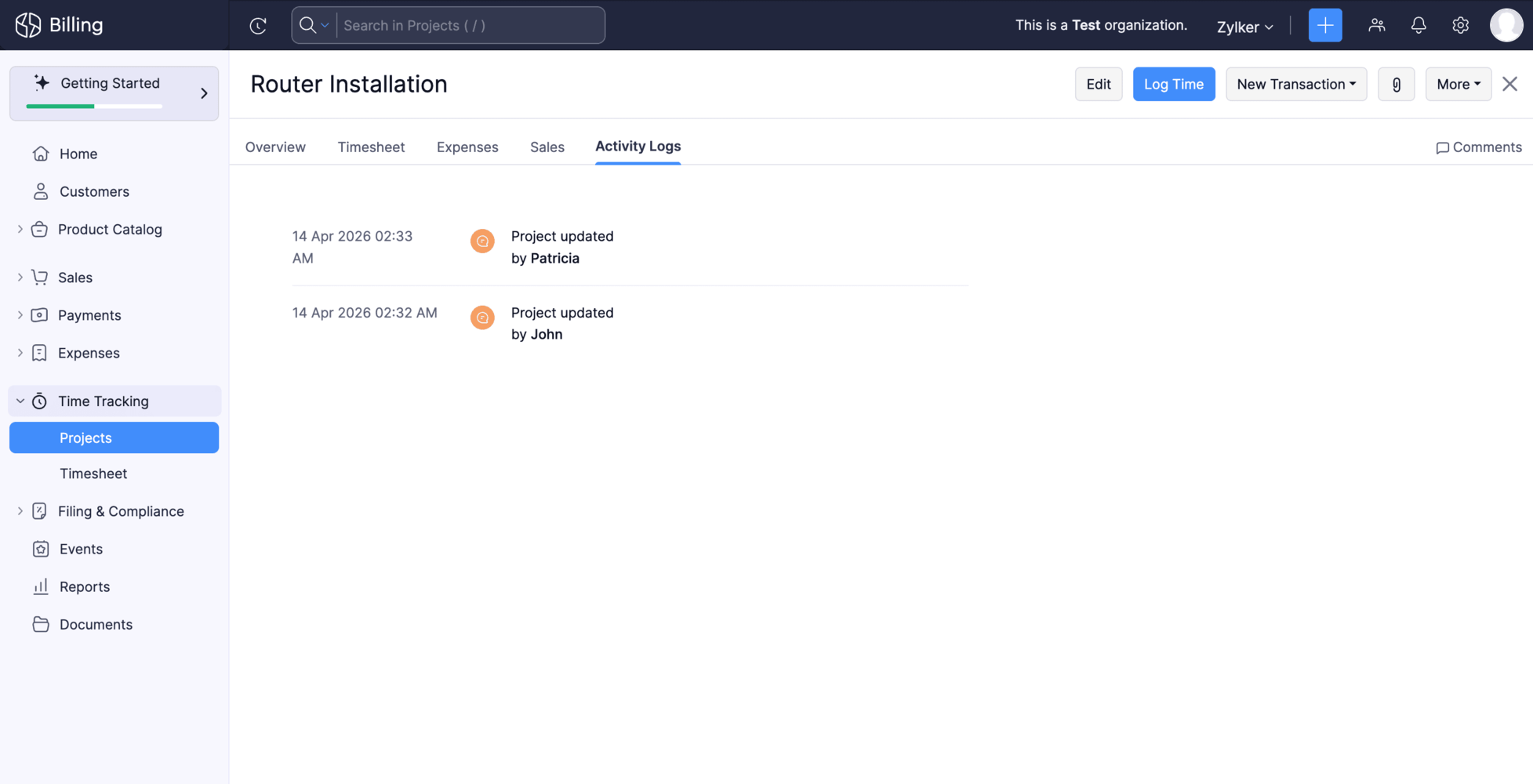
Keeping tabs on what's happening across your projects just got easier. Each project now has a dedicated Activity Logs tab that gives you a consolidated view of all project-related changes and actions, making it easier to track changes and stay on top of what's happening across your projects.
To access it, open any project and navigate to the Activity Logs tab.
Create Custom Fields for Locations Module
Your locations can now hold more than just standard address details. You can create and associate custom fields with the Locations module to capture any additional information your business needs.
To set it up, go to Settings > Organization, select the Locations module, and create your fields. To include them in your address format, go to Settings > General > Organization Address Format, click the Insert Placeholders dropdown, and select your custom field.
Note : This feature is currently in Early Access.Manage Custom Reports as an Admin
Admins now have full control over custom reports across the organization. You can edit, clone, and delete any custom report, including those created by other users without needing to track down the original owner.
Create Custom Fields for Contact Persons
You can now create and manage custom fields for contact persons to capture information specific to your business needs.
To create one, go to Settings > Module Settings > General > Customer > Field Customization > + New Custom Field to create custom fields for your customers.
Write-Off Multiple Invoices at Once
You can now write-off multiple invoices at once. Select the invoices you want to write off, provide the write-off date and reason, and the details will be applied to all selected invoices. Bulk write-off is available for the Unpaid, Open (Sent), Partially Paid, Late Fee, and Custom View filters.

Note: This update is currently only available for the Global edition
Filter Custom Reports by Date Range
You can now apply date range filters directly within a custom report. Previously, if you wanted to view a custom report for a specific period say, just last quarter or a particular month you had to edit the report each time. Now, a date range filter is available right on the report page, letting you view your data instantly.
To view custom report for a specific period, go to any custom report and select from the Date Range dropdown.
Voiding Invoices Now Updates the Usage Status
Usage records linked to an invoice will now automatically move back to Pending if the invoice is voided.
What this means for you:
- Keeps your billing data accurate and in sync
- Makes re-billing error-free
Log Usage Records for Earlier Dates
You can now create usage records for any date from when a subscription was activated. This makes it easier to log missed or delayed usage entries and correct historical data.
Why this helps:
- Log missed or delayed usage entries
- Correct historical data
Stay Compliant with Income Tax Act 2025 — TDS and TCS Updates. [India Edition]
Effective 1 April 2026, the Income Tax Act 2025 (ITCA 2025) replaces the Income Tax Act, 1961. Zoho Billing has been updated to reflect the revised TDS and TCS rates as announced in the Union Budget 2026-27. You can continue filing TDS and TCS returns accurately without any manual intervention.
Try these updates now and share your thoughts in the comments! Need help getting started? Reach out to our support team at support@zohobilling.com. We look forward to your feedback and helping you make the most of these features!
Recent Topics
Zoho Projects Roadshows 2026 - APAC
Dear Users, Building on the amazing response to our roadshows in 2025, we are excited to announce our next set of roadshows in the APAC region. To start with, our team of experts will conduct these events in Singapore and Manila. They will walk you through
how do i add more than one google my business location?
they are connected to one account, but while connecting social channels it makes me pick one location. I have 3 and growing.
Notes - Reaction Buttons
Using the native notes option within CRM is fine, it works and the RTF features are great, however, would it be possible - if there isnt already something in place, where we can add a reactions button, similar to teams/whatsapp to show that its been read
Zoho Analytics: Clarification on Email Schedule Limits in Basic Plan
Hi Team, I have a question regarding the email scheduling limits in the Zoho Analytics Basic Plan. The plan shows that I can create 4 email schedules. However, I understand that schedule consumption is calculated based on recipients (i.e., 1 schedule
Zoho → ShipStation Integration – Sales Order–Driven Fulfilment Workflow
Hello All, I’m reaching out to explore the best way to integrate a shipping tool into our inventory which will speed our process up. We are looking to integrate ShipStation into our existing order-to-fulfilment workflow, as we’re keen to standardise on
Updating Sales orders on hold
Surely updating irrelevant fields such as shipping date should be allowed when sales orders are awaiting back orders? Maybe the PO is going to be late arriving so we have to change the shipment date of the Sales order ! Not even allowed through the api - {"code":36014,"message":"Sales orders that have been shipped or on hold cannot be updated."}
Lost the ability to sort by ticket owner
Hi all, in the last week or so, we have lost the ability to sort tickets by Ticket Owner. Unlike the other columns which we can hover over and click on to sort, Ticket Owner is no longer clickable. Is it just us, or are other customers seeing this too?
Custom button for list page
Why is my 'List Page - Bulk Action Menu' button in the Packages module not autopopulating the List argument with selected record IDs?
Rename system-defined labels in Zoho CRM
Renaming system-defined labels is now available across all DCs. Hello everyone, Zoho CRM includes predefined system fields across modules to support essential CRM operations. Until now, the labels of these fields were fixed and could not be edited from
Exclude Email or Domain From New Ticket Notification
Hi, we utilize the new ticket notification feature in Zoho Desk. However, it would be great if there was a way to exclude certain email addresses or domains from receiving the automatic notification. This would be particularly helpful for automated alerts
Anyone have a working connection with CRM and shipstation via Flow
Just wondering if anyone has successfully integrated shipstation and Zoho CRM. I know there’s code to do it but am hoping to find out all the pitfalls before I jump on!! Scenario: SalesOrder gets created in CRM with multiple line items. I want this pushed to shipstation. On shipping via shipstation I want to push the tracking # back to CRM. Many thanks in advance
ShipStation and Zoho Inventory
Hello, I am looking to sync zoho inventory with shipstation ZOHO INVENTORY SHIP STATION Sales Order ==> create ORDERS INVOICE <== Shipments What exactly does BETA mean on the Shipstation connector? This is required for me to sign-on in the next month. Thanks in advance for your efforts
Connect to Shipstation's API
Shipstation is a very big service, with lots of users, tons of order data.....and poor un-customizable reporting. This is perfect for Zoho analytics. The Shipstation API is modern and efficient. Today I think many people pay Zapier to get Shipstation data into Reports/CRM/Books - why not have a direct connection? -can pull in shipments via webhook or polling. -also nice to pull in order data along with shipment data
What’s the Correct Integration Flow Between Zoho Inventory, ShipStation, and Multi-Channel Sales Platforms?
Hi Zoho Community, I’m currently implementing Zoho One to manage all of my business processes, and I’d appreciate some guidance on the correct integration flow for the tools I’m using. Here’s my current setup: Zoho Inventory is my central system for managing
Remove Zoho Header from Portals
I have a portal page with custom domain. But when I print directly from a webpage, the Zoho CRM header shows. It kind of kills the branding aspect. Is there a way to get rid of this?
Setting defaults for "Find and Merge Duplicate for..."
To remove some of the extreme tedium from Zoho's poorly implemented merge function, I would like to set defaults. Currently I am defaulted to match "ANY" when I would never do that, so I always have to click "ALL". Then it makes me click on several totally irrelevant drop boxes to turn off phone, mobile and other useless match criteria. Is there a way I can set: Match to default as "ALL" Firstname to default to "IS" Lastname to default to "IS" every other match field default to "-NONE-" This will
Clone a Module??
I am giong to repurpose the Vendors module but would like to have a separate but very similar module for another group of contacts called Buyers. I have already repurposed Contacts to Sellers. Is it possible to clone (make a duplicate) module of Vendors
Let's bring Manufacturing Resource Planning (MRP), Material Requirement Planning (MRP), and Production Planning/Management module / feature in Zohobooks
CLIENT PORTAL (If clients can place orders directly on the portal)
Zoho client portal is excellent. Everything is there except one thing. Client should be able to place orders directly on the portal. This would enhance the portal and end users will be extremely happy. This suggestion infact came from one of our client.
Zoho Inventory Feature Roadmap Visible To All
Hello, please consider making your feature roadmap visible to us users so that we know what to expect in future. This may appease current users who are seeking clarification on feature implementation dates, so that they can make an informed decision whether
アナリティクスで商談中のパイプライン(ステージ)の件数比較
アナリティクスで商談中のパイプライン(ステージ)の件数を前週と前々週で比較したい。前々週の件数が更新することで変動してしまう。対象方法をご教授ください。
How do I remove a data source from Zoho Analytics?
I am unable to find a delte option on a datasource that i put in the system as an error. On teh web it refers to a setup icon but I do not see that on my interface?
Identify and clean hard bounce lists in Automation 2.0
Hello. 1. I want to know how I can identify hard bounces in the lists I created to clean them before sending an email, given that the bounce rate has increased and it is necessary to clean the lists. 2. How can I exclude hard bounces and invalid emails
Enhanced Sign-in UI and OTP-Based Password Reset for Portals
As of 5th December, 2024, we are introducing enhanced sign-in interfaces and One-Time Password (OTP) based verification for password reset in an effort to improve security and stream the user journey across all portals. What's changing New Interface for
Trigger workflows from SLA escalations in Zoho Desk?
Hey everyone, I’m currently working with SLA escalation rules in Zoho Desk and ran into a limitation that I’m hoping someone here has solved more elegantly. As far as I can tell, SLA escalations only support fairly limited actions (like changing the ticket
Delete a department or category
How do I delete a Department? Also, how do I delete a Category? This is pretty basic stuff here and it's impossible to find.
Zoho Webinar - Sharing System Audio (NOT AVAILABLE)
Hi, We are having a serious problem with Zoho Webinar. In the webinars we run, we very often share the audio from a video we are streaming directly from YouTube or other applications. Until recently we were using Zoom, but as we use other Zoho applications
Big Time HELP
I am old, disabled and need to speak to a person. I needed to use a service to copy my zoom contacts to. I think I signed up for a security service, which I do not need. I don't know enough to choose from your many lists or how to see what I have and
Cancellation Fees
Hi, It really would be good if Billing could take subscription management further with cancellations & being able to apply or set a cancellation fee for a plan that is either fixed or prorated. It is not uncommon in subscriptions for cancellation fees
Custom Field for Subscription
Hi, I can't find a way to add a custom field (to contain a license key generated from our software) against a subscription? Is the only place to add this information in the Invoice module (as custom field for invoice)? When a customer views his subscription
Zoho CRM Meetings Module Issues
We have a use-case that is very common in today's world, but won't work in Zoho CRM. We have an SDR (Sales Development Rep) who makes many calls per day to Leads and Contacts, and schedules meetings for our primary Sales Reps. He does this by logging
How to get the campaingns key?
Reading the documentations of the API, I see that is necessary have the campaign key, but I don't see how can I get it. For example to get the campaign details we need to do the request: https://campaigns.zoho.com/api/getcampaigndetails?authtoken=[API Authentication Token]&scope=CampaignsAPI&campaignkey=[campaignkey] I have the API Authentication Token but I don`t see how to generate the campaignkey
Unable to switch existing AWS RDS connection to DataBridge after moving RDS behind VPN
Unable to switch existing AWS RDS connection to DataBridge after moving RDS behind VPN Hi everyone, I’m facing a problem with an existing Zoho Analytics setup and would like to know the best migration path. Originally, my Zoho Analytics connection to
[Bug] WebAuthn passkey registration blocked on rpIds with TLDs longer than 6 characters (.accountant, .technology, etc.) — isValidDomain regex too strict
Hi, Filing on behalf of an enterprise customer where Zoho Vault is deployed across the company. The Chrome extension blocks WebAuthn passkey registration on legitimate sites whose Relying Party ID (rpId) has a TLD longer than 6 letters. This affects every
Native QuickBooks integration for Zoho CRM: Connecting sales and finance
Greetings, I hope all of you are doing well. We're excited to announce Zoho CRM's integration with QuickBooks Web, which is designed to synchronize your CRM data with your QuickBooks accounting records and bridge the gap between sales and finance. This
Syncing zoho books into zoho crm
I was wondering how I can use zoho books in crm as I have been using them separately and would like to sync the two. Is this possible and if so, how? Thanks
Feature Request — Allow updating Status / Bounced_Time / Bounce_Reason on emails created via actions/associate_email (v8)
Summary Emails created through the v8 POST /{module}/{record}/actions/associate_email endpoint are returned by View Email with "editable": false and reject every update method (PUT, PATCH) with INVALID_REQUEST_METHOD. There is no way via the public API
ZohoBooks_add_expense_attachment Fails
I'm working MCP in Claude to automate bookkeeping. Claude cannot seem to attach and reciept to an expense. The 'add expense attachment' tool is added to the server and enabled in Claude. I asked Claude to give me the calls he performed and this is what
ZohoBooks_create_chart_of_account
I'm setting up Claude to do my bookkeeping workflows using a Zoho MPC server I setup. He does not seem to be able to create a chart of account. The 'create chart of account' tool is added to the server and enabled in Claude. I asked Claude to give me
Zoho Books Product Road Map
I am planning to look into Zoho Books to maintain my Company's Account Books. Is the roadmap of Zoho Books Development available online? What happens if you product dies, without an export feature to other popular Accounting softwares like Tally or Quickbook. Are we going to be left in lurch? Do you have a product road map? Regards, Vishal.
Next Page