March is here with a fresh wave of updates to Zoho Billing. From making compliance easier, reporting more flexible, to making day-to-day workflows smoother across the board. Here's everything that's new this month.
Introducing Usage-Based Billing Reports
You can now access four new reports under the Usage Billing section to gain complete visibility into how usage is recorded and billed. These reports also help you monitor fund allocations and track drawdown activity across all subscriptions.
The four reports available are:
- Usage Summary
- Usage Details
- Prepaid Summary
- Prepaid Details
You can track your usage through a set of reports tailored to your billing type. If you have Usage Billing enabled, the Usage Summary and Usage Details reports are available to you. If your organization uses Prepaid Billing with Drawdown, you also get access to the Prepaid Summary and Prepaid Details reports.

Note: This feature is currently in Early Access.
To access these reports, go to Reports > Usage Billing Group and select the report you need.
Manage Module Visibility for Plans, Addons, and Coupons
You can now choose which modules are active in your organization. If your business doesn't use Plans, Addons, or Coupons, you can simply disable them to keep your workspace clean and focused.
To configure these settings, go to Settings > Setup & Configuration > General.
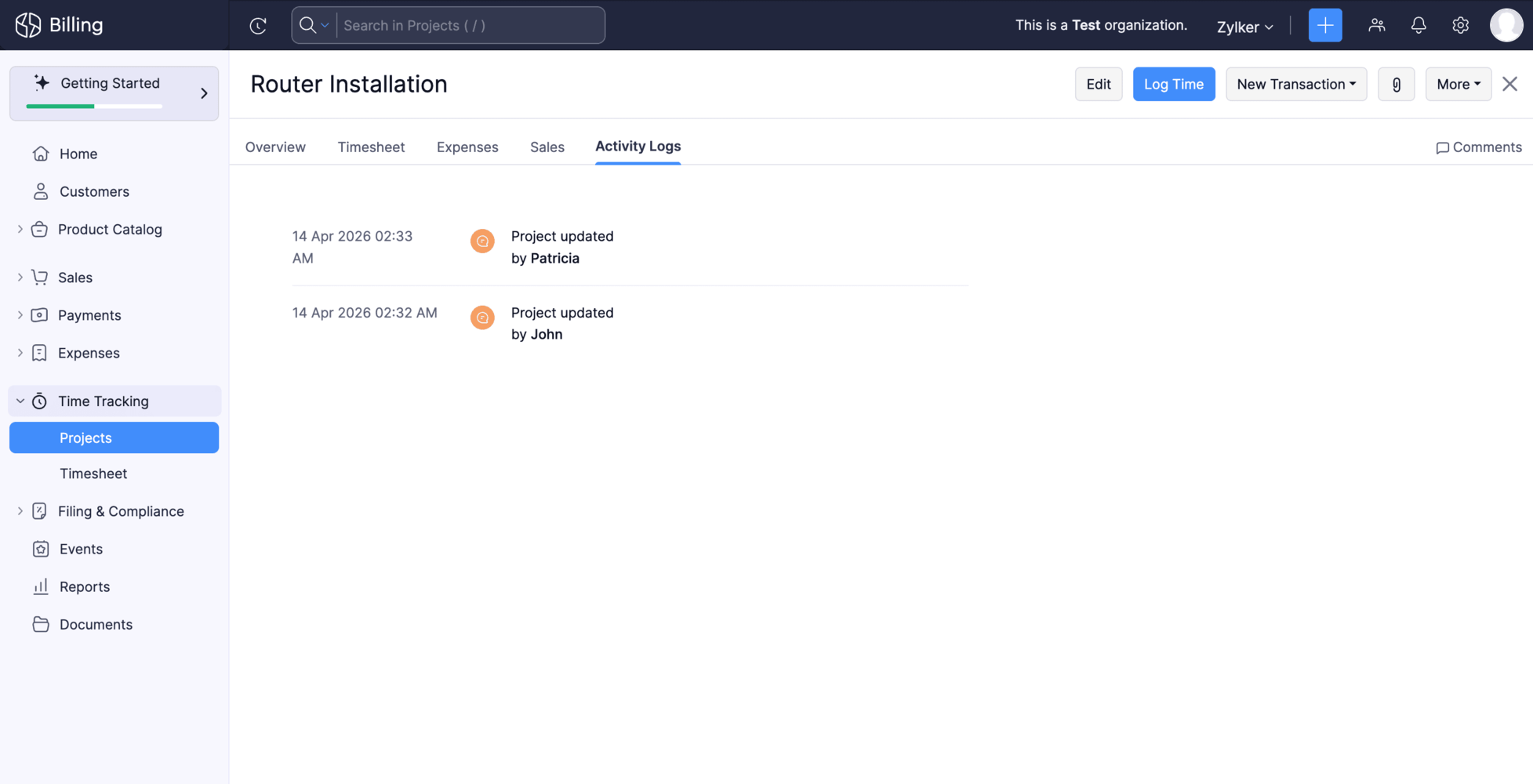
Track Activity Logs for Projects
Keeping tabs on what's happening across your projects just got easier. Each project now has a dedicated Activity Logs tab that gives you a consolidated view of all project-related changes and actions, making it easier to track changes and stay on top of what's happening across your projects.
To access it, open any project and navigate to the Activity Logs tab.
Create Custom Fields for Locations Module
Your locations can now hold more than just standard address details. You can create and associate custom fields with the Locations module to capture any additional information your business needs.
To set it up, go to Settings > Organization, select the Locations module, and create your fields. To include them in your address format, go to Settings > General > Organization Address Format, click the Insert Placeholders dropdown, and select your custom field.
Note : This feature is currently in Early Access.Manage Custom Reports as an Admin
Admins now have full control over custom reports across the organization. You can edit, clone, and delete any custom report, including those created by other users without needing to track down the original owner.
Create Custom Fields for Contact Persons
You can now create and manage custom fields for contact persons to capture information specific to your business needs.
To create one, go to Settings > Module Settings > General > Customer > Field Customization > + New Custom Field to create custom fields for your customers.
Write-Off Multiple Invoices at Once
You can now write-off multiple invoices at once. Select the invoices you want to write off, provide the write-off date and reason, and the details will be applied to all selected invoices. Bulk write-off is available for the Unpaid, Open (Sent), Partially Paid, Late Fee, and Custom View filters.

Note: This update is currently only available for the Global edition
Filter Custom Reports by Date Range
You can now apply date range filters directly within a custom report. Previously, if you wanted to view a custom report for a specific period say, just last quarter or a particular month you had to edit the report each time. Now, a date range filter is available right on the report page, letting you view your data instantly.
To view custom report for a specific period, go to any custom report and select from the Date Range dropdown.
Voiding Invoices Now Updates the Usage Status
Usage records linked to an invoice will now automatically move back to Pending if the invoice is voided.
What this means for you:
- Keeps your billing data accurate and in sync
- Makes re-billing error-free
Log Usage Records for Earlier Dates
You can now create usage records for any date from when a subscription was activated. This makes it easier to log missed or delayed usage entries and correct historical data.
Why this helps:
- Log missed or delayed usage entries
- Correct historical data
Stay Compliant with Income Tax Act 2025 — TDS and TCS Updates. [India Edition]
Effective 1 April 2026, the Income Tax Act 2025 (ITCA 2025) replaces the Income Tax Act, 1961. Zoho Billing has been updated to reflect the revised TDS and TCS rates as announced in the Union Budget 2026-27. You can continue filing TDS and TCS returns accurately without any manual intervention.
Try these updates now and share your thoughts in the comments! Need help getting started? Reach out to our support team at support@zohobilling.com. We look forward to your feedback and helping you make the most of these features!
Recent Topics
How to Backup Zoho to PST?
I'm looking for a simple way to backup Zoho Mail emails to PST format. I tried the IMAP method with Outlook, but it seems slow and complicated for large mailboxes. I need a solution that can: Export Zoho emails to PST Preserve attachments and folder hierarchy
Zoho CRM Deal API returning null pipeline in case of default pipeline
Hey team, We are writing to report an issue with the Deals module pipeline API behavior that we believe stems from how the default (Standard) pipeline is handled when no custom pipelines have been configured. When the "Manage Pipelines" page under CRM
Warehouse -> Locations Transition Causing Errors
After saying "okay" to the transition from 'warehouses' to 'locations', I've now got shipped Sales Orders that I cannot invoice. How does one proceed?
Zoho CRM Community Digest - May 2026 | Part 1
Hello Everyone! This edition introduces the new centralized Zoho Announcements Hub, a single dashboard designed to let you track and filter live product roll-outs from across the Zoho ecosystem. Alongside the Announcements Hub, this month also features
SalesIQ : How to disable markdown autoformatting?
Hello Is there setting to disable "Markdown Text" this feature and enter raw markdown in plain text only format it after you send the message? Thanks
Converting XML to JSON
Hi! I need to convert a variable in XML to JSON. Can i do it without using an API on deluge? I looked into the documentation but couldn't get any answers to this. Thank you in advance!
元問い合わせメールに返信したときの統合処理
ワークフロー作成したので備忘録です。 Zoho Desk で作成したメールアドレス宛てに既存のメールアドレスにきた問合せ先メールを転送してチケット作成を行っています。 元の問い合わせメールに返信、転送した際にRe,RE,re,Fw,FW,fwが件名の頭に付くため、その度に新規起票が乱立します。 メールの頭にRe,RE,re,Fw,FW,fwがある時それを除いた件名と同じ件名が既にチケット作成されていれば統合するワークフローを作成しました。 条件が緩いので既存チケットの検索で完了済みや5日以上前に作成したものは除いてもいいとは思います。
Marketing Automation Demo Video
I would like to see a video demo for Marketing Automation. Do you have one statashed away somewhere?
is it possible to add more than one Whatsapp Phone Number to be integrated to Zoho CRM?
so I have successfully added one Whatsapp number like this from this User Interface it seems I can't add a new Whatsapp Number. I need to add a new Whatsapp Number so I can control the lead assignment if a chat sent to Whatsapp Phone Number 1 then assign
Automate Backups
This is a feature request. Consider adding an auto backup feature. Where when you turn it on, it will auto backup on the 15-day schedule. For additional consideration, allow for the export of module data via API calls. Thank you for your consideration.
How to record GST amount for Value of Service on Inward remittance charged by bank
Hi please advice I have a situation. 1. I have HDFC bank account 2. I have a customer who has done inward remittance for purcahses from overseas. 3. HDFC is showing Value of Service say $100 and GST @ 18%. 4. Value of Service is not charged. But CGST
Sort by Project Name?
How the heck do you sort by project name in the task list views??? Seems like this should be a no-brainer?
Project Statuses
Hi All, We have projects that sometimes may not make it through to completion. As such, they were being marked as "Cancelled". I noticed that these projects still show as "Active" though which seems counter intuitive. In fact, the only way I can get them
I have a requirement to integrate Zoho Books with Zoho Projects at both project and task levels.
Currently, when i create transactions in Zoho Books (Expenses, Invoices, Bills), we can only map them at the project level. However, our requirement is to: Map records at both project and task levels Sync these transactions back to Zoho Projects under
What’s New in Zoho Inventory — Latest Features, Integrations & Updates | December 2025
Zoho Inventory has evolved significantly over the past months, bringing you smarter, faster, and more connected tools to streamline your operations. Whether you’re managing multichannel sales, complex fulfillment workflows, or fast-moving stock, our newest
Add Multiple Modules in Automation
Right now I am trying to automate sending customer statements in WhatsApp, if they have overdue invoices, since customer has multiple invoices overdue I don't want to send repetitive message for those. Right now in automation you can only select 1 module,
Feature Request in Zoho Books : Tracking Inventory for Service Items
At the moment, ZOHO Books don't allow to track inventory of Service Items (I just talked with customer care executive for confirmation). MY PROBLEM: I resell services Digital Signatures Certificates ( SAC ‐ 998319) and other similar services, I purchase
Create Tasklist with Tasklist Template using API v3
In the old API, we could mention the parameter 'task_template_id' when creating a tasklist via API to apply a tasklist template: https://www.zoho.com/projects/help/rest-api/tasklists-api.html#create-tasklist In API v3 there does not seem to be a way to
Audio Recording Button needs work
People struggle to understand how to record the audio - the mic button is tiny and barely visible. Please make the recording option more prominent and obvious and the upload file function should be secondary... (not taking up the majority of the space).
Enhancing user experience with Audio/Video Upload in Zoho Forms
Hello form builders! Today, interactive forms are an integral part of websites and applications. While text-based inputs serve a variety of purposes, audio and video uploads can open up a world of possibilities for businesses. Imagine you are a talent
Early Preview for an Upcoming Enhancement to Zoho One - App Adoption and Feature Discovery
Hello, Enterprise Support Community, We're excited to give you an early sneak peak at an upcoming enhancement to the Zoho One platform: new App Adoption & Feature Discovery components, designed to help our customers adopt the right tools to enhance their
You cannot send this email campaign as it doesn't have any eligible contacts in the selected mailing list. You can try adding contacts or choose other mailing lists.
please help
Add Days In Stage to Filter Options for Pipeline
We use the days in stage to see how long a ticket has been in a certain stage. But there is no option to see this via filters. eg if i wanted to see how many tickets over 5 days in a stage, there no way to do this. Currently we have to export a report
Integration problem between zoho crm and zoho forms for an update in zcrm, with two mapped custom fields
Hello everyone, I need to correct an existing integration between Zoho CRM and Zoho Forms: the use case is that a user needs to send an email to a contact, who will click on a button in this email, redirecting to a Zoho Forms. The contact can update or
Purchase Order Quantity Validation Not Enforced During Bill Approval
Hello Team, I would like to report a potential issue in the Purchase Order to Bill workflow. Steps to reproduce: Create a Purchase Order for an item with Quantity = 100. Approve/sign the Purchase Order. Convert the Purchase Order into a Bill. Change the
How do I add multiple contacts in a deal
Blueprint Not Triggering When Lead Status Is Updated by Workflow (IndiaMART Integration)
I have set up a blueprint that triggers when a lead’s status is “New Lead.” Our CRM is integrated with IndiaMART, and when leads are created from IndiaMART, their Lead Status is initially set to None. To handle this, I created a workflow that automatically
Add multiple users to a task
When I´m assigning a task it is almost always related to more than one person. Practical situation: When a client request some improvement the related department opens the task with the situation and people related to it as the client itself, the salesman
Journey vs Campaign Confusions
Hi there! I hope you're all doing great! I'm new to the Zoho MA and I'm confused between Journey and Campaigns. I'm not sure if these two work together or not. I hope you can enlighten me. What I'm trying to do is setting up a Newsletter. 1. We have a
The 3.1 biggest problems with Kiosk right now
I can see a lot of promise in Kiosk, but it currently has limited functionality that makes it a bit of an ugly duckling. It's great at some things, but woeful at others, meaning people must rely on multiple tools within CRM for their business processes.
Zoho Webinar not sending calendar entry into Outlook or other calendars
Dear All, I am using Zoho Webinar for last few months and noted that when a attendee registers at the webinar link he gets an email will intimating his registration and link to webinar. He also get few file ( for Outlook, Google calendar etc) which he
Ticket Status
HI, Any idea on how to create other options for this header??? I want to add an "Ordered" status. Its under "tickets" in Overview, I need a new status created (see second picture)
Turning off the recorded welcome in Zoho Webinar
Is there a way to turn off the recorded voice that comes up at the beginning of every webinar session? It devalues the experience for attendees from feedback, interrupting their connection with our brand and delaying webinar start unnecessarily.
Client Script | Update - Client Script Support For Custom Buttons
Hello everyone! We are excited to announce one of the most requested features - Client Script support for Custom Buttons. This enhancement lets you run custom logic on button actions, giving you greater flexibility and control over your user interactions.
Save embed widget personalizations
Ok, Zoho, Great work on providing PRICING TABLES via the embed widget. Thanks so much. This changed the game for me Only one slight problem....I can't seem to save my widget settings. I'm still building my products and plans but I'm testing how they look
Problem with UTM Parameters: Zoho Forms - Zoho Desk Integration
Hi Zoho Support Team, I want to automatically capture UTM Parameters from my website URLs and pass it from Zoho Forms into Zoho Desk. I have activated the UTM tracking feature. I've integrated the UTM Tracking code in my website footer on all pages. I've
Team folder not created when creating project using zoho flow
When I try to automate project creation using zoho flow, and I have enabled workdrive integration to automatically create team folders to attach to the project, this only works when I create a new project through the UI. But I am trying to automate project
Add an option to deactivate Zoho Meeting "Welcome" message
My request is to provide an option to deactivate the annoying Zoho Meeting "Welcome" voice when participants join meetings... or remove it all together. First impressions count, especially with new clients. This notification reminds me of the AOL "You've
Service line items
Hello Latha, Could you please let me know the maximum number of service line items that can be added to a single work order? Thanks, Chethiya.
SalesIQ > My Chat sort by Unread or Follow-up
Hi Zoho SalesIQ Team, I would like to submit a feature request regarding the My Chat > Sorting in the SalesIQ UnRead Follow-up Conversation tags Thank you for considering. Best regards, CJ
Next Page