What's New in Zoho Inventory | September 2026
Hello users,
September brings a range of new features and enhancements across Zoho Inventory. From improved inventory operations and reporting capabilities to greater customization, automation, and enhancements to Delivery Challans, there’s plenty to explore in this release. Here's a look at the latest updates.
Inventory Management
Sales, Purchases & Fulfillment
Items & Item Configuration
Reports & Analytics
Customization & Automation
Payments & Documents
Retail Store
Mobile App
Warehouse Operations
Inventory Management
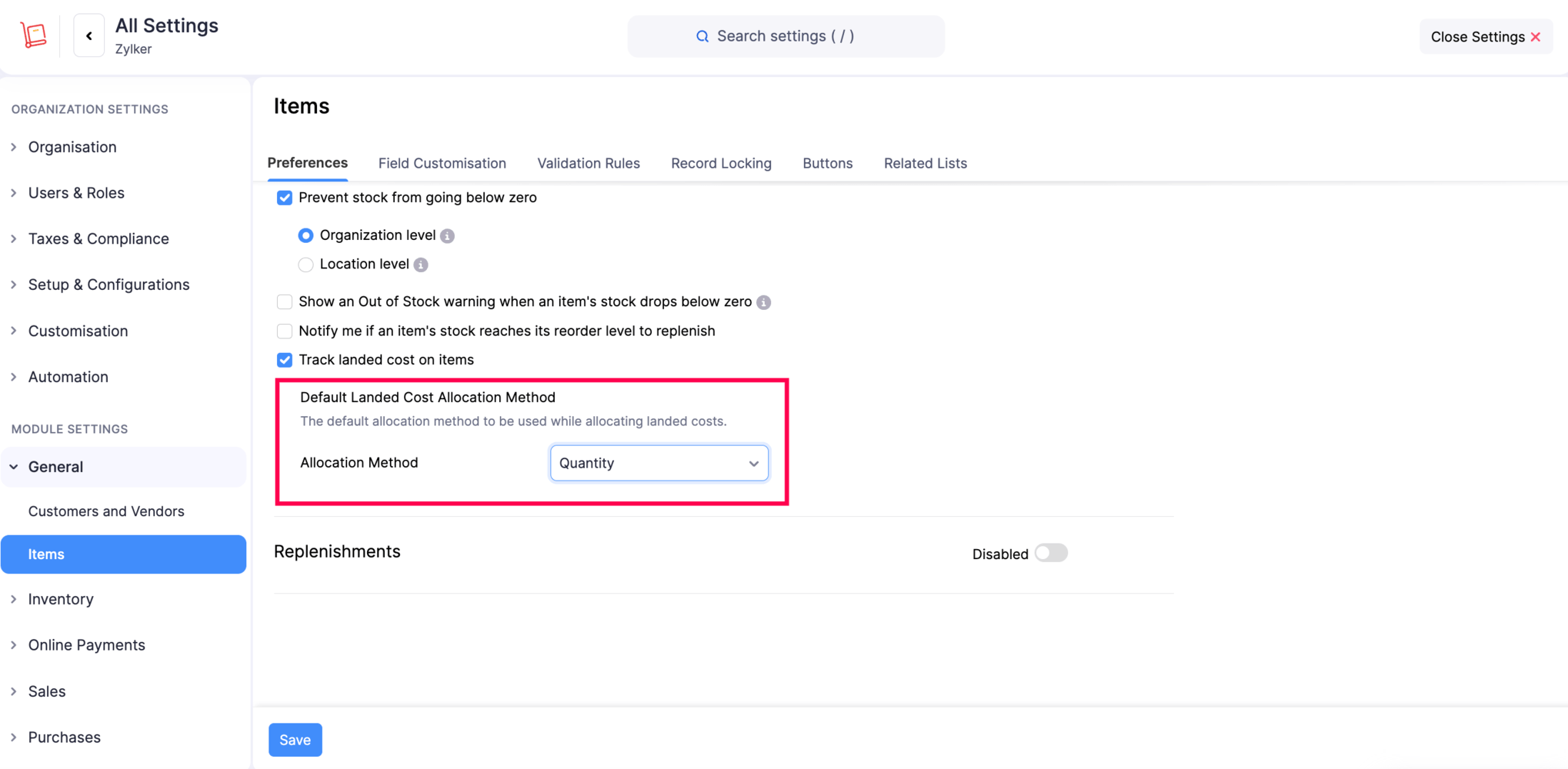
Set a Default Landed Cost Allocation Method
You can now configure a default Landed Cost Allocation Method for your organization. This eliminates the need to manually select the allocation method each time you record landed costs, especially if your business consistently uses methods such as Value instead of the default Quantity method.
To configure the default method > Go to Settings > Items > Enable Track landed cost on items > Default Landed Cost Allocation Method.
Receive Items at a Different Warehouse Location [Early Access]
You can now receive items at a warehouse location different from the one specified in the purchase order, as long as the selected location belongs to the same business location. This gives you more flexibility when receiving goods based on storage availability, delivery requirements, or operational needs. When creating a purchase receive, you can select the required warehouse location from the locations available under the purchase order's business location.
Note: When creating a bill, you can choose either the purchase order's location or the warehouse location specified in the purchase receive. If Advanced Inventory Tracking is set to Bills for the purchase order, the warehouse location cannot be changed for the items in the purchase receive.
To receive items at a different warehouse location > Open a Purchase Receive and select the required warehouse location from the locations available under the Purchase Order's business location.

Import Default Preferred Bins for Items
You can now import the Default Preferred Bin configured for your items. This makes it easier to assign preferred bins to items in bulk when importing item data.
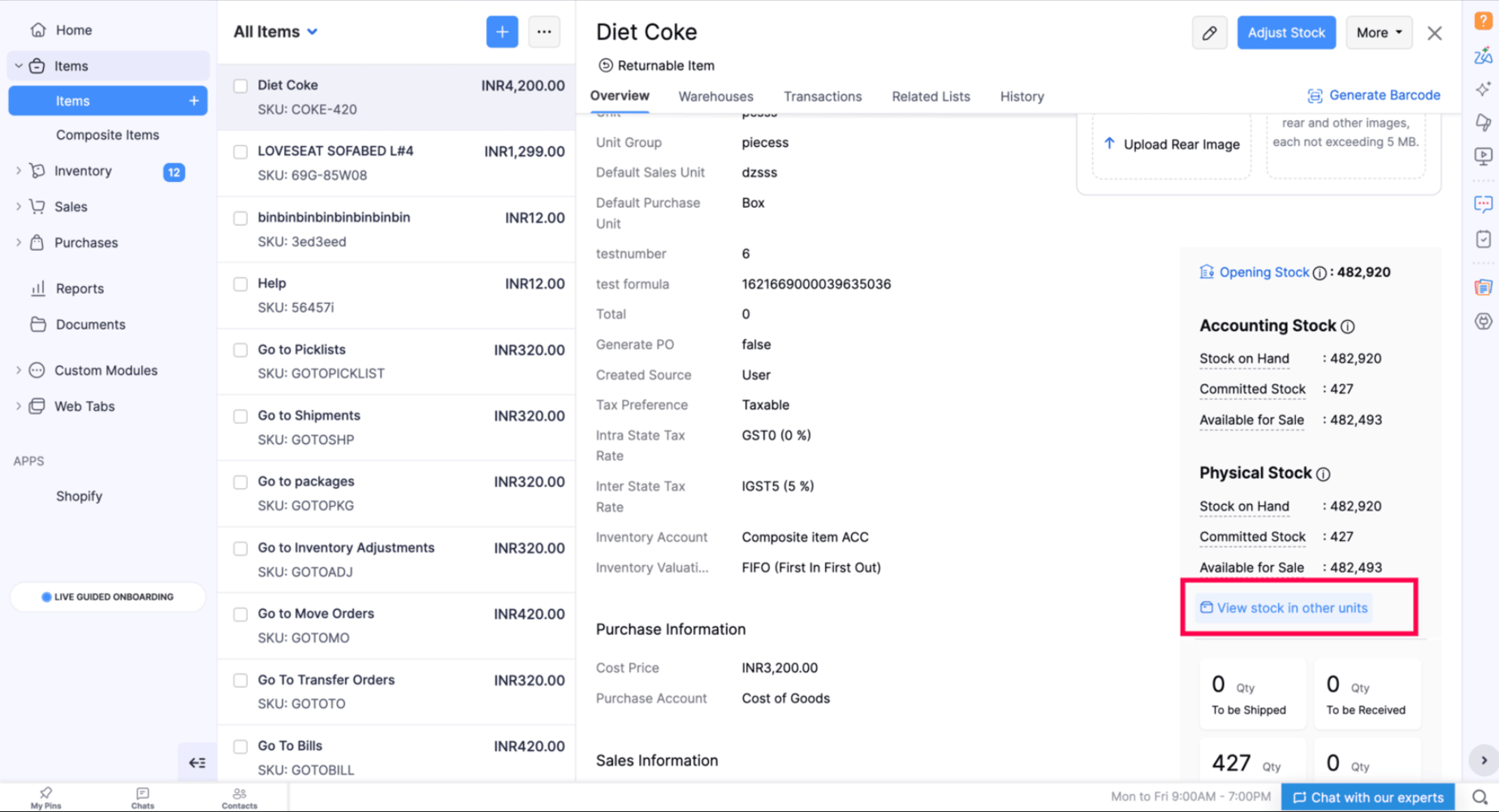
View Stock Details in Multiple Units
You can now view an item's stock details in all the units associated with it, including its base unit and available conversion units, directly from the Item Overview page. This makes it easier to track stock across different units without manually converting quantities from the base unit.
To view stock details in multiple units > Go to the Item Overview page.
Adjust Inventory with Greater Control
You can now enhance Inventory Adjustments with item-level custom fields, validation rules, and record locking. These options help you capture additional item-level information, enforce specific data requirements, and control whether adjustments can be edited or deleted.
Sales, Purchases & Fulfillment
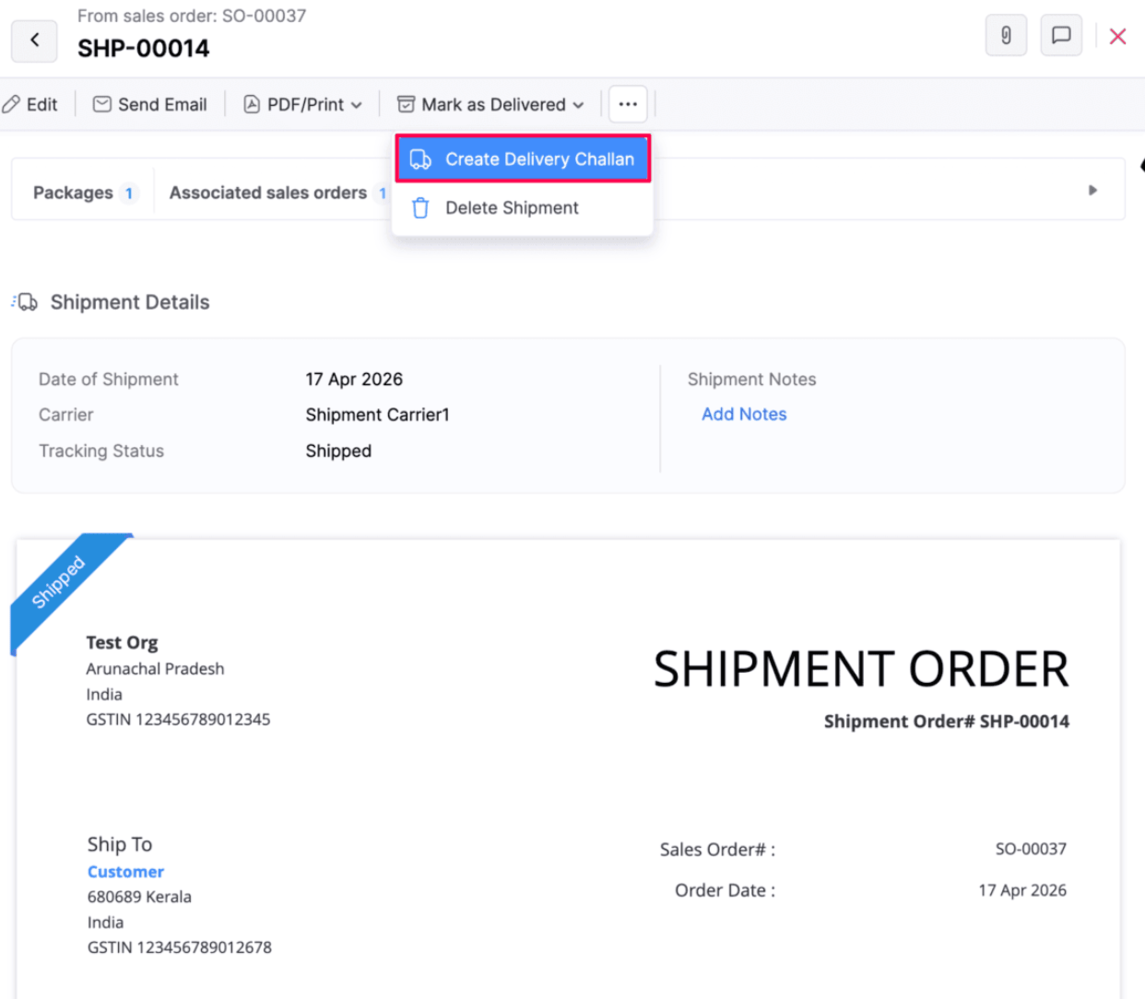
Create Delivery Challans from Shipments
You can now create a delivery challan directly from shipments generated from sales orders. This is useful when goods need to be dispatched before an invoice is created, allowing you to provide a delivery challan as a supporting document during transportation. You can either quickly create a delivery challan by entering the challan number and type, or use the detailed creation option to enter additional details on the delivery challan creation page. The delivery challan status is automatically updated based on the corresponding shipment status.
Note: Creating a delivery challan from a shipment does not affect stock. The line items cannot be edited, except for discounts and custom fields.
Create and Link Packages with Invoices [Early Access]
You can now create a package directly from an Invoice that is associated with a sales order, with the relevant items and quantities automatically carried over. You can also create invoices and packages separately and link them later, including linking existing documents. This provides greater flexibility in managing invoices and packages and simplifies the fulfilment process. Note: You cannot create a package directly from a standalone invoice. The invoice must be associated with a sales order.
This feature is currently available under Early Access. If you want to try it, write to us at support@zohoinventory.com and we'll enable it for you.Add Attachments to Sales Returns
You can now add attachments when creating a sales return and access them from the sales return details page. This makes it easier to keep supporting documents and files associated with the return for future reference.
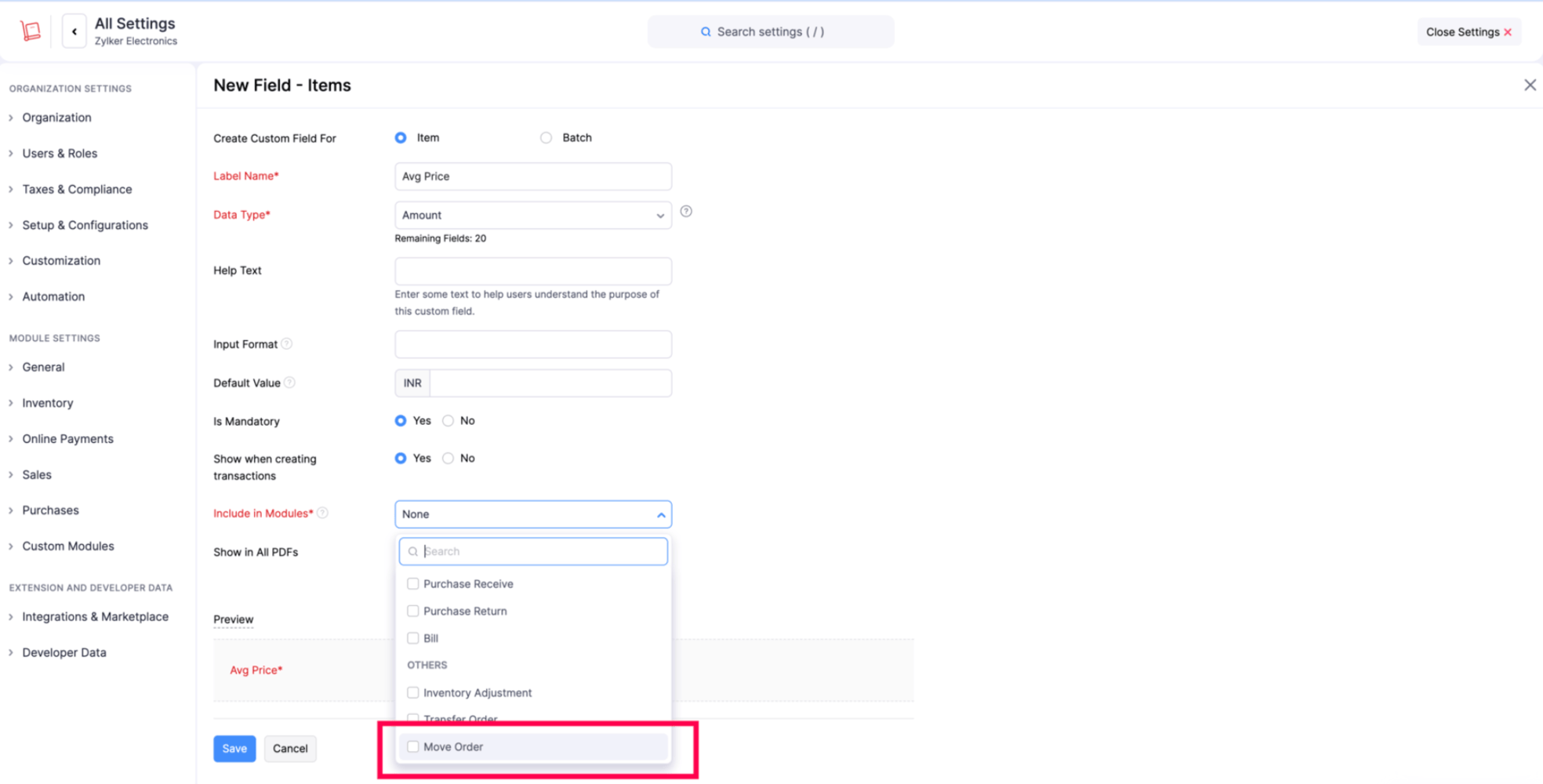
Add Custom Fields to Move Orders
You can now add custom fields and item-level custom fields in move orders. This gives you more flexibility to capture and manage additional information at both the move order and individual item levels.
Digital Signatures for Transactions
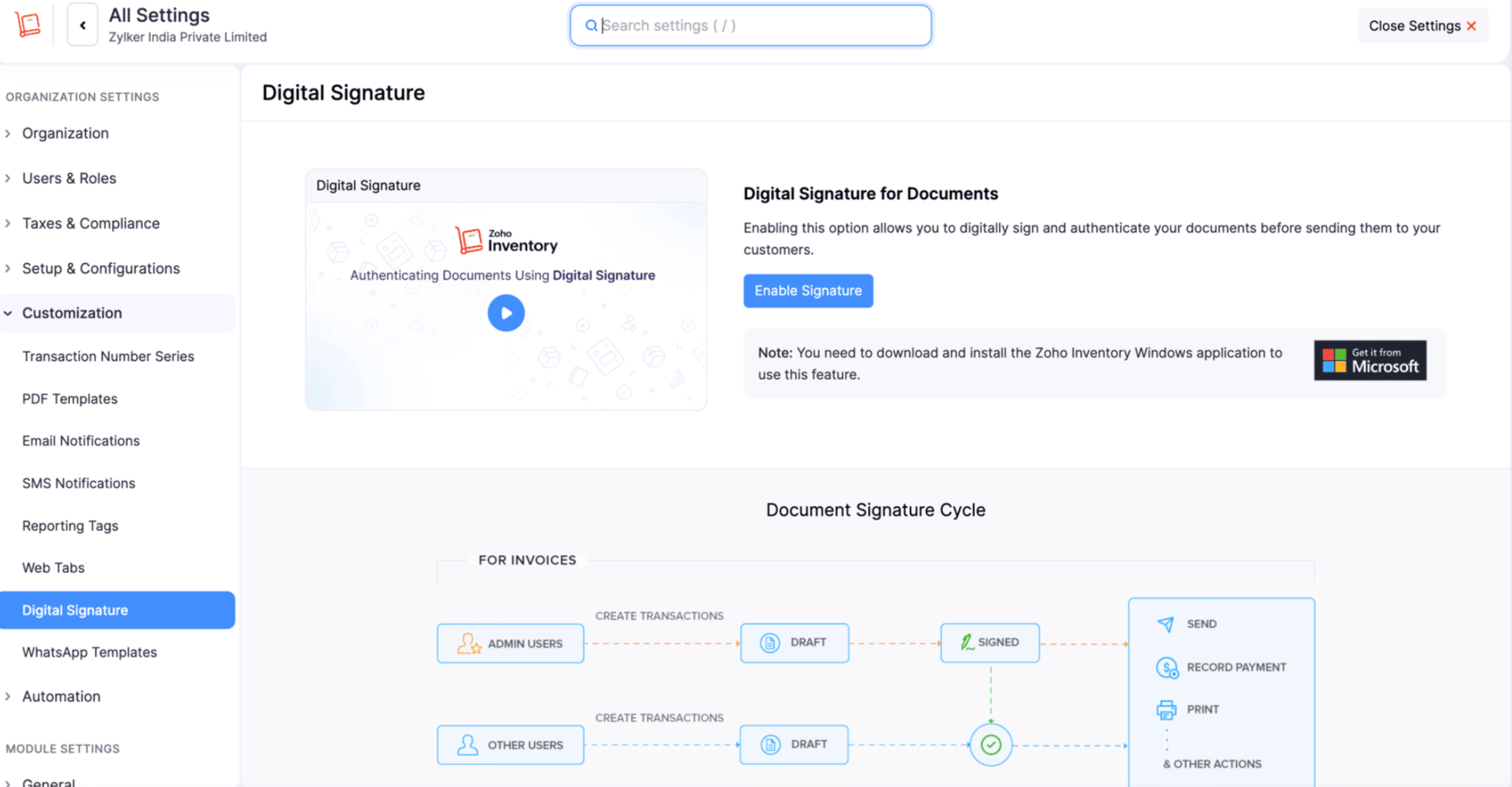
Digital Signatures are now available in Zoho Inventory for the India Edition. You can digitally sign supported transactions using your digital signature certificate to help ensure document authenticity and protect them from unauthorized changes.
Digital signatures are supported for Invoices, Credit Notes, and Purchase Orders. You can configure your signature preferences and digitally sign transactions using the Zoho Inventory Windows application.
Record Locking for Purchase Receives
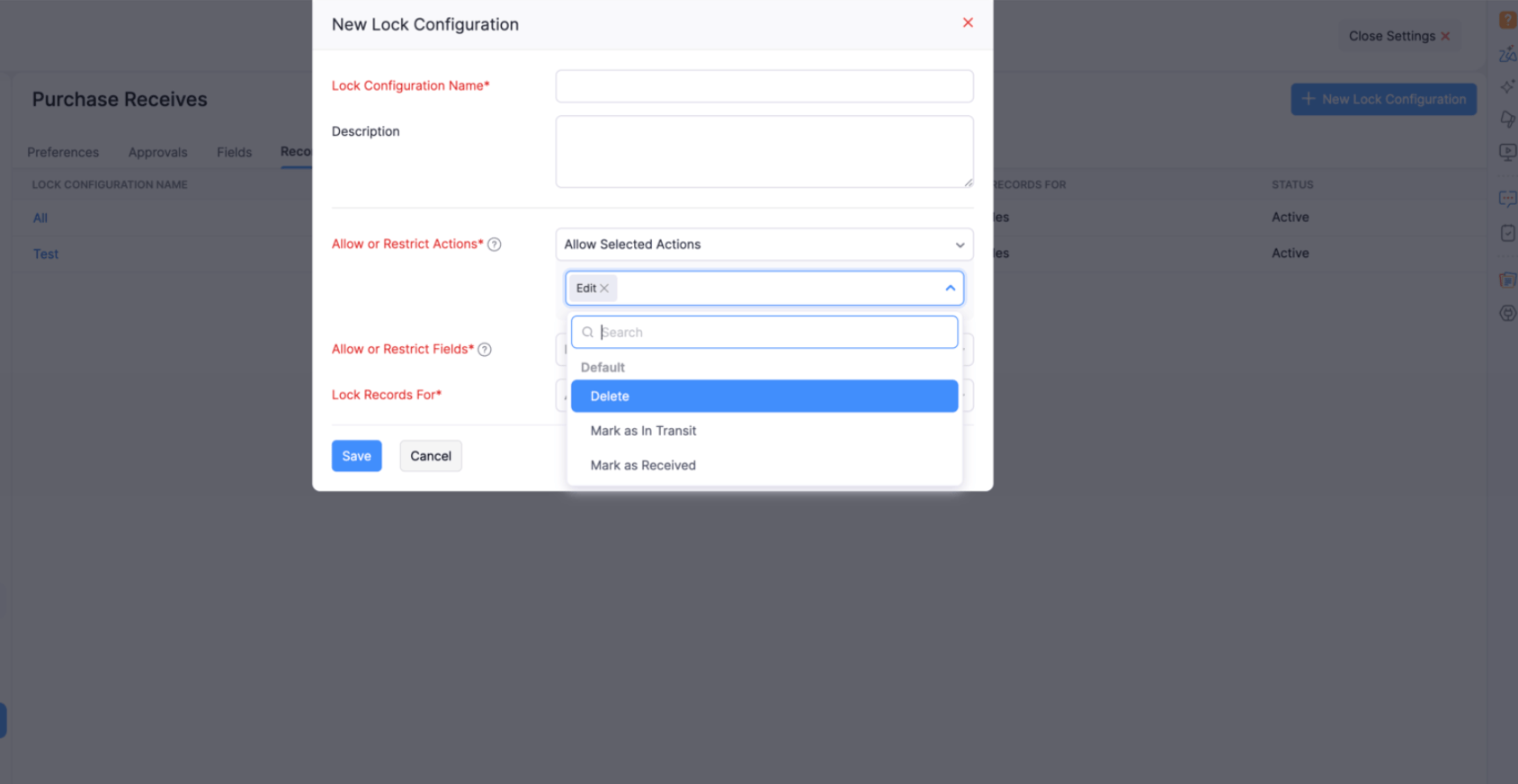
You can now use Record Locking for purchase receives to control changes to records and protect important transaction details from unauthorized modifications. You can configure locking for actions such as editing, deleting, and changing the status of purchase receives, as well as for specific fields such as Tracking Number and Quantity Received.
Items & Item Configuration
Automatically Generate SKUs for Items [Early Access]
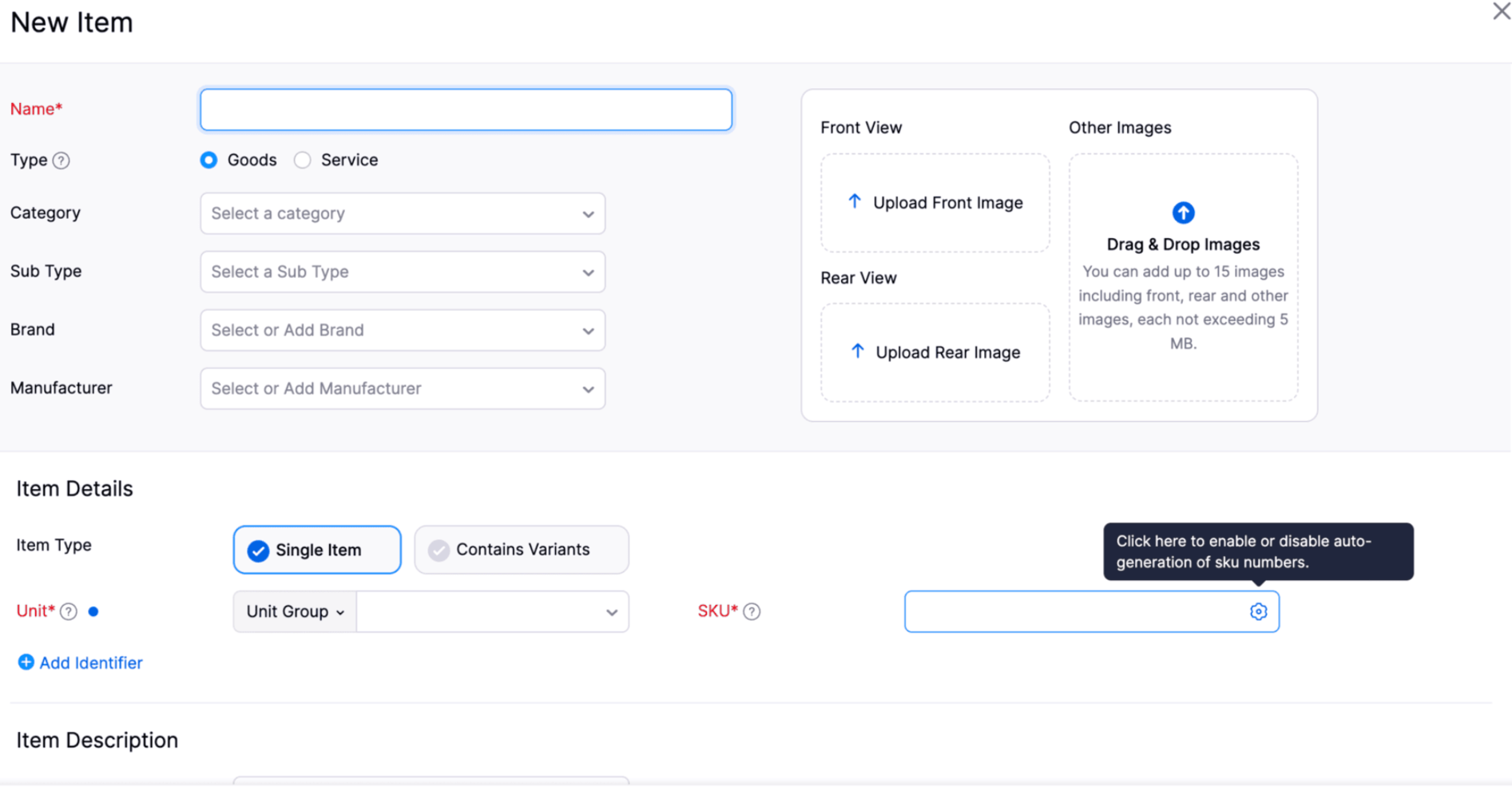
You can now enable SKU Auto-Numbering to automatically generate unique SKUs for items based on your configured numbering preference. This reduces manual effort, helps prevent duplicate SKUs, and maintains a consistent numbering sequence across your organization. Generated SKUs can be edited before saving the item. For variant items, a unique SKU is automatically generated for each variant and can also be edited before saving.
Enhancements to Item Barcode Templates
You can now customize Item Barcode Templates with enhancements such as resizing the organization logo, printing item names in a secondary language, and displaying barcode values in QR code templates. These enhancements provide greater flexibility when designing barcode labels for different business and printing requirements.

Record Locking for Composite Items and Assemblies
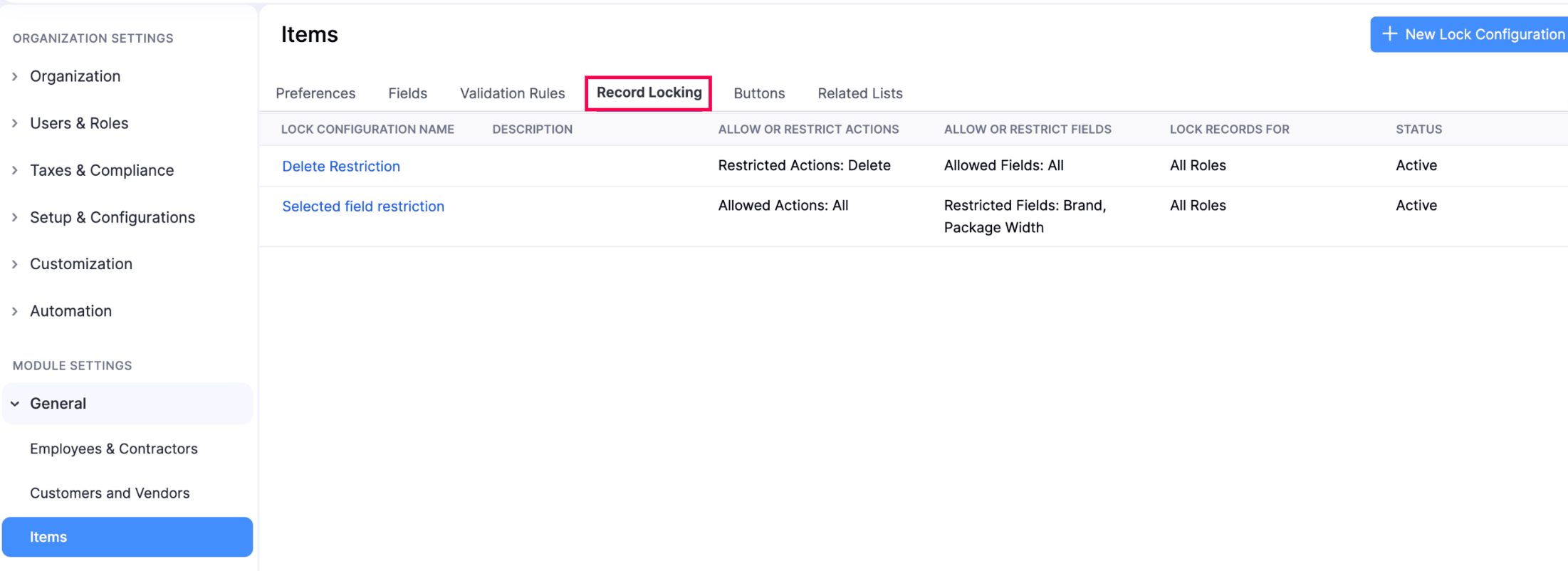
You can now configure Record Locking for Composite Items and Assemblies to control changes to these records. Record locking can be configured from the respective settings and applied to individual composite items and assemblies.
Reports & Analytics
Analyze Inventory by Location in the ABC Classification Report
You can now use the Location filter in the ABC Classification report to analyze and classify inventory items based on their importance and contribution at a specific location. This provides better visibility into location-wise inventory performance.
Filter Sales by Item Composition
You can now use the Item Composition filter in the Sales by Item report to analyze sales based on the type of item sold. You can filter sales of Individual Items, Kits, Combos, or Modifiers to get more granular insights into item-level sales performance.
To filter sales by item composition > Go to the Sales by Item Report and use the Item Composition filter.
Analyze Inventory by Project in Reports
You can now use the Project filter in the Committed Stock Details, Inventory Summary, Transfer Order Details, Transfer Order Summary, Inventory Adjustment Details, Inventory Adjustment Summary, Stock Movement, and Location/Warehouse Details reports. This enhancement helps you track inventory transactions and stock availability on a project-wise basis, providing better visibility into how inventory is utilized across different projects.
To analyze inventory by project > Open any of the supported reports and use the Project filter.
Enhancements to the Inventory Valuation Report
You can now select MRP and MRP Amount as columns in the Inventory Valuation report. The Inventory Valuation Summary report also supports multi-level grouping, allowing you to analyze valuation data across multiple dimensions. Additionally, you can use the Show Only Total option to view summarized totals without displaying other records.
To view MRP and MRP Amount > Customize the Inventory Valuation Report and select the required columns. To summarize valuation data > Use multi-level grouping and enable Show Only Total. Pasted markdown
Enhancements to the Committed Stock Details Report
The Committed Stock Details report now supports multi-level grouping and the Show Only Total option. You can organize report data across multiple grouping levels and view summarized totals without displaying the other detailed records.
Filter Stock Summary Data by Quantity In and Out
You can now use the Quantity In and Quantity Out filters in the Stock Summary report to analyze stock movements based on inward and outward quantities. This makes it easier to identify items based on their quantity in and quantity out values.
View MRP and Selling Price in the Batch Details Report
The Batch Details Report now includes MRP and Selling Price at the batch level, providing better visibility into the pricing associated with each batch.
View Transaction Count in the Sales by Category Report
The Sales by Category Report now includes a Transaction Count column, allowing you to see the number of sales order and invoice transactions associated with each category. This provides better visibility into category-level sales activity.
Customization & Automation
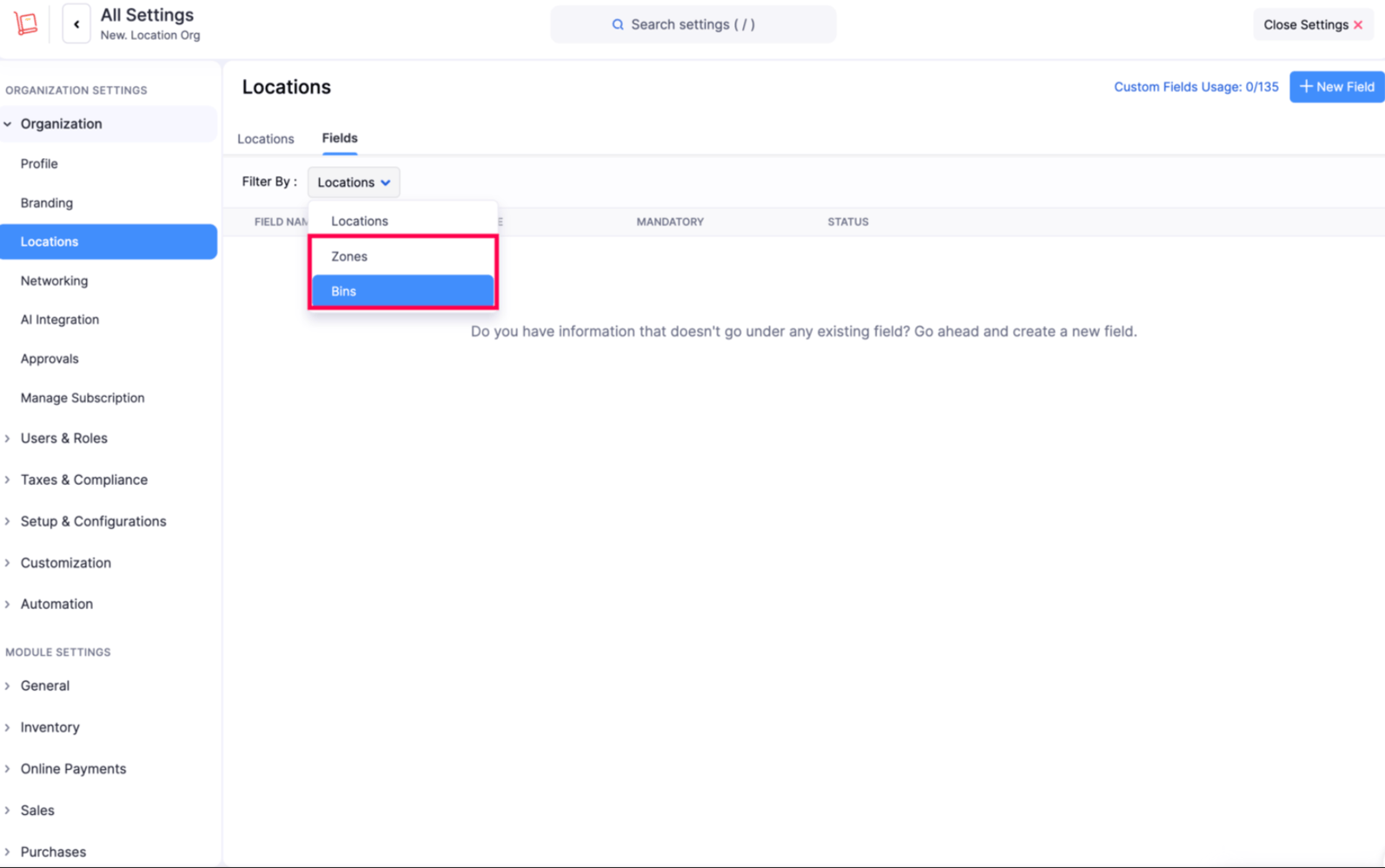
Add Custom Fields to Bin Locations and Zones
You can now add custom fields to both Bin Locations and Zones in organizations with Locations enabled. This allows you to capture additional information specific to your warehouse setup and requirements.
Customize Materials with Advanced Controls
The Materials module now supports item-level custom fields, record locking, custom approvals, workflow rules, and validation rules. You can also configure workflow actions such as field updates, email alerts, in-app notifications, and record locking to streamline and control material management processes.
Secure Web Tabs with JWT Authentication
You can now use JWT Authentication to securely connect Web Tabs, Customer Portal Tabs, and Developer Portal extensions with your applications. Zoho generates a signed, short-lived token when an embedded experience loads, allowing your application to verify the user's identity and organization before providing access to sensitive data. You can configure the token validity period and use the Web Tab Auth SDK to handle token delivery and refresh. Developers can also use the Validate JWT Token tool to verify token details and troubleshoot authentication during development.
Reporting Tags at Entity and Line-Item Levels [Early Access]
You can now associate reporting tags at both the entity and line-item levels, giving you more flexibility in categorizing and tracking transactions. For example, you can assign a reporting tag to an entire invoice and apply different tags to individual line items within the same invoice.
This feature is currently available under Early Access. If you want to try it, write to us at support@zohoinventory.com and we'll enable it for you.Payments & Documents
Include Refunds in the Retail Sales Summary Report
You can now include refund payments in the Retail - Sales Summary Report from the Customize Report section. When enabled, the report displays the net payment value for each payment mode after accounting for refunds, providing a more accurate view of payments received.
Enhancements to Delivery Challans
The Delivery Challan module now includes several enhancements for easier creation, tracking, and management. You can now import Delivery Challans, manage billing addresses, identify challans pending invoicing, create challans for vendors and from shipments, and manage packages, shipments, returns, and receives. We've also added record locking, validation rules, item-level custom fields, bulk update and delete, data backup, comments, workflow PDF attachments, and additional tax and Zoho Analytics capabilities.
Retail Store
Automatically Sync POS Terminal Devices
You can now automatically sync active terminal devices configured in your Zoho Payments account with the Android POS app. Use the Sync Terminal Devices option to sync your terminal devices without having to configure them manually.
Include Refunds in the Retail Sales Summary Report
You can now include refund payments in the Retail - Sales Summary report from the Customize Report section. When enabled, the report displays the net payment value for each payment mode after accounting for refunds, providing a more accurate view of payments received.
Mobile App
Android App Updates
The Zoho Inventory Android app now supports tracking details search when adding line items to invoices. You can scan serial numbers or batch details using your device's camera or an external barcode scanner to quickly add the corresponding items. We've also introduced automatic batch assignment for outgoing transactions, Custom Buttons in the Packages and Shipments modules, an improved unit selection interface in the Items and Composite Items modules with searchable unit names and symbols, and the ability to change templates for Payment Receipts.
Warehouse Operations
Assign Users to Putaways
You can now assign a specific user to a Putaway, making it easier to manage responsibilities and track Putaway tasks.
Quick and Advanced Search for Move Orders and Putaways
You can now use Quick Search and Advanced Search in the Move Orders and Putaways modules, making it easier to quickly find and filter records.
That's a wrap for this release! We hope these enhancements help you manage your inventory more efficiently, streamline your workflows, and get better visibility into your business operations.
Try out these features and let us know what you think in the comments below. If you have any questions, feel free to reach out to us at support@zohoinventory.com
Best regards,
The Zoho Inventory Team
Topic Participants
Akshin Eniyavel S
Recent Topics
WhatsApp Business Calling API
Dear Zoho SalesIQ Team, I would like to request a feature that allows users to call WhatsApp numbers directly via Zoho SalesIQ. This integration would enable sending and receiving calls to and from WhatsApp numbers over the internet, without the needWorkflows failing / fields not updating by function or action
Any one else having issues like this? All was working fine last week, now all of a sudden the system doesn't like 3 fields in one of my (most important) forms, and won't update these by workflow / deluge / action. Only by manually editing, or bulk edits.Europäische Zeichen: Komma "," anstatt Punkt "." möglich?
In alle Betragsfelder müssen wir mit dem Punkt "." die Beträge erfassen wie 123.34 EUR. Das müssen wir nur in Zoho so machen, weil in anderen Applikationen wird in "Europa" mit dem Komma 123,34 EUR gearbeitet. Das Datumsformat kann kann in Books eingestelltIntroducing Seek Profile & Seek Ad Sync in Zoho Recruit
Hiring on SEEK usually means working in two places. You check a candidate's SEEK Profile in one tab to confirm their work history and credentials, then switch back to Zoho Recruit to move them forward. When you post a new role, you rebuild the ad forZoho Bookings 1.0 is being retired – Switch to Bookings 2.0 by December 2, 2026
Hello everyone! Zoho Bookings 2.0 was launched on April 17, 2025, introducing a simpler, workspace-based interface for managing appointments and scheduling activities. As part of the transition to the new version, Zoho Bookings 1.0 is being retired. If[Webinar] AI-powered writing and automation in Zoho Writer
Live webinar on November 12, 2026 | Time: 2 PM IST | 2 PM EST Hi, When organizations create documents, they often start from scratch. Then they need to proofread and translate them. Doing all of this manually takes time, and errors and hard-to-read writingFeature Request - Ability to Customise Contact Info Card on Ticket Details View
Hi Desk Team, I've added a "Contact Priority" and "Account Prioirty" field and it would be very useful to agents if they could see that information in the Contact Info card on the Ticket Details view. It would be great if we could choose some fields toChatGPT Plugin / MCP Server auth error
Hi all I'm trying to connect the ChatGPT plugin for Zoho CRM but after username stage of the auth process, I get this error from the URL https://mcp.zoho.eu/mcp-client/ {"error_description":"Invalid request url, Request is not as per defined in oauthCriteria-based follow-ups , and additional email response signals in Cadences
Hello all, We've got a couple of updates for Cadences. Until now, the next follow-up in a Cadence was triggered based on the response to the previous follow-up. With this update, when the previous step is a call or a task, you can now also trigger theIntroducing Vibe in CRM: Turn Your Ideas to Live Experience
Hello Partners! AI is changing the way we work and build things every day. Everyone is using AI to build widgets and front-end apps, turning their ideas and requirements into working experiences faster than ever. Imagine simply describing what you wantCan Zoho CRM Emails be used in Zoho Analytics in any capacity?
We're wanting to display details about Lead Activity in regular reports through Zoho Analytics but we're having difficulty integrating Emails at all. We'd like to be able to note when an email is received and when it is sent somewhere other than justShow discounted amount on sales order / invoice against MRP when using Price List
Zoho has this great feature of having different Price Lists. The only thing missing perhaps is that MRP isn't shown when a price list is selected and discounted amount isn't shown on Sales Order / Invoice. This simple feature could be a great tool forTitle: How Are You Managing Sales Order Stock Allocation, Backorders, and Purchase Orders for Multiple Sales Orders in Zoho Inventory?
Title: How Are You Managing Sales Order Stock Allocation, Backorders, and Purchase Orders for Multiple Sales Orders in Zoho Inventory? Hi Zoho Community, We are using Zoho Inventory under our Zoho One subscription, and we are facing challenges with managingZoho CRM mobile updates: Display field settings, query support for kiosks, quick navigation button, and more
Hello everyone, We've made a few updates to the Zoho CRM mobile app to enhance your mobile CRM experience and efficiency. Here's a quick look at what's new: Display field customization (Android) Query support in Kiosk (Android) Quick navigation buttonZoho Inventory – Stock Allocation and Warehouse ManagementAs we implement Zoho One in our organization, we are currently facing a challenge with stock allocation and warehouse management. While the wa
As we implement Zoho One in our organization, we are currently facing a challenge with stock allocation and warehouse management. While the warehouse management part can be handled in Zoho Inventory, our main requirement is the customer-wise stock allocationZoho Desk MCP doesn't expose all functions
Hello, I'd like to be able to draft (rather than send) ticket replies using Claude Cowork. However, the Zoho Desk MCP doesn't currently offer that, despite it being available in the API (https://desk.zoho.com/DeskAPIDocument#Threads#Threads_DraftEmailReply).Total Outstanding via Whatsapp?
Is there a way to Send an automated WhatsApp message to all the customers (for whom outstanding is above 0) on daily basis from Zoho Books directly??Important update regarding public wikis
Hello everyone, We would like to share an important update regarding public access to wikis created under the Zoho Wiki Free plan. Public access was initially available as part of the Zoho Wiki Free plan. Over time, to improve and optimize our services,【開催報告】大阪 Zoho ユーザー交流会 2026 NEXUS|少人数でマーケティング・営業を回すZoho×AI活用
Zoho ユーザーの皆さん、こんにちは。 ゾーホージャパンの中野です。 11月12日(木)、AP大阪にて「大阪 Zoho ユーザー交流会 2026 NEXUS」を開催しました。 今回は、ZohoとAIを活用して、少人数でもマーケティング・営業・顧客対応を回していくための実践例を中心にご紹介しました。 ご登壇いただいた小園さん、アダルシさん、そしてご参加いただいた皆さん、ありがとうございました! ユーザー活用事例 聞き直さない、追いかけない、思い出さない 〜ZohoとAIで一人営業を回す方法〜 登壇者:株式会社ジーニアスウェブHiding old CRM Contacts in Desk
I have an issue with contacts in Desk. We sync contacts from CRM with DESK and we have old contacts, eg staff members that have left businesses. The issue is when adding a ticket (most of our tickets are raised over the phone), staff sometimes pickAction Request - Zia Agents - Get Agent API
It would be great if there was a "Fetch Agent" action for Zia Agents. The main use case here is getting the latest version of the Agent to populate the "Trigger Agent Execution" action. That action requires one to specify which version of the Agent isCalendar Reminders unavailable
For some received meeting invitations, Zoho Calendar’s web interface provides no option to add or edit a reminder. However, I can add a reminder to the same event through the phone app. That reminder then appears in the browser, but still cannot be editedEmail-Data Synchronization with Zoho Analytics
Hello, Enterprise Support Community! We're excited to announce the availability of Email Data Synchronization with Zoho Analytics! This highly requested enhancement allows you to sync email data from Zoho CRM into Zoho Analytics, making it easier to analyzeKeeping phone number text format exporting from Books to Sheet
We have a custom function that copies data from our customers in Books to Sheets. In the process the customers' phone numbers (unless they contain a space) get treated as numeric values, so leading zeros get stripped off, and in some cases scientific#22 I Sent It to the Wrong Person
Meera was sending an invoice to a client when she mistyped the email address. She noticed the mistake a week later, when the payment had not come in. She corrected the email address on the customer record and waited for the payment to arrive. But nothingNew Search Function
Hey Team, The search function updated in our CRM about a week ago, so I assume it was an automated update across Zoho. It no longer displays leads/deals etc in Chronological order so that the most recently created or updated is the first to display whichBuild a historical inventory snapshot in Google BigQuery using Zoho DataPrep
Businesses using Zoho Inventory may want to transfer their inventory data to Google BigQuery to maintain an up-to-date data warehouse. While scheduled pipelines help keep BigQuery updated with the latest inventory data, businesses that also need to trackZoho writer tabs
I'm trying to post a list of actions for my team to share online. For this I need to set tabs -- can't find a way of setting tabs anywhere. Would prefer not to go to the formality of a table. Can anyone tell me how to set tabs? greiggAbility to Set Text Direction for Individual Cells in Zoho Sheet
Dear Zoho Sheet Team, We hope you are doing well. We would like to request an enhancement in Zoho Sheet that allows users to set the text direction (right-to-left or left-to-right) for individual cells, similar to what is available in Google Sheets. UseKeep Zoho Books data in sync with Google BigQuery
Businesses using Zoho Books may need to transfer their financial data to a data warehouse like Google BigQuery for reporting and analysis. Zoho DataPrep helps automate this process by preparing Zoho Books data and syncing it with BigQuery at scheduledWhat's New - October 2026 | Zoho Backstage
Hello everyone, The last few months of the year are usually the busiest for events, with more people to reach and more details to manage. This month, we’ve made a few changes that should save you some time and back-and-forth along the way. Here’s what’sIntroducing user-based authentication across Zoho CRM
We have introduced two enhancements to simplify authentication and enable user-specific access when working with Connections and executing CRM operations across different developer tools. 1. Enable user-based authentication for Connections ConnectionsSet connection link name from variable in invokeurl
Hi, guys. How to set in parameter "connection" a variable, instead of a string. connectionLinkName = manager.get('connectionLinkName').toString(); response = invokeurl [ url :"https://www.googleapis.com/calendar/v3/freeBusy" type :POST parameters:requestParams.toString()Allow Multiple usage units to items while adding them to sales/purchase transactions
The usage unit of items added in zoho books are static right now and can not be changed. But certain items are received or sold in multiple usage units. One example is fabric. It can be bought in Meters, inches, kgs or other units. Another example wouldHow to restore deleted campaigns?
I accidentally deleted my first campaign that went out today (08/21/18). How do I restore it?Using IMAP configuration for shared email inboxes
Our customer service team utilizes shared email boxes to allow multiple people to view and handle incoming customer requests. For example, the customer sends an email to info@xxxx.com and multiple people can view it and handle the request. How can I configureNew in Cadences: Option to Resume or Restart follow-ups when re-enrolling records into a Cadence, and specify custom un-enrollment criteria
Managing follow-ups effectively involves understanding the appropriate timing for reaching out, as well as knowing when to take a break and resume later, or deciding if it's necessary to start the follow-up process anew. With two significant enhancementsAutomatic Invoice Number generation for createRecord
Hello, while testing some custom Buttons in my Zoho Books application, I noticed that I get an error that previously did not occur. After some further digging I found that the automatic transaction numbering of invoices no longer work in my organization.Stop completed task lists from disappearing?
Is there any way to stop projects from making tasks lists disappear when all the tasks in the list are completed? That's one of those little things where we're constantly fighting the product. For instance we have some projects which are ongoing - no start and end date. We use Kanban view to show the various task lists. We don't want the kanban list to disappear every time the items on it happen to be closed out. ThanksApproval Processes, Now in Standard and Professional
We encourage existing Approval Process users to switch to the new UI to access enhanced capabilities, including naming each rule and stage, setting stage-specific field updates and tasks, sending email notifications upon rejection, and tracking progressNext Page