Zoho Analytics - Pivot: Lookup Column is showing IDs instead of their actual names

Zoho Analytics - Pivot: Lookup Column is showing IDs instead of their actual names

Hi,

I'm new to Zoho and have no prior experience with the platform. Has anyone encountered a similar issue in a pivot table, where the values in the columns are showing as IDs instead of the actual names? See image:
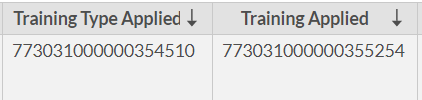
I am pulling these fields from a module called Applications which I believe was originally Leads and got renamed. In the crm, these fields are displaying the actual names. See image:


Troubleshooting Steps Performed so far:
-Attempt to change the Data Type format from the pivot settings. The settings won't allow it.
-Resync from Data Source.
-Re-Authenticate from Data Source.
-Remove/add the data source. Made sure that the affected fields are selected and included in the sync.
-Used Data Pipeline. Was able to change the data type from there to Text. But the values still show as IDs.
-Double-checked in the crm that the affected columns are lookup fields in Applications.

Is there a way to fix these values to show the actual names? Thank you in advance for your help!
    • Sticky Posts

    • What's New in Zoho Analytics - November 2025

      We're thrilled to announce a significant update focused on expanding your data connectivity, enhancing visualization capabilities, and delivering a more powerful, intuitive, and performant analytics experience. Here’s a look at what’s new. Explore What's
    • What's New in Zoho Analytics - October 2025

      Hello Users! We're are back with a fresh set of updates and enhancements to make data analysis faster and more insightful. Take a quick look at what’s new and see how these updates can power up your reports and dashboards. Explore What's New! Extreme
    • What’s New in Zoho Analytics – September 2025

      Hello Users!! In this month’s update, we’re raising the bar across multiple touchpoints, from how you bring in data, plan and track projects to how you design and brand your dashboards. We’ve added the all-new Gantt chart for project visualization, expanded
    • Announcing Agentic AI - Ask Zia!

      We are delighted to roll out the new agentic AI capabilities in Ask Zia, where every stage of the BI workflow is assisted by AI. With a human-in-the-loop approach, Ask Zia ensures that you’re in command of the decision, while AI handles the complexity.
    • Invitation-Based User Access in Zoho Analytics

      Hello everyone, We’re rolling out an important update on how users are added to your Zoho Analytics Organization and Workspaces. Previously, when admins added users, they were automatically added to the organization. Moving forward, to improve security