Zoho Creator Upcoming Updates - October 2023
Hello all!
As we step into the final quarter of this year, we're ushering in a fresh wave of improvements and new features to supercharge your experience with
Zoho Creator. Join us today as we present the newest updates and enhancements for this month:
-
App menu builder
- Notification preferences
- - - - - - - - - -
Without further ado, let's delve in and explore each of the updates!
App menu builder
We’re excited to announce our newest addition: the App menu builder. This tool will soon be your one-stop shop for creating easy-to-use, multi-level menus for your apps. With this powerful tool, you can control how your components are organized and make user navigation easier than ever.
-
Intuitive drag-and-drop interface:
This lets you effortlessly organize your components by simply dragging and dropping them to start crafting your design for the desired menu structure.
-
Hierarchical menus:
Create categorized menus with ease, enabling users to explore your application's depth seamlessly.
-
Customization options:
Make accessing the various sections of your app a breeze by customizing them based on your needs. Add elements (which include existing sections) and components (your forms, reports, pages) to come up with the structure.
-
We listened to your feedback and allowed the approvals menu to be rearranged. We refer to this as a system component and introduced a few others to make menu listing more flexible for the application model.
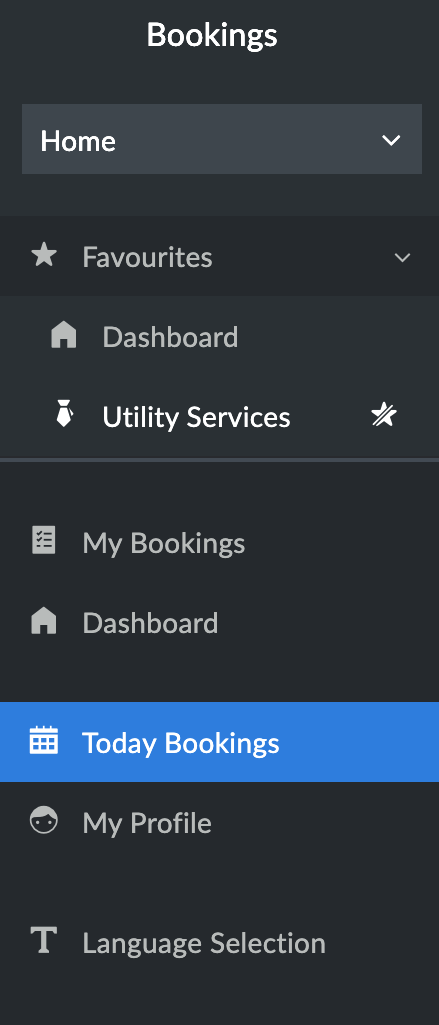
- Finally, we'll also be launching the new Favourites option. This lets you mark your most frequently used forms, reports, and pages as favourites and easily access them.
How do I access it?
Navigate to the
Design
tab in the edit mode of the application and click the
App Menu Builder
option.

How does it work?
Here's a sample of how a customized menu would look in Live mode.

Illustration of a multi-level menu

Illustration of a multi-level menu
A glimpse into the new Favourites
section within the App Menu
How do I benefit from this?
The flexible app menu builder will provide your users with customized menus for an exceptional user experience.
Applicable for:
C5, C6
Availability:
All DCs
- - - - - - - - - -
Notification preferences
The soon-to-be launched
Notification preferences
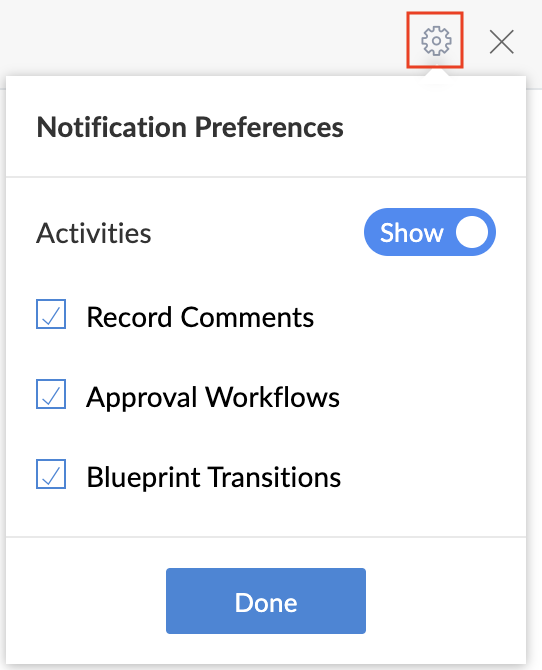
feature will be a nifty addition that provides you with complete control over customizing your notifications. You'll now have the power to fine-tune your notifications by enabling/disabling the alerts on
Record comments,
Approval actions, and
Transition
actions. This helps in preventing unwanted notifications from bombarding you.
Moreover, you'll also have the option to completely turn off notifications.
Moreover, you'll also have the option to completely turn off notifications.
How do I access it?
Navigate to the
Notifications
pane and click the
Settings
icon.
How do I benefit from this?
The Notification preferences feature offers a range of valuable benefits—enhanced relevance, minimized interruptions, improved productivity, and more—to make your user experience more pleasant.
Applicable for:
C5, C6
- - - - - - - - - -
With that, we conclude this month's updates. Your continued support keeps us motivated, and we're gearing up to introduce even more thrilling enhancements in the upcoming months.
Regards,
The Zoho Creator Team
Topic Participants
Ashwin Vishal R
Damien Cregan
Peter Zijlstra
Marks
admin
Sticky Posts
Introducing Zoho Creator's 2025 Release Projection 2
Hello Creators! I'm Prakash, from the Creator product management team, and today I'm delighted to unveil our next set of features as part of Release Projection 2 for 2025. With thoughtful analysis and planning, we've curated powerful new capabilitiesZoho Creator - 2023 Release Projection 1
Hello everyone! A very Happy New Year to you and your family. Hope you're all good and having a great time using Zoho Creator to make your lives easier and your businesses prosper. 2022 was an action-packed year for us at Creator, and we hope to continueZoho Creator User Group meetups in a city near you! - Oct - Nov, 2023
Greetings from the Zoho Creator team! We're hosting a series of Zoho Creator meetups in various cities across the globe, and we'd love to meet you there! Our meetups are a great opportunity to network with industry peers, exchange ideas and best practices,Zoho Creator - 2023 Release Projection 2
Hello everyone! Time truly flies when you're having an incredible journey, and today we mark the completion of an eventful and action-packed six months. It feels like just yesterday when we embarked on this adventure together with the launch of our newUpcoming Updates - August 2022
Hi all, Greetings from the Zoho Creator team! Today we've got news for you on some exciting updates. And rest assured— there’s more to come! In this post, we'll be going over the upcoming features and improvements for this month as mentioned below. A
Recent Topics
e-mail bloqueado
Estou com meu e-mail lucas@peplus.me bloqueado, preciso desbloquear para retorno de usos em minhas atividades.zoho labels api not working
We're using n8n to automte email reply using zoho api. I'm facing issue with label api. I added the required scopes but its not working. i followed zoho api documentation but didn't work. also, where do i find/how do i create zoho oauth token mentioneeedDesk DMARC forwarding failure for some senders
I am not receiving important emails into Desk, because of DMARC errors. Here's what's happening: 1. email is sent from customer e.g. john@doe.com, to my email address, e.g info@acme.com 2. email is delivered successfully to info@acme.com (a shared inboxStreams/Shared email doesn't show up in windows trident app. It works fine on MAC. Is there any difference between 2 install ?
I can see streams/share email boxs on my MAC version of trident app but i can't see them in windows version of trident app. Is there any difference between 2 install? I try to find setting but not able to see any setting to add stream/share email boxes.add zoho account
How to add a zoho mail to previous zoho account? I have twoZoho Desk Mobile App Year-End Roundup - 2025
Dear Zoho Desk users, Greetings! As you gear up for the festive season, we are excited to share a quick journey into all that is released in 2025! Zia's generative AI capabilities Zia insights can be highly beneficial in helping agents manage daily supportNarrative 17: The role of Zia AI in customer support
Behind the scenes of a successful ticketing system: BTS Series Narrative 17: The role of Zia AI in customer support Overview Zia in Zoho Desk is a layered AI assistant that combines generative AI, prediction, and automation to support agents, automateDomain Transaction
I have purchased a domain name called trainedworkforce.co.in I made the payment got the receipt but the domain is still not purchased after successful transaction .Zohomail - The "All Messages" vs "In Box"
Why do some new email message appear under the all messages view but not in my inbox? That's really annoying but to be fair I've experienced the same with gmail.error while listing mails
I can't access email in any of my folders: Oops, an error occurred - retry produces the second error response: error while listing mails (cannot parse null string). I've signed in and out of Zoho, restarted my iMac.Introducing the Zoho Projects Learning Space
Every product has its learning curve, and sometimes having a guided path makes the learning experience smoother. With that goal, we introduce a dedicated learning space for Zoho Projects, a platform where you can explore lessons, learn at your own pace,Where to show Customization Field ?
Dear Sir, I have made some New Field in Item Field Customisation. Now I don't require that field in Estimate, Sales Orders etc. I just wants that field in Sales Invoice to Show/Hide... Is that possible ?Zoho Desk 2025 round-up: Key highlights on feature releases
Hello everyone, As we gear up for 2026, here is a detailed round-up of all feature releases in Zoho Desk web throughout the year. For consolidated information on releases check out the What’s New page You can also watch these webinars. Zia in web ZiaPrint Sales Orders, Purchase Orders or Invoices from API
Hello, Is it possible to use the print option that is available in Sales Orders Purchase Orders and Invoices with the API?. I don't see any information in the docs about this. ThanksHow to show a hided report??
in CRM Report , I clicked Hide incidently , how to show the floder again? Nowhere I can find the hided report floder...Converting Customer Invoice to Purchase Bill
Hi, In my service-based business, I sometimes create the customer invoice first, and later I receive the purchase bill from the vendor for the same job. Is there any option in Zoho Books to: Convert a customer invoice into a purchase bill, or Link/associateEmail tracking inquiry
I am trying to track when my emails are opened and clicked like I previously did in HubSpot. HubSpot pretty much did the entire process automatically. After digging through, I finally found in settings --> emails --> BCC Dropbox there is an email I canMass Update of Lookup Fields not possible
Hello List I've created a custom field for Leads and Contacts 'Current Campaign'. This is very Handy as I can filter leads and then related them to a campaign. Everything ready, but then I realized that mass update doesn't work for lookup fields... aCollapsible Sections & Section Navigation Needed
The flexibility of Zoho CRM has expanded greatly in the last few years, to the point that a leads module is now permissible to contain up to 350 fields. We don't use that many, but we are using 168 fields which are broken apart into 18 different sections.Download Attached Files
Hi everyone, Brand new to Zoho Creator. I have a form with a subform. The subform has a field for "File Upload" I have this in a subform to allow multiple files to be uploaded to the parent form. Once the files are uploaded, how can i download or view them? Is this a setting I am just not seeing? If there isn't a way to download them, could i create another form field that dynamically creates the file's URL? That way a user can click the URL to get to the file? Any help with this would be greatlyTicket layout based on field or contact
Hi! I want to support the following use-case: we are delivering custom IT solutions to different accounts we have, thus our ticket layouts, fields and languages (priority, status field values should be Hungarian) will be different. How should I setupNo funcionan correctamente el calculo de las horas laborales para informe de tickets
Hola, estoy intentando sacar estadísticas de tiempo de primera respuesta y resolución en horario laboral de mis tickets, pero el calculo de horas en horario laboral no funciona correctamente cree los horarios con los feriados : Ajusté los acuerdos deZoho Mail Android app update: Set out of office response exclusively for organization members and external users, response interval
Hello everyone! We have now introduced an option to configure out of office messages exclusively for organization members and external users within the Zoho Mail app. Additionally, now you can also customize response intervals for the Out of office messages.Feature Request: Detailed View - Related Block Links!
Desperately need a view record link option on records displaying in the related blocks on a Detail View. For the love of god, please add this feature. Thank you!Sub-Form Padding in CSV Export
Hi, When you use the Sub-Form, and for example you have a Date Field on the Main Page, then Option 1 and Option 2 fields on the Subform, when you export this to CSV the Date column will only have the Date in 1 row, the first row, it would be nice to padDependent / Dynamic DropDown in ZohoSheets
Has anyone figured out a way to create a Dropdown, the values of which is dependent on Values entered in the other cell ?How do I change the order of fields in the new Task screen?
I have gone into the Task module layout, and moving the fields around does not seem to move them in the Create Task screen. Screenshot below. I have a field (Description) that we want to use frequently, but it is inconveniently placed within the MoreZoho → ShipStation Integration – Sales Order–Driven Fulfilment Workflow
Hello All, I’m reaching out to explore the best way to integrate a shipping tool into our inventory which will speed our process up. We are looking to integrate ShipStation into our existing order-to-fulfilment workflow, as we’re keen to standardise onIA ou je peux trouver comment utiliser IA
Je voudrais utiliser IA dans l'interface zoho pour m'aider quand j'ai des questions de rôle partage ou autre configuration d'automatisation, j'utiliser ChatGPT externe mais il ne connait pas toujours l'interface zoho et les réponses sont parfois longueData Processing Basis
Hi, Is there a way to automate the data processing for a candidate every time an application arrives from job boards, without requiring manual intervention? That is, to automatically acquire consent for data processing. I've seen a workflow that allowsZoho vault instal on windows
I am trying to use Zoho Vault Desktop for Windows, but I am unable to complete the sign-in process. Problem description After logging in to my Zoho account and clicking Accept on the authorization page, nothing happens. The application does not proceedZOHO GLITCHES
Ok, you guys have done a great job at building a platform that has the potential to surmount the competition but these glitches are becoming more than frustrating! This is beyond annoying, I'm trying draft lawsuits and type up privacy and refund policiesNotification to customers when I use a Zoho function
Hi all, I tried searching the community but couldn't find anything about it. I noticed that the customer receives the notification of reopening the old ticket but does not receive the notification of opening a new ticket when I use the function: "separateDate Filters in Zoho Desk Dashboard
Hello Team, Currently, in the Zoho Desk dashboard, the date filter is available only for daily, weekly, and monthly views. Could we also add a yearly date filter to allow filtering by an entire year? Additionally, in the custom date filter, it is currentlyMobile app - offline
If I made a couple of forms and my field guys had the mobile app and were somewhere without signal, could they open the app, complete and sumbit a form and have it upload when they are back in signal (we need different info at different jobs and I'm tryingZoho Survey reminder settings are extremely confusing
Hi, I just want to set 3 reminders, one week apart from the first email out. Your form is too confusing and I don't understand. Can you simplify and be more specific regarding the language used on the form ?Zobot drop down list
Hi, I am trying to create a drop down list in Zobot by creating a plug. I think I am close but I just can't get it over the line and was hoping that someone could help me. I had a little bit of help getting the script started (hence the comments) // DelugeHow to compare a subform lookup field that allows multiple entries when edited
I have a form with a subform with multiple fields. One of the fields is a lookup field that allows a multi select. On edit validation, I want a workflow to execute only when the entries in that subform field has changed. The old. function is not workingTranslation of Tooltip Messages
The descriptive help messages should be available to provide translations for.Business Day Logic Update: More Accurate Scheduling for Your Workflows
Hello everyone, We’re improving how business-day calculations work in workflows, especially when triggers happen on weekends. This update ensures that offsets like +0, +1, and +2 business days behave exactly as intended, giving you clearer and more predictableNext Page