Announcing Zoho Analytics 6.0 Beta!
We are delighted to open up the next major version, Zoho Analytics 6.0 Beta! The new version comes packed with a wide range of functionalities for all persona, namely business users, data analysts, data engineers, and data scientists. Zoho Analytics team has meticulously developed these functionalities with a focus on current and future business needs, incorporating valuable user & market feedback.

New capabilities in Zoho Analytics 6.0 Beta includes more data connectors, new visualizations, new interactions, advanced analytical models , the ability to build custom ML models, and 60+ features.

Note: 6.0 Beta is now available in all paid plans to try out. Features available in specific plans are annotated inline.
1. Data Connectors & Data Management
New Connectors
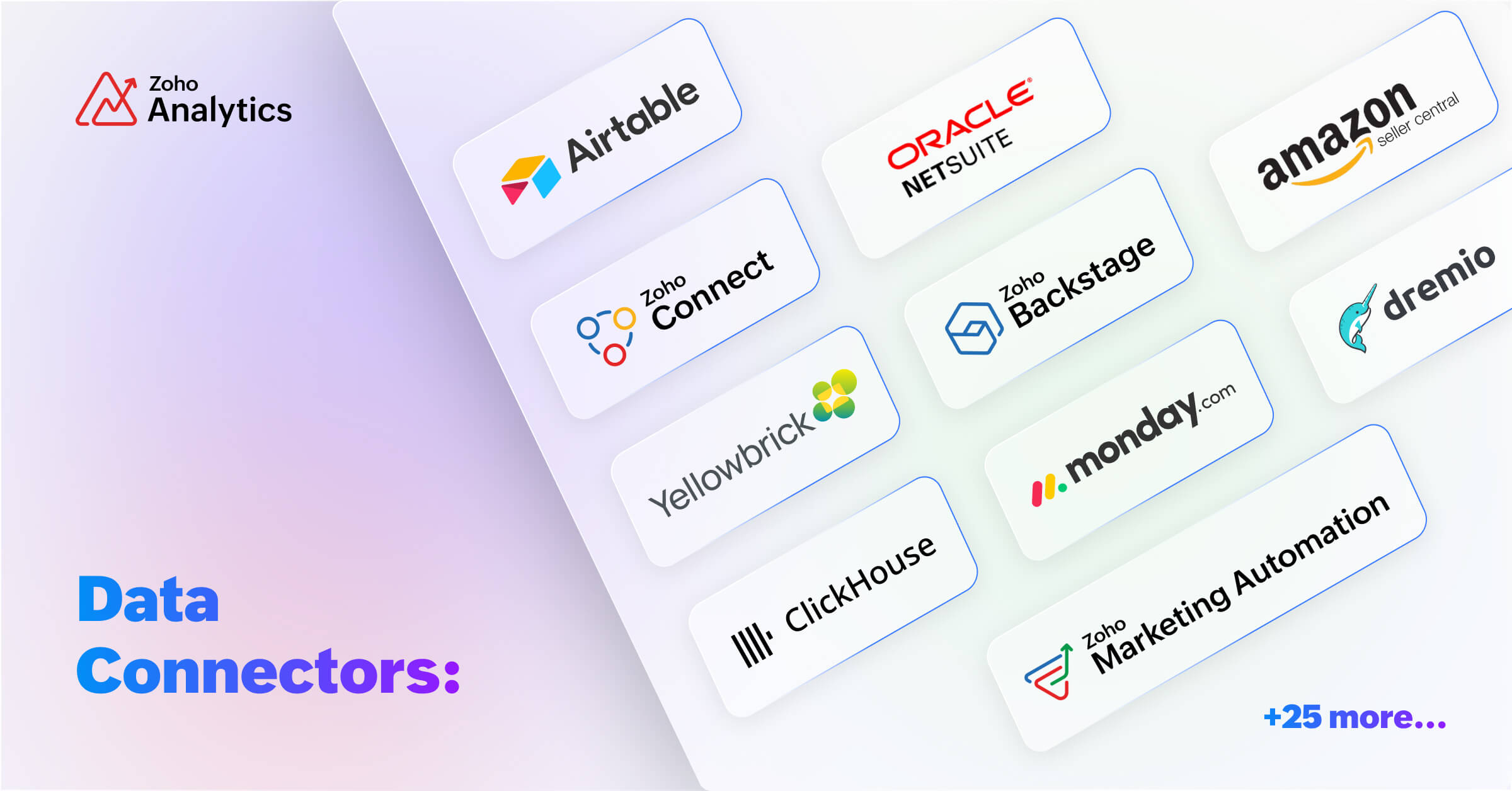
We are expanding our already available 500+ data connectors with 25+ new connectors for big data platforms and business applications that includes Yellowbricks, ClickHouse, Dremio, Zoho Connect, Zoho Marketing Automation, Zoho Backstage, Amazon Seller Central, Airtable and many more.
Also, managing data has now become easier with the following features -- Audit history, Sync history, and Import roll back.
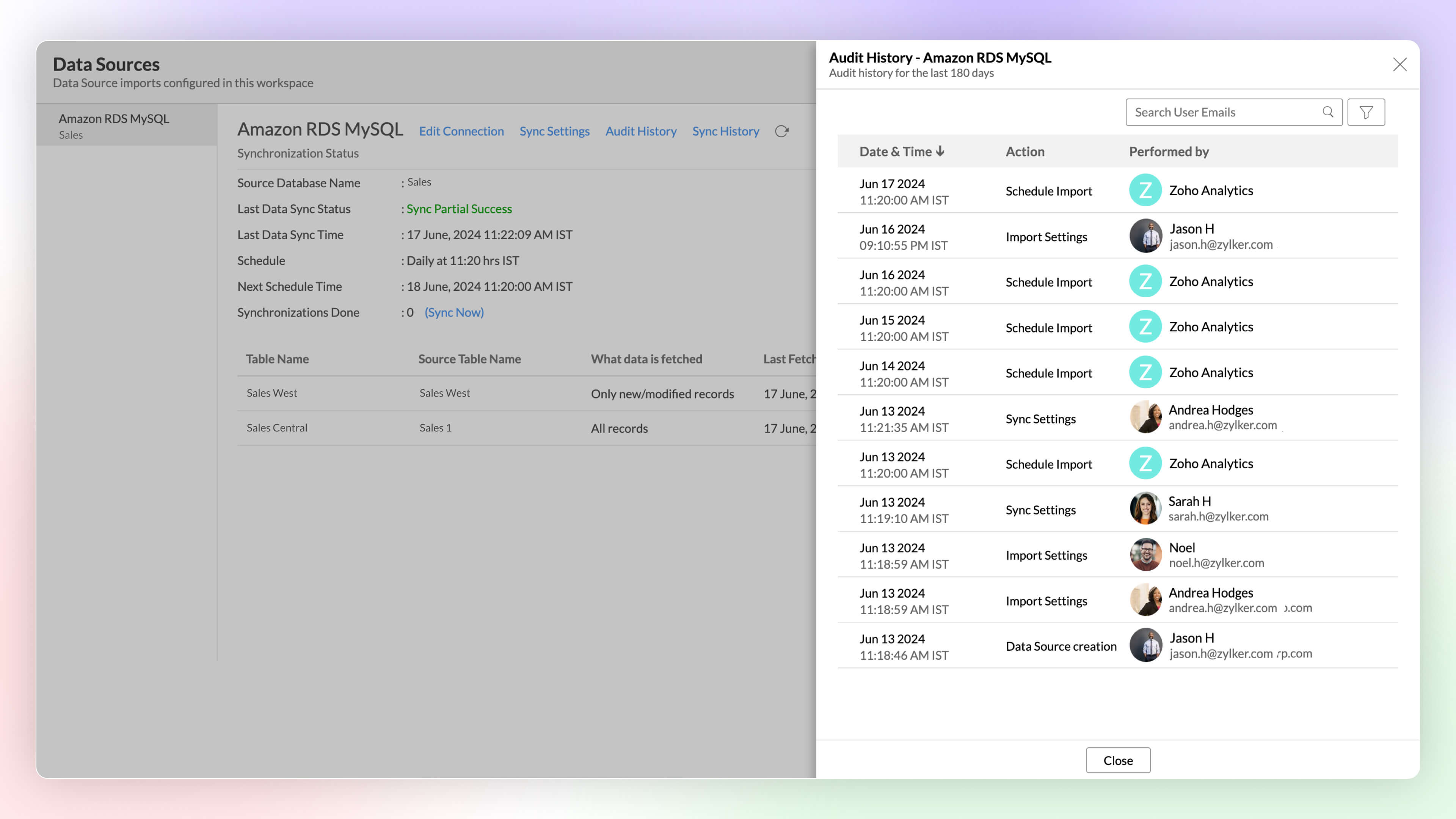
Audit History
Audit logs are crucial for maintaining security and troubleshooting issues. They provide a comprehensive record of user and system Actions, including details of the time when the action occurred and information about the administrator who performed the action.
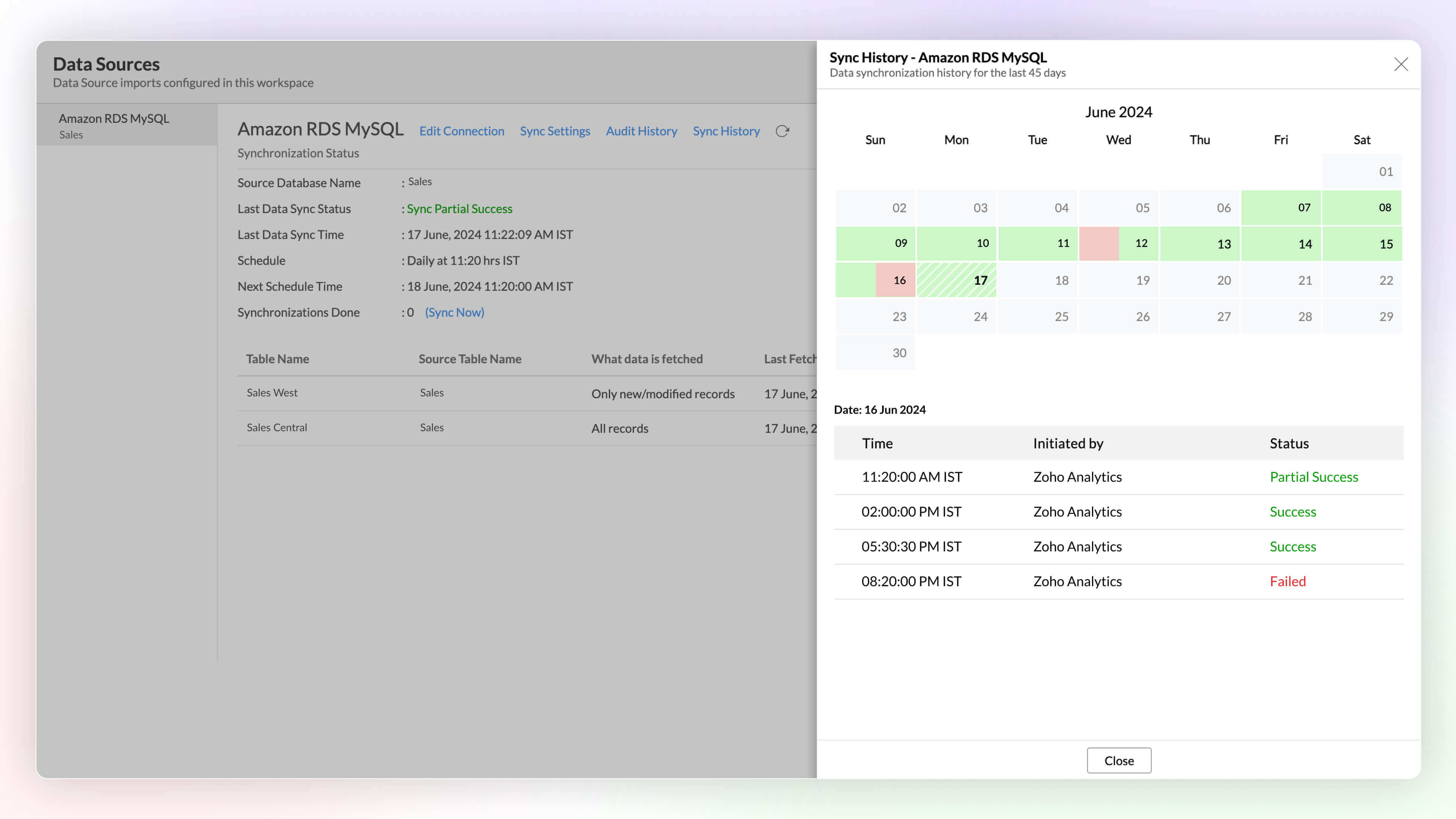
Sync History
Sync history provides a detailed record of data synchronization activities, making it easy for the administrators to track the status of each data sync. The sync operations are color-coded for immediate recognition. Successful data syncs are indicated in green, and failed data syncs are marked in red with the reasons for failure along with the necessary action to be taken.
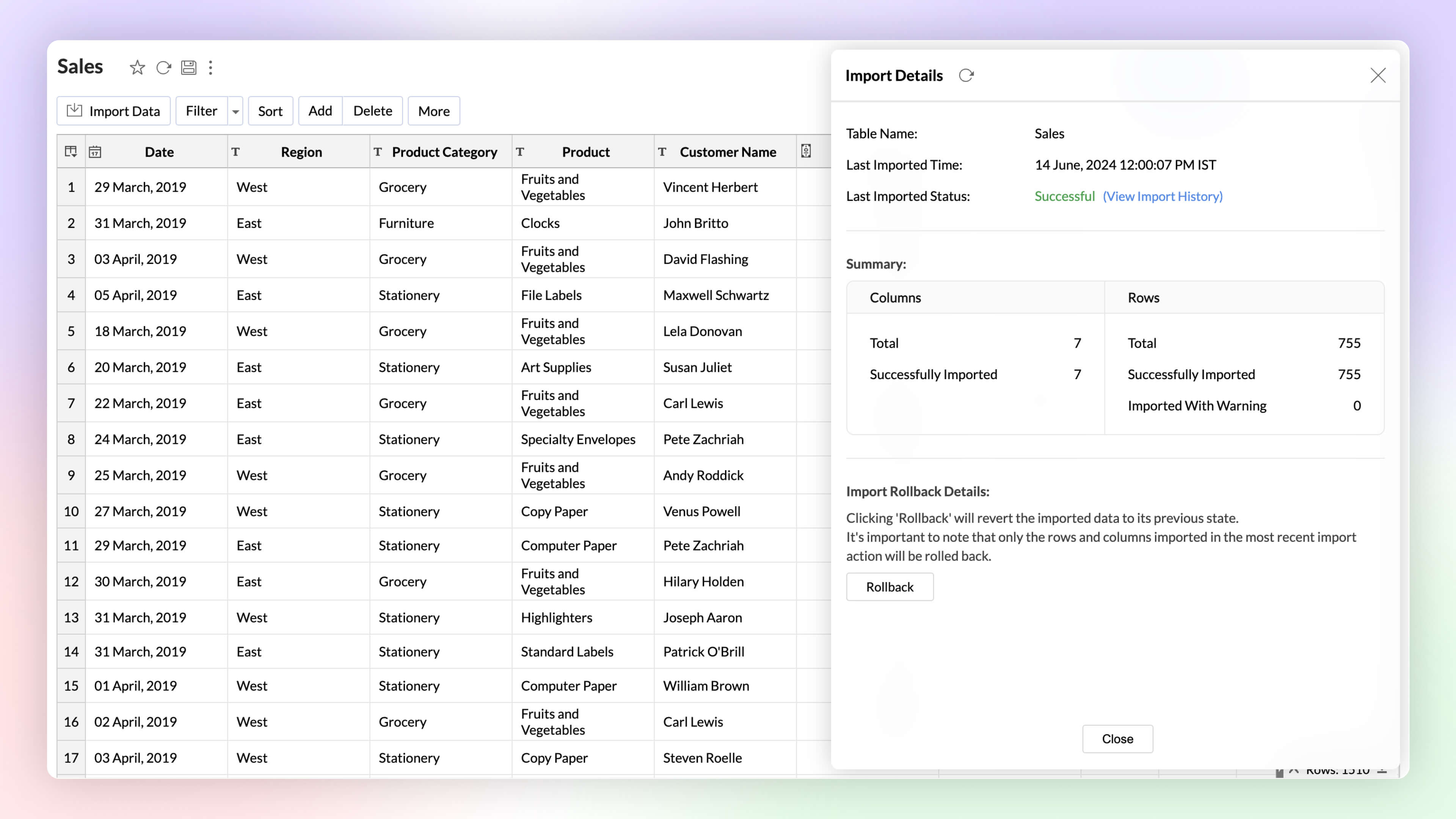
Import Rollback 
Automated imports can sometimes have errors and inconsistencies in data, and this can affect the data quality and the results. The import rollback capability reverts the current data import version to its previous version without affecting the existing data flow and analysis, ensuring data integrity.
Unified Metrics
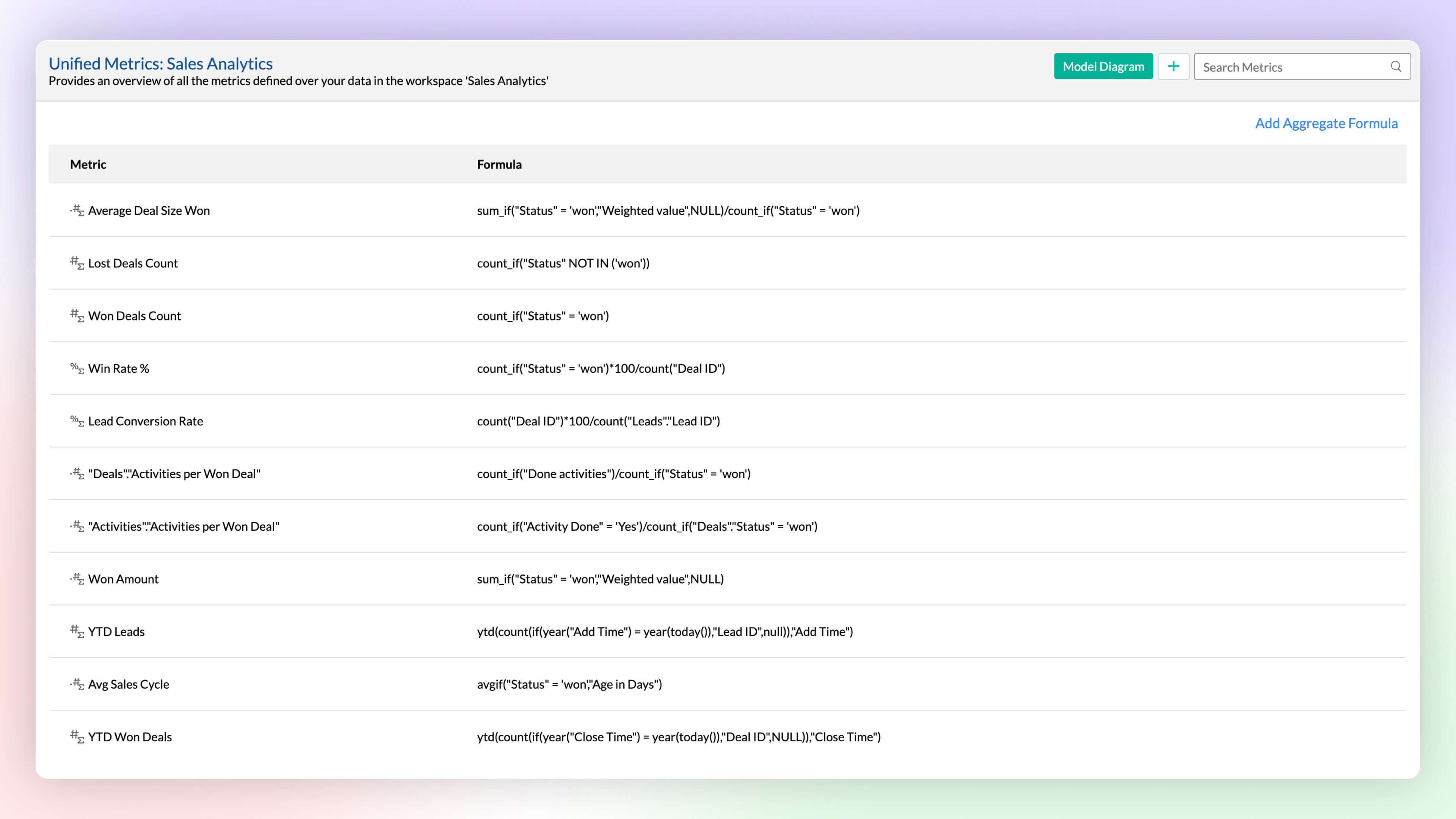
Workspace will have data imported from varied sources, and each data source or table will have different metrics (aggregates) computed for analysis. A unified metrics consolidates all the metrics used across the workspace, helps in standardization, promotes usage, and avoids duplication.
Data Bucketing
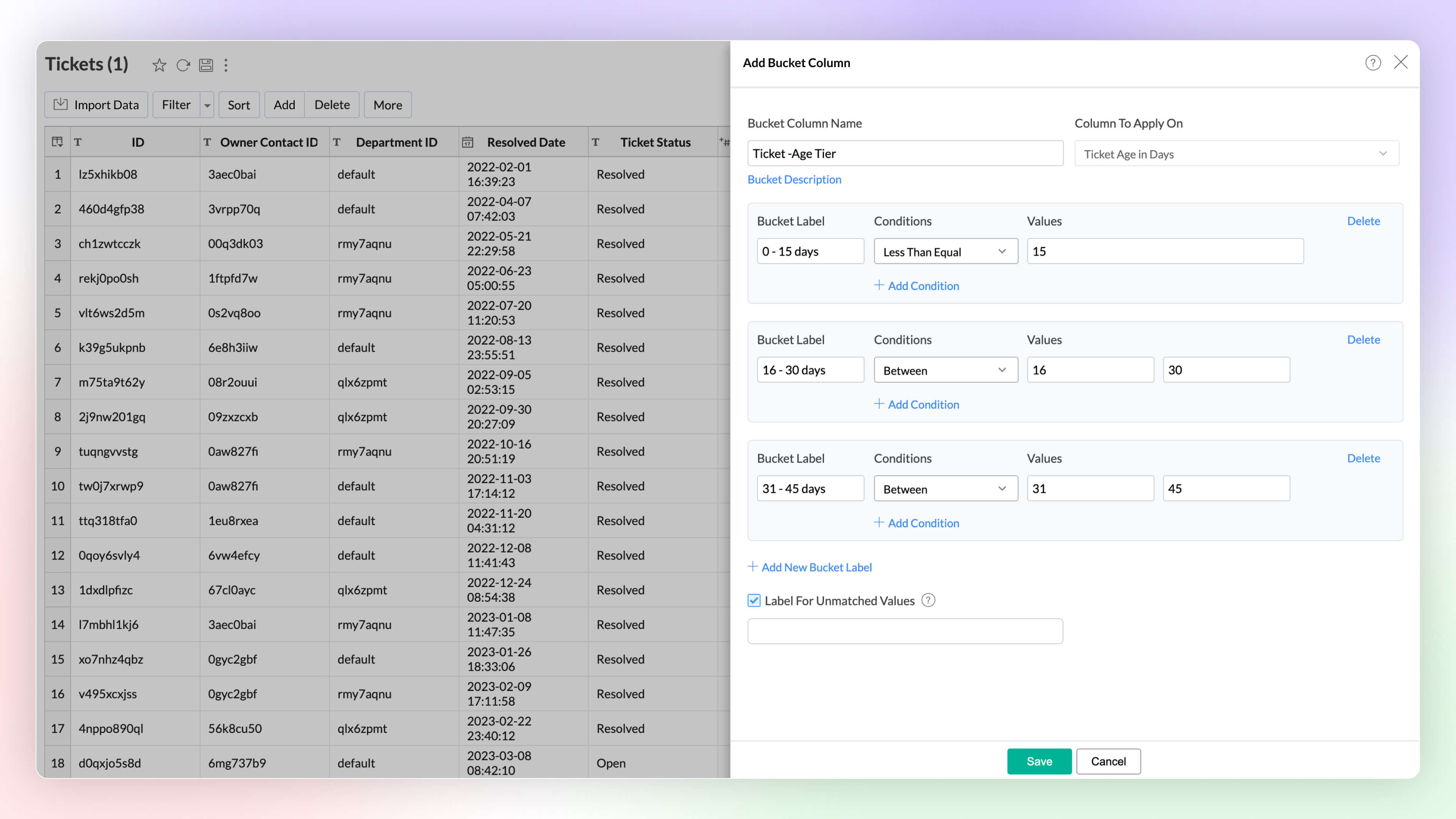
Categorize or group data points easily with the Bucket Columns options in Zoho Analytics. (Until now, users had to write formulas to achieve this; now, it is available as an inbuilt option.) Bucketing reduces the number of distinct values (cardinality). It facilitates the transformation of numerical data into different categorical bins and makes data analysis easier.
2. Visual Analytics
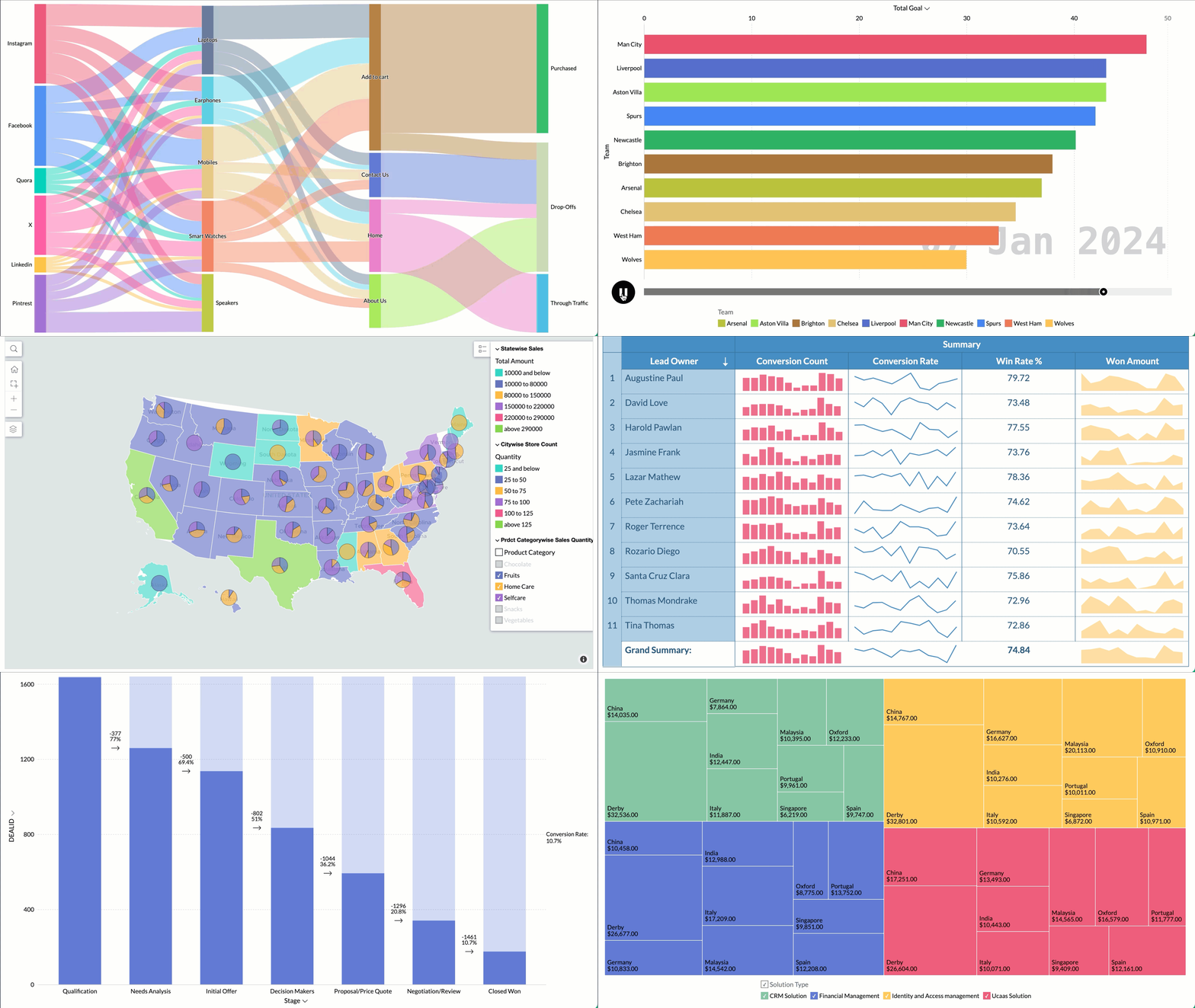
Zoho Analytics supports 7+ new chart types (on top of 50+ existing ones) with extensive customization options to enhance the presentation and interpretation of the data.
- Sankey charts are best suited for visualizing the flow of any process, as they clearly capture the movement of data from one point to another. It helps understand the movement of events through interconnected lines.
- Racing charts are animated views that are best suited for visualizing the changes in the data over a period of time where the relative ranking of categories is important. They highlight and help comprehend the fluctuations and progression in the data. These types of charts grab the user's attention instantly, providing an immersive experience and helping craft a compelling story about the data.
- Spark lines are compact charts that show the trends and variations in the data without taking up much space. They are widely used alongside pivot tables and help grasp trends and allow quick comparison of metrics across different fields. Zoho Analytics supports three variations that includes line chart, area chart, and bar chart.
- Geo Map Layering, add multiple data layers to the geo map to visualize various dimensions of information. This feature includes interactive options for enhanced data exploration.
- Sunburst charts represent hierarchical data through a series of rings, or concentric circles. Each ring corresponds to a level in the hierarchy. The central or innermost circle represents the root node, or the top-level category. Moving outwards, each subsequent ring represents a subcategory, where the outermost ring is the leaf node. The size of each arc in the ring is proportional to the value of the data.
- Conversion bar charts show the connected stages of a process and the gradual decrease in data as it moves through different stages of the process. Each stage is represented by a bar, with a step or stair case pattern indicating the shift in values (along with conversion percentage) at each stage.
- Tree Map is a visualization composed of differently-sized rectangles that represent your data values. This is beneficial when you want to depict the part to whole relationship among various categories.
Zia Suggestions
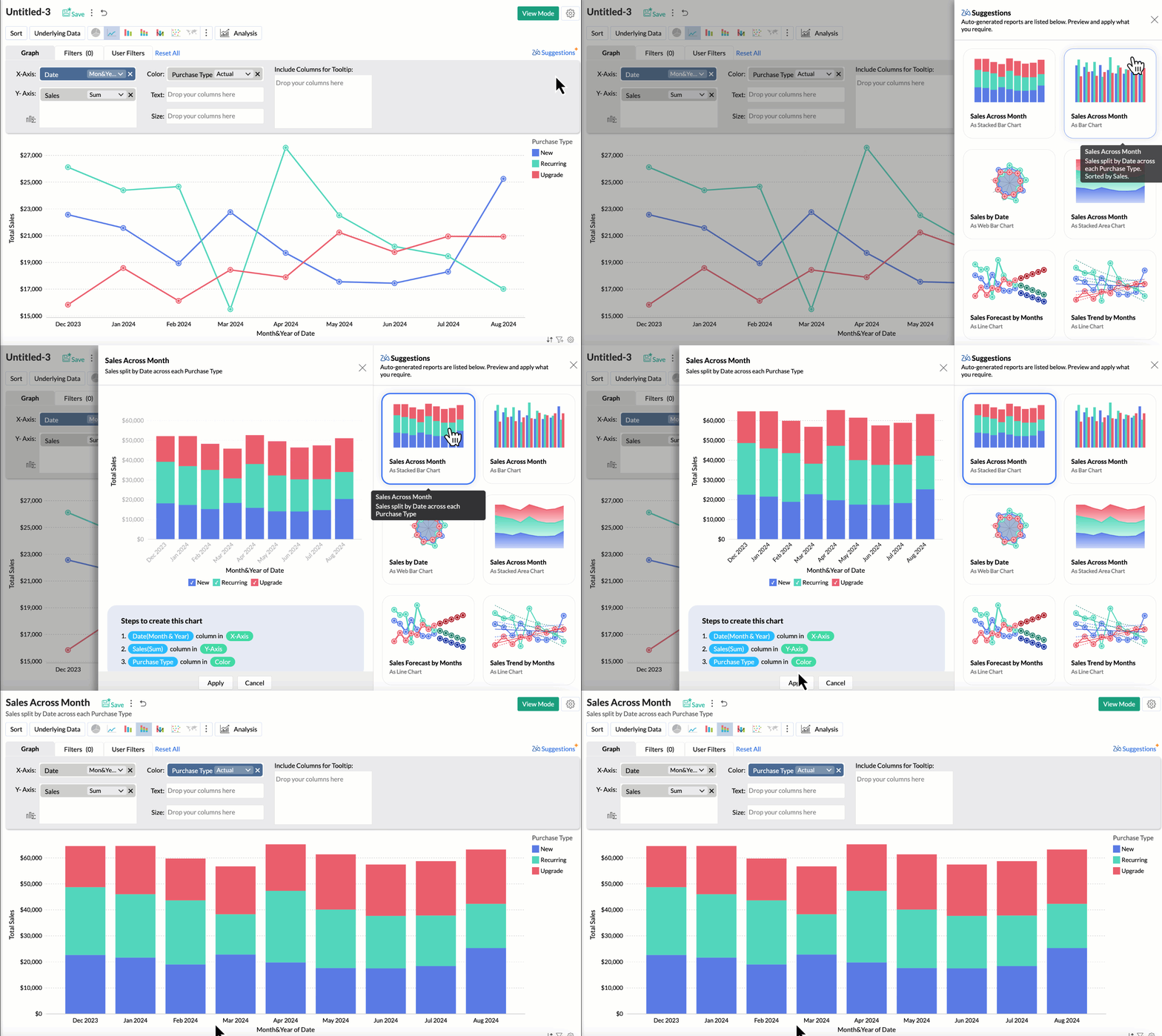
Now, with the new Zia Suggestions, you can effortlessly receive insightful chart recommendations while you are in the creation process. Zia suggests a variety of charts suggestions tailored to your data, allowing you to preview and apply them seamlessly with just a click.
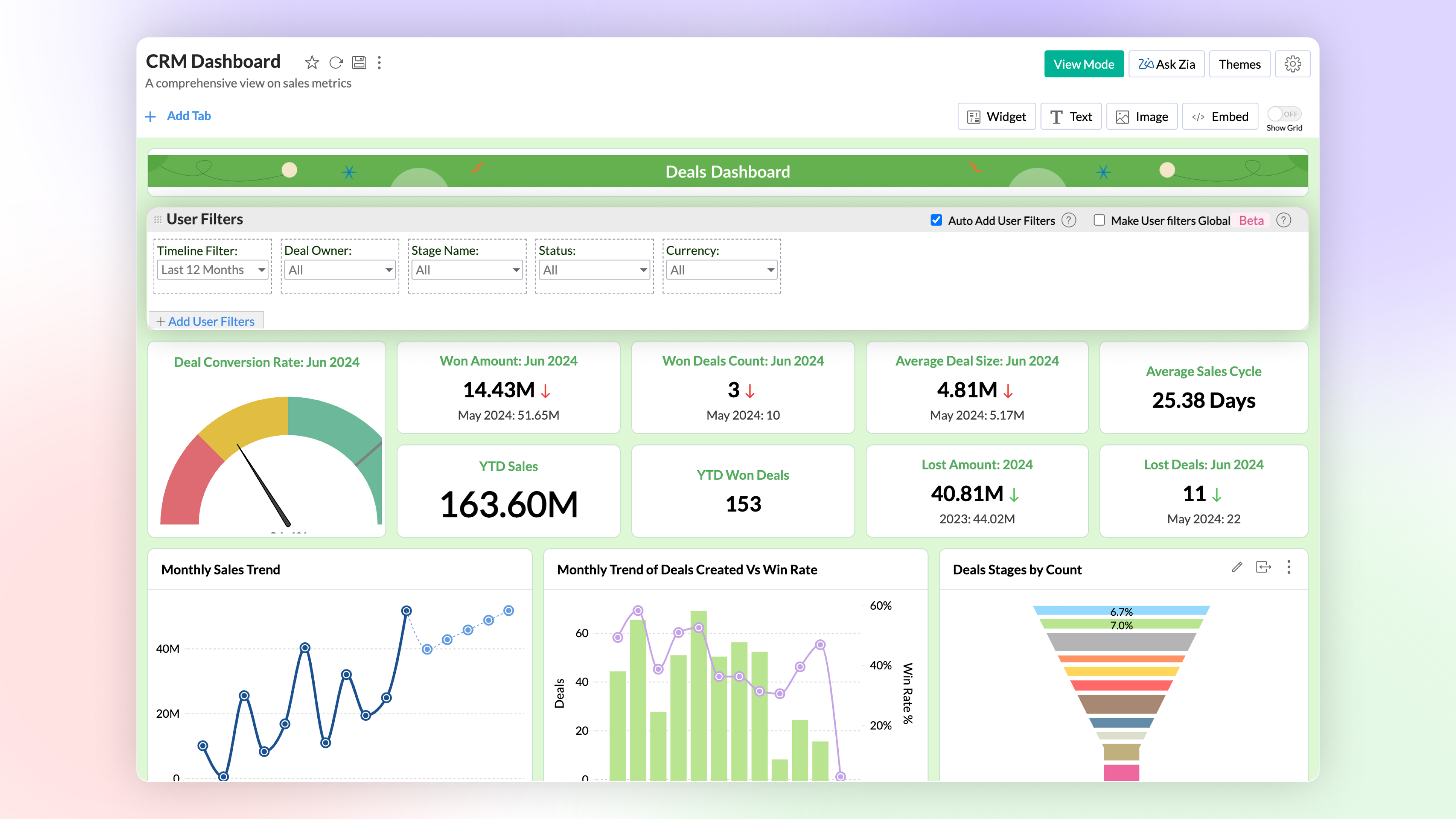
Global User Filter in Dashboards
You can now have a common user filter across all tabs in the dashboard. Global user filter gets applied across all reports in all tabs of the dashboard.
3. Advanced Data Analytics
Zoho Analytics now supports two more advanced data analytics methods: Anomaly Detection and Cluster Analysis.
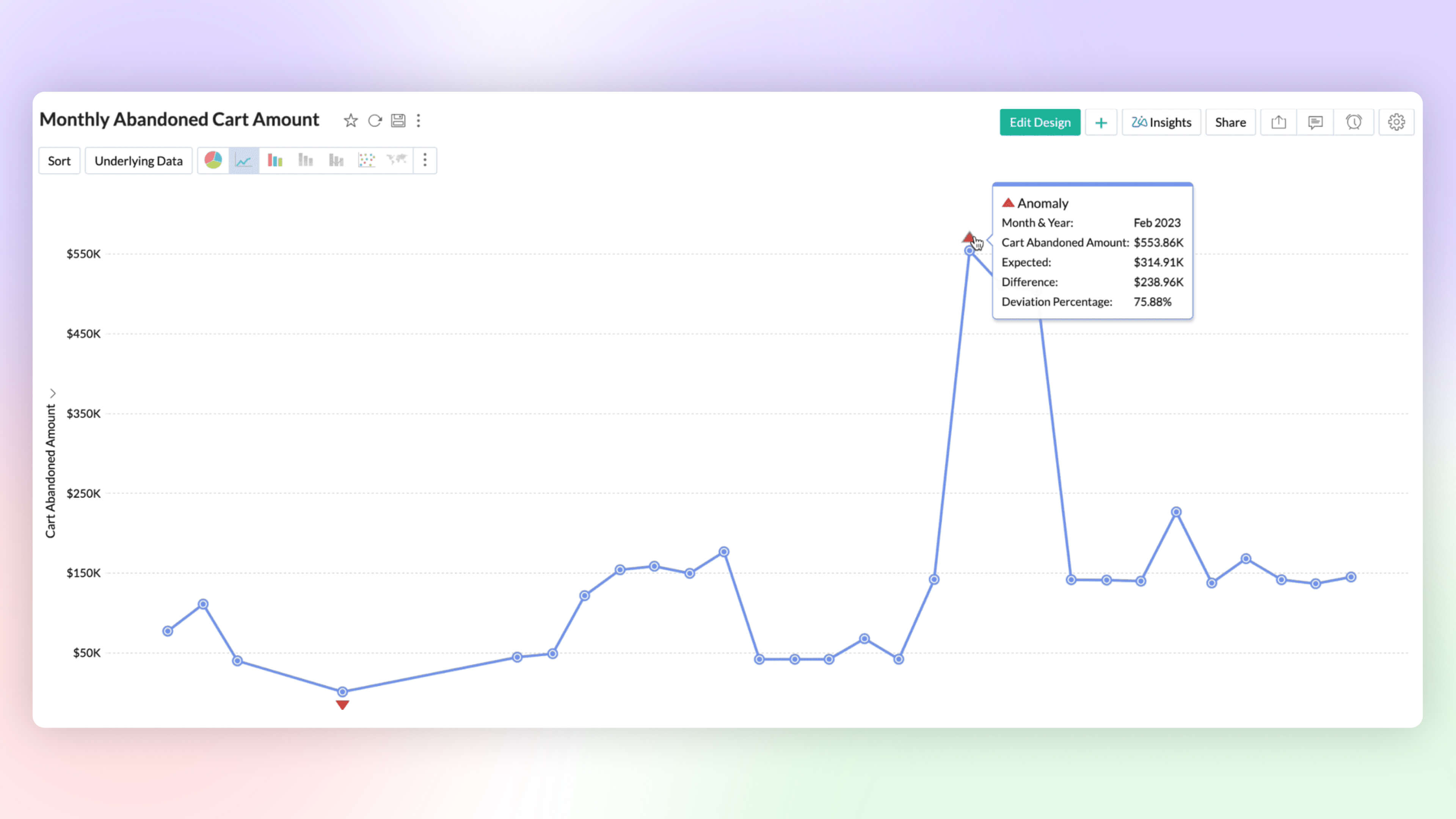
Anomaly Detection 
Anomaly detection helps you to flag outliers in your data or metrics easily. You can now create charts which highlight anomalous points visually for your attention and action. Zoho Analytics deploys robust ML algorithms and various statistical models for detecting outliers.
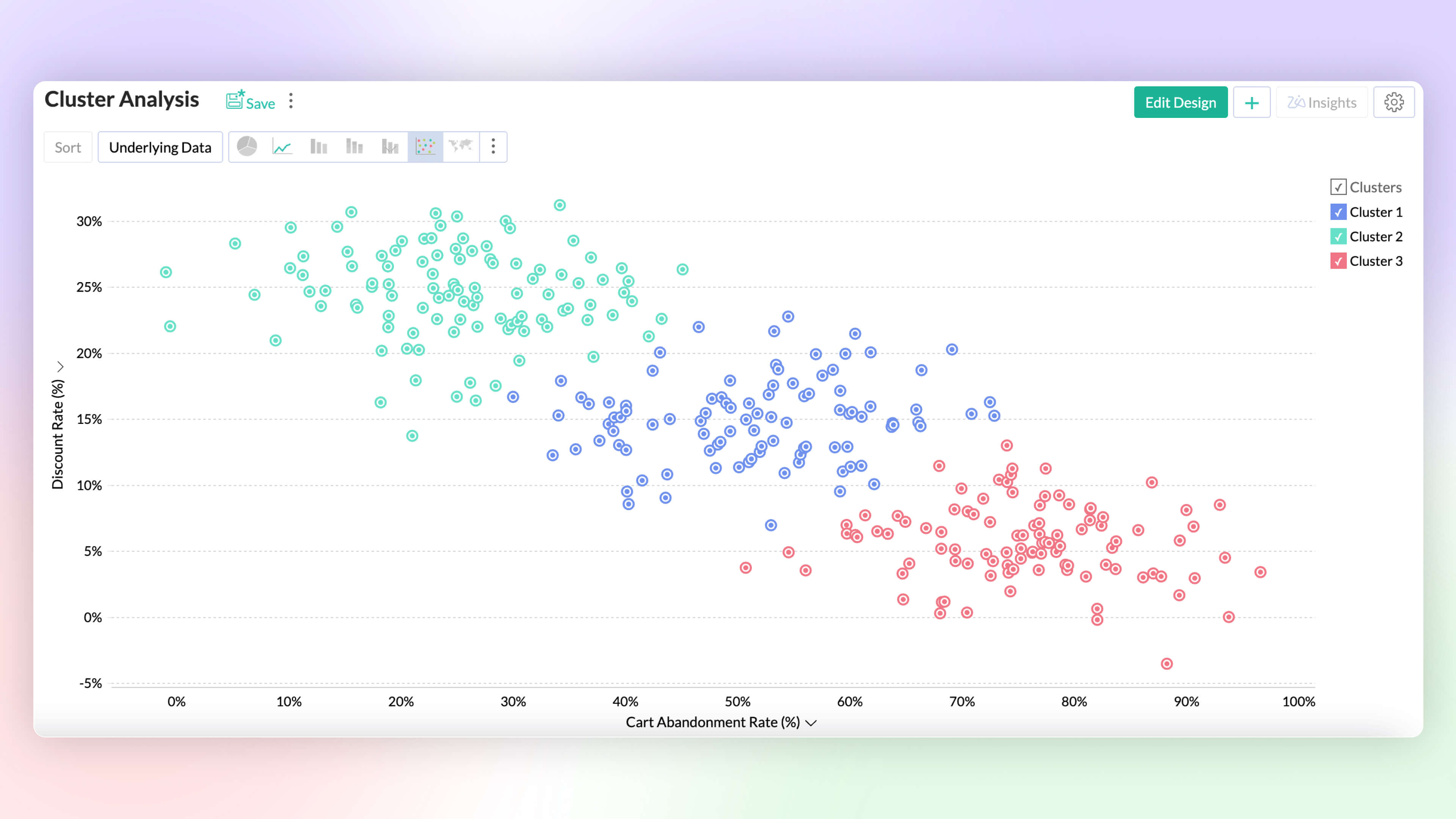
Cluster Analysis 
Cluster analysis groups similar data points together based on certain factors or conditions. Each cluster contains data points that are more similar to each other than to those in other clusters, reducing the complexity of the data. Zoho Analytics deploys K-means, K-modes and K-prototypes algorithms for clustering the data points.
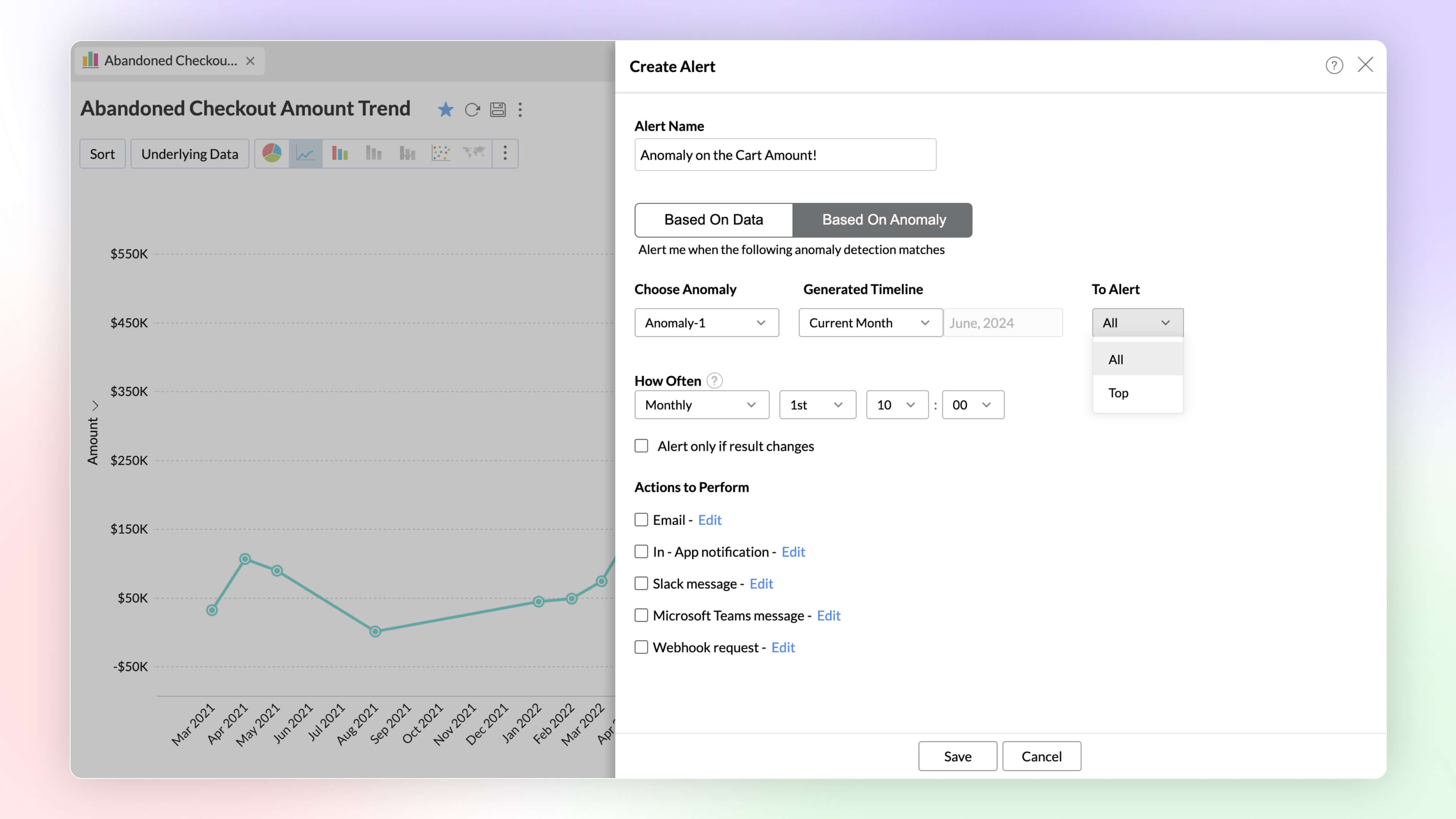
Alerts Based on Threshold and Anomalies
Set data alerts based on thresholds and anomalies to ensure timely identification of vital change in the key business metrics and potential issues.
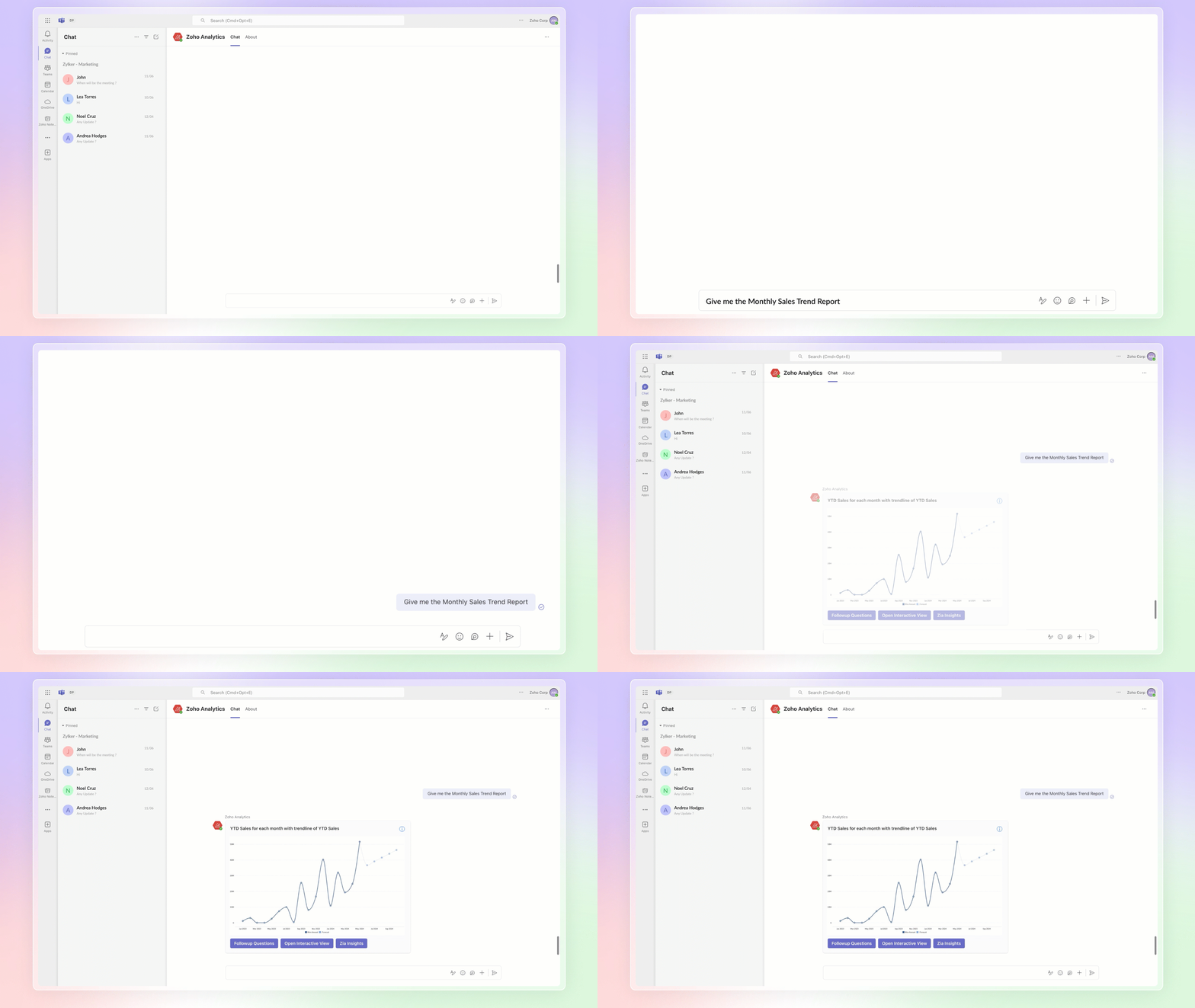
Ask Zia Bot in Microsoft Teams
Combine the generative AI capabilities of Zoho Analytics' Ask Zia with Microsoft Teams. Get answers to your data queries, access key business insights quickly, predict future trends, and build reports right from within Microsoft Teams with Ask Zia bot.
4. Build your ML Models with AutoML & Code Studio
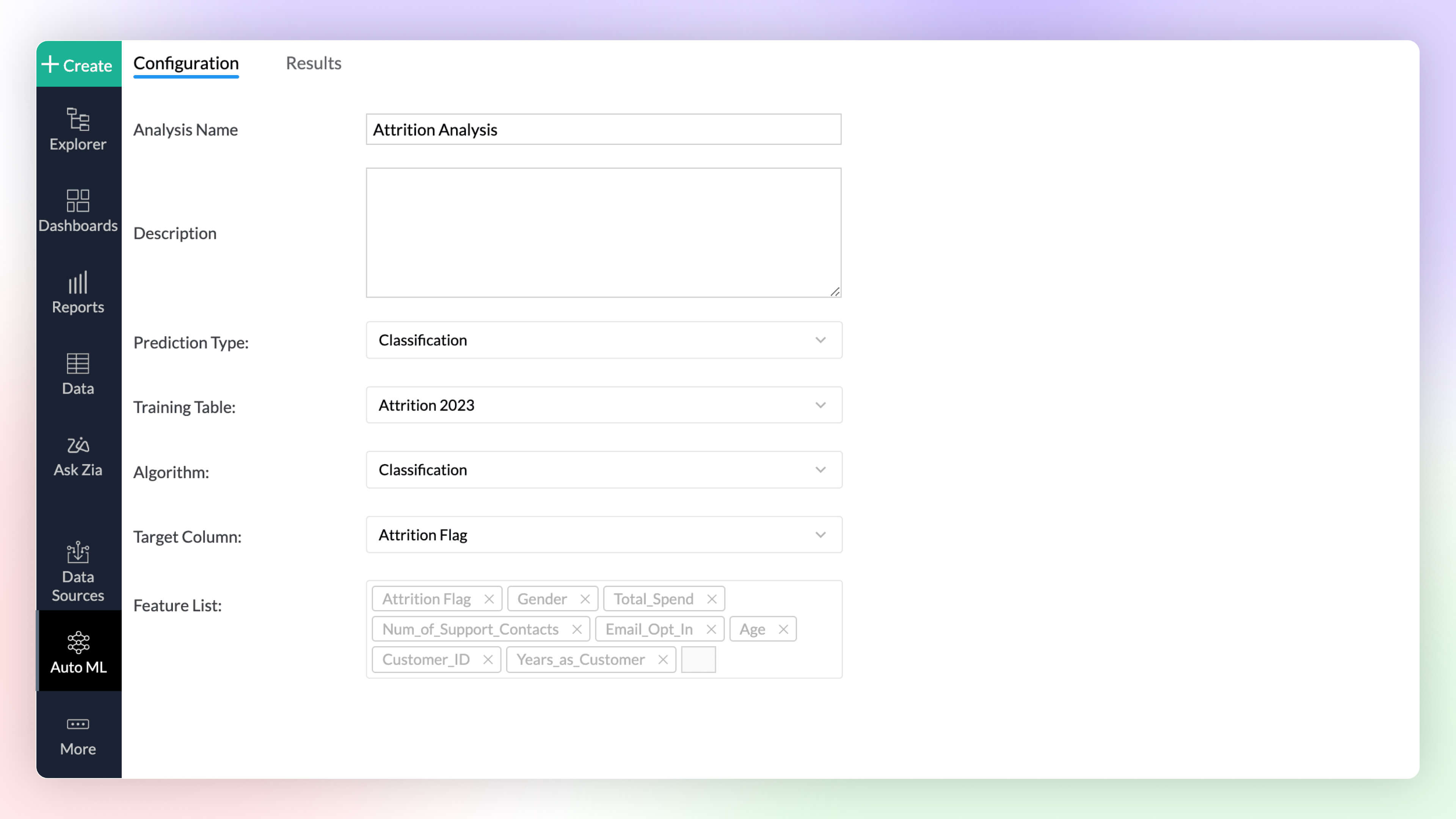
Auto ML 
Automated machine learning provides a code-free (low-code/no-code) experience to train, verify, and build custom machine learning models with high efficiency. The simple and user-friendly design makes it possible for people with varied data-level expertise to create ML models easily for their custom needs.
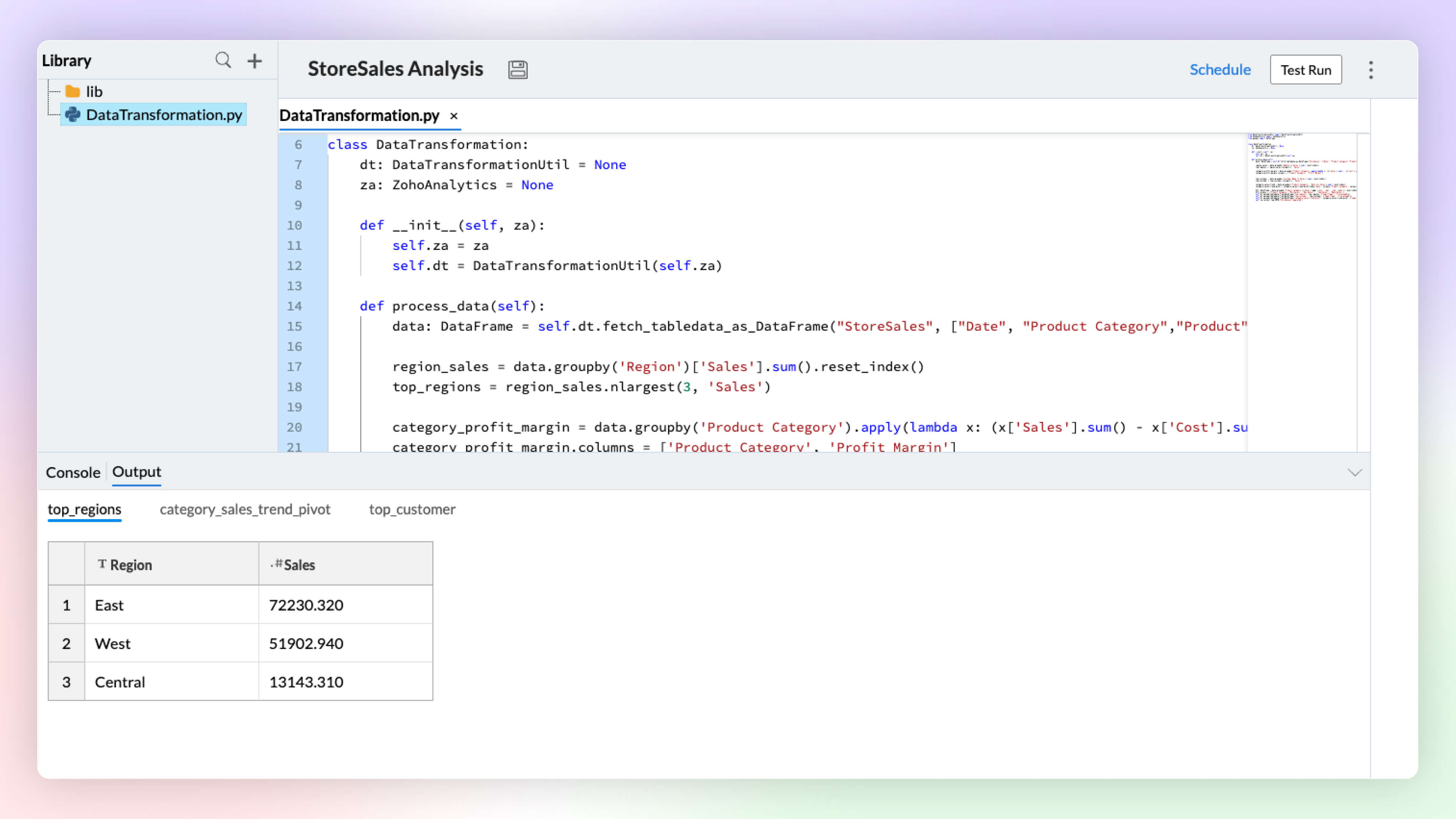
Code Studio 
Python Code Studio enables you to build/import custom logic and ML models for your specific data preparation, transformation, enrichment, and analytical modeling needs.
5. Data Storytelling
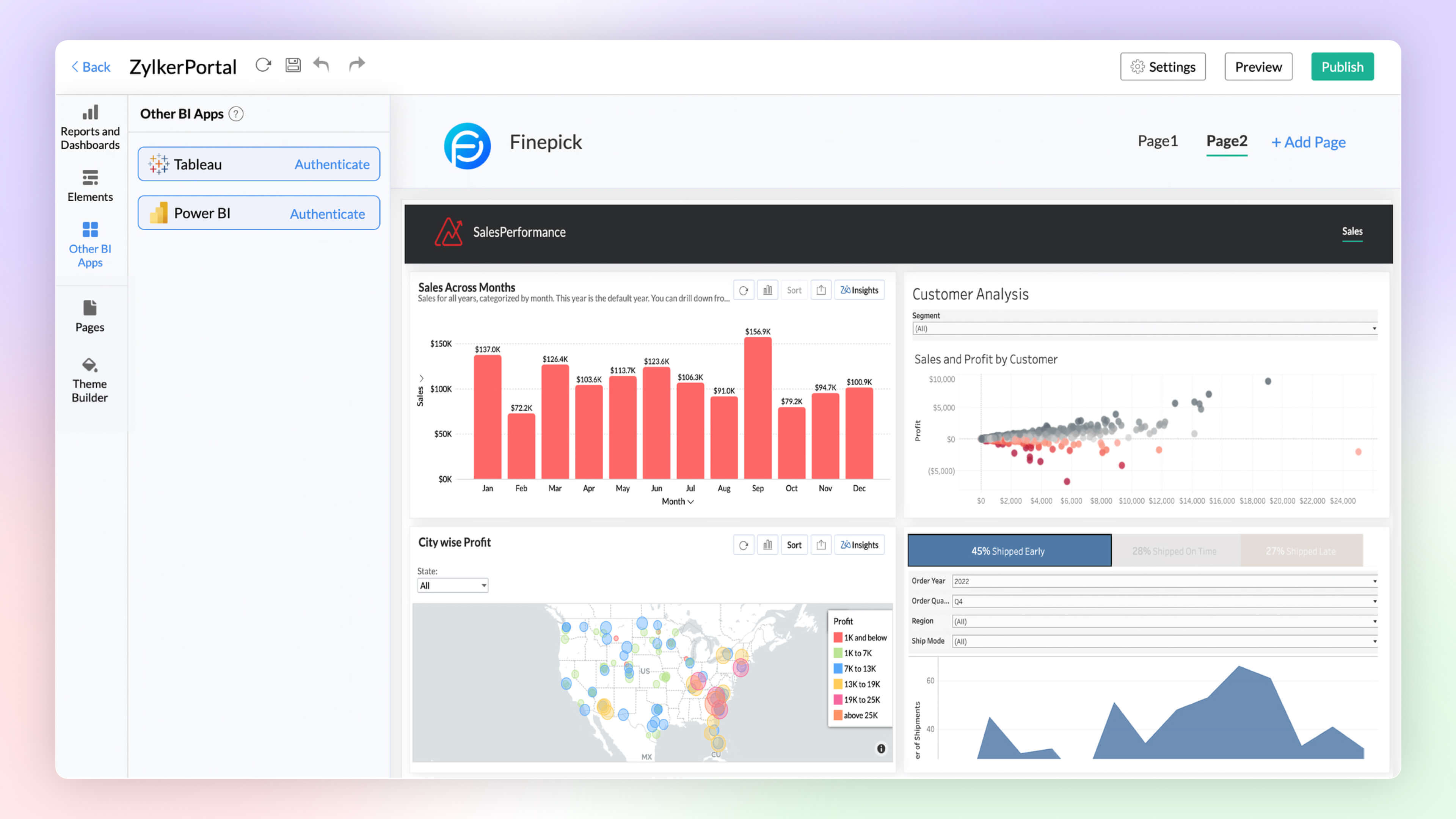
BI Fabric
Create unified BI portals for your organization's business needs. Collate reports from other BI applications like Tableau and Power BI. Having a unified portal improves collaboration, promotes centralized accessibility, and makes it easy for C-level executives to make robust business decisions.
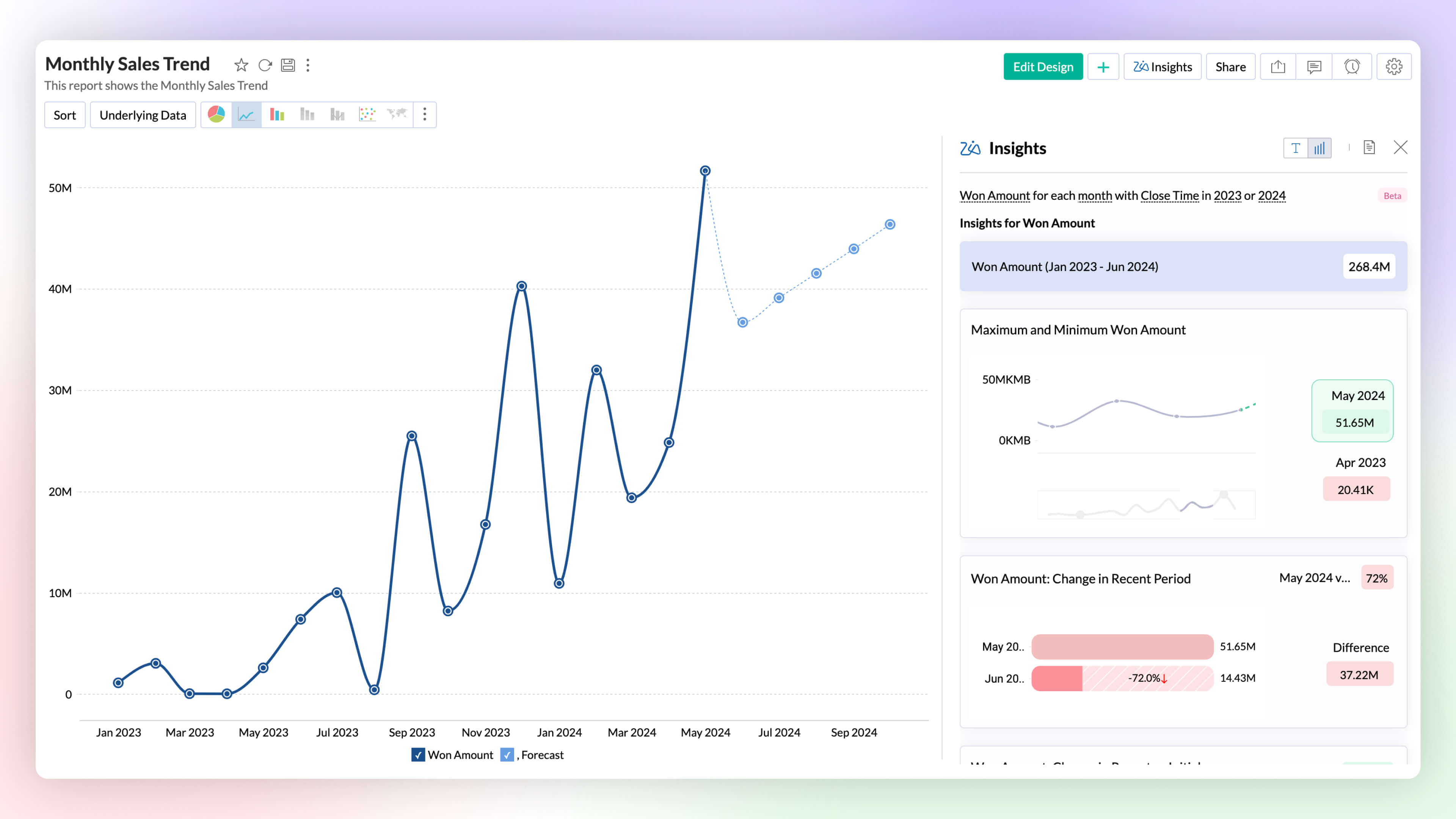
Visual Zia Insights
Zia Insights now provides visual narratives! Visuals help process information far more efficiently than lengthy text descriptions. These visuals facilitate multi-dimensional interpretations like comparison, contribution, distribution, trends and proportions.
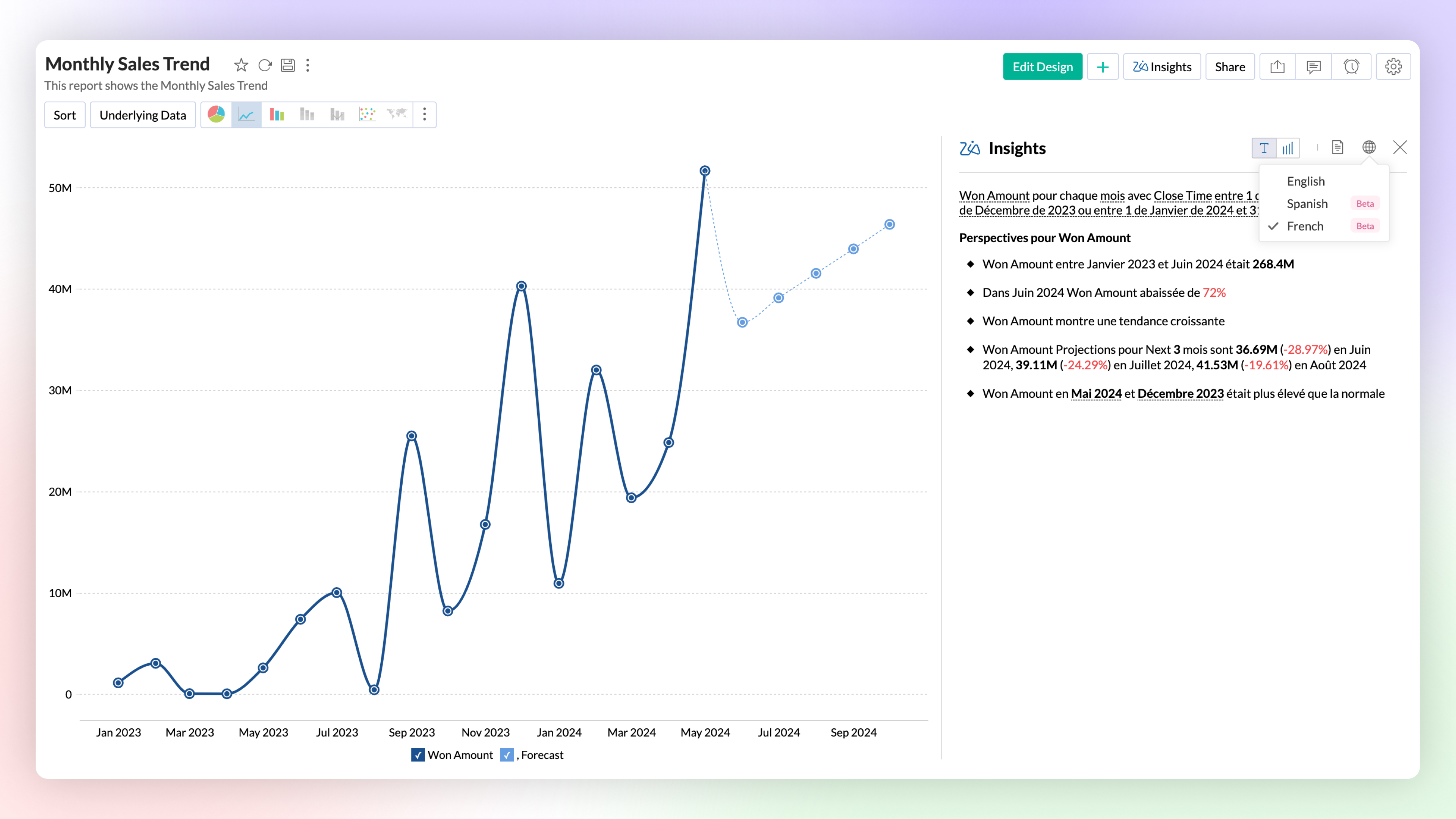
Zia Insights -Multilingual Support
Zia Insights is now available in French and Spanish. Users can choose their preferred language when accessing Zia Insights for a specific report.
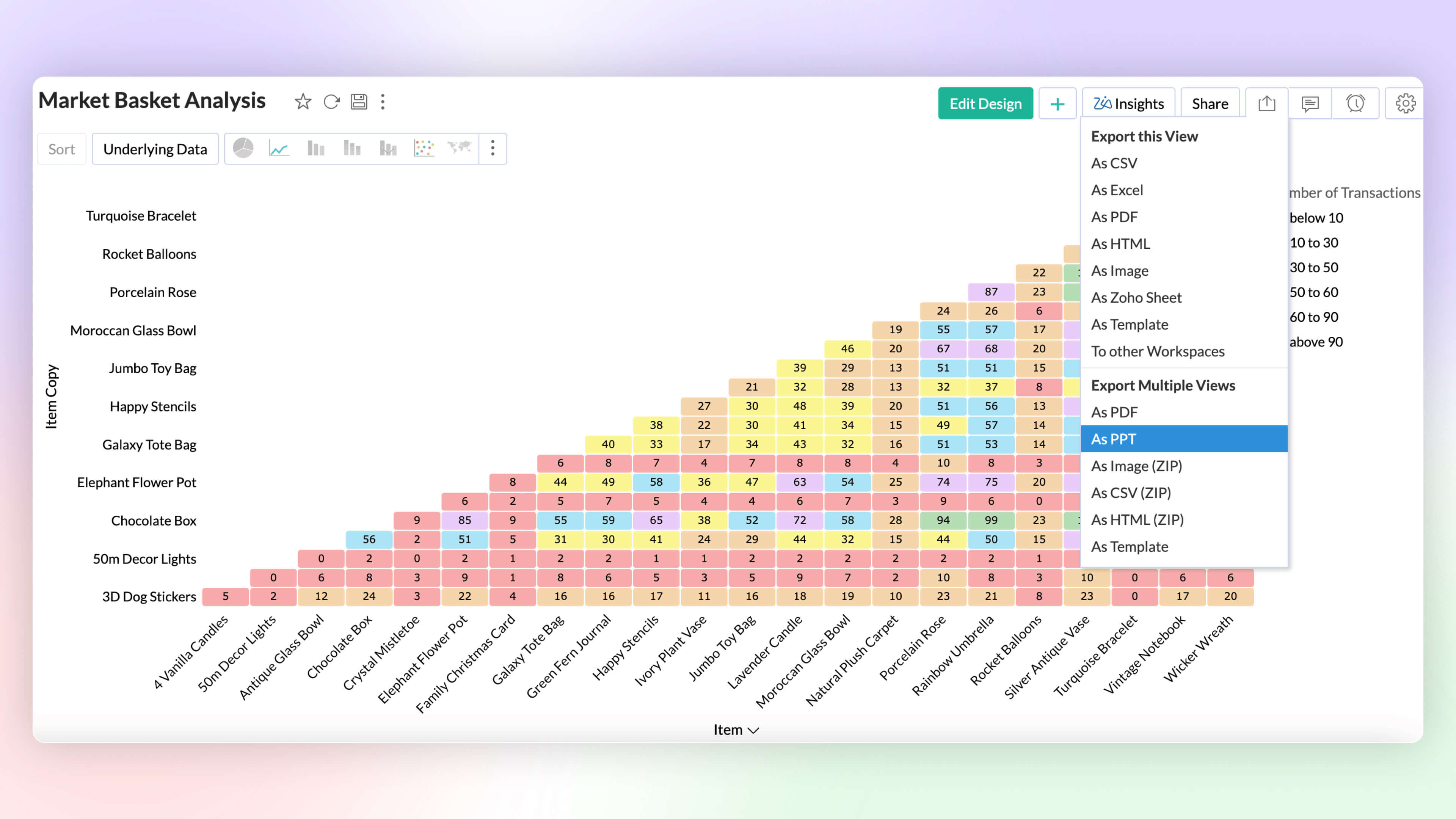
Export as PPT
Export multiple views as a Microsoft PowerPoint presentation. Enhance security by protecting the file with a password.
6. More enhancements
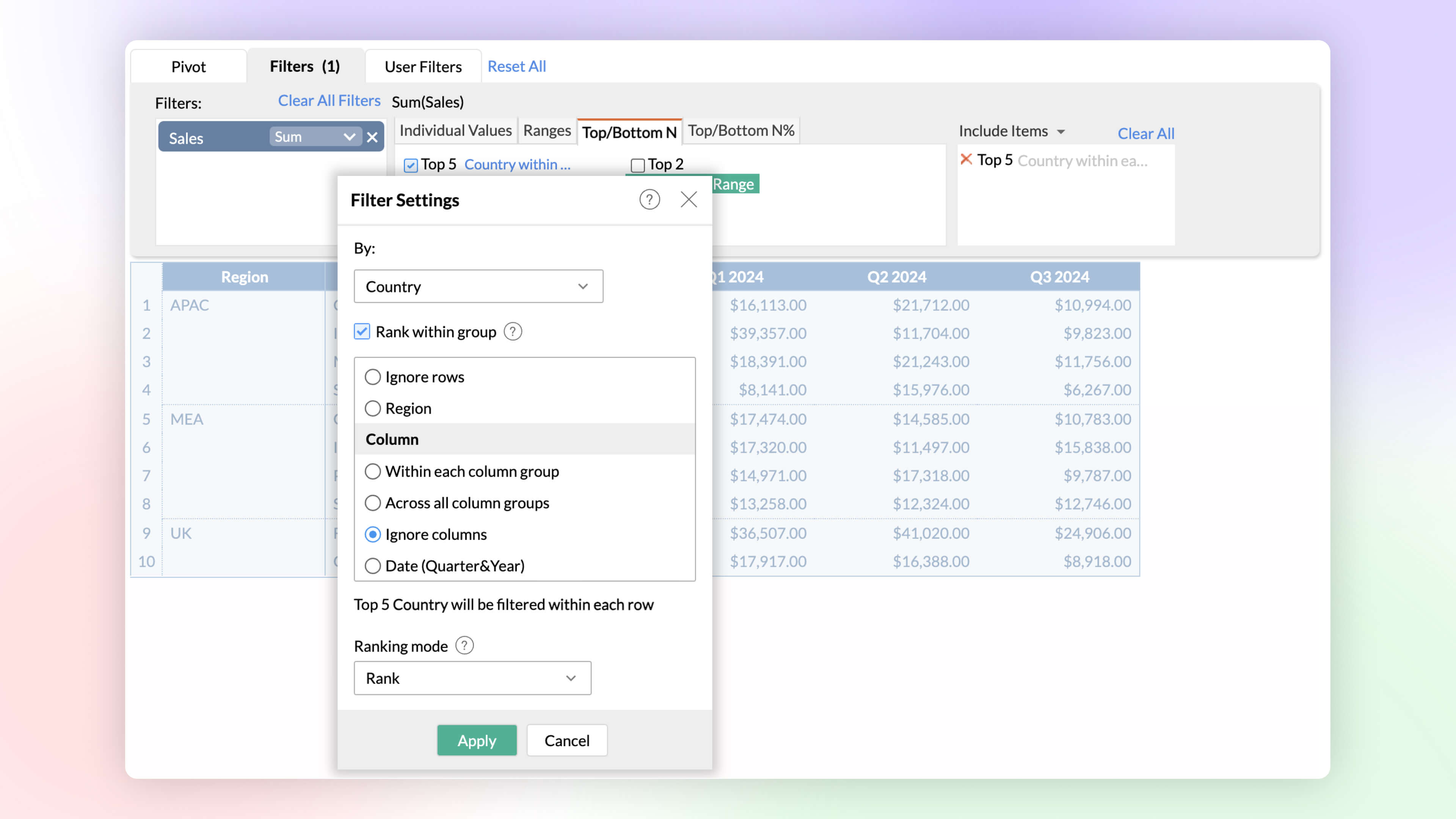
Rank within Filters
Identify and analyze top and bottom performers across various dimensions. The rank-based ability helps find the top or bottom performers within and across individual groups without having to write complex formulas.
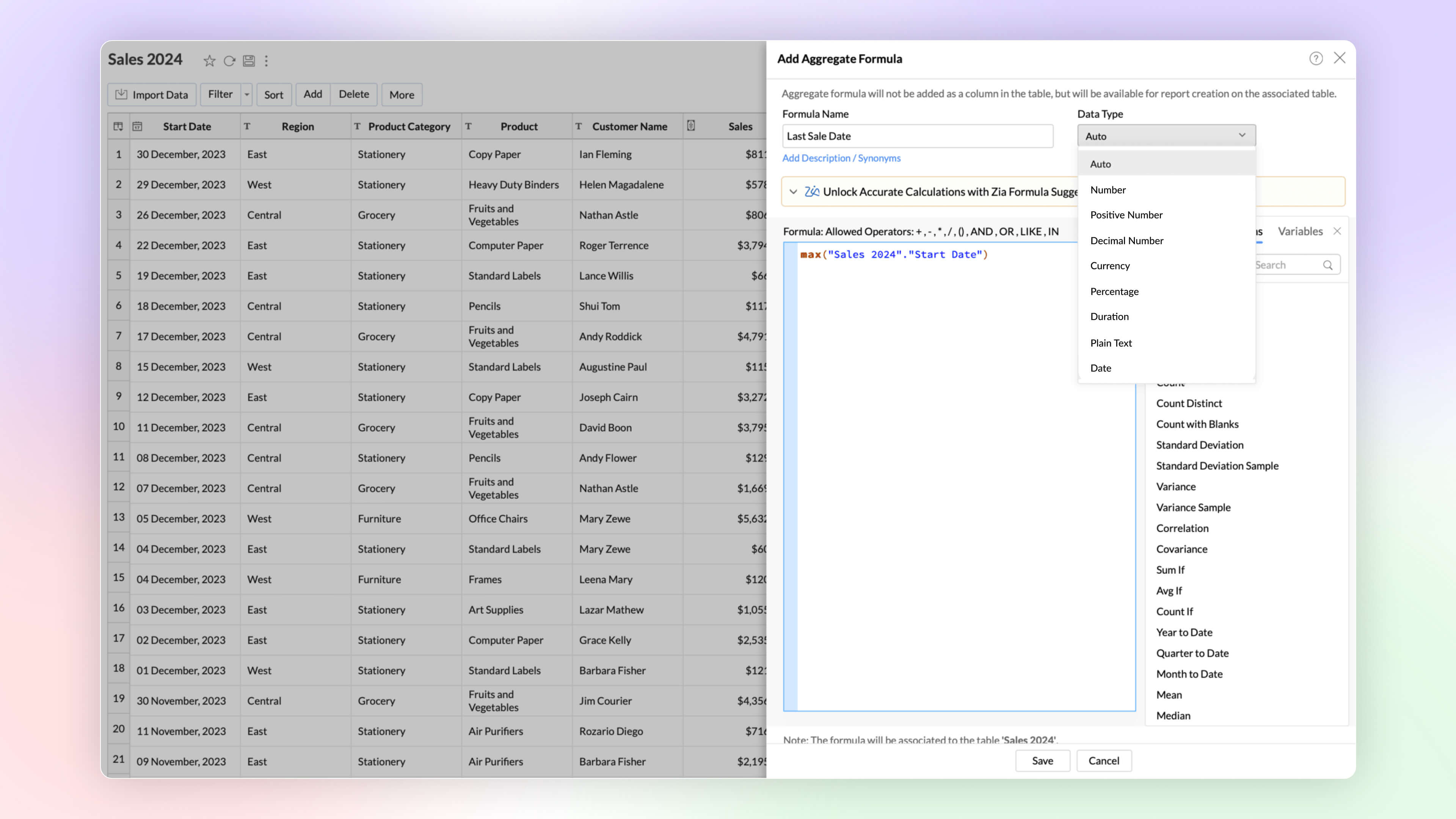
Date and String data types in Aggregate Formula
Zoho Analytics now supports the date and plain text as return data types in aggregate functions. This improvement proves immensely beneficial in scenarios such as cohort analysis, project milestone tracking, and various other use cases.
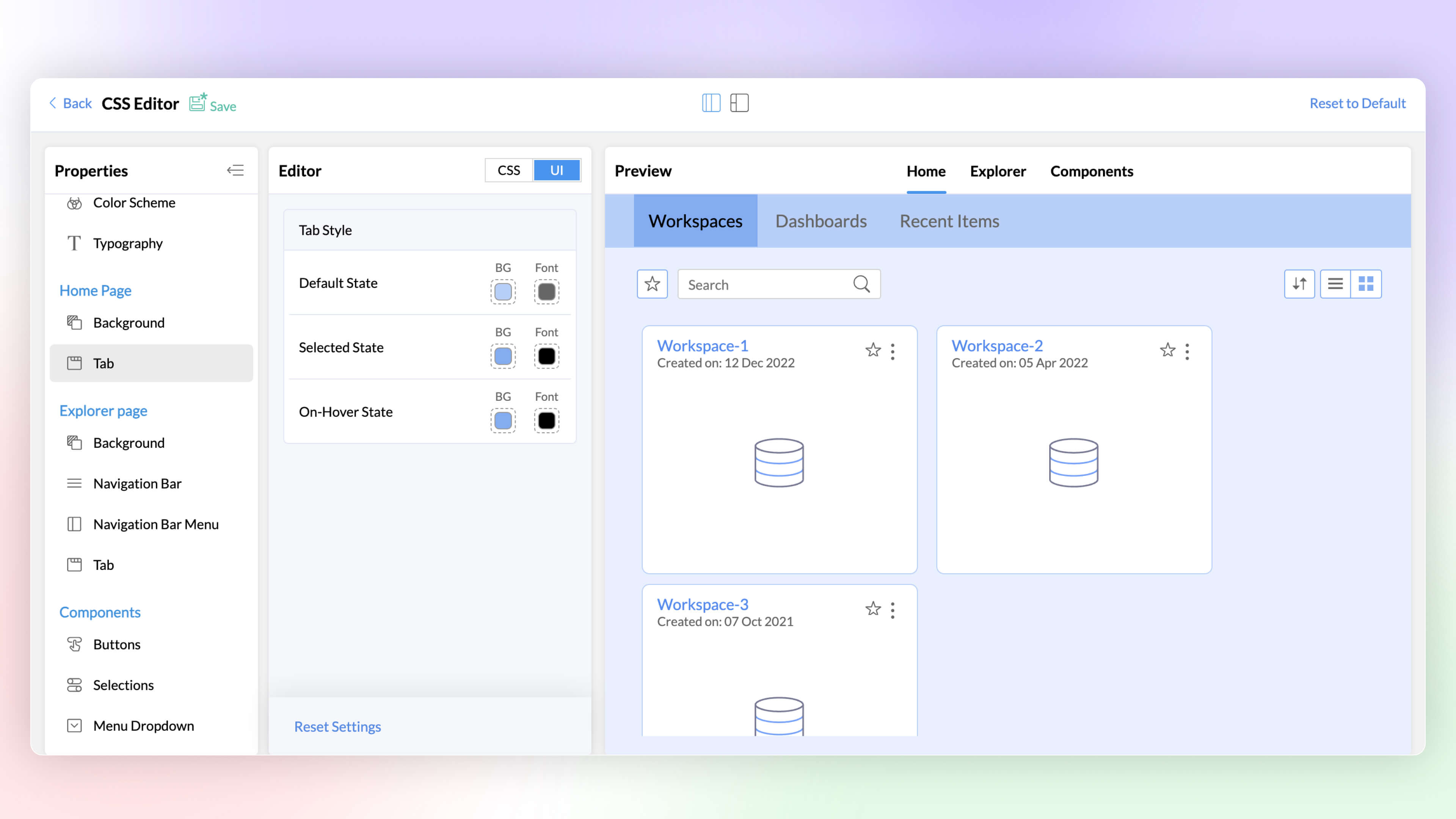
White Label CSS Customization
Elevate the visual appeal of your white labeled product and align it with your brand through the CSS customization feature. This latest addition to Zoho Analytics enables you to customize text, colors, and more on pages, tabs, selections, hover options, enhancing the overall look and feel.
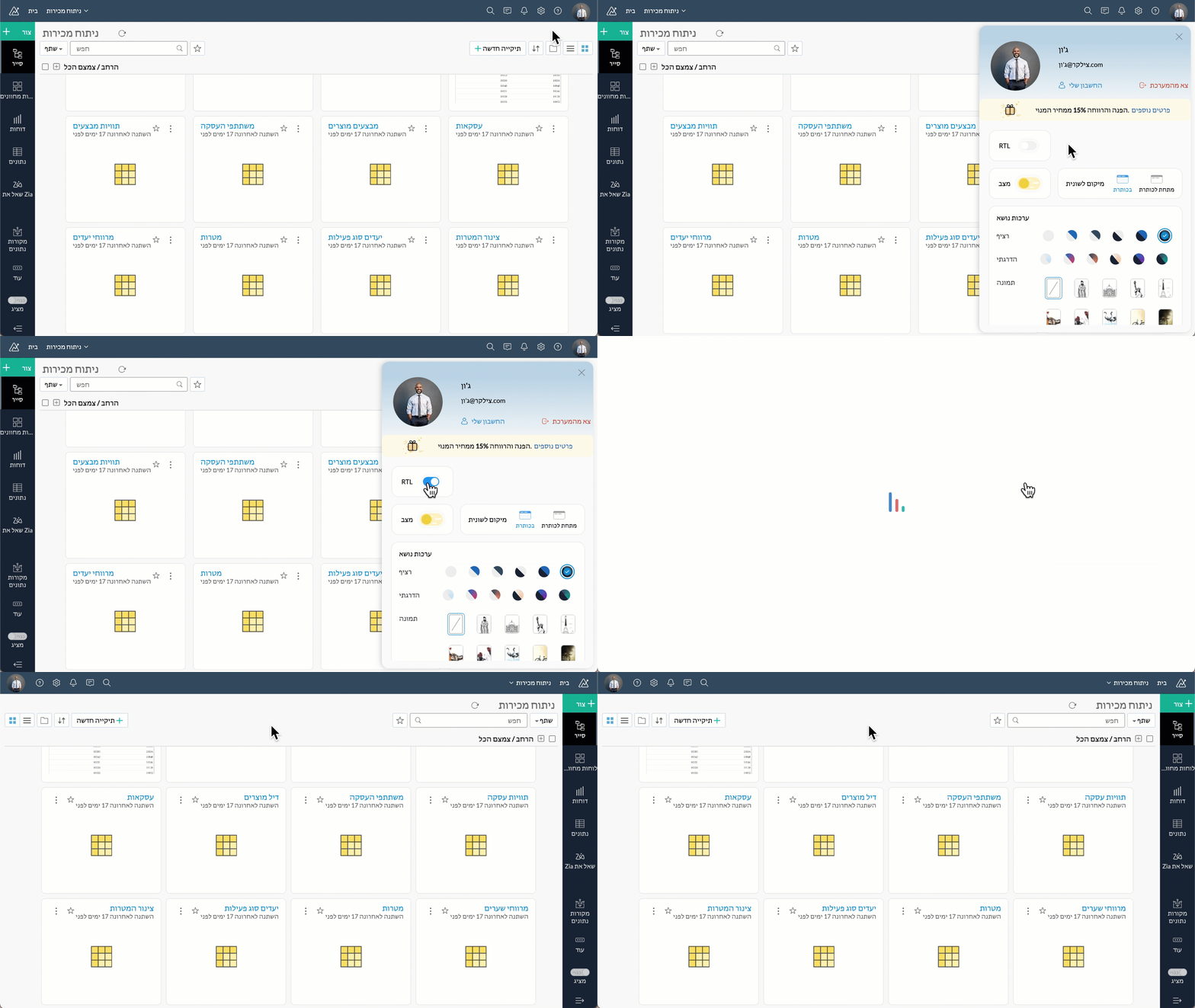
Right to left User Interface
Zoho Analytics now supports a right to left user interface. This option is best suited for languages like Arabic and Hebrew that are read from right to left.
Security
At Zoho Analytics, ensuring data privacy and security remains our topmost priority. We have implemented additional measures to strengthen security through the following enhancements.
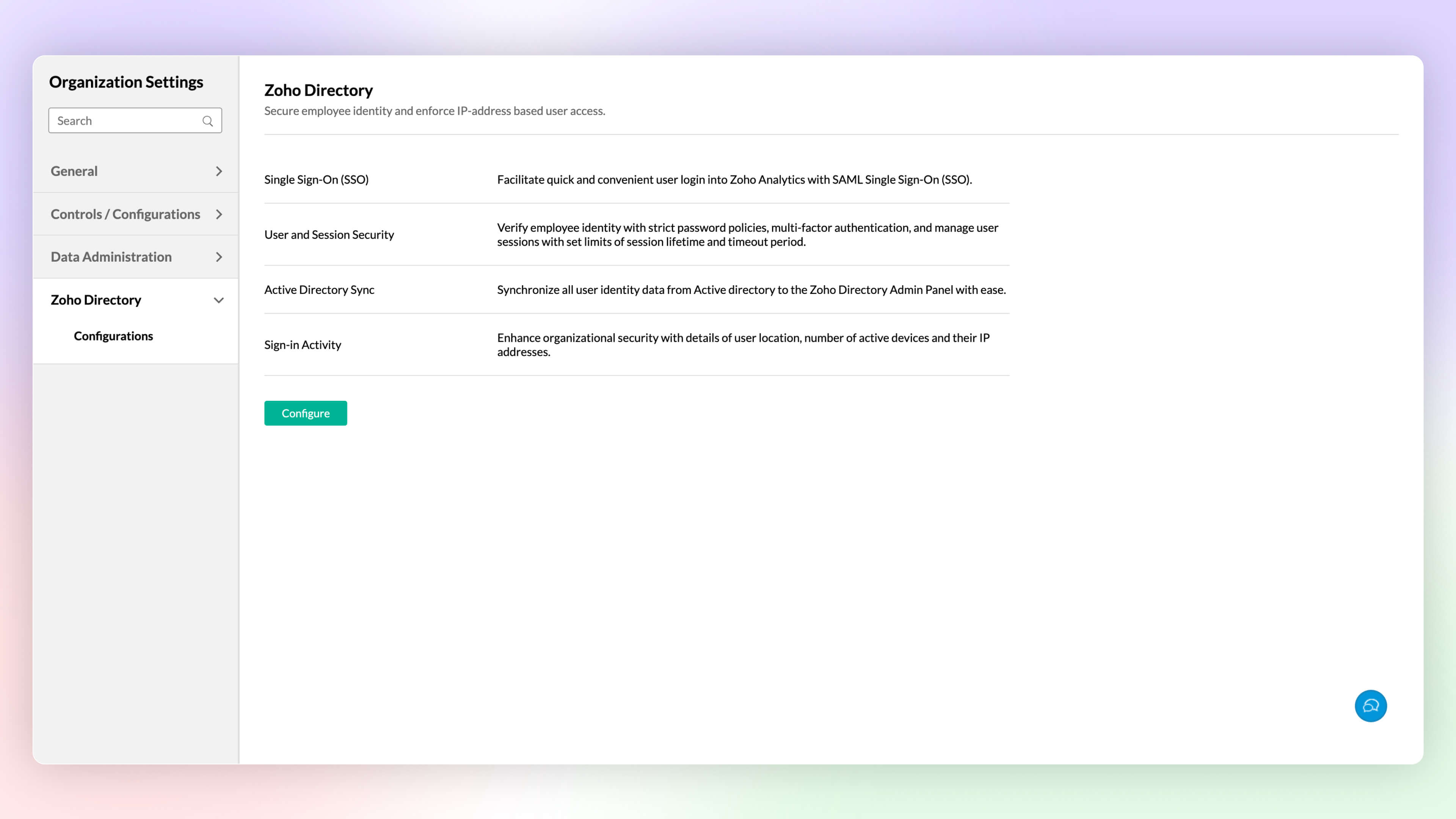
Zoho Directory
Zoho Analytics' integration with Zoho Directory allows administrators to handle identity and user access management with ease. You can now easily setup Single Sign-on, setup Active Directory sync, manage user access, etc.,with Zoho Directory.
Workspace Level IP Restriction
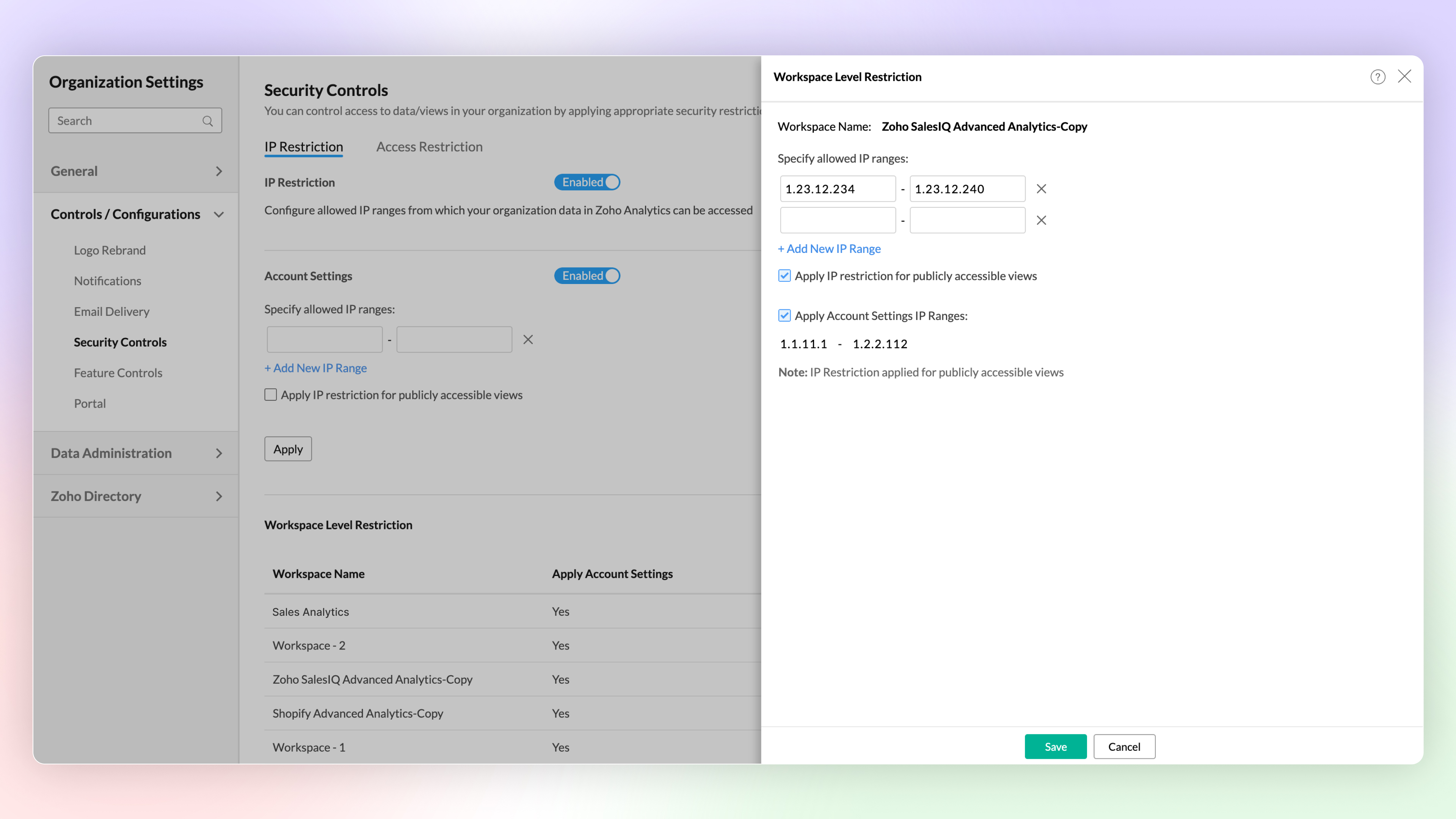
Configure workspace-level IP restrictions for enhanced security and to prevent unauthorized access. Previously, IP restrictions were available only at the account level.
Zoho Analytics Mobile App
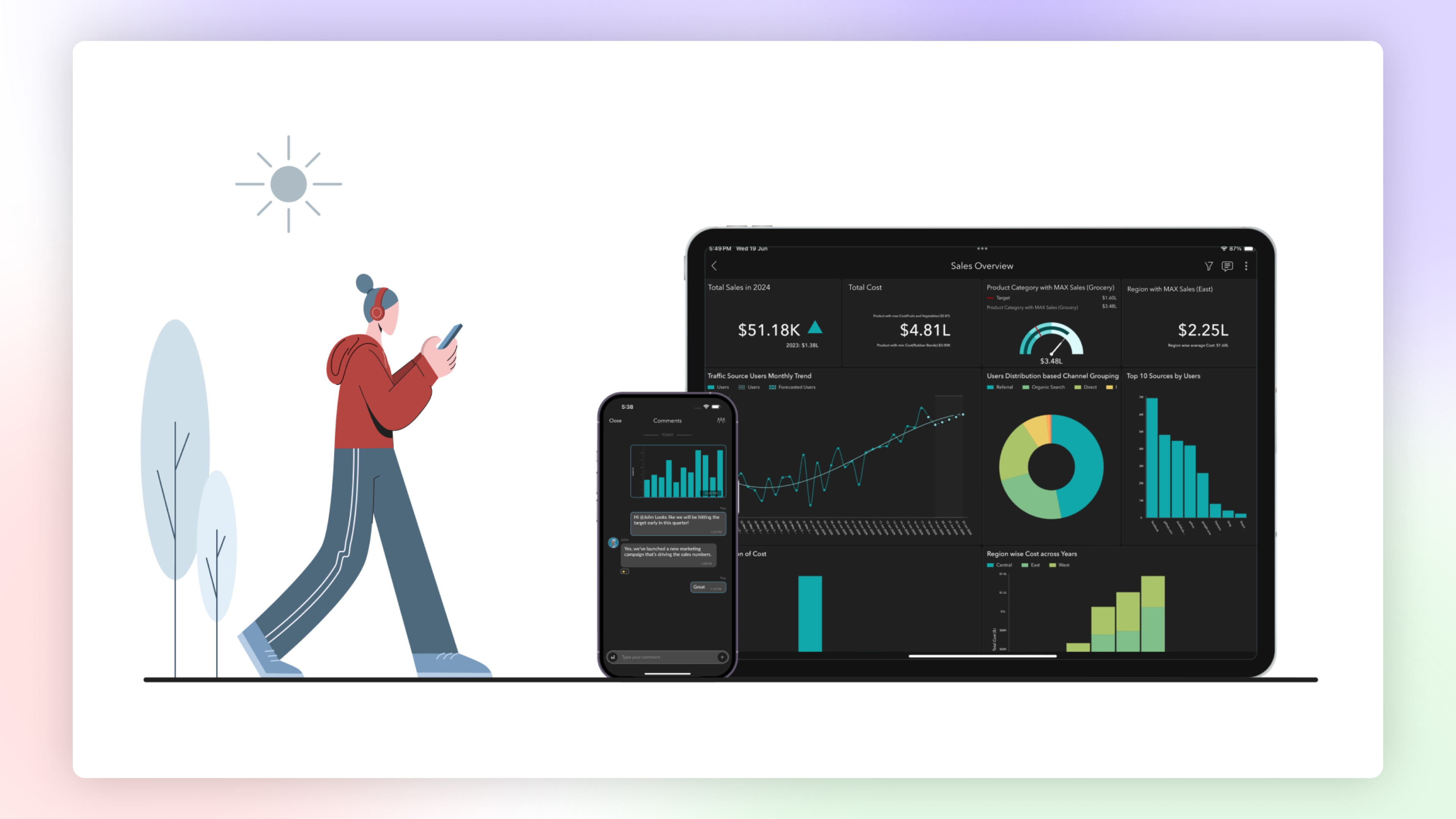
The Zoho Analytics Mobile app has been upgraded as a native app, optimized for your specific device. This enhancement provides faster loading times, high-quality visuals, and advanced security features specific to your device's operating system to protect your data.
Email Schedule APIs
A new set of APIs are now available for managing your email schedules. These APIs enable you to create, update, trigger and delete email schedules easily.
Features in Private Beta
ChatGPT in Ask Zia
Ask Zia now integrates with ChatGPT assisting you to write complex queries and formulas for effective data analysis.
Diagnostic Analysis
Zia insights now supports diagnostic analysis helping you understand the root causes for a certain outcome.
Custom Connector
Zoho Analytics now enables you create your own integration with third party applications.
Try Zoho Analytics 6.0 Beta!
Do try out the new features and share your valuable feedback with us at support@zohoanalytics.com. Your suggestions are crucial to helping us improve and serve you better.
Topic Participants
Nisha Angel J
Sellers
paul
César Pedrolini
Heike
Sticky Posts
What's New in Zoho Analytics - November 2025
We're thrilled to announce a significant update focused on expanding your data connectivity, enhancing visualization capabilities, and delivering a more powerful, intuitive, and performant analytics experience. Here’s a look at what’s new. Explore What'sWhat's New in Zoho Analytics - October 2025
Hello Users! We're are back with a fresh set of updates and enhancements to make data analysis faster and more insightful. Take a quick look at what’s new and see how these updates can power up your reports and dashboards. Explore What's New! ExtremeWhat’s New in Zoho Analytics – September 2025
Hello Users!! In this month’s update, we’re raising the bar across multiple touchpoints, from how you bring in data, plan and track projects to how you design and brand your dashboards. We’ve added the all-new Gantt chart for project visualization, expandedAnnouncing Agentic AI - Ask Zia!
We are delighted to roll out the new agentic AI capabilities in Ask Zia, where every stage of the BI workflow is assisted by AI. With a human-in-the-loop approach, Ask Zia ensures that you’re in command of the decision, while AI handles the complexity.Invitation-Based User Access in Zoho Analytics
Hello everyone, We’re rolling out an important update on how users are added to your Zoho Analytics Organization and Workspaces. Previously, when admins added users, they were automatically added to the organization. Moving forward, to improve security
Recent Topics
Find and Merge Duplicates to trigger webhook
My sales team uses the Find and Merge Duplicates feature often to cleanup records in the CRM. We use webhooks to signal to our internal tools database when new Contacts are created, updated, or deleted, in order to keep our DB in sync with Zoho CRM. However,Charting the 2025 Voyage: Zoho Invoice's Year in Review
2025 has been a year of progress, productivity, and purposeful growth for Zoho Invoice. From expanding into new regions to refining everyday workflows, each update was designed to help businesses stay compliant, get paid faster, and work with confidence.How to Hide System-DefinedTemplates in Service Report
Is there any option available to hide system-defined templates? these templates are causing confusion for field users.WhatsApp Report in Bigin CRM
Reporting feature for Bigin CRM’s integrated WhatsApp that provides insights such as: Number of WhatsApp conversations closed Number of messages sent and received Number of conversations replied to Response and closure metrics for WhatsApp chats MoreAuto tracking URL generation based on Carrier
Hi, While creating a shipment order for a package in Zoho Books, I have a requirement that for example, if the carrier is Delhivery and tracking number is 1234, then can automatically the tracking link/URL be generated as www.delhivery.com/1234. Similary,Issue with Azure DevOps Integration in Zoho Flow
Hello, All workflows between Zoho Flow and Azure DevOps have stopped working for several days now. Upon further investigation, it seems that the connection to Azure DevOps is no longer directly supported. Indeed, Microsoft has deprecated the Azure DevOpsNarrative 16: Simplify with workflows
Behind the scenes of a successful ticketing system: BTS Series Narrative 16: Simplify with workflows What is a workflow? A workflow organizes business tasks in a defined sequence that makes each step clear to all participants. This ensures work is completedZoho Invoice Customer Login Portal
Are there any plans for a customer portal to Zoho Invoice, ala Freshbooks? I would like customers that I invoice to be able to login to review invoices and invoice history. I have not switched from Freshbooks for this very reason.Random Leads are being created
Hi, Every few days I am getting random leads that are being created with no form interactions at all. The email addresses are from obvious spam, such as 'Easymerchantsx'. When I look at the timeline, there is a Visit record and then a Lead Created record,Print a price list or price book
Hi Community. Am I right in concluding that Zoho has no functionality to print a price list from either Zoho CRM, Zoho Inventory or Zoho Books? I won't get stuck on the fact that Zoho doesn't sync price books between Zoho CRM and Books/Inventory (moreBar Chart -- sort X-axis
Hi! I created a bar chart ("Top 10 Products by Revenue") X-axis: Product Name Y-axis: Revenue Filter: Revenue - Top 10 Here's a picture: http://screencast.com/t/ZTJlZTdkNz The x-axis is sorted alphabetically by Product Name. How can I force it to sort numerically by Revenue?ZoHo Flow Custom Function not Processing JSON
JSON is being escaped and converting all the quotes in the JSON to '"' Here's the Code: void InsertRowInE123EligibitySheet(map input) { rawData = get("data",""); decodedData = rawData.htmlDecode(); data = decodedData.toMap(); sheet_id = "ID GOESManaging functions
Can someone let me know if there are any plans to improve the features for managing functions in CRM? I have lots of functions and finding them is hard. The search only works on the function name and the filter only works on function type. I have createdZoho FSM - Service Appointment Trouble Adding Field Agent
Hello, I just started using Zoho FSM and I'm currently adding older work orders from prior Field Service application I use. The work order that im trying to add is from an earlier date, and when I try to add a field agent to a service appointment it doesShifts in Zoho People vs Zoho Shifts?
Hello Zoho People Team, We hope you are doing well. We are evaluating the Shifts functionality within Zoho People and comparing it to the standalone Zoho Shifts product. We’ve encountered comments and discussions suggesting that the Shifts feature inside年内最後のユーザー向けイベント:5名限定! 課題解決型ワークショップイベント Zoho ワークアウト開催のお知らせ (12/18)
ユーザーの皆さま、こんにちは。コミュニティチームの中野です。 12月開催のZoho ワークアウトについてお知らせします。 今回はZoomにて、オンライン開催します。 参加登録はこちら(無料) https://us02web.zoom.us/meeting/register/QHn6kJAcRs-znJ1l5jk0ww ━━━━━━━━━━━━━━━━━━━━━━━━ Zoho ワークアウトとは? Zoho ユーザー同士で交流しながら、サービスに関する疑問や不明点の解消を目的とした「Zoho ワークアウト」を開催します。How do I get my account id?
Hello, I followed the instructions to get a list of accounts of the currently authenticated user (which is me, and I am logged in). But when I follow the below instructions I get the following error: ERROR: {"data":{"errorCode":"INVALID_TICKET","moreInfo":"Invalid ticket"},"status":{"code":400,"description":"Invalid Input"}} Instructions that I am following: GET - User account details Purpose The API retrieves the list of accounts of the currently authenticated user. Request URL http://mail.zoho.com/api/accountsThis domain is not allowed to add. Please contact support-as@zohocorp.com for further details
I am trying to setup the free version of Zoho Mail. When I tried to add my domain, theselfreunion.com I got the error message that is the subject of this Topic. I've read your other community forum topics, and this is NOT a free domain. So what is theZoho Quartz Screen Recording
Hello, can we get access to Quartz, please, as a standalone solution? It would be great for creating training videos for current and future staff on how to use Zoho software according to our company requirements. Thank youauto close automated alert tickets which are similar
Hello ZOHO Community, we are using ZOHO Desk to process automated monitoring alerts. Scenario: Our monitoring system creates a ticket when a threshold is exceeded, e.g. Subject: Computer 1 – CPU usage 100% – Error A few minutes later, once the issue resolvesMaintain knowledge base integrity by moderating article comments
Hello everyone, A knowledge base provides a self-service platform where customers can refer to articles, user manuals, and other resources to learn about the company's products or services and troubleshoot problems. Often, readers leave a comment on theMaking another calendar your default calendar
I am trying to make another calendar my default calendar when I add events to it. It keep going to a single calendar, I need it to go to my google calendar by default, as this is linked to other services / websites. I cannot find an option to make itOption to Delete Chats in IM
Currently, there is no option to delete any chats in IM, regardless of their source.Referencing a cell from another sheet
My workbook has multiple sheets. Each sheet has some calcluated totals in certain cells. The front master sheet has a list of everything that is detailed on the other sheets, with the totals. These could change at any time, so the totals need to be references to the other cell's value, not a fixed number. So on the master sheet, I put in =, then go the other sheet and choose the cell and hit Enter. In regular Excel, this works. But in the Zoho sheet, it doesn't work. I have to edit the result byGroup mail for external email addresses
Hello, I was just wondering if the Group mail feature works with external email addresses - e.g. gmail.com or a completely different domain? it seems only internal addresses (hosted with Zoho) receive the mail. Thanks, OliverIs Zoho Shifts included in the Zoho One plan?
In case the answer is no: there's any plan to make it available via One? Thank youMarketing Automation Requirements Questions
I would like to set up a multi-email drip campaign- please see the structure below and confirm if I can achieve this set up in Zoho marketing automation. Where applicable, highlight gaps and workarounds. Thanks Drip email campaign- Can I create one dripThe email address you have entered belongs to a different deployment/region.
Hi, I am trying to create the user - mprust@crombiecomputers.co.uk but keep getting the message below - The email address you have entered belongs to a different deployment/region. Please contact support@zohoaccounts.com for assistance. Look forwardUse Zoho Flow Credits for CRM ‘Actions by Zoho Flow’
Hello Team, We would like to submit a feature request regarding credit usage for “Actions by Zoho Flow” in Zoho CRM. Use Case: We are Zoho One users and actively use Zoho Flow, where our organization has 52,000 Flow tasks per month. In Zoho CRM, we useUnusual activity detected from this IP. Please try again after some time.
Hello Zoho admin and IT team We are a registered website in Eloctronic services and we been trying to add our users to the zoho system but this issue faced us ,, hope you unlocked us please.Alert if a field is ticked.
Hi There, We have two modules named Opportunities (Deals) and End Users (CustomModule1), as per the image below. Within Opportunities, we have a lookup field that looks up from the End Users Module. We are looking to get an alert either via email or anotherZoho CRM Analytics - Allow To Reorder Dashboards
I would like to suggest that you add the ability to reorder dashboards in the Analytics Module. I can see that this has been requested some time ago, the latest 9 years ago. I am not sure if this is a big or small endeavor, but such a small fix can goSending a Template to Sign
hi, trying to send a template to be signed using this as a test: $accessToken = "1000.xxx" $templateId = "1234" $uri = "https://sign.zoho.eu/api/v1/templates/$templateId/createdocument" $payload = @{ templates = @( @{ template_id = $templateId request_nameKaizen #194 : Trigger Client Script via Custom buttons
Hello everyone! Welcome back to another interesting and useful Kaizen post. We know that Client Scripts can be triggered with Canvas buttons and we discussed this with a use case in Kaizen#180. Today, let us discuss how to trigger Client Script when aAdding Choices in a Sub-Form Dropdown
Hi, Has anybody tried Adding Choices to a Dropdown in a Zoho Creator Sub-Form programmatically? My Deluge code adds rows to a subform with 2 fields A and B. A - text field. B - dropdown. My Deluge script adds the row and displays A successfully. For theZoho CRM Email Templates 100% Width No Background How?
Hi, On the Zoho CRM Email Templates in setup > customization > templates > new templates > I choose blank template, but still it puts in a gray background and a max width for the email. I just want to make an email that looks like an email I would send from gmail that has no background or max width. How do you do this?Checking client unsubscribe details
Hi team, Can you please let me know where we can check if a client has unsubscribed, along with the date and time it was done? If this information is not available at our end, please help confirm the unsubscribe date for the below email ID from the backend:Optimum CRM setup for new B2B business
Can some advise the most common way to setup Zoho CRM to handle sales for a B2B company? Specifically in how to handle inbound/outbound emails. I have spent hours researching online and can't seem to find an accepted approach, or even a tutorial. I haveIntegration with...
Dear Zoho Commerce team, Please could you consider the integration within Zoho Commerce / Inventory and Qapla'? (https://www.qapla.it/en/) This app is better than Aftership in many ways: - Aftership integration require PRO plan and price start from moreScan and Fill CRM Lookup Field
Not sure if there is a reason why this isn't possible or if I'm just missing it. But I would like to be able to use the scan and fill feature on the mobile app to prefill the CRM lookup field and fetch the rest of the data in the form.Next Page