Augmenting subform capabilities
Greetings, everyone!
Finally, the day has come for us to announce some of the most anticipated, requested, and exciting updates to
subforms in Zoho Creator.
As you're aware, subforms are an integral part of Creator forms, as they help in establishing proper modelling of the app, collecting rows of data, and setting up users to enter data that has a parent-child relationship. With this new set of updates, we've bought in a paradigm shift to subforms, as they'll be getting an all-new look for an improved user experience, along with new capabilities for solving challenges. This post will give you a sneak peek into these new subform enhancements.
Do you find it difficult to scroll subforms horizontally? Do you wish you could drag and drop subform rows? Do you want to manipulate subform fields via Deluge script? Then your wait has come to an end—continue reading to learn more on how you can now do all of this in subforms.
Subform list and pop-up view
As announced in the
March 2023 post, the List
view type of subforms will display the subform as a pop-up, and the current method of displaying subforms has been christened
Grid.
To further understand how this can be helpful, let's put ourselves in the shoes of a supply chain manager. Their job requires them to regularly keep track of inventory lists in their warehouses.
Let's assume there's a form collecting warehouse details, like name, location, and stock inventory. For collecting the stock inventory details, a subform is present with these fields—Item No, Name, Manufacturer, Description, Cost Per Item, Stock Quantity, Inventory Value, Units Sold, Reorder Quantity, Reorder Date,
and
Person In Charge.
Now, the default view type will tire you out from scrolling back and forth horizontally, and results in a frustrating time-consuming process. We all long for a new way to avoid this and make data entry swifter.
To achieve this, make use of the new List option under
Subform->Field Properties->View Type.
List view, which looks similar to our list report, is a table-like subform without inline inputs. When you try adding or updating data in each row, a pop-up will be displayed listing out the fields with vertical scrolling, thereby ensuring a vastly superior user experience and more effective space management.
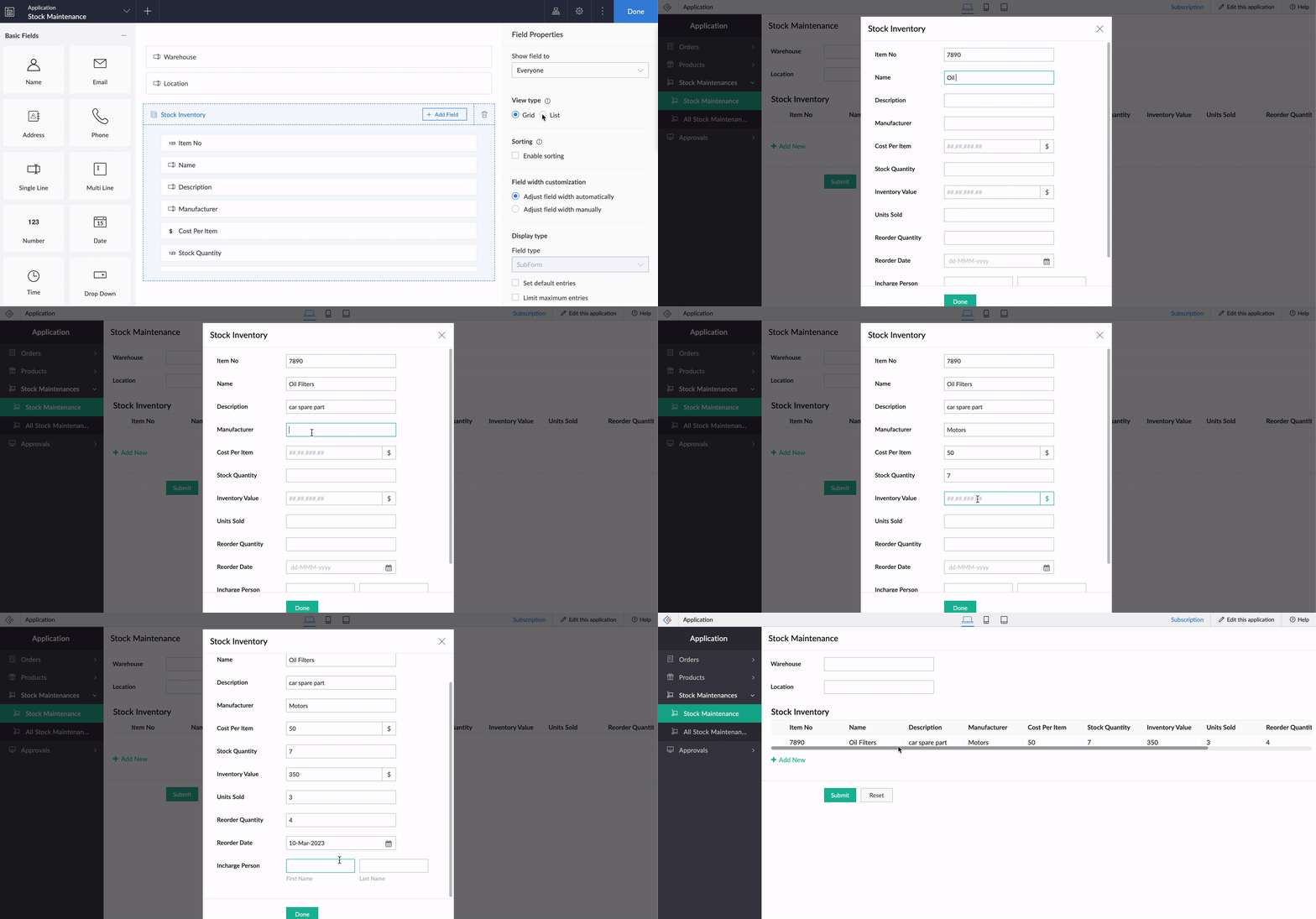
Crucially, it also helps to load subform rows quickly while editing records, by reducing the loading time.
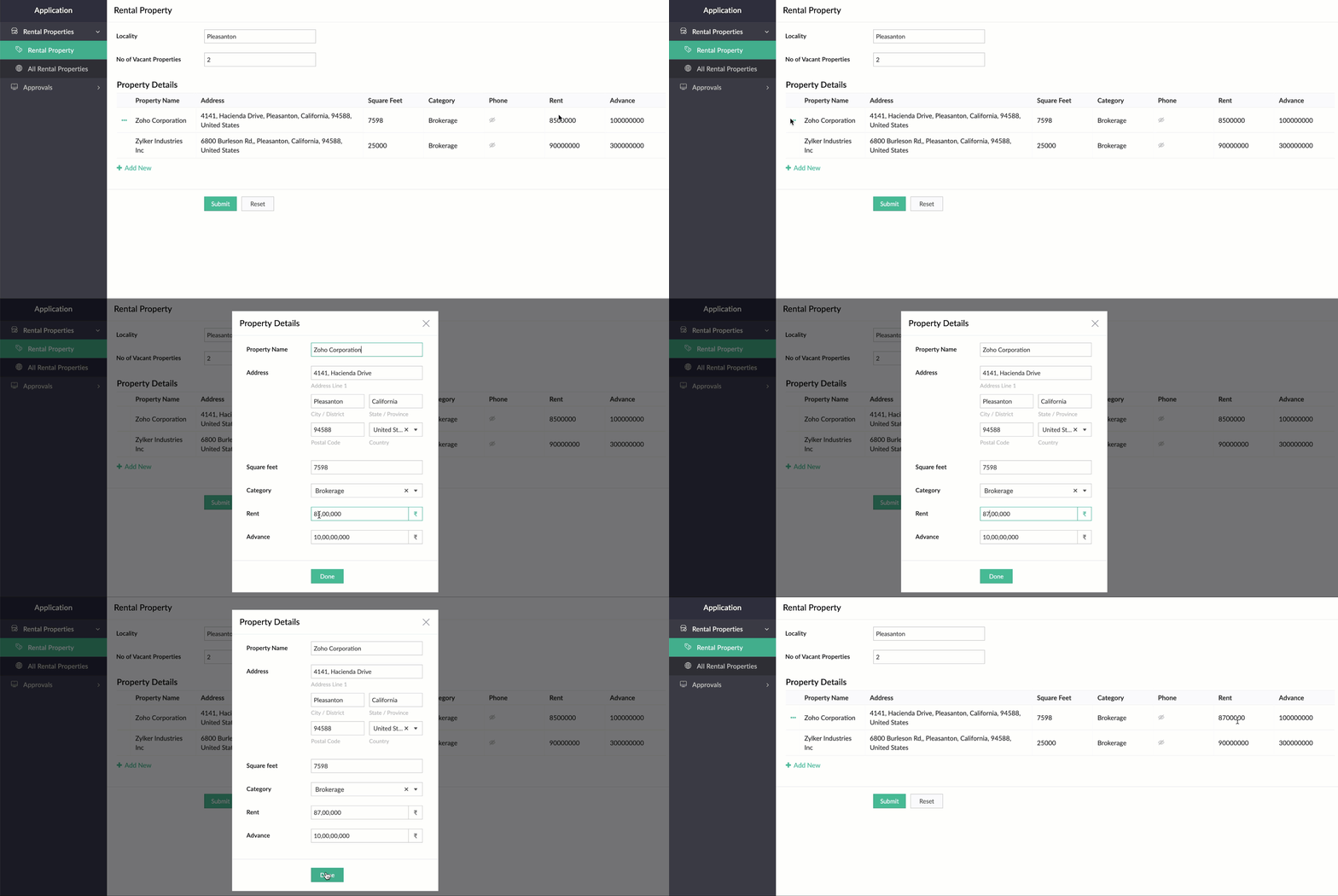
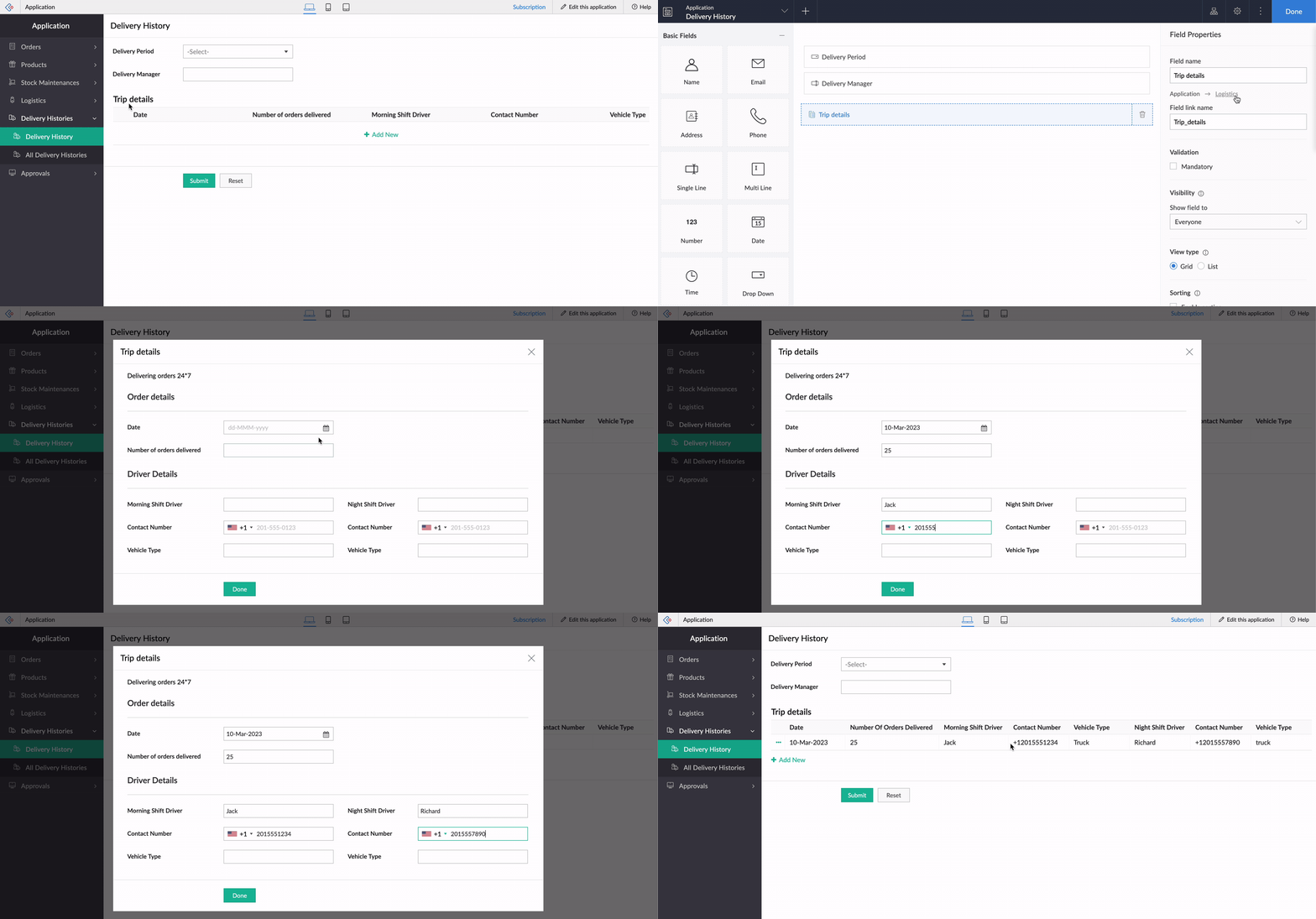
While using an existing form as a subform, the form's exact structure will be replicated in the pop-up, to ensure consistency in the look and feel of the form. To understand this better, let's assume our form has a two-column layout, with
Section
and Note
fields. Now the same customizations will be displayed in the pop-up, too!
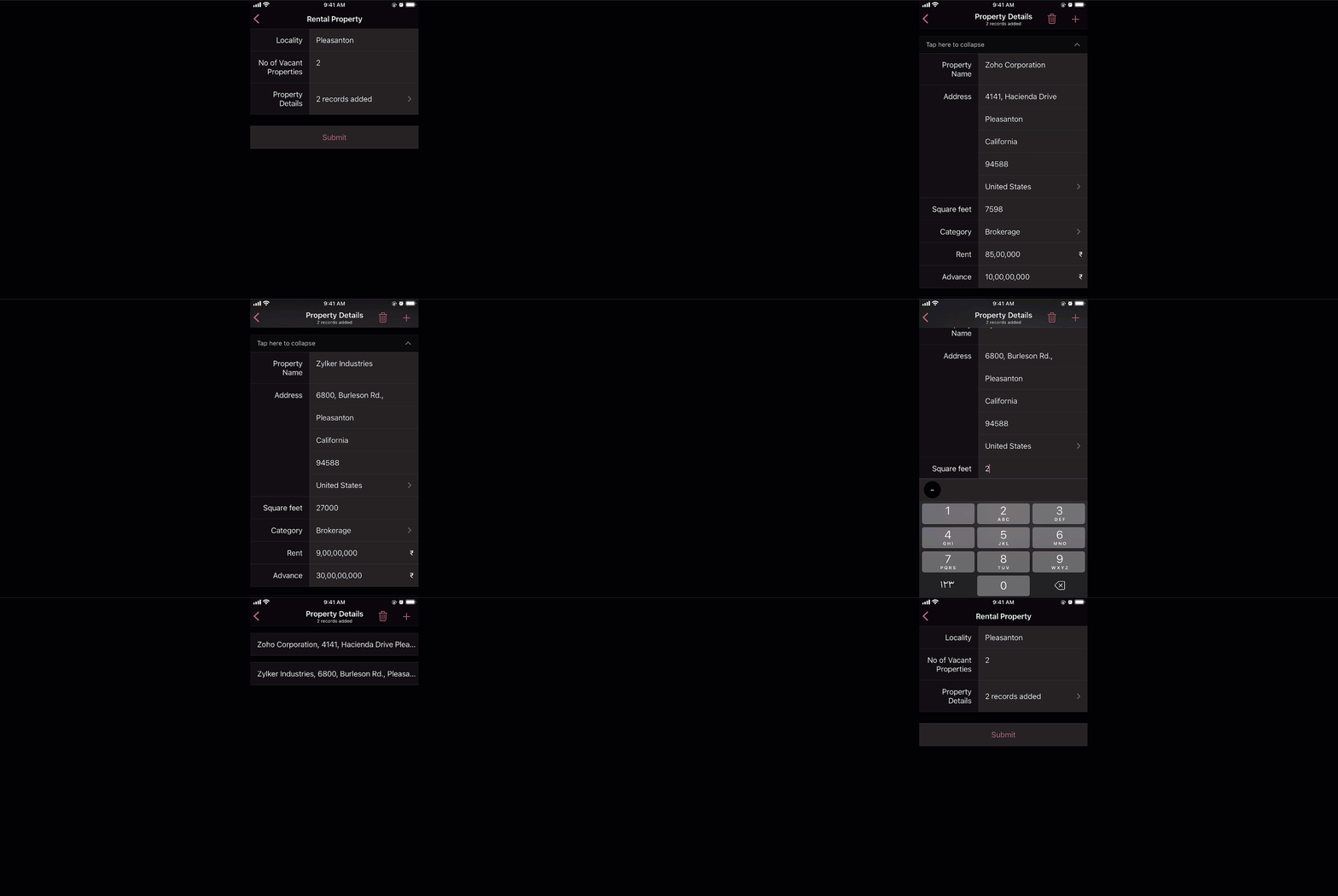
And that's not all—the new List view type is being extended to mobile apps, too. When it's enabled, the subform will be opened in the next screen, where users can add their data. This data will then be added as a subform row.
Custom sorting
Currently, the only sorting option in subforms is
field-based sorting, where you can choose a field based on which rows are sorted, either in ascending or descending order. Though this works well for basic cases, the need may arise in some cases to sort the subform in random order. With the new custom sorting support, you can effortlessly drag and drop subform rows to rearrange them.
To understand how it works, let's consider a task manager working on a To-Do List
form, to plan activities for a current project. For this, they have a main form collecting
project details, date-time,
and
milestones,
and a subform for maintaining the to-do list with the following fields:
Task Name, Description, Category, Status, Deliverables, Priority, and
Deadline. Here, before submitting the list, they want to rearrange some tasks based on their daily routine.
To achieve this, they use the Custom sorting option under
Subform->Field Properties->Sort type.
Now, with custom sorting, all they need to do to reorder the row sequence—both while adding and editing records—is simply drag and drop them in the required position.
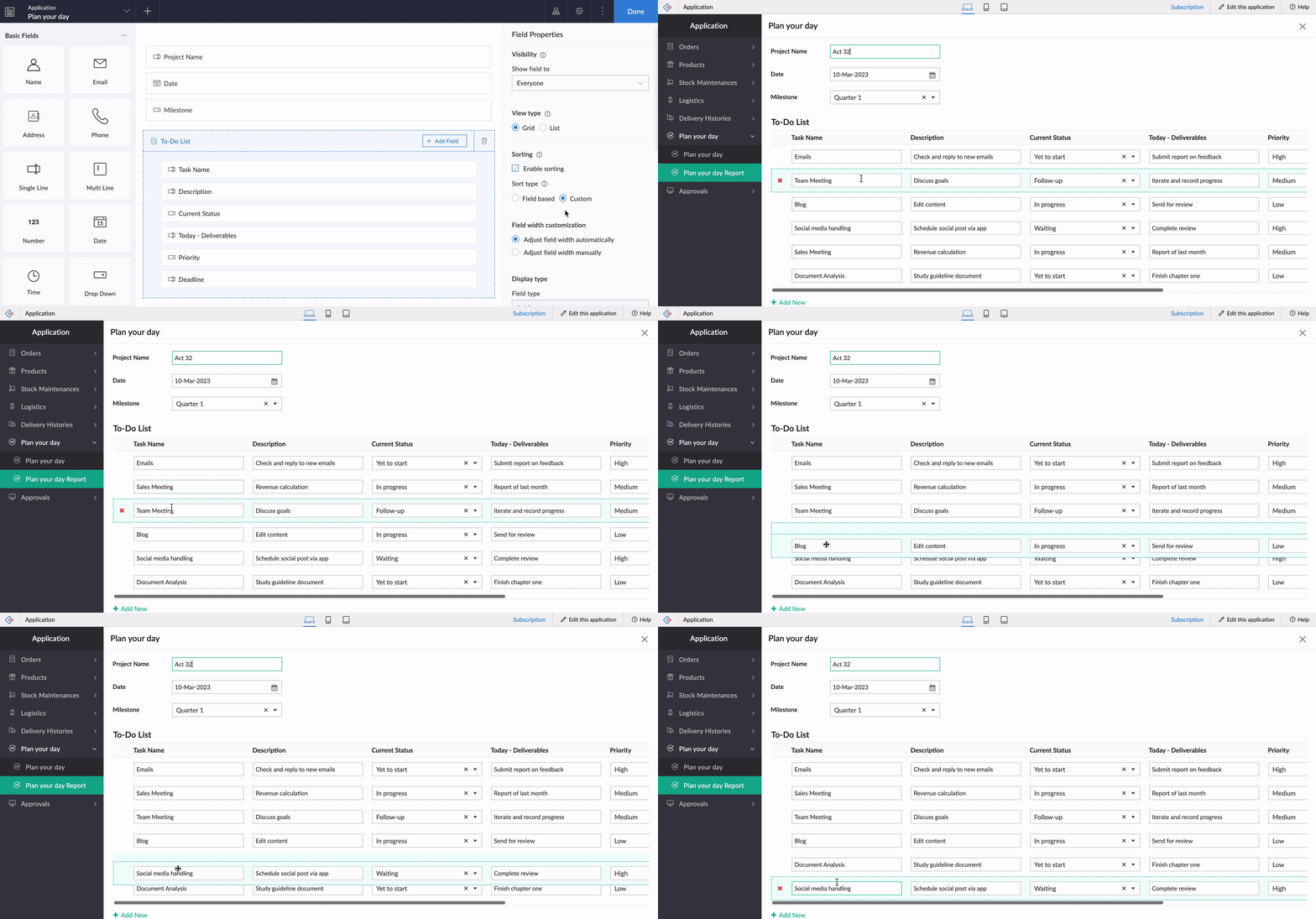
The same order will be retained in reports or while opening the form for updating the list.
Note:
Custom sorting can be used both in List and Grid-type subforms.
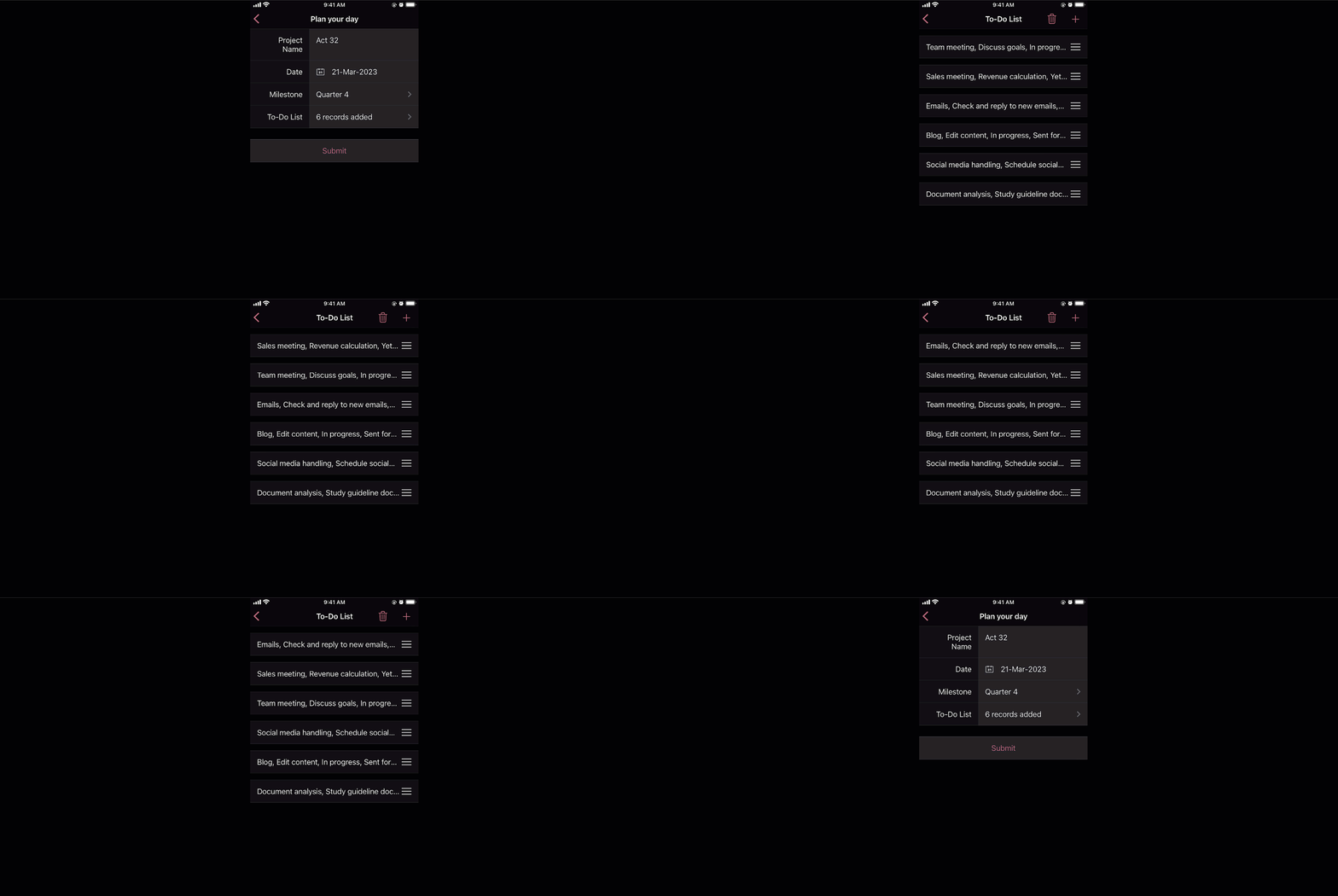
Custom sorting will also be available on the mobile apps and you can effortlessly rearrange fields in subforms.
Deluge tasks for row-level actions
You can use a combination of workflows and Deluge scripts to help your subforms handle complex business logic. With that in mind, we formulated the idea of bringing in actions that help you take control at the row level of subforms.
In the past, you may have come across business scenarios which required you to hide/show or enable/disable a particular field in a specific subform row. Now, with new dedicated Deluge tasks, you can bid adieu to shortcuts and workarounds.
Note:
Deluge tasks can be used both in List and Grid-type subforms.
Enable/disable
The new enable and disable subform Deluge tasks can be used to enable and disable specific fields.
Syntax:
enable row.subform_field
disable row.subform_field
disable row.subform_field
Events:
On add row, On delete row, On user input of subform field
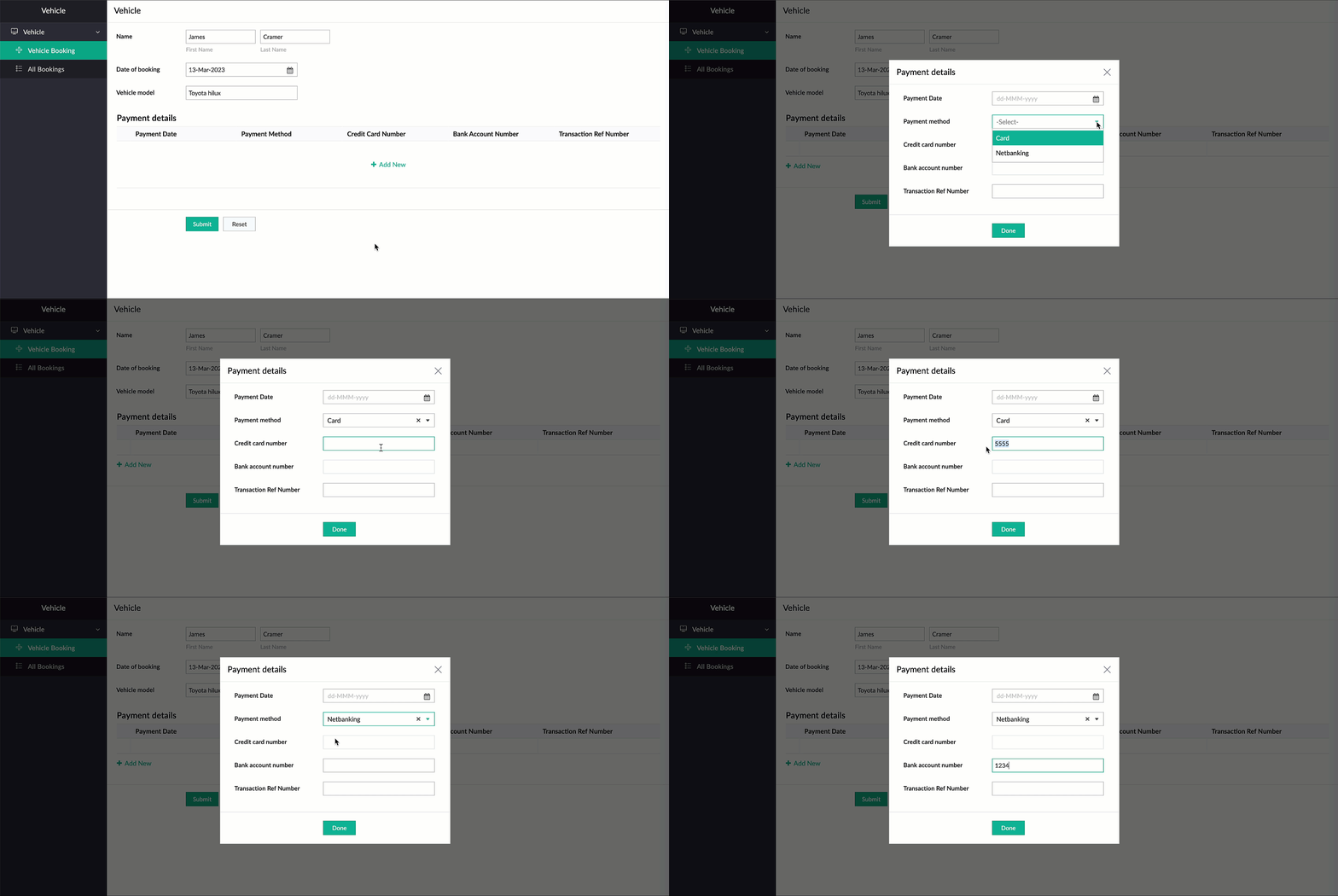
Let's assume a Vehicle form has fields like
Customer Name, Vehicle Model, and Date of Booking,
and a subform to collect payment details with the following fields:
Payment Date, Payment Method, Credit Card Number, Bank Account Number,
and
Transaction Ref Number.
Now, there are two payment options—Card and Netbanking. If Card is chosen, then the Credit Card Number field should be enabled and the Bank Account Number field should be disabled. Similarly, when Netbanking is chosen, then the Bank Account Number field should be enabled and the Credit Card Number field disabled.
Code snippet:
if(Payment_details.Payment_method == "Card")
{
enable row.Credit_card_number;
disable row.Bank_account_number;
}
if(Payment_details.Payment_method == "Netbanking")
{
enable row.Bank_account_number;
disable row.Credit_card_number;
}
{
enable row.Credit_card_number;
disable row.Bank_account_number;
}
if(Payment_details.Payment_method == "Netbanking")
{
enable row.Bank_account_number;
disable row.Credit_card_number;
}
Hide/show
The new show
and
hide subform
Deluge tasks can be used to show and hide specific fields.
Syntax: hide row.subform_field
show row.subform_field
show row.subform_field
Events: On add row, On delete row, On user input of subform field
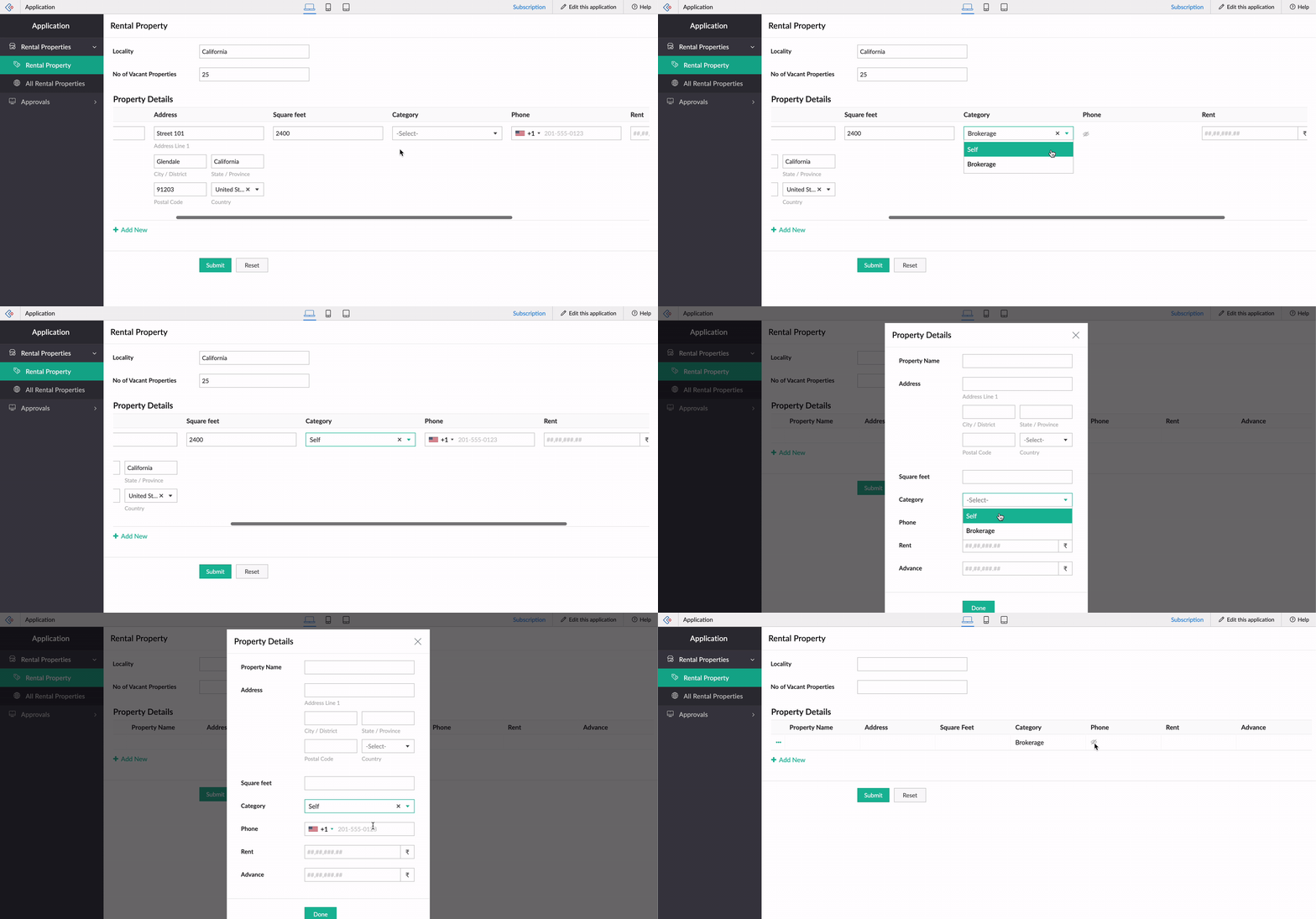
Let's use the example of a rental property manager who needs to keep track of a list of properties that are available in every locality. For this, a form is used for collecting information like Locality and No of Vacant Properties, and a subform will be used to list property details with the following fields: Property Name, Address, Square Feet, Rent, Advance, Category, and Contact Number.
When the category is Brokerage, we need to hide the contact number of the landlord. We can use the new Deluge tasks to achieve this.
Code snippet
:
if(row.Category == "Brokerage")
{
hide row.Phone_Number;
}
else
{
show row.Phone_Number;
}
-----
That's it from us on our subform enhancements! We expect these updates to be rolled out in the upcoming weeks. Once done, we'll pop in a comment below and also update our Release Notes page.
Don't forget—your feedback helps us make Creator better and stronger. We'd love to hear what you think about these updates. Please use the space below or send your feedback to
support@zohocreator.com.
Regards,
Zoho Creator Team
Topic Participants
Ashwin Vishal R
Jean Le Gal
stevesmith41
Darren Burn
Anurag Jaiswal
Sticky Posts
Introducing Zoho Creator's 2025 Release Projection 2
Hello Creators! I'm Prakash, from the Creator product management team, and today I'm delighted to unveil our next set of features as part of Release Projection 2 for 2025. With thoughtful analysis and planning, we've curated powerful new capabilitiesZoho Creator - 2023 Release Projection 1
Hello everyone! A very Happy New Year to you and your family. Hope you're all good and having a great time using Zoho Creator to make your lives easier and your businesses prosper. 2022 was an action-packed year for us at Creator, and we hope to continueZoho Creator User Group meetups in a city near you! - Oct - Nov, 2023
Greetings from the Zoho Creator team! We're hosting a series of Zoho Creator meetups in various cities across the globe, and we'd love to meet you there! Our meetups are a great opportunity to network with industry peers, exchange ideas and best practices,Zoho Creator - 2023 Release Projection 2
Hello everyone! Time truly flies when you're having an incredible journey, and today we mark the completion of an eventful and action-packed six months. It feels like just yesterday when we embarked on this adventure together with the launch of our newUpcoming Updates - August 2022
Hi all, Greetings from the Zoho Creator team! Today we've got news for you on some exciting updates. And rest assured— there’s more to come! In this post, we'll be going over the upcoming features and improvements for this month as mentioned below. A
Recent Topics
2025 Highlights: A Year of Steady Progress and Significant Developments
As we come to the end of 2025, let's take a moment to reflect on the significant progress and developments we've made to improve your travel and expense management. In the Spotlight Introducing Online Booking (US edition only - Early access) Enable onlineFunction #42: Show the actual rate of items on invoices
Hello everyone, and welcome back to our series! In Zoho Books, you have the ability to create Price Lists, wherein you can mark up and mark down the item rates by a specific percentage or set custom rates. Generally, when you apply a price list to anAbility to Set Text Direction for Individual Cells in Zoho Sheet
Dear Zoho Sheet Team, We hope you are doing well. We would like to request an enhancement in Zoho Sheet that allows users to set the text direction (right-to-left or left-to-right) for individual cells, similar to what is available in Google Sheets. UseNew in CRM: Dynamic filters for lookup fields
Last modified on Oct 28, 2024: This feature was initially available only through Early Access upon request. It is now available to all users across all data centers, except for the IN DC. Users in the IN DC can temporarily request access using this formWarehouse fast processing
Hey guys, would anyone be interested in something like the attached image ? If there's any interest I'd be willing to develop it further for others to use, it's much faster than using Zohos native solutions, it can part pack, pack in full, part ship,Automatic Invoice Number generation for createRecord
Hello, while testing some custom Buttons in my Zoho Books application, I noticed that I get an error that previously did not occur. After some further digging I found that the automatic transaction numbering of invoices no longer work in my organization.Can I create a CODE 128 custom field for my items in Zoho Inventory and then use it for generating Sales Orders?
Can anyone helps me, I don't want to use the SKU code for scanning my products. Because all my products have a CODE-128 label attached.Start/Stop Timmer in Chrome Extension
The chrome extension is great and allows you to do allot however one of the most common things employees working on projects need to do is track their time. Having an easy start/stop timer to track time would be great.Invalid collection string
I haven't changed anything in one of my functions. I'm trying to run it manually and suddenly "Invalid collection string" appears. My code has 6 lines and the error says that the error is on 7th line. Why? What does this error mean? Nothing has been changedZoho Directory 2025: New Features | Security Enhancements | Enriched UI
Hello everyone, Greetings from the Zoho Directory team! 2025 has been a highly successful year for Zoho Directory. We are delighted to introduce a fresh set of features, an enriched UI, and major product enhancements. These updates aim to deliver a smootherBulk Schedule for Posting TikTok
Hallo, We have a client whose business is a social media agency specifically TikTok. Currently they are handling 30 TikTok accounts from. I think zoho Social can handle it with Agency License + with Add on 10 Brands. Their concern is related to postingzoho people 5 report
How do I customize my report in Zoho People Report? I understand that I can get the results of multi-table queries through SQL join statements, but I don't know the relationship between each table. I tried to create a report using Attendance User ReportLeave Report Emailed Weekly
I am wondering if someone knows how to have a report generated either weekly or monthly or both for department heads and ownership of upcoming employee leave. For instance, it would be nice to get an emailed report on Friday for the upcoming week of whoZoho Flow Decision Continuing Despite Not Meeting Conditions
I have a picklist field called Lead Status in the leads module, with the following lead Statuses: New Lead Attempted Contact - 1 Attempted Contact - 2 Attempted Contact - 3 Attempted Contact - 4 Attempted Contact - 5 Attempted Contact - 6 Attempted ContactTip #55- Accessibility Controls in Zoho Assist: Exploring Vision Settings- 'Insider Insights'
As we approach the end of the year, it’s a good moment to reflect on how we can make our tools more inclusive and easier to use for everyone. Remote support often involves long hours in front of screens, varied lighting conditions, and users with differentZoho Recruit Slow and Freezing on all screens
We have had an issue with Zoho Recruit for weeks being extremely slow and at times freezing. We have 100 mega internet, and I went into each computer and updated the virtual memory so there is more available. Also restarted all computers daily. Still having the issues. Almost unable to work.Credit Management: #2 Configuring Right Payment Terms for Credit Control
Think about the last time you ordered something online and saw that little note at the checkout, "Pay on Delivery" or "Pay later". It's simple, but it actually sets the tone. As a business owner, you know exactly when payment is expected. Now, imagineDependent (Conditional) Fields in Zoho Bookings Forms
Hello Zoho Bookings Team, Greetings, We would like to request the ability to create dependent (conditional) fields in Zoho Bookings registration forms. Current Limitation: There is currently no way to make one field’s available options depend on the valueBug Report: Search fails to find existing notes after Evernote import
Hello, I recently migrated from Evernote (~2600 notes across 23 notebooks), but the search functionality is currently broken. The Issue: I can manually browse to a specific note and see it exists. However, when I type the exact or partial title of thatMarketing Tip #13: Win repeat customers with post-purchase emails
The relationship with your customer doesn’t end after the sale; that’s when it begins. A thoughtful post-purchase message shows customers you appreciate them, keeps your brand top of mind, and can even lead to another sale. You can thank them, ask forZoho Form
I have problem with Zoho Form. One of form i don't received the PDF version. Others okay except this one. W904533Create & Update Zoho Vault Passwords via Zoho Flow
Hi Zoho Flow / Zoho Vault Team, We’d like to request an enhancement to the Zoho Vault integration in Zoho Flow. Current Limitation: At the moment, Zoho Flow supports only the following selected Zoho Vault actions, such as: Fetch passwords, Share passwordsCredit Note for Shipped and Fatoora pushed invoices
We have shipped a Sales Order and created an Invoice. The Invoice is also pushed to Fatoora Now we need to create a credit note for the invoice When we try it, it says we need to create a Sales Return in the Zoho Books, we have already created a SalesCustom Related List Inside Zoho Books
Hello, We can create the Related list inside the zoho books by the deluge code, I am sharing the reference code Please have a look may be it will help you. //..........Get Org Details organizationID = organization.get("organization_id"); Recordid = cm_g_a_data.get("module_record_id");Features, Feedback and Votes
We’re launching the Feedback Forum for our customers. This is 'THE' place where you can add everything you’d like to see in Zoho Books. If you don't find the specific feature you need, simply add it so others can also vote for it. While we cannot promisePayment system for donations management
I manage an organization where we receive donations from payers. Hence, there is no need to first create invoices and then create payments received against the invoices. What are the recommended best practices to do this in ZohoBooks?There Might Be A Glitch in Determining If A String Represents A URL
I suspect there might be a glitch in determining if a string represents a URL or not. For example, I cannot embed the following URL. Perhaps the exclamation mark or parentheses are the culprit? https://en.wikipedia.org/wiki/How_the_Grinch_Stole_ChriCustomer Management: #4 Enhance Customer Journey
When Neha started DefineOps, a growing IT support and consulting firm, most of her work was straightforward. A client would sign up for a free version, decide whether the service works for them, and then either continue or discontinue. Billing was simple,Android app sync problem - multiple devices have same problem
Hello, I am having a problem with synchronization in the Android app. When I create a drawing, the data does not sync correctly—only a blank note is created without the drawing. I tested this on multiple devices, including phones and tablets, and theMarketing Tip #1: Optimize item titles for SEO
Your item title is the first thing both Google and shoppers notice. Instead of a generic “Leather Bag,” go for something detailed like “Handcrafted Leather Laptop Bag – Durable & Stylish.” This helps your items rank better in search results and instantlyTerritory Assignment Issues (Lead to Account + Contact)
1. Lead → Account & Contact Territory Assignment on Conversion A Lead is automatically assigned one or more territories using a workflow and Lead Assignment Rules. This works as expected, and we are able to assign multiple territories to a Lead automatically.Marketer's Space: Proven tips to improve open rates – Part II
Hello Marketers! Welcome back to another post in Marketer's Space! We're continuing from where we left off a fortnight ago. We ended the previous post discussing the subject line, and we'll continue from there. Let's dive right in. Pre-header Pre-headerSQL Table slowed to a crawl
Hi all - I seem to have noticed an update. Now whenever I am typing in the script field for the SQL tables there is a huge delay and it is all very slow. This has never been the case for me in over 5 years of using Analytics - I really hope it's fixedDeluge Events/search API works in user environment but not in sandbox – why?
I am creating an Extension for Zoho CRM using Zoho Sigma Platform I’m using the following Deluge code to search Events in Zoho CRM based on Start_DateTime: criteria = "(Start_DateTime:greater_than:2025-12-20T00:00:00+00:00)"; url = "crm/v8/Events/search?criteria="Ensure Consistent Service Delivery with Comprehensive Job Sheets
We are elated to announce that one of the most requested features is now live: Job Sheets. They are customizable, reusable forms that serve as a checklist for the services that technicians need to carry out and as a tool for data collection. While onWhat are Zoho Meeting capabilities included in Zoho Workplace Standard?
I am evaluating using Zoho Meeting for my organization, but it is not clear what Zoho Meeting capabilities are already included in Zoho Workplace Standard. - Are meeting recordings included in Workplace Standard? - Can we invite external meeting participantsHow can I get the participant list of a reoccurring meeting afterwards?
I'm trying to use the Meeting Participant Report from the API docs but when I call it on a reoccurring meeting it returns that there are no participants because it thinks I'm talking about the meeting in the future. Is there a way to use webhooks or someFunction #50: Send Mass emails to your customers
Hello everyone, and welcome back to our series! We have reached a milestone of 50 Functions, which means that we have automated 50 different tasks in Zoho Books. Every Friday, we have shared a nifty function aimed at either automating a task or streamliningFull Hebrew Language Support for Client-Side Zoho Assist Interface
Dear Zoho Assist Team, We would like to request an enhancement to Zoho Assist's client-side interface to support full Hebrew language customization, including all popups, notifications, and session-related messages. Current Limitation The Join page allowsAdd Hebrew & RTL Support to Feedback Widget
Hello Zoho Desk Team, How are you? We are using Zoho Desk and would like to utilize the Feedback Widget. While Zoho Desk itself supports Hebrew and RTL, the Feedback Widget unfortunately does not. We kindly request that Hebrew and full RTL support beNext Page