Augmenting subform capabilities
Greetings, everyone!
Finally, the day has come for us to announce some of the most anticipated, requested, and exciting updates to
subforms in Zoho Creator.
As you're aware, subforms are an integral part of Creator forms, as they help in establishing proper modelling of the app, collecting rows of data, and setting up users to enter data that has a parent-child relationship. With this new set of updates, we've bought in a paradigm shift to subforms, as they'll be getting an all-new look for an improved user experience, along with new capabilities for solving challenges. This post will give you a sneak peek into these new subform enhancements.
Do you find it difficult to scroll subforms horizontally? Do you wish you could drag and drop subform rows? Do you want to manipulate subform fields via Deluge script? Then your wait has come to an end—continue reading to learn more on how you can now do all of this in subforms.
Subform list and pop-up view
As announced in the
March 2023 post, the List
view type of subforms will display the subform as a pop-up, and the current method of displaying subforms has been christened
Grid.
To further understand how this can be helpful, let's put ourselves in the shoes of a supply chain manager. Their job requires them to regularly keep track of inventory lists in their warehouses.
Let's assume there's a form collecting warehouse details, like name, location, and stock inventory. For collecting the stock inventory details, a subform is present with these fields—Item No, Name, Manufacturer, Description, Cost Per Item, Stock Quantity, Inventory Value, Units Sold, Reorder Quantity, Reorder Date,
and
Person In Charge.
Now, the default view type will tire you out from scrolling back and forth horizontally, and results in a frustrating time-consuming process. We all long for a new way to avoid this and make data entry swifter.
To achieve this, make use of the new List option under
Subform->Field Properties->View Type.
List view, which looks similar to our list report, is a table-like subform without inline inputs. When you try adding or updating data in each row, a pop-up will be displayed listing out the fields with vertical scrolling, thereby ensuring a vastly superior user experience and more effective space management.
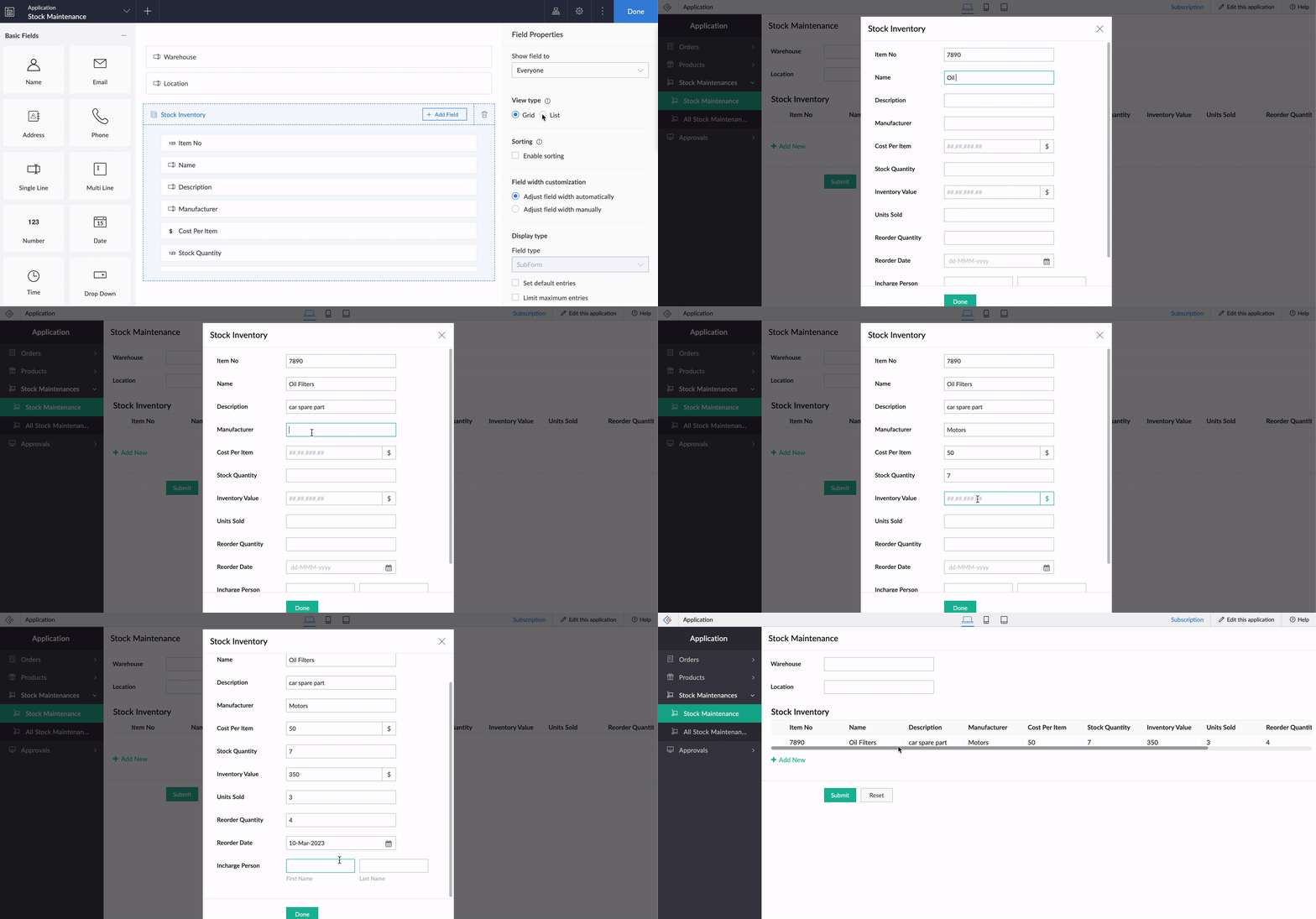
Crucially, it also helps to load subform rows quickly while editing records, by reducing the loading time.
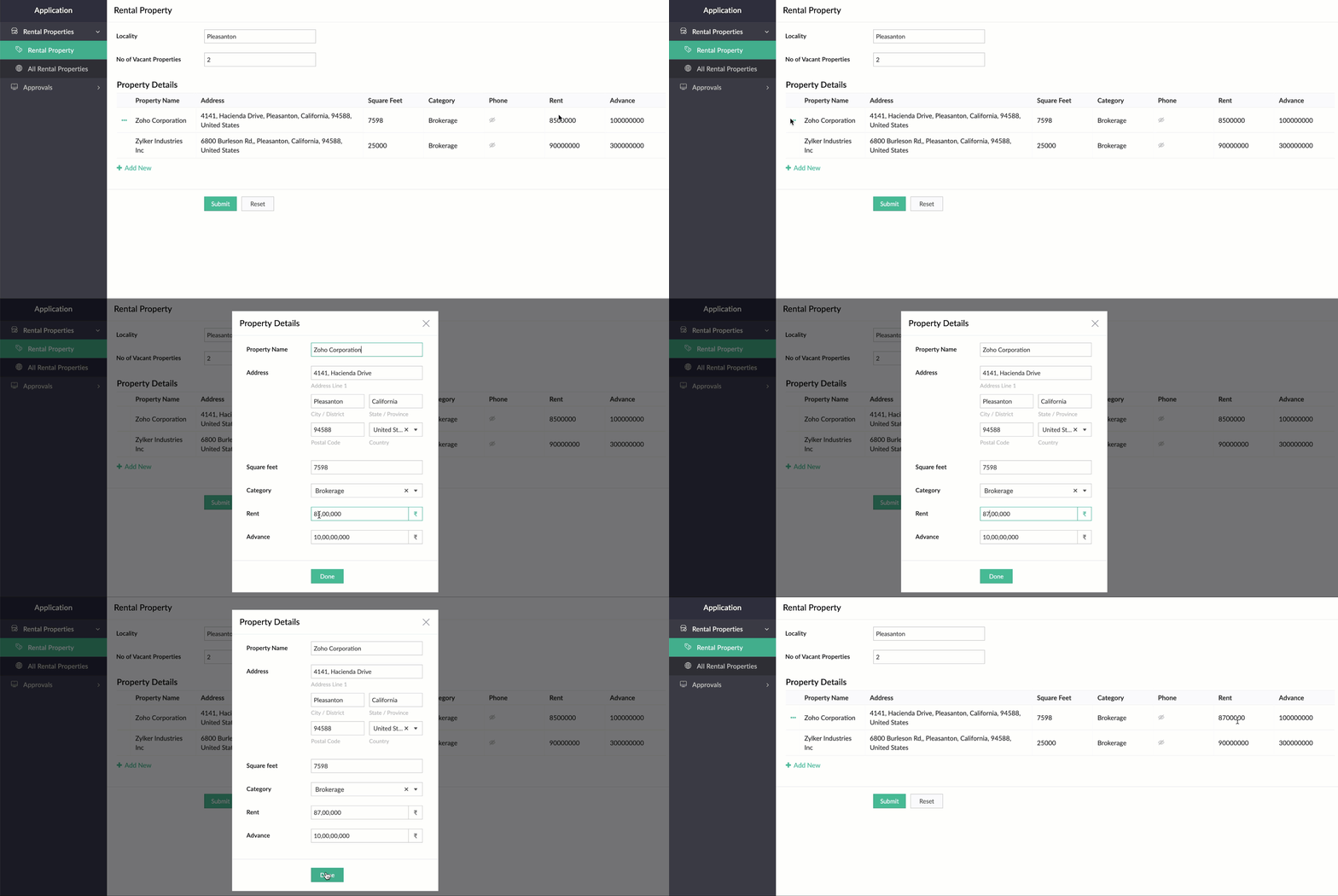
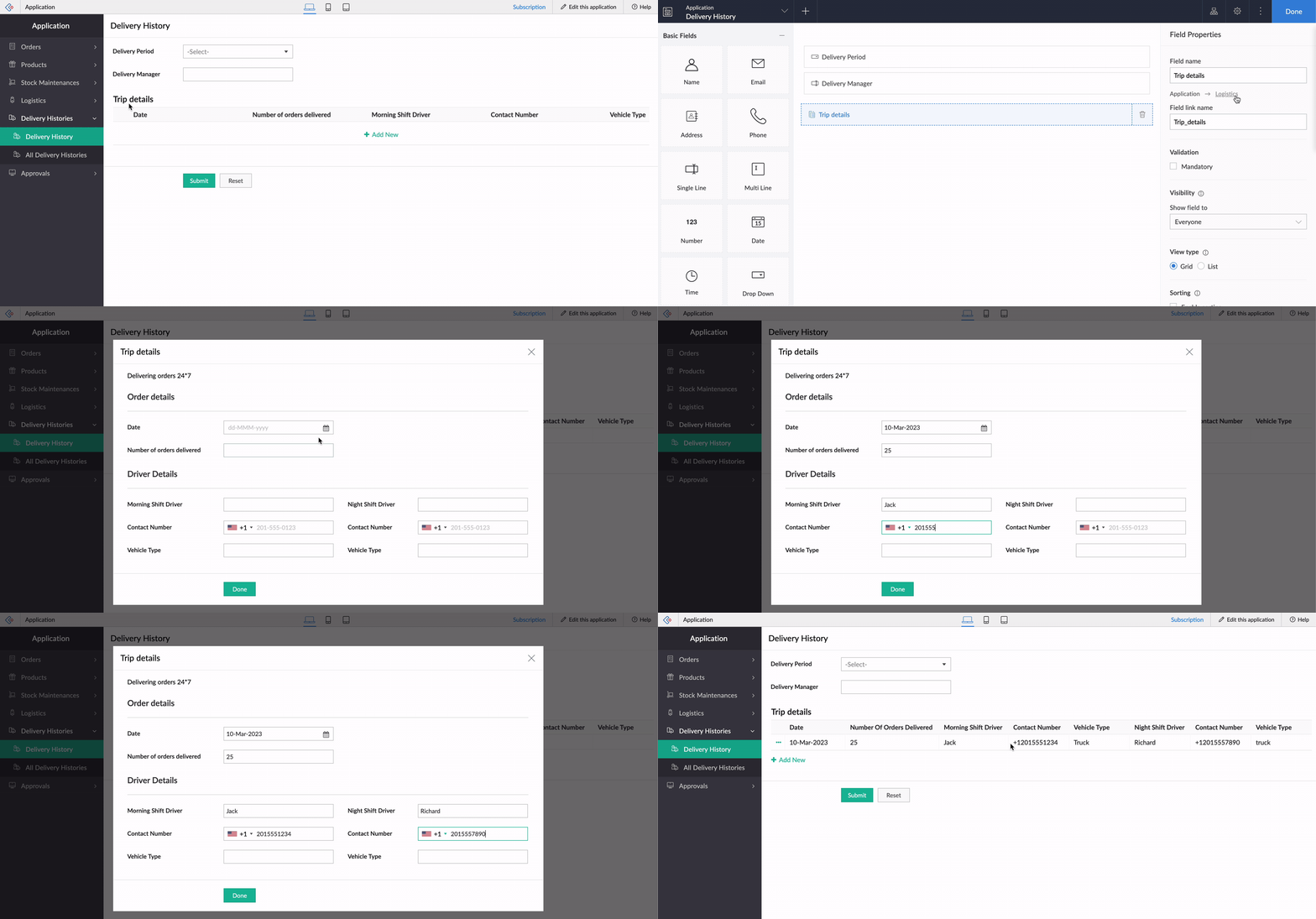
While using an existing form as a subform, the form's exact structure will be replicated in the pop-up, to ensure consistency in the look and feel of the form. To understand this better, let's assume our form has a two-column layout, with
Section
and Note
fields. Now the same customizations will be displayed in the pop-up, too!
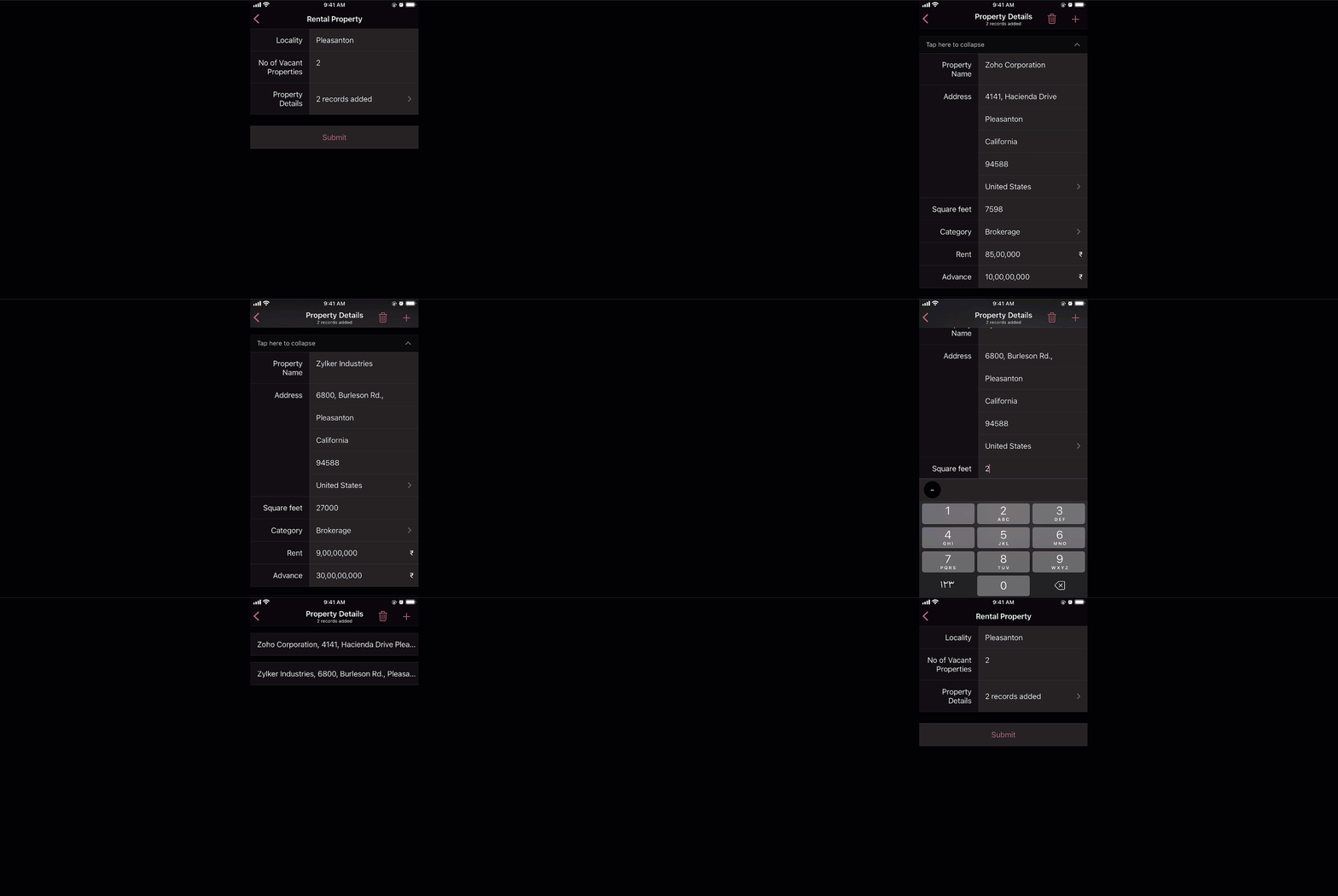
And that's not all—the new List view type is being extended to mobile apps, too. When it's enabled, the subform will be opened in the next screen, where users can add their data. This data will then be added as a subform row.
Custom sorting
Currently, the only sorting option in subforms is
field-based sorting, where you can choose a field based on which rows are sorted, either in ascending or descending order. Though this works well for basic cases, the need may arise in some cases to sort the subform in random order. With the new custom sorting support, you can effortlessly drag and drop subform rows to rearrange them.
To understand how it works, let's consider a task manager working on a To-Do List
form, to plan activities for a current project. For this, they have a main form collecting
project details, date-time,
and
milestones,
and a subform for maintaining the to-do list with the following fields:
Task Name, Description, Category, Status, Deliverables, Priority, and
Deadline. Here, before submitting the list, they want to rearrange some tasks based on their daily routine.
To achieve this, they use the Custom sorting option under
Subform->Field Properties->Sort type.
Now, with custom sorting, all they need to do to reorder the row sequence—both while adding and editing records—is simply drag and drop them in the required position.
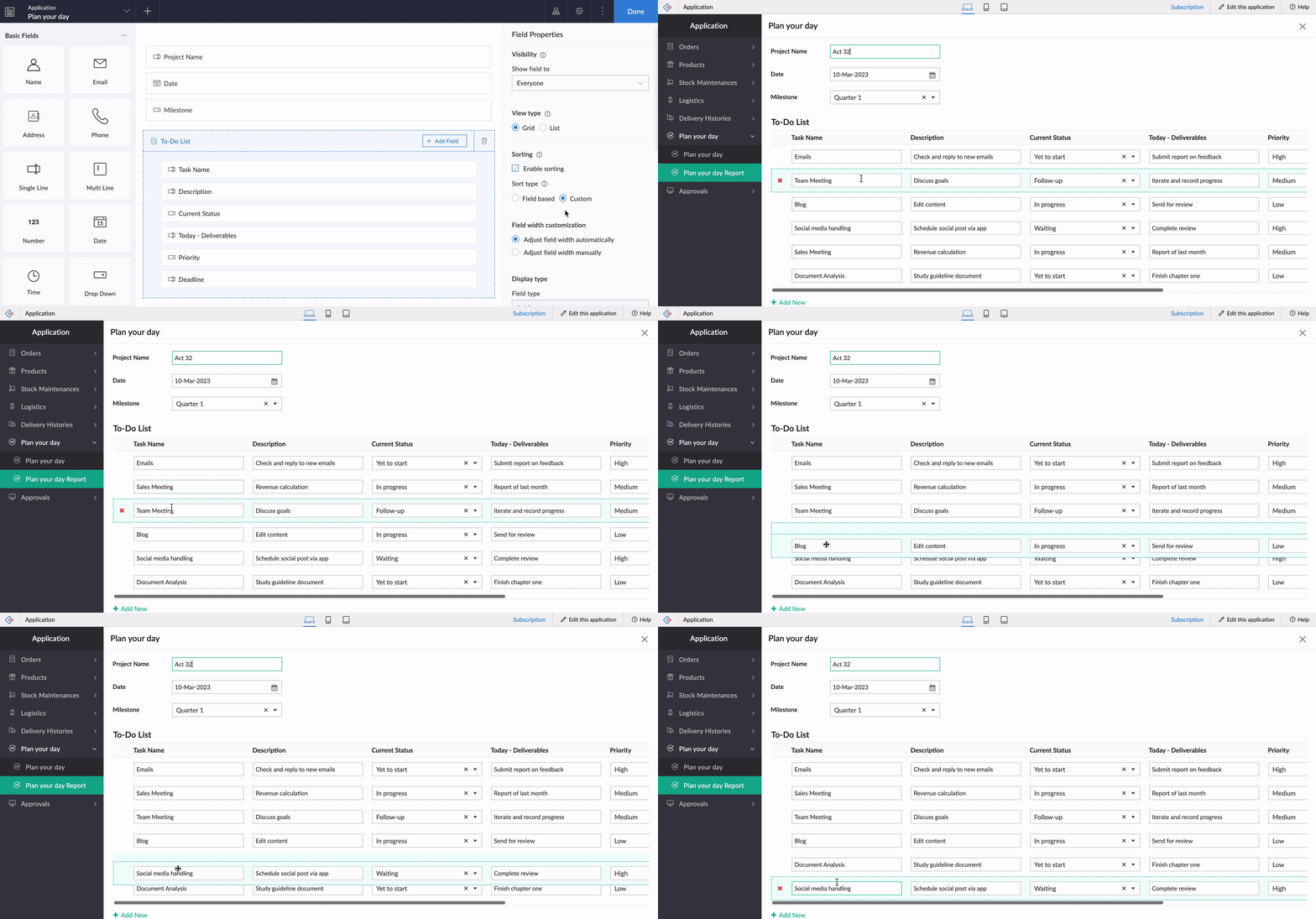
The same order will be retained in reports or while opening the form for updating the list.
Note:
Custom sorting can be used both in List and Grid-type subforms.
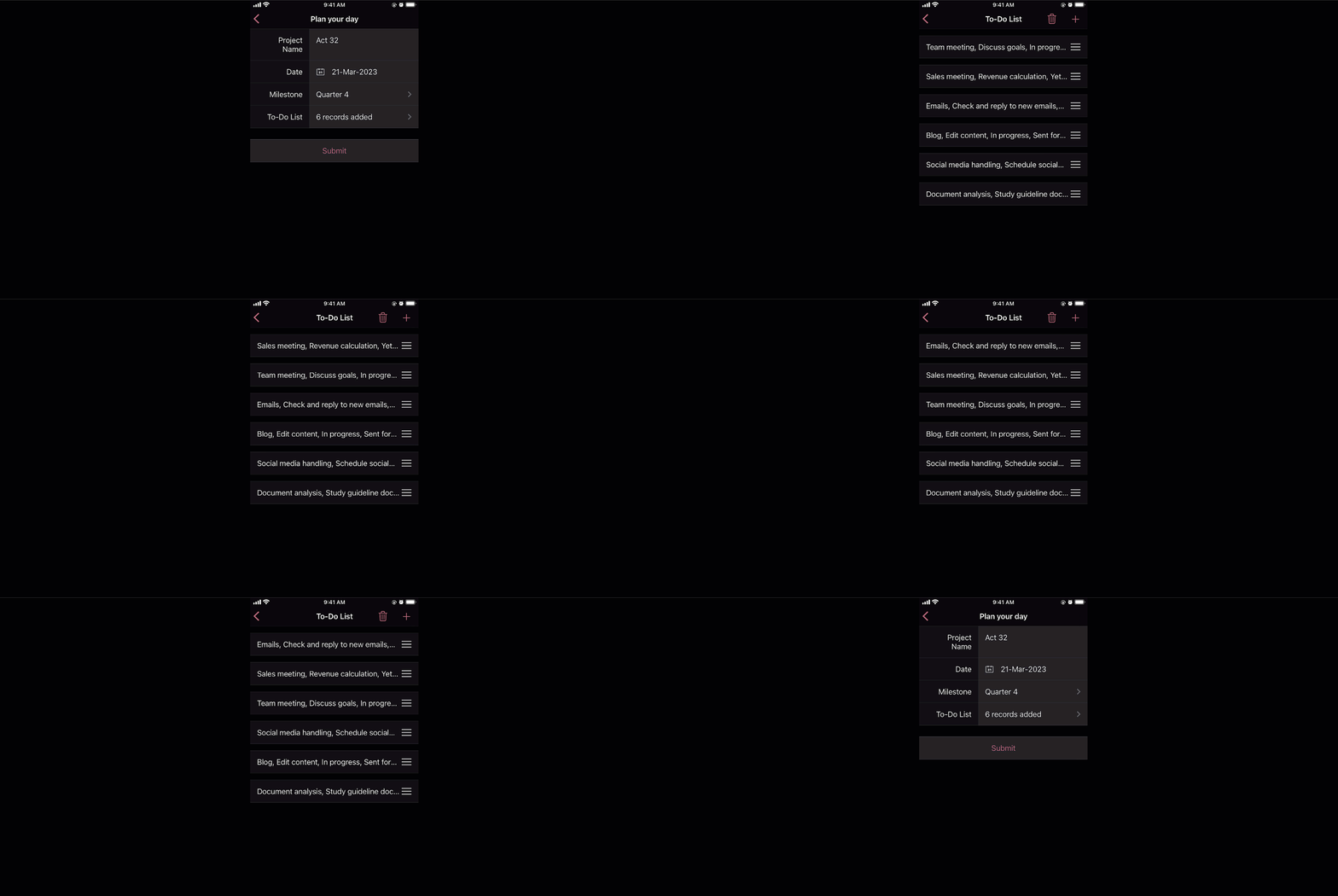
Custom sorting will also be available on the mobile apps and you can effortlessly rearrange fields in subforms.
Deluge tasks for row-level actions
You can use a combination of workflows and Deluge scripts to help your subforms handle complex business logic. With that in mind, we formulated the idea of bringing in actions that help you take control at the row level of subforms.
In the past, you may have come across business scenarios which required you to hide/show or enable/disable a particular field in a specific subform row. Now, with new dedicated Deluge tasks, you can bid adieu to shortcuts and workarounds.
Note:
Deluge tasks can be used both in List and Grid-type subforms.
Enable/disable
The new enable and disable subform Deluge tasks can be used to enable and disable specific fields.
Syntax:
enable row.subform_field
disable row.subform_field
disable row.subform_field
Events:
On add row, On delete row, On user input of subform field
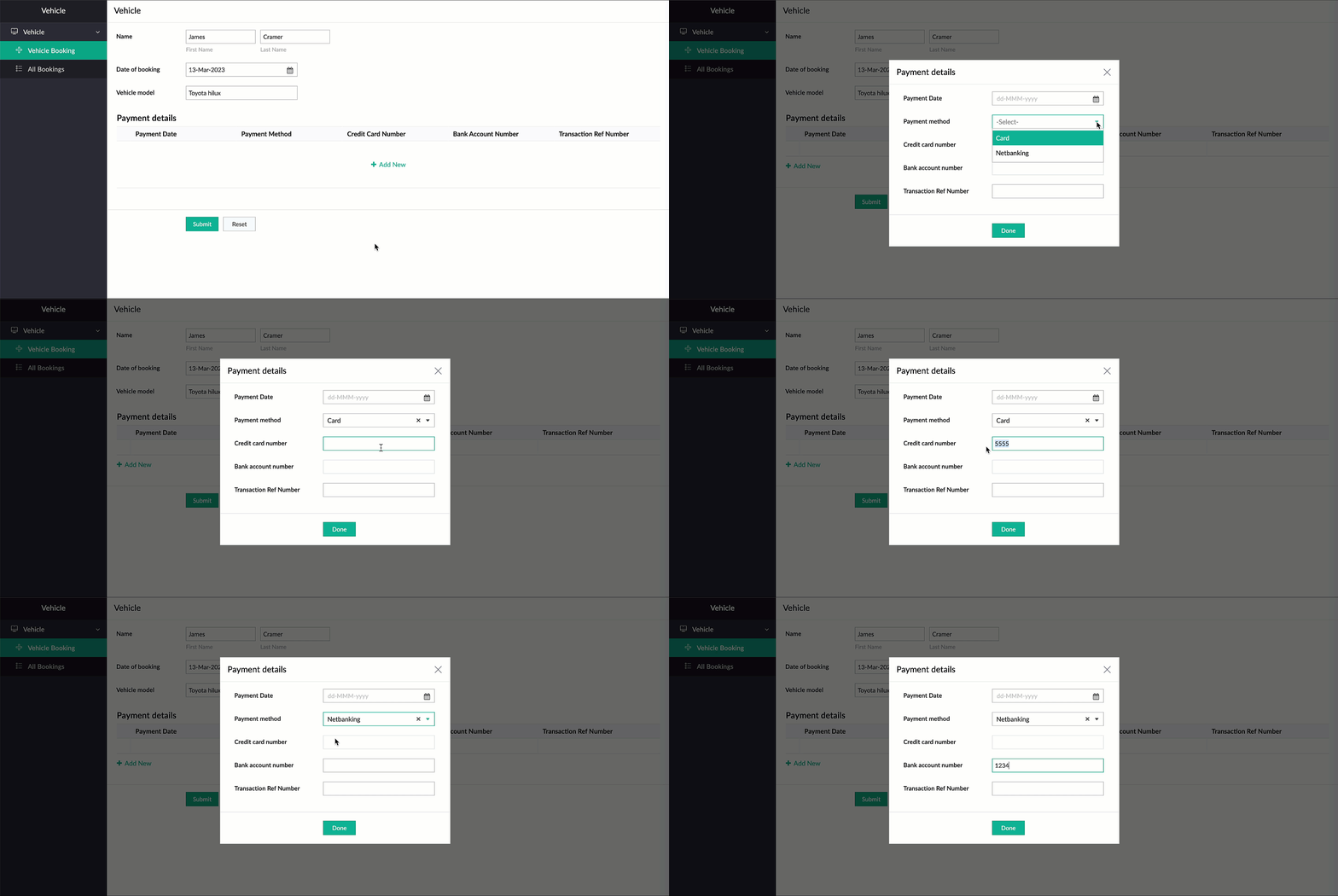
Let's assume a Vehicle form has fields like
Customer Name, Vehicle Model, and Date of Booking,
and a subform to collect payment details with the following fields:
Payment Date, Payment Method, Credit Card Number, Bank Account Number,
and
Transaction Ref Number.
Now, there are two payment options—Card and Netbanking. If Card is chosen, then the Credit Card Number field should be enabled and the Bank Account Number field should be disabled. Similarly, when Netbanking is chosen, then the Bank Account Number field should be enabled and the Credit Card Number field disabled.
Code snippet:
if(Payment_details.Payment_method == "Card")
{
enable row.Credit_card_number;
disable row.Bank_account_number;
}
if(Payment_details.Payment_method == "Netbanking")
{
enable row.Bank_account_number;
disable row.Credit_card_number;
}
{
enable row.Credit_card_number;
disable row.Bank_account_number;
}
if(Payment_details.Payment_method == "Netbanking")
{
enable row.Bank_account_number;
disable row.Credit_card_number;
}
Hide/show
The new show
and
hide subform
Deluge tasks can be used to show and hide specific fields.
Syntax: hide row.subform_field
show row.subform_field
show row.subform_field
Events: On add row, On delete row, On user input of subform field
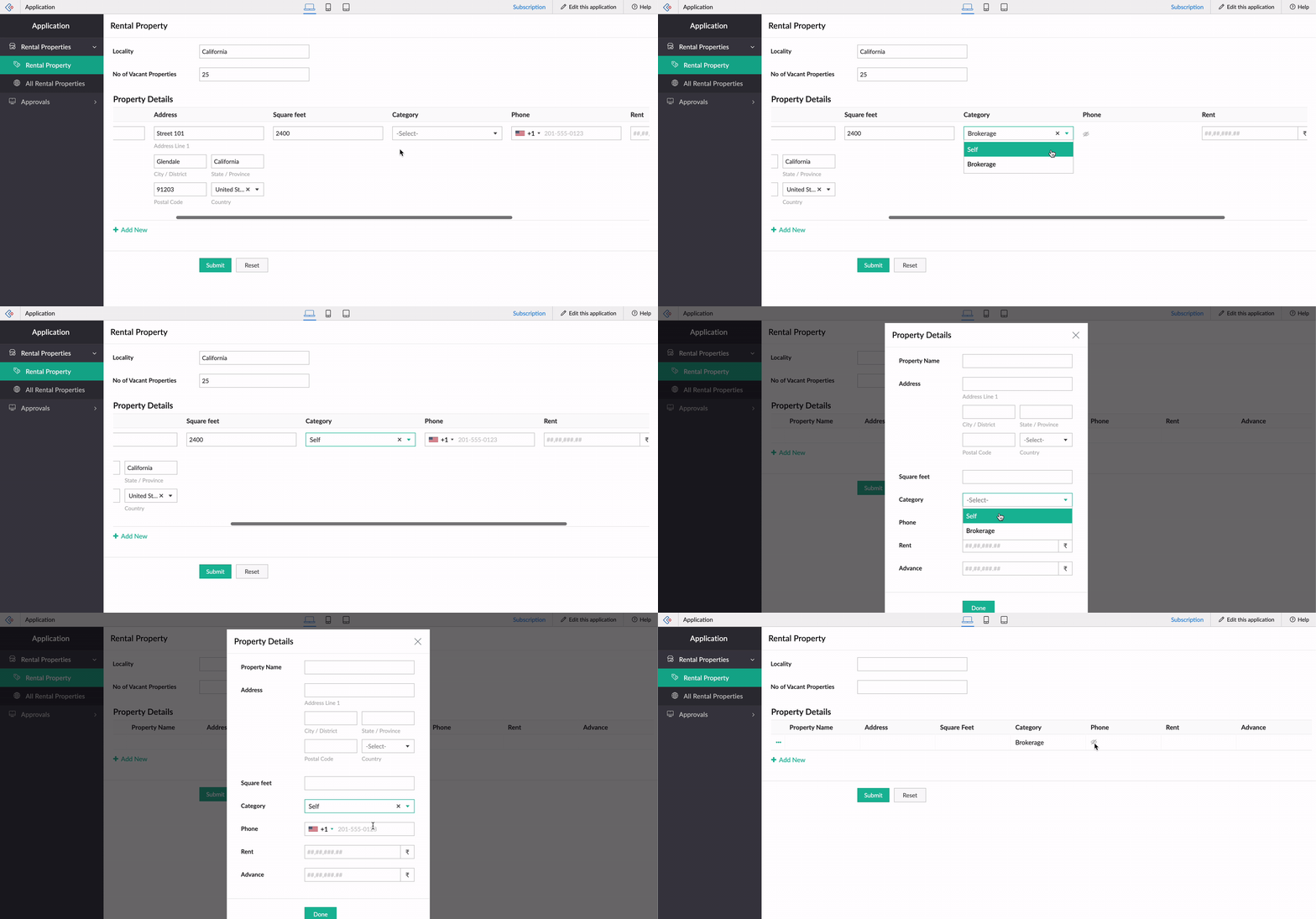
Let's use the example of a rental property manager who needs to keep track of a list of properties that are available in every locality. For this, a form is used for collecting information like Locality and No of Vacant Properties, and a subform will be used to list property details with the following fields: Property Name, Address, Square Feet, Rent, Advance, Category, and Contact Number.
When the category is Brokerage, we need to hide the contact number of the landlord. We can use the new Deluge tasks to achieve this.
Code snippet
:
if(row.Category == "Brokerage")
{
hide row.Phone_Number;
}
else
{
show row.Phone_Number;
}
-----
That's it from us on our subform enhancements! We expect these updates to be rolled out in the upcoming weeks. Once done, we'll pop in a comment below and also update our Release Notes page.
Don't forget—your feedback helps us make Creator better and stronger. We'd love to hear what you think about these updates. Please use the space below or send your feedback to
support@zohocreator.com.
Regards,
Zoho Creator Team
Topic Participants
Ashwin Vishal R
Jean Le Gal
stevesmith41
Darren Burn
Anurag Jaiswal
Sticky Posts
Introducing Zoho Creator's 2025 Release Projection 2
Hello Creators! I'm Prakash, from the Creator product management team, and today I'm delighted to unveil our next set of features as part of Release Projection 2 for 2025. With thoughtful analysis and planning, we've curated powerful new capabilitiesZoho Creator - 2023 Release Projection 1
Hello everyone! A very Happy New Year to you and your family. Hope you're all good and having a great time using Zoho Creator to make your lives easier and your businesses prosper. 2022 was an action-packed year for us at Creator, and we hope to continueZoho Creator User Group meetups in a city near you! - Oct - Nov, 2023
Greetings from the Zoho Creator team! We're hosting a series of Zoho Creator meetups in various cities across the globe, and we'd love to meet you there! Our meetups are a great opportunity to network with industry peers, exchange ideas and best practices,Zoho Creator - 2023 Release Projection 2
Hello everyone! Time truly flies when you're having an incredible journey, and today we mark the completion of an eventful and action-packed six months. It feels like just yesterday when we embarked on this adventure together with the launch of our newUpcoming Updates - August 2022
Hi all, Greetings from the Zoho Creator team! Today we've got news for you on some exciting updates. And rest assured— there’s more to come! In this post, we'll be going over the upcoming features and improvements for this month as mentioned below. A
Recent Topics
Analytics : How to share to an external client ?
We have a use case where a client wants a portal so that several of his users can view dashboards that we have created for them in Zoho Analytics. They are not part of our company or Zoho One account. The clients want the ability to have user specific,Reference Deal Categories in Deluge
Hello, Is there a way to reference Deal Category in deluge functions? So for our Deals, we have several different WON stages in a pipeline. Rather than type each stage into our functions, we'd like to be able to reference the Deal Category. SimilarUsers Name & Email in Reports
Hi, I would like to show the Users Name from their Zoho Acount in All Entries/Reports as well as the current Account Email. Thanks DanWorkflow Creation with Zia gets stuck
It gets stuck here:Unable to Add Asset to Work Order Due to Different Contact and Company
Hello Zoho Team, I’m facing an issue in our environment related to asset linking in Work Orders. Here’s the situation: When our engineers go for field activities, they initially create the Work Order using the salesperson’s contact details. After completingI NEED MORE CUSTOM FIELDS!!!
Why can I only have 60 custom fields! It's not enough. I want another 100 extra custom fields to do what's necessary for my business! I'm sure I can't be the only one with this problem!!! How hard would it be to fix this? Just fix it for me please atZoho Webinar et Zapier : de la prise de rendez-vous aux relances — une automatisation performante
Organiser un webinaire réussi et gérer efficacement les participants peut être un véritable défi. Avec Zoho Webinar et Zapier, vous pouvez rendre vos processus plus simples. Vous gagnez du temps en automatisant les tâches répétitives. Résultat : une expérienceTicket Stages Report
From data to decisions: A deep dive into ticketing system reports Ticket stages refer to the series of transitions from the moment a support ticket is created until it is closed. It moves through various stages based on the actions taken at each preceding【参加無料】今年最後のZoho ユーザー交流会|東京・大阪・名古屋で開催! 活用事例&ユーザー同士の情報交換
ユーザーの皆さま、こんにちは。コミュニティチームの中野です。 11月に東京、大阪、名古屋の3都市でZoho ユーザー交流会を開催します! 毎回ご好評いただいている本イベントでは、実際の Zohoユーザーによるリアルな活用事例の共有や 参加者同士でノウハウを交換し合うグループワークを予定しています。 「他社の活用を参考にしたい」「Zoho をもっと使いこなしたい」方にぴったりの場です。 初参加の方もぜひお気軽にご参加ください! ーーーーーーーーーーーーーーーーーーーーーーーーーーーーーーーーーーーーーSlow Performance on desk.zoho.com. 11/3/2025
I’m not seeing any active service alerts for desk.zoho.com, but everyone on our account is currently experiencing very slow load times when opening or navigating tickets. We’ve already tried the standard troubleshooting steps — clearing cache and cookies,Create View to See Tickets Closed within the last 3 days
I'm trying to create a view in Zoho Desk that shows me "recently closed ticket," which I will define as tickets closed in the last 3 days. I want this view to update so that whenever I click to view it is recalculates and shows me tickets closed withinRecurring Events Not Appearing in "My Events" and therefore not syncing with Google Apps
We use the Google Sync functionality for our events, and it appears to have been working fine except: I've created a set of recurring events that I noticed were missing from my Google Apps calendar. Upon further research, it appears this is occurringDissociate account from contact
Hello, When I make the call through the API to "Dissociate account from contact" using, /api/v1/contacts/**integer**/accounts/**integer**/dissociate I get this response back, 422Unprocessable Entity (WebDAV) (RFC 4918) { "errorCode": "INVALID_DATA", "message":Zoho Desk and Zoho People Integration - is it possible in order to alert whether an agent is available
Hi, We use Zoho People for our employees to log absence (Paid Time Off etc). I was wondering if it was possible that this information can be shared in to Zoho Desk, so that when allocating a ticket to an agent, if they are on leave there is an onscreenAdd Save button to Expense form
A save button would be very helpful on the expense form. Currently there is a Save and Close button. When we want to itemize an expense, this option would be very helpful. For example, if we have a hotel expense that also has room service, which is aCall transcrition working for ringcentral?
I don't see anything about what telephony providers can be used. The Zoho support person A said that RingCentral isn't supported. Zoho support person B said that it works, just make sure the call recording link works. Excellent instructions here: CallHow to Send Email from within a custom module (with or without an email template)
It is possible to send an email from the Deals module. However, I can't find a way to send an email from any of our custom modules. I have tried adding an email field to the modules (even though we don't really want one or need it there). That doesn'tZoho Inventory - Managing Items With Multiple Suppliers
Hi community, I'm working on a project at the moment for a car parts wholesale business. Each Item (part) has its own original manufacturer part number (sometimes more than one part number for the same item). When purchasing parts from 3rd party suppliers,How do I see the total leads during a certain period?
I understand I can get the count of leads and potentials but the total number of leads in a certain period should be equal to Leads+potentials because when we convert a lead it gets moved to potentials and no longer exists there. is there a way i couldWhere is the Global Search field?
I am looking for an alternative to SF.com. Zoho CRM seems to be work fine, and be customizable in terms of the fields and reports. But there's one big thing missing and it's going to prevent us from using it: there's no global search box at the top ofKeeping start and end time logged, when using the timer
As it seems to be now: I sometimes forget to stop and restart the timer, when switching projects. And switching between projects happens upto 10 times a day. Since there's no indication to when a timer was started or stopped, I have to guess how many hours I have to remove from one project and add it to another.API 500 Error
Hello amazing ZOHO Projects Community, I get this message. How can we solve this? { "error": { "status_code": "500", "method": "GET", "instance": "/api/v3/portal/2010147XXXX/projects/2679160000003XXXX/timesheet", "title": "INTERNAL_SERVER_ERROR", "error_type":In place field editing for candidates
Wondering about any insight/best practices for efficiently updating candidate records while reviewing them in a Job Opening pipeline. We can do in-field editing (e.g. update job title or City) only when we have the full candidate record open, howeverDefault tax type for mileage?
Where we are, mileage includes a government tax. Is there any way to set a default tax for the Personal Car Mileage category of expense? (Or any other way?)Show price book list price
When using price books, once you add products to the price book in the Products related list you can display the Unit price which is the default list price; however, there is no option to show the price book list price. To see the price book list priceCliq File Upload
While uploading large file like 500MB, it takes time, that fines. But if you resize window or move window in other screen, that uploading disappears. After upload complete & sent it will be visibleConstant color of a legend value
It would be nice if we can set a constant color/pattern to a value when creating a chart. We would often use the same value in different graph options and I always have to copy the color that we've set to a certain value from a previous graph to makeWhat's New in Zoho POS - October 2025
Hello everyone, Welcome to Zoho POS's monthly updates, where we share our latest feature updates, releases, changes, and more. Let’s take a look at how October went. Process returns for refunds, exchanges, or offer store credit Returns and exchanges canLoan and purchase
My husband is lending me mobey to buy a vehicle intersst free ... I need to know how to record the cash receipt and how I pay it back... the money is for a vehicle do I just post the invoice for that as I normally would usung the loan money to pay forZoho Connect Module in Zoho Trident
Hi I really like where Zoho Trident is going. Having Mail and Cliq in one place is especially powerful. However, Zoho Connect really needs to be included to make this a true communication and collaboration hub. I would like to request that Zoho ConnectFile Field Validation
Hello all, We are tracking our customer NDA agreements in our CRM and have created 2 fields to do so, an execution date field and a file upload field. I want to create a validation rule to ensure that when the execution date field is populated that the100 record view limitation
I have just migrated from another CRM and am starting in ZOHOcrm with over 5000 contacts. It seems that my searches and sorts are limited to 100 live records....or am I missing something. This seems to be very limiting...in a lot of scenarios (mass email,ZUG Meet-ups are back - Across India (December 2025)
The Zoho User Group (ZUG) meet-ups are back, and this time, we’re travelling across India to reconnect with our amazing community! From Chennai to Delhi, Bengaluru to Mumbai, we can’t wait to meet you all in person and talk everything Zoho SalesIQ, automation,Categorise Attachments
We take ID, proof of address, right to work documentation and more. I can upload a single file in to field, but we often receive multiple files for each category e.g. someone may send a separate file for the front and back of their national ID card. My team don't have time to manipulate the files in order to upload them as a single file. The options, as far as I can tell, would be to create additional fields on attachments in order to categorise what the file is, or to be able to upload singleScheduling a meeting for just a 1:1 phone call
My business is B2C and many of my customer's don't want to engage in an online meeting for what can be handled in a regular phone call. I am trying to create a new meeting invitation, but there is no venue optoin for "phone call". How are other's handlingNeed more details on API Usage Dashboard
Hi Team, We have implemented Zoho Expense for a client and has done some integrations with well known third party ERP via api. Recently we have noticed a huge spike in the API consumption. But we couldn't get the root cause for the same. I accept therePower of Automation:: Automating SLA Timelines for First Response & Resolution for Issues module.
Hello Everyone, Ever wished SLAs could update automatically based on issue severity i.e no manual tracking, no missed timelines? That is exactly what one of our customers, Alex, wanted to achieve in the Issues module. So, we have setup a simple automationPower of Automation :: Quick way to associate your Projects with Zoho CRM
A custom function is a software code that can be used to automate a process and this allows you to automate a notification, call a webhook, or perform logic immediately after a workflow rule is triggered. This feature helps to automate complex tasks andMove orders scan ISBN
Hi We have ISBN setup to be searched in items zoho but move orders dissent recognize the ISBN is there q missing configuration? regards, JSWhat's New - October 2025 | Zoho Backstage
Hey everyone! We’ve been busy rolling out a host of upgrades for Zoho Backstage. While some major features are still going through final rounds of testing to make your event experience smooth as butter, here’s what was new and improved in October 2025.Next Page