Augmenting subform capabilities
Greetings, everyone!
Finally, the day has come for us to announce some of the most anticipated, requested, and exciting updates to
subforms in Zoho Creator.
As you're aware, subforms are an integral part of Creator forms, as they help in establishing proper modelling of the app, collecting rows of data, and setting up users to enter data that has a parent-child relationship. With this new set of updates, we've bought in a paradigm shift to subforms, as they'll be getting an all-new look for an improved user experience, along with new capabilities for solving challenges. This post will give you a sneak peek into these new subform enhancements.
Do you find it difficult to scroll subforms horizontally? Do you wish you could drag and drop subform rows? Do you want to manipulate subform fields via Deluge script? Then your wait has come to an end—continue reading to learn more on how you can now do all of this in subforms.
Subform list and pop-up view
As announced in the
March 2023 post, the List
view type of subforms will display the subform as a pop-up, and the current method of displaying subforms has been christened
Grid.
To further understand how this can be helpful, let's put ourselves in the shoes of a supply chain manager. Their job requires them to regularly keep track of inventory lists in their warehouses.
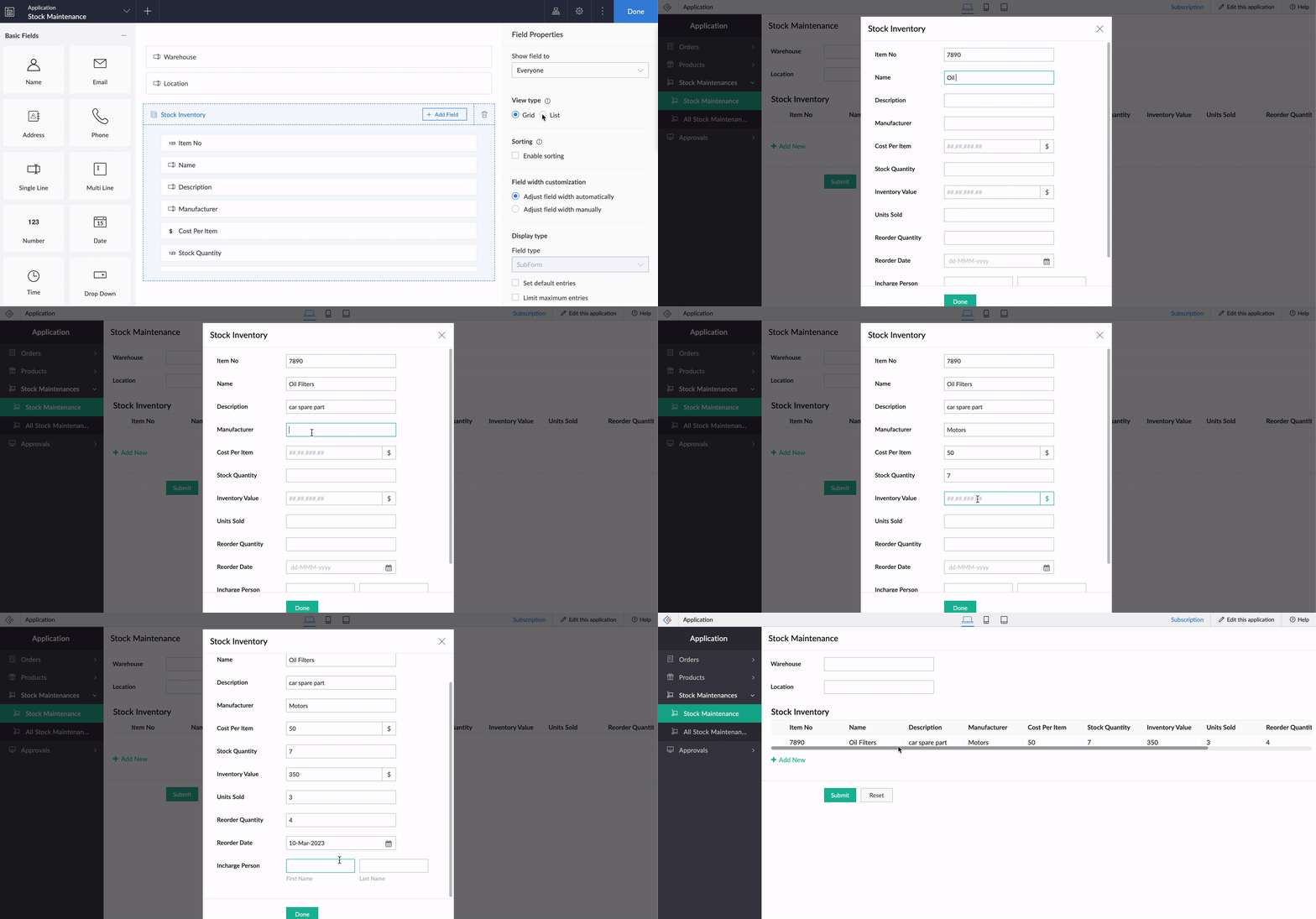
Let's assume there's a form collecting warehouse details, like name, location, and stock inventory. For collecting the stock inventory details, a subform is present with these fields—Item No, Name, Manufacturer, Description, Cost Per Item, Stock Quantity, Inventory Value, Units Sold, Reorder Quantity, Reorder Date,
and
Person In Charge.
Now, the default view type will tire you out from scrolling back and forth horizontally, and results in a frustrating time-consuming process. We all long for a new way to avoid this and make data entry swifter.
To achieve this, make use of the new List option under
Subform->Field Properties->View Type.
List view, which looks similar to our list report, is a table-like subform without inline inputs. When you try adding or updating data in each row, a pop-up will be displayed listing out the fields with vertical scrolling, thereby ensuring a vastly superior user experience and more effective space management.
Crucially, it also helps to load subform rows quickly while editing records, by reducing the loading time.
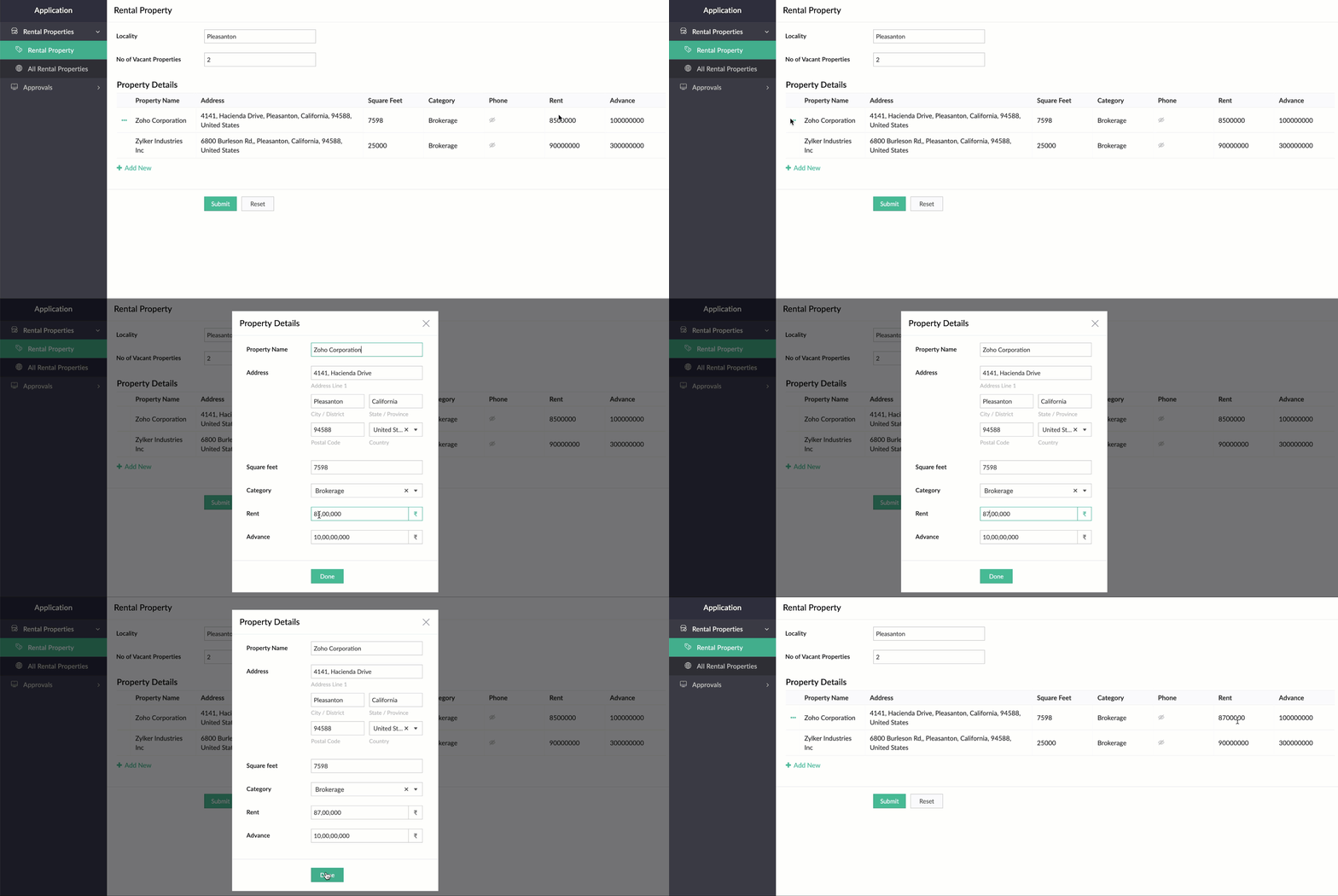
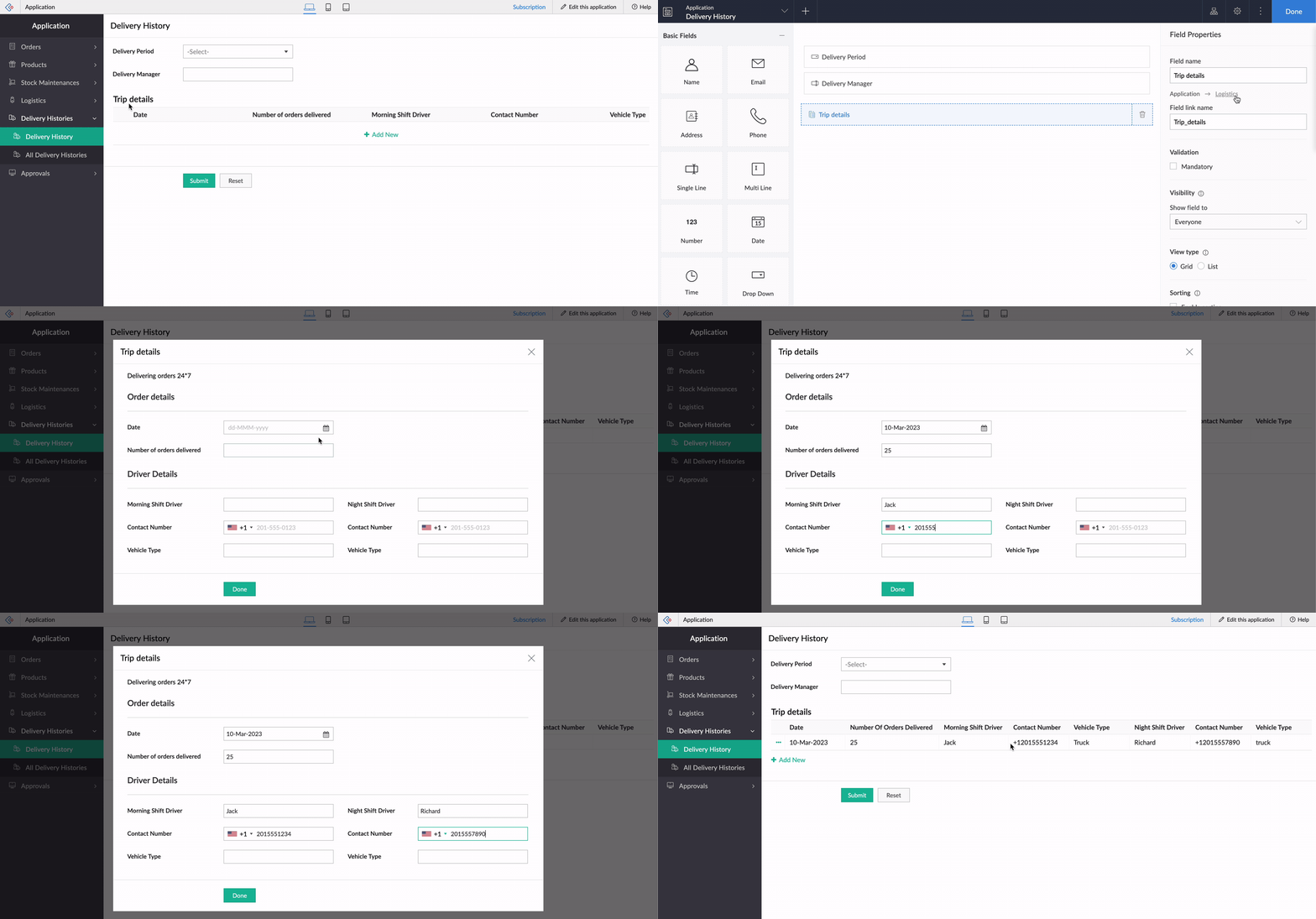
While using an existing form as a subform, the form's exact structure will be replicated in the pop-up, to ensure consistency in the look and feel of the form. To understand this better, let's assume our form has a two-column layout, with
Section
and Note
fields. Now the same customizations will be displayed in the pop-up, too!
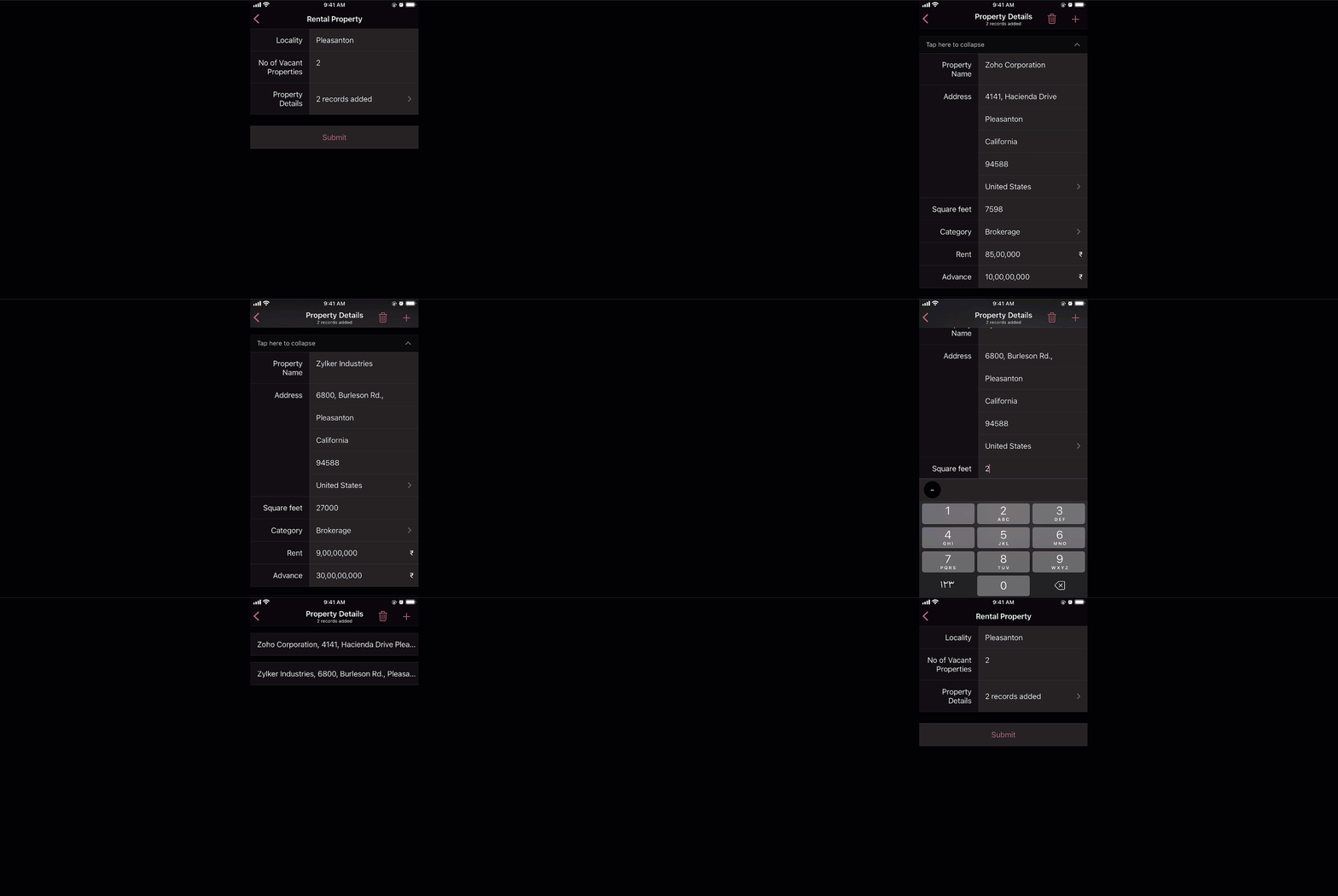
And that's not all—the new List view type is being extended to mobile apps, too. When it's enabled, the subform will be opened in the next screen, where users can add their data. This data will then be added as a subform row.
Custom sorting
Currently, the only sorting option in subforms is
field-based sorting, where you can choose a field based on which rows are sorted, either in ascending or descending order. Though this works well for basic cases, the need may arise in some cases to sort the subform in random order. With the new custom sorting support, you can effortlessly drag and drop subform rows to rearrange them.
To understand how it works, let's consider a task manager working on a To-Do List
form, to plan activities for a current project. For this, they have a main form collecting
project details, date-time,
and
milestones,
and a subform for maintaining the to-do list with the following fields:
Task Name, Description, Category, Status, Deliverables, Priority, and
Deadline. Here, before submitting the list, they want to rearrange some tasks based on their daily routine.
To achieve this, they use the Custom sorting option under
Subform->Field Properties->Sort type.
Now, with custom sorting, all they need to do to reorder the row sequence—both while adding and editing records—is simply drag and drop them in the required position.
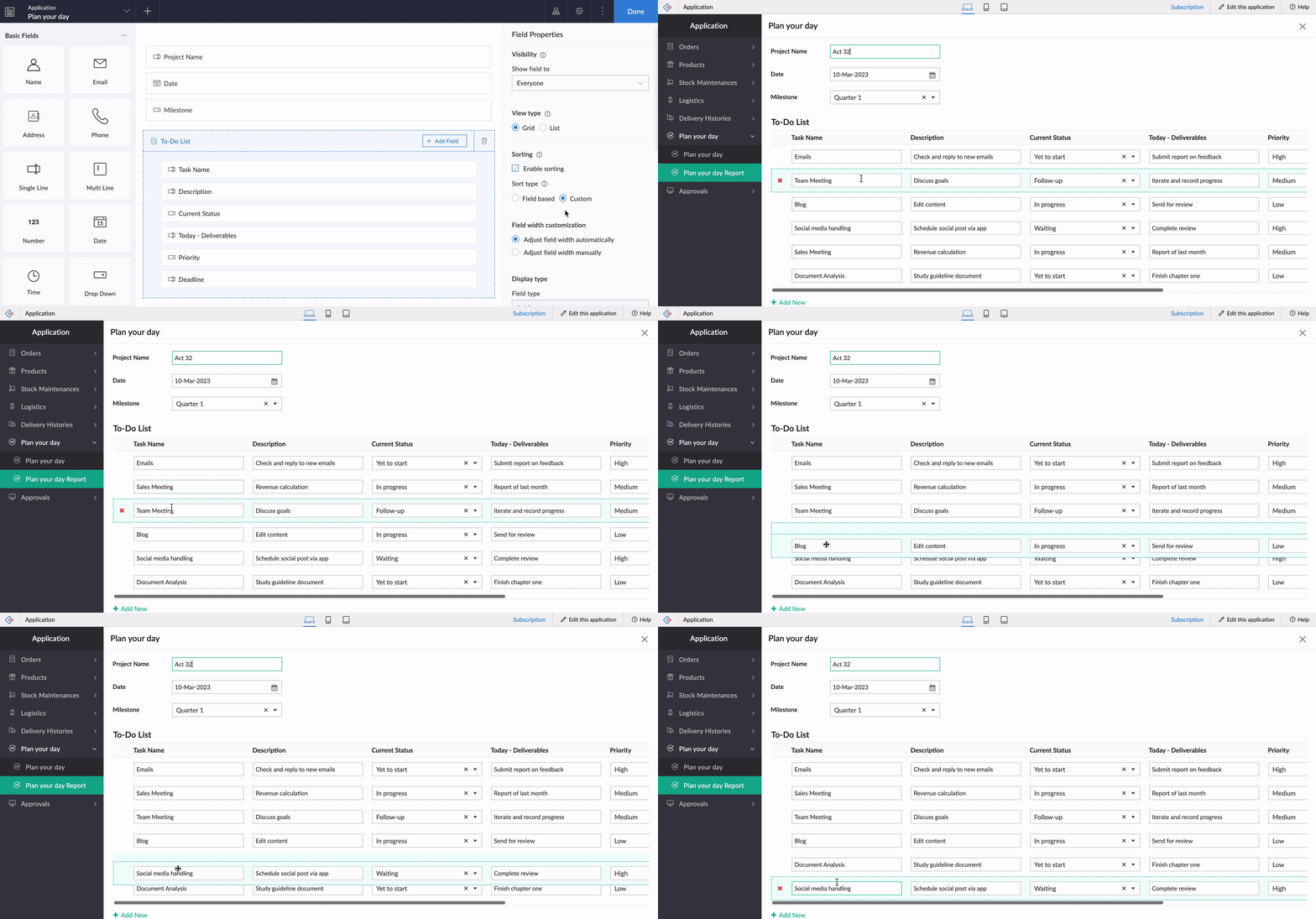
The same order will be retained in reports or while opening the form for updating the list.
Note:
Custom sorting can be used both in List and Grid-type subforms.
Custom sorting will also be available on the mobile apps and you can effortlessly rearrange fields in subforms.
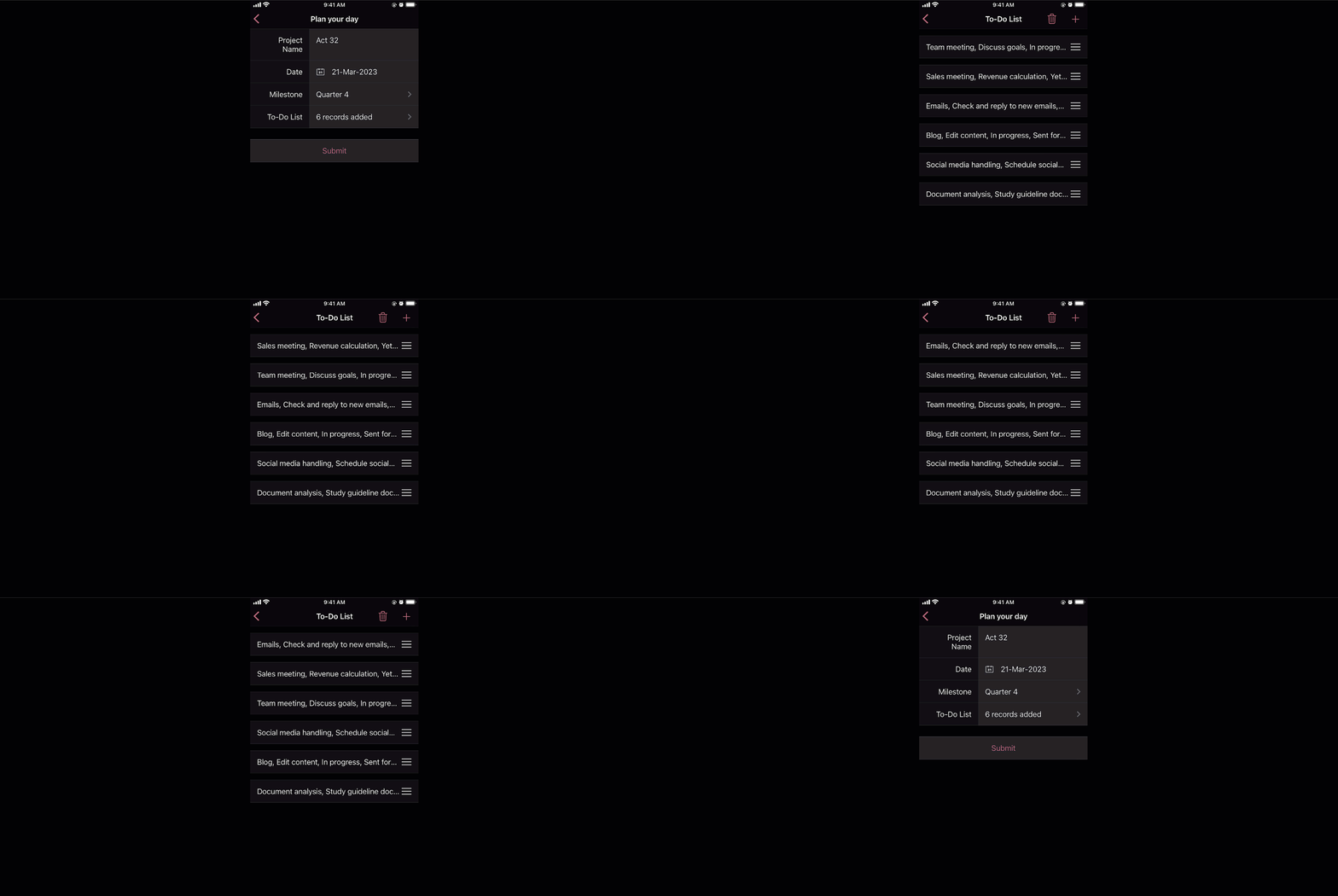
Deluge tasks for row-level actions
You can use a combination of workflows and Deluge scripts to help your subforms handle complex business logic. With that in mind, we formulated the idea of bringing in actions that help you take control at the row level of subforms.
In the past, you may have come across business scenarios which required you to hide/show or enable/disable a particular field in a specific subform row. Now, with new dedicated Deluge tasks, you can bid adieu to shortcuts and workarounds.
Note:
Deluge tasks can be used both in List and Grid-type subforms.
Enable/disable
The new enable and disable subform Deluge tasks can be used to enable and disable specific fields.
Syntax:
enable row.subform_field
disable row.subform_field
disable row.subform_field
Events:
On add row, On delete row, On user input of subform field
Let's assume a Vehicle form has fields like
Customer Name, Vehicle Model, and Date of Booking,
and a subform to collect payment details with the following fields:
Payment Date, Payment Method, Credit Card Number, Bank Account Number,
and
Transaction Ref Number.
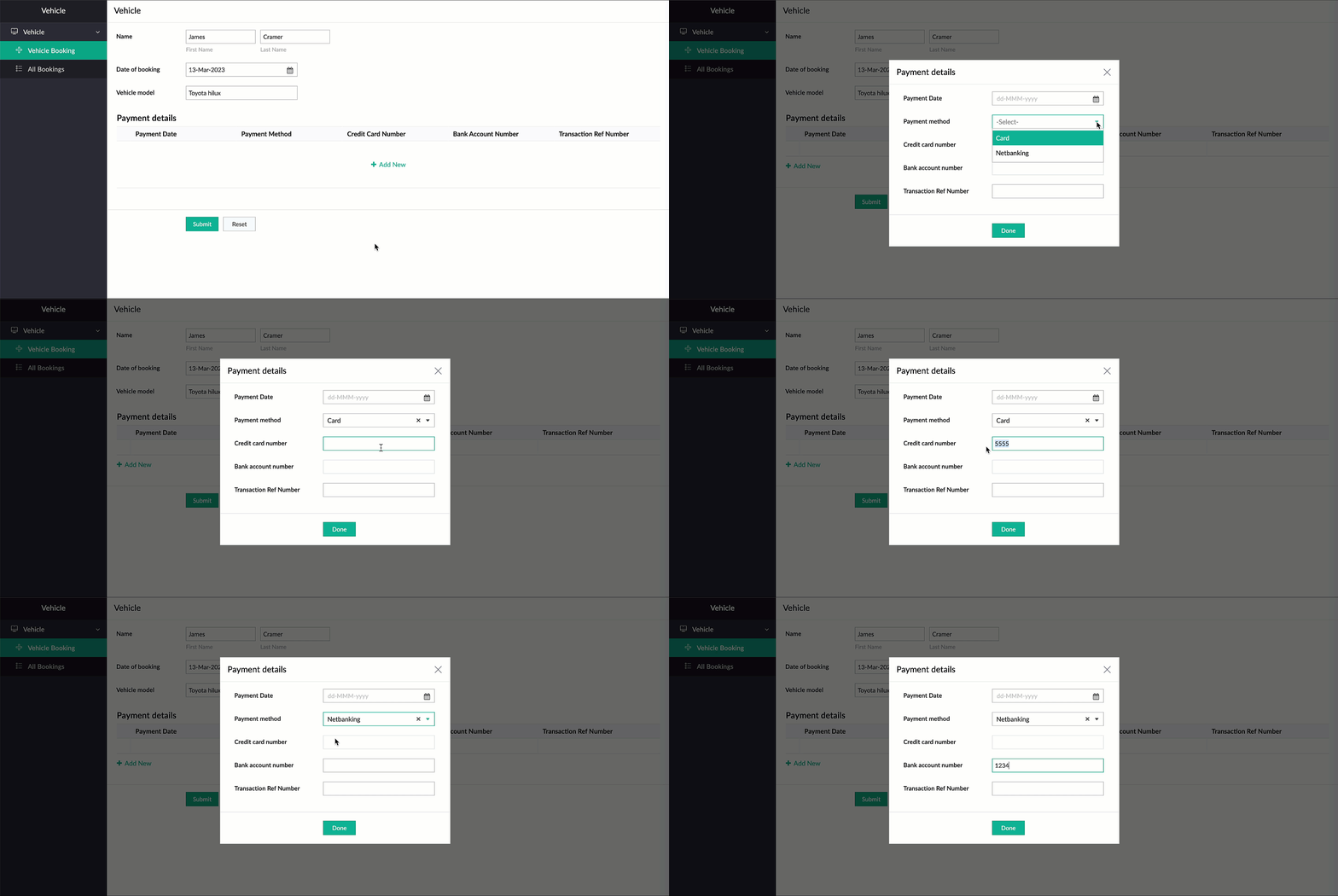
Now, there are two payment options—Card and Netbanking. If Card is chosen, then the Credit Card Number field should be enabled and the Bank Account Number field should be disabled. Similarly, when Netbanking is chosen, then the Bank Account Number field should be enabled and the Credit Card Number field disabled.
Code snippet:
if(Payment_details.Payment_method == "Card")
{
enable row.Credit_card_number;
disable row.Bank_account_number;
}
if(Payment_details.Payment_method == "Netbanking")
{
enable row.Bank_account_number;
disable row.Credit_card_number;
}
{
enable row.Credit_card_number;
disable row.Bank_account_number;
}
if(Payment_details.Payment_method == "Netbanking")
{
enable row.Bank_account_number;
disable row.Credit_card_number;
}
Hide/show
The new show
and
hide subform
Deluge tasks can be used to show and hide specific fields.
Syntax: hide row.subform_field
show row.subform_field
show row.subform_field
Events: On add row, On delete row, On user input of subform field
Let's use the example of a rental property manager who needs to keep track of a list of properties that are available in every locality. For this, a form is used for collecting information like Locality and No of Vacant Properties, and a subform will be used to list property details with the following fields: Property Name, Address, Square Feet, Rent, Advance, Category, and Contact Number.
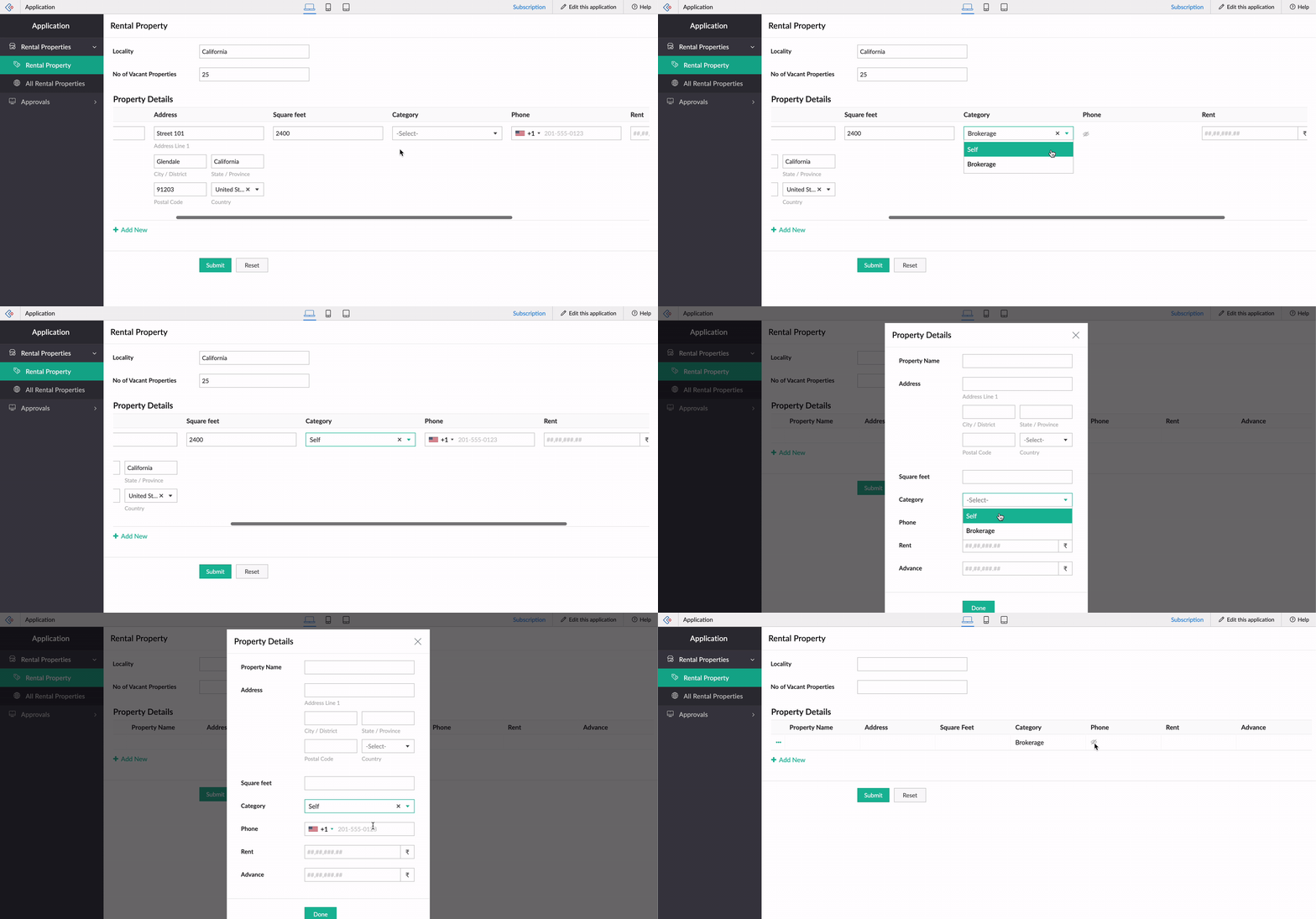
When the category is Brokerage, we need to hide the contact number of the landlord. We can use the new Deluge tasks to achieve this.
Code snippet
:
if(row.Category == "Brokerage")
{
hide row.Phone_Number;
}
else
{
show row.Phone_Number;
}
-----
That's it from us on our subform enhancements! We expect these updates to be rolled out in the upcoming weeks. Once done, we'll pop in a comment below and also update our Release Notes page.
Don't forget—your feedback helps us make Creator better and stronger. We'd love to hear what you think about these updates. Please use the space below or send your feedback to
support@zohocreator.com.
Regards,
Zoho Creator Team
Topic Participants
Ashwin Vishal R
Jean Le Gal
stevesmith41
Darren Burn
Anurag Jaiswal
Sticky Posts
Introducing Zoho Creator's 2025 Release Projection 2
Hello Creators! I'm Prakash, from the Creator product management team, and today I'm delighted to unveil our next set of features as part of Release Projection 2 for 2025. With thoughtful analysis and planning, we've curated powerful new capabilitiesZoho Creator - 2023 Release Projection 1
Hello everyone! A very Happy New Year to you and your family. Hope you're all good and having a great time using Zoho Creator to make your lives easier and your businesses prosper. 2022 was an action-packed year for us at Creator, and we hope to continueZoho Creator User Group meetups in a city near you! - Oct - Nov, 2023
Greetings from the Zoho Creator team! We're hosting a series of Zoho Creator meetups in various cities across the globe, and we'd love to meet you there! Our meetups are a great opportunity to network with industry peers, exchange ideas and best practices,Zoho Creator - 2023 Release Projection 2
Hello everyone! Time truly flies when you're having an incredible journey, and today we mark the completion of an eventful and action-packed six months. It feels like just yesterday when we embarked on this adventure together with the launch of our newUpcoming Updates - August 2022
Hi all, Greetings from the Zoho Creator team! Today we've got news for you on some exciting updates. And rest assured— there’s more to come! In this post, we'll be going over the upcoming features and improvements for this month as mentioned below. A
Recent Topics
Introducing Configure, Price, Quote (CPQ) in Zoho CRM | Public early access 2023
Greetings Customers! We're excited to announce that the CPQ feature will soon be available in Zoho CRM and accessible to all accounts using the Professional, Enterprise, and Ultimate editions. We've opened this feature to select customers, and it'll behow to edit the converted lead records?
so I can fetch the converted leads records using API (COQL), using this endpoint https://www.zohoapis.com/crm/v5/coql and using COQL filter Converted__s=true for some reasons I need to change the value from a field in a converted lead record. When I tryShare Video Response Card ion Zobot
I am using the zobot codeless bot builder in SalesIQ. I want to share a video but delay the next response card until after the video has finished playing or has been stopped. Is this possible?Zoho Bookings <> CRM integration
Hello Zoho community! We are enabling our Zoho Bookings <> CRM integration. What is the workflow if the integration detects that the contact already exists in the CRM? Does it create a duplicate record? Overwrite the record? Merge the record? (in thisCannot reject empty expense report
Hello, We are currently having issues with two empty expense reports where if we try to reject them, either manually or through the REST API, we get error 114016, which says some of the expenses have already been billed and must be removed. I'd appreciateUse of Zia within Forms
I have noticed that recently you have added Zia to help create forms from scratch. Would it be possible to add Zia functionality to free text fields for form submissions or if this is already on the roadmap an ETA for this please? We have a lot of fieldDefault in fields on Form B based on the user selection in Form A
Hi Everyone, I have added an action button to a form report to bring up a new form based on user selection, see it indicated in red below: Then when the ne form loads, I want to default in some of the fields based on the record the user was selected on.Last activity time is acting like last modified time
When i edit the description or any field in the potential, account, contact and lead, the Last Activity Time is being updated like the Modified Time. This is messing all workflows and reports and we are unable to track real last time of activities likeEnhancements to the formula field in Zoho CRM: Auto-refresh formulas with the "Now" function, stop formula executions based on criteria, and include formulas within formulas
Dear Customers, We hope you're well! By their nature, modern businesses rely every day on computations, whether it's to calculate the price of a product, assess ROI, evaluate the lifetime value of a customer, or even determine the age of a record. WithHEX/RGB Color Input in Visual Editor
Hello Zoho Pagesense Team, We hope you're doing well. We’d like to submit a feature request to improve the color selection options in the Pagesense popup editor. Current Limitation: Currently, to set text colors, users must move the color slider manually.CRM and Campaigns- tags not integrating?
Hi! I am setting up an automation in zoho campaigns and it says the crm is integrated...but when I want to use a trigger of a certain tag I created for people in the crm to denote those who purchased, it doesnt have that tag available as an option inMaximum limit of rows exceeded
I am trying to add a row to a spreadsheets that has fewer than 60 rows. I keep getting an error message that says I have exceeded the maximum limit of 65,536 rows. Any ideas out there?Tip #7: 5 formas de mantener tus listas de correo electrónico
Tips and Tricks #7, adaptado de Susmit Sen ¡Hola, comunidad! Esta semana volvemos con nuestros Tips and Tricks para Zoho Campaigns. En esta ocasión, voy a darte algunos consejos para mantener limpias tus listas de correo electrónico, y empezar el 2021Mail Merge related Lists
When I try to merge an associated list the fields do not have a checkbox to choose them as it does in the tutorials. Am I missing something? Any ideas would be appreciated.create-a-purchase-receive API issues
Hello all, I'm trying to use the create a purchase receive inventory API documented here (https://www.zoho.com/inventory/api/v1/purchasereceives/#create-a-purchase-receive) however when I do am getting the following error {"code":9,"message":"The purchaseZoho Pagesense really this slow??? 5s delay...
I put the pagesense on my website (hosted by webflow and fast) and it caused a 5s delay to load. do other people face similar delays?Heatmap: Missing Content Elements - Zoho Page Sense
Hi there, I'm trying out Zoho Page Sense to generate heatmaps for my Wix pages. My problem: Some parts of my Wix pages don't show on my heatmap, the heatmap is just empty there. Maybe Wix default lazy loading setting causes this error? Is there a wayMarketing Tip #3: Use social proof to build trust
People trust people. Showcasing reviews, testimonials, or “bestseller” badges on your product pages can nudge hesitant buyers toward purchase. Try this today: Add one customer testimonial or highlight your top-selling product on your homepage. Or, doMake CAMPAIGNS email look as simple as possible
Hi there I'm trying to make my Campaigns email look as much like a normal email as possible. I'm a bit stuck with the "justification" of the email email block. Can I LEFT JUSTIFY the "whole email" to make it look "normal"? (Please see screenshot attached)Zoho Sign Reminder email template
Is there a template we can edit for the reminder emails? I don't see it in Settings / Choose a templatePreview an upload PDF or File
I have a form where the customer has to upload a file (normally PDF - never jpeg) When in report view I want to be able to preview the uploaded file without having to download it. If I click on the upload it downloads to my computer, I want to be ableHow to filter emails by Reply-to field?
I receive a very particular newsletter from an association A registered on a website W (that is used by many associations), and the emails fields are not great: the From just contains the generic website's W's email, while A is only mentioned in the Reply-toHow to invite friends on other social media platforms to one of my group chats in arattai?
Hello, I have formed chat groups in arattai. I want to invite my friends on other social media platforms like WhatsApp/ FB to one of my groups. Different friends would be invited to different groups. How to share an invite link of one of my groups toLine spacing
I coudn't decrease the line spacing to space smaller then a single line. There is too much space between the lines that make the document look ugly. Please fix that. Liran. fonarControl Position of “X” (Close) Button in Popup Editor
Hello Zoho PageSense Team, We hope you're doing well. We would like to request a customization improvement in the PageSense popup editor. Current Limitation: Currently, the position of the “X” (close) button is fixed and cannot be customized in the popupAdd Standalone “Save” Button in Pagesense Popup Editor
Hello Zoho Pagesense Team, We hope you're doing well. We would like to request an important usability improvement in the Pagesense popup editor. Current Limitation: There is currently no dedicated Save button while building a popup. The only way to saveText Direction Control in Pagesense Popup Editor
Hello Zoho Pagesense Team, We hope you're doing well. We’d like to submit a feature request to add text direction control in the Pagesense popup editor. Current Limitation: Currently, the popup editor does not provide native support for RTL (Right-to-Left)Autosave in Pagesense Popup Editor
Hello Zoho Pagesense Team, We hope you're doing well. We’d like to submit a feature request to enhance the Pagesense editor with an autosave functionality. Current Limitation: Currently, changes made in the Pagesense editor must be manually saved. InBilling frequency is not displayed correctly.
Hello There is an issue while displaying the billing frequency on a subscription quote. I am able to activate the subscription details and get this lovely overview: If I am adding a Plan which I charge quarterly, first of all it should be possible toCreating Secret via Vault API
Hi I am trying to create a secret through vault api. This is the response I get. One thing I am not sure is how to decrypt the secretdata, how to get the secrettypeid? { "operation": { "result": { "error_code": "", "message": "Sorry, we are unable to process your request.",Is It Possible to Hide Menu Option from Main Navigation?
Is it possible to hide a menu option, e.g. Admin, from the Main Navigation based on some criteria, e.g. login = zoho.adminuserUnleash the power of detail, with Table View.
What use is context that's not available where you need it? With this in mind, we bring you the Table View. This feature will add more power to the way you organize and work through your ticket load. Table View comes in handy when you want more control over the ticket information you see. This is a nifty tool for users who find themselves limited in terms of the level of information that is being offered in the Classic View and Compact View. With an upper limit of 15 columns, agents can glean mostKaizen #126 - Circuits in Zoho CRM - Part 1
Hello everyone! Welcome back to another week of Kaizen! Today, we will discuss an exciting topic—Circuits in Zoho CRM. For starters, we will discuss what Circuits are, how beneficial they are for businesses, different views of a Circuit, and the differentWorkdrive on Android - Gallery Photo Backups
Hello, Is there any way of backing up the photos on my android phone directly to a specific folder on Workdrive? Assuming i have the workdrive app installed on the phone in question. EmmaRendering PDF to view on page
My company upload lots of PDF files onto Zoho. But every time we open it, it downloads the file instead of viewing it on the web page. Does Zoho allow uploaded PDF files to be rendered to view on web page yet? I've been trying to use <embed> or <object> but it cannot be loaded. (similar thread: https://help.zoho.com/portal/community/topic/how-to-open-a-pdf-file-of-a-view-in-preview-mode)Dynamically Fetching Lookup Field Display Value
I have an audit trail form, Audit_Changes, that tracks old vs new values across different forms. For lookup fields, the old/new value is the ID, but I also need the display value. What's a best practice for dynamically fetching the display value of theI have a problem. I use Zoho invoice
I have a problem. I use Zoho invoice, which is that when I create an invoice for a customer with specific items, let's say the value of these items is 2100, but my customers are not the type who pay the entire invoice amount at once, as they divide theAbility to Create New Items When Zoho Trident is Minimized via tray or taskbar icon
Allow users to create new items (emails, calendar events, tasks, etc.) directly from the system tray icon or by right clicking the task bar icon, even when the window is minimized or not actively running in the foreground. This enables quick access toI can not see Undeliverable emails from my Mass Email Leads activity in CRM
I am sending email templates and I can not see the Undeliverables? I only receive the "Out of Office" replies and any manual replies from the lead. Can you please let me know where the Undeliverable emails are sent so I can use the information to clean up the database?Select Zoho Contacts as Meeting Participants in Zoho Cliq
Hello Zoho Cliq Team, We hope you're doing well. We would like to request an enhancement to the meeting scheduling functionality in Zoho Cliq. Current Limitation: When scheduling a meeting in Zoho Cliq, participants can only be selected from: OrganizationNext Page