Enable your teams to respond in seconds by bridging the gap between booking confirmation and team notification. No sticky notes, no calendar nudges and no follow-up frenzies. For businesses that rely on scheduled appointments, real-time visibility is a crucial operational need.

Timely automated communication is essential for managing important appointments and bookings. Let's integrate Zoho Bookings with Zoho Cliq via the Cliq developer platform's bots and workflows, ensuring that every appointment confirmation is automated and reaches Cliq chats promptly.

Business Benefits

  1. Operational Efficiency: This custom solution eliminates the need for manual dashboard monitoring. Booking updates are automatically communicated to Cliq as they occur.
  2. Enhanced Customer Experience: Faster internal awareness leads to expedited confirmations, better-prepared staff, and a more seamless appointment experience.
  3. Centralized Communication: All booking activities are consolidated in the same Cliq channel your team uses daily, minimizing context switching and preventing information silos.
  4. Enterprise-Ready, No Additional Cost: Built entirely on the Zoho Cliq Developer platform, this custom solution requires no third-party middleware. It operates within your existing Zoho subscription framework.

Step 1: Create a bot 

  1. Go to the top-right corner of your profile and click on it.
  2. Select "Bots and Tools" from the dropdown menu.
  3. To create a new bot, click on "Create Bot" under the "Bots" section.
  4. Enter a name and description for your bot and ensure that channel configuration settings are enabled during setup.
  5. Finally, save the bot.

Step 2: Retrieve the bot webhook URL 

  1. Webhook tokens are listed in the Bots & Tools section along with other internal tools.
  2. When you access the webhook tokens module, you'll need to authenticate using two-factor authentication (2FA), verify your identity, and then click "Continue."
  3. After authenticating, you can create, edit, and manage your webhook tokens as needed.
  4. Generate a webhook token and retrieve the bot's webhook URL as instructed.
ⓘ Learn more about webhook tokens in Zoho Cliq.


Step 3: Generate Cliq bot incoming url  

To create the bot's incoming URL, combine the bot's endpoint with the webhook token.
  1. Navigate to the newly created bot and click on it. A pane will appear showing the bot's URL details.
  2. Copy your bot's incoming endpoint from this window and append your token to it:
  1. https://cliq.zoho.com/api/v2/bots/<yourbotname>/incoming?zapikey=<webhooktoken>
Keep this URL handy, as you will need to paste it into the Zoho Bookings workflow later.

Step 4 : Creating a workflow in Zoho Bookings 
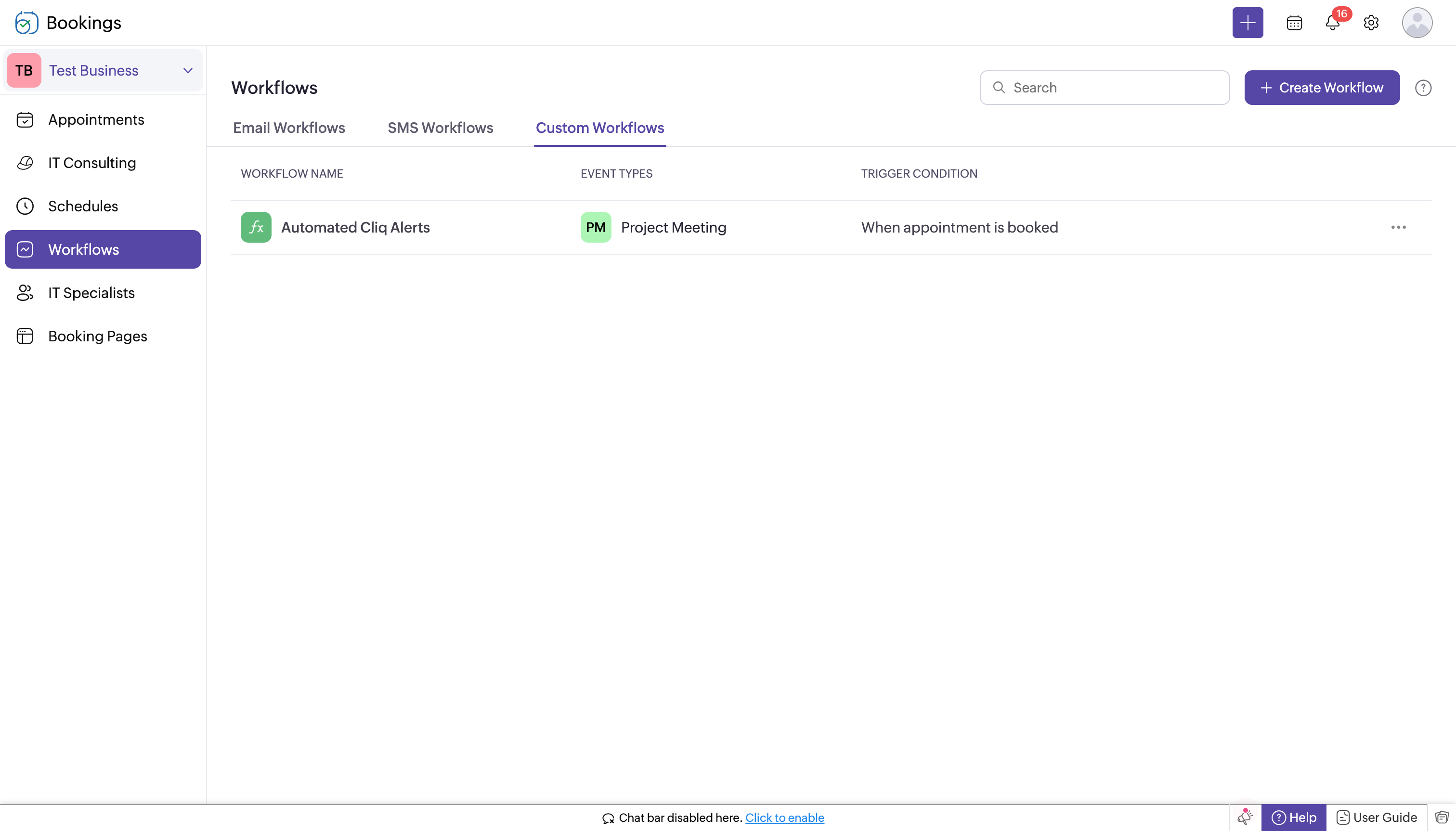

  1. Log in to Zoho Bookings.
  2. In the left panel, navigate to one of the following options:
    1. Workflows → Custom Workflows → Create New Workflow
    2. or Workflows → Create Workflow → Create New Workflow.
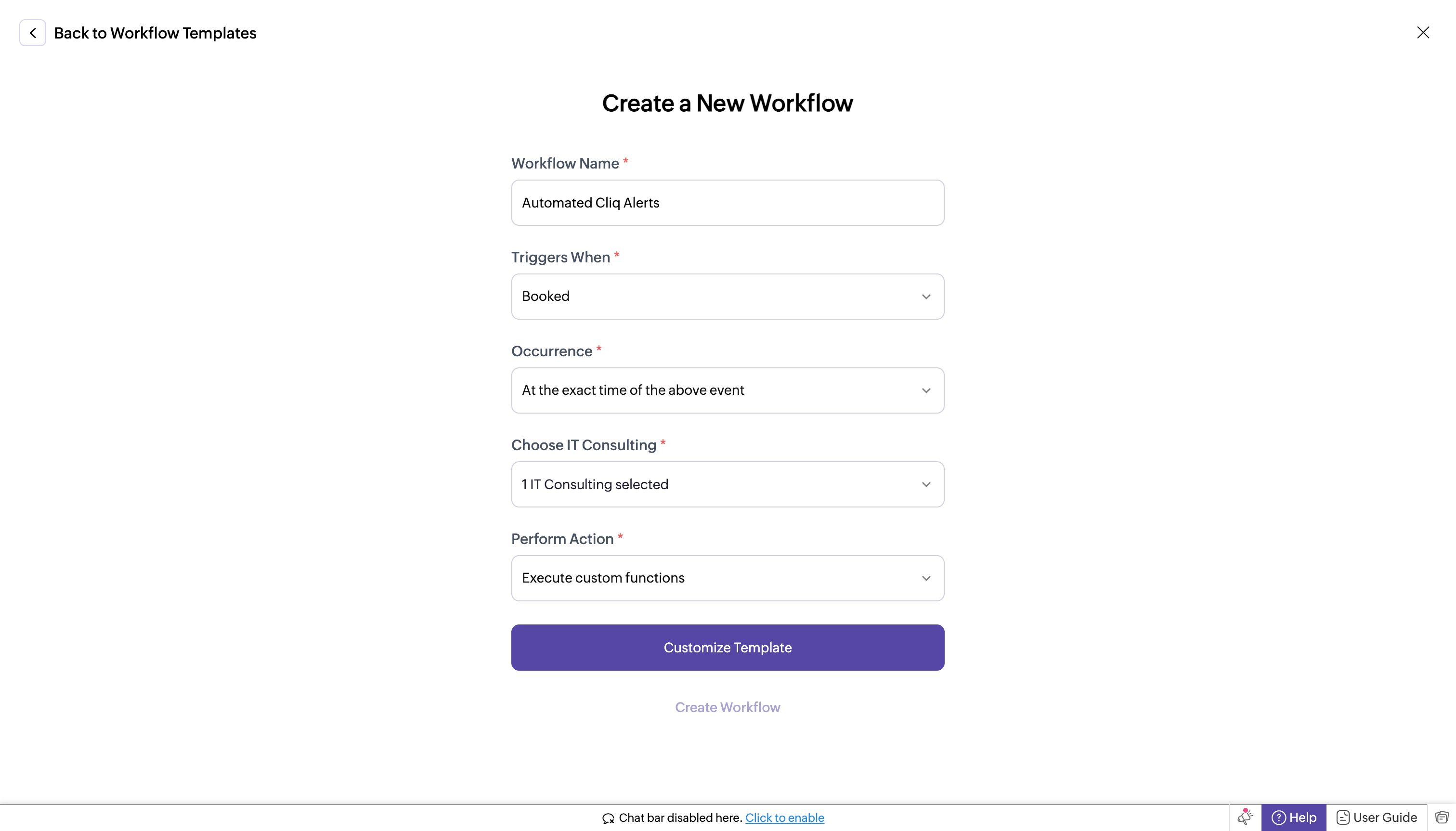
  3. If you chose Workflows → Custom Workflows → Create New Workflow, complete the following fields:
    1. Workflow Name: Enter a name for your workflow.
    2. Trigger When: Select "Booked."
    3. Occurrence: Choose "Immediately."
    4. Choose Service (e.g., IT Consulting): Select your Service.
    5. Perform Action: Select "Execute Custom Functions."
    6. Customize Template: Paste the following code. 
  4. In the template editor, paste the code, replacing "<bot incoming url>" with the full URL you created in the previous step. 
    1. bookingInfoMap = Map();
    2. bookingInfoMap.put("BookingInfo",bookingInfo);
    3. cliqWebhookTrigger = invokeurl
    4. [
    5. url : "<bot incoming url>"
    6. type :POST
    7. parameters:{"Book Details":bookingInfo} + ""
    8. headers:{"content-type":"application/json"}
    9. ];
    10. info cliqWebhookTrigger;
  5. Click Create Workflow. With this setup, whenever a new appointment is booked, it will trigger a notification to your Cliq bot's incoming handler.
Step 6 : Setting up bot incoming webhook handler   

  1. Head back to Cliq, locate the bot you created under the "Bots and Tools" section, and access its incoming webhook handler.
  2. The incoming webhook handler is designed to allow third-party services, such as Zoho Bookings, to post messages directly to your bot.
  3. Copy and paste the below code, then click "Save".
Note: You can customize the message format using the Message Builder.

Pre-requisites before scripting:
  1. Create a Zoho Cliq Default Connection:

    Before you begin scripting the code below, you need to create a connection in Zoho Cliq. Once the connection is established, you can use it in Deluge integration tasks and invoke URL scripts to access data from the required service.

    Use a unique name for the connection with the scope set to ZohoCliq.Reminders.All.

    Note: Refer to the document on Connections in Cliq for more information.

  2. Post Alerts to a Channel:

    To post an alert to a channel, you'll need the unique names of both the channel and the bot. This is necessary as we will use the zoho.cliq.postToChannelAsBot Deluge task in the code below. Follow these steps to retrieve these names:

    How to Obtain the Channel Unique Name in Cliq?:

    • Navigate to the top right corner of your preferred channel and click on the three dots.
    • In the menu that appears, select "Channel info." A pop-up will display detailed information about the channel.
    • Hover over the "Connectors" section and click on it.
    • Under "API Parameters," you will find the channel unique name.

    How to Obtain the Bot Unique Name in Cliq?

    • Go to "Bots & Tools," and under the bots section, select your preferred bot.
    • Copy the API endpoint URL. The bot's unique name is located between "bots/" and the next slash ("/").

    Example:

    In this example, the bot's unique name is crmupdatesincliq.

  3. Retrieve the Bot Chat ID:
    • Open Zoho Cliq and navigate to your bot in the chat window.
    • Click on the bot to open the conversation.
    • Check the URL in your browser; the bot chat ID is the alphanumeric string that appears after "chats/".

    Example:

    In this example, the bot chat ID is CT_9874563201845670134_10005673821-B7.

After creating the connection, retrieving the channel unique name, bot unique name, and bot chat ID, keep this information handy for use in the code below.

Script
  1. response = Map();
  2. info params;
  3. info headers;
  4. info body;
  5. bookingDetails = body.get("Book Details");
  6. info bookingDetails;
  7. bookingID = bookingDetails.get("booking_id");
  8. workspaceName = bookingDetails.get("workspace_name");
  9. customerEmail = bookingDetails.get("customer_email");
  10. startTime = bookingDetails.get("start_time");
  11. endTime = bookingDetails.get("end_time");
  12. timeZone = bookingDetails.get("time_zone");
  13. summaryUrl = bookingDetails.get("summary_url");
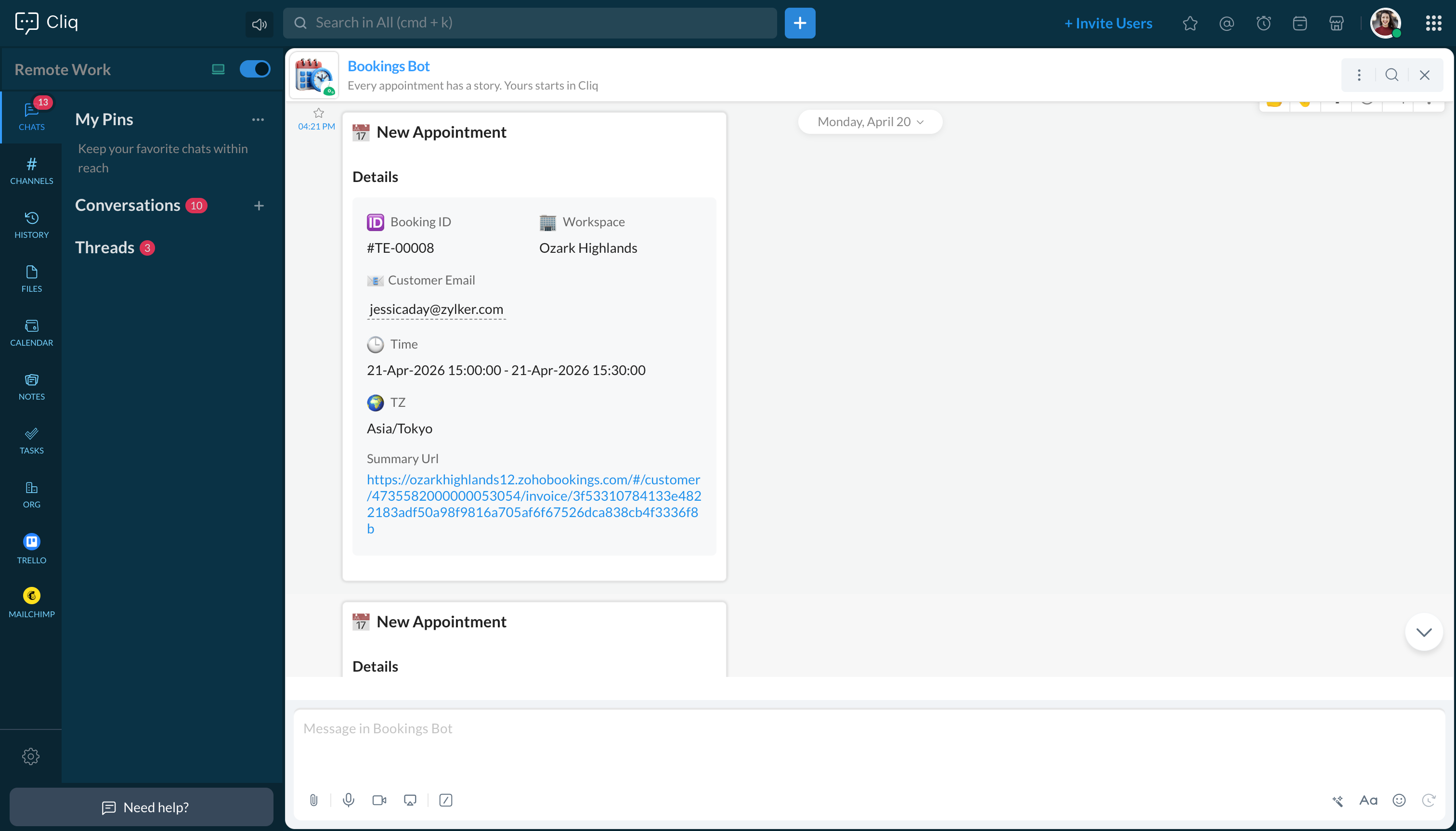
  14. responseMsgCard = {"text":"### 📅 New Appointment","card":{"theme":"modern-inline"},"slides":{{"type":"label","title":"Details","buttons": [
  15. {"label": "Open Summary","action": {"type": "open.url","data": {"web":summaryUrl}}}],"data":{{"🆔 Booking ID":bookingID},{"🏢 Workspace":workspaceName},{"📧Customer Email":customerEmail},{"🕒 Time":startTime + " - " + endTime},{"🌍 TZ":timeZone}}}}};
  16. info zoho.cliq.postToBot("<bot unique name>",responseMsgCard);
  17. //Post to your Bot
  18. info zoho.cliq.postToChannelAsBot("<Channel unique name>","<bot unique name>",responseMsgCard);
  19. //It will send to channel with bot permission.
  20. //--------------------------------- To set reminder -------------------------------//
  21. eventTimeZone = bookingDetails.get("time_zone");
  22. info eventTimeZone;
  23. userTimeZone = user.get("timezone");
  24. dateTimeObj = bookingDetails.get("start_time").toTime("dd-MMM-yyyy HH:mm:ss",eventTimeZone).toString("dd-MM-yyyy HH:mm:ss");
  25. info dateTimeObj;
  26. info dateTimeObj.toTime("dd-MM-yyyy HH:mm:ss",user.get("timezone")).subMinutes(60);
  27. datetime_30min_sub = dateTimeObj.toTime("dd-MM-yyyy HH:mm:ss",userTimeZone).subMinutes(30).toString("dd-MMM-yyyy HH:mm:ss",userTimeZone);
  28. datetime_60min_sub = dateTimeObj.toTime("dd-MM-yyyy HH:mm:ss",userTimeZone).subMinutes(60).toString("dd-MMM-yyyy HH:mm:ss",userTimeZone);
  29. info datetime_60min_sub+"datetime_60min_sub";
  30. info datetime_30min_sub+"datetime_30min_sub";
  31. secondsVal_60sec_before = datetime_60min_sub.unixEpoch(userTimeZone);
  32. secondsVal_30sec_before = datetime_30min_sub.unixEpoch(userTimeZone);
  33. info secondsVal_60sec_before;
  34. info secondsVal_30sec_before;
  35. reminderTimes = list();
  36. reminderTimes.add(secondsVal_60sec_before);
  37. reminderTimes.add(secondsVal_30sec_before);
  38. for each  reminderTime in reminderTimes
  39. {
  40. param = Map();
  41. content = "Zoho Bookings Reminder : " + bookingID;
  42. param.put("content",content);
  43. param.put("time",reminderTime);
  44. chatidsList = list();
  45. chatidsList.add("<Bot chat id>");
  46. param.put("chat_ids",chatidsList);
  47. createReminder = invokeurl
  48. [
  49. url :"https://cliq.zoho.com/api/v2/reminders"
  50. type :POST
  51. parameters:param + ""
  52. connection:"<your connection name>"
  53. ];
  54. info createReminder;
  55. }
  56. return response;


Team responsiveness and operational clarity are critical, and automated booking alerts create a measurable impact. Businesses managing a scalable client base and operating on appointments cannot afford delays in information. Every booking that goes unnoticed is a missed chance to respond and deliver.

This custom solution brings real-time Zoho booking data into the Cliq communication layer, effectively filling the gap, letting teams stay coordinated, respond faster, and deliver a consistently better experience to every customer.

If you have any further questions or need support, please reach out to support@zohocliq.com, and we'll be happy to assist you.
    • Sticky Posts

    • Zoho Cliq REST APIs v3 : A complete guide to what's changed and why 

      APIs are not just consumed by a developer with numerous automations and a series of open browser tabs. They are parsed by LLMs, fed into agent pipelines, and auto-completed by AI coding assistants that have zero tolerance for inconsistency. A verb tucked
    • Cliq Bots - Post message to a bot using the command line!

      If you had read our post on how to post a message to a channel in a simple one-line command, then this sure is a piece of cake for you guys! For those of you, who are reading this for the first time, don't worry! Just read on. This post is all about how
    • Automating Real-Time Zoho Bookings Alerts in Zoho Cliq

      Enable your teams to respond in seconds by bridging the gap between booking confirmation and team notification. No sticky notes, no calendar nudges and no follow-up frenzies. For businesses that rely on scheduled appointments, real-time visibility is
    • Add Claude in Zoho Cliq

      Let’s add a real AI assistant powered by Claude to your workspace this week, that your team can chat with, ask questions, and act on conversations to run AI actions on. This guide walks you through exactly how to do it, step by step, with all the code
    • Automate attendance tracking with Zoho Cliq Developer Platform

      I wish remote work were permanently mandated so we could join work calls from a movie theatre or even while skydiving! But wait, it's time to wake up! The alarm has snoozed twice, and your team has already logged on for the day. Keeping tabs on attendance
    • Recent Topics

    • Why don't Zia agents support file uploads?

      I am trying to build a Zia Agent that allows uploading of a PDF file and uses the GLM5 model to process it and extract information. But agents.zoho.com has no way to enable file uploads on the agent. Additionally, GLM5 based agents keep outputting their
    • Zia Agent built in ChatKit UI does not render markdown

      Hi, You have a major shortcoming in the Zia Agent UI. The test UI that is embedded in agents.zoho.com allows you to test the agent has full support for rendering markdown, but your ChatKit UI does not have support for rendering markdown. If I embed it
    • How to use Zoho Billing info in a workflow

      We have Zoho Billing and CRM sync'd and the Billing info appears as expected for each Account in Zoho CRM, including subscription status, plan type etc. But how can we use this in a workflow? Thanks Dylan
    • Zoho Forms - Failed CRM Sync Improvement

      I'd like to suggest an enhancement to the Zoho Forms and Zoho CRM integration. Currently, once a form entry has been submitted, there is no simple way to push that individual entry to CRM again if needed. Before anyone mentions it, I am aware that the
    • Will I see emails sent via campaigns in CRM?

      It would be useful for people to be able to see emails sent via campagins in Zoho CRM is that possible?
    • Cliq iOS can't see shared screen

      Hello, I had this morning a video call with a colleague. She is using Cliq Desktop MacOS and wanted to share her screen with me. I'm on iPad. I noticed, while she shared her screen, I could only see her video, but not the shared screen... Does Cliq iOS is able to display shared screen, or is it somewhere else to be found ? Regards
    • Zoho Books | Product updates | June 2026

      Hello users, Welcome to this month's roundup of what's new in Zoho Books! We have an exciting line-up this time. The highlight is the launch of the all-new France Edition with full ISCA compliance. We're also introducing features such as Layout Rules
    • Enhancement in Zoho CRM: Introducing New Return Types for String Fields Based on Character Length

      Dear Customers, We hope you’re well! In Zoho CRM, formula field with string return type is used in various scenarios where text is involved like concatenating customers’ first and last names, trimming characters from texts, performing find and replace
    • GLM 5 not available

      Hello, I am trying to setup a Zia Agent using agents.zoho.com. The settings says that GLM5 is among the list of free zoho hosted models available. However, when I try to setup an agent and pick a model from the list only GLM 4.7 Flash is available. How
    • Canvases Auto-Skewing/Adding Scroll Bars When They Were Not There Prior

      Is anyone else noticing rendering issues in their canvases today? It seems to be mainly icons which now have scroll bars added which makes them all look off, though some fields seemed to revert to squished length as well. Were the icons replaced with
    • Supervisor Rules --> Custom Function

      Hello, currently I can't add a custom function to a supervise rule. Is there a reason for this? Background: We have BluePrint managed tickets and actually we have a Supervise rule which should set the ticket to "closed" after 168 hours since the last
    • Vault Chrome Extension Asks for Master Password every single time

      Is this supposed to be a feature, or is this a bug?  My assumption is that it's a bug, because every time I click on the Extension, there is a red exclamation mark/notification on the Zoho Vault extension.  Is the idea with the Extension that I have to
    • What's New in Zoho Inventory | April & May 2026

      Hello users, We're excited to roll out the latest Zoho Inventory updates for April and May 2026. These enhancements are designed to make your daily operations smoother and more efficient, from advanced inventory management and flexible pricing to automated
    • Ability to Use Both AND and OR When Creating Rules (Advanced Conditions)

      I'd like to be able to use more complicated logic when setting up rules. E.g. in Zoho Mail, I can choose "Advanced conditions (AND/OR) to create a rule that can be applied to multiple subject lines from the same sender. But in Zoho TeamInbox, I will have
    • How to display Pick List values with vertical separation in Canvas

      I have a Multi-Select Pick List whose values I would like displayed vertically. So far, I have only been able to figure out how to adjust the width and other sizing of the field itself or even how to wrap the values to the next line below. I am trying
    • "Make online" not clearing previously downloaded files from disk

      I downloaded a large folder via "Make offline" so I could copy it to another location. This worked. When I was done I hoped that "Make online" would restore it to the previous state where those files are not stored locally in TrueSync. This did not work—Finder
    • Permission Denied for Worklogs URL

      We're attempting to pull worklogs data from service desk plus and when using the below URL we are met with a message stating we do not have permission. https://sdpondemand.manageengine.com/api/v3/requests/xxxxxx/worklogs/ We used SDPOnDemand.requests.ALL
    • Anyone in Australia using Zoho Books AND has their account with NAB?

      Hi I have an account with both NAB and Suncorp. Suncorp transaction come in the next day however NAB transactions take 4-5 business days to appear. eg: A deposit made today in my Suncorp will be imported into Zoho tomorrow. A deposit made today to the NAB account will be imported maybe Saturday (Friday overnight). I have contacted both Zoho and NAB but noone seems to know why. I was just wondering if anyone else in Australia uses NAB and has this issue (or doesn't) maybe we could compare notes and
    • Please Make Zoho CRM Cadences Flexible: Allow Inserting and Reordering Follow-Up Steps

      Sales processes are not static. We test, learn, and adapt as customers respond differently than expected. Right now, Zoho Cadences do not support inserting a new step between existing follow-ups or changing the type of an existing primary step. If I realize
    • Partner with HDFC And Sbi Bank.

      Hdfc and sbi both are very popular bank if zoho books become partner with this banks then many of the zoho books users will benefit premium features of partnered banks.
    • #12 Never Leave a Billable Hour Behind

      A client approves a website redesign project. The estimated effort? 40 hours. The project is going well. A few additional review meetings are scheduled. Several rounds of content changes are requested. A few "quick fixes" get added along the way. The
    • Close task on Completion Date entry

      This discussion is similar to my issue: "backdated-task-completion-date" discussion Scenario: A bunch of tasks have been completed. But, they have not been closed. Time goes by You finally get around to closing those tasks Projects assigns the date the
    • Can I add Conditional merge tags on my Templates?

      Hi I was wondering if I can use Conditional Mail Merge tags inside my Email templates/Quotes etc within the CRM? In spanish and in our business we use gender and academic degree salutations , ie: Dr., Dra., Sr., Srta., so the beginning of an email / letter
    • Records from ATE 29: Knowledge Base, Community, and AI for smarter User Education

      Hi Everyone, "Ask the Experts 29" was an engaging session, where we explored how to utilize the Knowledge Base for customers and internal teams, as well as emphasizing the importance of our Community. This post highlights the questions and use cases discussed,
    • Deleted User Emails

      I need to delete a user as I need to re-use their license, but I'd like to keep all their emails that are attached to various contacts in the CRM. Their emails are hosted externally on an M365 license. Anyone any idea how best to engineer this? TIA
    • Its 2022, can our customers log into CRM on their mobiles? Zoho Response: Maybe Later

      I am a long time Zoho CRM user. I have just started using the client portal feature. On the plus side I have found it very fast and very easy (for someone used to the CRM config) to set up a subset of module views that make a potentially extremely useful
    • Zoho CRM upload files error

      Since today, we have been experiencing issues with uploading photos to opportunities. The message indicates that the storage is full, but as far as I can see, there is still plenty of space available. Could there be an issue or a bug?
    • Kaizen #246 - Incoming Lead Email Intent Detection using Zia Assistant API in Zoho CRM

      Hello all! Welcome back to a fresh Kaizen week. In this post, we will explore how Zia detects positive intent from incoming emails in the Leads module using the Zia Assistant API along with Workflow Rules and Custom Functions in Zoho CRM. Use Case Problem
    • Smart URL Determination

      I would like to see Vault implement some sort of "smart" URL determination. When one starts to add a new username-password combination from a new site, Vault brings in the exact URL of the page from which this is happening. All too often, it looks something
    • Removing To or CC Addresses from Desk Ticket

      I was hoping i could find a way to remove unnecessary email addresses from tickets submitted via email. For example, a customer may email the support address AND others who are in the helpdesk notification group, in either the TO or CC address. This results
    • Tip #76- Exploring Technician Console: Quick Launch- 'Insider Insights'

      Hello Zoho Assist Community! Welcome back to our Technician Console series. Last time we explored Power Options, and this time we are turning the spotlight on a feature that quietly saves you dozens of clicks in every session by getting you exactly where
    • Multi-Book Accounting Support in Zoho Books

      Currently, businesses that operate multiple entities, regions, or divisions need to maintain separate Zoho Books instances or resort to manual consolidation processes. This creates significant operational friction and increases the risk of errors. PROBLEM:
    • Automated Multi-Subsidiary Consolidation Engine in Zoho Books

      For organizations managing multiple subsidiaries across different geographies or business units, consolidation is a quarterly/annual nightmare. Zoho Books lacks native consolidation tools, forcing companies to export data, manipulate it in Excel, and
    • Zoho Books | Product updates | April 2026

      Hello users, Welcome to our April 2026 product updates roundup! Highlights include profit margin for sales transactions, insights in reports, recording deposits from undeposited funds in banking, and faster production workflows with improved assembly
    • Unable to charge GST on shipping/packing & Forwarding charges in INDIA

      Currently, tax rates only apply to items. It does not apply tax to any shipping or packing & forwarding charges that may be on the order as well. However, these charges are taxable under GST in India. Please add the ability to apply tax to these charges.
    • How to add packing & forwarding charge in purchase order & quotation???

      Hello Zoho Team I have just started using Zoho for my company and I wanted to make purchase order. My supplier charges fix 2% as packing & forwarding on Total amount of material and then they charge me tax. For example, Material 1 = 100 Rs Material 2
    • How to book GST paid in zoho books

      hi, i am a new user to Zoho books and not able to book GST paid in books, kindly suggest how i can book it in books. thanks, siddharth
    • [Bug] WebAuthn passkey registration blocked on rpIds with TLDs longer than 6 characters (.accountant, .technology, etc.) — isValidDomain regex too strict

      Hi, Filing on behalf of an enterprise customer where Zoho Vault is deployed across the company. The Chrome extension blocks WebAuthn passkey registration on legitimate sites whose Relying Party ID (rpId) has a TLD longer than 6 letters. This affects every
    • Zoho Payroll: Product Updates - H1, 2026

      Over the last few months, Zoho Payroll has added updates that make payroll easier to process, review, explain, and manage for businesses. The most important improvements focus on payroll flexibility, gratuity tracking, employee self-service, reporting,
    • Pushover Notification Module

      Hello, it would be good if there would be a "Pushover" (https://pushover.net/) module besides the standard SMS module. Pushover is now very well known, especially in IT, and is becoming more and more popular. The biggest advantage are the customizable
    • Next Page