Collaborate efficiently with Zoho Writer's track changes feature

Collaborate efficiently with Zoho Writer's track changes feature

Hi Zoho Writer Community,

Zoho Writer's track changes feature is a simple, built-in solution that helps you and your team work together efficiently. Instead of juggling multiple versions of a document or building up a long email chain of comments, each collaborator can put their suggestions directly into the document. This makes it a great tool for developing and reviewing all types of written content.

Here is how track changes helps you be productive:

  • Everyone involved in a document can see exactly what changes have been made, when, and by whom. This ensures everyone is on the same page and avoids confusion.
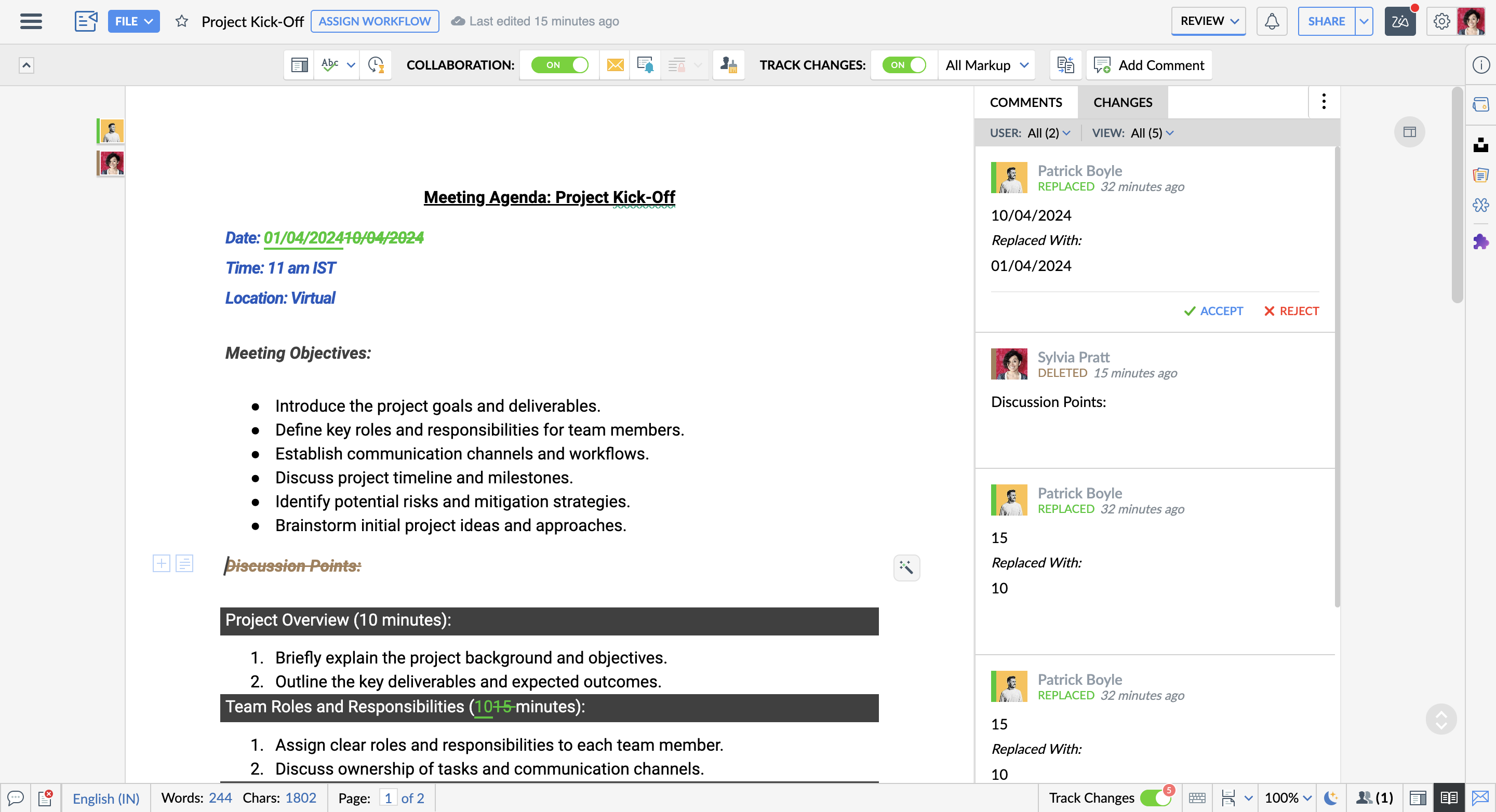


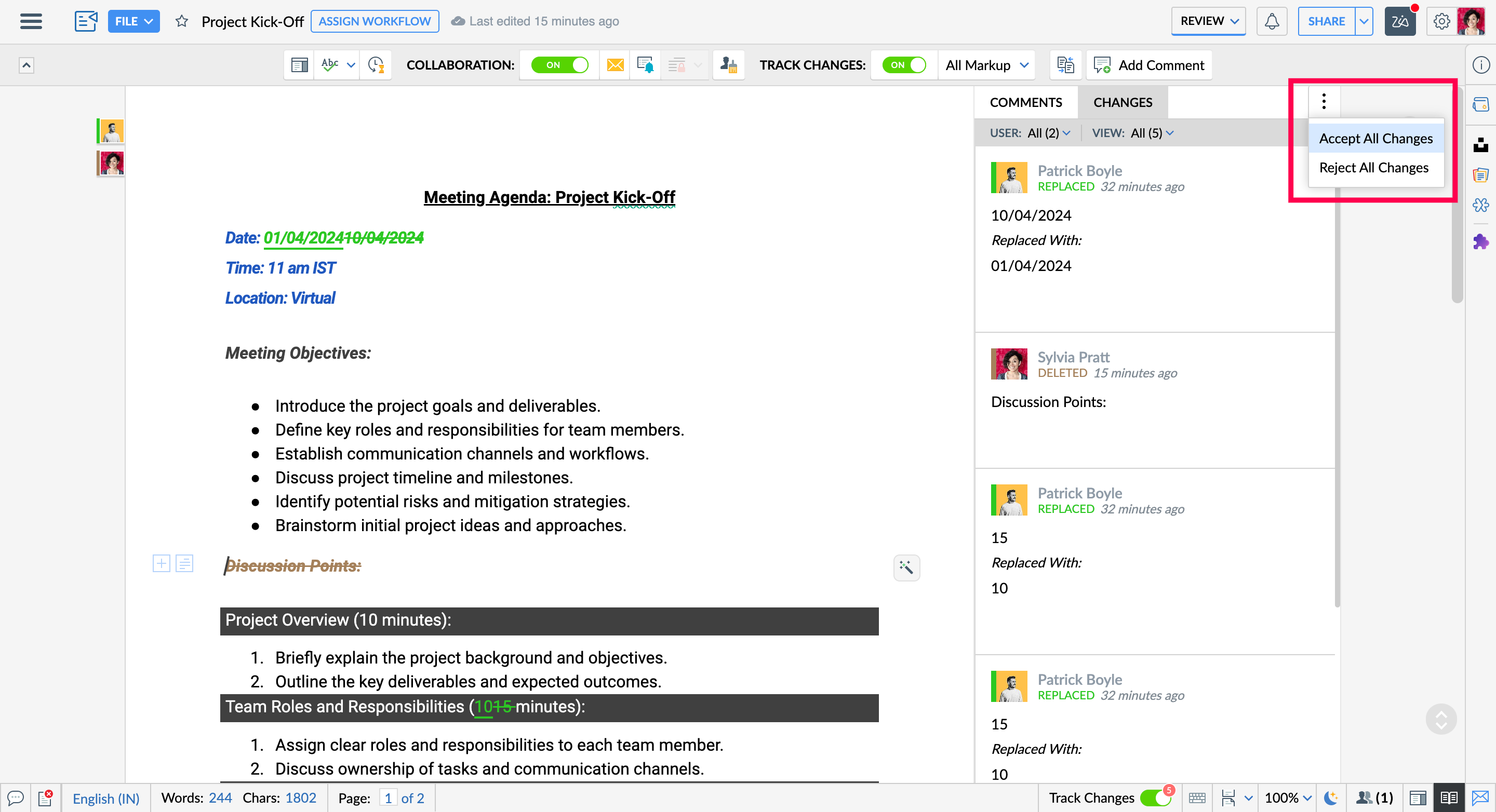
  • You can accept or reject changes individually or all at once, making the review process faster and more efficient.
     

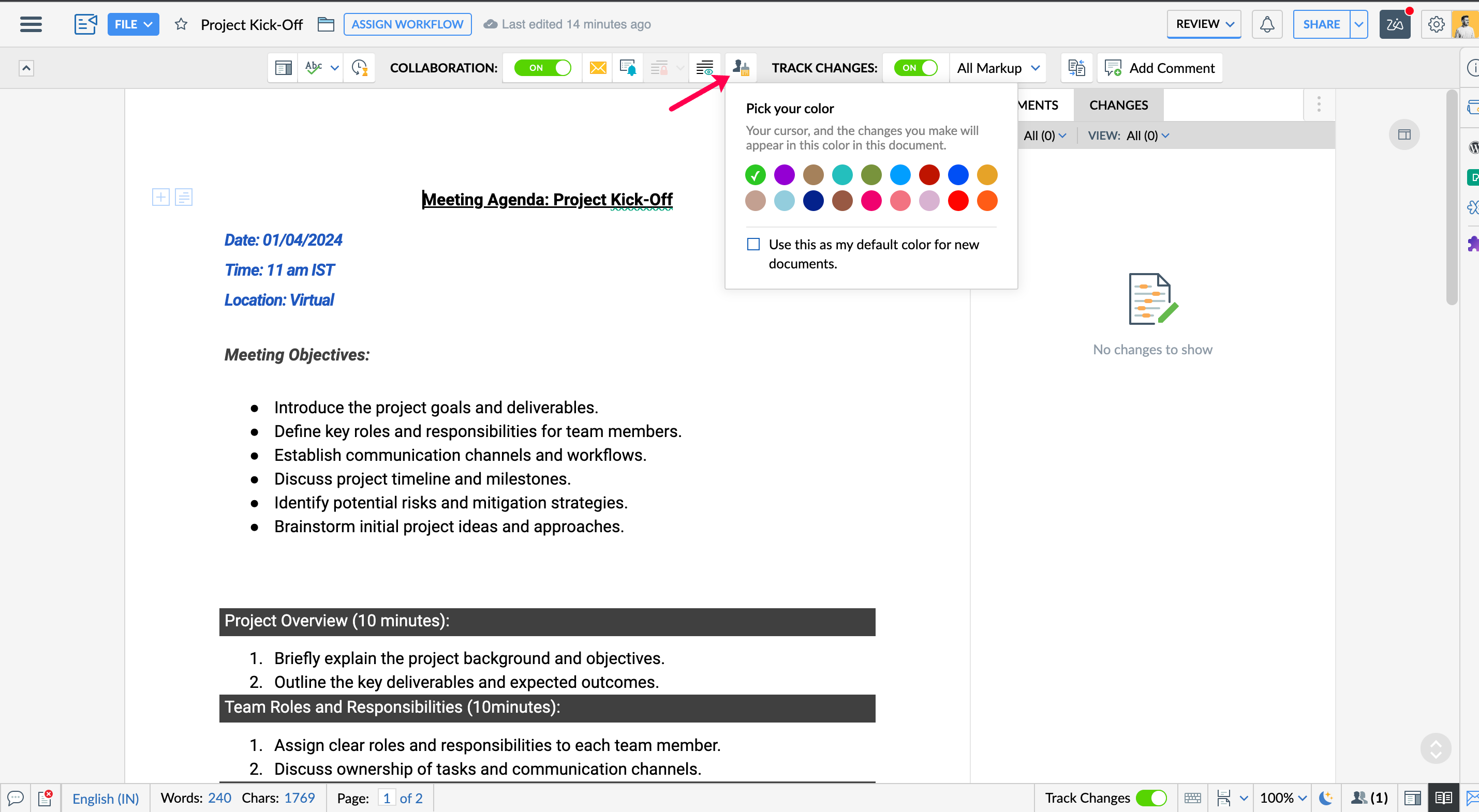
  • Choose a custom editing color to differentiate your edits from others, making it easier to track.


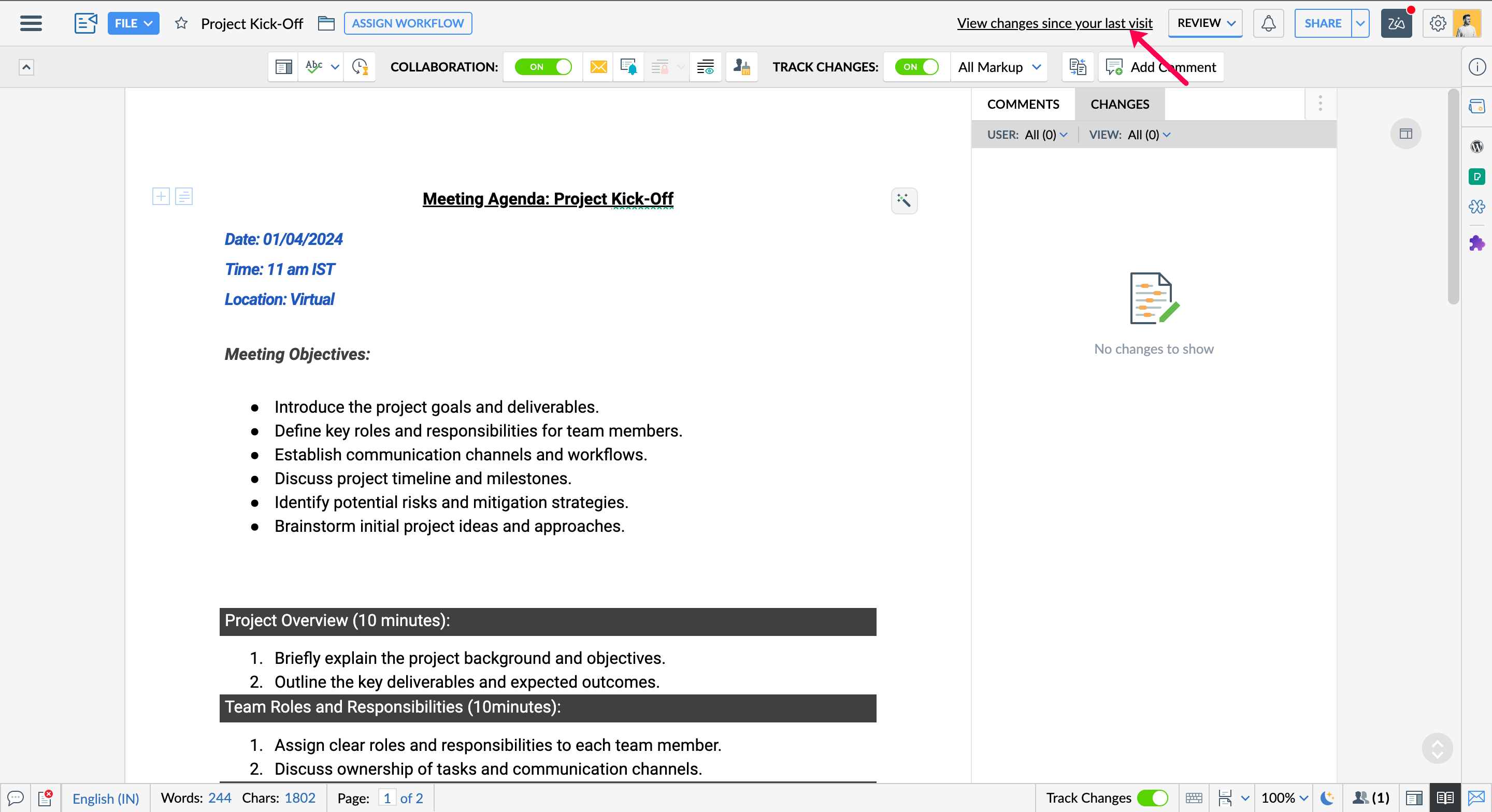
  • Collaborators with Edit and Share access can instantly see all edits made since their last visit by clicking "View changes since last visit."


  • You can filter the view to see changes made by:
    • All collaborators: Get a comprehensive view of all edits made by everyone.
    • Specific collaborator: Focus on edits from a particular team member for a targeted review.
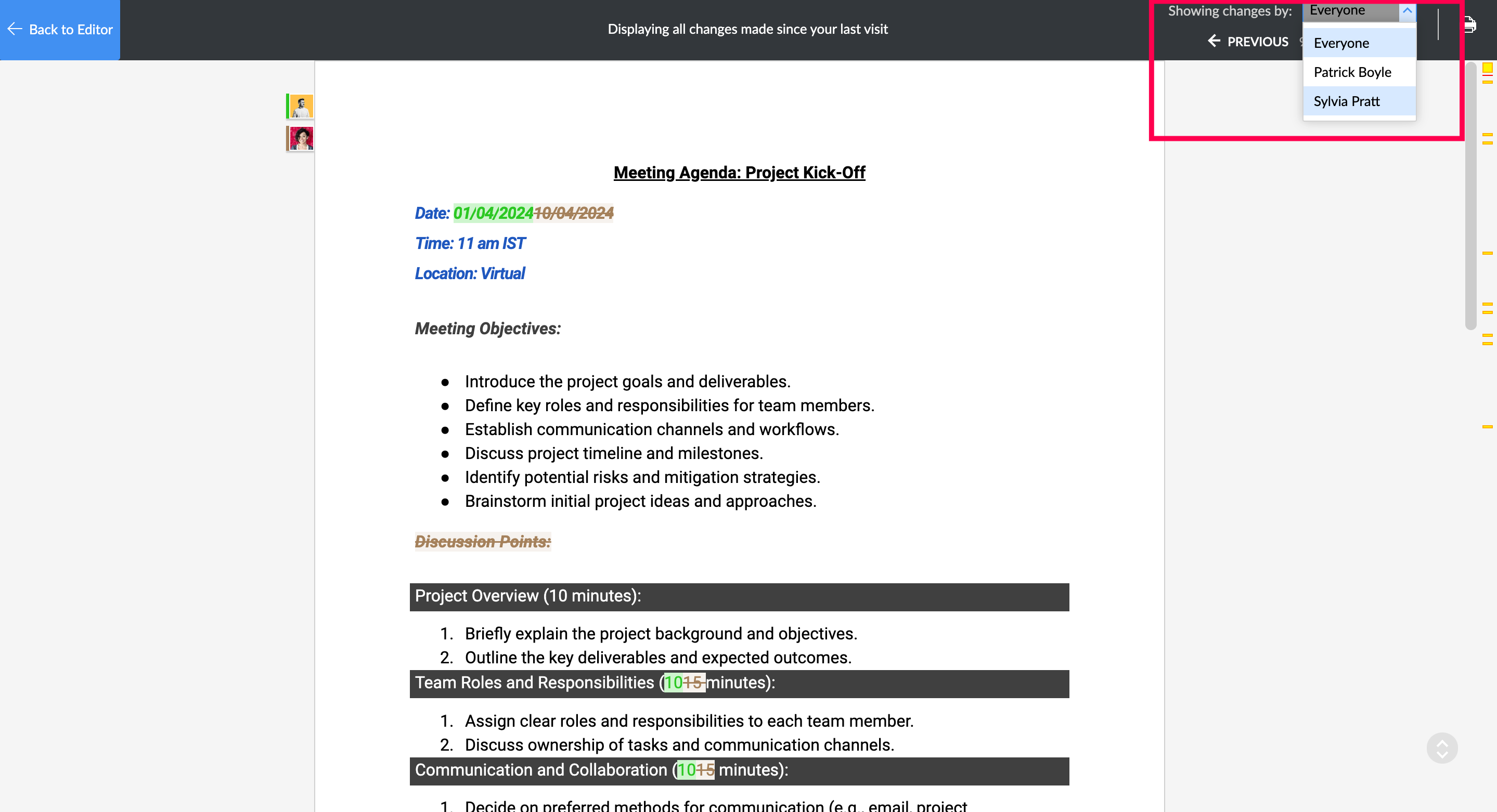


With the Track Changes feature in Zoho Writer, you can collaborate efficiently and manage the revision process for your documents! Please write to us at support@zohowriter.com if you have any questions or suggestions!
 
Stay tuned for more!

Until then,

Happy Writing!

    • Sticky Posts

    • [Announcement] Insert image from URL changes in Zoho Writer

      Hi Zoho Writer users! We'd like to let you know that we've changed the behavior of the Insert image from URL option in Zoho Writer for security reasons. Earlier behavior Once you inserted an image URL in a Writer document, the image would be fetched from
    • Deprecation of certain URL patterns for published Zoho Writer documents

      Hi Zoho Writer users! We'd like to let you know that we have deprecated certain URL patterns for published and embedded documents in Zoho Writer due to security reasons. If the published or embedded documents are in any of these URL patterns, then their
    • Introducing plagiarism checker in Zoho Writer

      Zia, Zoho Writer's AI-driven writing assistant, now highlights plagiarized and duplicated content in addition to offering contextual grammar and writing suggestions to help you write clearly and concisely in English. Zoho Writer's plagiarism reports Here
    • [Important announcement] Impact of Google's new email guidelines for Zoho Writer automation users

      Hi users, Google has recently announced new guidelines for sending emails to Gmail and other Google-hosted domains. These guidelines will be effective starting Feb. 1, 2024, and can impact the delivery of emails sent from Zoho Writer. Your organization
    • Transitioning from MS Word to Writer: A complete walkthrough

      Hello everyone! We understand moving to a new word processing tool can be difficult, especially if it means switching from a legacy software like MS Word. That's why we've organized an exclusive webinar where we talk you through ways to make your switch from MS Word to Writer as easy as possible. In this webinar, you'll learn: - Why Writer is a simple yet powerful alternative to MS Word. - How to locate your favorite MS Word features and functions in Writer.  - How to migrate your Word documents
    • Recent Topics

    • Zoho CRM Layout Rules: Nine New Actions, Profile-Based Execution, and Interactive Preview

      Hello everyone, Availability: This feature is now available for customers in the JP and SA DCs. It is planned to be released for other customers in soon. We’re excited to announce powerful new enhancements to Layout Rules in Zoho CRM - a feature built
    • CNIL - Suivi de Pixel

      Bonjour à tous, À la suite de la nouvelle recommandation de la CNIL sur les pixels de suivi dans les e-mails, savez-vous si Zoho Campaigns permet : de conditionner le suivi des ouvertures au consentement de chaque contact ; de proposer un lien permettant
    • Automatically set the default VAT percentage on a quote

      Every time I create a quote, I have to manually adjust the VAT and activate the checkbox for 21%. But all of our quotes include 21% VAT. So now occasionally, it happens that the checkbox is forgotten, and the customer receives an incorrect quote (without
    • How to View Part Inventory and Warehouse Location When Creating a Work Order in Zoho FSM

      Hi everyone, We’re currently setting up Zoho FSM and would like to improve how our team selects parts when creating a Work Order. Right now, when we add a part or item to a Work Order, we can select it from our Zoho Inventory list but we don’t see any
    • Zoho Sprints - Q2 Updates for 2026

      Improve your agile project management experience with the newly released capabilities in Zoho Sprints. This quarter we've shipped a few new features and enhancements that are built around smarter planning and execution tools, tighter integrations, and
    • CNIL - Suivi de Pixel

      Bonjour à tous, À la suite de la nouvelle recommandation de la CNIL sur les pixels de suivi dans les e-mails, savez-vous si Zoho Campaigns permet : de conditionner le suivi des ouvertures au consentement de chaque contact ; de proposer un lien permettant
    • Building extensions #5: Creating custom user interfaces using widgets

      In our last post, we looked at connections and how they help build a seamless integration with an example. In this post, we'll explore creating widgets in Zoho Sprints and their benefits with a real-time example. Widgets What and where? Widgets are custom
    • Images not saved in notes

      Created noteboards and create a note, copy pasted the image, close the note and open again, image is not coming this same problem occurs in note on notebook I have attached the replication steps as video url to analyse it, and also attached the videos
    • How to Change Notecard Color After It Is Created

      I would like to change the color of a Notecard that already exists in my notebook. I can't for the life of me figure out how to do it. I don't see an option or color picker anywhere.
    • Cannot export Zoho Notebook data nor search via MCP (GDPR)

      Hi, I'm using Zoho Notebook for a few years now. Not as my main notetaking app, but for specific usecases I did find it handy. Now I want to export all my data. Preferably all notes in html format with metadata like note title, included images and parent
    • Bring more clarity to your blueprints with color-coded transitions

      As your hiring processes evolve, blueprints naturally become more detailed. When multiple transitions connect different stages, it can take extra effort to identify approvals, rejections, reviews, and other actions at a glance. With this enhancement,
    • Add a MATRIX field to the forms creation

      Same as Zoho forms, we need a Matrix field in Zoho Creator forms, is very usefull
    • incoming mails not received

      incoming mails not received
    • Integrate QuickBooks with Bigin and streamline your sales and accounting!

      If your business relies on Bigin for customer management and QuickBooks for accounting and invoicing, this new integration is here to make your operations more efficient. By connecting these two platforms, you can now manage your CRM and financial processes
    • Automatically calculate and include tax on quotes

      I've recently been VAT registered and now need to include VAT on my quotes. I have been able to set the tax label and amount but still need to click the tax link and select the tax I wish to include before it appears on the quote. Does anyone know of
    • Relative Dates

      Is there a way to apply a Relative Date filter in DataPrep (ie. Today or Yesterday)? I need to filter a dataset to only include rows with a created date of yesterday, but I’m not finding a way to do it?
    • Change email addresses - Advise how

      Good day, I need assistance to change all our users email addresses Please advise
    • email signature

      How do you add an email signature
    • Email Forwarding | How to Enable and Disable Email Forwarding on a Non-Admin User Account

      Email Forwarding Issue: Enable and Disable Email Forwarding
    • Ask the Experts 31: Improving support performance with reports and dashboards

      Hello everyone, Join us for the next Ask the Experts (ATE) session! Ask the Experts is an opportunity to connect with people who have deep knowledge of Zoho Desk. Let's look at the topic we're focusing on this month. Just as we rely on the right tools
    • Zia AI capabilities now available in all paid editions

      Hello everyone, We are expanding the availability of AI-powered features in Desk to the other paid subscriptions from 7th July 2026. Right now, the following AI-based features are available for Enterprise edition users: Intelligence: Sentiment analysis,
    • Product updates in Zoho Workplace applications | June 2026

      Hello Workplace Community, Let’s take a look at the new features and enhancements that went live across all Workplace applications for the month of June. Zoho Mail Alphanumeric support for attachment extensions in rule conditions Attachment extension
    • Biggest supported size of a note

      I'm still testing this ZOho Notebook before purchasing a premium licence and can't work with large notes. I store personal vocabulary in two 13,000-word / 83200-character notes. Same poor experience with PC, Web, and mobile apps: Is there an application
    • I need help lease Email

      I' not getting an email replay when someone open a ticket
    • Sigma function call hangs forever from Desk widget — app_install_id/encapiKey are null

      Calling ZOHODESK.request() from the widget to invoke a Sigma DRE function URL hangs forever (never resolves, never rejects, no error) until client timeout. Tried with merge fields app_install_id={{sigmaInstallId}}/{{installationId}} and encapiKey={{enCapApiKey}}
    • Draft quotes, sales orders, and raise invoices for services in CRM

      Create Quotes, Sales Orders, and Invoices for Services in Zoho CRM You can now draft Quotes, and Sales Orders as well as raise Invoices for services in Zoho CRM. And how is that possible? By filling out the Service subform in your Quotes, Sales Orders
    • Tiktok

      When will Tiktok be added to the Zoho Social Platform?
    • Canva Integration

      Hello! As many marketing departments are streamlining their teams, many have begun utilizing Canva for all design mockups and approvals prior to its integration into Marketing automation software. While Zoho Social has this integration already accomplished,
    • Admin Logging in as another User

      How can a Super Admin login as another user. For example, I have a sales rep that is having issues with their Accounts and I want to view their Zoho Account with out having to do a GTM and sharing screens. Latest Update (27th April 2026): With the early
    • Action Required: Allowlist New IP Ranges for the EU Data Center

      Dear Users, We are adding new IP ranges for the Zoho Analytics EU data center (https://analytics.zoho.eu) If you connect Zoho Analytics to cloud databases (both Live Connect and import), such as Amazon RDS, Amazon Redshift, or Microsoft Azure, you must
    • Tips & Tricks #3: Zoho CRM - Agentes en la página de inicio

      Hola a todos, Vuestros Agentes realizan un trabajo muy útil. Encuentran información como clientes potenciales importantes, oportunidades de venta y actualizaciones relevantes. Sin embargo, hasta ahora no era posible ver esa información directamente en
    • Pricelists

      So we have them in books but I cannot find them in commerce?
    • Automating CRM backup storage?

      Hi there, We've recently set up automatic backups for our Zoho CRM account. We were hoping that the backup functionality would not require any manual work on our end, but it seems that we are always required to download the backups ourselves, store them,
    • 'Pinned' notes feature of a pipeline record

      Hi team, Could you please implement a feature which will allow users to pin different notes so that they will appear at the very top of the notes tab in a pipeline record. Sometimes we have a wide range of notes on a record which means more important
    • Associate emails from both primary and secondary contacts to deal

      We need to associate emails from multiple contacts to a deal. Please advise how this can be achieved. At present, only emails from primary contacts can be associated. Thanks
    • Custom Button Creation from Layout Editor in Zoho CRM

      Hello All, Buttons in Zoho CRM act as triggers that perform a specific action when clicked. Zoho CRM includes a set of system buttons that help you carry out common actions with a single click. Beyond these, your organization can create custom buttons
    • #PitStop3: Share & Collect Payment using Zoho Invoice

      We have reached another milestone in our journey. Post #15 to #20 weren't just about sharing invoices, they were about building a payment workflow that works for you, your customers and your business. Here's a quick wrap of what we covered in this segment:
    • Suggestions for Improving the Deluge Development Experience

      Hello, I would like to share some ideas that could significantly improve the Deluge development experience, especially for partners and developers building larger solutions across the Zoho ecosystem. Some key areas that would add a lot of value: Deluge
    • Enhancement announcement: Mitigate mailbox clutter using the new field: "Sync emails from"

      Dear Customers, We hope you're well! We are here with a minor enhancement in email integration in Zoho CRM. Emails have become the primary mode of communication these days. Because of which mailboxes are getting overly cluttered day after day. To help
    • Zoho CRM Sandbox now supports integrations

      Hello everyone, We are now expanding Zoho CRM Sandbox to support integrations with other Zoho products. You can connect, configure, and validate the behavior of your integrated tools within a safe, isolated environment - testing end-to-end without touching
    • Next Page