Data Import: New interface, improved field mapping, and more

Data Import: New interface, improved field mapping, and more

Hello everyone!

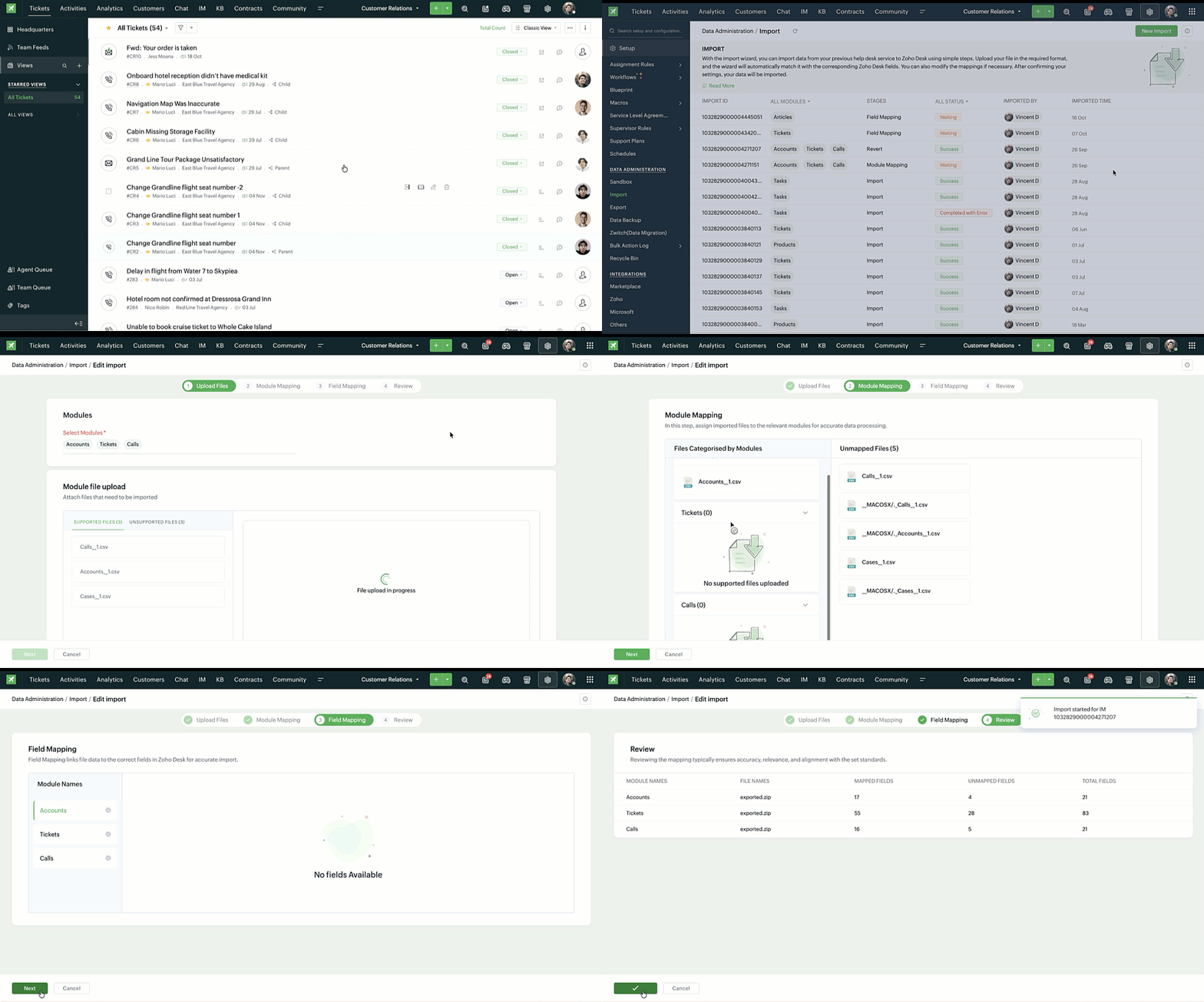
We’ve redesigned the data import process to ensure accurate field alignment and verify that every column in the uploaded file maps correctly with Desk fields before import. Here's how:

Streamlined Import Steps

Importing data is now more guided and detailed—from selecting multiple modules to mapping fields with clearer steps and improved instructions at every stage—it is now simpler to validate and manage imports.


User can now review and validate every mapping detail before proceeding:
  1. Field in File: Displays the column names contained in the first row of data in the uploaded file, which helps identify the data source for each field.
  2. Desk Fields: Shows the corresponding field names in Zoho Desk, ensuring that each imported data point lands in the right place.
  3. Field Format: Allows users to set formatting for data in a field, especially dates and times, for consistency after import.
  4. Sample Data from File: Displays real examples from the second and third rows of import file, letting a user verify that each mapping and data format looks correct before importing.


Import History

The Import History page shows every a record of the imported files in one place along with the following details:
  1. Import ID, module name, and import stage
  2. Import status (In Progress, Success, Failed, Waiting)
  3. Imported by and imported time

Additional capabilities

  1. Add data to existing imports: New records can be added to a completed import using the same module and field mappings. No need to start over; Desk automatically applies the previous mapping setup for continuity.
  2. Revert imports: Undo imported data in just one click. If users have added data multiple times (e.g., Add Data 1, Add Data 2), reverting will remove only the latest addition.
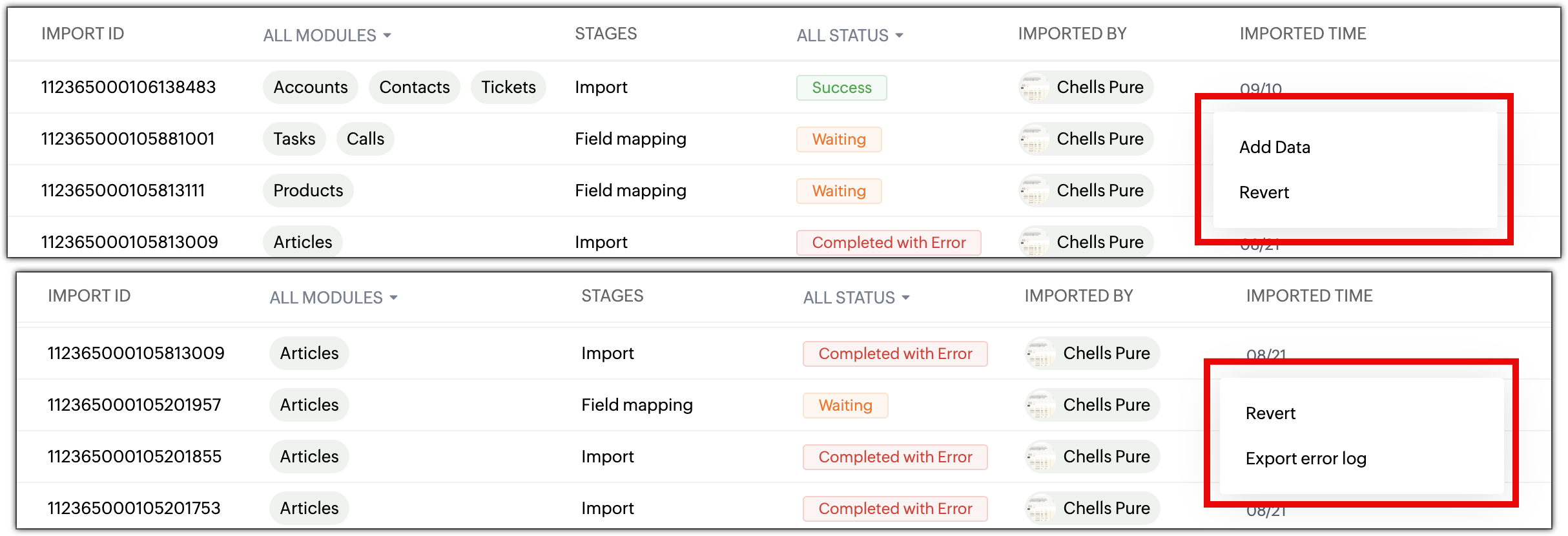
  3. Detailed error logs: Identify why an import failed in the new Error Logs section lists so the users can correct and re-import without repeating previous errors.

Points to remember

  1. Add Data is available only if the original import was successful.
  2. A user cannot modify mappings while adding data as it follows the original import setup.
  3. Unsupported file types (.xls, .pdf, etc.) will be automatically separated under Unsupported Files.
The new interface for import is now available in all data centers. For more details, please refer to the help document.

PM: @Nivedhan Senthilkumar 

Regards,
Velantina V
User Ed | Zoho Desk
    • Sticky Posts

    • 2024 Email Authentication Standards: Elevating Security with Google and Yahoo

      In contemporary email communication, email authentication plays a pivotal role in mitigating email fraud, spam, and phishing attacks. Brace yourself for a new level of security. Starting February 2024, Gmail and Yahoo will be implementing robust email
    • Using Agent Email Address as From Address

      Currently, while replying to a ticket, it is possible for agents to choose their own email addresses as 'from' addresses. Although we built this just for that little extra flexibility, in hindsight, it hasn't figured much in conventional usage.  Almost all businesses prefer that responses to their customers' tickets be sent from the common support/service email address and NOT from those of individual agents. During personal interactions at events, some of you have even made passing mentions about
    • Edit and Delete options in Comments

      A lot of teams have been using ticket comments extensively to collaborate everyday. Notification Center further improved this experience by bringing real-time updates. As we continue to build more improvements to this experience, we've shipped a small-yet-important
    • Webinar 2: Supercharged customer support for growing business

      Join us for this webinar and learn how to step up your support game using a real-time communication platform to generate happier, more successful customers. In this live webinar, we will will discuss the importance of SalesIQ for your support team and how it can help you:  Understand your customers better and their journeys to proactively support and engage them even before they ask for help.  Integrating real time conversations into Zoho Desk’s Support, providing a conversational customer service
    • Customize Colors of your Customer Self Service Portal

      You asked for it. We heard you. We're happy to roll out the most sought after feature request, Customizing the Colors of your Customer Self-service Portal. Now you can set the color of your customer portal to mimic your company's web site, so that your customers visiting the portal will not feel alienated by the default theme.  Go ahead and configure the color of the header, tabs, fonts and background according to your needs. You can either choose between default color themes like Blue, Grey, Green
    • Recent Topics

    • WhatsApp IM in Zoho Desk always routes to Admin instead of assigned agent

      Hello Zoho Experts, I connected WhatsApp IM to my Zoho Desk account. I only assigned my Customer Service (CS) agent to the WhatsApp channel, and I did NOT include Admin in this channel. However, every new WhatsApp conversation automatically gets assigned
    • import data from Apollo.ai into zoho crm via zoho flow

      I might be asking this question in the wrong forum. We use Apollo.ai to find potential new leads for our business, there are around 10000 leads that we have initially found. We have an Apollo.ai account but just to do searches, we dont use it as a crm.
    • Woocommerce Line Item Information

      I'd like to add each line item from a Woocommerce order to a zoho creator form record. The line items are found within the line items array, but I'm not sure how to get each item out of the array? Any help would be much appreciated.
    • Synching changes to Stripe when changes are made in Zoho Billing

      We have a situation where we have merged customers in Zoho BIlling and then found out later that the payment in Stripe was not updated and still associated with the old customer record. The card gets updated and billed, but that payment is still associated
    • How do I fix this? Unable to send message; Reason:554 5.1.8 Email Outgoing Blocked.

      How do I fix this? Unable to send message; Reason:554 5.1.8 Email Outgoing Blocked.
    • Disable Smart Filters By Default

      The smart filters "feature" is causing confusion for Zoho Mail users. New emails should be delivered to the inbox unless they have specifically opted to redirect them somewhere else. People don't understand that new emails might be waiting in a random
    • ME SALE ESTE ERROR: No fue posible enviar el mensaje;Motivo:554 5.1.8 Email Outgoing Blocked

      Ayuda!! Me sale este error al intentar enviar mensajes desde mi correo electronico de Zoho! Tampoco recibo correos pues cuando me envia rebotan. Ayuda, Me urge enviar unos correo importantes!! Quedo atenta MAGDA HERNANDEZ +5731120888408
    • Client Script | Update - Client Script Support For Custom Buttons

      Hello everyone! We are excited to announce one of the most requested features - Client Script support for Custom Buttons. This enhancement lets you run custom logic on button actions, giving you greater flexibility and control over your user interactions.
    • validation rules doesn't work in Blueprint when it is validated using function?

      I have tried to create a validation rule in the deal module. it works if I try to create a deal manually or if I try to update the empty field inside a deal. but when I try to update the field via the blueprint mandatory field, it seems the validation
    • Image field in custom module

      Hi guy, Is there any hope of adding a custom image field in the custom module? We created a custom module to keep track of assets, and it would be helpful if we could attach an image to the record. Thanks Rudy
    • Zoho Mail not working

      Zoho Mail not working
    • Stop the Workarounds: We Need Native Multi-Step Forms

      After over 17 years of community requests, I'm hoping the Zoho team can finally address the lack of native multi-page form support in Zoho Creator. This has been one of the longest-standing feature requests in the community, with threads spanning nearly
    • CRM x WorkDrive: File storage for new CRM signups is now powered by WorkDrive

      Availability Editions: All DCs: All Release plan: Released for new signups in all DCs. It will be enabled for existing users in a phased manner in the upcoming months. Help documentation: Documents in Zoho CRM Manage folders in Documents tab Manage files
    • Queries on Project-Based Inventory Consumption and Proforma Invoice in Zoho ERP

      We would appreciate your clarification on how Zoho ERP plans to handle the following: Project-based inventory consumption without itemized sales orders Accurate project cost tracking along with inventory reduction Proforma Invoice usage We look forward
    • I can't add a new customer in Zoho invoice? Anyone had this issue before?

      Ive been using Zoho invoice for over 6 years. Today I wanted to add a new customer to send an invoice to but it doesn't save when I try to access it from the pulldown menu when you go to send a new invoice.
    • Spreadsheet View click & focus issue in Arabic (RTL) localization

      Hello Zoho Support Team, I am facing an issue in Zoho Creator Spreadsheet View when using Arabic localization (RTL). Scenario: My app supports English (LTR) and Arabic (RTL). I created a Spreadsheet View for a form. In English, everything works correctly.
    • Fix the speed

      It takes ages to load on every step even though my dataset is quite small.
    • Copy contents of File Upload Field into Workdrive

      Hello, I have set up our CRM so that a Workdrive folder is automatically created for each Deal via workflow, this adds the id of the folder into a dedicated field. We also have a field on each Deal called 'Approved Layout', which is a file upload field.
    • Can I add Conditional merge tags on my Templates?

      Hi I was wondering if I can use Conditional Mail Merge tags inside my Email templates/Quotes etc within the CRM? In spanish and in our business we use gender and academic degree salutations , ie: Dr., Dra., Sr., Srta., so the beginning of an email / letter
    • Customer address in Zoho Bookings

      Hello,  Is it possible to add customer address information to the Zoho bookings appointment screen? Or have it pull that information automatically from the CRM? We are wanting to use this as a field management software but it is difficult to pull the address from multiple sources when it would be ideal to have a clickable address on the appointment screen that opens up the user's maps.  It would also be advantageous for the "list view" to show appointment times instead of just duration and booking
    • Ghost email notification on a form

      Hello, We have recently encountered an error where I can not see a email notification set up for a form which I am currently the owner, although neither the form nor the notification were created by me. However, neither can the Super Admin access the
    • Introducing Record Category in CRM: Group options to see record status at a glance.

      Release update: Currently available for CN, JP, and AU DCs (all paid editions). It will be made available to other DCs by mid-March. Hello everyone, We are pleased to introduce Record Category in Zoho CRM - a new capability where the user can get an overview
    • bulk edit records and run internal logic

      hi there is few logics in manner "it this than that" logics work well when i edit entry openning it one by one (via workflow "on add/edit - on success" , for custom field "on update/on user input") but when i try bulk edit records - logic does not work.  how can i turn on logic to work as programmed - for mass editing records via bulk edit?
    • Dheeraj Sudan and Meenu Hinduja-How do I customize Zoho apps to suit my needs?

      Hi Everyone, I'm Meenu Hinduja and my husband Dheeraj Sudan, run a business. I’m looking to tweak a few things to fit my needs, and I’d love to hear what customizations others have done. Any tips or examples would be super helpful! Regards Dheeraj Sudan
    • Bulk bank rule creatioin

      Hi team, I am exploring Option to create a multiple bank rule. Could please suggest the option to implement this?
    • Limitations on editing a message in Cliq

      Hi I've checked the documentations and there's no mention of how many times a message can be edited. When trying with code, I get various numbers such as ~1000 edits or so. Please mention if there's a limit on how many times one can change a message via
    • Zoho mail account ownership transfer

      We recently took over another company and have assumed responsibility for its Zoho account, including Zoho Mail and all related services. We would like to formally transfer ownership of this account to our organization. Could you please outline the complete
    • email address autocomplete

      Is there a way to eliminate certain addresses from showing up in auto complete when entering an address? Many old and unused addresses currently show up, many of which I would like to get rid of. Thanks
    • How to use MAIL without Dashboard?

      Whenever I open Mail, it opens Dashboard. This makes Mail area very small and also I cannot manage Folders (like delete/rename) etc. I want to know if there is any way to open only Mail apps and not the Dashboard.
    • Introducing Radio Buttons and Numeric Range Sliders in Zoho CRM

      Release update: Currently out for CN, JP, AU and CA DCs (Free and standard editions). For other DCs, this will be released by mid-March. Hello everyone, We are pleased to share with you that Zoho CRM's Layout Editor now includes two new field formats—
    • User is already present in another account error in assigning users to marketing automation

      Hello everyone Greeting, I had a problem in assigning user in marketing automation, when I try to add it I see this error: (User is already present in another account error) what should I do?
    • How can i download and secure all my mails from the archive folders?

      Hi, i would like to download all my mails from my archive folders and secure it on my external HDD. Is this possible? Thx. amir
    • How to open filtered report in popup using Zoho Creator Deluge?

      First report: There is so many records in Report, If I click one record, pop up is occur. Second report (Pop up): there is also so many record data, and this pop up is also Report, not Form. First report: It has got "Sales Order" field. when I click any
    • Deluge Function to Update Custom Field

      I'm trying to get a Deluge function (which will run as part of a Schedule in Desk) that retrieves all tickets with the status "Recurring" and updates the custom field checkbox "cf_recurring" to "true". Here's what I have, which doesn't work: searchValue
    • Make panel configuration interface wider

      Hi there, The same way you changed the custom function editor's interface wider, it would be nice to be able to edit panels in pages using the full width of the screen rather than the currently max-width: 1368px. Is there a reason for having the configuration panel not taking the full width? Its impossible at this width to edit panels that have a lot of elements. Please change it to 100% so we can better edit the layouts. Thanks! B.
    • Can you default reports/charts to report the current week?

      Our data table maintains two years of data. Management wants certain report to automatically filter the report to the latest calendar week. I know I can do this manually with filters but I want the report to automatically default to the latest calendar
    • Rendering PDF to view on page

      My company upload lots of PDF files onto Zoho. But every time we open it, it downloads the file instead of viewing it on the web page. Does Zoho allow uploaded PDF files to be rendered to view on web page yet? I've been trying to use <embed> or <object> but it cannot be loaded.  (similar thread: https://help.zoho.com/portal/community/topic/how-to-open-a-pdf-file-of-a-view-in-preview-mode)
    • Overlapping Reports in Dashboards

      It's rare, but occasionally it would be a good feature if I were able to overlap reports, either fully or partially in the Dashboards. Also, then having the ability to move objects to the front or rear, or make them transparent/translucent would be good
    • Feature request - pin or flag note

      Hi, It would be great if you could either pin or flag one or more notes so that they remain visible when there are a bunch of notes and some get hidden in the list. Sometimes you are looking for a particular name that gets lost in a bunch of less important
    • Admin guide: Handling Mailbox Settings for better user management

      Managing day-to-day email scenarios, such as supporting users with multiple email addresses, ensuring uninterrupted email access during employee absences, enabling secure mailbox sharing, and enforcing organizational security and compliance, can be challenging
    • Next Page