Enable or disable any Field Rule | Zoho Forms
Hello Zoho Forms Community,
We are excited to announce a powerful new enhancement to Field Rules that gives you greater control and flexibility in managing your form logic!
Previously, if you wanted to temporarily deactivate a field rule, you had two options:
Delete the rule entirely (losing all your configurations)
Modify the rule conditions to prevent it from triggering

What's new?
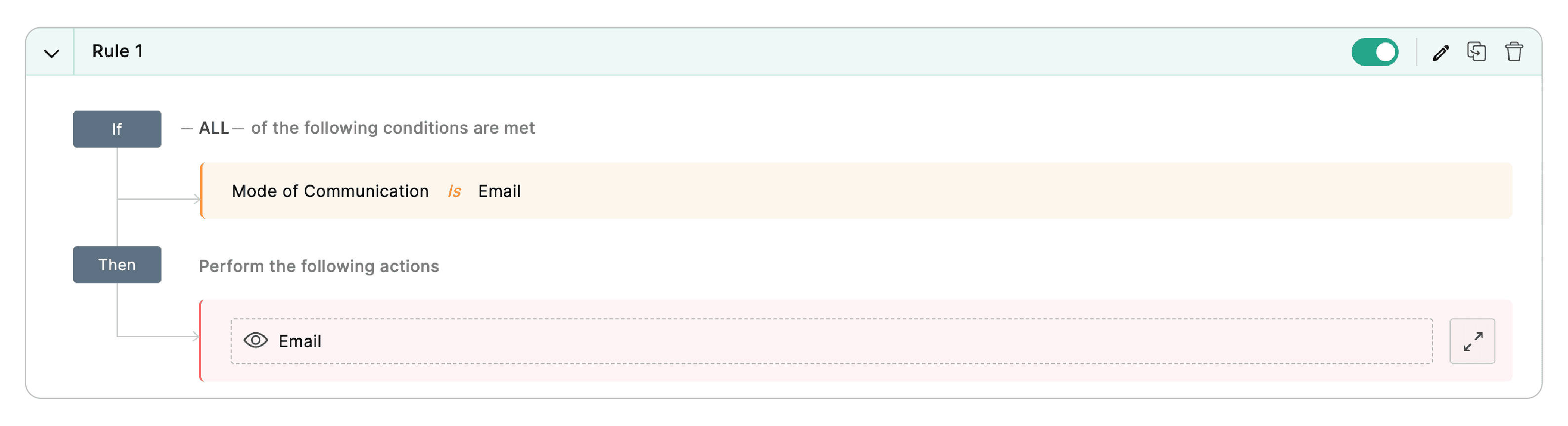
This provides you with unprecedented control over your form's conditional logic without requiring you to delete and recreate rules.
What makes this so useful?
- Solve it like a pro: Why is my form acting weird?
Your form is misbehaving, but you've got 12 rules. Which one is the culprit? Disable them one by one. Find the troublemaker. - Want to test if Rule A works better than Rule B?
Disable A, enable B, check results. Swap them back. No rebuilding needed. - Your hard work is sacred
Save that complex rule with 47 conditions you spent 3 hours perfecting. Toggle it off, and every single detail stays exactly where you left it. - Because seasons change (and so do your forms)
Holiday promotion rules? Toggle them on for December, then turn them off in January. Rules now have hibernation mode.
How to use this toggle
If you need detailed instructions for this, we might have over-engineered it.
Open your form's Field Rules section.
Look at any rule.
Click the toggle on the right.
You are done! And visual indicators make it crystal clear which rules are active and which are napping.
Already discovered this toggle when building forms? We want to hear if its making your form building experience better. Drop a comment below.
The toggle awaits!
Samhita,