Hello everyone,
We're incredibly excited to announce the all-new AWS authentication for connections in Deluge! This highly anticipated feature simplifies connecting to Amazon Web Services, opening up a world of possibilities and allowing you to seamlessly integrate your Zoho apps with the power and scalability of the AWS cloud.
What does this mean for you?
This new integration empowers you to connect and access AWS services like S3 directly from within Deluge. This eliminates the need for third-party tools to achieve a connection between Zoho and AWS. It also allows you to harness AWS's scalability for handling massive datasets while utilizing Deluge's power for complex transformations.
How does it work?
AWS is now offered as a custom connector in Deluge. This AWS connection utilizes Signature Version 4 authentication, the most up-to-date and secure method for authenticating requests to AWS services. It offers several key advantages that help protect your AWS credentials and prevent unauthorized access.
Availability
The new AWS authentication for connections is available across all Zoho services that support
Deluge connections. This means you can use it within your existing Zoho applications, be it CRM, Books, Mail, or others, to unlock new possibilities.
Creating an AWS connection
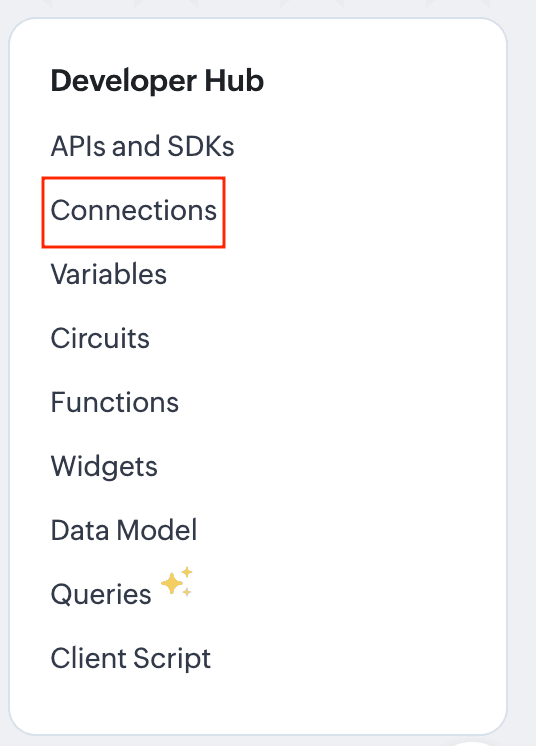
- Navigate to the Connections section of the desired Zoho service. For this example, we'll use Zoho CRM. For Zoho CRM, you can access it under Settings -> Developer Hub -> Connections.
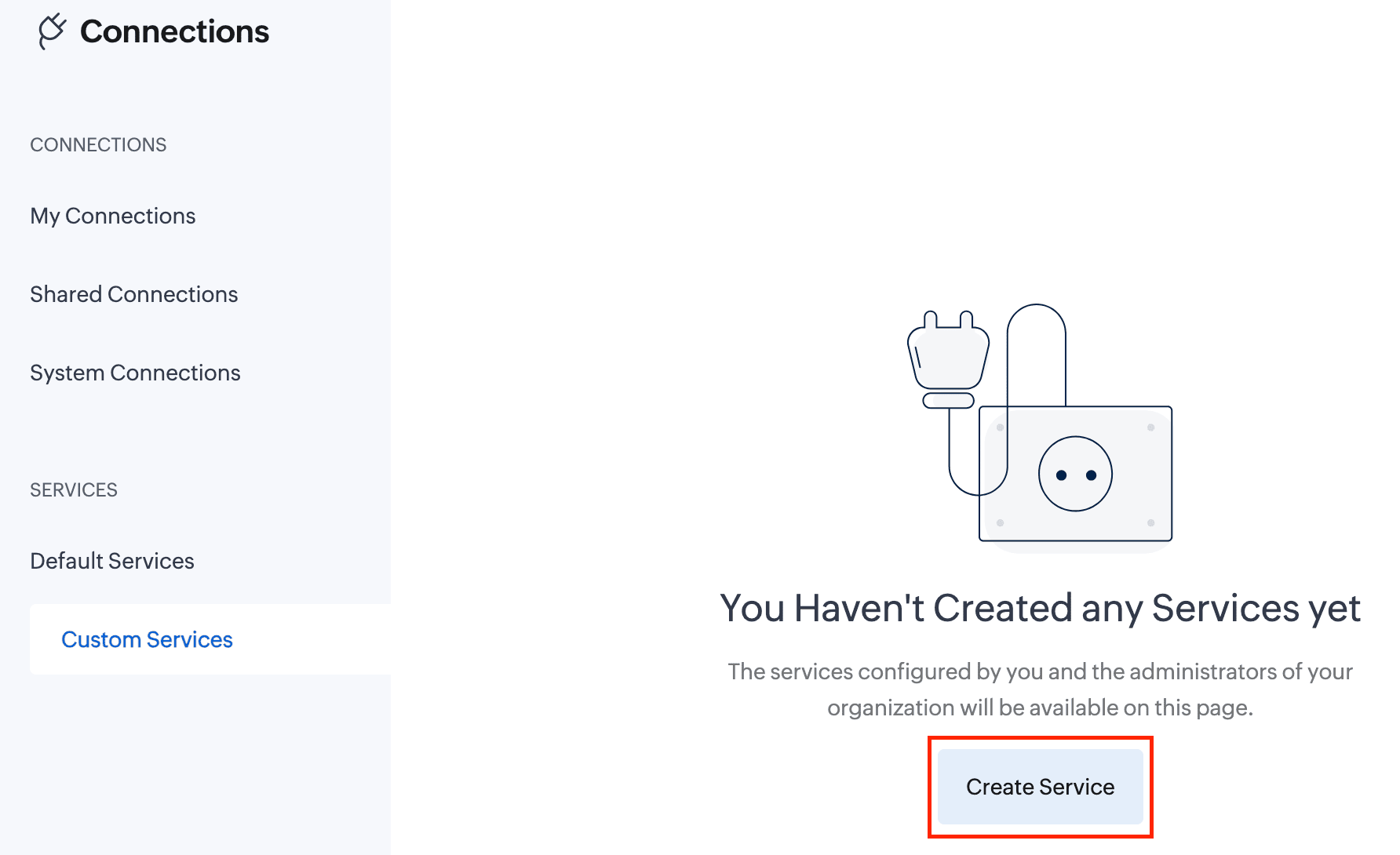
- In the Connections section, go to Custom Services and click the Create Service button.
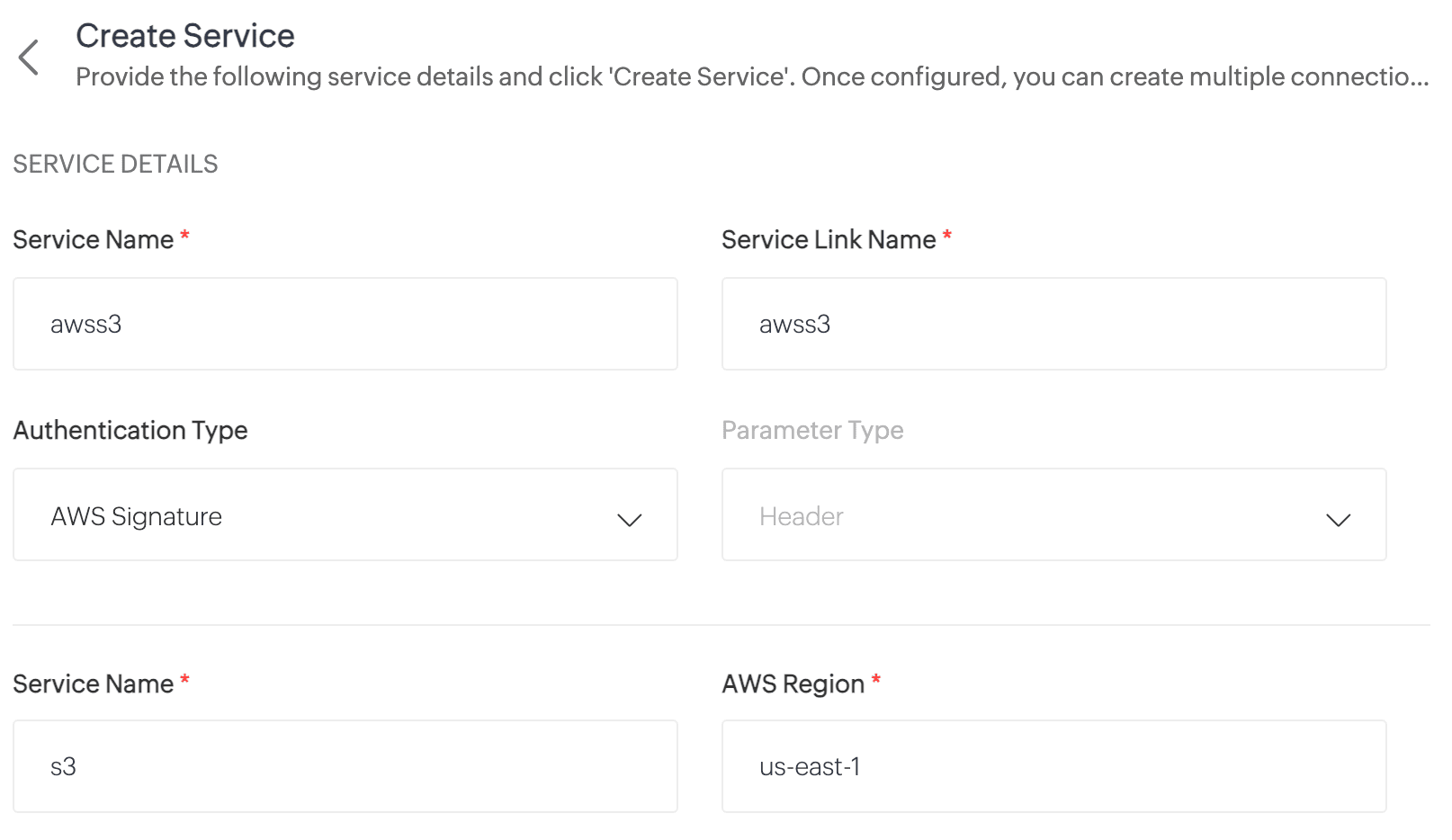
- On the Create Service page, enter the following details:
Service Name: awss3 //Custom connector name
Service Link Name: awss3
Authentication Type: AWS Signature
Service Name: s3 //Amazon service name
AWS Region: Enter your AWS region. To find your AWS region, log in to your AWS account and navigate to Console -> S3 -> General Purpose Buckets. Locate your storage buckets and copy the AWS region (e.g., us-east-1) displayed next to the required bucket.
- Click Create Service. The AWS S3 custom service will now be created.
- Now, navigate to My Connections and click Create Connection.
- On the Create Connection page, go to Custom Services under Pick Your Service and select awss3.
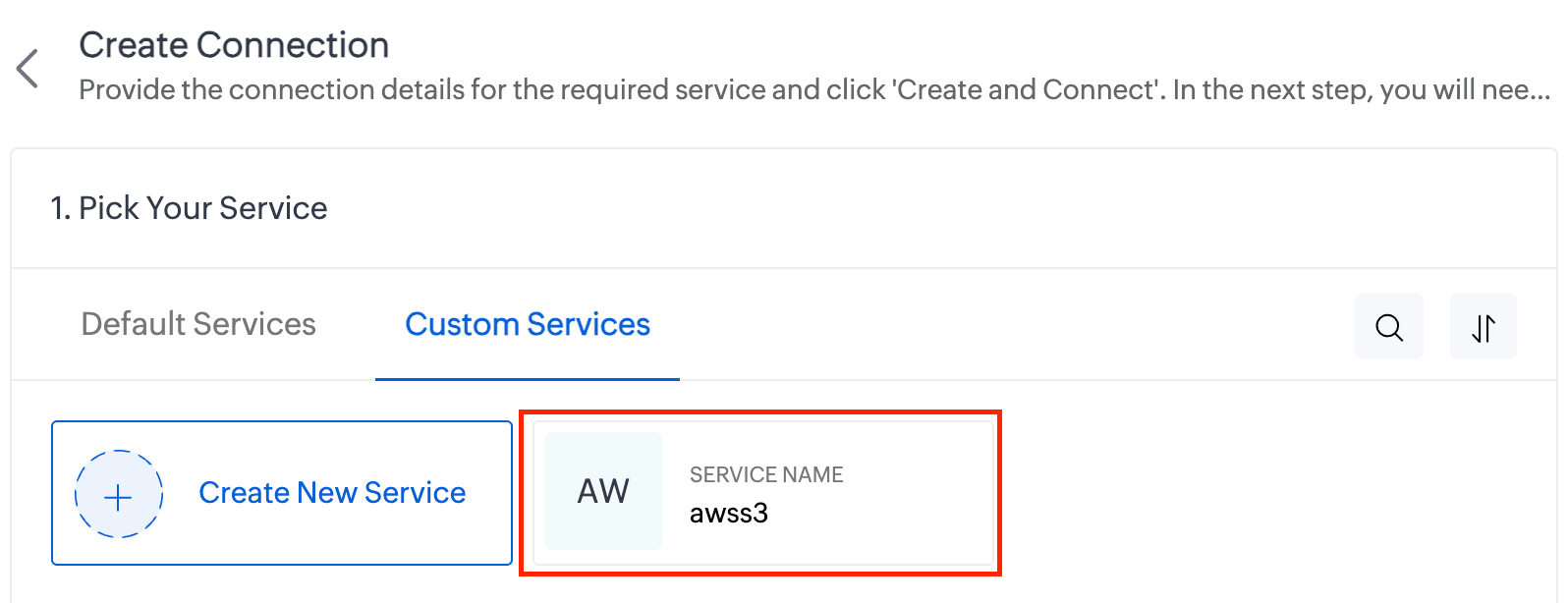
- Enter the Connection Name and Connection Link Name. Then click Create and Connect.
- You'll be redirected to the AWS authorization page, where you'll need to enter your Access Key and Secret Key.
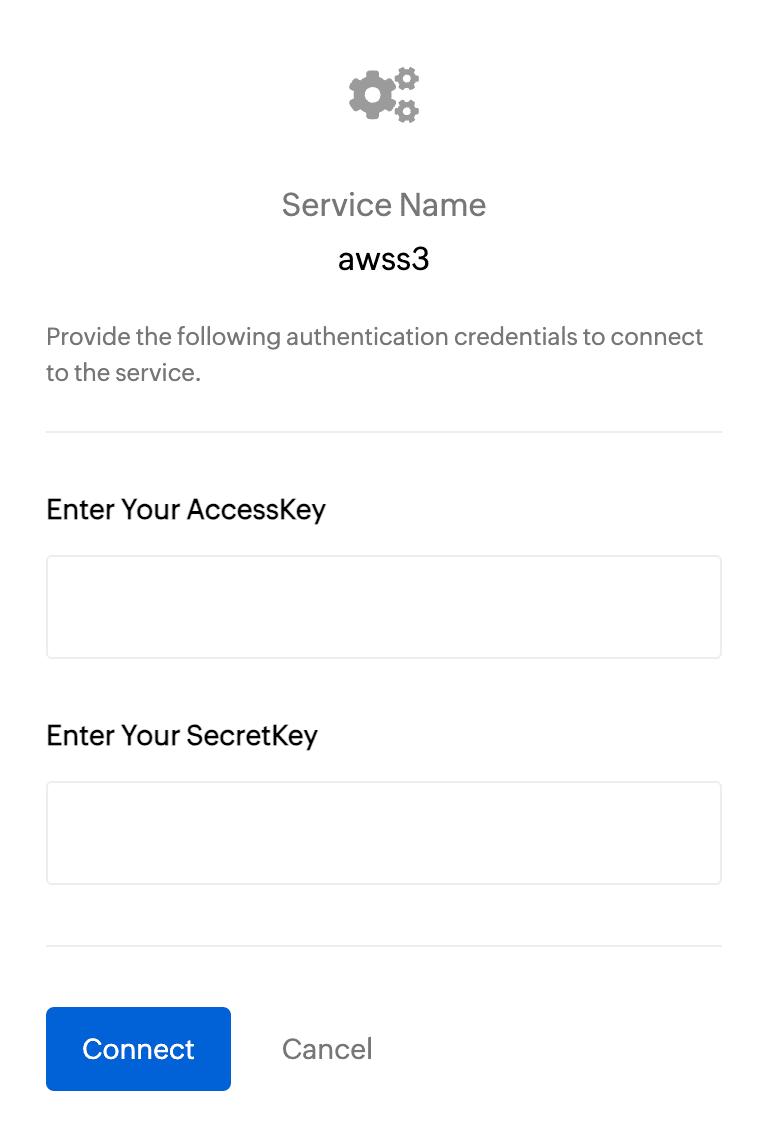
To get the Access Key and Secret Key:
- Log in to your AWS account and navigate to IAM.
- In the left pane, under Access Management, click Users.
- Select the required user from the list.
- On the User Details page, go to the Security Credentials section.
- Under Access Keys, click Create Access Key.
- On the next page, choose Command Line Interface (CLI) as the use case and click Next.
- Click Create Access Key.
- Copy the Access Key and Secret Key, then paste them into the respective fields on the AWS authorization page.
- Finally, click Connect.
- Your AWS connection has now been successfully created!
Working with AWS connections
Now you can utilize this AWS connection to integrate with AWS services and perform various actions, such as storing and retrieving data from Amazon S3. This connection can be leveraged across Zoho services (such as functions) to automate your data workflows.
For example, let's create a function to upload a file to AWS S3:
- Create a new function. Name the function and choose the appropriate type.
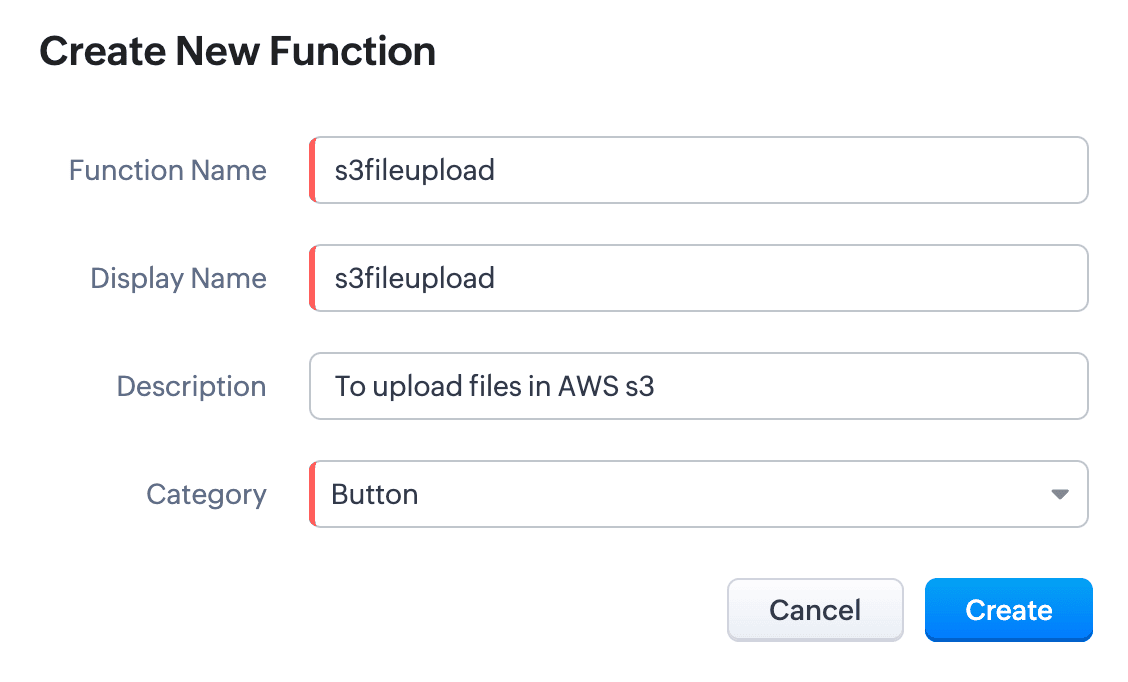
- Write the required scripts in the Deluge editor.
Here's a sample script which fetches a file from a given URL and uploads it to an AWS S3 bucket using the configured AWS connection:
fileResponse = invokeUrl
[
url:"
https://filesamples.com/samples/document/txt/sample1.txt" type: GET
];
file = tofile(fileResponse,"sample1.txt");
// Upload the file to AWS S3
awsResponse = invokeUrl
[
"https://<your-bucket-name>.s3.amazonaws.com/<file-name>" // Replace with your bucket name and file name
type: PUT
parameters:file
content-Type : "application/octet-stream"
connection: "awss3" // Use the AWS connection created earlier
detailed:true
];
// Log the response
info awsResponse;
- Execute the function by clicking the Save and Execute button.
- Switch to your AWS account, go to Console -> S3 -> General Purpose Buckets, and select the required bucket.
- You’ll see the sample file from the script listed under the Objects section. Every successful execution results in the file being uploaded to the bucket
Use cases
- Zoho CRM: You can automatically back up important customer documents from Zoho CRM to AWS S3. For instance, when a new file (e.g., contracts, proposals) is uploaded to a CRM record, a Deluge function can be triggered to fetch and store the file in S3 storage.
- Zoho Books: You can store and retrieve invoices from Zoho Books to AWS S3. When an invoice is generated, a Deluge function fetches the PDF and uploads it to an S3 bucket. This can act as centralized space for all your invoices.
We have comprehensive documentation covering everything you need to know about Deluge connections. For more information, visit our
Deluge Connections help doc.
Note: Please be aware that Zoho Creator has its own Connections feature, and we are working to bring AWS connections to Creator soon.
That’s all from us on the AWS connector! We hope you find it valuable and make the most of it across Zoho services. Give it a try, explore its possibilities, and let us know your thoughts.
And if you need any assistance, don’t hesitate to reach out to us. We’re always happy to help.
Regards,
The Deluge Team
Recent Topics
Change eMail Template for Event-Invitations
Hello ZOHO-CRM Team How I can change the eMail Template for Event-Invitations? I work with the German Version of the Free Version. I know how I can modify eMail alerts or Signature Templates, but where I can other eMails modify you send out? Thank you for your answer. Regards, Juerg
Right-Click Pipeline to Open in New Tab
Please add the ability to right-click on a pipeline to open it in a new tab
Service Title in Service Report Template Builder
I am currently working on the Service Report Template Builder in Zoho FSM. I have created three separate service report templates for different workflows: Preventive Maintenance Report Requested Service Report Installation Report My issue is that I cannot
Zoho Sign for Zoho Projects
Documents authorization and validation with signature is now easier in project management with Zoho Projects' Zoho Sign extension. Sign documents or send them for signatures directly from tasks and issues using Zoho Sign extension in Zoho Projects. Extension
Deluge Learning Series – Best Practices in Deluge | December 2025
We’re excited to bring you the next session of the Deluge Learning Series, focused entirely on writing cleaner, faster, and more reliable Deluge code. In this edition, we’ll dive deep into the essential best practices every Deluge developer should follow
Associate a Contact to a Campaign using deluge?
If I want to add one record to another related list, which zoho function do I use? zoho.updateRelatedRecord is not it I don't think. I simply want to take a "Contact" and associate it to a "Campaign" using deluge. Can anyone help? contactId = 5122008000000796037;
Add "Groups" above "Users" in the Zoho Forms Left Menu
Hi, We have Groups but you have to go to a Form and Share or use the Directory App to manage them, please add "Groups" above "Users" in the Zoho Forms Left Menu so you can manage them in 1 place within Zoho Forms too. Thanks Dan
What tool is best to import PST to Zoho Mail?
The best tool to import PST to Zoho Mail is Aryson PST Converter, as it offers direct and secure migration without data loss. Zoho Mail does not support native PST file imports, so using a professional tool is the most reliable solution. Aryson PST Converter
Changing field types
Question im a Zoho CRM user and curious, if I change a flied type from single or multi line text to a URL field type will i lose the data in the field or will it be converted to website link automatically. Thanks
Adding Taxes to paid consultations in Zoho Bookings
I created a 'paid' consultation under Zoho Booking and integrated it with payment gateways for online/instant payment before a booking is done. How can I add 'taxes' to the price of consultation? I can add taxes to other Zoho apps (liks Books, Checkout,
Zoho CRM Reports Module on Mobil App
I have the mobile app and the reports module doesn't appear in the sidebar for some reason. I saw a Youtube video where the user had the Reports module on mobile. Is there a setting to show it on mobile? Thanks.
Inquiry on Help Centre Tab Customisation
Hi Zoho team, I’m wondering if it’s possible to further customise the Help Center tabs, specifically the descriptions under Knowledge Base, Community, and Tickets. While the current setup allows customising tab names, being able to tailor the descriptions
Passing a form object to a function
Suppose I have a sort_order field in multiple tables and I want to increment it by +1 onCreate of a new record. Is there a way to pass the form object as an argument into the function to keep things DRY? The following function from Zia works, but I'd
Can you copy and paste a page within a form?
I have been looking at trying to copy/duplicate a whole page within a form. I can't see how I can do this without having to add all the data in again. This is very time consuming. Any help would be great.
Zoho Desk Limitations
Good day, all, I would like to know whether others share my frustration with some of Zoho's limitations. Don't get me wrong, I like Desk (and I also have a subscription for Analytics), I have been with them for close to 10 years, and unfortunately, I
SMS to customers from within Bigin
Hi All, Is there anyone else crying out for Bigin SMS capability to send an SMS to customers directly from the Bigin interface? We have inbuilt telephony already with call recordings which works well. What's lacking is the ability to send and receive
Unable to sort as Descending order
Trying to change the sort order for a lookup field (checkboxes) from Ascending to Descending and keep getting an error in Deluge that the order must be Ascending Did anyone ran into this? Thanks Eyal
How do I copy an email message to one or more other folders?
I can move a message to another folder using the "move to" option but I can't figure out how to copy a message.
New feature request: Allow copy of email message to another folder
Hello Zoho team, This is a suggested new feature to allow copy an email message to either another folder or the same folder. Within the same Zoho account. This is not a support request about "label". This is a suggested new feature to allow copies of
Hotmail is blocking the zoho mail IP
Greetings, Since last Tuesday (5 days ago today) I wrote to Zoho support and I still haven't received a single response (Ticket ID: 2056917). Is this how you treat people who pay for your email service? I am making this public so that those who want to
Desk DMARC forwarding failure for some senders
I am not receiving important emails into Desk, because of DMARC errors. Here's what's happening: 1. email is sent from customer e.g. john@doe.com, to my email address, e.g info@acme.com 2. email is delivered successfully to info@acme.com (a shared inbox
Creator Simplified #11: Create a custom button to download files
Hey there! This time, let's see how to create custom buttons to download the files uploaded in the file upload field. Sample use-case A training app has a module that provides the materials for all the available courses. Students can click on the corresponding
Hide horizontal lines at bottom of form
Hi I have a page with 3 forms embedded in html snippets. On each of the forms I can hide the submit button easily but I am left with the horizontal lines that bound that section and I cannot figure out to remove them (see below for the two sets of horizontal
Autosaving of Form Field
HI can anyone suggest a way of autosaving or simulating an autosave function for a specific field in a form. The story is as follows. I have a bunch of technicians who write notes on how they do a repair. Sometimes they write for a couple of hours the troubleshooting process. If they click incorrectly, press ESC, Cancel or the browser crashes the information is lost which can be heartbreaking so my guys use notepad and then copy the information in. The only way around this is to click submit on the
Can I export all attachments from Zoho CRM?
Zoho Tracking Image location
So we've been having an issue with tracking email opens. Specifically in Gmail. Our emails are not that long either, maybe 4 sections of image/250 characters of text/button per section. But all my test accounts I used via Gmail we're showing opens. But then come to find out the tracking image is at the very bottom of the email. So If the message is clipped (It always just clips our social icons on the bottom) and the user doesn't click the show more button it never tracks the open. Looking at other
AI Interview Insights: Turn Recorded Interviews into Quick Transcripts & Summaries
Evaluating interviews shouldn’t require replaying long recordings or taking manual notes. With AI Interview Insights, you can now review complete transcripts and AI-generated summaries of your One-way (Recorded) interviews right inside Zoho Recruit. This
How do I associate pricebooks to a customer?
I setup a few pricebooks, that worked fine. But now the only thing I can do with it, when I enter a quote or sales order, I can select which pricebook to use, but I have to do this product by product every time I add one. Is there a way to connect a pricebook
Employee Appraisal Applicability - Why is Date of Joining Hard-Coded?
In the new (to me, at least) Performance Appraisal Cycle wizard, it's possible to set criteria to determine for whom the appraisal process should apply. This makes sense on its face. However, one MUST use the Date of Joining criterion as a filter. Why
Spotlight series #6: The Show app for Android TV has a new look!
Hello everyone! We are delighted to introduce our revamped and redesigned Show app for Android TV. Smart TVs are exploding in popularity. Android TV alone has over 110 million active monthly devices. Zoho Show, as part of a constant effort to improve
Ask the Experts 26: Brighten every customer interaction with Zoho Desk all year long
Hello everyone, Greetings and welcome to Ask the Experts 26. As we wrap up 2025, we are excited to invite you to the 26th episode of our Ask the Expert series. 🎄The Merry Metrics Edition = Best of Zoho Desk [Best Practices + Holiday Automation + Year-End
Pricing calculator
Alright, so I'm trying to create a pricing calculator/pricing report generator to use in a cabinet shop. I did all the logic and such, and the calculator works. I have a few other things that I would need it to be able to do though, I'll do my best to
Bug Details
In the Bug detail the milestoneid is missing
Group by Owner/ Owner Kanban /Group by Custom Field
Hi, We are missing the option of viewing Tasks grouped by their owner, as it is an essential function for us to manage our employees' working tasks. We find it hard to inspect what are the tasks that our employees are working on. We are seeking an option
Stop completed task lists from disappearing?
Is there any way to stop projects from making tasks lists disappear when all the tasks in the list are completed? That's one of those little things where we're constantly fighting the product. For instance we have some projects which are ongoing - no start and end date. We use Kanban view to show the various task lists. We don't want the kanban list to disappear every time the items on it happen to be closed out. Thanks
Exciting Updates to the Kiosk Studio Feature in Zoho CRM!
Hello Everyone, We are here again with a series of new enhancements to Kiosk Studio, designed to elevate your experience and bring even greater efficiency to your business processes. These updates build upon our ongoing commitment to making Kiosk a powerful
Change of Blog Author
Hi, I am creating the blog post on behalf of my colleague. When I publish the post, it is showing my name as author of the post which is not intended and needs to be changed to my colleague's name. How can I change the name of the author in the blogs?? Thanks, Ramanan
Allow customers to choose meeting venue and meeting duration on booking page
My business primarily involves one-to-one meetings with my clients. Given the hybrid-work world we now find ourselves in, these meetings can take several forms (which I think of as the meeting "venue"): In-person Zoom Phone call I currently handle these
Booking outside of scheduled availability
Is there a way for staff (such as the secretary) to book appointments outside of the scheduled availability? Right now to do this special hours must be set each time. There should be a quicker way. Am I missing something?
Operation Questions.
Hello, I hope you are well. To explain a little, we are a company that sells services and products with a technical team responsible for installation and maintenance. Zoho FSM can be useful for the technical team, namely for the technical coordinator
Next Page