Release update: Currently out for CN, JP, AU and CA DCs (Free and standard editions).
For other DCs, this will be released by mid-March.
Hello everyone,
We are pleased to share with you that Zoho CRM's Layout Editor now includes two new field formats— Radio Buttons and Sliders for Numeric Fields. These additions will make it easier for your users to fill out forms across all your modules, given the convenience they offer, as well as visual appeal.
Let's take a closer look at how these new elements work.
Radio Buttons
Radio Buttons are ideal when a user has to input a single choice from a minimal set of options that are presented upfront, making selection clearer and faster.
Here are some common use cases where Radio buttons work the best:
Billing cycle, such as Monthly or Yearly
Subscription plan, such as Basic, Pro, or Enterprise
Property type in real estate, such as 1 BHK, 2 BHK, or 3 BHK
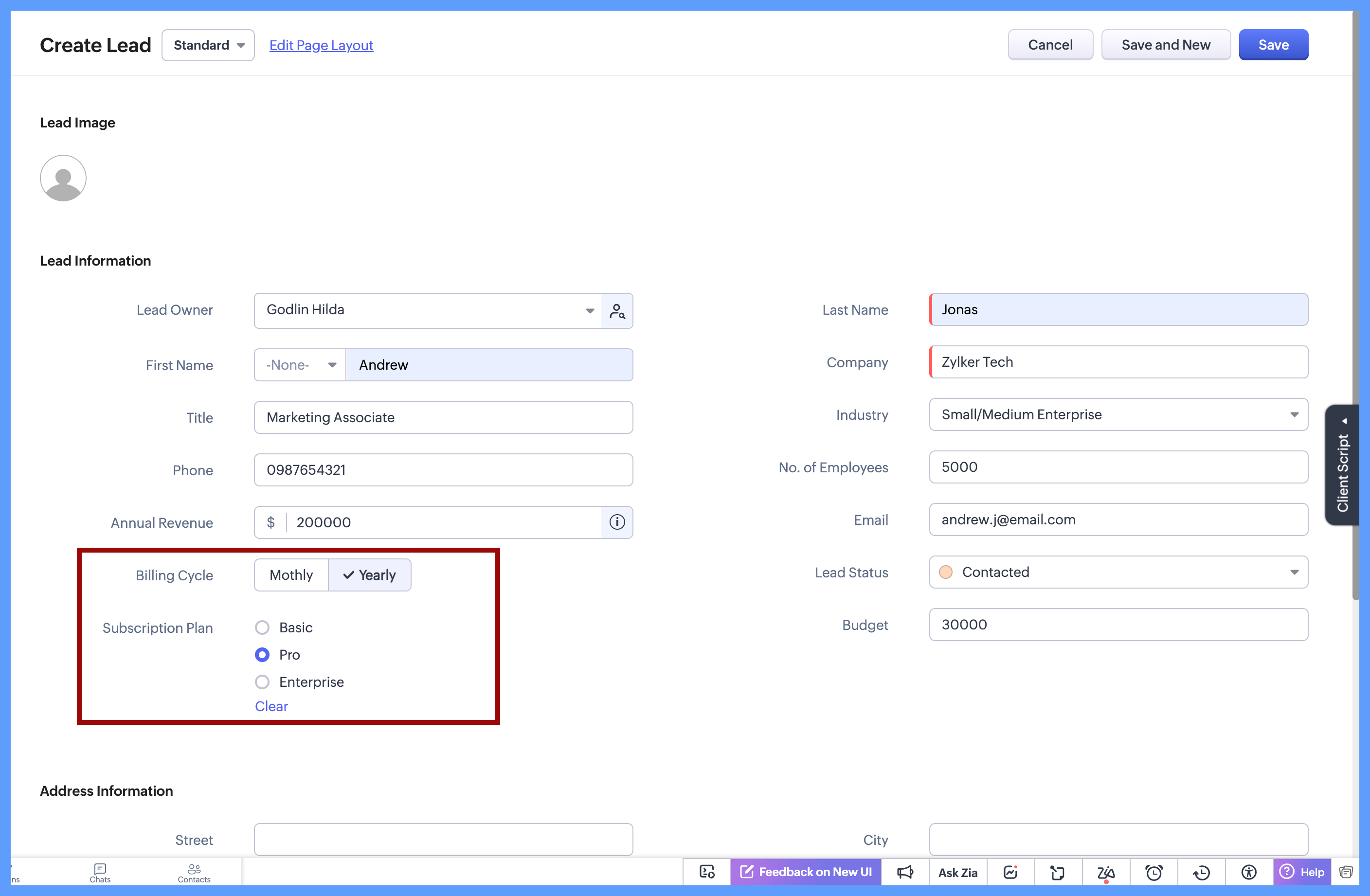
In each of these cases, the choices are limited to 2 or 3 options which are clearly defined, and the user needs to select just one option. Since all options are visible upfront, there’s no need to open a dropdown or scroll, making the selection quick and effortless.
Here's how to configure a radio button on the module's layout page:
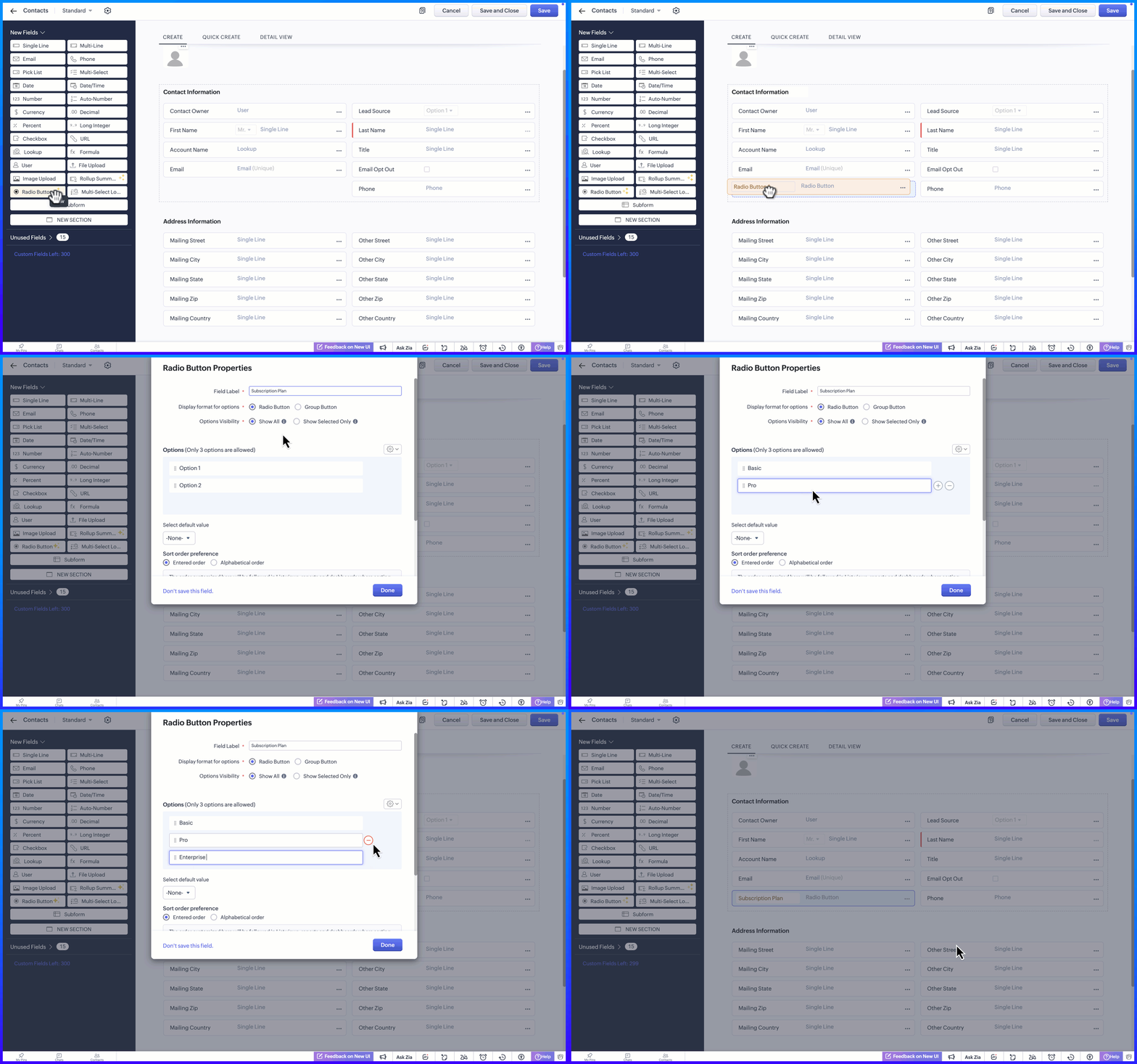
Display Format for options
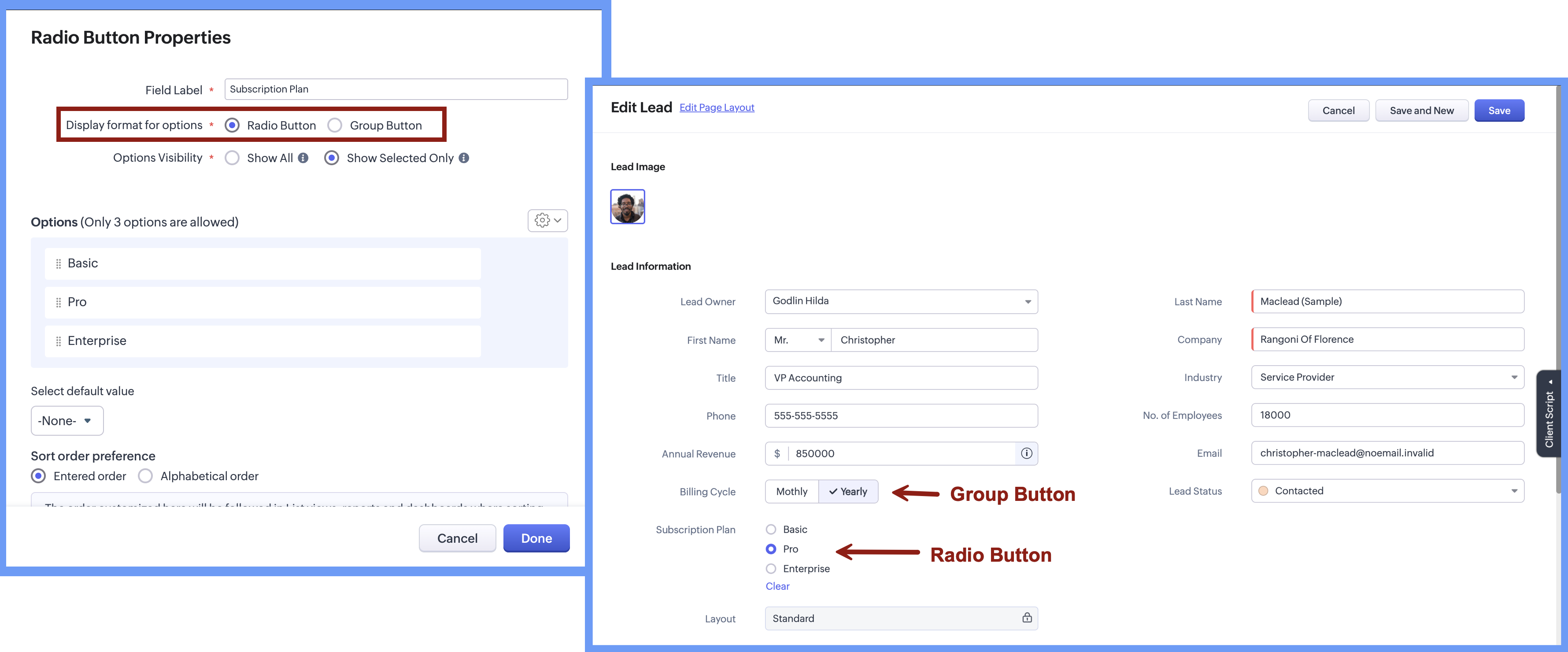
When adding the radio button, the Radio Button Properties pop-up lets you choose how the options appear on the screen. Rather than using a fixed format, you can select a display style that best suits the field, making it easier for users to see and choose from the available options.
There are two display format options:
Radio button, where options are listed one below the other.
Group button, where options appear as a compact set of selectable buttons.
This flexibility helps you design forms that feel clear and easy to use, while letting users quickly understand their choices and select the right option.
Option Visibility
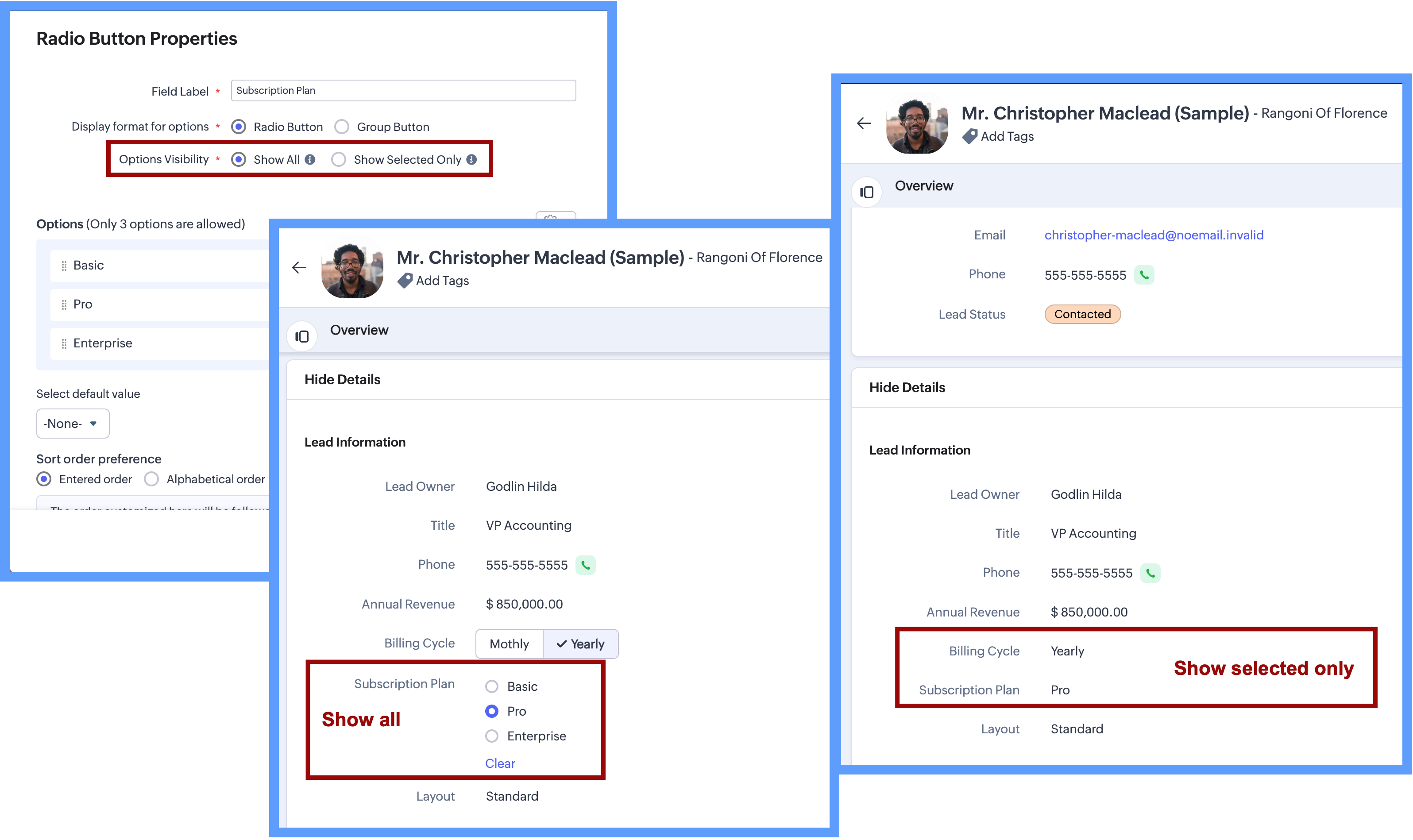
The Option Visibility setting helps you decide how much information users need to see after a value is selected.
Show all: If users need to view all available options at all times and quickly update their choice on the go, you can select Show All. This keeps every option visible on the screen, making it easy to compare options and change the selection whenever needed.
Show selected only: If the field is mainly required during record creation and showing all options later adds little value, you can choose Show Selected Only. In this case, only the chosen value is displayed after selection, keeping the details page clean and focused while still capturing the required input.
Important Notes:Consistent data, every time - Once a Radio Button field is configured with a fixed set of options, users can select only from those defined values while creating or updating records from any source. Any value outside the configured options is not accepted by the system, ensuring clean and consistent data across all records.
Options limit - 3 options per field in each layout. (Excluding Unused options)
Field Limits - This field is included under Text Field limits.
Edition Availability - In all editions except Free.
Modules Supported - Supported in all Modules, except Users.
Range and Sliders for Numeric Fields
Earlier, defining a default range for numeric fields was not straightforward. Users were not aware of what range was expected or acceptable until they saved the form. Let's say, for example, a Customer Satisfaction Score is being captured after a sales interaction. If the score is meant to be recorded on a scale of 1 to 5, there was previously no direct way to enforce or clearly communicate this range upfront.
Now, as we bring the setting of range for numeric fields, you will be able to define the minimum and maximum value for numeric fields. This sets clear boundaries on the values that can be entered, so the users know the expected range before they add any data.
Sliders are another prominent aspect that will help users to visually select a value within a defined range. When you choose to display sliding scale, the user can simply click on any interval or drag the slider to choose a value directly, making the selection more visual and guided.
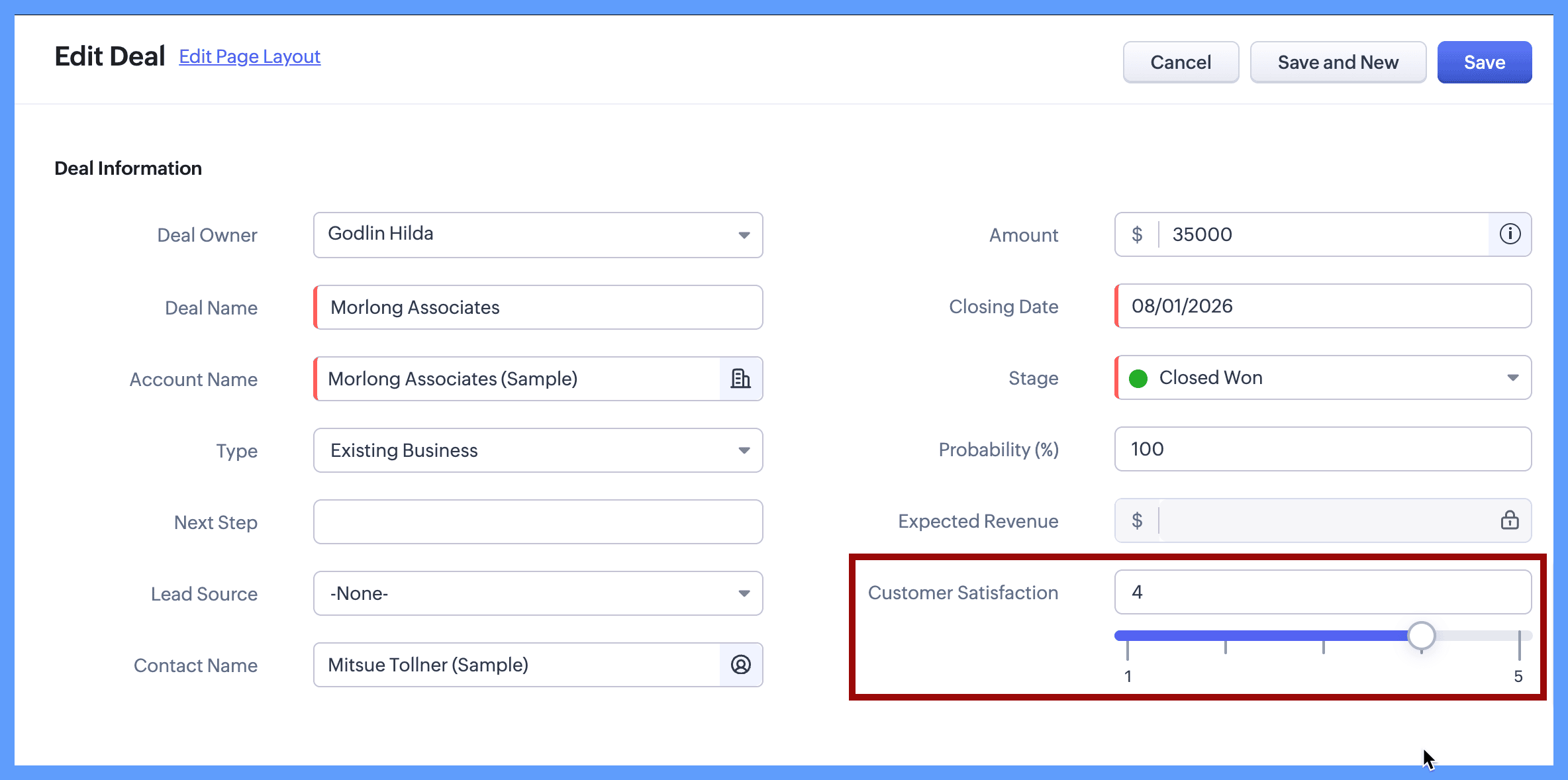
Continuing with the same example, you can define the customer satisfaction score by setting its minimum value to 1 and maximum value to 5. When the users create or edit a new record, they will clearly see that the value must fall within this range and can either type a number or use the sliding scale to select the score visually. The spaced intervals help users quickly understand the scale and choose the right value with confidence.
The same approach works well for other controlled scales, such as:
Here's how to configure a sliding scale for a numeric field on the module's layout page:
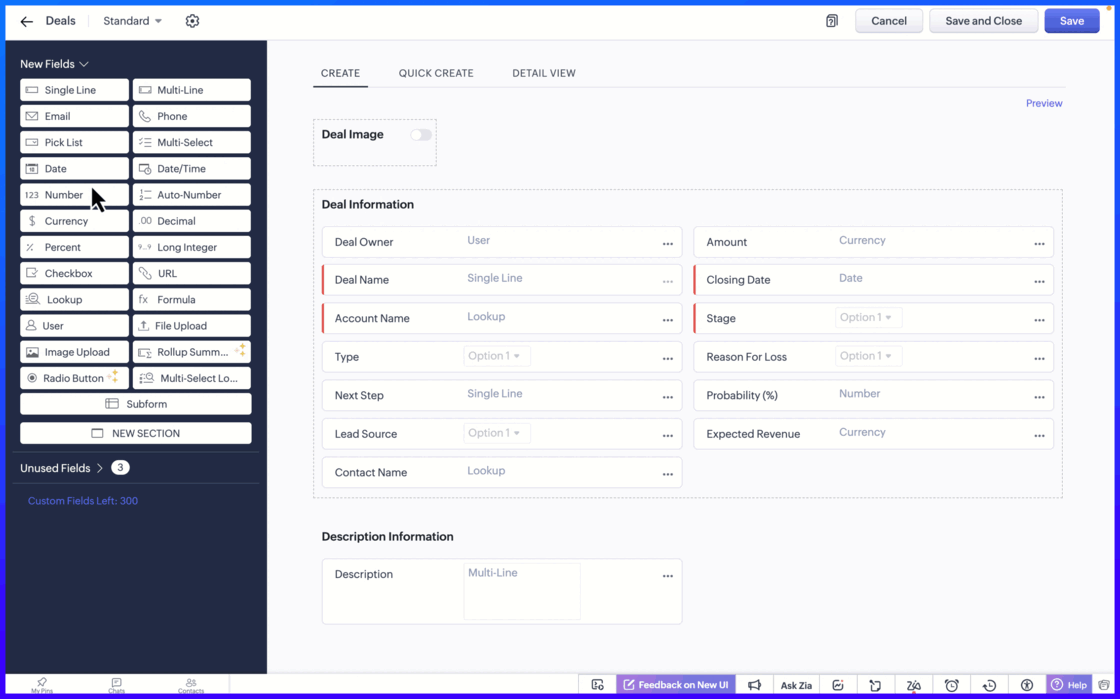
Setting the minimum and maximum limit values ensure that users can only enter values within an allowed range.
Important notes:
Sliding Scale depends on Limit Values: When you enable the Sliding Scale, you must define minimum and maximum liit values. However, Limit Values can be used on their own. If you do not need a Sliding Scale, you can simply set the limits to restrict the allowed range.
If the user tries to enter a value outside the allowed limits, an error message appears, preventing incorrect entries. This helps to keep the data accurate and consistent across records.
Fields Supported: Number, Long Integer, Decimal, Percent, Currency.
Edition Availability: All editions
Module Availability: All Modules
Sliding Scale is not supported for Subforms.
We hope you find this update helpful!
To learn more check out our help resource here.
Recent Topics
Show backordered items on packing slip
Is it possible to show a column on the Packing Slip that shows number of backordered items when a PO is only partially filled? I would also like to see the Backordered column appear on POs after you receive items if you didn't get ALL of the items or partial amounts of items. And lastly, it would be nice to have the option of turning on the Backordered column for invoices if you only invoice for a partial order. -Tom
Unable to change the "credentials of login user" option when creating a connection
I want to create a new Desk connection where the parameter to use 'credentials of login user' is set to YES. I'm able to create a new connection but am never given the option to change this parameter. Is this a restriction of my user profile, and if so,
Zoho Sheet for Desktop
Does Zoho plans to develop a Desktop version of Sheet that installs on the computer like was done with Writer?
Manage Every Customer Conversation from Every Channel inside Zoho SalesIQ
Your customers message you from everywhere. But are you really able to track, manage, and follow through on every conversation, without missing anything? With interactions coming in from websites, mobile apps, and messaging platforms like WhatsApp and
Zoho CRM Community Digest – January 2026 | Part 1
The new year is already in motion, and the Zoho CRM Community has been buzzing with steady updates and thoughtful conversations. In this edition, we’ve pulled together the key product enhancements, Kaizen learnings, and helpful discussions from the first
Zoho CRM Feature Requests - SMS and Emails to Custom Modules & Time Zone Form Field
TLDR: Add Date/Time/Timezone form field, and be able to turn off auto timezone feature. Allow for Zoho Voices CRM SMS Extension to be able to be added to custom modules, and cases. Create a feature that tracks emails by tracking the email chain, rather
Service Title in Service Report Template Builder
I am currently working on the Service Report Template Builder in Zoho FSM. I have created three separate service report templates for different workflows: Preventive Maintenance Report Requested Service Report Installation Report My issue is that I cannot
PDF Attachment Option for Service Reports
Hello Team, I would like to check with you all if there is an option to attach PDF documents to the service reports. When I try to attach a file, the system only allows the following formats: JPEG, JPG, and PNG. Could you please confirm whether PDF attachments
Introducing Bigin's Add-in for Microsoft Outlook
Hello Everyone, Email is an important way to communicate with customers and prospects. If you use Outlook.com for emails and Bigin as your CRM, the Outlook Add-in helps you connect them easily so you can see your Bigin contact details right inside Outlook.com.
system not picking my default custom service report template
Can you tell me why when we create a service report always pick the (standard old) template? Even when I have a custom service report selected as Default.
Ask the Expert – Zoho One Admin Track : une session dédiée aux administrateurs Zoho One
Vous administrez Zoho One et vous vous posez des questions sur la configuration, la gestion des utilisateurs, la sécurité ou encore l’optimisation de votre back-office ? Bonne nouvelle : une session Ask the Expert – Zoho One Admin Track arrive bientôt,
Create custom rollup summary fields in Zoho CRM
Hello everyone, In Zoho CRM, rollup summary fields have been essential tools for summarizing data across related records and enabling users to gain quick insights without having to jump across modules. Previously, only predefined summary functions were
Zoho Commerce
Hi, I have zoho one and use Zoho Books. I am very interested in Zoho Commerce , especially with how all is integrated but have a question. I do not want my store to show prices for customers that are not log in. Is there a way to hide the prices if not
Will be possible to create a merge mail template for products?
Hi, we would need to create a mail merge template for products (native) module. Will be possibile? or do you have a smart solutions to merge products data with a mail merge? thanks Chris
How to Associate Zoho Projects in Zoho CRM
Hi I need script for associating projects in zoho projects to particular Account in zoho CRM side. It can be done manually but I need the automation for this process. There are no api regarding associating a project in zoho crm account. Need assistance
Add Claude in Zoho Cliq
Let’s add a real AI assistant powered by Claude to your workspace this week, that your team can chat with, ask questions, and act on conversations to run AI actions on. This guide walks you through exactly how, step by step, with all the code you'll need.
Need to set workflow or journey wait time (time delay) in minutes, not hours
Minimum wait time for both Campaigns workflows and Marketing Automation journeys is one hour. I need one or the other to be set to several minutes (fraction of the hour). I tried to solve this by entering a fraction but the wait time data type is an integer
Editing Item Group to add Image
I did not have the image of the product when the Item Group was created. Now I have the product image, and would like to associate/add to the Item Group. However the Item Group Edit functionality does not show/allow adding/changing image. Please hel
Composite Product (kit) - Dynamic Pricing
I am setting up Composite Products for item kits that I sell. I also sell the items from the kit individually. Problem is when pricing changes on an individual part, the Composite Product price does not change meaning when the cost of item # 2 in the
Urgent: Slow Loading Issue on Zoho Commerce Website
Dear Zoho Support Team, I am experiencing slow loading times on my Zoho Commerce website, which is affecting its performance and user experience. The issue persists across different devices and networks. Could you please investigate this matter and provide
Cliq Bots - Post message to a bot using the command line!
If you had read our post on how to post a message to a channel in a simple one-line command, then this sure is a piece of cake for you guys! For those of you, who are reading this for the first time, don't worry! Just read on. This post is all about how
Zoho Books - France
L’équipe de Zoho France reçoit régulièrement des questions sur la conformité de ses applications de finances (Zoho Books/ Zoho Invoice) pour le marché français. Voici quelques points pour clarifier la question : Zoho Books est un logiciel de comptabilité
New in Office Integrator: Download documents as password-protected PDFs
Hi users, We're excited to introduce password-protected PDF as a download option in Zoho Office Integrator's document editor. This allows you to securely share your confidential information from within your web app. Highlights of the password-protected
Sales IQ - Zobot en multilangue
Bonjour, J'ai un Zobot installé sur mon site depuis longtemps. J'ai ajouté plusieurs langues, dans la configuration et dans le générateur de bot sans code Pourtant, le Chat continue à s'afficher en Francais. Comment enclencher le multilangue en front
Streamlining E-commerce Photography with AI Background Tools
Hey Zoho Community, I’ve been messing around with ways to make product images less of a headache for fashion brands on Zoho Commerce. You know how boring generic backdrops can get, and how much time traditional photoshoots eat up, right? I tried out this
Is there a way to show contact emails in the Account?
I know I can see the emails I have sent and received on a Contact detail view, but I want to be able to see all the emails that have been sent and received between all an Accounts Contacts on the Account Detail view. That way when I see the Account detail
Android Solutions
hi everyone, I’m in the process of evaluating Android Solutions for my organization. Despite exploring multiple resources, I haven’t been able to narrow down the options and feel quite overwhelmed. A colleague advised me to ask here, and I would sincerely
Add "Reset MFA" Option for Zoho Creator Client Portal Users
Hello Zoho Creator Team, We hope you are doing well. We would like to request an important enhancement related to Multi-Factor Authentication (MFA) for client portal users in Zoho Creator. Currently, Creator allows us to enforce MFA for portal users,
Unable to Assign Multiple Categories to a Single Product in Zoho Commerce
Hello Zoho Commerce Support Team, I am facing an issue while assigning categories to products in Zoho Commerce. I want to assign multiple categories to a single product, but in the Item edit page, the Category field allows selecting only one category
Collapsing and expanding of lists and paragraphs
hello Would you ever implement Collapsing and expanding of lists and paragraphs in zoho writer ? Best regards
Saving issue
First problem I opened a MS word file in writer. after the work is done, it does not save instantly, I waited for like 10min and it still did not save. second problem When I save a file, then file gets saved as another copy. I just did save, not save
Introducing Built-in Telephony in Zoho Recruit
We’re excited to introduce Built-in Telephony in Zoho Recruit, designed to make recruiter–candidate communication faster, simpler, and fully traceable. These capabilities help you reduce app switching, handle inbound calls efficiently, and keep every
Does Zoho Writer have Dropdowns
I want to add a drop down field in Zoho writer. Is this possible?
Fix image at bottom of a page fot automatic proposal creation
I'm working on a proposal document to automate our proposal creation process. So far it works fine, but I experience some problems with an image I want to have fixed at the bottom of the page AND above the footer. This section of the document consists
Notifications Feeds unread count?
How do I reset the unread count on feeds notifications? I've opened every notification in the list. And the count never goes to zero.
Tables for Europe Datacenter customers?
It's been over a year now for the launch of Zoho Tables - and still not available für EU DC customers. When will it be available?
Zoho Finance Limitations 2.0 #3: Can't assign a Contact to a Finance Record (estimate, sales order or invoice)
If you use a business to business scenario with different contact people within the company you can't assign a finance record (estimate, invoice, etc...) to that person. Why this matters? No way to find out which person placed the order without manual
Ranking by group in report
Dears, I am new to Zoho Analytics and I would like to ask you guys help to creating a ranking column. Report type: Pivot Matter: I want to create a ranking column on the right of Percentage. This ranking is group by column Type, and ranking by Final Score/Percent.
Zoho CRM for Everyone's NextGen UI Gets an Upgrade
Hello Everyone We've made improvements to Zoho CRM for Everyone's Nextgen UI. These changes are the result of valuable feedback from you where we’ve focused on improving usability, providing wider screen space, and making navigation smoother so everything
Zoho Community Digest — Febrero 2026
¡Hola, comunidad! Un mes más os traemos las novedades más interesantes de Zoho para febrero de 2026, incluyendo actualizaciones de producto publicadas oficialmente, cambios de políticas y noticias del ecosistema. Pero antes de lanzarnos a las actualizaciones,
Next Page