Kaizen #121 : Customize List Views using Client Script

Kaizen #121 : Customize List Views using Client Script

Hello everyone! 

Welcome back to another interesting Kaizen post. In this post, we can discuss how to customize List Views using Client Script. This post will answer the questions Ability to remove public views by the super admin in the Zoho CRM and Is it possible to restrict ZCRM user to see only custom views created by administrator?


In this post,
  1. What is a List View?
  2. Use Case - To hide all public views except one
  3. Solution using Client Script
  4. Other ZDKs available to customize List Views
  5. Summary
  6. Related Links


1. What is a List View?

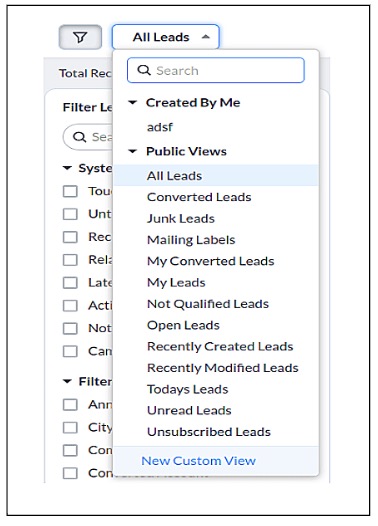
      A List View is grouping of records based on a defined set of criteria. List Views are beneficial for displaying customer specific data according to your business requirements. For example, you may be interested in following-up on the leads created during the last week or reviewing overdue tasks. The best way to handle these scenarios is to filter the records using the list views. Click here for more details on List Views.There are two types of List Views in Zoho CRM -
  • Standard List Views : You can modify the standard views and sort the order of the columns in the list. 
  • Custom List Views : You can create, modify, and delete custom views, and you can also sort the order of the columns in the list.
Often, there are business requirements where you need to customize these views, like hiding a view from certain users or masking a particular column in the view. Let us see how to control the list views visible to a user, using Client Script.

2. Use Case - To hide all public views except one

      Zylker is a manufacturing company that uses Zoho CRM. A Salesman creates records in the custom module named "Orders".The name of the profile assigned to a Salesman is "Sales".  The Admin does not want the "Sales" profile users to view the standard public views except the "My Orders" public view.

3. Solution using Client Script 

      Admin should remove the visibility to all public views for the profile "Sales" and permit only the "My Orders" view. Here are the list of steps to be followed.
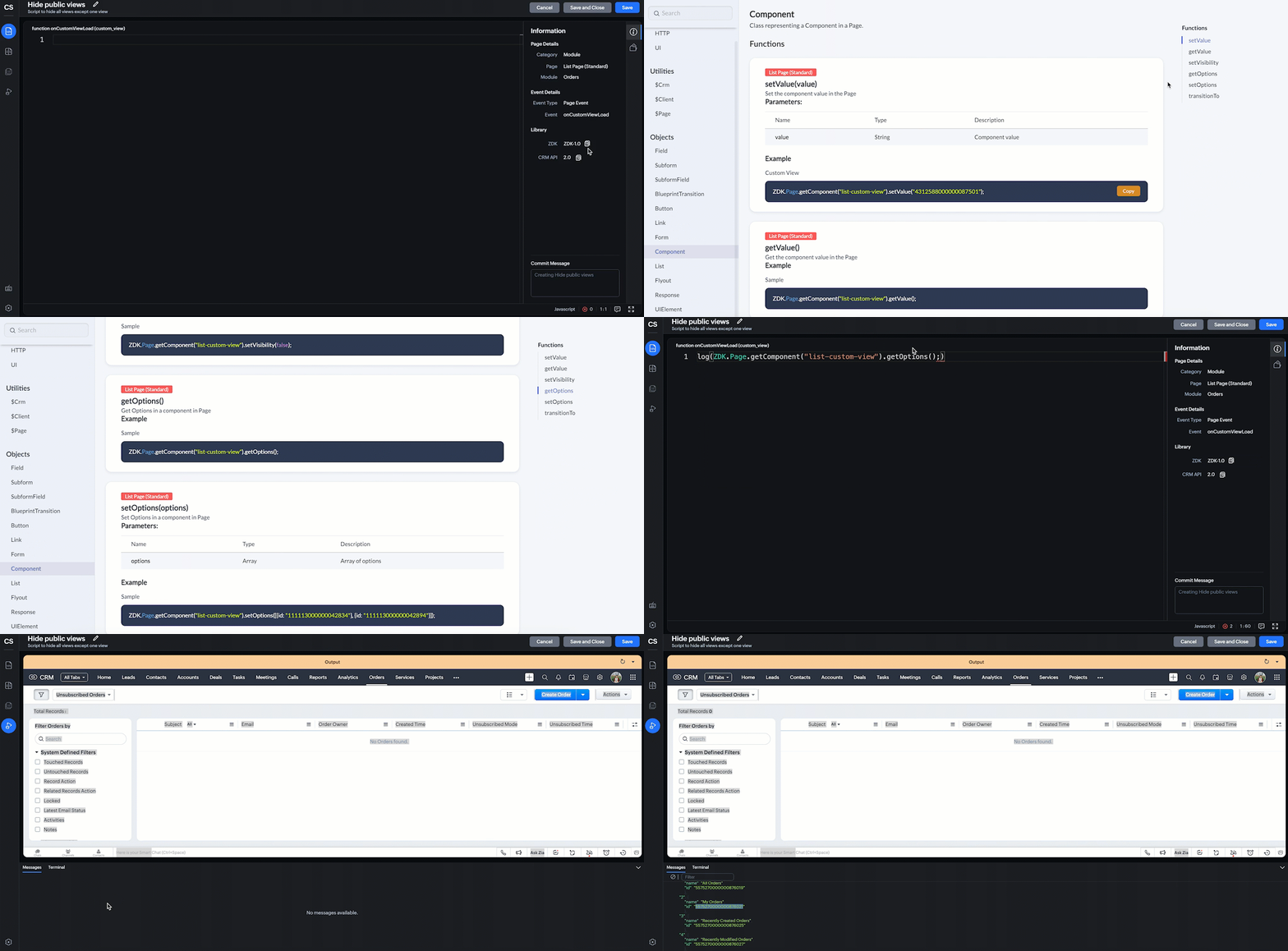
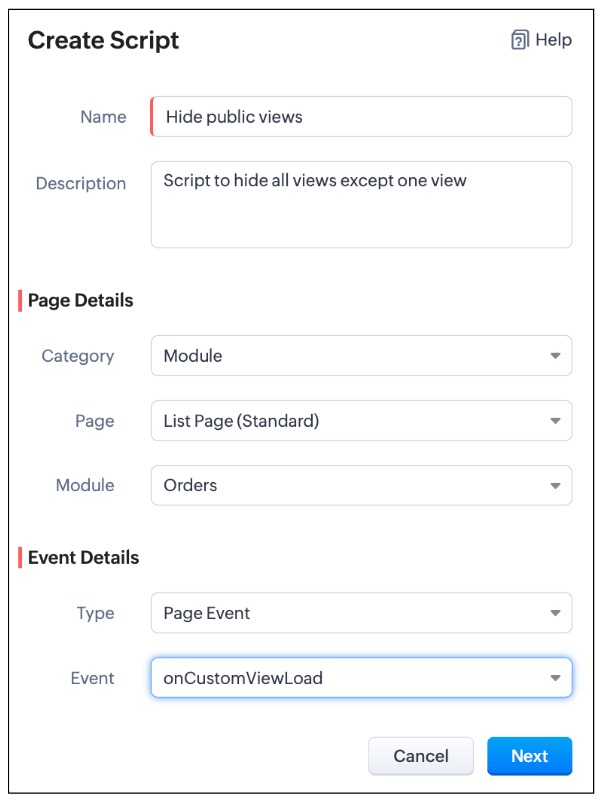
  • Create a Client Script for List Page (Standard) of Orders module and specify the event as onCustomViewLoad.  To know more about how to create a Client Script, click here.


    log(ZDK.Page.getComponent("list-custom-view").getOptions());


  •  Then,  getOptions() will return the options in the component of List Page. Here the component is 'list-custom-view'.
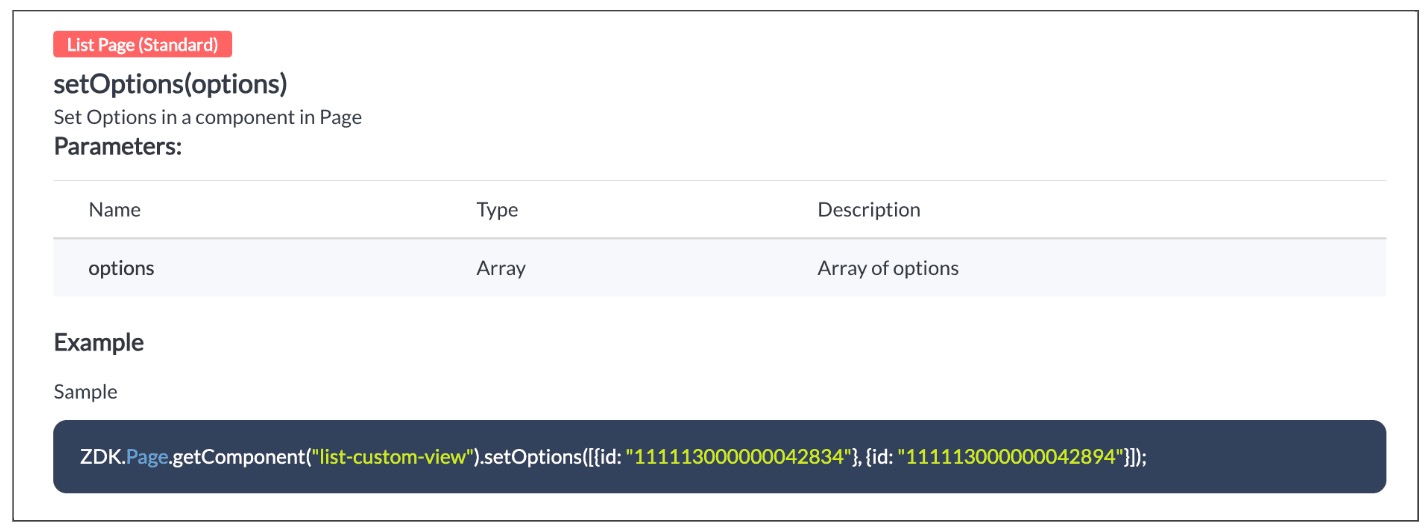
  • Now with  the copied id of "My Orders" view , use  "getComponent.setOptions()" and add the only option on list-custom-view as "My Orders" view, if the profile is "Sales".

var user = ZDK.Apps.CRM.Users.fetchById($Crm.user.id);
if (user.profile.name != 'Sales') {
    ZDK.Page.getComponent("list-custom-view").setOptions([{ id: "5575270000000876021" }]);
}
  • Save the Script.

  • You can now see that only "My Orders" view is visible for the "Sales" profile, and all other public views are hidden.
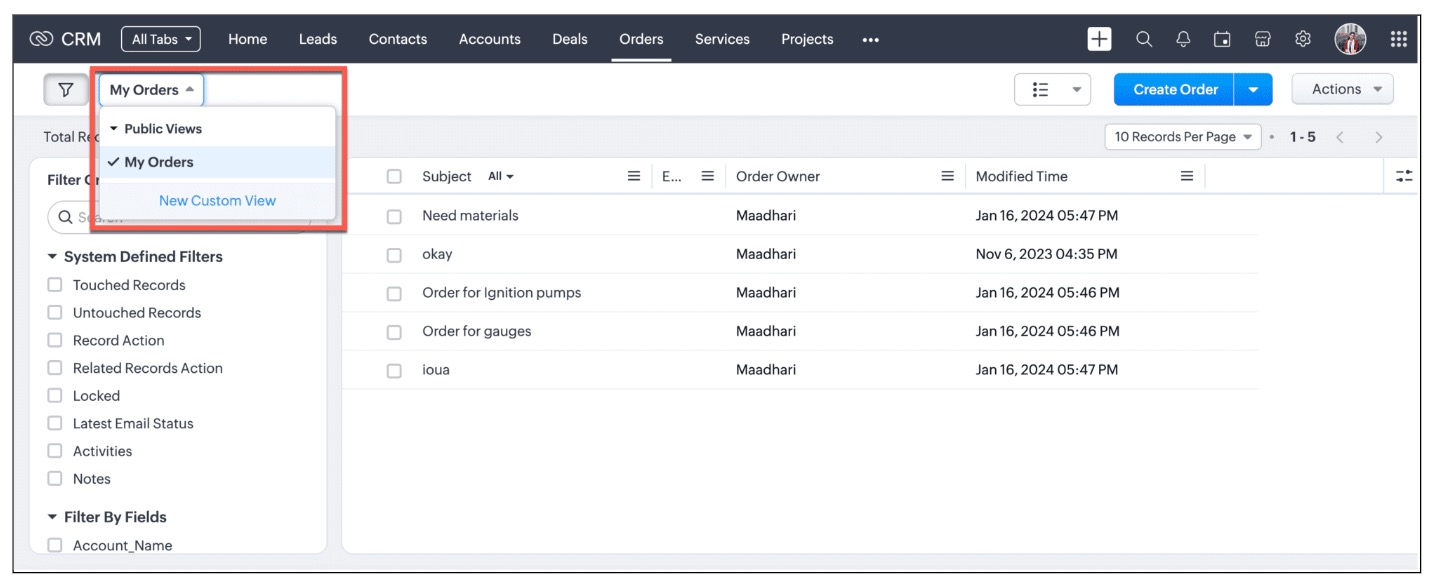
  • For other profiles like Manager and Admin, all public views will be visible as shown below.
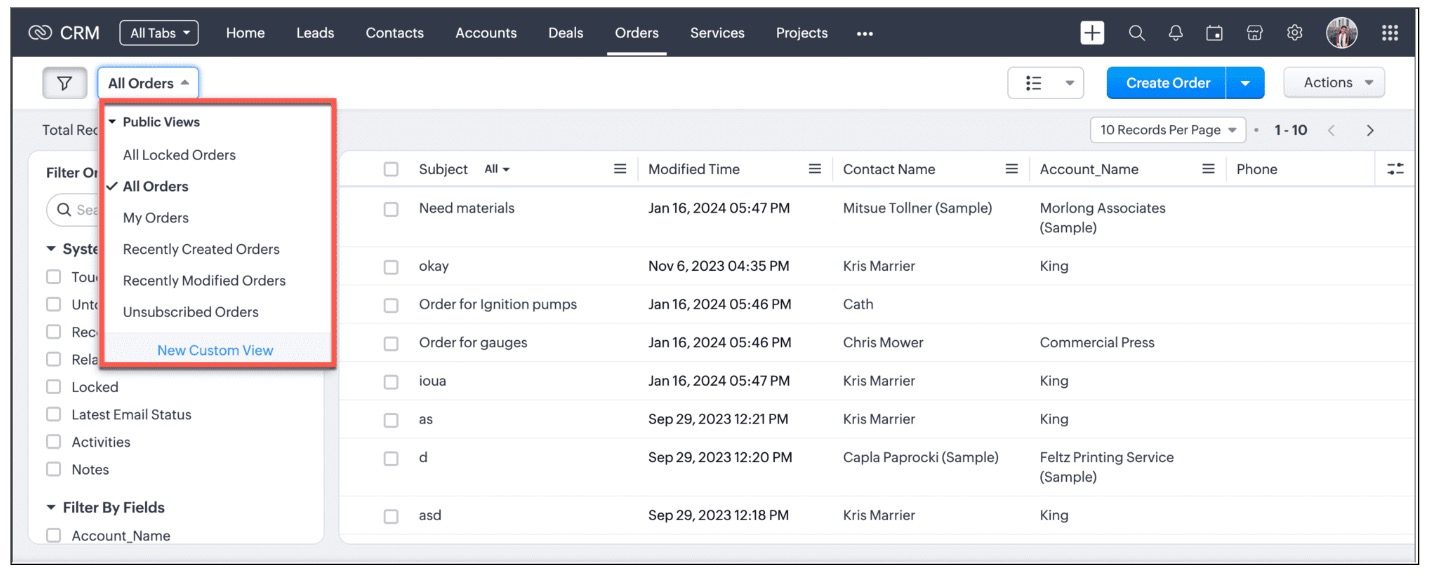
We are working on the other components in the List Page, and will let you know once they are live.

4. Other ZDKs available to customize List Views

Client Script enables you  to customize List Views using the following list of ZDKs and Client Script functions.
  • freezeColumns(option) - You can freeze list view and disable modifying columns.
  • maskField(field_name, (length,character,reverse)) - You can mask fields in the List View
  • sortByField(field_name, option) - You can sort field in the List View
  • getRecords() - You can get Records in the List View
  • selectRecords(criteria) - You can select Records in the List view by criteria
  • selectRecordsByID(ids) - You can select Records in the List view by record ID
  • clearSelection() - You can clear selected Records in the List view
  • style(style_config, criteria) - You can style Records in the List View. Click here to view the related Kaizen post.
  • setValue(value) - You can set the component value in the Page
  • getValue() - You can Get the component value in the Page
  • setVisibility(value) - You can set visibility of the component in the Page
5. Summary:

In this post, we have discussed,
  • About standard and custom List Views.
  • How to control the visibility of List Views using Client Script.
  • How to fetch the list of views available for a module using Client Script.
  • How to set your desired views for users using Client Script.
  • ZDK methods available in Client Script to customize List views

6. Related Links

Notes
Kaizen Collection : 
Click here to view our Kaizen Collection. 
We hope you found this post useful. We will meet you next week with another interesting topic!
If you have any questions, let us know in the comment section.


Cheers!


    • Sticky Posts

    • Kaizen #222 - Client Script Support for Notes Related List

      Hello everyone! Welcome to another week of Kaizen. The final Kaizen post of the year 2025 is here! With the new Client Script support for the Notes Related List, you can validate, enrich, and manage notes across modules. In this post, we’ll explore how
    • Kaizen #217 - Actions APIs : Tasks

      Welcome to another week of Kaizen! In last week's post we discussed Email Notifications APIs which act as the link between your Workflow automations and you. We have discussed how Zylker Cloud Services uses Email Notifications API in their custom dashboard.
    • Kaizen #216 - Actions APIs : Email Notifications

      Welcome to another week of Kaizen! For the last three weeks, we have been discussing Zylker's workflows. We successfully updated a dormant workflow, built a new one from the ground up and more. But our work is not finished—these automated processes are
    • Kaizen #152 - Client Script Support for the new Canvas Record Forms

      Hello everyone! Have you ever wanted to trigger actions on click of a canvas button, icon, or text mandatory forms in Create/Edit and Clone Pages? Have you ever wanted to control how elements behave on the new Canvas Record Forms? This can be achieved
    • Kaizen #142: How to Navigate to Another Page in Zoho CRM using Client Script

      Hello everyone! Welcome back to another exciting Kaizen post. In this post, let us see how you can you navigate to different Pages using Client Script. In this Kaizen post, Need to Navigate to different Pages Client Script ZDKs related to navigation A.
    • Recent Topics

    • Zoho Recruit Slow and Freezing on all screens

      We have had an issue with Zoho Recruit for weeks being extremely slow and at times freezing.  We have 100 mega internet, and I went into each computer and updated the virtual memory so there is more available.  Also restarted all computers daily.  Still having the issues.  Almost unable to work.
    • How to disable the edit option in subform

      How to disable the edit option in subform
    • Credit Management: #2 Configuring Right Payment Terms for Credit Control

      Think about the last time you ordered something online and saw that little note at the checkout, "Pay on Delivery" or "Pay later". It's simple, but it actually sets the tone. As a business owner, you know exactly when payment is expected. Now, imagine
    • New in CRM: Dynamic filters for lookup fields

      Last modified on Oct 28, 2024: This feature was initially available only through Early Access upon request. It is now available to all users across all data centers, except for the IN DC. Users in the IN DC can temporarily request access using this form
    • Sending automated messages that appear in the ticket's conversation thread

      Good morning, esteemed Zoho Desk community, warm greetings Today I am here to raise the following problem, seeking a solution that I can implement: I need to implement an automation that allows me to send reminder messages to customers when I am waiting
    • Dependent (Conditional) Fields in Zoho Bookings Forms

      Hello Zoho Bookings Team, Greetings, We would like to request the ability to create dependent (conditional) fields in Zoho Bookings registration forms. Current Limitation: There is currently no way to make one field’s available options depend on the value
    • Replace Zoho Invoice with QuickBooks

      We are implementing Zoho FSM for a cleaning business in the US with 50+ field workers. This business has been using Quickbooks for accounting for decades and will not migrate to Zoho Books. A major issue in the integration is the US sales tax calculation.
    • Send Supervisor Rule Emails Within Ticket Context in Zoho Desk

      Dear Zoho Desk Team, I hope this message finds you well. Currently, emails sent via Supervisor Rules in Zoho Desk are sent outside of the ticket context. As a result, if a client replies to such emails, their response creates a new ticket instead of appending
    • Bug Report: Search fails to find existing notes after Evernote import

      Hello, I recently migrated from Evernote (~2600 notes across 23 notebooks), but the search functionality is currently broken. The Issue: I can manually browse to a specific note and see it exists. However, when I type the exact or partial title of that
    • Can't change form's original name in URL

      Hi all, I have been duplicating + editing forms for jobs regarding the same department to maintain formatting + styling. The issue I've not run into is because I've duplicated it from an existing form, the URL doesn't seem to want to update with the new
    • Marketing Tip #13: Win repeat customers with post-purchase emails

      The relationship with your customer doesn’t end after the sale; that’s when it begins. A thoughtful post-purchase message shows customers you appreciate them, keeps your brand top of mind, and can even lead to another sale. You can thank them, ask for
    • Zoho Books Sandbox environment

      Hello. Is there a free sandbox environment for the developers using Zoho Books API? I am working on the Zoho Books add-on and currently not ready to buy a premium service - maybe later when my add-on will start to bring money. Right now I just need a
    • Formula fields

      Zoho People now supports formula fields. This post illustrates it. Formula fields are fields whose value is calculated instead of being entered by the user. Using this, number, decimal and date manipulations can be done. The value of this field could be numeric or date depending on the output of the formula. In date manipulations, the result will be given in milliseconds, which you can format as per you need. The operators we support are +, - , *, /. Formula fields get recalculated automatically
    • Unable to remove the “Automatically Assigned” territory from existing records

      Hello Zoho Community Team, We are currently using Territory Management in Zoho CRM and have encountered an issue with automatically assigned territories on Account records. Once any account is created the territory is assigned automatically, the Automatically
    • Zoho Form

      I have problem with Zoho Form. One of form i don't received the PDF version. Others okay except this one. W904533
    • Introducing the Zoho Projects Learning Space

      Every product has its learning curve, and sometimes having a guided path makes the learning experience smoother. With that goal, we introduce a dedicated learning space for Zoho Projects, a platform where you can explore lessons, learn at your own pace,
    • Create & Update Zoho Vault Passwords via Zoho Flow

      Hi Zoho Flow / Zoho Vault Team, We’d like to request an enhancement to the Zoho Vault integration in Zoho Flow. Current Limitation: At the moment, Zoho Flow supports only the following selected Zoho Vault actions, such as: Fetch passwords, Share passwords
    • I Need Help Verifying Ownership of My Zoho Help Desk on Google Search Console

      I added my Zoho desk portal to Google Search Console, but since i do not have access to the html code of my theme, i could not verify ownership of my portal on Google search console. I want you to help me place the html code given to me from Google search
    • Is Zoho Communityspaces now part of Zoho One?

      Is Zoho Communityspaces now part of Zoho One?
    • Warehouse fast processing

      Hey guys, would anyone be interested in something like the attached image ? If there's any interest I'd be willing to develop it further for others to use, it's much faster than using Zohos native solutions, it can part pack, pack in full, part ship,
    • How to install Widget in inventory module

      Hi, I am trying to install a app into Sales Order Module related list, however there is no button allow me to do that. May I ask how to install widget to inventory module related list?
    • Credit Note for Shipped and Fatoora pushed invoices

      We have shipped a Sales Order and created an Invoice. The Invoice is also pushed to Fatoora Now we need to create a credit note for the invoice When we try it, it says we need to create a Sales Return in the Zoho Books, we have already created a Sales
    • Search by contain letter in a column

      Hello, everyone I need a filter function that searches by letter in a cell, and it should be a macro. To clarify further, if I have a column with several names and I chose a search cell and what I want is search by a single letter, for example, "a" then
    • Cliq iOS can't see shared screen

      Hello, I had this morning a video call with a colleague. She is using Cliq Desktop MacOS and wanted to share her screen with me. I'm on iPad. I noticed, while she shared her screen, I could only see her video, but not the shared screen... Does Cliq iOS is able to display shared screen, or is it somewhere else to be found ? Regards
    • MCP no longer works with Claude

      Anyone else notice Zoho MCP no longer works with Claude? I'm unable to turn this on in the claude chat. When I try to toggle it on, it just does nothing at all. I've tried in incognito, new browsers, etc. - nothing seems to work.
    • Custom Related List Inside Zoho Books

      Hello, We can create the Related list inside the zoho books by the deluge code, I am sharing the reference code Please have a look may be it will help you. //..........Get Org Details organizationID = organization.get("organization_id"); Recordid = cm_g_a_data.get("module_record_id");
    • Features, Feedback and Votes

      We’re launching the Feedback Forum for our customers. This is 'THE' place where you can add everything you’d like to see in Zoho Books. If you don't find the specific feature you need, simply add it so others can also vote for it. While we cannot promise
    • Function #53: Transaction Level Profitability for Invoices

      Hello everyone, and welcome back to our series! We have previously provided custom functions for calculating the profitability of a quote and a sales order. There may be instances where the invoice may differ from its corresponding quote or sales order.
    • Ability to Set Text Direction for Individual Cells in Zoho Sheet

      Dear Zoho Sheet Team, We hope you are doing well. We would like to request an enhancement in Zoho Sheet that allows users to set the text direction (right-to-left or left-to-right) for individual cells, similar to what is available in Google Sheets. Use
    • There Might Be A Glitch in Determining If A String Represents A URL

      I suspect there might be a glitch in determining if a string represents a URL or not. For example, I cannot embed the following URL. Perhaps the exclamation mark or parentheses are the culprit? https://en.wikipedia.org/wiki/How_the_Grinch_Stole_Chri
    • is it possible to add more than one Whatsapp Phone Number to be integrated to Zoho CRM?

      so I have successfully added one Whatsapp number like this from this User Interface it seems I can't add a new Whatsapp Number. I need to add a new Whatsapp Number so I can control the lead assignment if a chat sent to Whatsapp Phone Number 1 then assign
    • Notes & Attachments visible on desktop but not on tablets (Zoho CRM)

      Hi everyone, I’m experiencing an issue with Zoho CRM and hoping someone can point me in the right direction. Our Team Users can see the Notes and Attachments related lists in the Contacts module when accessing CRM from a desktop browser. However, when
    • Start/Stop Timmer in Chrome Extension

      The chrome extension is great and allows you to do allot however one of the most common things employees working on projects need to do is track their time. Having an easy start/stop timer to track time would be great.
    • Customer Management: #4 Enhance Customer Journey

      When Neha started DefineOps, a growing IT support and consulting firm, most of her work was straightforward. A client would sign up for a free version, decide whether the service works for them, and then either continue or discontinue. Billing was simple,
    • Primary / Other Billing Contacts

      If you add an additional contact to a Zoho Billing Customer record, and then mark this new contact as the primary contact, will both the new primary and old primary still receive notifications? Can you stop notifications from going to the additional contacts
    • Pipeline.Company Name field shows up as numbers! [Bigin Developer Console > Component > URL]

      Hi there, I am setting up to invoke URL to send infromation zoho bigin > zoho forms with company name pre-fill in the form. however when I use : ${Pipelines.Company Name} field it shows up as a string of number instead of words. Help.
    • Marketing Tip #1: Optimize item titles for SEO

      Your item title is the first thing both Google and shoppers notice. Instead of a generic “Leather Bag,” go for something detailed like “Handcrafted Leather Laptop Bag – Durable & Stylish.” This helps your items rank better in search results and instantly
    • Territory Assignment Issues (Lead to Account + Contact)

      1. Lead → Account & Contact Territory Assignment on Conversion A Lead is automatically assigned one or more territories using a workflow and Lead Assignment Rules. This works as expected, and we are able to assign multiple territories to a Lead automatically.
    • Emails sent through Bigin are not posting in IMAP Sent folder

      I have set up my email to work from within Bigin using IMAP.  I am using IMAP so I can sync my email across multiple devices - phone / laptop / desktop / iPad / etc.  I want all my emails to populate my email client (outlook & iphone email) whether or
    • Marketer's Space: Proven tips to improve open rates – Part II

      Hello Marketers! Welcome back to another post in Marketer's Space! We're continuing from where we left off a fortnight ago. We ended the previous post discussing the subject line, and we'll continue from there. Let's dive right in. Pre-header Pre-header
    • Next Page