Kaizen #142: How to Navigate to Another Page in Zoho CRM using Client Script

Kaizen #142: How to Navigate to Another Page in Zoho CRM using Client Script

 
Hello everyone!

Welcome back to another exciting Kaizen post. In this post, let us see how you can you navigate to different Pages using Client Script. 


In this Kaizen post,
  1. Need to Navigate to different Pages
  2. Client Script ZDKs related to navigation
         A. navigateTo()
         B. navigation_data
  3. Use Case
  4. Solution
  5. Summary
  6. Related Links


1. Need to Navigate to different Module's Pages in Zoho CRM

Often navigation between Module pages is required for improved user experience and streamlined workflows. Seamless transitions between related modules ensure quick access to relevant data and actions, enhancing productivity. For example, whenever the status of Account is updated to "Deal Creation", you can open the Deal Create Page. 

2. ZDKs to navigate to different pages

A. navigateTo()

Using this ZDK method, you can open any modules' detail/create/clone/edit page in a new tab or in same tab. Here is the syntax.
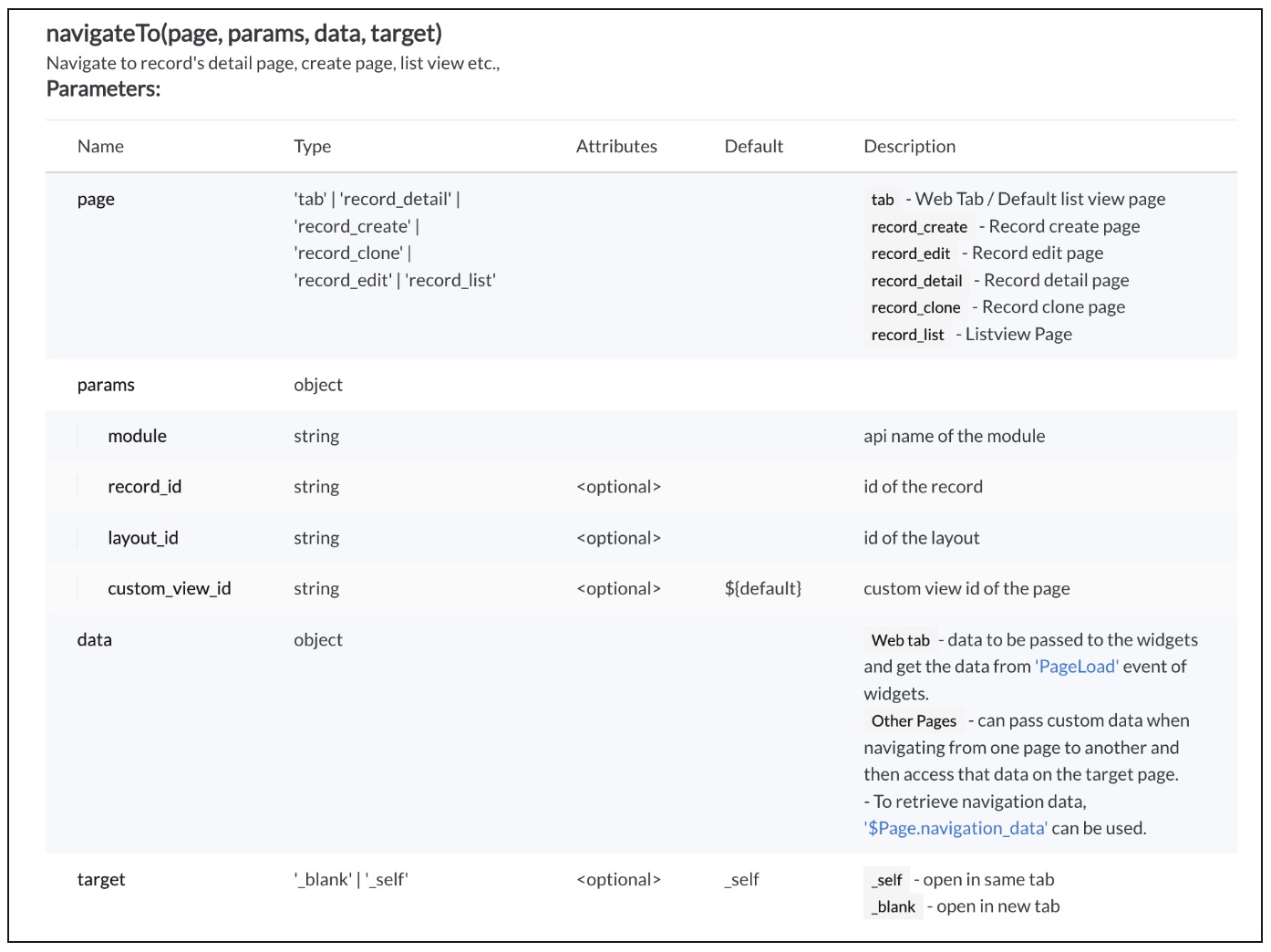


Click here to know more details.

B. navigation_data

Using The Constant , $Page.navigation_data, you can get the data passed from navigateTo() method.
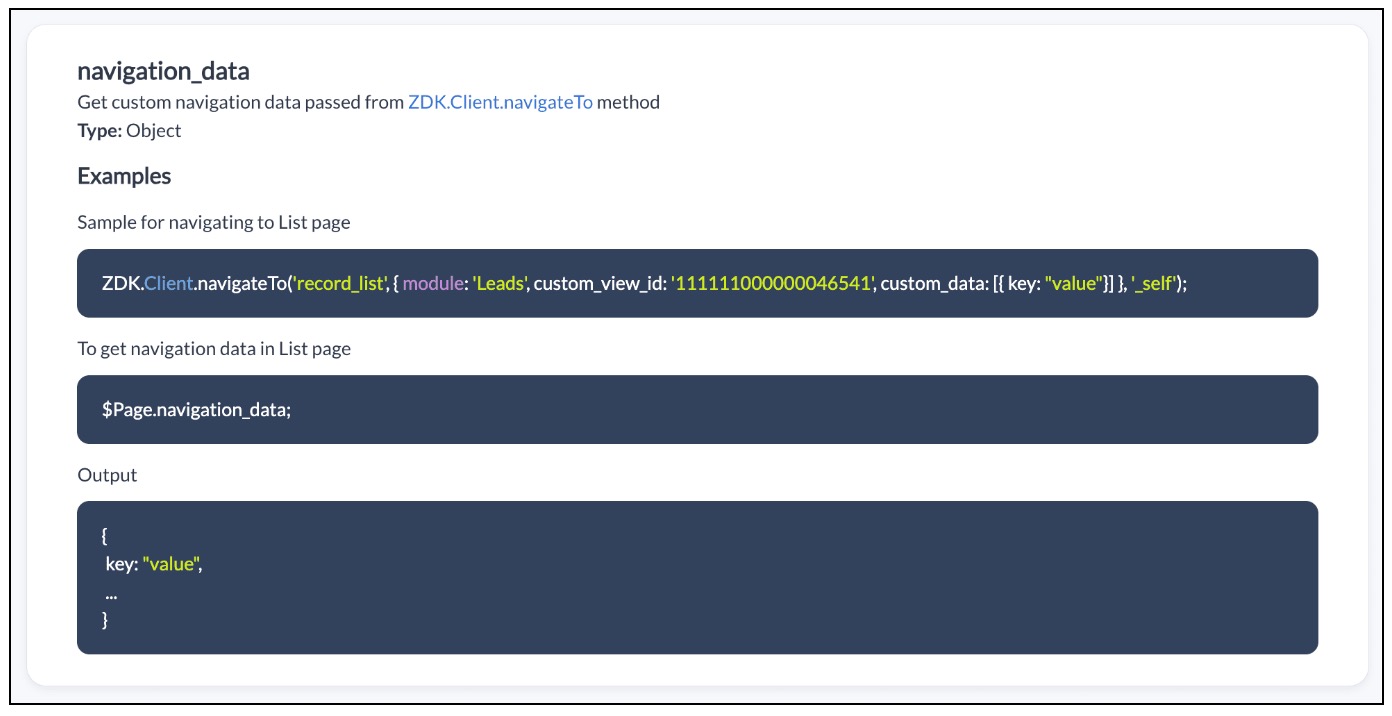


Click here to know more details.

3. Use Case

Zylker is a manufacturing organisation uses Zoho CRM. The admin wants to automatically open the Deal Create Page whenever the status in the Detail Page of Account is "Deal Creation". Also Deal Create Page should have the "Account Name"  prefilled from the Detail Page of Account record."

4. Solution

If the user updates the status to "Deal Creation" in Accounts module you need get confirmation from the user and  open a new Deal Create Page automatically with Account Name prefilled. 

To accomplish this using Client Script, you need to create two Client Scripts. 

A. Client Script for Accounts Module
B. Client Script for Deals Module

A. Client Script for Accounts Module

Create a Client Script for Detail Page of "Accounts" module with the following details and click "Next". To know more about Creating Client Script, click here.
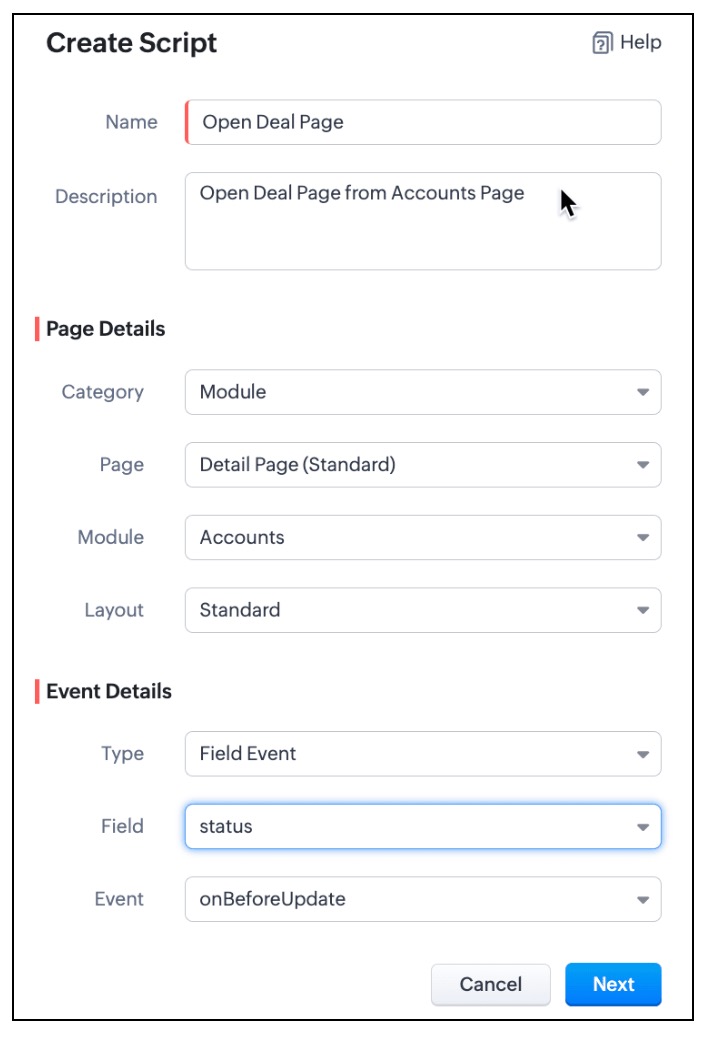

  • In the Client Script IDE, enter the below script and click Save.
  1. var a_name = ZDK.Page.getField("Account_Name").getValue();
  2. var rec_id = $Page.record_id;
  3. if (value == "Deal Creation")
  4. {
  5.     var resp=ZDK.Client.showConfirmation("Do you want to update the status as Deal Creation?");
  6.     if (resp)
  7.     {
  8.         var rec = $Page.record;
  9.         var rec_id = $Page.record_id;
  10.         rec.status = "Deal Creation";
  11.         var response = ZDK.Apps.CRM.Accounts.updateById(rec, rec_id);
  12.         log(response);
  13.  ZDK.Client.navigateTo('record_create', { module: 'Deals', custom_data: {data: a_name,data_id :$Page.record_id}}, '_blank')
  14.     }
  15. }

  • Whenever the status is updated to "Deal Creation" , you can show a Confirmation box using showConfirmation() asking whether the user wants to update the status as "Deal Creation"
  • Then, update the current record's status using updateById(). You can use the $Page, to get the current record id.
  • Then using  navigateTo() method you can open the Deal Create Page from Account Detail Page.
  • As per the following syntax, you should pass the required parameters, which includes the data needed for the Client Script on Deal Page. In this case the data being passed is the Account Name and Id.
  • Syntax : navigateTo(page, params, data, target)
    • page :  record_create denotes that you want to open Create Page.
    • params :  You need to mention the name of the module for which the Create Page has to be opened. In this case it is "Deals". You can also mention the layout_id and record_id in params. For more details, click here.
    • data : "custom_data" hold the data that you want to pass to the Deals Page.
    • target: You can open the page in same tab or in a different tab using "_self" and "_blank" respectively.
B. Client Script for Deals Module

Now, create another Client Script for "Deals" module with the following details and click "Next".
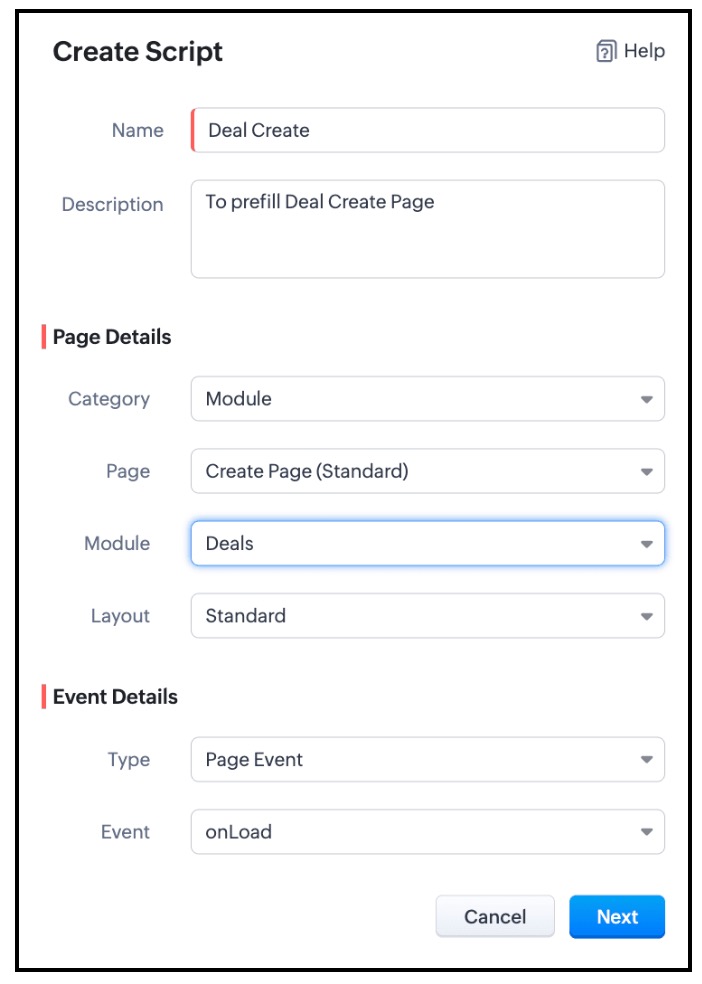


In the Client Script IDE, add the following script and click "Save"

  1. var a = $Page.navigation_data;
  2. if (a!=null);
  3. {
  4. var field_obj1 = ZDK.Page.getField('Account_Name');
  5. field_obj1.setValue({ "id":a.data_id , "name":a.data });
  6. }

To get the data passed in Account Detail Page, you need to use "$Page.navigation_data". In this script you can use setValue() and mention the id and name of "Account Name". As Account Name is a lookup field, you should mention the Id of the Account along with the Account Name.

Here is how the Client Script Works.
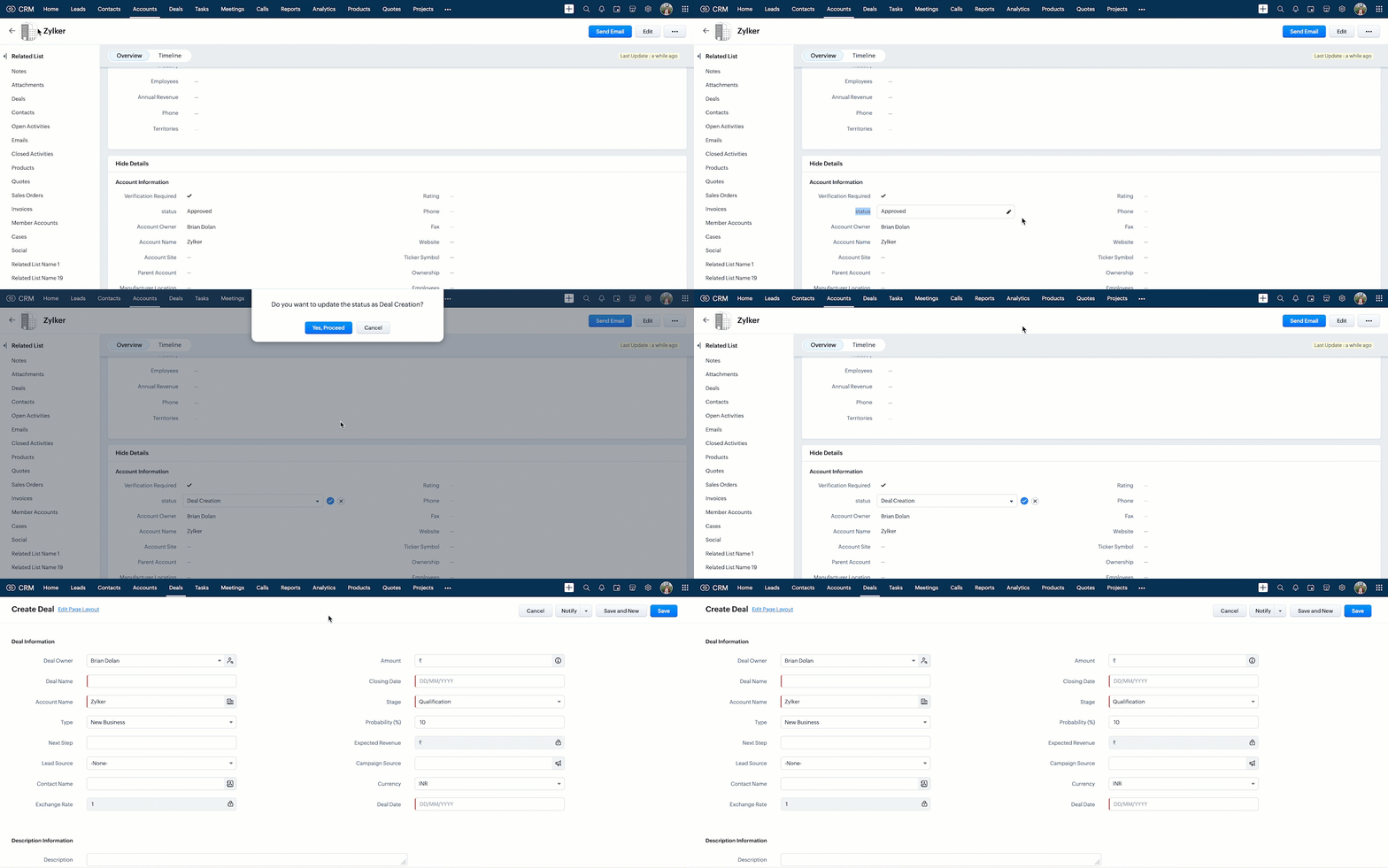

Click here to know more details.

Notes
Note:

You can open any external URL using Client Script in a new tab using openURL().
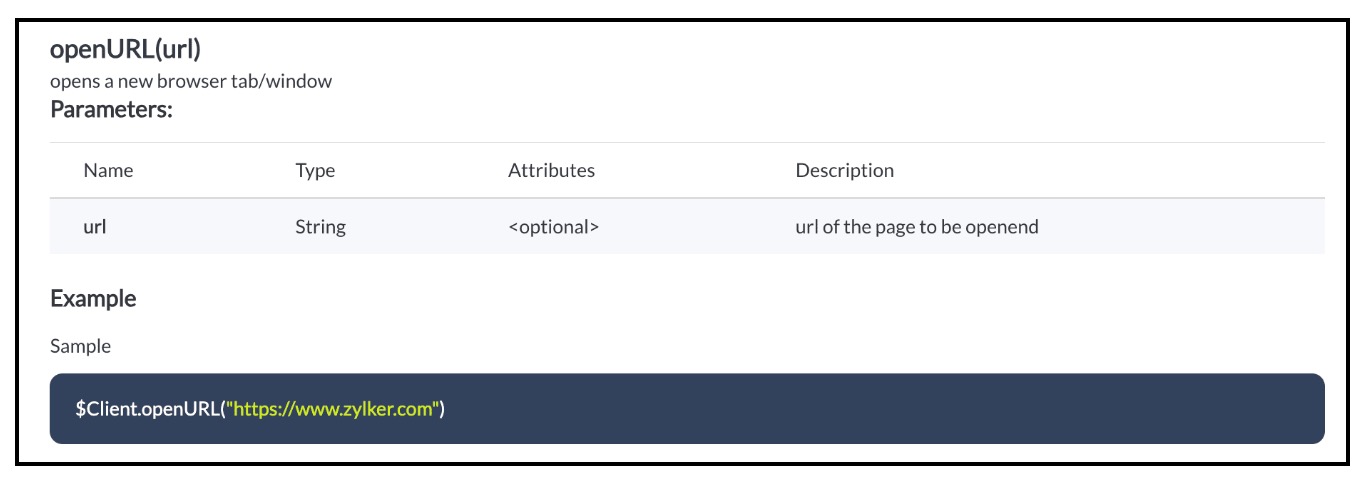
Notes

Click here to know more details.

5. Summary :

In this post we have discussed,
  • How to pass data from one page to the other using Client Script.
  • How to perform actions after a record is updated.
  • How to update a record using Client Script without clicking on Save button.
  • How to open external URLs using Client Script.
-------------------------------------------------------------------------------------------------------------------

6. Related Links :


-------------------------------------------------------------------------------------------------------------------

Previous Post: Kaizen #141 - Zoho CRM's API Collection in Postman     |     Kaizen Collection: Home
Alert
Join us for our upcoming Zoho CRM Developer Series: Zoho CRM APIs, where you can explore more about Zoho CRM APIs. Register Now!  


    • Sticky Posts

    • Announcing the new SKILL.md for Zoho CRM and the updated OAS repository!

      We are introducing a new zoho-crm skill to make working with Zoho CRM Developer tools (like APIs, functions, widgets, client scripts, queries etc) easier and faster, with the help of AI in your preferred AI harness like Claude Code, Codex, Cursor, VSCode
    • Kaizen #261 : Using Zoho CRM Skill to generate complex COQL queries

      Hello everyone, In the previous Kaizen posts, we introduced the zoho-crm SKILL.md and discussed how it can help you when you are working with Zoho CRM APIs and Client Script. In this Kaizen, we will focus on using the Zoho CRM `SKILL.md` with GitHub Copilot
    • Kaizen #256 - Build an Arrival Readiness Web Tab in Zoho CRM

      Hi everyone! Welcome back to the Kaizen series! In the post, we discuss a use case in hospitality industry: how an Arrival Readiness web tab widget can be used to let reception staff identify and resolve issues before arrival of guests. Use case In the
    • Kaizen #198: Using Client Script for Custom Validation in Blueprint

      Nearing 200th Kaizen Post – 1 More to the Big Two-Oh-Oh! Do you have any questions, suggestions, or topics you would like us to cover in future posts? Your insights and suggestions help us shape future content and make this series better for everyone.
    • Kaizen #226: Using ZRC in Client Script

      Hello everyone! Welcome to another week of Kaizen. In today's post, lets see what is ZRC (Zoho Request Client) and how we can use ZRC methods in Client Script to get inputs from a Salesperson and update the Lead status with a single button click. In this
    • Recent Topics

    • 👍 Zoho CRM's Notes now gets Reactions and a new look

      Moderation update: Currently available in the following DC's CA, AU, CN, UAE, JP, SA - All Editions EU - Free, Standard and Professional Hello everyone, Notes help users capture important updates, collaborate with teammates, and maintain context for records.
    • Add @Mention Notifications in Zoho Cliq for Zoho Project Mentions

      Hello Zoho Projects Team, We hope you are doing well. We would like to submit a feature request regarding "Projects Bot" Cliq bot notifications for @mentions inside Zoho Projects comments (Tasks and Issues). Current Behavior: At the moment, when someone
    • Can't connect to POP and SMTP over VPN

      I use Thunderbird to access Zoho Mail via POP and SMTP. I have configured an app-specific password for Thunderbird to use. Everything is properly configured and works correctly — until I enable my VPN. I'm using a paid commercial VPN service (Mullvad).
    • Outgoing Mail Blocked – Suspicious Login Activity (Need Clarification and Solution)

      Hello, I’m currently facing an issue where my Zoho Mail account has been blocked due to “suspicious login activity,” and outgoing emails are restricted. Here are the details shown: Block type: Outgoing mail blocked Reason: Suspicious login activity A
    • Online Payment Fees

      We don't take many online credit card payments so the merchant service provider (PayPal) charges us the 2.9% fee for processing the amount. I would like the ability for the fee to be automatically added to the total amount for "ease of payment". We'd
    • O SalesIQ aceita números do Whatsapp Business com coextistência?

      Tenho uma equipe com vários vendedores e cada um deles tem um celular corporativo usando o Whatsapp Business para se comunicar com os clientes. Estamos no plano Zoho One e esses mesmos vendedores também usam o SalesIQ para atender os leads que vem do
    • Losing description after merging tickets

      Hello, We merge tickets when they are about the same topic from the same client. It happens sometimes. We recently noticed that after the merger only the description from the master ticket is left in a thread. And the slave-ticket description is erased.
    • Any update on much requested feature, to delete attachments without deleting the e-mail body?

      People have been requesting the ability to delete e-mail attachments without deleting the e-mail for more than ten years now. The latest I see is marked "Working On It" and a year ago it was supposedly being added, see here: https://help.zoho.com/portal/en/community/topic/is-there-a-way-to-delete-mail-attachments-without-deleting-the-text
    • Undo/redo when composing Mail

      Where is the undo/redo button when composing mail? I've new to Zoho, I've looked, I've searched and can't find it. What am I missing?
    • Mail menu bar items missing in Inbox and folders

      Last night some shortcuts such as Move to Folder, Archive, Delete, Mark as spam, and others, disappeared from my Mail menu bar, along with items in the vertical three dots extension such as Mark as read, Flag as, Mark as unread, etc. What I now have instead
    • ERROR CODE :554 - Your access to this mail system has been rejected due to poor reputation of a domain used in message transfer

      This message was created automatically by mail delivery software. A message that you sent could not be delivered to one or more of its recipients. This is a permanent error. *****, ERROR CODE :554 - Your access to this mail system has been rejected due
    • Sent items with shared folders

      Hello, this is in some way in between a problem and an idea.  When sharing folders (which is actually not any close to a shared mailbox...) the person which the folder has been shared with can access that folder and can send emails when delegation is
    • What's New in Zoho Inventory | July & August 2026

      Hello users, The July and August 2026 releases bring a range of new features and improvements across the product. From the Nigeria Edition and Super Admin enhancements to Sri Lanka IRD-compliant invoicing, Loyalty Program Management, and improvements
    • E-mail com problema

      Não estou recebendo e-mail desde Janeiro. Algo desconfigurou e eu não consigo resolver. Podem ajudar? Aguardo. Wagner Della Aversana Whats 55 11 985119899
    • Account Blocked due to Suspicious Activity.

      Hello, Trying to get access to my account, I have found this message above in the subject of this message. I am unable to log back to my account (see err. mess. below.) and thus cannot get rif of this following the Zoho procedure : I followed the step
    • SAML authentication in Zoho Mail: Simplify and secure your organization's login management

      Managing login credentials across multiple web applications can be challenging for organizations with a large number of users. Without a centralized authentication system, users are required to maintain separate passwords for each application, increasing
    • How to prepare a balance sheet for a company that has no operations yet?

      .
    • Can't create new account in zoho email

      Hello, i'm trying to create some free accounts to my customers... and since yesterday i can't create a new account, what is wrong? why i can't create free account? Thank You
    • Name autocomplete

      Hi, During searching emails the web tool does not always propose the auto-completion of the saved emails. As a result I either have to go to contacts and look up the exact email, or the exact full name including the middle name and any dots, which is
    • Introducing Incentives for Zoho CRM: Build, automate, and track sales commissions

      Dear Customers, We are here with an amazing news! We built a direct solution to help manage your commission provisioning activity in your business. From creating commission plans to issuing payouts, this application leverages your sales reps’ performance
    • Bank Feeds - Again

      Bank feeds broken again for me. I don't see other recent posts on this, so maybe it's just us? Tried: refresh update cred/ deact./react. feeds chat support Nothing. On day 2 without zoho as a result, which is crippling for us. We've used zoho for a year
    • Create a single record from multiple images with ICR

      Hello all, Zia's Intelligent Character Recognition can now create a single record from multiple images based on the configured ICR rule. Users can upload up to three images at once, such as an ID, a passport, and a business card, and Zia will extract
    • SPF failure in android app

      I have no domain. I am not admin of anything. All I want to do is send an email from a zohomail.eu address, using the Zoho android app, with all settings as default. I do not use Office 365, or EOP, or Outlook, and I have no domain or domain registrar.
    • Recover accidentally deleted mail account

      Email account was accidentally deleted from admin console. 
    • Zoho Books | Product updates | August 2026

      Hello users, July has been an exciting month for Zoho Books! This month, we're excited to introduce HTML PDF Templates, Placeholders as Pills, expanded approval workflows for Sales Returns and Journals, and significant compliance updates across the India,
    • Page Not Found error - 404 error

      Hello, I am a first time user of zoho sites.I just published my website dentistinminneapolis.com but its giving me a 404 error.Please look into it ASAP and help with the problem.
    • What's New in Zoho POS - September 2026

      Hello everyone, Welcome to Zoho POS’s monthly update, where we share our latest feature updates, enhancements, events, and more. Let’s take a look at how September went. Global Edition of Zoho POS for Retail is here On September 28, 2026, we launched
    • Push error with Zoho Books and Zoho CRM

      I have successfully linked Books and CRM but I have some push errors with the following message: "The customer associated to this record is not linked to module chosen in the current contact sync configuration." I am unable to work this out, could you help please.
    • crm to books

      We currently sync CRM Contacts to Zoho Books Customers using two-way sync. We now wish to change to "Accounts & their Contacts". What happens to existing Books customers? Will they be merged with CRM Accounts, duplicated, left unchanged, or recreated?
    • Announcing new features in Trident for Windows (v.1.43.5.0)

      Hello Community! This release includes a collection of enhancements and feature updates aimed at making your email and collaboration experience smoother. Let’s dive into what’s new! Zoho Desk email notifications as Smart Mail. Zoho Desk Smart Mail is
    • How to Manage Two GST Numbers / Two Companies in a Single Zoho Inventory Organization?

      Hi Team, We currently have two separate legal entities: A Proprietorship Firm with its own GSTIN A Private Limited Company with a different GSTIN However, operationally, both companies deal with the same products, and we would like to manage the physical
    • How To Implement an Auto-Check-out Feature for Attendance?

      If an employee forgets to check out, the system should automatically check out the employee at 6:30 PM
    • Convert an Existing Single Item into an Item with Variants

      Hello Zoho Team, Introducing variants is a great addition to Zoho Inventory. However, we would like to request an option to convert an existing single item into an item with variants. For example, Item A initially comes in only one colour, so we create
    • IP Address List > Sigma

      We have developed a ZohoCRM extension that utilizes API calls to our server from Deluge scripts and Widgets. Our API server has IP restrictions in place. To ensure successful communication, we require a list of IP addresses utilized by Zoho's platform
    • How to turn off notifications for shared mailbox?

      It seems like a pretty common use case for shared mailboxes is getting notifications that are relevant to multiple people. That type of email tends to be high-volume and not time sensitive, the type of thing you check once a day to see if anything is
    • Default Country list suggestions on CRM is different then on Book; how do/did others address this?

      So I already have a support ticket in for this and waiting for a response but figured I'd ask the community also to see if others experienced the same problems and/or how they went about addressing it because sometimes I feel like I'm going crazy with
    • Object-level edit permissions

      Hi, we are currently running into a limitation with permissions inside larger workspaces. Our use case is a central Analytics workspace that contains many tables, Query Tables, reports and dashboards used by different teams. We would like to allow certain
    • Convert Sales order to Delivery Challan

      Dear Developer Team, In Zoho books we cannot convert sales order into delivery challan before making invoices. As a service business we have to get the delivery note signed then only we can make the invoice. In Some cases we don't receive a purchase order
    • What's New in Zoho Inventory | September 2026

      Hello users, September brings a range of new features and enhancements across Zoho Inventory. From improved inventory operations and reporting capabilities to greater customization, automation, and enhancements to Delivery Challans, there’s plenty to
    • Mirror Component in Zoho CRM: Access real-time related data without leaving your record

      Hi everyone, This feature is now available for the JP, CA, SA, UAE, and AU DCs. We're excited to bring to you Zoho CRM's mirror component, which presents relevant data on a record's details page and keeps everything users need in one place without having
    • Next Page