Kaizen #169 - Serialization and Schema Management in Queries

Hello everyone!
Welcome back to another post in the Kaizen series!
In Kaizen #166, we discussed handling Variables in Queries and associating the query in Kiosk.
This week, we will discuss Serialization and Schema management in Queries.
Business Scenario
Let's consider the same use case of Delivery Hub discussed in Kaizen #166.
Here, a tele-commerce platform uses Zoho CRM to manage sales and deliveries. When a customer provides their PIN code, the salesperson must confirm with the customer for a nearby post office for package pick-ups and drop-offs in Kiosk.
For this case, we wrote a query with the Source as REST API. When a PIN code was entered, the query dynamically retrieved the list of post offices in that area and displayed it on the Contact's detail page.
Let's take it a step further and see how we can serialize the response.
When you query by entering a PIN code, the response contains all post offices in that area including the ones that are non-operational.
To display only relevant data and leverage the capabilities of the Queries feature, you can serialize the response to display only those post offices that are operational(with the value "DeliveryStatus":"Delivery") along with the names of those post offices.
We will also see how Schema varies based on serialization.
Serialization
Serialization refers to the process of transforming complex data structures into a format that is more meaningful and relevant to your business needs. In Zoho CRM Queries, serialization affects how responses are formatted and what data is included.
Serialization offers the following:
- Response Customization: By serialization, you can manipulate the output of a query to focus on relevant fields. For example, if a query retrieves multiple post offices, serialization can filter these results to display only those marked as 'deliverable'.
- Schema Adjustment: When you serialize the response, the schema changes. This allows you to have only relevant data in the serialized output like the required fields, especially while querying a module with multiple relationships.
- User Experience: Serialization avoids unnecessary information clutter, giving the users only what they need, thereby improving their overall experience.
Example
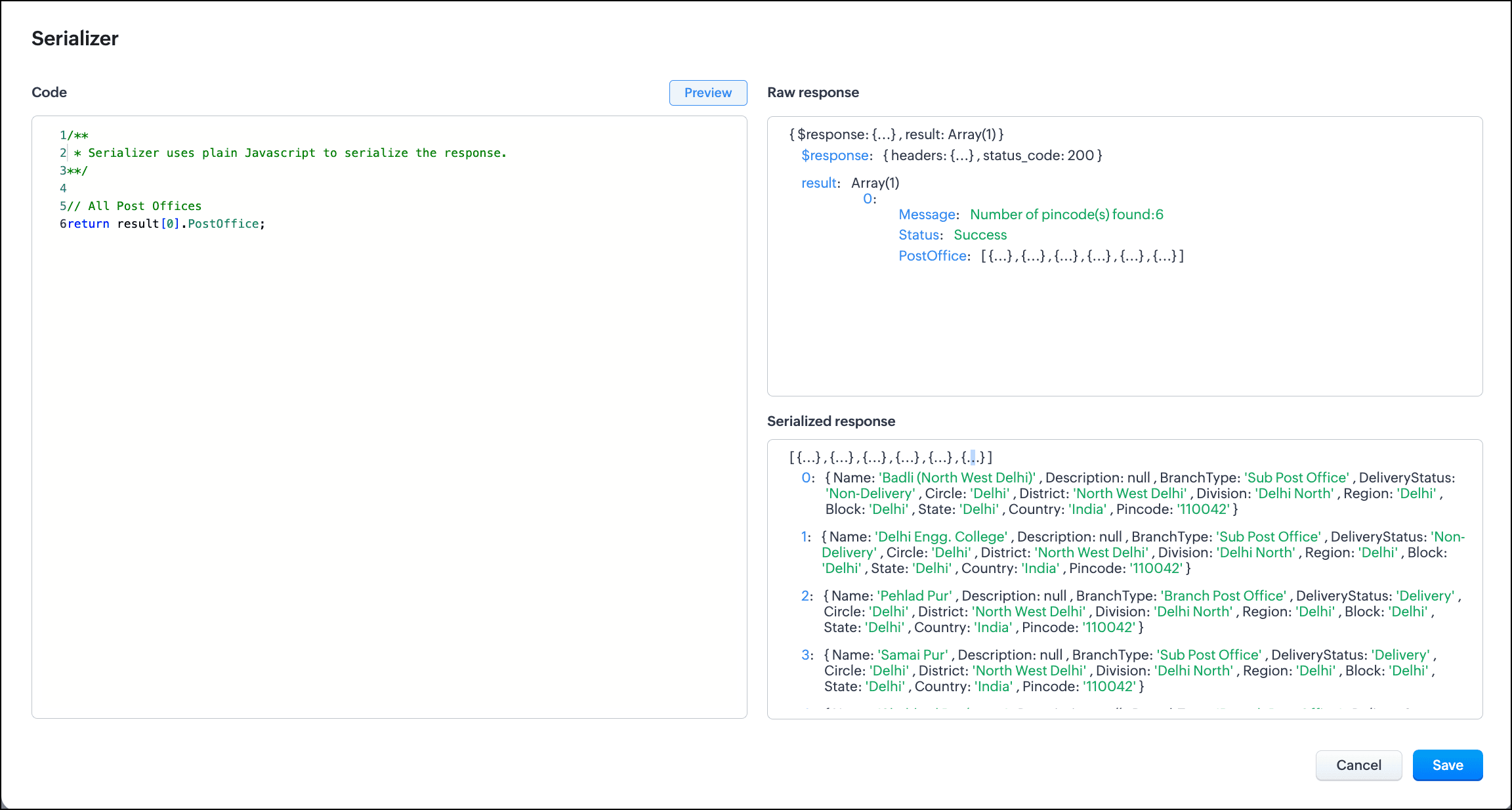
Consider the example of Delivery Hub. For PIN 110042, the response contains a list of six post offices in that area.
{ Name: 'Badli (North West Delhi)' , Description: null , BranchType: 'Sub Post Office' , DeliveryStatus: 'Non-Delivery' , Circle: 'Delhi' , District: 'North West Delhi' , Division: 'Delhi North' , Region: 'Delhi' , Block: 'Delhi' , State: 'Delhi' , Country: 'India' , Pincode: '110042' } 1 : { Name: 'Delhi Engg. College' , Description: null , BranchType: 'Sub Post Office' , DeliveryStatus: 'Non-Delivery' , Circle: 'Delhi' , District: 'North West Delhi' , Division: 'Delhi North' , Region: 'Delhi' , Block: 'Delhi' , State: 'Delhi' , Country: 'India' , Pincode: '110042' } { Name: 'Pehlad Pur' , Description: null , BranchType: 'Branch Post Office' , DeliveryStatus: 'Delivery' , Circle: 'Delhi' , District: 'North West Delhi' , Division: 'Delhi North' , Region: 'Delhi' , Block: 'Delhi' , State: 'Delhi' , Country: 'India' , Pincode: '110042' } 3 : { Name: 'Samai Pur' , Description: null , BranchType: 'Sub Post Office' , DeliveryStatus: 'Delivery' , Circle: 'Delhi' , District: 'North West Delhi' , Division: 'Delhi North' , Region: 'Delhi' , Block: 'Delhi' , State: 'Delhi' , Country: 'India' , Pincode: '110042' } 4 : { Name: 'Shahbad Daulatpur' , Description: null , BranchType: 'Branch Post Office' , DeliveryStatus: 'Delivery' , Circle: 'Delhi' , District: 'North West Delhi' , Division: 'Delhi North' , Region: 'Delhi' , Block: 'Delhi' , State: 'Delhi' , Country: 'India' , Pincode: '110042' } 5 : { Name: 'Siraspur' , Description: null , BranchType: 'Branch Post Office' , DeliveryStatus: 'Delivery' , Circle: 'Delhi' , District: 'North West Delhi' , Division: 'Delhi North' , Region: 'Delhi' , Block: 'Delhi' , State: 'Delhi' , Country: 'India' , Pincode: '110042' } |
Now, we will use serialization to display only those post offices that deliver with the value DeliveryStatus = 'Delivery' .
You can serialize the response using JavaScript. Here is the code.
const postOffices = result[0]?.PostOffice; // Ensure `postOffices` is iterable const postOfficesArray = Array.isArray(postOffices) ? postOffices : (postOffices ? Object.values(postOffices) : []); const filteredResults = []; // Filter and manually extract `Name` and `DeliveryStatus` for (const office of postOfficesArray) { if (office.DeliveryStatus === "Delivery") { filteredResults.push({ Name: office.Name, DeliveryStatus: office.DeliveryStatus }); } } return filteredResults; |
Let's see how serialization brings a difference in the output.
Output when fetching all post offices
Serialized output displaying only the name and status of the post offices that deliver
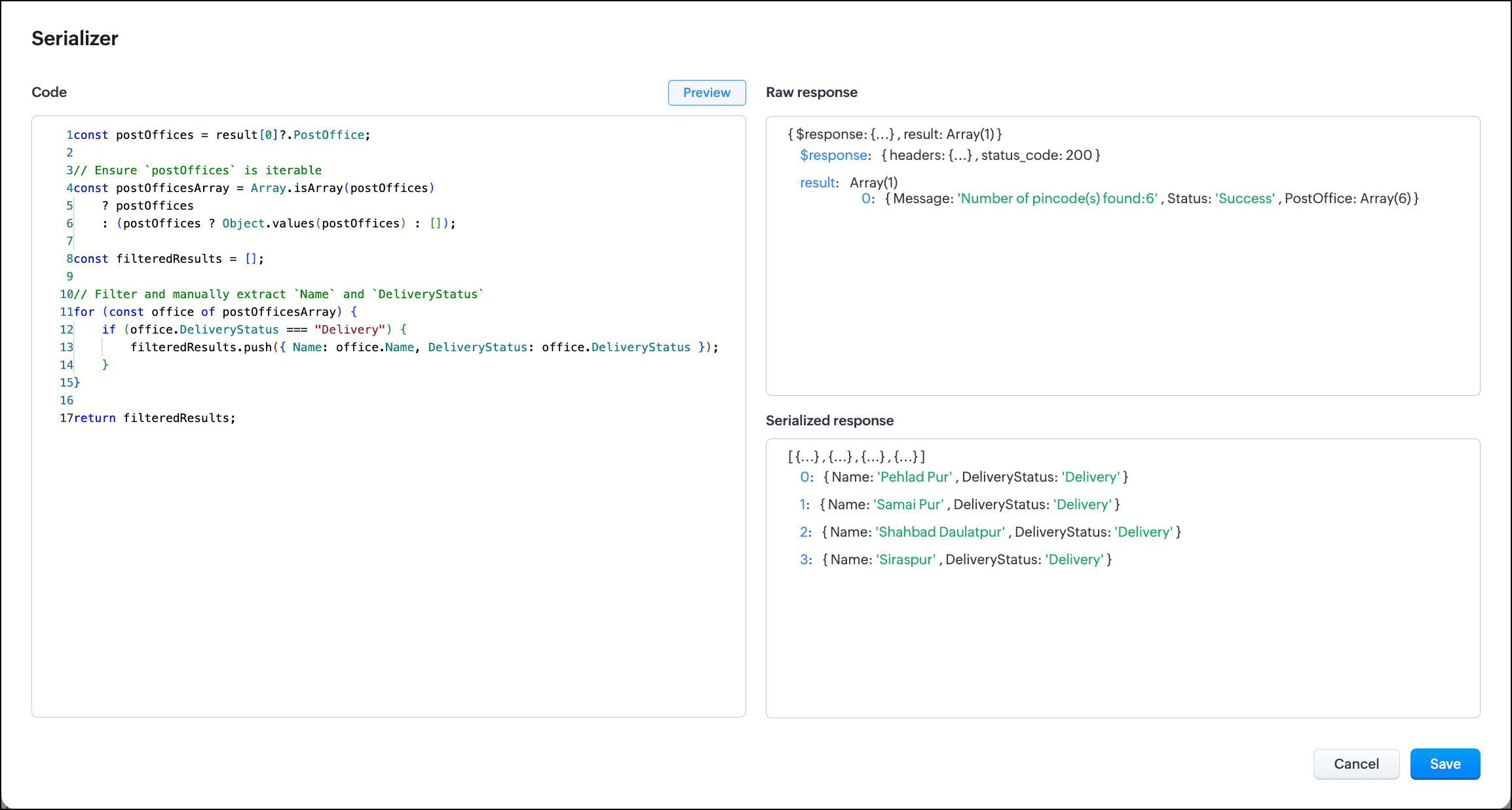
As you can see, serialization makes the output less bloated and a lot more meaningful and relevant.
Schema Management
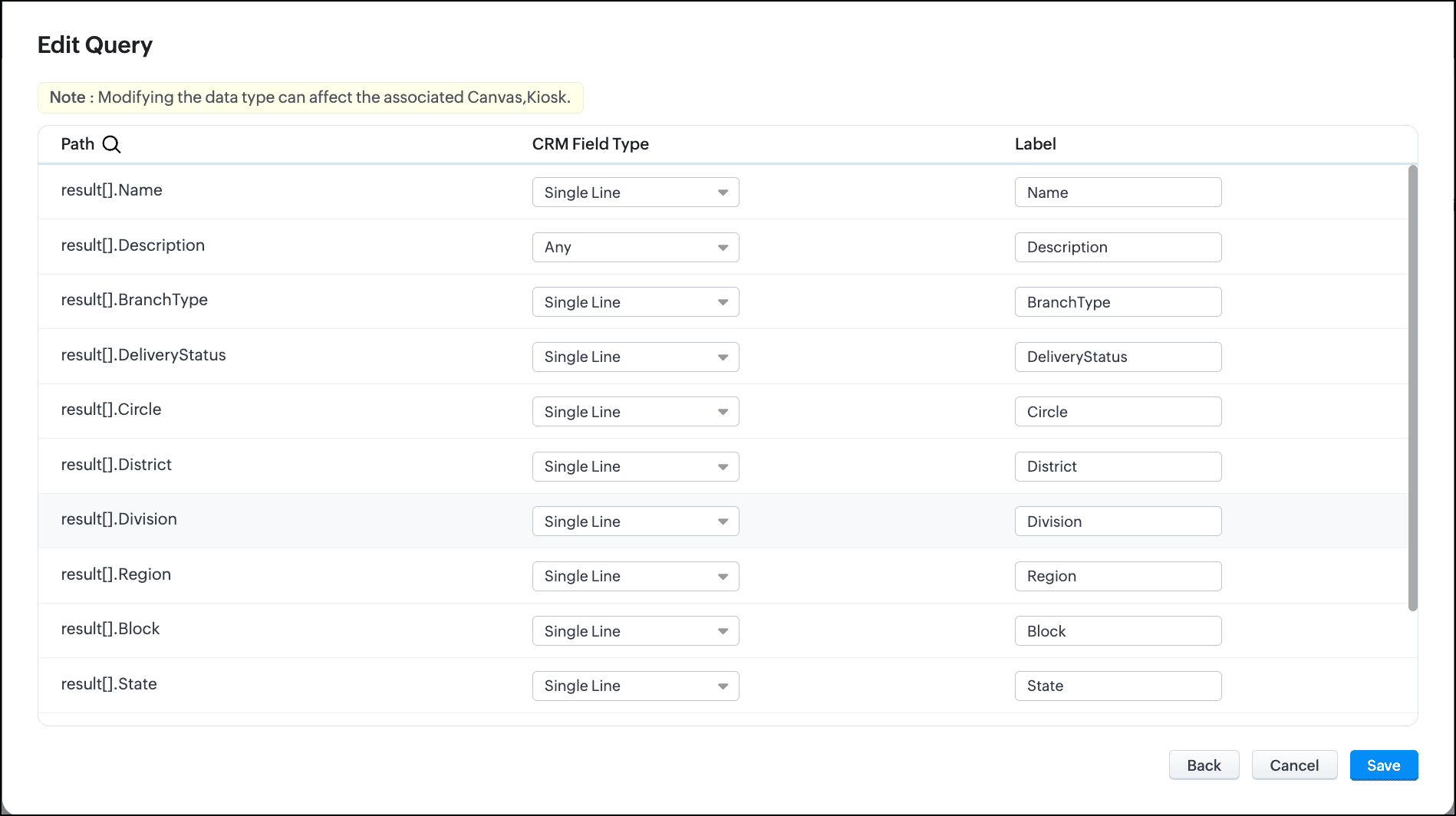
For every query, the schema is auto-generated. It outlines the structure of the retrieved data and helps identify the path of each field, its CRM field type, and the label.
You can modify the auto-generated schema to suit your requirements better. You can update field labels and types, which helps in presenting data in a more user-friendly way.
For example, if a query returns a field labeled "Deal Stage," you can rename it to "Current Status" for clarity when displaying results on dashboards or reports.
Let's look at the schema when fetching all post offices for a PIN code vs the schema of the serialized response.
Schema before serialization
Schema after serialization
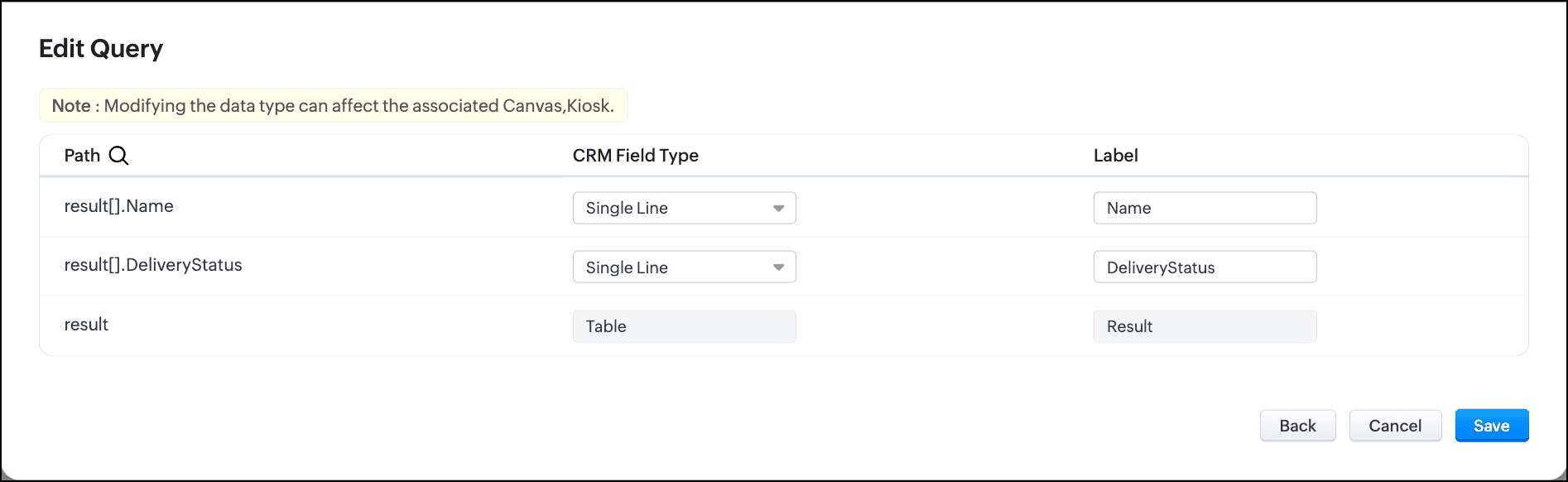
You can see that serializing helps you achieve crisper results.
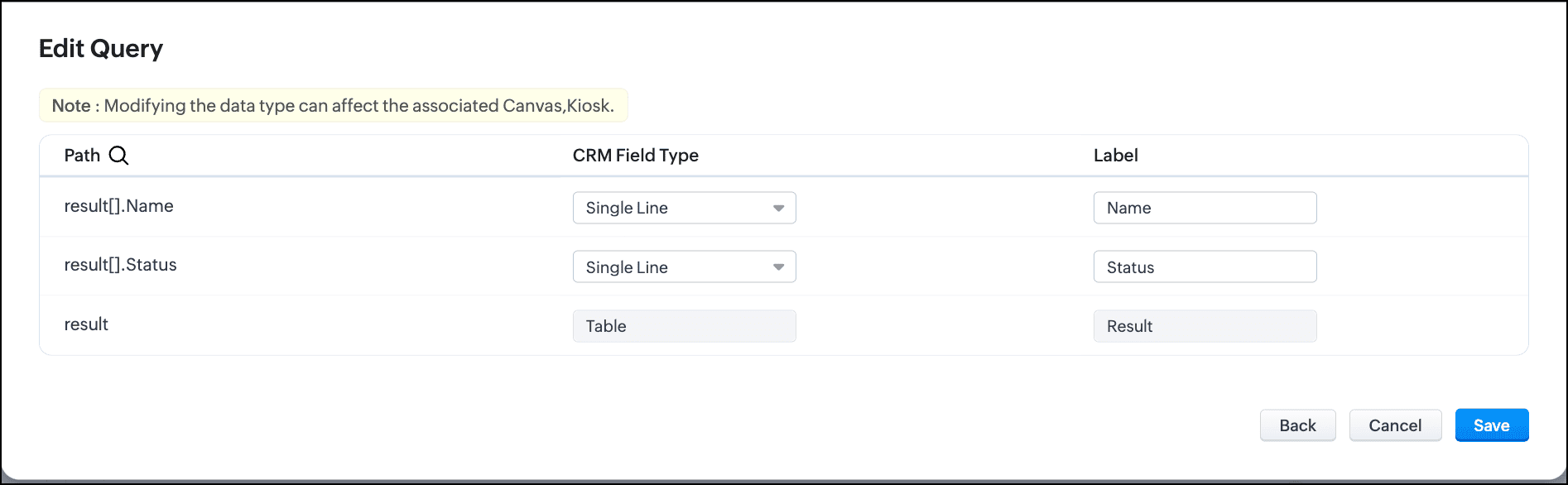
It shows the CRM field type of every field in the response and its label. You can further customize the schema by changing the field labels to suit your needs.
In the following image, the field label for DeliveryStatus is changed to Status in the serializer which is reflected in the schema.
We hope you found this post useful. Watch this space for more posts on interesting topics.
We love to hear from you! Write to us at support@zohocrm.com.
See you all next week!
Cheers!
-------------------------------------------------------------------------------------------------------------

See Also
- Kaizen #166 - Handling Variables in Queries
- Kaizen #167 - Config and Init for PHP SDK for self client and server-based client
- Kaizen #168 - Incremental Authorization
- Kaizen Directory