Kaizen# 204 - Answering Your Questions | Perform Field Updates before Blueprint transition via Client Script

Kaizen# 204 - Answering Your Questions | Perform Field Updates before Blueprint transition via Client Script


Hello everyone!

Welcome back to another exciting Kaizen post.
One of the questions we received through your Kaizen feedback was: 

“How can I update fields before Blueprint transition and how to prevent a transition based on a condition using Client Script?”

 In today’s post, let’s walk through how to achieve this with a simple real-world example. 
We have previously explored how to use Blueprint Events in this Kaizen post and how to implement custom validations within a Blueprint in another Kaizen post.
In this Kaizen post, 


In this Kaizen post, 

1. Use Case
        A. Field Update during Blueprint Transition
        B. Prevent Transition
2. Solution
3. Summary
4. Related Links


1. Use Case

Lisa, the CRM Admin at Zylker, wants to enhance the Lead follow-up Blueprint by capturing the reason behind each transition. Before any transition, a popup should prompt the user to enter a comment.

Field Update:
The Description field should act as the comment history for all Blueprint transitions. When a user enters a comment during a transition, the system should append the comment along with the transition name and the user’s name to this field if the comment has more than 25 characters.

Prevent Transition:
If the comment is less than 25 characters, the transition should be prevented.

2. Solution: 

  • To achieve this, you should create a Client Script that runs during the beforeTransition Blueprint event in your Blueprint.
  • The Before Transition event allows you to control what happens just before a Blueprint transition is executed, and this is perfect for tasks like validating inputs or updating fields dynamically.
  • Go to Setup > Developer Space > Client Script. 
  • Click +New Script.
  • Specify the details to create a script and click Next.
  • Enter the following script and click Save.

  1. // Show a popup input asking the user to enter comments
  2. var notes_pop_up = ZDK.Client.getInput(
  3.     [{ type: 'text', label: 'Comments' }], // Input type and label
  4.     'Deal',                                // Title of the popup
  5.     'OK',                                  // Confirm button text
  6.     'Cancel'                               // Cancel button text
  7. );

  8. // Get the "Description" field from the current record
  9. var notes_field = ZDK.Page.getField("Description");

  10. // Check if the input comment length is greater than 25 characters
  11. if (notes_pop_up.length > 25) {

  12.     // If the Blueprint transition is "Gather Details", create a new description with just this comment
  13.     if (transition.name == "Gather Details") {
  14.         var desc = transition.name + "- " + notes_pop_up + ",";
  15.     } 
  16.     // For other transitions, append the new comment to the existing description along with the user name
  17.     else {
  18.         var desc = notes_field.getValue() + " ,\n '" + transition.name + "' - " + notes_pop_up + " - " + $Crm.user.full_name;
  19.     }

  20.     // Fetch the Lead record using the record ID from the page
  21.     var lead = ZDK.Apps.CRM.Leads.fetchById($Page.record_id);

  22.     // Update the Description field of the lead
  23.     lead.Description = desc;

  24.     // Save the updated lead record
  25.     var response = ZDK.Apps.CRM.Leads.updateById(lead, $Page.record_id);

  26. // If comment length is less than or equal to 25 characters, prevent the transition
  27. else {
  28.     ZDK.Client.showAlert("Enter minimum of 25 characters to proceed");
  29.     return false; // Block transition
  30. }

  • To prompt the user for comments during a Blueprint transition, use ZDK.Client.getInput(), which displays a popup input box.
  • The existing value of the Description field can be fetched using ZDK.Page.getField("Description").
  • To retrieve full lead details based on the current record, call ZDK.Apps.CRM.Leads.fetchById() using $Page.record_id.
  • Once the new comment is prepared, update the lead by calling ZDK.Apps.CRM.Leads.updateById().
  • If the entered comment is too short (e.g., under 25 characters), the code displays an alert using ZDK.Client.showAlert() to guide the user.
  • The user’s full name is accessed via $Crm.user.full_name.
  • Finally, return false will stop the Blueprint transition if the number of characters is less than 25.
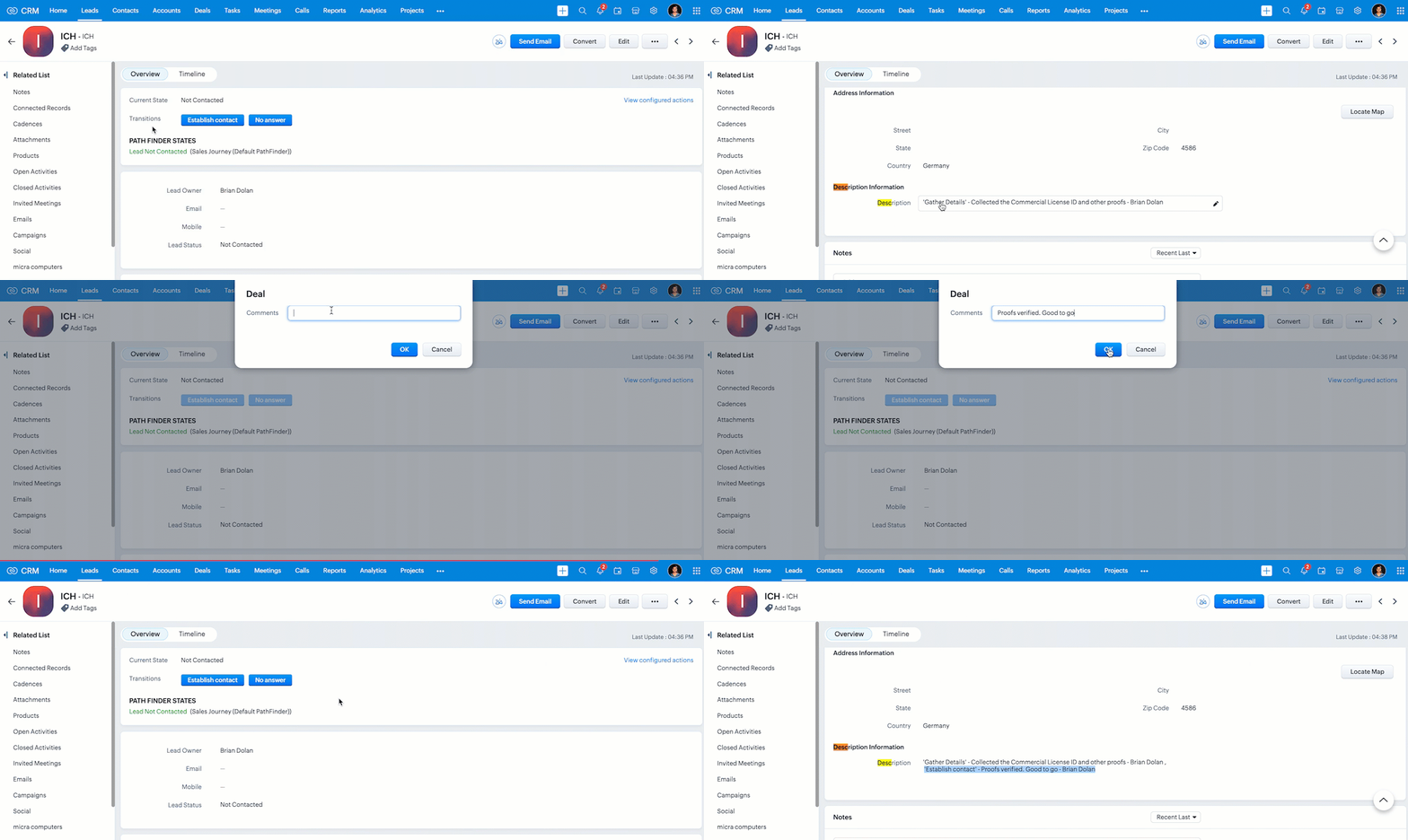
  • Here is how the Client Script works if the user specifies a description with sufficient length.

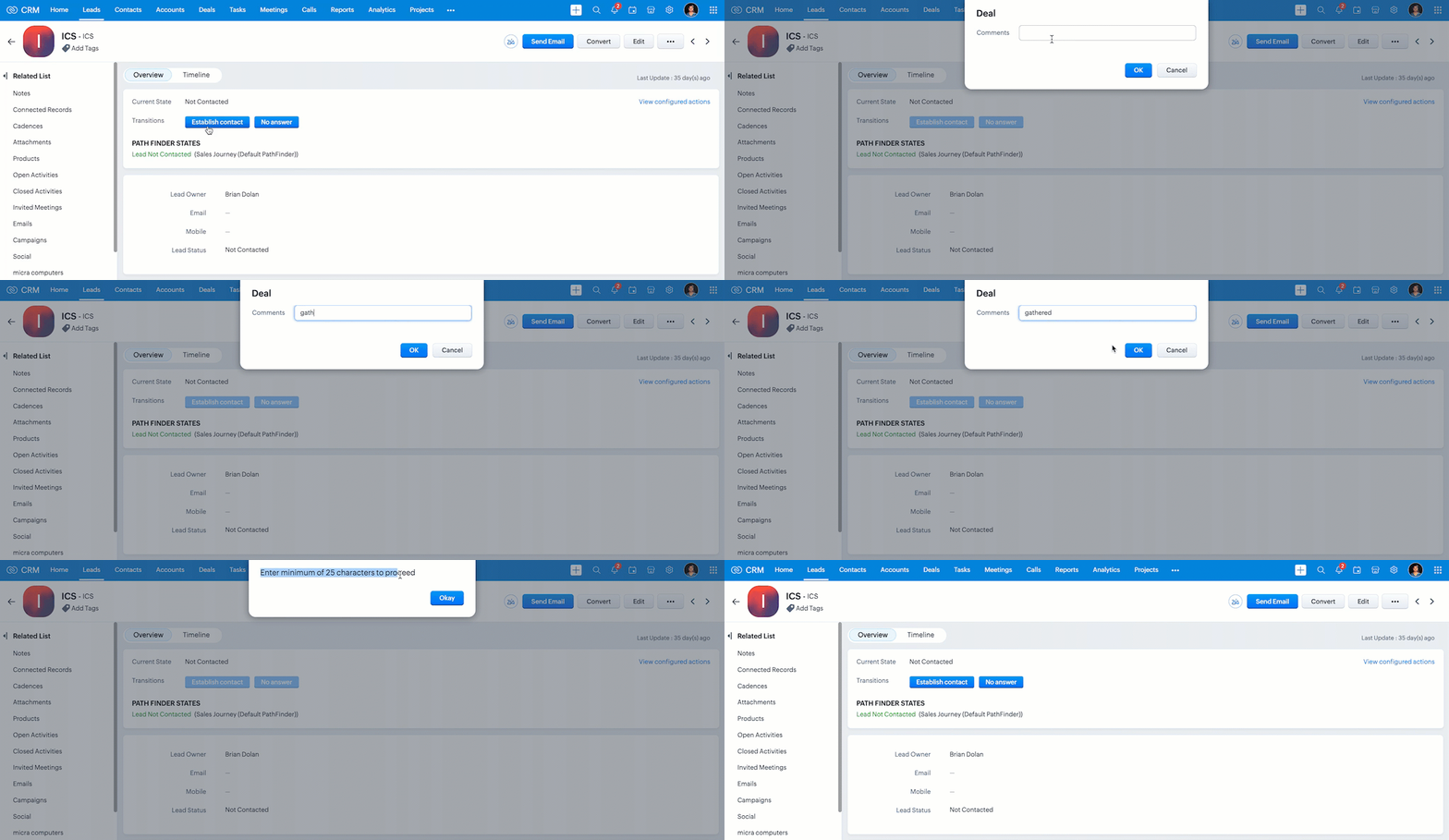
  • As you can see in the following gif, if the user enters a short description, the Client Script shows an alert and prevents the Blueprint transition.


We hope you found this post useful. We will meet you next week with another interesting topic!
If you have any questions, let us know in the comment section.
Click here for more details on Client Script in Zoho CRM.

3. Summary

A. How can I update fields during a Blueprint transition using Client Script
B. How to prevent Blueprint transition

4. Related Links

Best practices of Client Script 

Happy Client Scripting!

    • Sticky Posts

    • Kaizen #226: Using ZRC in Client Script

      Hello everyone! Welcome to another week of Kaizen. In today's post, lets see what is ZRC (Zoho Request Client) and how we can use ZRC methods in Client Script to get inputs from a Salesperson and update the Lead status with a single button click. In this
    • Kaizen #222 - Client Script Support for Notes Related List

      Hello everyone! Welcome to another week of Kaizen. The final Kaizen post of the year 2025 is here! With the new Client Script support for the Notes Related List, you can validate, enrich, and manage notes across modules. In this post, we’ll explore how
    • Kaizen #217 - Actions APIs : Tasks

      Welcome to another week of Kaizen! In last week's post we discussed Email Notifications APIs which act as the link between your Workflow automations and you. We have discussed how Zylker Cloud Services uses Email Notifications API in their custom dashboard.
    • Kaizen #216 - Actions APIs : Email Notifications

      Welcome to another week of Kaizen! For the last three weeks, we have been discussing Zylker's workflows. We successfully updated a dormant workflow, built a new one from the ground up and more. But our work is not finished—these automated processes are
    • Kaizen #152 - Client Script Support for the new Canvas Record Forms

      Hello everyone! Have you ever wanted to trigger actions on click of a canvas button, icon, or text mandatory forms in Create/Edit and Clone Pages? Have you ever wanted to control how elements behave on the new Canvas Record Forms? This can be achieved
    • Recent Topics

    • Add Zoho PDF to Zoho One Tool Applications

      It should be easy to add from here without the hassle of creating a web tab:
    • JOB WISE INVOICE PROCESS

      I WANT TO ENABLE JOB WISE TRACKING OF ALL SALES AND PURCHASE
    • PDF Template have QTY as first column

      I want to have the QTY of an item on the sales orders and invoices to be the first column, then description, then pricing. Is there a way to change the order? I went to the Items tab in settings but don't see how to change the order of the columns on
    • RAG (Retrieval Augmented Generation) Type Q+A Environment with Zoho Learn

      Hi All, Given the ability of Zoho Learn to function as a knowledge base / document repository type solution and given the rapid advancements that Zoho is making with Zia LLM, agentic capabilities etc. (not to mention the rapid progress in the broader
    • Welcome to the Zoho ERP Community Forum

      Hello everyone, We are thrilled to launch Zoho ERP (India edition), a software to manage your business operations from end to end. We’ve created this community forum as a space for you to ask questions, comment answers, provide feedback, and share your
    • In App Auto Refresh/Update Features

      Hi,    I am trying to use Zoho Creator for Restaurant management. While using the android apps, I reliased the apps would not auto refresh if there is new entries i.e new kitchen order ticket (KOT) from other users.   The apps does received notification but would not auto refresh, users required to refresh the apps manually in order to see the new KOT in the apps.    I am wondering why this features is not implemented? Or is this feature being considered to be implemented in the future? With the
    • Consolidated report for multi-organisation

      I'm hoping to see this feature to be available but couldn't locate in anywhere in the trial version. Is this supported? The main aim to go to ERP is to have visibility of the multi-organisation in once place. I'm hopeful for this.
    • IMAP mail after specify date

      Hi My customer's mail server is on premise and mail storage is very huge. So It never finish sync. and finally stop sync. Cloud CRM have a option like zoho mail sync mail after some date.
    • Analytics <-> Invoice Connection DELETED by Zoho

      Hi All, I am reaching out today because of a big issue we have at the moment with Zoho Analytics and Zoho Invoice. Our organization relies on Zoho Analytics for most of our reporting (operationnal teams). A few days ago we observed a sync issue with the
    • Claude + MCP Server + Zoho CRM Integration – AI-Powered Sales Automation

      Hello Zoho Community 👋 I’m excited to share a recent integration we’ve worked on at OfficehubTech: ✅ Claude + MCP Server + Zoho CRM This integration connects Zoho CRM with Claude AI through our custom MCP Server, enabling intelligent AI-driven responses
    • Notes badge as a quick action in the list view

      Hello all, We are introducing the Notes badge in the list view of all modules as a quick action you can perform for each record, in addition to the existing Activity badge. With this enhancement, users will have quick visibility into the notes associated
    • Search Bar positioning

      Why is the Search bar on the far right when everything is oriented towards the left?
    • Basic Mass Update deluge schedule not working

      I'm trying to create a schedule that will 'reset' a single field to 0 every morning - so that another schedule can repopulate with the day's calculation. I thought this would be fairly simple but I can't work out why this is failing : 1) I'm based in
    • The Social Playbook - January edition: Getting started with content creation

      Social media isn’t just about posting some random content. It’s about why certain content works, how brands stand out, and what makes people pause mid-scroll. The Social Playbook is a monthly community series where we break all of that down. Through real
    • Peppol: Accept Bill (Belgium)

      Hi, This topic might help you if you're facing the same in Belgium. We are facing an issue while accepting a supplier bill received by Peppol in Zoho Books. There is a popup with an error message: This bill acceptance could not be completed, so it was
    • Import Error: Empty values for mandatory fields - Closing Date

      Hello, I've tried multiple times to import a CVS Potential list from another Zoho account. But the error message I get is: Empty values for mandatory fields - Closing Date There are valid dates in this field, so I don't understand why this error messages
    • Adding custom "lookup" fields in Zoho Customization

      How can I add a second “lookup” field in Zoho? I’m trying to create another lookup that pulls from my Contacts, but the option doesn’t appear in the module customization sidebar. In many cases, a single work order involves multiple contacts. Ideally,
    • Special characters (like â, â, æ) breaking when input in a field (encoding issue)

      Hey everyone, We are currently dealing with a probably encoding issue when we populate a field (mostly but not exclusively, 'Last Name' for Leads and Contracts). If the user manually inputs special characters (like ä, â, á etc.) from Scandinavian languages,
    • Customizable UI components in pages | Theme builder

      Anyone know when these roadmap items are scheduled for release? They were originally scheduled for Q4 2025. https://www.zoho.com/creator/product-roadmap.html
    • Feature Requests - Contact Coloured Picklist Visibility & Field Visibility During Ticket Creation

      Hi Desk Team, I have 2 feature requests for you. Since Coloured Picklists are now available in Desk, It would be great if the colours were visible on the Related Details (Contact Information) when creating a ticket. In the screenshot below, I have 2 fields
    • How to integrate XML with Zoho CRM

      Hi, I have an eCom service provider that gives me a dynamic XML that contains order information, clients, shipments... The XML link is the only thing I have. No Oath or key, No API get... I want to integrate it into Zoho CRM. I am not a developer nor
    • Feature Request - Ability to Customise Contact Info Card on Ticket Details View

      Hi Desk Team, I've added a "Contact Priority" and "Account Prioirty" field and it would be very useful to agents if they could see that information in the Contact Info card on the Ticket Details view. It would be great if we could choose some fields to
    • Tax in Quote

      Each row item in a quote has a tax value. At the total numbers at the bottom, there is also a Tax entry. If you select tax in both of the (line item, and the total), the tax doubles. My assumption is that the Tax total should be totalling the tax from
    • Zoho Flow integration with Facebook Messenger and Whatsapp

      Hi there,  any plans of adding integrations with Facebook Messenger and Whatsapp into Zoho Flow? Seems that more and more business are delivering automated updates such as "your order is received",  "your order has been shipped" and so on via these two platforms. Not sure if Whatsapp has the API access needed i am pretty sure that Facebook Messenger has... Kind regards Bo Thygesen 
    • Really want the field "Company" in the activities module!

      Hi team! Something we are really missing is able to see the field Company when working in the activities module. We have a lot of tasks and need to see what company it's related to. It's really annoying to not be able to see it.🙈 Thx!
    • Multi-currency and Products

      One of the main reasons I have gone down the Zoho route is because I need multi-currency support.  However, I find that products can only be priced in the home currency, We sell to the US and UK.  However, we maintain different price lists for each. 
    • Campaigns unsubscribe/manage preferences links

      Hi, Where can I edit the unscubscribe and manage preferences link in the footer of the email. I would like it so that when you click 'manage preferences' an form opens up that allows the person to choose what type of emails they do and don't wish to
    • email address somehow still not verified (?!)

      L.S. After creating a new email template in CRM I was about to send a group email to my clients, then Zoho CRM announced that they would change the sender address to some kind of Zoho-e-ddress because my email address "has not been verified". Not only
    • Marketing Tip #17: Add credibility to your online store with Review Widgets

      One of the fastest ways to build trust in an online store is to show real customer feedback right where people are deciding to buy. Third-party widgets let you embed things like Google Reviews, Instagram feeds, or even a WhatsApp chat button. These add
    • adding several team members to an Opportunity

      How can we add several team members to one opportunity for collaboration? I have researched and only found something called Deal Team which I cannot find in my CRM to configure.
    • CRM gets location smart with the all new Map View: visualize records, locate records within any radius, and more

      Hello all, We've introduced a new way to work with location data in Zoho CRM: the Map View. Instead of scrolling through endless lists, your records now appear as pins on a map. Built on top of the all-new address field and powered by Mappls (MapMyIndia),
    • PDF Annotation is here - Mark Up PDFs Your Way!

      Reviewing PDFs just got a whole lot easier. You can now annotate PDFs directly in Zoho Notebook. Highlight important sections, add text, insert images, apply watermarks, and mark up documents in detail without leaving your notes. No app switching. No
    • Bulk update Profile Permissions

      Dears, What should we do if we add new forms or reports and need to update more than 20 permissions? Updating them one by one feels pretty harsh, doesn’t it?
    • From Zoho CRM to Paper : Design & Print Data Directly using Canvas Print View

      Hello Everyone, We are excited to announce a new addition to your Canvas in Zoho CRM - Print View. Canvas print view helps you transform your custom CRM layouts into print-ready documents, so you can bring your digital data to the physical world with
    • Unify Overlapping Functionalities Across Zoho Products

      Hi Zoho One Team, We would like to raise a concern about the current overlap of core functionalities across various Zoho applications. While Zoho offers a rich suite of tools, many applications include similar or identical features—such as shift management,
    • Filter in fields from Jira extension

      We have installed the Jira extension so we can maken Jira issues from Zoho desk. In Zoho desk I can also see the Jira issue status for example but I can not filter on this field. I would like to setup an filter showing me the closed Jira issues. How can
    • text length in list report mobile/tablet

      Is there a way to make the full text of a text field appear in the list report on mobile and tablet? With custom layouts, the text is always truncated after a certain number of characters.
    • Zoho Creator customer portal limitation | Zoho One

      I'm asking you all for any feedback as to the logic or reasoning behind drastically limiting portal users when Zoho already meters based on number of records. I'm a single-seat, Zoho One Enterprise license holder. If my portal users are going to add records, wouldn't that increase revenue for Zoho as that is how Creator is monetized? Why limit my customer portal to only THREE external users when more users would equate to more records being entered into the database?!? (See help ticket reply below.)
    • Link Contacts to Billed Accounts

      Hello, I want to do a survey on all my customers of 2025. For that I want to select all contacts linked to accounts who where billed in 2025. How to I create this link to I can then use Zoho Survey with this database of contacts?
    • Export all of our manuals from Zoho Learn in one go

      Hi, I know there's a way to export manuals in Zoho Learn, but I want to export everything in one go so it won't take so long. I can't see a way to do this, can I get some assistance or is this a feature in the pipeline? Thanks, Hannah
    • Next Page