Hello Everyone,
Welcome back to yet another post in the Kaizen Series!
As you already may know, for the Kaizen #200 milestone, we asked for your feedback and many of you suggested topics for us to discuss. We have been writing on these topics over the past few weeks. One of the feedbacks asked us to cover "more on ZDK CLI". In this post, we will discuss building an Event Management System in Zoho CRM Using
ZDK CLI.
Consider the case of Zenith, a Zoho CRM partner who is also partner for Zoho's competing products. Zenith is hosting a conference in which their representatives are inviting speakers from Zoho and also other competing products. The attendees of the conference will be either external attendees or leads or contacts of Zenith. For this purpose existing meetings module of Zoho CRM (previously called Events) can not be used as it is not a good fit for this case. Custom modules and fields are required for this. In this post, we’ll discuss how to create a Event Management System that is complimentary to Zoho CRM using ZDK CLI.
Why Use ZDK CLI?
ZDK CLI allows developers to:
- Create and edit CRM metadata (modules, fields, roles, profiles, and widgets)
- Define relationships between modules (lookups, multi-select lookups)
- Push and sync metadata changes to sandbox.
- Resolve conflicts when multiple users work on the same metadata.
This makes it ideal for building reusable CRM systems such as event management.
Initial Setup
As the initial setup, initialize the ZDK CLI project directory using zdk init command and create a new ZDK Project folder "Zenith".
Then, login to the sandbox environment for Zenith using zdk auth:login command.
When you execute zdk auth:login, you can either select any org that is already signed in or select NEW LOGIN to visit the login page and select the sandbox org you will be working on.
After logging in to Zoho select the sandbox environment and give required permissions.

For the current beta release, ZDK CLI is exclusively available for Sandbox environment and is not operational in Production environments.
You will be redirected to the terminal after successful login and you can start working on ZDK CLI.
Change the api_version to 8 in zdk-project.json file.
Step 1: Define the Modules
For an event management use case, we will need the following custom modules:
- Conference – Stores details of each event.
- Attendees – Tracks participants, whether leads, contacts, or external.
- ConferenceAttendees (Linking Module, not created) – Connects conferences and attendees with registration status.
- Venues – Captures details of event locations.
- Speakers – Stores details of invited speakers.
This has been visualized in the data model below.
To create a module, use the command
This creates the json file for module metadata : Conference.modules-meta.json in the path Zenith/crm/meta/modules/Conference
Conference.modules-meta.json content
{ "singular_label": "Conference", "plural_label": "Conferences", "api_name": "Conference", "profiles": [ { "api_name": "Administrator" } ], "display_field": { "api_name": "Conferences" }, "show_as_tab": true } |
Similarly create modules Attendees , Venues, and Speakers modules
Step 2: Customize Fields
To create a field, use the command
Conference module:
Conference modules's fields are:
- Attendees (multiselectlookup to Attendee module)
- Speakers (multiselectlookup to Speakers module)
- Venue (lookup to Venue module)
- Date (datetime)
- Duration(double)
- Description (textarea)
- Status (picklist: Planned, Ongoing, Completed)
Attendees field
Let us check how to create the field attendees of type multi-select lookup (to Attendee module)
The json file Attendees.fields-meta.json created in the path Zenith/crm/meta/modules/Conference/fields will look like this
To provide dependent details for the multi select lookup, add the multiselectlookup json object to the Attendees.fields-meta.json file as below:
{ "field_label": "Attendees", "display_name": "Attendees", "api_name": "Attendees", "type": "used", "data_type": "multiselectlookup", "multiselectlookup": { "connected_details": { "module": { "api_name": "Attendee" }, "field": { "field_label": "AttendingConference" } }, "linking_details": { "module": { "plural_label": "Conferences_X_attendees" } } } } |
Speakers (multi-select lookup to Speakers module)
Similar to Attendees field, create Speakers field and modify the json file Speaker.fields-meta.json created in the path Zenith/crm/meta/modules/Conference/fields:
{ "field_label": "Speaker", "display_name": "Speakers", "api_name": "Speakers", "type": "used", "data_type": "multiselectlookup", "multiselectlookup": { "connected_details": { "module": { "api_name": "Speaker" }, "field": { "field_label": "AttendingConference" } }, "linking_details": { "module": { "plural_label": "Speakers_X_attendees" } } } } |
Venue (lookup field to Venue module)
Similarly, create the Venue field with type as "lookup" The json file Venue.fields-meta.json created in the path Zenith/crm/meta/modules/Conference/fields will look like this
To provide dependent details for the lookup, add the lookup json object to the json as below.
{ "field_label": "Venue", "display_name": "Venue", "api_name": "Venue", "type": "used", "data_type": "lookup" "lookup": { "display_label": "Venue", "api_name": "Venue", "module": { "api_name": "Venue" } } }
|
Description (textarea)
After create a textarea field Description using zdk meta:create fields command, add textarea json object to the field meta json file as below :
{ "field_label": "Description", "display_name": "Description", "api_name": "Description", "type": "used", "data_type": "textarea", "textarea": { "type": "rich_text" } }
|
The possible values for text area are small, large and rich_text.
Status (picklist)
After create a picklist field Status using zdk meta:create fields command, add pick_list_values json array to the field meta json file as below:
{ "field_label": "Status", "display_name": "Status", "api_name": "Status", "type": "used", "data_type": "picklist", "pick_list_values": [ { "display_value": "Planned", "actual_value": "Planned" }, { "display_value": "Ongoing", "actual_value": "Ongoing" }, { "display_value": "Completed", "actual_value": "Completed" } ] } |
Date and duration fields of type datetime and double does not require any edits to the created meta.json file.
Attendees Module
Similarly, add fields for attendees modules
- Phone (phone)
- Company (text)
- EventsAttended (multi-select lookup to Conference module)
- Attendee Type (picklist with options Lead, Contact, External)
- Leads (lookup to Lead module)
- Contacts (lookup to Contact module
Venue Module
- Location (text)
- Capacity (integer)
- Contact erson (text)
- ContactNumber(phone)
- Description(textarea)
Speakers Module
- Phone (phone)
- Company (text)
- SpeakerStatus (picklist with options Confirmed, Pending, Canceled)
Step 3: Create a Custom Role
To create a field, use the command
This ensures event managers have the right access without interfering with other CRM operations.
Pushing changes to the sandbox environment
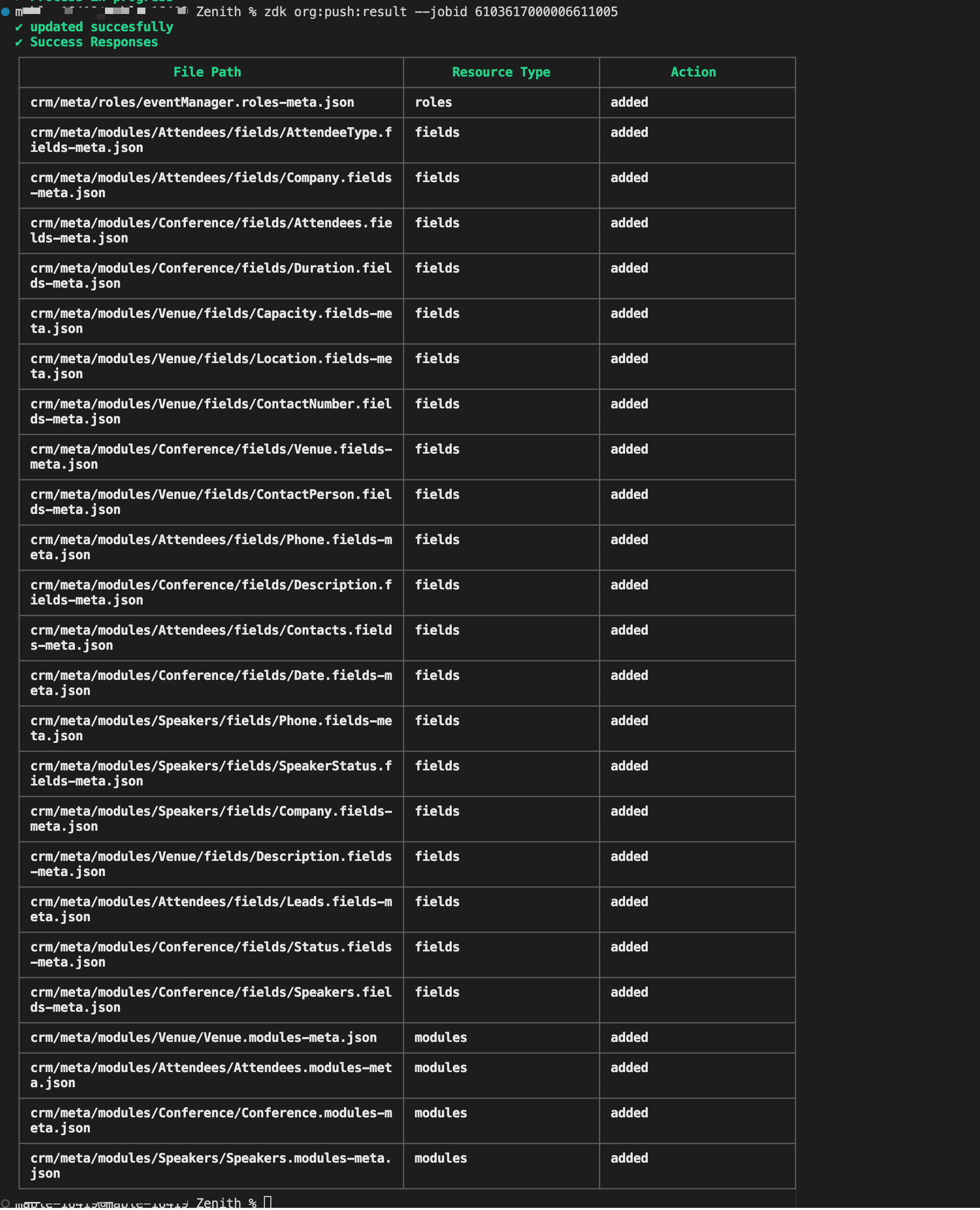
Once all changes are done execute
zdk org:push and zdk org:push result --{jobId} command to deploy the changes to the sandbox environment. Once the changes are verified in your sandbox environment you can deploy it to the production environment.

You can extract this
metadata zip file, that is created using
zdk org:export command to your own ZDK project directory and try pushing the changes to your sandbox environment.
Building the Event Management System for "Zenith" illustrates the core strength of ZDK CLI. It brings software engineering best practices to Zoho CRM customization. By defining modules/fields/roles as json files directly or creating them using the command, the source truth of the metadata is available in local system. The same can be tracked via version control systems like GIT for better collaboration among the team.
Recent Topics
Personalize your booking pages with Custom CSS
Greetings from the Zoho Bookings team! We’re introducing Custom CSS for Zoho Bookings, designed to give you complete control over the look and feel of your booking pages. With this new feature, you can upload your own CSS file to customize colors, fonts,
Customer address in Zoho Bookings
Hello, Is it possible to add customer address information to the Zoho bookings appointment screen? Or have it pull that information automatically from the CRM? We are wanting to use this as a field management software but it is difficult to pull the address from multiple sources when it would be ideal to have a clickable address on the appointment screen that opens up the user's maps. It would also be advantageous for the "list view" to show appointment times instead of just duration and booking
Bulk bank rule creatioin
Hi team, I am exploring Option to create a multiple bank rule. Could please suggest the option to implement this?
Marketer's Space: Plan smarter with Zoho Campaigns' Calendar
Hello Marketers, Welcome to another post! Today, we'll talk about a discreet yet significant feature that's neatly tucked inside Zoho Campaigns: the calendar. It might look like an optional but somewhat unnecessary feature that you can use occasionally,
User
If user is already part of manage engine endpoint central , what hapens when i try to add them to another Zoho org / directory? Are these users added as external users?
Add an background image to an email template in CRM
Hi all, We wants to put an background image behind all our email templates. Is there a way to import this thru html. If i put the option background image in <body style="background-image:...</body> and i look to the preview it shows our background, but
Create static subforms in Zoho CRM: streamline data entry with pre-defined values
Last modified on (9 July, 2025): This feature was available in early access and is currently being rolled out to customers in phases. Currently available for users in the the AU, CA, and SA DCs. It will be enabled for the remaining DCs in the next couple
Outlook - Zoho CRM Calendar Integration
I'm facing an issue integrating Outlook with Zoho CRM. Has anyone successfully connected their Outlook to Zoho, and are all your meetings and emails being captured correctly in the CRM? Any insights or troubleshooting tips would be appreciated
Can 1 Zoho CRM instance sync with 2 Zoho Marketing Automation instances?
【Zoho CRM】ポータル機能のアップデート
ユーザーの皆さま、こんにちは。コミュニティチームの藤澤です。 今回は「Zoho CRM アップデート情報」の中から、ポータル機能のアップデートをご紹介します。 ポータル管理の新機能「自動招待」により、Zoho CRMからポータルへの招待を自動化できるようになりました。これまで必要だった、ユーザーごとの手動設定は不要になります。設定した条件に基づいて、対象ユーザーに自動で招待が送信されます。 ポータルの新機能 条件に基づく自動招待:指定した条件を満たすユーザーに、自動で招待を送信 招待設定:招待メールの言語を選択し、言語ごとに条件を設定可能
Contact data removes Account data when creating a quote
Hi, Our customer has address fields in their quote layout which should be the address of the Account. They prefill the information, adding the account name - the address data is populated as per what is in the account - great. However when they then add
I need to know the IP address of ZOHO CRM.
The link below is the IP address for Analytics, do you have CRM's? IP address for Analytics I would like to know the IP address of ZOHO CRM to allow communication as the API server I am developing is also run from CRM. Moderation Update: The post below
Email was sent out without our permission
Hi there, One customer just reached out to us about this email that we were not aware was being sent to our customers. Can you please check on your end?
Export all of our manuals from Zoho Learn in one go
Hi, I know there's a way to export manuals in Zoho Learn, but I want to export everything in one go so it won't take so long. I can't see a way to do this, can I get some assistance or is this a feature in the pipeline? Thanks, Hannah
Automation#31: Automate Splitting Names for New Contact Records
Hello Everyone, This week, we present to you a custom function, which allows you to split the first and last names from the user's email ID based on the separator used in the ID. Having grown into a large firm, Zylker Techfix aims to optimize its processes,
Automatically remove commas
Team, Please be consistent in Zoho Books. In Payments, you have commas here: But when we copy and paste the amount in the Payments Made field, it does not accept it because the default setting is no commas. Please have Zoho Books remove commas autom
Can not add m365 outlook account to zohomail.
I am attempting to use zoho mail as an imap client to add my outlook.com m365 account. In the m365 exchange admin center i have made sure the imap is enabled. In zoho mail i go to settings, mail accounts, add account, add imap account, i select "outlook",
Error AS101 when adding new email alias
Hi, I am trying to add apple@(mydomain).com The error AS101 is shown while I try to add the alias.
Transfer ownership of files and folders in My Folders
People work together as a team to achieve organizational goals and objectives. In an organization, there may be situations when someone leaves unexpectedly or is no longer available. This can put their team in a difficult position, especially if there
Project Change Orders and Additions
We are in the process of migrating from QuickBooks Online to Zoho Books. We have Zoho One and like the ability to sync all of our data across everything. And I like that projects work in a way that's less dumb than QuickBooks. I'm trying to figure out
ZOHO Desk - Description of slave ticket disappeared after Merge
Dear Support, On Zoho Desk the description of a ticket disappeared after merging two ticket. The one which was the slave one completely disappeared. The problem that in this description there was an image which i had only on Desk in that ticket. Could
How do I insert a cross-reference link to a different section within one Knowledge Base article using Zoho Desk?
I would like to insert a link within a Knowledge Base article to a different section of that same article. The section I want to link to is formatted with the Heading 3 style and is displayed within my TOC. However, I do not see any way to add a link
Problem Adding Facebook Account
Hi, I'm new here, I'm having trouble setting up my Facebook account as a social channel. I think the issue is down to how my Facebook is set up, which is pretty confusing. I have a personal Facebook account (let’s called it A) which is my main Facebook
Zoho Desk Teams App is not loading
Hi Zoho Desk support. Need an assistance on the Zoho Desk Teams app. Once I click View Ticket, it isn't showing anything. Kindly refer to attached: ZohoDesk Teams App_View Ticket Error.jpg For our Dashboard, we are still experiencing the same issue. Kindly
About Meetings (Events module)
I was working on an automation to cancel appointments in zoho flow , and in our case, we're using the Meetings module (which is called Events in API terms). But while working with it, I'm wondering what information I can display in the image where the
Cliq iOS can't see shared screen
Hello, I had this morning a video call with a colleague. She is using Cliq Desktop MacOS and wanted to share her screen with me. I'm on iPad. I noticed, while she shared her screen, I could only see her video, but not the shared screen... Does Cliq iOS is able to display shared screen, or is it somewhere else to be found ? Regards
Zoho People - Retrieve the Leave Details - get("LeaveCount")
Hi, Zoho People I need to collect all of an employee's leave requests for the calendar year and check how many half-days they have taken. If I run the script on the query he just modified, I can retrieve the information related to that query and use the
Mapping a new Ticket in Zoho Desk to an Account or Deal in Zoho CRM manually
Is there any way for me to map an existing ticket in Zoho desk to an account or Deal within Zoho CRM? Sometimes people use different email to put in a ticket than the one that we have in the CRM, but it's still the same person. We would like to be able
Which WhatsApp API works seamlessly with Zoho CRM?
I’m exploring WhatsApp API solutions that integrate seamlessly with Zoho CRM for customer communication, lead nurturing, and automation. I would love to hear insights from those who have successfully implemented WhatsApp within Zoho CRM. My Requirements:
Allow people to sign a zoho form by using esign or scanned signature
Button to Reapply Filters on Sheet(s)
I wrote a macro that I attached to a button to reapply the filters on all my sheets and it says it works, but it doesn't actually do anything. What is wrong with it? Is there another way? Or even make it work for one sheet? Sub UniversalFilterRefresh()
Integrate Multiple ZohoBooks organization with zoho projects
We have successfully connected our Zoho Books with Zoho Projects for synronizing timesheet data. Our Business specialty is, that the staff of the Main company (A) is working on several projects, but the Clients are sometimes contracted and paying to a
Zoho OAuth Connector Deprecation and Its Impact on Zoho Desk
Hello everyone, Zoho believes in continuously refining its integrations to uphold the highest standards of security, reliability, and compliance. As part of this ongoing improvement, the Zoho OAuth default connector will be deprecated for all Zoho services
How to drag row(s) or column(s)?
Hi. Selecting a row or column and then dragging it to a new position does not seem to work. Am i missing something or this is just not possible in Zoho Sheet? Cheers, Jay
Flexible Partial-Use Coupons (Stored Value Credits)
Subject: Feature Request: Ability for users to apply partial coupon balances per transaction Problem Statement Currently, our coupons are "one-and-done." If a user has a $50 coupon but only spends $30, they either lose the remaining $20 or are forced
Unable to Assign Multiple Categories to a Single Product in Zoho Commerce
Hello Zoho Commerce Support Team, I am facing an issue while assigning categories to products in Zoho Commerce. I want to assign multiple categories to a single product, but in the Item edit page, the Category field allows selecting only one category
How do I add todays date to merge field
I don't see any selection of todays date when creating a letter. Surely the date option of printing is standard? John
Polish signer experience to compete with docusign
I would like to suggest that someone spend the little bit of time to polish the signer experience, and the email templates to more of a modern professional feel. They are currently very early 2000s and with some simple changes could vastly improve the
Add RTL and Hebrew Support for Candidate Portal (and Other Zoho Recruit Portals)
Dear Zoho Recruit Team, I hope you're doing well. We would like to request the ability to set the Candidate Portal to be Right-to-Left (RTL) and in Hebrew, similar to the existing functionality for the Career Site. Currently, when we set the Career Site
Uplifted homepage experience
Hello everyone, Creating your homepage is now much easier, more visual, and more impactful. Until now, your homepage allowed you to display custom views, widgets, analytic components, and Kiosk. With the following improvements, the homepage is now a smarter,
Next Page