Map Dependency Fields in Zoho CRM using APIs

Map Dependency Fields in Zoho CRM using APIs


Hi Everyone!!

Welcome back to another week of Kaizen series!

Over the past few weeks, we have been addressing your questions and feedback shared through our Kaizen 200th feedback form. Thank you for your continued engagement and thoughtful queries. We truly enjoy helping users solve real challenges through these Kaizen series.

This week, we will explore the Map Dependency Fields in Zoho CRM, and how you can configure and manage them using Zoho CRM APIs.

Map dependency fields with a use case

In Zoho CRM, dependency fields are also called picklist dependencies. They create a relationship between two picklist fields. A controlling field is the parent field, and a dependent field is the child field. The option chosen in the parent field decides which options should be shown in the child field. Helps you to make easy data entry and maintain cleaner with only relevant options.

In many businesses, one field’s options depend on another. For example, if your support team tracks Issue Type and Sub-Issue, showing all sub-issues at once lets users select incorrect options. A user might accidentally choose Payment Failed under Login Issue. This results in incorrect data selection and makes confusion in records.

Dependency fields solve this problem by creating a parent-child relationship between two picklist fields.

Let us consider the Support Cases module, where two picklist fields are already created:
  1. Parent Field - Issue Type: The value chosen here determines which options appear in the dependent field.
  2. Child Field - Sub-Issue: The available options change dynamically based on the selected value in the parent field.
Below table shows the picklist fields along with their respective options.

                            Issue Type

                                   Sub-Issue 

Login Issue

Forgot Password, Account Locked, 2FA Not Working
Payment Issue

Credit Card Declined, Refund Not Received, Double Charge

Feature Request

New Integration, UI Enhancement, Report Customization

By mapping these fields, CRM users see only the Sub-Issue values relevant to the selected Issue Type.

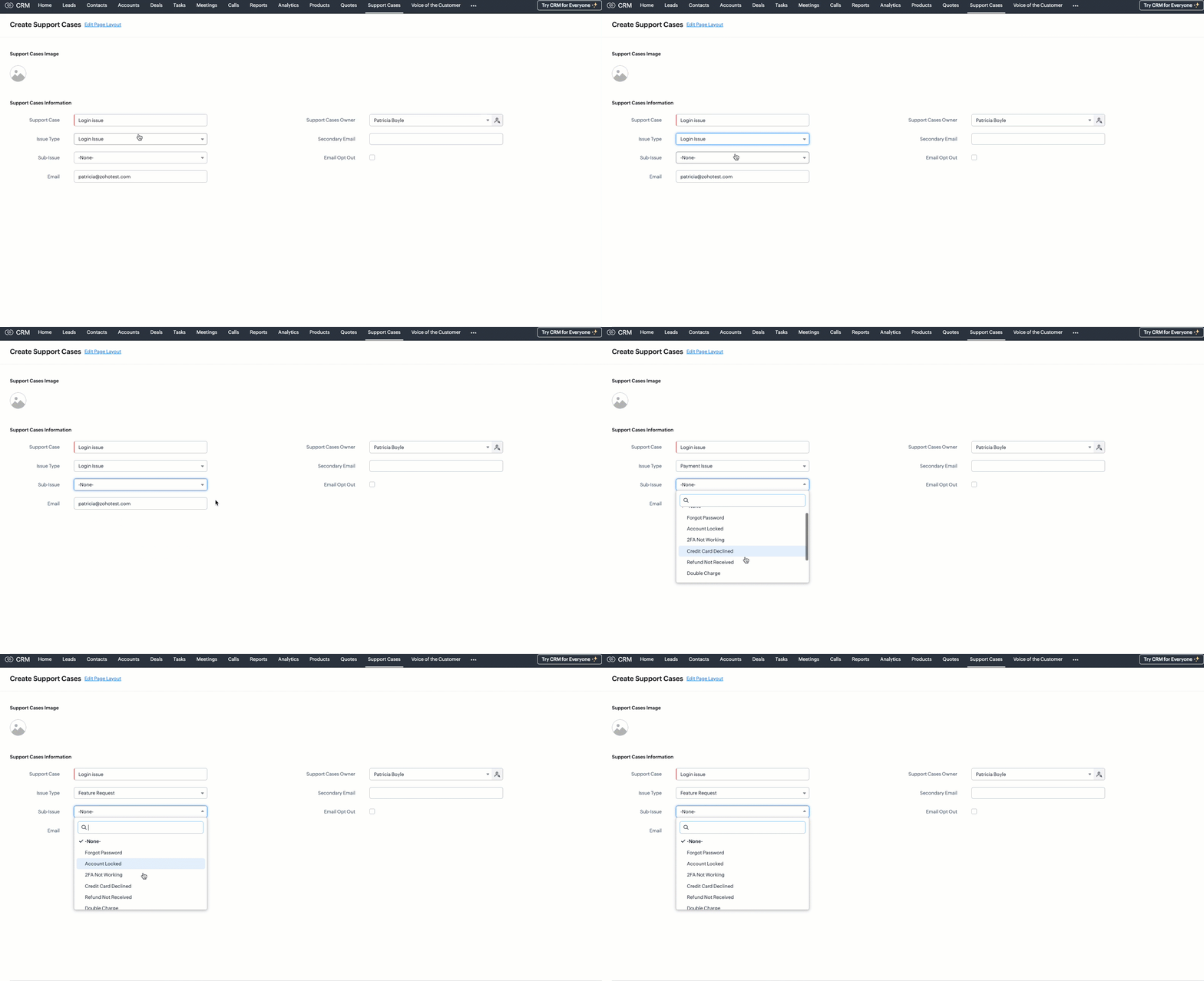
Without map dependency

Without configuring a map dependency, the Sub-Issue picklist would always display all available options - regardless of the selected Issue Type. For example, users might see options like Forgot Password, Double Charge, and Report Customization all at once. This can easily confuse users and lead to incorrect selections, such as choosing Double Charge under Login Issue.

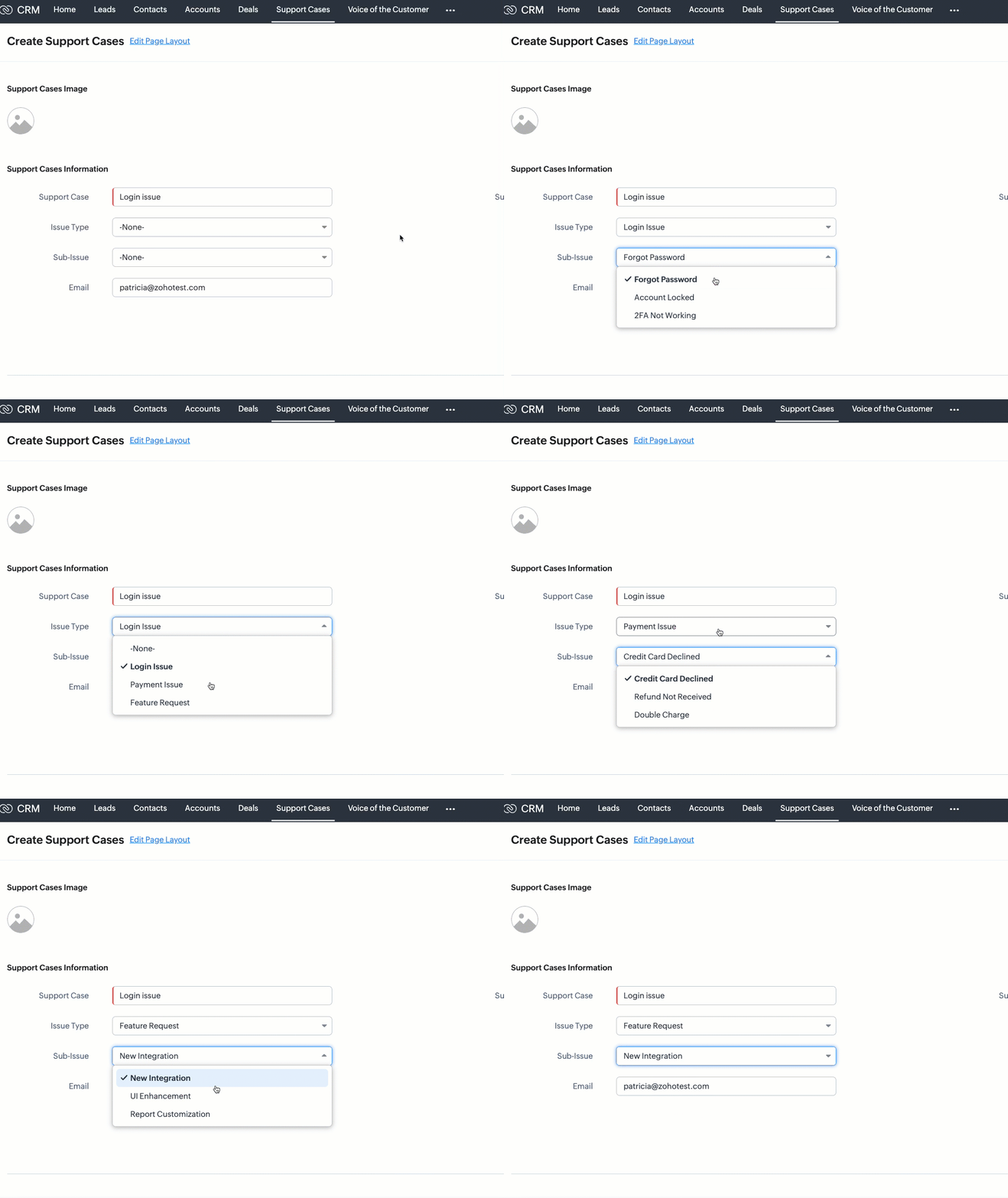
With map dependency

With mapping dependencies, you can guide users to make correct selections by showing only the relevant options in the child field based on the option selected in the parent field.

Mapping picklist options in UI

You can map picklist field options directly from the Zoho CRM user interface.
Follow these steps:
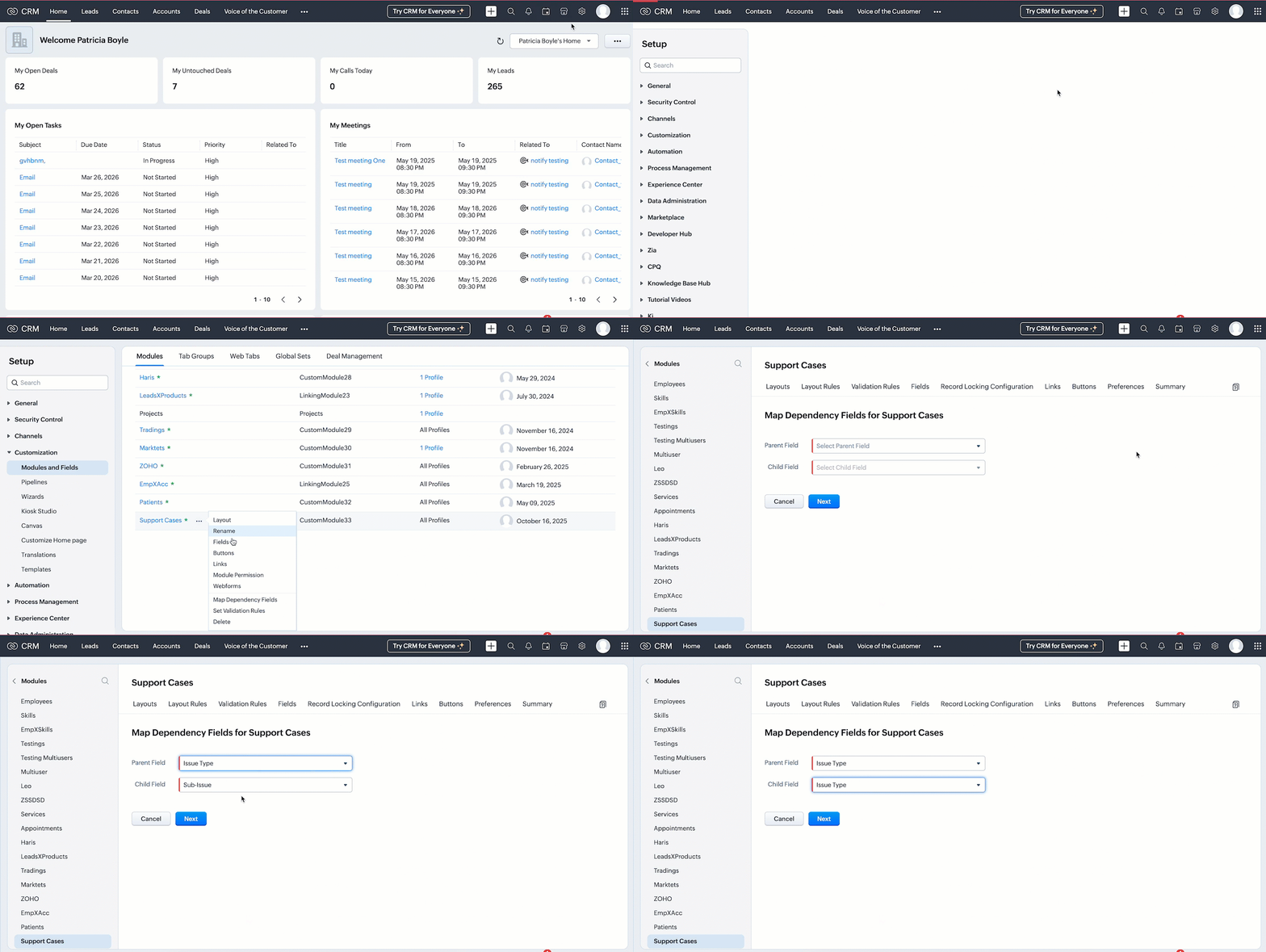
  1. Go to SetupCustomizationModules and Fields.
  2. Select the desired module. In this case, Support Cases.
  3. Click the (more) icon next to the module name.
  4. Select Map Dependency Fields.
  5. On the Map Dependency Fields page, click the New button to create a new dependency.
  6. Choose the Parent Field and Child Field you want to map.
  7. Click Next button.


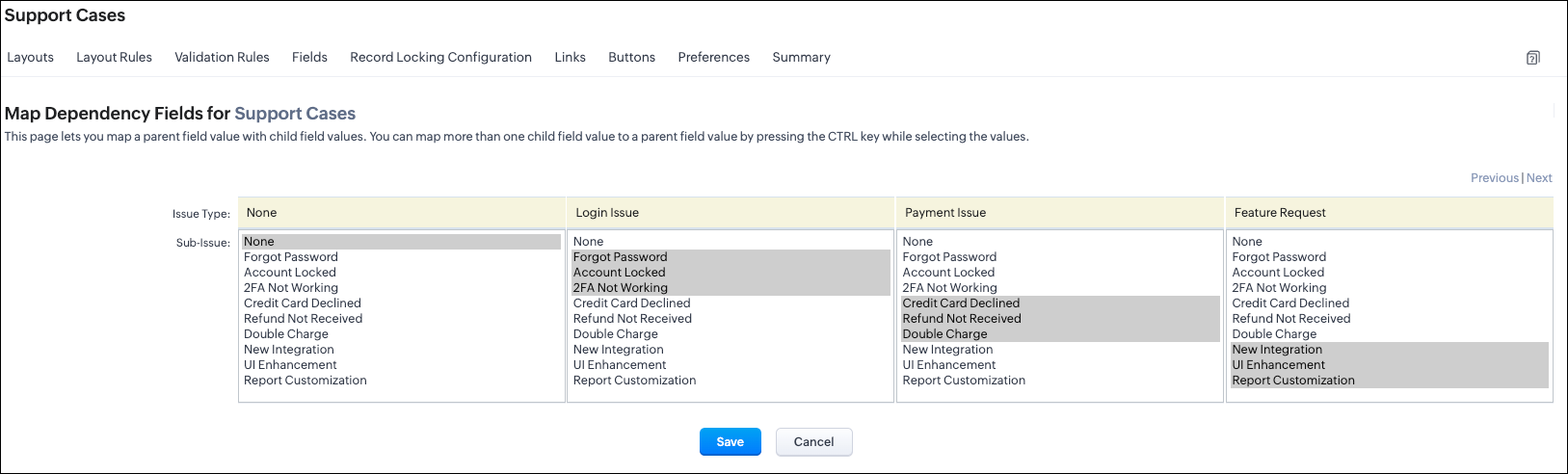
      8. Add option mappings to define which child field options should be shown based on the option selected in the parent field, then Save your configuration.

UI options mapping view

Mapping picklist options via API

Before mapping the options, you must need the following APIs :
  1. Modules Metadata API - To know the API name of the module.
    1. Endpoint: GET - /settings/modules
    2. Here, the API name of the Support Cases module is Support_Cases.
  2. Layouts Metadata API - Since dependencies are layout-specific, this API helps you identify the layout ID and all the available picklist fields for mapping. It also provides detailed metadata such as the layout ID, field IDs, and the corresponding picklist value IDs.
    1. Endpoint: GET /settings/layouts?module=Support_Cases

Create Dependency using the POST Map Dependency

Request URL:  {{api-domain}}/crm/v8/settings/layouts/5725767000007972011/map_dependency?module=Support_Cases

Request Method: POST

Input JSON
Each object in the map_dependency array requires a parent field, a child field, and a pick_list_values array that maps each parent option to its relevant child options.


{

    "map_dependency": [ //Array that contains one or more dependency mappings

        {

            "parent": { // Mandatory - Represents the parent picklist

                "api_name": "Issue_Type", //Mandatory - API name of the parent field

                "id": "5725767000007985243" // Mandatory - Unique ID of the parent picklist

            },

            "pick_list_values": [  //Mandatory - List of parent picklist values and their corresponding child mappings

                {

                    "display_value": "-None-",

                    "maps": [

                        {

                            "display_value": "-None-",

                            "actual_value": "-None-",

                            "id": "5725767000007985204"

                        }

                    ],

                    "actual_value": "-None-",

                    "id": "5725767000007985249"

                },

                {

                    "display_value": "Login Issue",

                    "maps": [

                        {

                            "display_value": "Forgot Password", //Label shown in the UI for the parent value

                            "actual_value": "Forgot Password", //Actual stored value of the parent picklist option

                            "id": "5725767000007985185" //Mandatory - Unique ID of the parent picklist option

                        },

                        {

                            "display_value": "Account Locked",

                            "actual_value": "Account Locked",

                            "id": "5725767000007985187"

                        }


                    ],

                    "actual_value": "Login Issue", //Actual value of the parent field's option

                    "id": "5725767000007985242" //Mandatory - Unique ID of the parent field's option

                },

                {

                    "display_value": "Payment Issue",

                    "maps": [

                        {

                            "display_value": "Credit Card Declined",

                            "actual_value": "Credit Card Declined",

                            "id": "5725767000007985191"

                        },

                        {

                            "display_value": "Refund Not Received",

                            "actual_value": "Refund Not Received",

                            "id": "5725767000007985193"

                        },

                        {

                            "display_value": "Double Charge",

                            "actual_value": "Double Charge",

                            "id": "5725767000007985195"

                        }

                    ],

                    "actual_value": "Payment Issue",

                    "id": "5725767000007985244"

                },

                {

                    "display_value": "Feature Request",

                    "maps": [

                        {

                            "display_value": "New Integration",

                            "actual_value": "New Integration",

                            "id": "5725767000007985197"

                        },

                        {

                            "display_value": "UI Enhancement",

                            "actual_value": "UI Enhancement",

                            "id": "5725767000007985199"

                        },

                        {

                            "display_value": "Report Customization",

                            "actual_value": "Report Customization",

                            "id": "5725767000007985201"

                        }

                    ],

                    "actual_value": "Feature Request",

                    "id": "5725767000007985246"

                }

            ],

            "child": { //Mandatory - Represents the child field

                "api_name": "Sub_Issue", //Mandatory - API name of the child field

                "id": "5725767000007985186" //Mandatory - Child picklist field ID

            }

        }

    ]


Sample Response 

{
    "map_dependency": [
        {
            "code": "SUCCESS",
            "details": {
                "id": "5725767000008174001"
            },
            "message": "map dependency created",
            "status": "success"
        }
    ]
}


Retrieve the configured field mappings using the GET Mapped Dependency Fields API

Request URL:  {{api-domain}}/crm/v8/settings/layouts/5725767000007972011/map_dependency/5725767000008174001?module=Support_Cases

Request Method: GET
Sample Response

{
    "map_dependency": [
        {
            "parent": {
                "api_name": "Issue_Type",
                "id": "5725767000007985243"
            },
            "internal": false,
            "active": true,
            "id": "5725767000008180001",
            "source": 1,
            "category": 0,
            "pick_list_values": [
                {
                    "display_value": "-None-",
                    "maps": [
                        {
                            "display_value": "-None-",
                            "actual_value": "-None-",
                            "id": "5725767000007985204"
                        }
                    ],
                    "actual_value": "-None-",
                    "id": "5725767000007985249"
                },
                {
                    "display_value": "Login Issue",
                    "maps": [
                        {
                            "display_value": "Forgot Password",
                            "actual_value": "Forgot Password",
                            "id": "5725767000007985185"
                        },
                        {
                            "display_value": "Account Locked",
                            "actual_value": "Account Locked",
                            "id": "5725767000007985187"
                        },
                        {
                            "display_value": "2FA Not Working",
                            "actual_value": "2FA Not Working",
                            "id": "5725767000007985189"
                        }
                    ],
                    "actual_value": "Login Issue",
                    "id": "5725767000007985242"
                },
              .
              .
              .
            ],
            "child": {
                "api_name": "Sub_Issue",
                "id": "5725767000007985186"
            }
        }
    ]
}
You will get a JSON structure containing all dependency mappings. Check if your parent and child fields appear as configured.

Update the existing mapped options using the PUT Mapped Dependency Fields API

Request URL:  {{api-domain}}/crm/v8/settings/layouts/5725767000007972011/map_dependency/5725767000008174001?module=Support_Cases

Request Method: PUT

Input JSON

{

    "map_dependency": [

        {

            "parent": {

                "api_name": "Issue_Type",

                "id": "5725767000007985243"

            },

            "pick_list_values": [

                {

                    "display_value": "-None-",

                    "maps": [

                {

                    "display_value": "Login Issue",

                    "maps": [

                        {

                            "display_value": "Forgot Password",

                            "actual_value": "Forgot Password",

                            "id": "5725767000007985185"

                        },

                        {

                            "display_value": "Account Locked",

                            "actual_value": "Account Locked",

                            "id": "5725767000007985187"

                        },

                        { // mapped a new option to the existing mapping

                            "display_value": "2FA Not Working",

                            "actual_value": "2FA Not Working",

                            "id": "5725767000007985189"

                        }

                    ],

                    "actual_value": "Login Issue",

                    "id": "5725767000007985242"

                }

            ],

            "child": {

                "api_name": "Sub_Issue",

                "id": "5725767000007985186"

            }

        }

    ]

}


Delete existing dependency using the DELETE Mapped Dependency Fields API

Request URL:  {{api-domain}}/crm/v8/settings/layouts/5725767000007972011/map_dependency/5725767000008174001?module=Support_Cases

Request Method: DELETE

Sample Response


{
    "map_dependency": [
        {
            "code": "SUCCESS",
            "details": {
                "id": "5725767000008174001"
            },
            "message": "map dependency deleted",
            "status": "success"
        }
    ]
}


Assigning picklist values using the Insert Records API

When you insert a record, you can directly pass the picklist option’s display value (not the ID) in the request body.

Request URL: {api-domain}/crm/v8/{module_api_name}
Request Method: POST

Sample Input 

{

    "data" : [

        {

            "Name" : "Support Case 1",

            "Support_Case" : "Login Issue",

            "Issue_Type" : "Login Issue",

            "Sub_Issue":"Forgot Password"

        }

    ]

}


Note: When creating or updating records via API, CRM does not validate the dependency relationship between parent and child picklist values.
To ensure data consistency and prevent data loss, always use the Get Map Dependency API before creating or updating records and to know correct mappings as well. This helps you retrieve the correct parent–child mappings and pass only valid picklist values in your API requests.

FAQs

Q1. Is the Map Dependency field supported in subforms?

Yes. You can configure dependency mappings for picklist fields within subforms as well. The Map Dependency Fields API supports creating parent–child picklist relationships directly inside a subform. To do this via API, use the subform’s API name as the module name when making the dependency mapping call.
This ensures that the dependency is created specifically for the picklist fields inside that subform, not the main module.

Q2. Can I keep the parent field in the main form and the child field in the subform?

Not currently. As of Zoho CRM API Version 8, cross-level mapping where the parent field is in the main form and the child field is in a subform, or vice versa is not supported neither via the UI nor through the API.

You can only:
  1. Map picklists within the main form, or
  2. Map picklists within the same subform.

Q3. What happens if I delete a picklist value that is part of a dependency?

If you delete a picklist option, the corresponding mapping will be automatically removed from the dependency.


Q4. What happens if I rename a picklist value that is part of a dependency?

If you rename a picklist option, the dependency will be automatically updated with the new option label.


We hope this post helps you learn more on mapping dependency fields in CRM using Zoho CRM APIs. Try it out, and let us know your experience in the comment section or reach out to us at support@zohocrm.com 

Stay tuned for more insights in our upcoming Kaizen posts!


    • Sticky Posts

    • Kaizen #198: Using Client Script for Custom Validation in Blueprint

      Nearing 200th Kaizen Post – 1 More to the Big Two-Oh-Oh! Do you have any questions, suggestions, or topics you would like us to cover in future posts? Your insights and suggestions help us shape future content and make this series better for everyone.
    • Kaizen #226: Using ZRC in Client Script

      Hello everyone! Welcome to another week of Kaizen. In today's post, lets see what is ZRC (Zoho Request Client) and how we can use ZRC methods in Client Script to get inputs from a Salesperson and update the Lead status with a single button click. In this
    • Kaizen #222 - Client Script Support for Notes Related List

      Hello everyone! Welcome to another week of Kaizen. The final Kaizen post of the year 2025 is here! With the new Client Script support for the Notes Related List, you can validate, enrich, and manage notes across modules. In this post, we’ll explore how
    • Kaizen #217 - Actions APIs : Tasks

      Welcome to another week of Kaizen! In last week's post we discussed Email Notifications APIs which act as the link between your Workflow automations and you. We have discussed how Zylker Cloud Services uses Email Notifications API in their custom dashboard.
    • Kaizen #216 - Actions APIs : Email Notifications

      Welcome to another week of Kaizen! For the last three weeks, we have been discussing Zylker's workflows. We successfully updated a dormant workflow, built a new one from the ground up and more. But our work is not finished—these automated processes are
    • Recent Topics

    • Introducing parent-child ticketing in Zoho Desk [Early access]

      Hello Zoho Desk users! We have introduced the parent-child ticketing system to help customer service teams ensure efficient resolution of issues involving multiple, related tickets. You can now combine repetitive and interconnected tickets into parent-child
    • cant upload images in signature- urgent help needed. ta!

      HI, I have been trying to insert the company logo in the signature. i have tried it several times since yesterday, the longest I waited was 1 hour and 12 minutes for the pop up window to upload a 180 KB .jpg file. what am i doing wrong.. an urgent reply
    • Add Ticket button in Home view

      When I go to the My Tickets or the Knowledge Base view in our Help Centre, the Add Ticket button is available, but not in the Home view. I would really like for it to be displayed in the Home view as well. Is this possible? Thanks.
    • Problem using Zoho Desk API

      Goodmorning, I am trying to use the Zoho Desk API to create a dashboard in Grafana, but I am having a problem. Following the instructions in the API documentation, I created the API Console application (server-based application). Then I created the string
    • Add zoho calendar to google calendar

      Hi I keep seeing instructions on how to sync Zoho CRM calendar with google calendar but no instructions on how to view Zoho calendar in my google calendar.
    • City field suggestion in Zoho Books

      Hi team, We are using Customers module in Zoho Books. In the Address section, we want to understand whether the City field can show suggestions while typing using any API or built-in feature. For example, if a user types “Mum”, can the system suggest
    • Non-responsive views in Mobile Browser (iPad)

      Has anyone noticed that the creator applications when viewed in a mobile browser (iPad) lost its responsiveness? It now appears very small font size and need to zoom into to read contents. Obviously this make use by field staff quite difficult. This is not at all a good move, as lots of my users are depending on accessing the app in mobile devices (iPads), and very challenging and frustrating. 
    • How can I check all announce?

      Hiii, May I ask how can I check all the announce based on broadcast date instead of reply date based So that I will not will miss out any new function
    • How to apply customized Zoho Crm Home Page to all users?

      I have tried to study manuals and play with Zoho CRM but haven't found a way how to apply customized Zoho CRM Home Page as a (default) home page for other CRM users.. How that can be done, if possible? - kipi Moderation Update: Currently, each user has
    • CRM limit reached: only 2 subforms can be created

      we recently stumbled upon a limit of 2 subforms per module. while we found a workaround on this occasion, only 2 subforms can be quite limiting in an enterprise setting. @Anonymous User I've read about imminent increase of other components (e.
    • What are the create bill API line item requiered fields

      While the following documentation says that the line items array is requiered it doesn't say what if any files are requiered in the array. Does anyone know? API documentation: https://www.zoho.com/inventory/api/v1/bills/#create-a-bill I'm trying to add
    • How to print a label from zoho creator app?

      Hello, I would like to print a label from zoho creator app record similar to attached one. Size 74mm x 102mm. I tried record template. It leaves plenty of space around the content and also I couldn't set the height of the page. So it is not printing properly. Could someone please direct me to right direction for this requirement?
    • Let us view and export the full price books data from CRM

      I quote out of CRM, some of my clients have specialised pricing for specific products - therefore we use Price Books to manage these special prices. I can only see the breakdown of the products listed in the price book and the specialised pricing for
    • Function #53: Transaction Level Profitability for Invoices

      Hello everyone, and welcome back to our series! We have previously provided custom functions for calculating the profitability of a quote and a sales order. There may be instances where the invoice may differ from its corresponding quote or sales order.
    • local file csv import problem

      The issue occurs when I upload a CSV file via Databridge. In the preview, everything looks correct — the values are in the proper columns. However, after clicking Import, the first column becomes empty, and the values from that column appear in a new
    • Emails are going to notification folder and not in inbox

      emails are going to notification folder and not into inbox
    • This domain is not allowed to add. Please contact support-as@zohocorp.com for further details

      I am trying to setup the free version of Zoho Mail. When I tried to add my domain, theselfreunion.com I got the error message that is the subject of this Topic. I've read your other community forum topics, and this is NOT a free domain. So what is the
    • This user is not allowed to add in Zoho. Please contact support-as@zohocorp.com for further details

      Hello, Just signed up to ZOHO on a friend's recommendation. Got the TXT part (verified my domain), but whenever I try to add ANY user, I get the error: This user is not allowed to add in Zoho. Please contact support-as@zohocorp.com for further details I have emailed as well and writing here as well because when I searched, I saw many people faced the same issue and instead of email, they got a faster response here. My domain is: raisingreaderspk . com Hope this can be resolved.  Thank you
    • Cannot connect to imap.zoho.eu on iOS26

      Hey, I recently migrated to another iPhone and since then use iOS26. Every since then, I was not able to connect to "imap.zoho.eu" from Apple Mail. I tried deleting the account and adding it again, did not work. I tried creating an app password, didn't
    • Personalize your booking pages with Custom CSS

      Greetings from the Zoho Bookings team! We’re introducing Custom CSS for Zoho Bookings, designed to give you complete control over the look and feel of your booking pages. With this new feature, you can upload your own CSS file to customize colors, fonts,
    • Customer address in Zoho Bookings

      Hello,  Is it possible to add customer address information to the Zoho bookings appointment screen? Or have it pull that information automatically from the CRM? We are wanting to use this as a field management software but it is difficult to pull the address from multiple sources when it would be ideal to have a clickable address on the appointment screen that opens up the user's maps.  It would also be advantageous for the "list view" to show appointment times instead of just duration and booking
    • Bulk bank rule creatioin

      Hi team, I am exploring Option to create a multiple bank rule. Could please suggest the option to implement this?
    • Marketer's Space: Plan smarter with Zoho Campaigns' Calendar

      Hello Marketers, Welcome to another post! Today, we'll talk about a discreet yet significant feature that's neatly tucked inside Zoho Campaigns: the calendar. It might look like an optional but somewhat unnecessary feature that you can use occasionally,
    • User

      If user is already part of manage engine endpoint central , what hapens when i try to add them to another Zoho org / directory? Are these users added as external users?
    • Add an background image to an email template in CRM

      Hi all, We wants to put an background image behind all our email templates. Is there a way to import this thru html. If i put the option background image in <body style="background-image:...</body> and i look to the preview it shows our background, but
    • Create static subforms in Zoho CRM: streamline data entry with pre-defined values

      Last modified on (9 July, 2025): This feature was available in early access and is currently being rolled out to customers in phases. Currently available for users in the the AU, CA, and SA DCs. It will be enabled for the remaining DCs in the next couple
    • Outlook - Zoho CRM Calendar Integration

      I'm facing an issue integrating Outlook with Zoho CRM. Has anyone successfully connected their Outlook to Zoho, and are all your meetings and emails being captured correctly in the CRM? Any insights or troubleshooting tips would be appreciated
    • Can 1 Zoho CRM instance sync with 2 Zoho Marketing Automation instances?

      Can 1 Zoho CRM instance sync with 2 Zoho Marketing Automation instances?
    • 【Zoho CRM】ポータル機能のアップデート

      ユーザーの皆さま、こんにちは。コミュニティチームの藤澤です。 今回は「Zoho CRM アップデート情報」の中から、ポータル機能のアップデートをご紹介します。 ポータル管理の新機能「自動招待」により、Zoho CRMからポータルへの招待を自動化できるようになりました。これまで必要だった、ユーザーごとの手動設定は不要になります。設定した条件に基づいて、対象ユーザーに自動で招待が送信されます。 ポータルの新機能 条件に基づく自動招待:指定した条件を満たすユーザーに、自動で招待を送信 招待設定:招待メールの言語を選択し、言語ごとに条件を設定可能
    • Contact data removes Account data when creating a quote

      Hi, Our customer has address fields in their quote layout which should be the address of the Account. They prefill the information, adding the account name - the address data is populated as per what is in the account - great. However when they then add
    • I need to know the IP address of ZOHO CRM.

      The link below is the IP address for Analytics, do you have CRM's? IP address for Analytics I would like to know the IP address of ZOHO CRM to allow communication as the API server I am developing is also run from CRM. Moderation Update: The post below
    • Email was sent out without our permission

      Hi there, One customer just reached out to us about this email that we were not aware was being sent to our customers. Can you please check on your end?
    • Export all of our manuals from Zoho Learn in one go

      Hi, I know there's a way to export manuals in Zoho Learn, but I want to export everything in one go so it won't take so long. I can't see a way to do this, can I get some assistance or is this a feature in the pipeline? Thanks, Hannah
    • Automation#31: Automate Splitting Names for New Contact Records

      Hello Everyone, This week, we present to you a custom function, which allows you to split the first and last names from the user's email ID based on the separator used in the ID. Having grown into a large firm, Zylker Techfix aims to optimize its processes,
    • Automatically remove commas

      Team, Please be consistent in Zoho Books. In Payments, you have commas here: But when we copy and paste the amount in the Payments Made field, it does not accept it because the default setting is no commas. Please have Zoho Books remove commas autom
    • Can not add m365 outlook account to zohomail.

      I am attempting to use zoho mail as an imap client to add my outlook.com m365 account. In the m365 exchange admin center i have made sure the imap is enabled. In zoho mail i go to settings, mail accounts, add account, add imap account, i select "outlook",
    • Transfer ownership of files and folders in My Folders

      People work together as a team to achieve organizational goals and objectives. In an organization, there may be situations when someone leaves unexpectedly or is no longer available. This can put their team in a difficult position, especially if there
    • Project Change Orders and Additions

      We are in the process of migrating from QuickBooks Online to Zoho Books. We have Zoho One and like the ability to sync all of our data across everything. And I like that projects work in a way that's less dumb than QuickBooks. I'm trying to figure out
    • ZOHO Desk - Description of slave ticket disappeared after Merge

      Dear Support, On Zoho Desk the description of a ticket disappeared after merging two ticket. The one which was the slave one completely disappeared. The problem that in this description there was an image which i had only on Desk in that ticket. Could
    • How do I insert a cross-reference link to a different section within one Knowledge Base article using Zoho Desk?

      I would like to insert a link within a Knowledge Base article to a different section of that same article. The section I want to link to is formatted with the Heading 3 style and is displayed within my TOC. However, I do not see any way to add a link
    • Next Page