Présentons RouteIQ pour Zoho CRM - Économiser du temps et de l'essence avec notre solution de cartographie intelligente
Au cours de vos déplacements professionnels, vous connaissez l'évolution constante de l'emploi du temps des membres de votre équipe. Ils se déplacent souvent, rendent visite à des clients et s'occupent d'une multitude de tâches. La gestion et l'organisation de leurs activités dans ce contexte en constante évolution peuvent s'avérer complexes et rendre leur productivité souvent difficile.
En effet, ils passent trop de temps à planifier et à se déplacer, ce qui entraîne une augmentation des frais de déplacement, une diminution du nombre de visites aux clients et une baisse de la productivité par agent.
Cela présente un gros problème pour vos équipes de vente, de service et de livraison et pourrait se transformer en un problème onéreux au fil du temps.
Nous sommes ravis de vous présenter RouteIQ pour Zoho CRM, une solution de cartographie intelligente qui a été conçue pour résoudre ce problème.
Visualisation cartographique
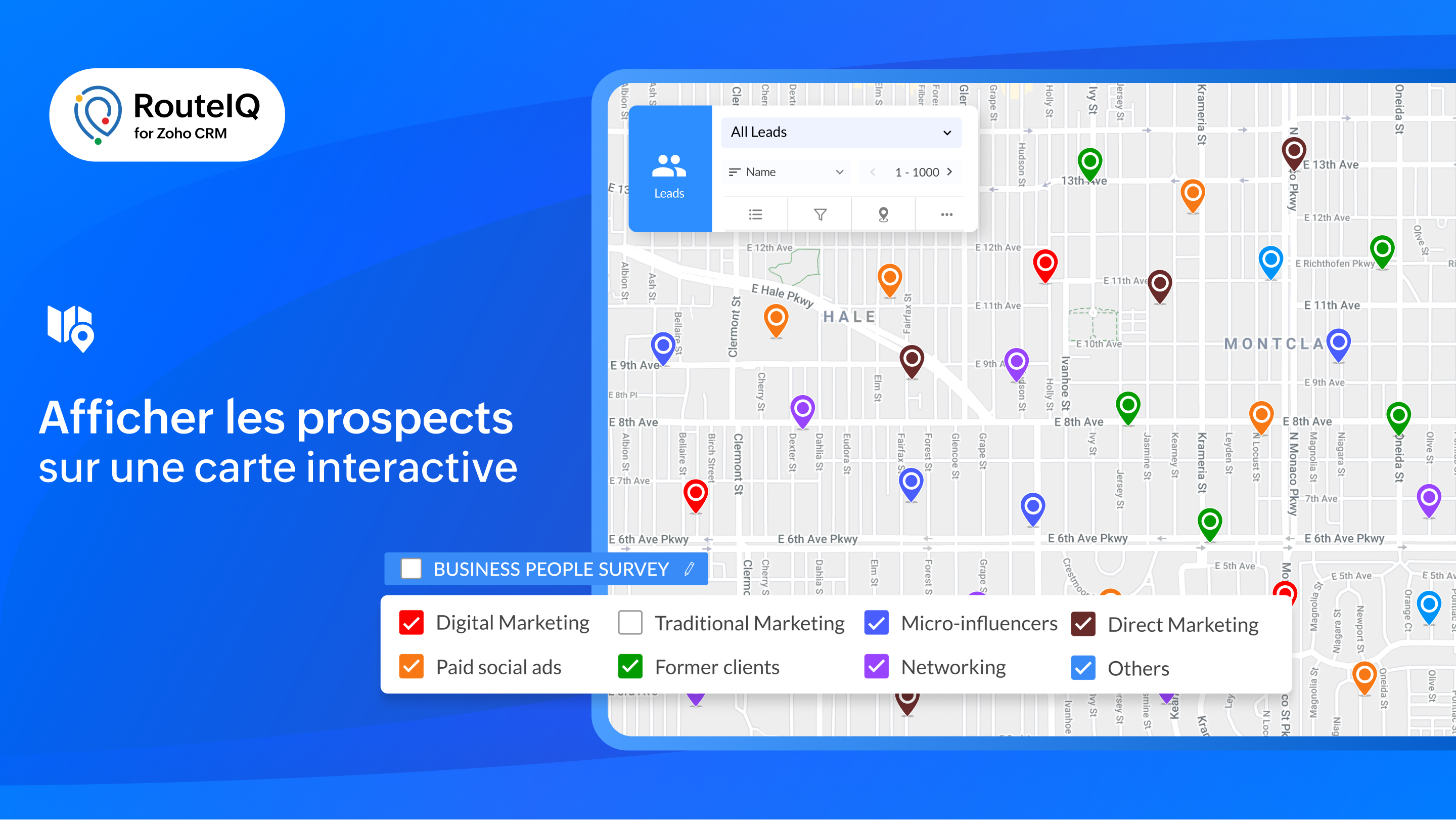
- Présentation des données CRM : affichez vos prospects sur une carte interactive pour obtenir une vue d'ensemble géographique de vos clients potentiels et de vos comptes.
- Explorer : consultez simultanément les contacts de plusieurs modules situés à un emplacement donné.
- Affichage en couleur : attribuez un code couleur à vos prospects en fonction de paramètres tels que le chiffre d'affaires, la date de la dernière visite, la priorité, et bien plus encore, afin de vous permettre de mieux planifier votre journée.
- À proximité : lors d'annulations de dernière minute, recherchez rapidement des prospects près de vous afin de remplacer les visites annulées.
Tracé des parcours
- Parcours flexibles et organisés : créez des parcours optimisés en fonction du temps ou de la durée de vos étapes.
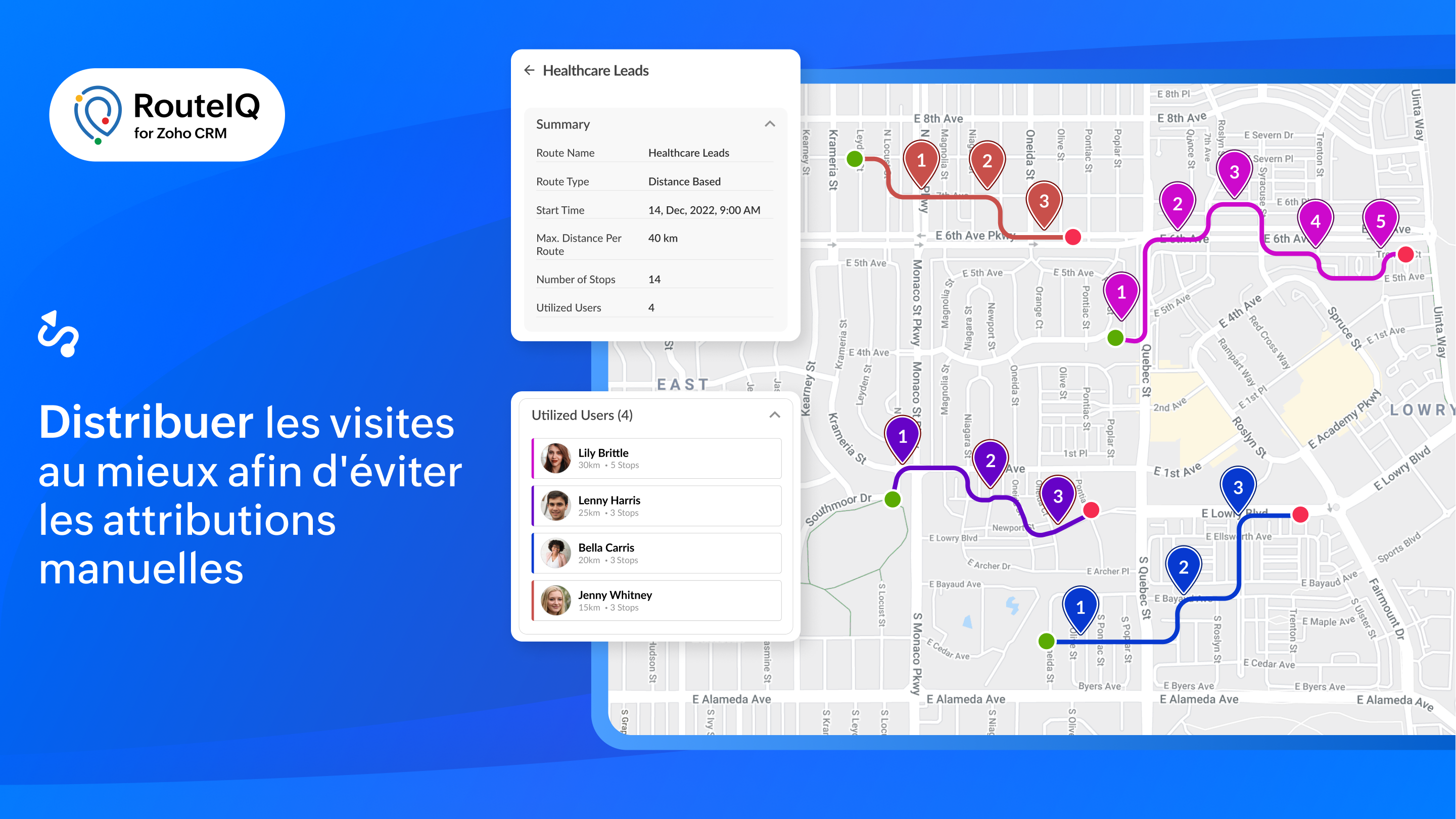
- Distribution des routes : RouteIQ répartit de manière optimale toutes vos visites, vos travaux et vos livraisons entre les membres de votre équipe afin d'économiser du temps.
- Programmation automatique de la route : créez automatiquement des parcours chaque jour pour vos réunions quotidiennes.
- Recherche tout au long du parcours : permettez à l'équipe d'identifier les clients potentiels qui se trouvent sur leur chemin.
Suivi
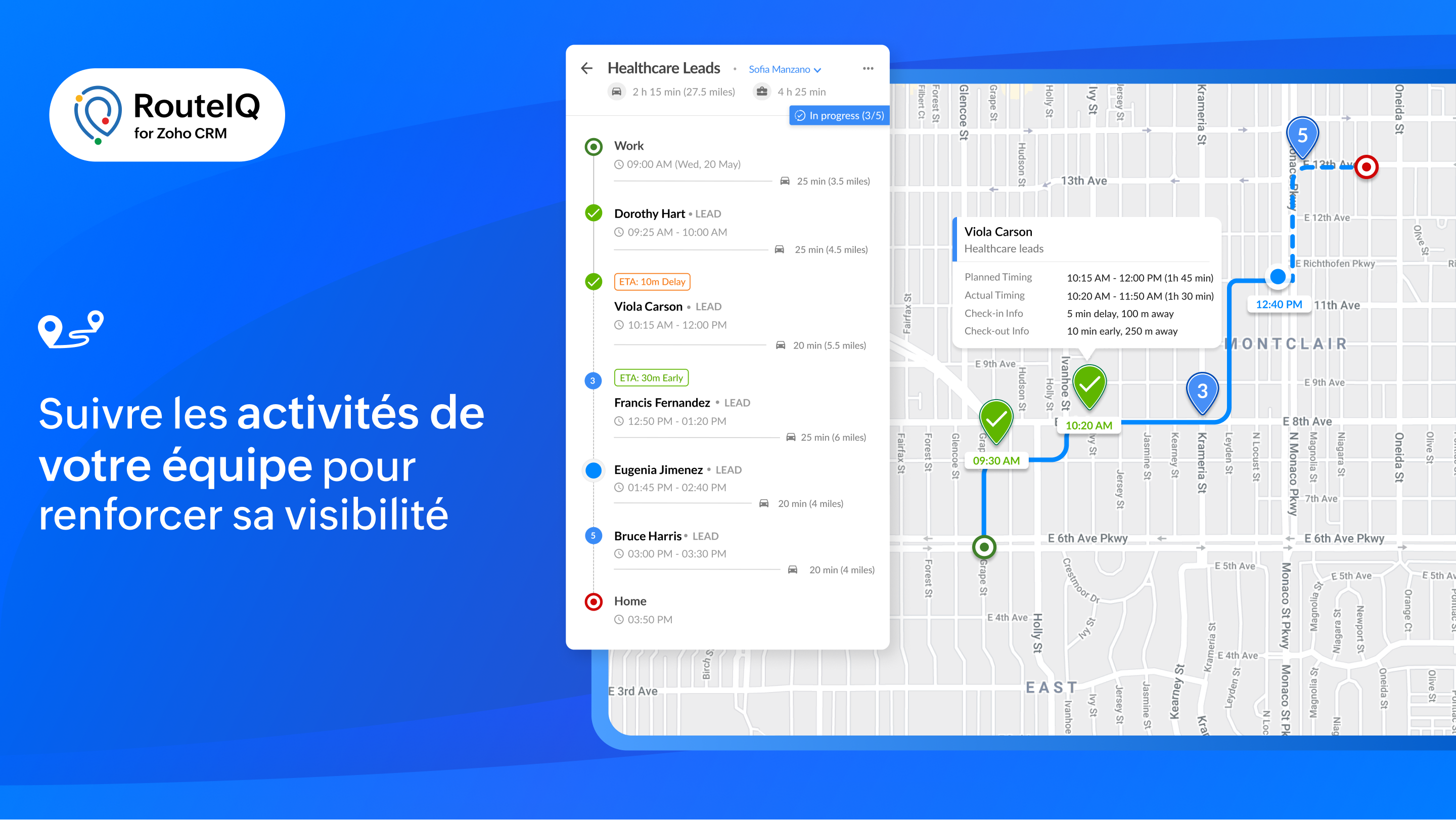
- Suivre le progrès de la route : affichez les progrès effectués sur les parcours de votre équipe en vous basant sur leurs pointages et leurs départs. RouteIQ suit également leur kilométrage et le temps passé.
- Suivi des visites : affichez les visites d'un agent en fonction de la date, y compris le suivi des visites et les écarts.
- Suivi du temps et du kilométrage : suivez la distance parcourue et le temps passé à rendre visite à des clients potentiels en vous basant sur les pointages et les départs.
Rapports et tableaux de bord
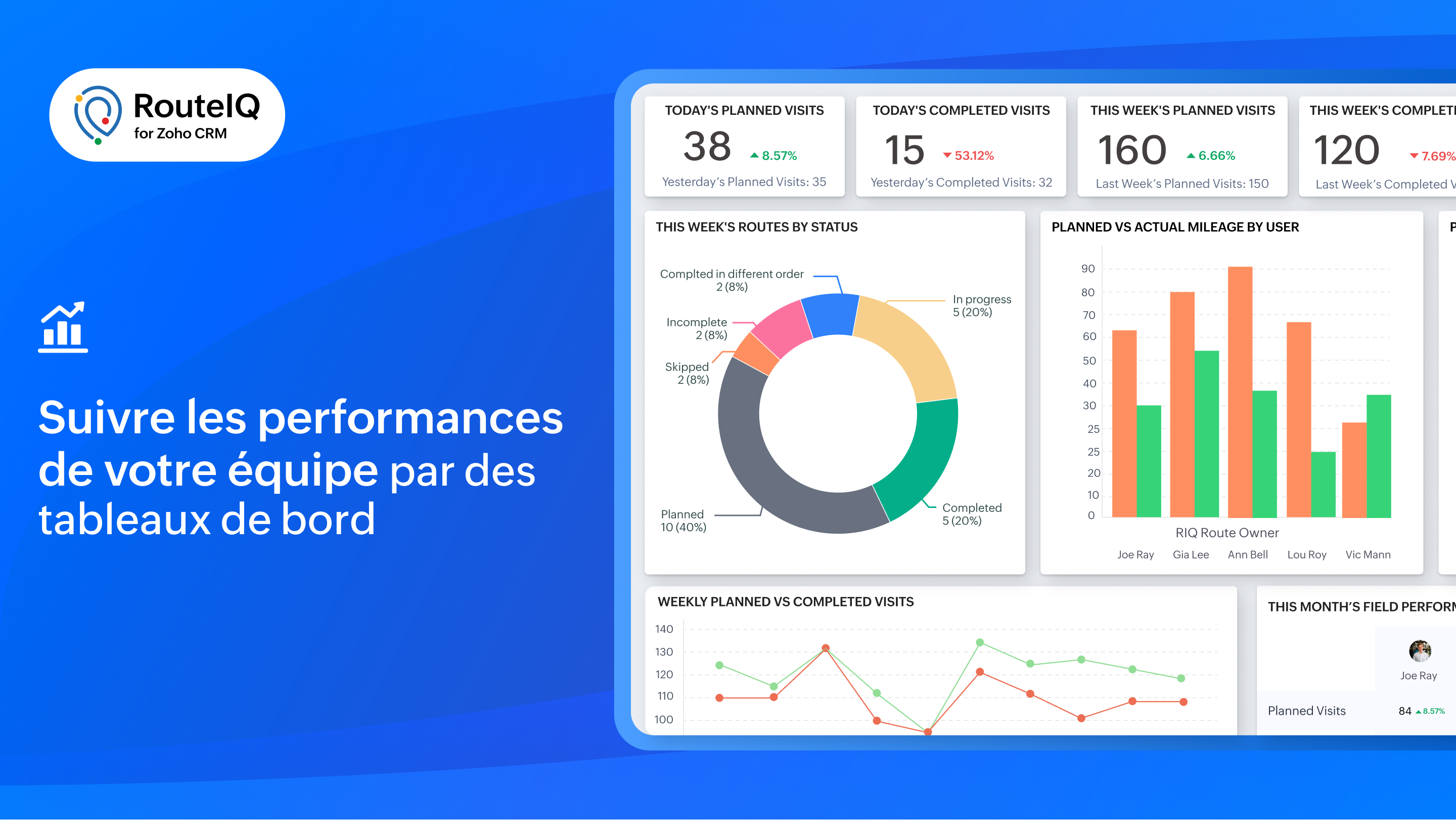
Profitez d'une visibilité sur les performances de votre équipe grâce à des indicateurs tels que le statut des parcours, les visites achevées, la distance parcourue, la durée, les déviations et bien plus encore.
RouteIQ en déplacement
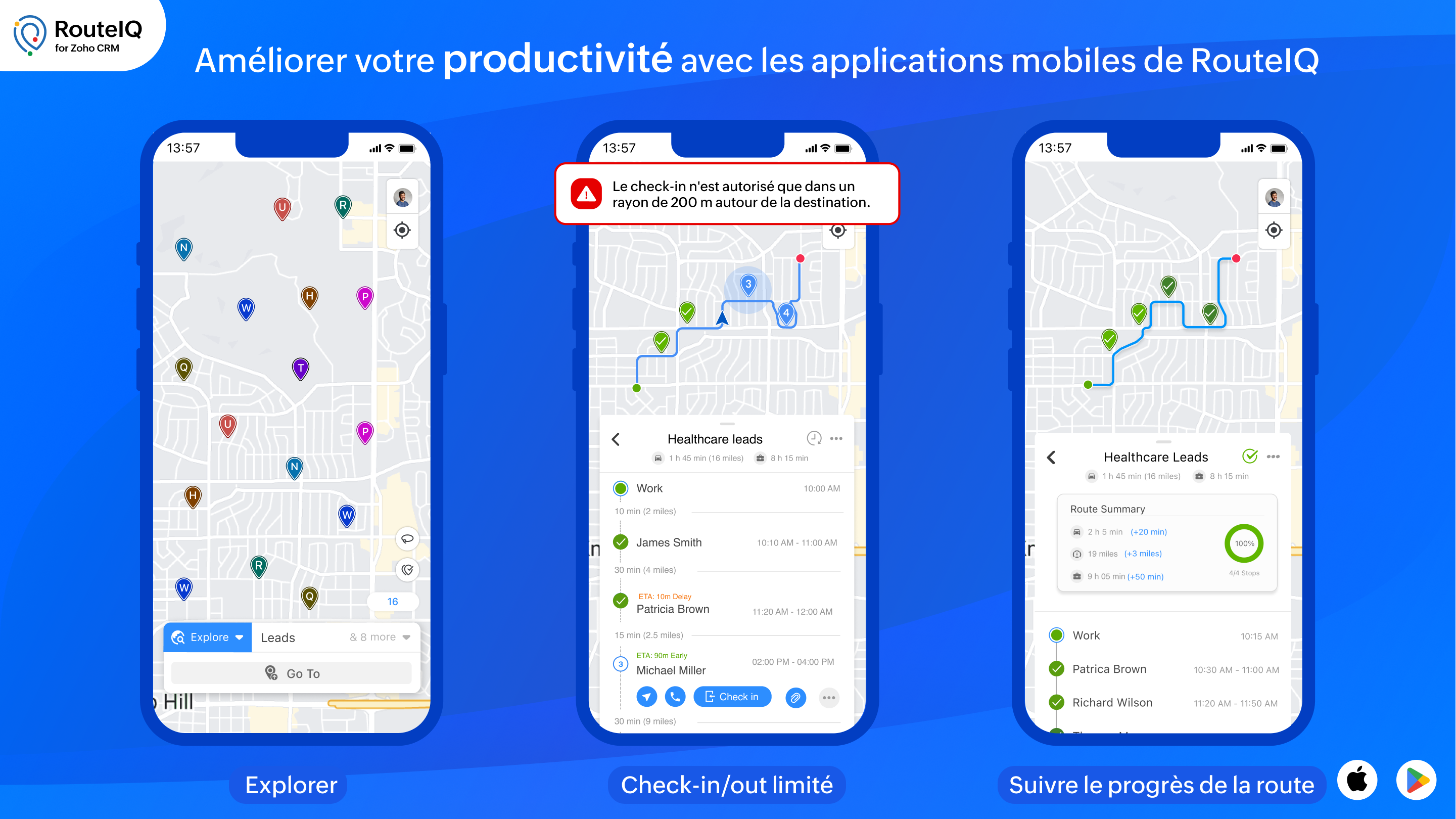
Il est essentiel d'avoir une solution mobile de cartographie pour augmenter la productivité de votre équipe. Voici quelques unes des fonctionnalités particulières de RouteIQ sur mobile, disponibles sur iOS et Android :
- Navigation : parcourez les arrêts avec vos applications de navigation préférées telles que Google Maps, Waze ou Apple Maps.
- Check-in, Check-out, et preuve de livraison : enregistrez les informations d'arrivée et de départ de vos arrêts (heures d'arrivée et de départ, dates, déviations) et saisissez la preuve de livraison.
- Check-in/out limité : autorisez vos agents à s'enregistrer uniquement s'ils se trouvent sur le lieu du rendez-vous.
- Check-in/out automatisé : RouteIQ vous notifie ou enregistre automatiquement votre arrivée et votre départ lorsque vous arrivez ou quittez le lieu d'un client potentiel.
Intégrer RouteIQ pour votre Zoho CRM
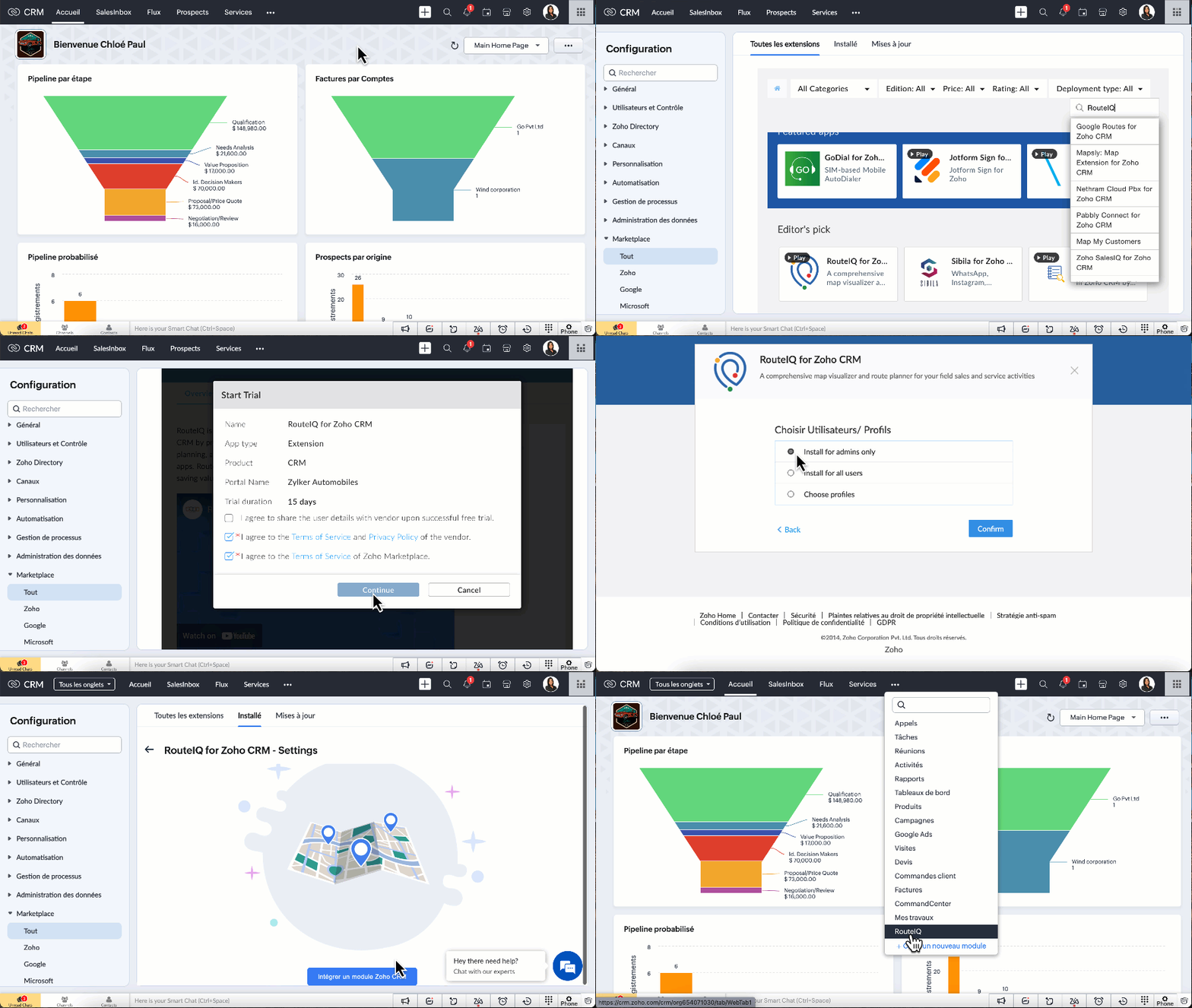
- Vous devez être un utilisateur payant de Zoho CRM pour installer l'extension RouteIQ pour Zoho CRM.
- Paramètres >> Marketplace >> Tout >> chercher "RouteIQ for CRM"
- Suivez les étapes affichées et profitez de la période d'essai de 15 jours.
N'hésitez pas à poser vos questions dans la section des commentaires ci-dessous.
L'équipe Zoho France
Topic Participants
Kinjal Lodaya
Sticky Posts
CRM - Astuce #5 : Effectuer des actions en masses
Bonjour à tous, Au programme du jour : éviter les répétitions grâce à la fonction "en masse". Gagnez du temps sur ces actions simples pour vous concentrez sur votre entreprise. Allez dans le module concerné et cliquer sur les : (...) Suppression enZoho CRM - Il y a du nouveau chez les modèles d'e-mails
Bonjour à tous, Nous sommes ravis d'annoncer que les modèles d'email dans Zoho CRM sont désormais adaptés au design pour tous les ordinateurs et mobiles. Le responsive design désigne une méthode selon laquelle les pages sont conçues pour s'afficherNouveautés Zoho CRM : la page d'accueil et le tableau de bord actualisés !
Bonjour à tous, Nous avons apporté quelques améliorations à la page d'accueil des utilisateurs et à l'onglet Tableau de bord, en voici un aperçu. Des composants supplémentaires dans la page d'accueil pour les nouveaux inscrits : Dans l'onglet Accueil,CRM Blueprint #5: Glossaire
Bonjour à tous, Voici le dernier volet de notre série sur les Blueprints : un glossaire pour comprendre tous les termes nécessaire à l'automatisation de votre process. État : fait référence à chaque étape de votre processus. Par exemple : qualification,CRM : Ajoutez de la couleur à vos balises CRM
Bonjour à tous, Les tags sont des identifiants uniques qui peuvent être associés à différents enregistrements ce qui permet de rechercher, trier, catégoriser, filtrer et segmenter efficacement les enregistrements. Cette nouvelle amélioration a pour but
Recent Topics
Create & Update Zoho Vault Passwords via Zoho Flow
Hi Zoho Flow / Zoho Vault Team, We’d like to request an enhancement to the Zoho Vault integration in Zoho Flow. Current Limitation: At the moment, Zoho Flow supports only the following selected Zoho Vault actions, such as: Fetch passwords, Share passwordsCustom Related List Inside Zoho Books
Hello, We can create the Related list inside the zoho books by the deluge code, I am sharing the reference code Please have a look may be it will help you. //..........Get Org Details organizationID = organization.get("organization_id"); Recordid = cm_g_a_data.get("module_record_id");Migrate different zoho subscription to zoho one
Dear We have different zoho subscription we need to migrate it to zoho one. Currently we are paying for zoho email, zoho expense, zoho payroll etc under different admin We need to move it too zoho one flexlible plan for all my employeesFeatures, Feedback and Votes
We’re launching the Feedback Forum for our customers. This is 'THE' place where you can add everything you’d like to see in Zoho Books. If you don't find the specific feature you need, simply add it so others can also vote for it. While we cannot promisePayment system for donations management
I manage an organization where we receive donations from payers. Hence, there is no need to first create invoices and then create payments received against the invoices. What are the recommended best practices to do this in ZohoBooks?There Might Be A Glitch in Determining If A String Represents A URL
I suspect there might be a glitch in determining if a string represents a URL or not. For example, I cannot embed the following URL. Perhaps the exclamation mark or parentheses are the culprit? https://en.wikipedia.org/wiki/How_the_Grinch_Stole_ChriCustomer Management: #4 Enhance Customer Journey
When Neha started DefineOps, a growing IT support and consulting firm, most of her work was straightforward. A client would sign up for a free version, decide whether the service works for them, and then either continue or discontinue. Billing was simple,Android app sync problem - multiple devices have same problem
Hello, I am having a problem with synchronization in the Android app. When I create a drawing, the data does not sync correctly—only a blank note is created without the drawing. I tested this on multiple devices, including phones and tablets, and theMarketing Tip #1: Optimize item titles for SEO
Your item title is the first thing both Google and shoppers notice. Instead of a generic “Leather Bag,” go for something detailed like “Handcrafted Leather Laptop Bag – Durable & Stylish.” This helps your items rank better in search results and instantlyTerritory Assignment Issues (Lead to Account + Contact)
1. Lead → Account & Contact Territory Assignment on Conversion A Lead is automatically assigned one or more territories using a workflow and Lead Assignment Rules. This works as expected, and we are able to assign multiple territories to a Lead automatically.Marketer's Space: Proven tips to improve open rates – Part II
Hello Marketers! Welcome back to another post in Marketer's Space! We're continuing from where we left off a fortnight ago. We ended the previous post discussing the subject line, and we'll continue from there. Let's dive right in. Pre-header Pre-headerSQL Table slowed to a crawl
Hi all - I seem to have noticed an update. Now whenever I am typing in the script field for the SQL tables there is a huge delay and it is all very slow. This has never been the case for me in over 5 years of using Analytics - I really hope it's fixedDeluge Events/search API works in user environment but not in sandbox – why?
I am creating an Extension for Zoho CRM using Zoho Sigma Platform I’m using the following Deluge code to search Events in Zoho CRM based on Start_DateTime: criteria = "(Start_DateTime:greater_than:2025-12-20T00:00:00+00:00)"; url = "crm/v8/Events/search?criteria="Ensure Consistent Service Delivery with Comprehensive Job Sheets
We are elated to announce that one of the most requested features is now live: Job Sheets. They are customizable, reusable forms that serve as a checklist for the services that technicians need to carry out and as a tool for data collection. While onWhat are Zoho Meeting capabilities included in Zoho Workplace Standard?
I am evaluating using Zoho Meeting for my organization, but it is not clear what Zoho Meeting capabilities are already included in Zoho Workplace Standard. - Are meeting recordings included in Workplace Standard? - Can we invite external meeting participantsHow can I get the participant list of a reoccurring meeting afterwards?
I'm trying to use the Meeting Participant Report from the API docs but when I call it on a reoccurring meeting it returns that there are no participants because it thinks I'm talking about the meeting in the future. Is there a way to use webhooks or someFunction #50: Send Mass emails to your customers
Hello everyone, and welcome back to our series! We have reached a milestone of 50 Functions, which means that we have automated 50 different tasks in Zoho Books. Every Friday, we have shared a nifty function aimed at either automating a task or streamliningFull Hebrew Language Support for Client-Side Zoho Assist Interface
Dear Zoho Assist Team, We would like to request an enhancement to Zoho Assist's client-side interface to support full Hebrew language customization, including all popups, notifications, and session-related messages. Current Limitation The Join page allowsAdd Hebrew & RTL Support to Feedback Widget
Hello Zoho Desk Team, How are you? We are using Zoho Desk and would like to utilize the Feedback Widget. While Zoho Desk itself supports Hebrew and RTL, the Feedback Widget unfortunately does not. We kindly request that Hebrew and full RTL support beMerge Tickets Directly from Contact Page in Zoho Desk
Dear Zoho Desk Support Team, We are writing to request a new feature that would allow users to easily merge tickets directly from the contact page in Zoho Desk. Currently, the only option to merge tickets is from the Tickets list view page, which canDifferent languages for users
Hello, Do you plan to enable individual users to select their languages for interface? Currently language can be changed for everyone - it looks like a settings for a whole portal, which is not good when you are working internationally. Best regards,Kaizen #222 - Client Script Support for Notes Related List
Hello everyone! Welcome to another week of Kaizen. The final Kaizen post of the year 2025 is here! With the new Client Script support for the Notes Related List, you can validate, enrich, and manage notes across modules. In this post, we’ll explore how2025年 Zoho コミュニティ 活動の振り返り 🎉
ユーザーの皆さん、こんにちは!コミュニティチームの中野です。 2025年も多くの学びと出会いがあったZoho コミュニティ。 本記事では今年の活動を振り返りながら、フォーラムの投稿・参加者の皆さん・イベントのハイライトをご紹介していきます。 目次 フォーラム:注目の投稿 フォーラム:多くの貢献をしてくださった方々 ユーザー交流会振り返り ワークアウト振り返り その他のトピックス 1. フォーラム:注目の投稿 本フォーラムでは様々な議論と知識の共有が行われました。 ユーザーの皆さんが日々の業務で直面する課題を投稿し、経験豊富なユーザーさん達が実践的な解決策を提供してくださいました。Customer Management: #3 Giving Customers Control & Privilege
Rio, the founder of RenoTech Solutions, a fast-growing digital service company, found itself juggling a dozen different services for its clients. They handled one-time setup fees, recurring monthly invoices, and custom milestone-based billing for projects.Can I use a Standalone CRM Function as the Callback URL For Async Export Data API?
I am creating an export job using this API https://www.zoho.com/analytics/api/v2/bulk-api/export-data-async/create-export/view-id.html There is a "callbackUrl" key in the CONFIG object. I tried copying the URL for a standalone function in CRM which canAdd RTL (Right-to-Left) Text Direction Support Across All Zoho Learn Editing Interfaces
Hi Zoho Learn Team, Hope you're doing well. We would like to request an important enhancement to Zoho Learn regarding support for right-to-left (RTL) languages such as Hebrew and Arabic. 🔹 Current Issue While the Knowledge Base Article editor providesAdd Hebrew Support for Meeting Transcripts Provided by ZIA in Zoho Cliq
Hi Zoho Cliq Team, Hope you're doing well. We would like to request the addition of Hebrew language support for the Meeting Transcript and Summary feature in Zoho Cliq. Currently the transcript and summary feature is available for recorded meetings andRemote Control Functionality During Screen Sharing in Zoho Cliq
Hello Zoho Cliq Team, We would like to request the addition of remote control functionality during screen sharing sessions in Zoho Cliq. Currently, while screen sharing in Cliq is very useful, it lacks the ability for another participant to take controlCentralized Organization Information Management in Zoho One
Dear Zoho One Support, I'm writing to propose a feature that would significantly improve the user experience and streamline data management within Zoho One. Current Challenge: Currently, managing organization information across various Zoho One apps requiresEnhance Zoho One Conditional Assignment to Fully Reassign App Settings When Changing Departments
Hi Zoho Team, We’d like to submit a feature request regarding the current behavior of Zoho One’s conditional assignment logic when moving a user between departments. 🔧 Current Limitation As it stands, Zoho One’s conditional assignment does not removeAbility to Filter Alias Mailboxes in Zoho Recruit
Dear Zoho Recruit Team, I hope you are doing well. We would like to request a feature enhancement regarding the handling of alias mailboxes in Zoho Recruit. Currently, when we connect an alias mailbox (e.g., jobs@domain.com) from our Zoho One accountAutomatic Department and Employee Sync Between Zoho One and Zoho People
Dear Zoho Support, I'm writing to propose a valuable feature request that would streamline data management and improve user experience within the Zoho ecosystem: automatic synchronization between departments and employees in Zoho One and Zoho People.Prefered Bin Missing in android APP
Andoroid app dosent show preferred bin in the picklist. The workaround support reccomend is to use the computre to create the picklist. it shuld be information to be shown aas basic for the pciker.Open Sans Font in Zoho Books is not Open Sans.
Font choice in customising PDF Templates is very limited, we cannot upload custom fonts, and to make things worse, the font names are not accurate. I selected Open Sans, and thought the system was bugging, but no, Open Sans is not Open Sans. The realFunction #1: Convert an accepted Estimate to Sales Order automatically in Zoho Books
As you’re aware, Zoho Books provides a default option to have the estimates automatically converted to invoices once your customer accepts them. Many of you wanted a similar option for sales orders, so here’s a workflow that converts accepted estimatesReusable Jira Connection for Multiple Zoho Projects Imports
Hello Zoho Projects Team, We would like to raise a concern and submit a feature request regarding the Jira → Zoho Projects migration process, specifically around how Jira connections are handled. Current Behavior: When setting up a Jira connection forZoho invoice doesn't support Arabic language
I added a clause in the terms & conditions section in Arabic but it doesn't appear when I sent or print it.Recurring Invoice Placeholder Not Updating Billing Period
Hi, I’m using Zoho Invoice Free and want the billing period to update automatically in recurring invoices. In Item Description I tried: Billing Period: %(m-6)% %(y)% to %(m-1)% %(y)% but even if the invoice date is in 2026, it still shows the period basedRelated list Mobile Device
Hello, We use an the Zoho creator application to make reports linked to Accounts. On the computer: it's easy to go the Account and see all the created reports in the related list below On iPad/Phone ZOHO CRM APP: we cannot see the reports on those accountsCan't update the company address in zoho invoice
Dear Sir/Madam, I want to update the company address in Zoho Invoice but failed. It popped out a sentence "Invalid value passed for Website". Please advice how to solve this problem. Thank you.Next Page