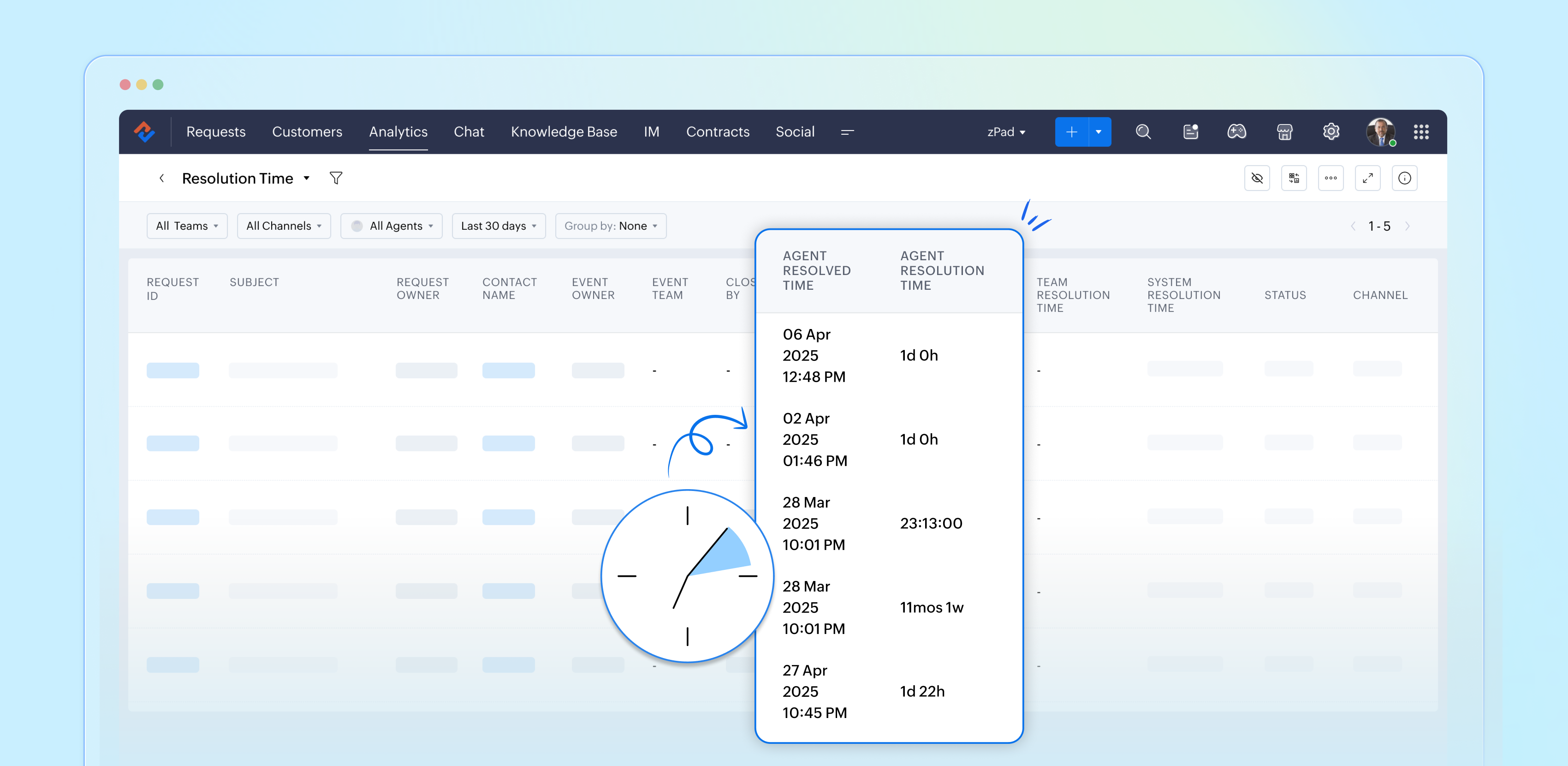
Resolution Time Report

Resolution Time Report

From data to decisions: A deep dive into ticketing system reports


What are time-based reports?

Time-based reports are valuable tools that help us understand how well things are going by breaking down key metrics over specific periods. By tracking, measuring, and visualizing data, these reports allow us to evaluate performance, spot trends, and make better decisions. They enable businesses to monitor efficiency, productivity, and operational effectiveness.

Resolution time

The time required to resolve support tickets varies significantly based on factors such as complexity, dependencies on customer input, cross-departmental collaboration, or the need for in-depth investigation. 

The Resolution Time Report plays a critical role in tracking and analyzing the amount of time agents take to resolve tickets, from creation to closure. This data empowers managers to identify trends, optimize workflows, and enhance team performance.

Quote
Availability: All paid versions 

Specific attributes/fields of the report

  • Ticket ID: Zoho Desk assigns a unique reference number to each ticket, known as a ticket ID.
  • Subject: The ticket subject typically summarises or describes the issue the customer is experiencing.
  • Ticket owner: Owner of the ticket.
  • Contact name: The customer's contact name.
  • Event name: The change in the ticket's status.
  • Closed by: The name of the agent who closed the ticket.
  • Agent resolved time: The time the ticket was closed.
  • Agent resolution time: The total time taken to resolve the ticket.
  • Team resolved time: The time the team closed the ticket.
  • Team resolution time: The total time it took the team to resolve the issue.
  • System resolution time: The time taken to resolve the issue.
  • Status: Status of the ticket.
  • Channel: The incoming channel.

Why is it taking so long to resolve tickets?

When a support ticket takes an unusually long resolution time, team leaders can drill down into the ticket details by clicking the ticket ID. This allows them to assess the root cause of the delays, such as any bottlenecks, dependencies, or process inefficiencies. They develop targeted strategies to streamline future handling of similar issues. By analyzing these insights, agents can resolve tickets more efficiently, improving both individual productivity and overall customer satisfaction.

Leveraging quick resolutions for the team

When a ticket is resolved quickly, it’s an excellent opportunity for team leads to take a closer look at the agent’s approach. By understanding how they tackled the issue, whether it was through effective troubleshooting, collaboration, or utilizing specific tools, we can pinpoint what worked well. Sharing these insights with the entire team not only promotes continuous improvement but also boosts our overall efficiency.

Conclusion

Taking a proactive approach to analyze both the quick resolutions and the more time-consuming ones helps the support team glean lessons from every ticket. This way, we can consistently enhance our performance and ultimately provide a better experience for our customers.


Please stay tuned for more Desk Reports series.


Cheers to reports.


Kavya Rao

The Zoho Desk Team

    • Sticky Posts

    • Zoho Desk Partners with Microsoft's M365 Copilot for seamless customer service experiences

      Hello Zoho Desk users, We are happy to announce that Zoho Desk has partnered with Microsoft's M365 to empower customer service teams with enhanced capabilities and seamless experiences for agents. Microsoft announced their partnership during their keynote
    • WhatsApp pricing changes: Pay per message starting July 1, 2025

      Starting July 1, 2025, WhatsApp is shifting from conversation-based pricing to per-message billing. That means every business-initiated message you send will count. Not just the first one in a 24-hour window. Pricing updates on the WhatsApp Business Platform
    • Live Webinar - Work smarter with Zoho Desk and Zoho Workplace integration

      Hello customers! Zoho Desk and Zoho Workplace are coming together for a webinar on 14th May, 2024. Zoho Workplace is a suite of productivity apps for email, chat, docs, calls, and more at one single place. Zoho Desk is closely integrated with a few tools
    • Apple iOS 17 and iPadOS 17 updates for Zoho Desk users

      Hello Zoho Desk users! Apple recently announced the release of iOS 17 and iPad OS 17. These latest OS updates will help you stay productive and efficient, through interactive and seamless user experiences. Zoho Desk has incorporated the updates to help
    • Zoho Desk Cheat Sheet For The Year-End

      Check out these Zoho Desk best practices to end this year on a high and have a great one ahead! #1 Set Business (Holiday) Hours - If you have limited working hours, please make sure you restrict your business hours or set them as holidays for the coming days. Let your customers know when you will, and won't, be available. #2 Update the Annual Holiday List - Check the holidays for the new year and update the holiday schedule. Usually, holidays from the current year will be carried over for the next
    • Recent Topics

    • Sync your CRM Tasks with Zoho Projects

      Zoho Projects integration with Zoho CRM helps you manage your tasks more efficiently. You can create all project related activities right inside your CRM using this integration. Create new portal or associate an existing portal, add projects to the portal,
    • Zoho CRM strips whitespace in text fields

      When editing field text with multiple spaces: CRM - both UI and API trim / compress the whitespace to a single space when saving: Is this known / expected / documented behaviour?
    • WorkDrive API returning empty response even after placing file in Team Folder

      Hi everyone, I am trying to fetch a file from Zoho WorkDrive using a Deluge standalone function in Zoho People. The API call executes successfully using a configured connection, but the response is coming back empty. I have verified the following: The
    • Custom Button makes scroll bar go down in report

      I have a report with a Custom button called Completed. A colleague mentionned to me that when he pressed this custom button it scrolled down the page which is annoying since he want to stay at the same space on the repoort. There is no reload linked to
    • Quickbooks Integrations Stopped Working

      All of our Quickbooks integrations have stopped working. I am checking in to see if: a) this is a known issue b) if anyone else is having this issue. As usual, Zoho support is unavailable.
    • sync two zoho crm

      Hello everyone. Is it possible to sync 2 zoho crm? what would be the easiest way? I am thinking of Flow. I have a Custom Module that I would like to share with my client. We both use zoho crm. Regards.
    • CRM x WorkDrive: We're rolling out the WorkDrive-powered file storage experience for existing users

      Release plan: Gradual rollout to customers without file storage add-ons, in this order: 1. Standalone CRM 2. CRM Plus and Zoho One DCs: All | Editions: All Available now for: - Standalone CRM accounts in Free and Standard editions without file storage
    • Incorrect Functioning of Time Logs API (Version 3)

      We need to fetch the list of time logs for each task for our company internal usage. We are trying to achieve it by using the next endpoint: https://projects.zoho.com/api-docs#bulk-time-logs#get-all-project-time-logs Firstly, in the documentation the
    • Zoho CRM Queries Now Support Databases and Cloud Data Sources

      Hello everyone! We're thrilled to announce a major enhancement to the Queries feature in Zoho CRM! Queries now support a broader range of external data sources, allowing you to fetch live data and combine it with CRM records, all using a unified query
    • Zoho CAMPAIGNS working hours

      Hi I use Campaigns Automation workflows to automate follow-ups to my Leads. I discovered this weekend that emails are being sent out on Sundays. How do I limit my Campaigns outgoing emails to business working hours? This is very important! Thanks, D
    • Salesforceに添付ファイルを格納したい

      お世話になっております。 Salesforceに添付ファイルを格納したく、カスタムオブジェクトに連携し、 「ファイルのアップロード」項目を設けました。 実際、エラーもなく送信出来たのですが、実際生成されたカスタムオブジェクトのレコードを見ると、どこにも添付ファイルがありません。仕様として、この添付ファイルはSalesforceのどこに格納されるのでしょうか? 今回作りたいフォームは、複数の書類を添付するため、Zohoformのファイルアップロード項目「本人確認書類」「源泉徴収票」などの項目を、Salesforce側にも設けた「本人確認書類」「源泉徴収票」という各項目にURLリンクとして紐づけたいと思っておりました。
    • Dynamic image in form works in the app but not on the customer portal.

      img = frm_Fichas[ID == input.Nombre].Foto; imgno = Nophoto[ID2 = 1].Image; if(len(img) > 1) { img = img.replaceAll("/sharedBy/appLinkName/",zoho.appuri); img = img.replaceAll("viewLinkName","Fichas_de_personal_public"); img = img.replaceAll("fieldName","Foto");
    • Is it possible to retrieve function (Deluge) code from Zoho CRM externally?

      Hi Everyone, Is it possible to fetch or retrieve the Deluge function code from Zoho CRM using an external method (API or any other approach)? I would like to know if there is any way to access or extract the function script outside of Zoho CRM, or if
    • Uplifted homepage experience

      Editions: All editions. Availability update: 17th February 2026: All editions in the CA and SA DC | JP DC (Free, Standard and Professional editions) 23 February 2026: JP (All Editions) | AU, CN (Free, Standard, Professional editions) 27 February 2026:
    • Darshan Hiranandani : How many participants can join a Zoho Meeting at once?

      Hi everyone, I'm Darshan Hiranandani, trying to find out the maximum number of participants that can join a Zoho Meeting at once. Has anyone here used Zoho Meeting for larger groups and can share their experience or knowledge about the participant limit?
    • Where is the scheduled report in New UI?

      Hi Team, Seems there is not such a field in New UI, hence I have to switch to old UI to handle request..
    • Approval Workflow for Purchase Orders Abrir

      The requirement is , that all purchase orders greater than or equal to 5000 go through an approval process from certain people, but within books I only see that the approvers can be by levels or any approver but we cannot enter a rule like these. Can
    • WeTravel + Zoho CRM Integration - Has Anyone Built a Connector or Extension?

      Hi all, I'm exploring options for integrating Zoho CRM with WeTravel (booking & payment platform for tour operators). Zapier seems to be the common method but seems limited. I'm wondering if anyone in the community has developed a more comprehensive solution,
    • Option in pipeline deal to select which hotel or branch or store if client has more than one local store

      Hi, I would like to know if there is an option in the deal pipeline to select which hotel, branch, or store a deal is related to—if the company has more than one location. For example, I have a client that owns several hotels under the same company, and
    • CRM x WorkDrive: File storage for new CRM signups is now powered by WorkDrive

      Availability Editions: All DCs: All Release plan: Released for new signups in all DCs. It will be enabled for existing users in a phased manner in the upcoming months. Help documentation: Documents in Zoho CRM Manage folders in Documents tab Manage files
    • Undo article like/dislike

      It seems to be not possible to undo your like/dislike for an article. Would be great if you can. Kind regards, Helen
    • Nested notebooks

      Dear Sir/Madam, I would like to know if it is possible to nest notebooks. It would be very helpful when there are too many, as it would improve organization. Thank you for your response. Best regards.
    • Tax in Quote

      Each row item in a quote has a tax value. At the total numbers at the bottom, there is also a Tax entry. If you select tax in both of the (line item, and the total), the tax doubles. My assumption is that the Tax total should be totalling the tax from
    • Issue with "Send Email" from Quotes not loading Email Template data

      Hi everyone, I'm currently experiencing an issue when using the "Send Email" option from a Quote record in Zoho CRM. What’s happening: When I go to the Quotes module and select a record, then click Send Email, the attached file (Quote) correctly pulls
    • Dynamically Fetching Lookup Field Display Value

      I have an audit trail form, Audit_Changes, that tracks old vs new values across different forms. For lookup fields, the old/new value is the ID, but I also need the display value. What's a best practice for dynamically fetching the display value of the
    • Stop Scrolling, Start Asking: Meet Zia for Your Files

      Hey everyone 👋 The era of 'scrolling and searching' is officially over. Whether it's a dense legal contract or a long meeting recording, searching for specific details is a massive time-sink. We think you should be able to interact with your files, not
    • Introducing a smarter, faster, and more flexible charting experience

      Hello Zoho Sheet users, We're delighted to share the latest news about a major update to charts in Zoho Sheet! The new version supports dynamic data ranges, granular styling options, faster loading, and other interesting enhancements that allow you to
    • How to create a new Batch and update Stock via Inventory?

      Hi everyone, We are building an automation where a user enters batch details (Batch Number, Mfg Date, Expiry, and Quantity) into a Custom Module. I need this to trigger an API call to Zoho Inventory to: Create the new batch for the item. Increase the
    • Can't change form's original name in URL

      Hi all, I have been duplicating + editing forms for jobs regarding the same department to maintain formatting + styling. The issue I've not run into is because I've duplicated it from an existing form, the URL doesn't seem to want to update with the new
    • How do I open MSG files in Microsoft Word?

      If you want to open MSG files in Microsoft Word is not natively supported, as MSG is an email file format created by Microsoft Outlook. However, there are professional approaches to access MSG content in Word. First, open the MSG file in Outlook and copy
    • Unable to charge GST on shipping/packing & Forwarding charges in INDIA

      Currently, tax rates only apply to items. It does not apply tax to any shipping or packing & forwarding charges that may be on the order as well. However, these charges are taxable under GST in India. Please add the ability to apply tax to these charges.
    • How to add packing & forwarding charge in purchase order & quotation???

      Hello Zoho Team I have just started using Zoho for my company and I wanted to make purchase order. My supplier charges fix 2% as packing & forwarding on Total amount of material and then they charge me tax. For example, Material 1 = 100 Rs Material 2
    • How to create a boxplot chart in Zoho Analytics?

      Hi, I'm looking forward to making a boxplot in Zoho Analytics, either with all my data or with a time segmentation. No documentation or YouTube video explaining that was found. I guess this is a feature gap. How feasible would it be to add this to Analytics?
    • New UI for Writer - Disappointed

      I've been enjoying Zoho Writer as a new user for about 6 months, and I really like it. One of my favorite things about it is the menu bar, which you can hide or leave out while still seeing most of your page because it is off to the left. I think this
    • What are the create bill API line item requiered fields

      While the following documentation says that the line items array is requiered it doesn't say what if any files are requiered in the array. Does anyone know? API documentation: https://www.zoho.com/inventory/api/v1/bills/#create-a-bill I'm trying to add
    • WorkDrive issues with Windows Explorer Not Responding

      We are using WorkDrive to collaborate on editing video content. We have a lot of files and quite a few are a few gigs. Recently anytime I try and work with the files Explorer freezes for a couple minutes whether it's dragging the files into Premiere or
    • Connecting Zoho Inventory to ShipStation

      we are looking for someone to help connect via API shipStation with Zoho inventory. Any ideas? Thanks. Uri
    • Where is the settings option in zoho writer?

      hi, my zoho writer on windows has menu fonts too large. where do i find the settings to change this option? my screen resolution is correct and other apps/softwares in windows have no issues. regards
    • Using IMAP configuration for shared email inboxes

      Our customer service team utilizes shared email boxes to allow multiple people to view and handle incoming customer requests. For example, the customer sends an email to info@xxxx.com and multiple people can view it and handle the request. How can I configure
    • When Does WorkDrive integrate with Books?

      When Does WorkDrive integrate with Books?
    • Next Page