The Social Playbook - February edition: Why moment marketing works (and how brands use it)
The Social Playbook - February edition: Why moment marketing works (and how brands use it)


Imagine the final season of your favorite series is about to drop. Your entire feed is talking about it. Trailers everywhere. Fan theories. Hype at 100%.

Now your go-to burger place launches a limited-edition meal box themed around that series—custom packaging, a collectible character inside, and a menu inspired by the show.

Be honest… you’re not just hungry anymore. You want it. You need it. That feeling? That’s not random. That’s "moment marketing."

What's happening here?

Moment marketing is when you start creating content around what’s actually happening in the world. It’s about tapping into real-time moments like a new series drop, a big match, or even a pop culture wave, and using that excitement to connect with your audience in a way that feels natural, fun, and timely. When a brand launches a limited-edition product, a themed post, or even just a clever content during a big moment, it’s not just marketing. It’s joining the conversation.

In the February edition of The Social Playbook, we break down what moment marketing is, how brands use real-time moments to create buzz, iconic examples that worked, and how you can apply it to your own content.

Why moment marketing works

When you connect your content or product to something people already care about, you stop feeling like an ad and start feeling like part of their world.

Here’s how using moments elevates your marketing:
  1. It builds brand recall and trust
When your audience sees your brand talking about something that’s happening right now, it feels relatable. Over time, this builds both brand recall and trust.
  1. It increases reach and shares
If your post taps into a moment in a clever way, your audience is more likely to send it to friends, post it on stories, or talk about it. That’s how your reach grows.
  1. It drives fast sales with FOMO (Limited-edition products)
When brands launch something exclusive around a hyped-up event (a series finale, a tournament, a festival) like limited-edition products, fans don’t want to miss out on something tied to what they love. It’s no longer just a product. It’s part of their passion. And that’s how brands build emotional connections.

Now let's take a look at an example;

During the Cricket World Cup, boAt launched a World Cup–themed edition watch.
It worked because:
  1. It showed up during a moment cricket fans truly cared about -> built recall and trust
  2. Fans shared it because it felt cool and personal -> boosted reach
  3. It was a limited-edition product at the right time -> created FOMO and quick sales
That’s moment marketing done right: right time, right idea, right emotion.



How brands use moment marketing (with real examples)

Brands adapt to moments based on what fits their brand voice, audience, and product. Some go big with campaigns, some keep it simple with packaging or social posts, but the goal stays the same: stay relevant and memorable.

Let’s look at a few popular ways brands have done this really well.
  1. Limited-edition products and themed packaging
When a big show, movie, or cultural moment drops, some brands create products and packaging inspired by it. When Bridgerton released a new season, several brands jumped in creatively. Brands like Kimirica, Dove, Nykaa, and others launched Bridgerton-inspired packaging and limited-edition products. The designs, colors, and themes matched the vibe of the series This makes fans feel like they were owning a piece of the moment. The launch of Nykaa’s Bridgerton collection resulted in a significant and record-setting boost in sales.


Similarly, when Stranger Things dropped a new season, brands like KFC, Burger King, Kinder Joy, and Miniso introduced themed meal boxes, collectibles, and special products. These weren’t just products, they were experiences fans wanted to be part of.


  1. Timely and relatable social media content
Some brands use the moments just by showing up at the right time with the right content. Whether it's creating posts, visuals, or captions linked to trending shows, events, or pop culture moments, brands insert themselves into conversations audiences are already having. This makes the content feel less like advertising and more like participation.


The most iconic moment marketing move in history

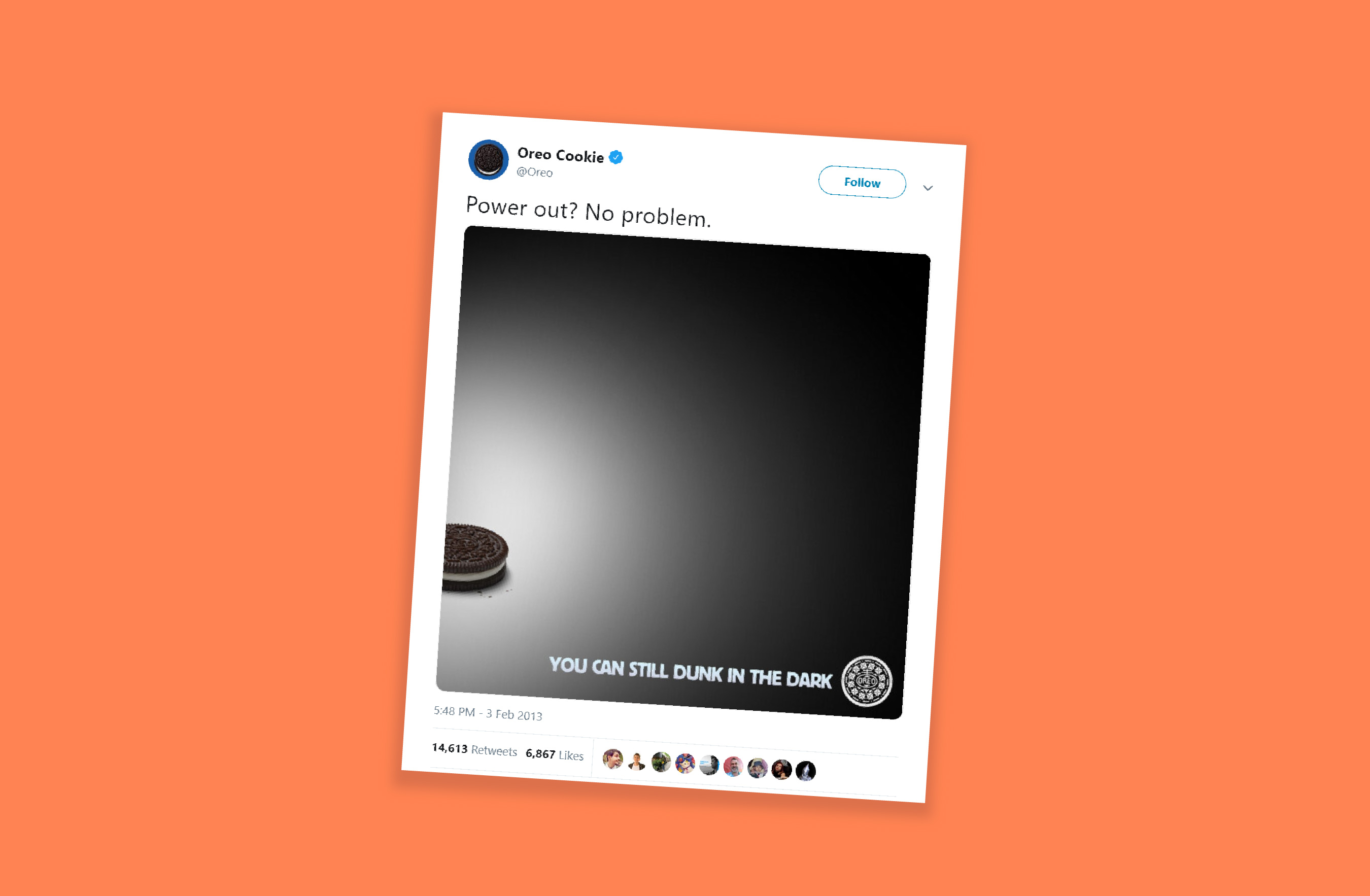
If there’s one example that perfectly defines moment marketing, it’s Oreo’s “Dunk in the Dark” moment during the 2013 Super Bowl.

During the Super Bowl, the stadium suddenly went dark due to a power outage. The game paused. The audience waited. And within minutes, Oreo’s social team posted a simple Tweet: “You can still dunk in the dark.” That’s it. No long copy. Just perfect timing and creativity.

The Tweet went viral, won multiple marketing awards, and is still talked about today as the most iconic moment marketing example ever.
  1. The Impact: The post received nearly 15,000 retweets and over 20,000 likes on Facebook within the first night. 
  2. Social Growth: Oreo's Twitter following increased by 8,000, and Instagram followers grew from 2,000 to over 36,000 (reaching over 85,000 later that month).
  3. Media Value: The campaign generated approximately USD 525 million in earned media impressions.


How to use moment marketing the right way

Moment marketing works best when three things come together:
Perfect timing -> smart idea -> creative execution
  1. Get the timing right
    1. Keep an eye on what’s trending using tools like Google Trends, X, and social media analytics
    2. Watch for events, shows, matches, and cultural moments
    3. React fast, because the earlier you join the moment, the more attention you get

  2.  Build a smart idea
    1. Your idea should connect naturally to the trend
    2. It should match your brand’s tone and personality
    3. Don’t force-fit yourself into a moment that doesn’t fit

  3.  Add creative execution
    1. Use crisp copy
    2. Keep visuals clean and simple
    3. Add a witty or relatable twist
    4. Make people smile and think
For example, during the Women’s Premier League, Amul used the cricket buzz at the right time and created a fun post in their usual style. Even though they sell dairy products, the content felt natural and not forced. It worked because the timing was right, the idea made sense, and the creativity matched their brand.


Common mistakes in moment marketing

  1. Jumping on every trend without checking if it fits your brand
  2. Posting too late and missing the moment
  3. Using sensitive, political, or emotional topics for humor
  4. Being unclear or confusing in your message
  5. Trying to fit into trends that don’t suit your brand style
In moment marketing, you’re not chasing attention—you’re meeting your audience where their attention already is. When brands show up at the right moment, people notice and remember.

Stay tuned for the March edition of The Social Playbook.
    • Recent Topics

    • Differences - Blueprint vs. Approval Process

      Cannot seem to get my head around the key differences between the Blueprints and the Approval Process. For me it seems like different flavours of more or less the same thing - especially now that we have the option of Record Locking. Have a quote to sales
    • Displaying Rate Inclusive of GST per unit

      Hello, Currently when I enter the pricing of a line item it shows the overall amount (price including tax * quantity). I would like to see price/unit inclusive of GST. Is there any way to simplify this and to be able to view it? I've attached my current
    • RouteIQ user Licensefor Non–Zoho One User

      Zoho RouteIQ needs to be purchased for Zoho CRM. The current setup uses the Zoho One plan, but RouteIQ is required for a different user who is not part of Zoho One. However, they need access to routes and customer details within RouteIQ for planning their
    • Zoho Flow not handling Boolean properly

      Hi, I have a checkbox in one system that I'm trying to sync with a checkbox in Zoho CRM. The value from the source system comes in as blank (unticked) or 1 (ticked). I've written the following custom function to convert the output to either boolean false
    • Set Default Status of Assembly to "Assembled" When Entered in UI

      I've just discovered the new "confirmed" status of Assemblies within Inventory. While I understand the intent of this (allowing for manufacturing planning and raw material stock allocation), it was initially confusing to me when manually entering some
    • Option+C shortcut conflict

      In the latest Cliq release, you introduced `Option+C` shortcut to start a new audio call. In Polish, `option+C` is used for letter `ć`. I changed this button combo but `Option+C` is still being blocked and doesn't allow me to write letter `ć`.
    • How to Automate an Unsubscribe based on Scoring

      I automatically assign a negative point score to bounced emails and would like to automate unsubscription of these emails from our Campaigns, without losing the contact data. (Oftentimes the lead is no longer at a business, but I want to keep the business
    • Introducing the New Applications Module

      We're excited to introduce the Applications module, a powerful new feature designed to revolutionize how you manage job applications. This module offers a more streamlined, efficient approach to tracking and processing candidates throughout your recruitment
    • Zoho Browser??

      hai guys, this sounds awkward but can v get a ZOHO BROWSER same as zoho writer, etc. where i can browse websites @ home and continue browsing the same websites @ my office, as v have the option in Firefox, once i save and close the browser and again when i open it i will be getting the same sites. If u people r not clear with my explanation, plz let me know. Thanks, Sandeep  
    • since the new interface of ZOHO writer can't turn of automatic reminder option for merge documents

      Since the new interface of ZOHO writer I have this problem. I have a large set of templates that I use to send documents to ZOHO Sign. But now in all those templates the box for Sending reminders is ticked, which i don't want. But even if I untick the
    • Sales Allowed Beyond Available Stock and Payment Recorded Without Restriction

      Hi, While testing in Zoho Inventory, I noticed that a sales order can be created with a quantity exceeding the available stock in the selected warehouse. In my case: Available stock: 5 units Ordered quantity: 6 units Despite this: I was able to convert
    • Function #25: Automatically generate purchase orders from a sales order

      We kicked off the "Function Fridays" series with the goal of helping you automate your everyday accounting tasks. As we delve into today's post, I'm delighted to announce that we're here to present the 25th custom function in this series. While it is
    • How can I add Material cost to a project?

      Hello, We use Zoho project to manage scheduled work. This consists in labour tasks and matrials cost. How can I add the material budget, then teh cost to the project? Thanks Barbara
    • Users I've shared the sheet with cannot use the Custom Functions

      Hi, I have a Zoho Sheet worksheet that I shared to 2 colleagues, giving them full access: In that worksheet, I created a button with a custom Deluge function and it works flawlessly for me: For those I shared the worksheet to, when they click the button,
    • How to set custom Sales Order numbers

      I am trying to create Sales Orders with data from Jotform submissions. Auto number generation is disabled within Books. Whereas the flow Input recognizes the number (40732 in this example), the Output does not. How can I fix this? I'd like the number
    • Mail bounces due to bad reputation

      Good evening. I'm seeing these errors from both hotmail/outlook and yahoo, as well as hard bounce from Virgin Media and talktalk for some time now. Bounce category: Connection issues Reason: uncategorized-bounce Message: 4.7.650 The mail server [136.143.188.237]
    • Automation Series #3: Macro vs Workflow in Zoho Desk

      Workflows vs Macros in Zoho Desk: Choosing the right help desk automation This post is part of the "Desk Automation Series," Chapter 1. Through this series, we will help you choose the right automation type in Zoho Desk by comparing commonly confused
    • Automation#17: Auto-Create Tasks in Zoho Projects Upon Ticket Creation in Zoho Desk

      Hello Everyone, This edition delivers the solution to automatically create a task in Zoho Projects when a ticket is created in Zoho Desk. Zylker Resorts uses Zoho Desk for bookings and handling guest requests. Zylker resorts outsources cab bookings to
    • Re: Application Architecture in Zoho Creator — A Platform-Specific Deep Dive

      A recent community post on application architecture made some excellent points about planning architecture early in Zoho Creator projects. The core message is right — Creator applications have a habit of growing organically into maintenance nightmares,
    • WO Completion Status Not Updating Automatically

      Hello Latha, Hope you are doing well. Over the past few days, we have been facing an issue with WO completion. When an AP is marked as complete, the work order status is not automatically updating to “Completed,” and we have to mark it manually. Could
    • Limiting the form - Zoho People

      Hi Team, I would like to limit the number of form/request submissions for employees within a given month. For example, if an employee has already submitted 3 requests in the current month, they should not be allowed to submit any further requests. An
    • Introducing PDF conversion in Deluge

      Hello everyone, We're pleased to introduce built-in PDF conversion capabilities in Deluge with the launch of the convertToPDF task. As PDF is one of the most widely used formats in professional environments, this task helps streamline document generation
    • Introducing our new 'Extension Development' Series!

      Hello users, We're excited to launch a new series on 'Building Extensions in Zoho Sprints' where the workspace owner or developers can learn to customize the workspace to meet their unique or niche requirements. Each post in this series will guide you
    • Product Updates in Zoho Workplace applications | March 2026

      Hello Workplace Community, Let’s take a look at the new features and enhancements that went live across all Workplace applications for the month of March. Zoho Mail Create Collections Under Categories in Bookmarks Create multiple collections under categories
    • How to install Widget in inventory module

      Hi, I am trying to install a app into Sales Order Module related list, however there is no button allow me to do that. May I ask how to install widget to inventory module related list?
    • Credit card transactions are backwards after importing statements

      I am new to Zoho Books so I'm importing my firm's bank and credit card statements in. My credit card statements have a single column with negative numbers so that is the option I chose. But when I went to categorize the credit card transactions, I can
    • BMO bank connection not working with either Yodlee or Plaid

      Been experiencing this issue for almost a month now. Anyone else?
    • How to reduce inventory valuation when not tracking individual items?

      We purchase clothing items wholesale, embroider them with a company's logo, then resell. The garment style, size, color, etc. changes according to a customer's desire, so we don't track the individual item's purchase within Zoho Inventory unless there's
    • Email templates for estimates

      Hi there, When I send an estimate the option to choose a template appears. However it is common to need to make some minor personalizations and modifications to the email before sending ie. adding a second person to the greeting, or adding a small note
    • Stage-probability mapping feature in custom module

      Hi, I'm building a custom module for manage projects. I would like to implement the stage-probability feature that Potentials has. Is this possible?
    • Mastering Zia Match Scores | Let's Talk Recruit

      Feeling overwhelmed by hundreds of resumes for every job? You’re not alone! Welcome back to Let’s Talk Recruit, where we break down Zoho Recruit’s features and hiring best practices into simple, actionable insights for recruiters. Imagine having an assistant
    • Zoho Books - France

      L’équipe de Zoho France reçoit régulièrement des questions sur la conformité de ses applications de finances (Zoho Books/ Zoho Invoice) pour le marché français. Voici quelques points pour clarifier la question : Zoho Books est un logiciel de comptabilité
    • Zoho Home Tasks View - any way to add conditional formatting?

      Hello! Is there any way to add conditional formatting to the tasks window under Home Page? Id like tasks to be shown in green/yellow and red depending on its task date. I know Classic View shows colorfull icons: But its not possible to add any custom
    • User Name in Zoho Cliq Not Updating Across Apps?

      We updated the name of a user in Zoho. (From Sue to Taylor) Her name has not been updated in Cliq on all apps. When in Zoho One, if I go to Cliq directly, it is correct, but if I am in another app, and the Cliq bar pops up on the bottom, it will be the
    • New Customization options in the module builder: Quick Create and Detail view

      Hello everyone, We have introduced two new components to the module builder: Quick create and Detail view. The Quick Create Component It is a mini form used to create a record and associate it to the parent record from a lookup field. For example, if you have a Deals lookup in the Contacts module, then you can associate existing deals or create a deal and associate it with the contact. You can customize this Quick Create form by adding standard as well as custom fields. There is no limit to the number
    • Items Landed Cost and Profit?

      Hello, we recently went live with Zoho Inventory, and I have a question about the Landed Cost feature. The FAQ reads: "Tracking the landed cost helps determine the overall cost incurred in procuring the product. This, in turn, helps you to decide the
    • How do I automate my package and shipment process

      Hey, I have a very basic problem regarding automating my package and shipment. My business does not require me to have those modules and manage them currently and since I'm new to zoho I want to start with just the basics. I just need to automatically
    • Announcing Zoho Sheet desktop app for macOS and Windows (Beta)

      Hello Sheet users, We know you’ve been waiting for this one. It has always been the top priority on our roadmap to provide a single native desktop app for macOS and Windows that works both online and offline. Today, we are excited to announce that the
    • zoho creator panel add formula

      Hello. I'm using zoho panels which works good for me but i need to add an extra calculation the predefined sum function provided by zoho. not sure if this is possible? The code zoho is generating for the sum is as follows; <text margin='0px' padding='0px'
    • How to take result of calculation in a form and subtract from a value in another form

      I'm using the following code on successful form submission to perform a calculation and enter the result into a field a shown below input.Space_Used = ifNull(input.Area_In_Square_Meters,0) * ifNull(input.Total_Stock,0); I now need the result above, the
    • Next Page