Hello Zoho Assist Community!
Welcome back to our Technician Console series. Last time we explored Power Options, and this time we are turning the spotlight on a feature that quietly saves you dozens of clicks in every session by getting you exactly where you need to be on the remote machine, instantly: Quick Launch.
What is Quick Launch?
Quick Launch in Zoho Assist gives technicians one-click access to the system tools and locations they reach for most during a session, without having to hunt through menus on an unfamiliar remote machine. Accessible from the Technician Console, it puts a long list of utilities a single click away. Start a remote support session and navigate to the Technician Console. Click on Tools in the left sidebar and select Quick Launch from the dropdown menu.
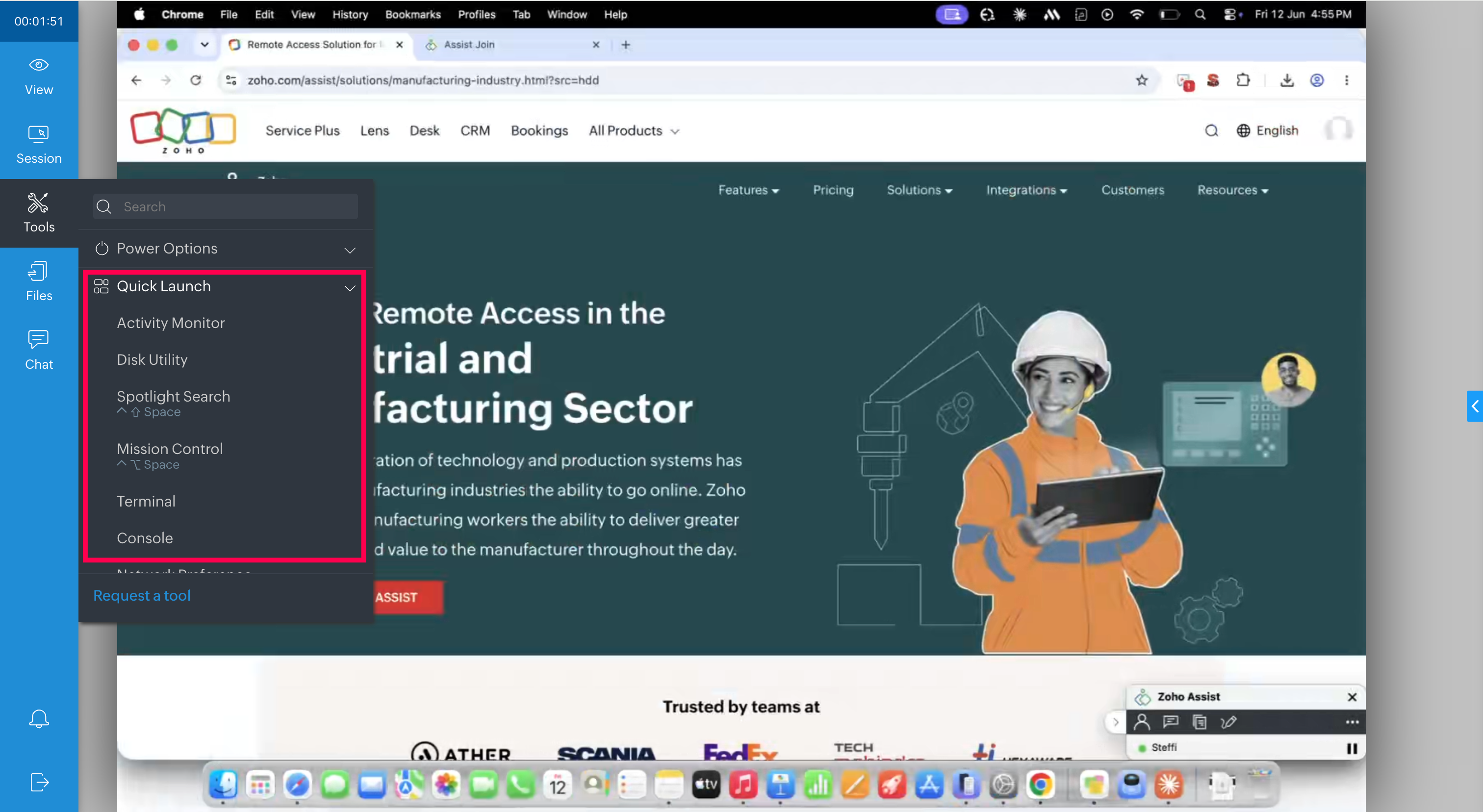
Here's what you can open in one click.
System tools and diagnostics — A customer's machine is crawling and you need answers fast. One click into Task Manager shows you the process eating their CPU; another into Event Viewer surfaces the errors behind a recurring crash; Command Prompt and Services let you confirm and restart what needs restarting, all without leaving the session. Also in this group: Device Manager, Performance Monitor, Computer Management, Registry, System Registry, Control Panel, and System Properties.
Files and navigation — Need to track down a stray file or check what's eating up space? Explorer and File System Management drop you straight into the remote machine's folders, no detours.
Software management — A misbehaving app needs to come off before a clean reinstall. Add/Remove Programs lets you uninstall it directly, instead of screen-sharing the customer through the process themselves.
Network — Connectivity is the problem and you need to pin it down. Network Connection lets you check the adapter and settings, while NS Lookup helps you confirm whether DNS is resolving the way it should.
Security and policy — Locking down a machine or pushing a policy change? Firewall, Local Security Policy, and Group Policy Editor are right there when you need to adjust rules or apply organizational settings.
Display — Resolution or scaling looking off on the remote end? Display Settings gets you there in a single step.
On a Mac? — Quick Launch surfaces the essentials here too: Activity Monitor and Console for spotting what's misbehaving, Disk Utility for storage and repair, Terminal for command-line work, plus Mission Control and Spotlight Search to move around quickly.
The next time a session calls for a quick check under the hood — a tool to open, a program to remove, a setting to tweak — you don't need to navigate the remote machine the long way or walk the customer through it. Just open Quick Launch and go straight to what you need.
Which Quick Launch shortcut do you find yourself using most during remote sessions? Has it changed how quickly you move through a support call? Share your experience in the comments below!
For questions or support, reach out to us at support@zohoassist.com. We are always happy to help!
Recent Topics
'Pinned' notes feature of a pipeline record
Hi team, Could you please implement a feature which will allow users to pin different notes so that they will appear at the very top of the notes tab in a pipeline record. Sometimes we have a wide range of notes on a record which means more important
Associate emails from both primary and secondary contacts to deal
We need to associate emails from multiple contacts to a deal. Please advise how this can be achieved. At present, only emails from primary contacts can be associated. Thanks
Custom Button Creation from Layout Editor in Zoho CRM
Hello All, Buttons in Zoho CRM act as triggers that perform a specific action when clicked. Zoho CRM includes a set of system buttons that help you carry out common actions with a single click. Beyond these, your organization can create custom buttons
#PitStop3: Share & Collect Payment using Zoho Invoice
We have reached another milestone in our journey. Post #15 to #20 weren't just about sharing invoices, they were about building a payment workflow that works for you, your customers and your business. Here's a quick wrap of what we covered in this segment:
Suggestions for Improving the Deluge Development Experience
Hello, I would like to share some ideas that could significantly improve the Deluge development experience, especially for partners and developers building larger solutions across the Zoho ecosystem. Some key areas that would add a lot of value: Deluge
Enhancement announcement: Mitigate mailbox clutter using the new field: "Sync emails from"
Dear Customers, We hope you're well! We are here with a minor enhancement in email integration in Zoho CRM. Emails have become the primary mode of communication these days. Because of which mailboxes are getting overly cluttered day after day. To help
Zoho CRM Sandbox now supports integrations
Hello everyone, We are now expanding Zoho CRM Sandbox to support integrations with other Zoho products. You can connect, configure, and validate the behavior of your integrated tools within a safe, isolated environment - testing end-to-end without touching
Building Toppings #8 - Using widgets to extend the Bigin UI
Hello Biginners, In our previous forum post, we explored schedules and workflow functions and learned how to automate real-time and time-based actions inside a topping. In this post we'll look at how to embed custom UI components inside Bigin using widgets.
Tip #81 – Turn every session into a story with Session Highlights – 'Insider Insights'
Hello Zoho Assist Community! Picture this: your team wraps up dozens of remote support sessions every week. Each one involved troubleshooting, tools, fixes, and back-and-forth with customers. But when it's time to review what actually happened across
Zoho CRM APIs
Hello, I think as a developer, it is very important to have the ability to manage, develop, and execute functions directly from my local development environment (for example, VS Code). Zoho CRM should have a way to create, deploy, and manage functions
🎙️ Ask The Experts: Get Your Bigin Questions Answered Live
We've seen so many thoughtful questions from our #BiginnersClub community over the years. While we're always happy to help here, we're excited to introduce a new way for you to connect with us directly. Join us for Ask The Experts, a one-hour live fireside
Pricelists
So we have them in books but I cannot find them in commerce?
Postcode problems
So we were very pleased to see we could limit shipping with postcodes. Brilliant. Unfortunately we have discovered It does not seem fit for purpose. In the UK we write postcodes in various ways Examples BH217NL BH21 7NL Bh217nl bh217NL and many more ways
Certain items certain shipping
Me again it would be helpful to have different shipping for different categories. Our example are salt. Delivery is free but have a minimum delivery. Pickup is cheaper so it has its own category- pickup.
Cookies Consent Management in Webforms
Hello Everyone! We are excited to introduce Cookie Consent Management for webforms. Read on to learn more. Webforms are online forms embedded on websites that allow users to submit data and create records in Zoho CRM. These forms utilize cookies to track
Payment links in Bigin just got supercharged
Greetings, We're happy to announce major enhancements to the Payments feature in Bigin. As you may already know, Bigin supports Payments integration, which enables you to create and send payment links directly from Bigin to your customers. It also allows
Disable Spam filter
Hi Support Team, Please disable spam filter for https://desk.zoho.in/support/keboli. Some spam ticket ids: #102, #103, #104
I just signed up
Hi, I have just signed up for the domain griffithcgenterprises.com. I would like to make two adjustments: If possible, I would prefer a 5 GB hosting/email plan instead of the current 10 GB option, as I believe that should be sufficient for my needs at
History tab stuck loading indefinitely on Android (v2.22.0)
History tab stuck loading indefinitely on Android (v2.22.0) — server returns 500 on visitorhistoryviews Hi all, I'm running into an issue where the History tab in the SalesIQ Android app (v2.22.0) never loads — it just spins indefinitely. Screenshots
Não consigo enviar e receber e-mail
Estou tendo problema de envio e recebimento de e-mail (meu e-mail é ands....lisi.com.br) Esta mensagem foi criada automaticamente pelo software de entrega de e-mails. Uma mensagem que você enviou não pôde ser entregue a um ou mais destinatários. Este
إلغاء الإشتراك
أريد إلغاء الإشتراك نهائياً.
Opening two notes at once in the Mac app
Just like the title says - I want two notes open the same time on my Mac Air. AI search seems to think I have the option to open one window, then click on a second one. But of course if one window is open I can't see the others. It also recommended using
Introducing the Employee Portal for internal job posting
Employee referrals and internal applications are one of the most trusted hiring channels. But in many organizations, employees only hear about openings through messages, word of mouth, or after the role has already been open for a while. When employees
Department Customization Copy/Paste
Hello! I love the new customization of the layouts, rules and templates! However, we have several "departments" that operate similar and as I'm updating either ticket layout or workflow rules, I'm finding that I have to do it in each department. I would
How do you import mail from Thunderbird into ZOHO mail
Hi, We have Thunderbird on our Apple Macs and want to transfer the emails from this to our shiny new Zoho mail account. I know using Outlook on a PC you can zip the .eml files up and upload them into specific folders on your ZOHO mail account using this form: mail.zoho.com/mail/jsp/importFolder.jsp However as Thunderbird use mbox files I'm not sure how to do it. Can anyone let me know if they have migrated mail from Thunderbird to Zoho mail and how they did it. I have many folders and emails to transfer
How to Open .mbox file in Gmail with Attachments?
Gmail offer users to backup INBOX folder in .mbox file format via Google Takeout Feature. Howver there is no such option to Restore Gmail MBOX. Thus I would like to suggest you to choose an alternate approach i.e. MBOX to Gmail Wizard. This utility will open .mbox file in Gmail with attachments. Steps to open MBOX file in Gmail are; Run MBOX to Gmail Wizard Click Add File and add .mbox file. Enter your Gmail login credentials. Click Convert button. Finished! This is how you can open MBOX file in
Poor Zoho Support
Been trying to reach support via telephone and email. The support has always been slow to respond but now its been two weeks without a return call. I have even sent them screen shots of the problem I've having with no results. Is anyone had the same problem.
Admin Logging in as another User
How can a Super Admin login as another user. For example, I have a sales rep that is having issues with their Accounts and I want to view their Zoho Account with out having to do a GTM and sharing screens. Latest Update (27th April 2026): With the early
Desk Contact Name > split to First and Last name
I am new to Zoho and while setting up the Desk and Help Center, I saw that new tickets created or submitted from the Help Center used the Contact Name field. This would create a new Contact but put the person's name in the Last Name field only. The First
SalesIQ operators will not receive any messages if customers do not answer the Pre-Chat questions in Flow Controls.
Hi Zoho SalesIQ Team, I am reaching out to report a issue regarding the Brands > Flow Controls SalesIQ operators will not receive any messages if customers do not answer the Pre-Chat questions in Flow Controls and continue sending messages without completing
SalesIQ's Summer '26 Release: For The Moments That Matter
Every customer journey is made up of moments. The moment someone discovers your business. The moment they need help. The moment you decide to reach out. The moment a simple chat turns into something more. And the moments that continue long after the conversation
Add Comprehensive Accessibility Features to Zoho Writer
Hello Zoho Writer Team, We hope you are doing well. We would like to submit a feature request to enhance Zoho Writer with a full set of accessibility tools, similar to the accessibility options already available in the Zoho Desk agent interface. 🚧 Current
Copying a Document with its Citations
When I copy a document that contains citations using File>Make a Copy from the document's menu the text copies but the citations do not (according to Google they should). Is this the correct way to make a complete copy of a document with its citations
Bing ads integration and tracking
Hi, Is there any way to track Bing ads in the same way that we are able to track google adwords? It is important for us to be able to determine the conversion rate of our Bing ads. If this is not possible now, will this feature be added in the future?
#20 Your Business Shouldn't Stop Just Because You Do
Imagine you are on a well-deserved vacation. Your clients are expecting invoices at the beginning of the month, recurring customers are due for billing, and payments are still coming in. Do you carry your laptop everywhere, hoping you don't miss a billing
Marketing Tip #26: Optimize product images for SEO
Product images can do more than make your store look good. They can also help customers discover your products through search. Since search engines can’t "see" images, they rely on text signals to understand what an image is about. Two small actions make
Canva Integration
Hello! As many marketing departments are streamlining their teams, many have begun utilizing Canva for all design mockups and approvals prior to its integration into Marketing automation software. While Zoho Social has this integration already accomplished,
Automation Series: Mandatory Time Logging Before Task Closure
In a project, when users work on multiple tasks simultaneously, they track time in different ways, either by starting a timer or by adding a time log. Sometimes users may forget to add time, which can lead to discrepancies in the timesheet. When timesheets
Is there a way to show contact emails in the Account?
I know I can see the emails I have sent and received on a Contact detail view, but I want to be able to see all the emails that have been sent and received between all an Accounts Contacts on the Account Detail view. That way when I see the Account detail
Zoho CRM gets a new email compose and lot more
Dear Customers, [UPDATE October 21, 2021: We have started opening these features to some of the customers already. And, it will be available to all the customers before November 2nd Week, 2021. Sorry for the delay caused] [UPDATE February 21, 2022:
Next Page