Transfer ownership of files and folders in My Folders

Transfer ownership of files and folders in My Folders

People work together as a team to achieve organizational goals and objectives. In an organization, there may be situations when someone leaves unexpectedly or is no longer available. This can put their team in a difficult position, especially if there is essential data stored in that user's account.

With this in mind, Zoho WorkDrive now lets Team Admins transfer ownership of files and folders from one member's My Folders to themselves or to another member. This helps Team Admins effectively manage the data of inactive or suspended members.
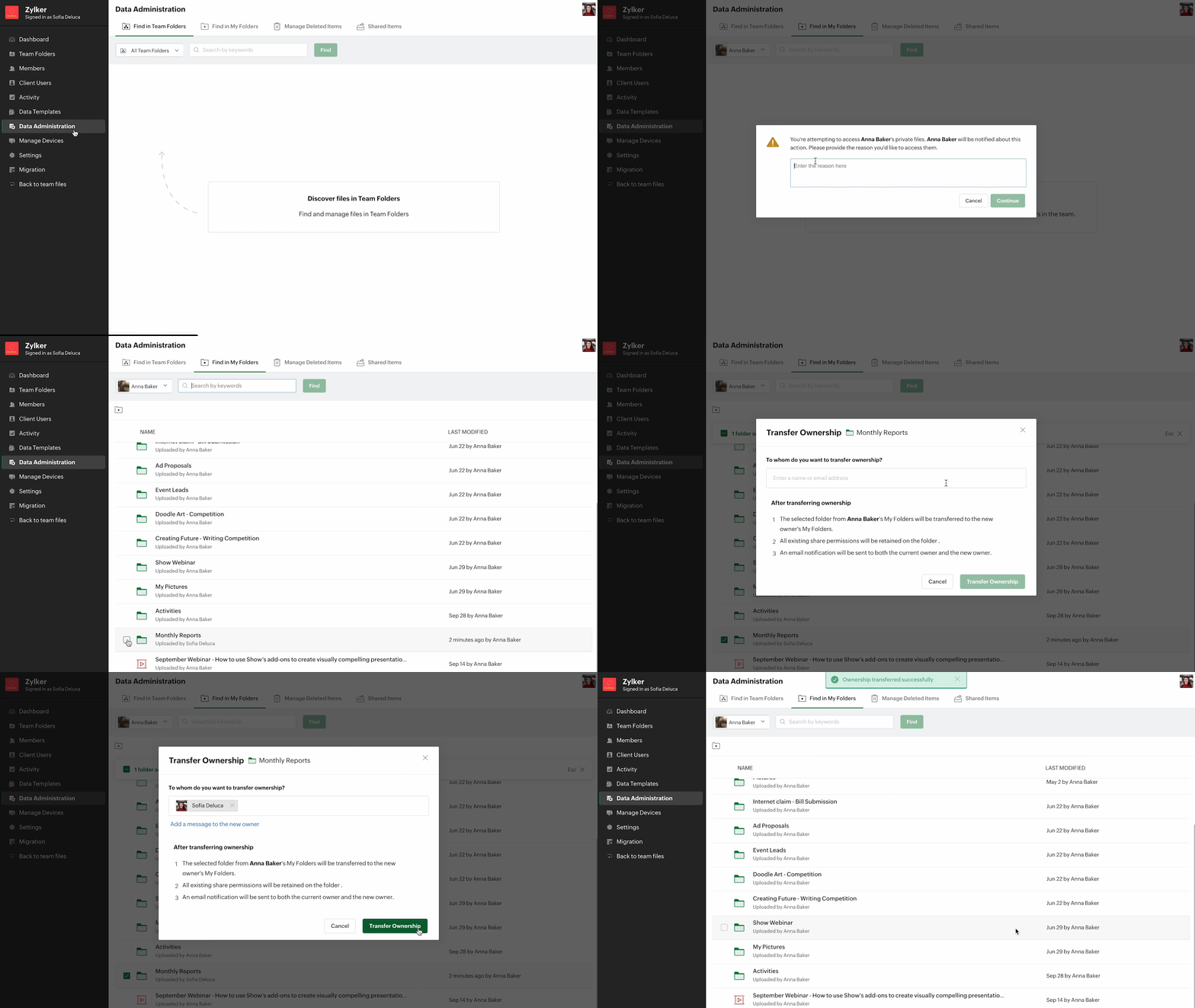


To transfer ownership of the files and folders in a member's My Folders, go to Data Administration under the Admin Console, and click the Find in My Folders tab. From here, you'll be able to choose the member's My Folders data and transfer it to yourself or to any other team member.

Notes:
  • Data Administration features are only available with WorkDrive's Business plan.
  • All existing share permissions will be retained for the transferred files and folders.
  • An email notification will be sent to both the current and new owners.
  • Currently, you cannot transfer ownership of the files and folders in a Team Folder.


We hope you find this new feature helpful! Let us know if you have any questions or feedback in the comment section below.

Watch this space for more exciting Zoho WorkDrive updates.
    • Sticky Posts

    • Ask the Experts: Five-hour live Q&A session with Zoho WorkDrive product experts

      Have questions about WorkDrive 5.0? Let’s talk! We recently launched Zoho WorkDrive 5.0, packed with powerful updates to help your team work smarter, stay secure, and get more value from your business content. From content-centric workflows and AI-powered
    • Support for auto-upgrade in TrueSync (for Windows)

      WorkDrive TrueSync app now supports auto-upgrading to the latest version for Windows OS. You must manually download and install the TrueSync app version 3.4.0 to avail this feature. Download the latest TrueSync app for Windows (version 3.4.0) Supported
    • WorkDrive API Documentation

      WorkDrive provides users and developers an extensive set of APIs to help integrate functionalities of Zoho WorkDrive with other Zoho applications and third-party tools. We have published the official WorkDrive API Documentation page for all external users.
    • March 15, 2023: Zoho Docs is discontinued

      As of today (March 15, 2023) Zoho Docs is discontinued for all users. We would like to thank our customers for trusting us for so many years! Going forward, we're confident you'll enjoy using Zoho WorkDrive for all your advanced file management and collaboration
    • Introducing WorkDrive 4.0: Enhanced productivity. Advanced data administration. (Phase 1)

      Hello All, We're excited to share the release of WorkDrive 4.0, which includes important new features and enhancements focused primarily on productivity, secure collaboration, data administration, integrations, and user experience. Read the official announcement
    • Recent Topics

    • Total Saving in POS Screen

      Displaying the Total Saving in POS Screen, while adding the items before before recording the payment. Customer wish to know this total savings before making the payment (i.e., before recording the payment). Currently we can able to view this total saving
    • How to skip weekends and public holidays in a scheduled workflow using Deluge in Zoho Creator?

      Hi, I have a scheduled workflow in Zoho Creator that runs daily at a fixed time. I want it to execute only on working days skipping weekends and public holidays. Could anyone please help me with how to achieve this?
    • Building extensions #1: Creating, testing, and editing extensions for Zoho Sprints using Sigma Cloud Editor

      Hello all! We're delighted to announce the beginning of a new series called Building extensions for Zoho Sprints. Our primary goal for this series is to educate developers on the process of creating extensions for Zoho Sprints and guide them through the
    • How to use Picklist values language in email templates

      Hello, I'm using multi-language in Zoho CRM and I've prepared separate email templates for each language. My question: how do I make sure the picklist field values in each template are rendered in the language that matches the template itself? This is
    • Is it possible to create a meeting in Zoho Crm which automatically creates a Google Meet link?

      We are using Google's own "Zoho CRM for Google" integration and also Zoho's "Google Apps Sync" tools, but none of them provide us with the ability to create a meeting in Zoho CRM that then adds a Google Meet link into the meeting. Is this something that
    • Built-in Date Functions in Zoho Analytics Query Tables

      I have a doubt about whether Zoho Analytics Query Tables provide built-in functions for start date, end date, and the current month
    • Zoho Analytics: Clarification on Email Schedule Limits in Basic Plan

      Hi Team, I have a question regarding the email scheduling limits in the Zoho Analytics Basic Plan. The plan shows that I can create 4 email schedules. However, I understand that schedule consumption is calculated based on recipients (i.e., 1 schedule
    • Urgent Security Feature Request – Add MFA to Zoho Projects Client Portal Hello Zoho Projects Team,

      Hello Zoho Projects Team, We hope you are doing well. We would like to submit an urgent security enhancement request regarding the Zoho Projects Client Portal. At this time, as far as we are aware, there is no Multi-Factor Authentication (MFA) available
    • Set Custom Icon for Custom Modules in new Zoho CRM UI

    • Standardize your booking forms with Centralized Customer Form

      We’re excited to introduce Centralized Customer Form, a new way to manage and standardize how customer information is collected across your event types. With this feature, you can define a common set of booking form fields once and apply them across your
    • Zoho Mail app update: Accessing Delegated Mailbox.

      Hello everyone! You can now access the delegated mailbox from within the iOS version of the Zoho Mail app. To access the delegated mailbox: Open the Zoho Mail app. Go on to the 'Email' module. Tap the profile picture. Choose the delegated mailbox Please
    • Cross Module Filtering – Use Fields from Lookup modules in Custom Views criteria and Advanced Filters

      Hello everyone, Zoho CRM now enables you to achieve deeper filtering of records in a module, using fields of a lookup, thereby enhancing your data management experience manifold. This filtering based on lookup module fields is now available in advanced
    • Ignroe_filtrers and drill through

      I have two charts, where one is connected to the other using drill-through. The issue is with the second chart (the drill-through target). It contains an aggregation formula that uses the ignore_filters function. Under normal conditions, the formula works
    • Introducing SlyteUI : From Idea to a Working Interface in Minutes

      Hello everyone! Are you spending hours building basic UIs? Does even the smallest customization feel like a major task? CRM customization should feel intuitive and straightforward, not time consuming or exhausting. SlyteUI makes this possible by simplifying
    • Super Admin Logging in as another User

      How can a Super Admin login as another user. For example, I have a sales rep that is having issues with their Accounts and I want to view their Zoho Account with out having to do a GTM and sharing screens. Moderation Update (8th Aug 2025): We are working
    • Publishing an Application with a Student Account

      Dear Zoho Creator Team, I hope this message finds you well. I would like to know if I can publish the application I built using my Zoho Creator account, which is currently a student account. If it is possible, could you please guide me on how to go about
    • Workflows being applied and the Large unwanted popup

      When a workflow is being applied do to an action, then the Agent is left with a large Window asking if they would like the see the changes this workflow did. Is there any way to disable this prompt from appearing?
    • What's New in Zoho Billing | March 2026

      March is here with a fresh wave of updates to Zoho Billing. From making compliance easier, reporting more flexible, to making day-to-day workflows smoother across the board. Here's everything that's new this month. Introducing Usage-Based Billing Reports
    • How to add a filter

      Hi Team, How can I set a filter like excel, instead of adding a new button.
    • A POS solution to complete the business solution for SME businesses

      For such a long time one aspect of SME business completely ignored has been a suitable POS solution native to Zoho and integrated with all the usual and necessary applications such as Inventory, Books, Commerce and CRM. The first and generally only option
    • Zoho Form not synching with Zoho CRM in CRM email template

      I have in the past successfully created an email template that has access to a Zoho Form in the url link to Forms in the email template. I am in the Contact Module of the CRM and I have created a Form for contacts and mapped the two. I am using the upsert
    • Schedule Timeout 5 minutes vs. stated 15 minutes

      I am running into a function run timeout error after 5 minutes for my schedules. The Functions - Limits documents states it should be 15 minutes: Functions - Limits | Online Help - Zoho CRM. What should it actually be? Due to the 5 minute timeout, I'm
    • Coupon Codes and Cancelling Subscriptions

      We have two Zoho One organizations, one we use for dev/testing. In Zoho Billing when we cancel a subscription, we are getting two different behaviors with regards to coupons. In one environment, the coupon is removed upon cancellation. In the other, the
    • Zoho Books | Product updates | April 2026

      Hello users, Welcome to our April 2026 product updates roundup! Highlights include profit margin for sales transactions, insights in reports, recording deposits from undeposited funds in banking, and faster production workflows with improved assembly
    • Journal Entries Do Not Show Multiple Entries to the Same Account

      Another basic accounting function that Books ... Accountants sometimes write journal entries, debiting and/or crediting the same account in the same entry. This is due to the need to record specific activity in an account when we pull reports especially
    • Email Opt Out Question

      Has the problem where if a customer is emailed opt out prevents you sending standard emails? For me this feature is simply to stop any email marketing and should not block people from receiving emails via Zoho mobile, which makes no sense.
    • Bulk Writer Export

      Pardon me if this has already been discussed (I can't find anything about it in these forums and my last attempt to start a thread seems to have failed). Is it possible to export more than one document at once? I would be really great to be able to burn OpenOffice.Org files of all my Zoho documents once a month to a CDR. If that feature is available/were created, this would be my main word processor. Without being able to do my own bulk backups I'm leery to count on Zoho's servers (which are robust
    • Sites API

      Is there a Sites API and if so where can we find documentation
    • Extracting phone number from variable

      Hi. I've created a flow between Calendly and Zoho CRM. So when someone schedules a meeting in Calendly, there is a lead created in Zoho CRM. However, I am not able to fill in the phone number field in Zoho CRM, because the phone number is included in
    • I can't fetch Calendly Fields

      Hello, I have set up a flow to connect Calendly with Zoho CRM, A few days ago I have mentioned that I should update the Calendly app connection and I have done, After Calendly has been updated I have some issues such as Event location missing I can map
    • Edit a previous reconciliation

      I realized that during my March bank reconciliation, I chose the wrong check to reconcile (they were for the same amount on the same date, I just chose the wrong check to reconcile). So now, the incorrect check is showing as un-reconciled. Is there any way I can edit a previous reconciliation (this is 7 months ago) so I can adjust the check that was reconciled? The amounts are exactly the same and it won't change my ending balance.
    • What's new in Zoho Social - Q1 recap

      Hello everyone, We’ve rolled out a bunch of updates in Q1, and we’re excited to walk you through them. To help you explore these features in detail, we’re hosting a Q1 recap webinar where we’ll show you how to make the most of each update. Q1 recap webinar
    • Ignore Auto Sales Order number generation not working

      Hi, My Flow has broken and I'm no longer able to use the Ignore auto number generation function and instead use the field that came from the trigger (via Jotform) when creating a new Sales Order in Books. Any suggestions how to fix this?
    • Vendor bills cannot be assigned to a customer or a customer project?

      I'm confused on how to handle outsourced contractor expenses on a customer project.  Between my business and the contractor, the invoice they send me fits obviously into Zoho Books as a Bill. However, I need to be able record those expenses to the client
    • Anyone using Books to track Project Profitability? If so, I could use some guidance

      Hello Zoho Community. I am a recent subscriber to Zoho, and its part of an ongoing evaluation.  My company (and my clients) have extensive project-tracking needs.  The Projects module seems to be good from a project management standpoint, but I am perplexed
    • Introducing parent-child ticketing in Zoho Desk [Early access]

      Hello Zoho Desk users! We have introduced the parent-child ticketing system to help customer service teams ensure efficient resolution of issues involving multiple, related tickets. You can now combine repetitive and interconnected tickets into parent-child
    • Problem in usage zoho

      Difficulty to submit the from in my training to handle ticket on your free trial
    • In-House, Non-Billable Projects

      I use Zoho Projects solely for in-house projects with fixed cost budgets.  Only bills and expenses need to be charged against the budget.  There are no customers to be billed or invoices to be created. How can such a non-billable project be set up?   As
    • [Webinar] What's New in Zoho Analytics: Q1, 2026

      To all the data enthusiasts out there, we're back again with another power-packed webinar in the What's New series! This last quarter was marked by exciting new features and product updates focused on offering you top-notch solutions. With new data connectors,
    • Ask The Expert: Deep Dive into Zoho CRM, Desk, SalesIQ, and Campaigns!

      Are you using Zoho to power your sales, support, and marketing, and have questions about configuration, automation, or best practices? We have great news: the “Ask The Expert” session is coming to the Zoho Benelux Community! This session is specifically
    • Next Page